
usageBar
macOS 菜单栏工具,聚合显示多个 AI 编程/Agent工具(Claude Code / Codex / Cursor / Qoder / 悟空/ Workbuddy 等)的 token 用量,全本地直读零配置
Install with your AI
Paste into Claude Code, Cursor, or any agent — it reads the repo and wires the tool into your project.
Install and set up usageBar (release-binary project) into my current project.
Found on https://claudeers.com/usagebar
Repo: https://github.com/ChanningYuan/usageBar
Homepage/docs: https://github.com/ChanningYuan/usageBar
Detected install method: release-binary → inspect the README
Category: devtools. Platforms: cli, api.
Read the repo's README for exact setup and env vars, then install it and wire it into my project.

Claudeers Health Verdict:
active; community-verified: false. Confirm the source before running anything.
Grab the latest release asset from GitHub.
# download a build from https://github.com/ChanningYuan/usageBar/releases
git clone https://github.com/ChanningYuan/usageBar
// compatibility
| Platforms | cli, api |
|---|---|
| Operating systems | — |
| AI compatibility | claude |
| License | MIT |
| Pricing | open-source |
| Language | Swift |
usageBar
macOS 菜单栏工具,聚合显示多个 AI 编程工具(Claude Code / Codex / Qoder / 悟空 等)的 token 用量,全本地直读、零配置。
Swift 6 · macOS 14+ · Apple Silicon
在 macOS 状态栏一眼看到你今天 / 近 7 天 / 近 30 天 / 累计在各个 AI 编程工具上烧了多少 token。除 Cursor 外,所有数据都从各工具落在本地的会话记录(jsonl / SQLite)直接读取,不联网、不抓包、装上即用。
🥇 GitHub 上唯一一个把 Qoder 全家桶(CLI / Work / IDE)token 全部打通可计量的项目。 三条产品线各自落盘的格式完全不同(npm transcript jsonl / 应用日志 mirror / SQLite),usageBar 把它们统一读出来,一个菜单栏就能看全。
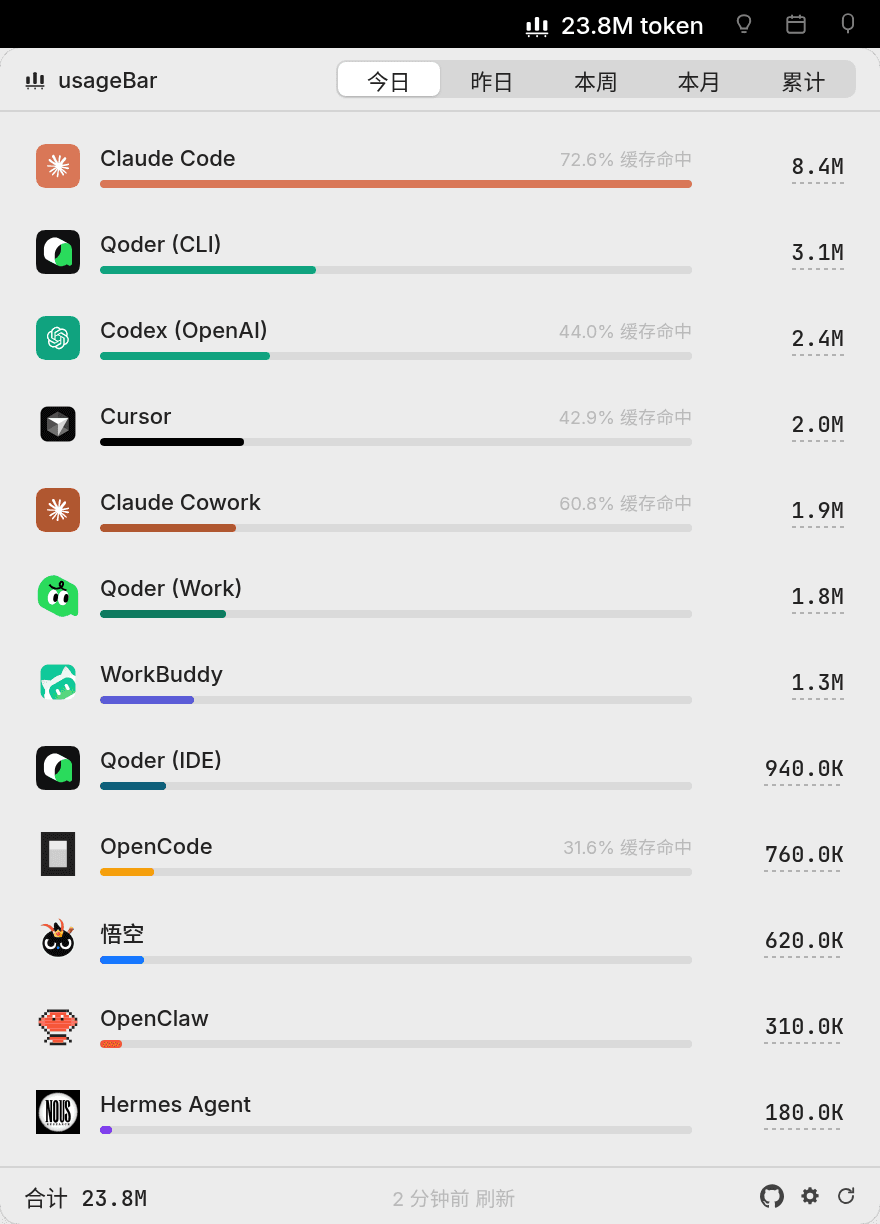
支持的 Provider
| Provider | 数据源 | 说明 |
|---|---|---|
| Claude Code(订阅) | ~/.claude/projects/**/*.jsonl | 按 message.id 前缀 msg_01 识别 Anthropic 直连 |
| Claude Code(API) | 同上 | msg_vrtx_ / msg_bdrk_ 前缀(Vertex / Bedrock 代理) |
| Qoder(CLI) 🥇 | ~/.qoder/projects/**/*.jsonl | npm qodercli 1.0.x+ transcript,完整 4 列 |
| Qoder(Work) 🥇 | ~/Library/Application Support/QoderWork/logs/<ts>/main.log | 增量 mirror 到本地 jsonl,精确 input/output 两列 |
| Qoder(IDE) 🥇 | ~/Library/Application Support/Qoder/SharedClientCache/.../local.db | 直读 SQLite chat_message.token_info |
| Codex(OpenAI) | rollout jsonl | 累计值,跨窗口做差分 |
| 悟空 | 本地 jsonl | flat 结构,毫秒时间戳 |
| WorkBuddy | ~/.workbuddy/projects/**/*.jsonl | Claude Code 风格会话记录 |
| Cursor | Cursor 服务端 API | ⚠️ 唯一联网 provider(本地无真实 token,必须联网拉取) |
| OpenClaw | 本地(mtime 增量) | 社区个人 AI Agent |
| Hermes | ~/.hermes/state.db | Hermes Agent(NousResearch),SQLite |
🥇 标记的三行 = Qoder 全家桶:CLI、Work、IDE 三条线全部覆盖,目前 GitHub 上仅此一家做到全部可计量。
各工具的 "token" 口径不完全一致(有的含 cache 拆分、有的只有 input/output),所以条形图长度是量级参考,不是严格同口径对比。
状态栏右键 → 偏好设置,可自定义每个 provider 的可见性。
技术亮点
- Codex 跨窗口差分:Codex 的 rollout 是 session 累计值,按相邻事件差分归到日期桶,避免跨天 session 被重复计算(否则会虚报十几倍)。
- 持久账本:会话文件被删 / 轮转后,其历史 token 仍计入累计——消耗发生过就保留,不会因源文件消失而丢失。
- mtime/size 增量缓存:只重读发生变化的文件,刷新快、CPU 占用低。
安装
给人类:下载即用
仅支持 Apple Silicon(M1/M2/M3/M4),暂无 Intel 版本。
- 到 Releases 下载
usageBar.dmg - 双击打开,把
usageBar.app拖进 Applications 文件夹
✅ 已做 Apple Developer ID 签名 + 公证,双击即开,无需任何额外放行步骤。 (也提供
usageBar.zip:解压出.app拖进/Applications,效果相同。)
给 AI Agent:让它帮你装
- 到 Releases 下载
install-usagebar.zip - 解压到 AI Agent 的 skill 目录,例如 Claude Code:
~/.claude/skills/install-usagebar/ - 跟 AI 说"装一下 usageBar",它会自动跑
scripts/install.sh(解压 .app → 清 Gatekeeper 隔离 → 拷到/Applications→ 启动)
诊断 / 卸载等更多用法见 install-usagebar/README.md。
🔄 自动更新:0.2.0 起内置 Sparkle——装好后会自动检查新版并提示一键升级,右键菜单也有"检查更新…"。
工程结构
usageBar/
├── app/                       SwiftPM 工程
│   ├── Package.swift
│   ├── Sources/
│   │   ├── usageBar/          主 App:NSStatusItem + SwiftUI popover
│   │   ├── usageBarCore/      协议层:Provider 协议 + 数据模型 + 增量缓存
│   │   └── usageBarProviders/ 各 provider 实现
│   └── Scripts/               打包脚本
├── icon/                      App 图标资源
└── install-usagebar/          安装 / 诊断 / 卸载 skill
自己构建 / 审计代码
usageBar 会读取你本地 AI 工具的会话数据。虽然发布版已做 Developer ID 签名 + 公证,但如果你想彻底放心,可以自己 clone 下来构建、审计源码:cd app && swift build,详见 app/SETUP.md。
反馈 & 支持
- 有 bug、想法或想要的功能,欢迎提 Issue。
- 如果 usageBar 帮到了你,点个 Star ⭐ 就是最好的支持。
License
MIT © ChanningYuan
// faq
What is usageBar?
macOS 菜单栏工具,聚合显示多个 AI 编程/Agent工具(Claude Code / Codex / Cursor / Qoder / 悟空/ Workbuddy 等)的 token 用量,全本地直读零配置. It is open-source on GitHub.
Is usageBar free to use?
usageBar is open-source under the MIT license, so it is free to use.
What category does usageBar belong to?
usageBar is listed under automation in the Claudeers registry of Claude-compatible tools.
// embed badge

[](https://claudeers.com/usagebar)
// retro hit counter

[](https://claudeers.com/usagebar)
// reviews
// guestbook
// related in Developer Tools
 🔓
🔓The agent harness performance optimization system. Skills, instincts, memory, security, and research-first development for Claude Code, Codex, Opencode, Curs…
 🔓
🔓Makes your AI agent think like the laziest senior dev in the room. The best code is the code you never wrote.
 🔓
🔓Use Garry Tan's exact Claude Code setup: 23 opinionated tools that serve as CEO, Designer, Eng Manager, Release Manager, Doc Engineer, and QA
 🔓
🔓AI coding assistant skill (Claude Code, Codex, OpenCode, Cursor, Gemini CLI, and more). Turn any folder of code, SQL schemas, R scripts, shell scripts, docs,…