
UltimateVibeController
Turn a VSD N1 / MiraBox Stream Dock into a live control deck for Claude Code. Raw USB HID, no vendor software. Glance down and see which session needs you.
Install with your AI
Paste into Claude Code, Cursor, or any agent — it reads the repo and wires the tool into your project.
Install and set up UltimateVibeController (git-clone project) into my current project.
Found on https://claudeers.com/ultimatevibecontroller
Repo: https://github.com/DandanITman/UltimateVibeController
Homepage/docs: —
Detected install method: git-clone → git clone https://github.com/DandanITman/UltimateVibeController
Category: devtools. Platforms: cli, desktop.
Read the repo's README for exact setup and env vars, then install it and wire it into my project.

Claudeers Health Verdict:
unknown; community-verified: false. Confirm the source before running anything.
git clone https://github.com/DandanITman/UltimateVibeController
// compatibility
| Platforms | cli, desktop |
|---|---|
| Operating systems | — |
| AI compatibility | claude |
| License | MIT |
| Pricing | open-source |
| Language | JavaScript |
Ultimate Vibe Controller
The Ultimate Vibe Controller: See all your Claude Code sessions on a physical deck. Never touch your keyboard or alt-tab again.
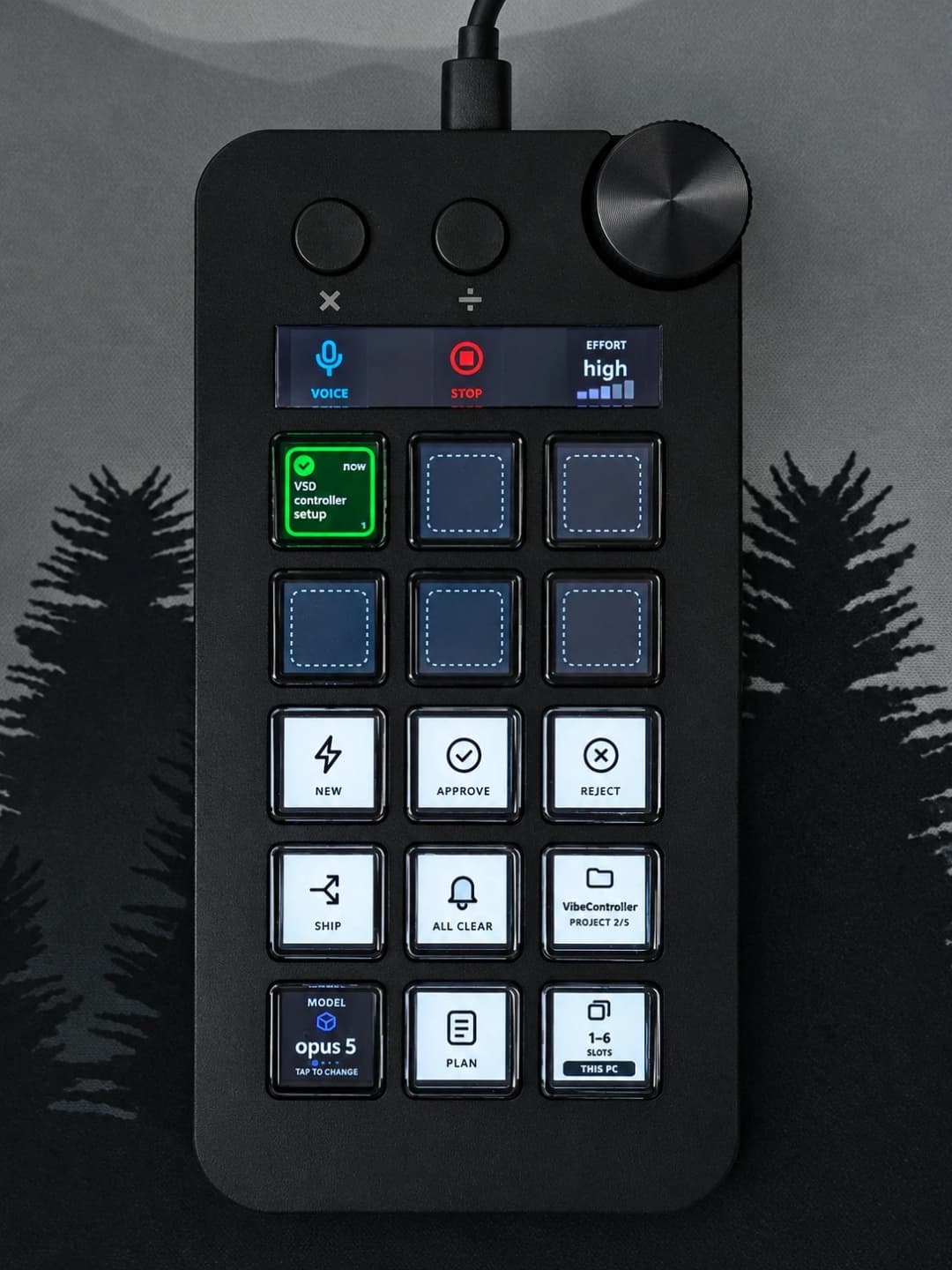
You run a lot of Claude sessions. One is building, one is waiting on your approval, one died twenty minutes ago and you haven't noticed.
This puts all of them on a macro pad. One key per session, colour-coded, so you know the state of every one at a glance:
| 🔵 Blue, moving dots | Working |
| 🟡 Yellow | Needs you. Permission card, question, or a plan to approve |
| 🟢 Green | Done |
| ⚪ Grey | Done, and you've looked at it |
| 🔴 Red | Error |
| ⬛ Dashed | Empty slot |
Look at a key, tap it, and you're in that session. Easy peasy. No window switching, no alt-tab archaeology.
It drives the pad over raw USB HID, so the vendor's software is not installed and not running.
What each key does
The top strip labels the two round buttons and the knob. The grid is six session slots and nine controls.
| Key | Tap | Hold |
|---|---|---|
| Slots 1-6 | Jump to that session | Hide it until it does something new |
| New | New session in the current project's folder | |
| Approve | Ctrl+Enter, approve the open card | |
| Reject | Esc, deny it | Clear the message box |
| Ship | Types push | |
| Needs you | Jump to whoever has waited longest | |
| Project | Next of your 5 recent projects | Back to all projects |
| Model | Cycle opus → sonnet → haiku → fable | Back to opus |
| Plan | Types /plan | Types /code-review |
| Page | Slots 1-6 / 7-12 | Cycle this PC → auto → remote PCs |
| Voice (round) | Press to start talking, press again to send | Send, with extra time to finish |
| Stop (round) | Esc, halt the agent | |
| Knob | Turn: reasoning low → max | Press: apply now |
Setup
You need Node 20+, Windows, the Claude desktop app, and a VSD N1 / MiraBox Stream
Dock N1 (USB 5548:1002).
git clone https://github.com/DandanITman/UltimateVibeController
cd UltimateVibeController
npm install
1. Check the hardware talks. Draws a numbered grid on the pad.
node tools/selftest.js
Is "1" on the top-left key, and does each number fill its key? If not, see Tuning below. If the screens stay on the pad's built-in calculator, that's covered in Troubleshooting.
2. Install the status hook. This is what makes the slots live. Copy
hooks/claude-deck-hook.mjs to ~/.claude/hooks/ and register
it in ~/.claude/settings.json for these events:
SessionStart  UserPromptSubmit  PreToolUse  PostToolUse  PostToolUseFailure
PermissionRequest  PermissionDenied  Stop  StopFailure  SessionEnd  Notification
3. Run it.
powershell -ExecutionPolicy Bypass -File .\install.ps1
Starts now and at every login, no console window. Remove with .\install.ps1 -Uninstall.
Dictating prompts
Press Voice, talk, press it again. That's it — the second press stops dictation and hits Enter for you. The strip screen above it turns red and says LISTENING while recording, so you can see the state rather than guess.
For a long prompt, hold the button to finish instead of tapping it. That waits an extra second and a half before pressing Enter, so a transcript that is still catching up has time to land.
Your words go into Claude's composer through Claude's own dictation, so you can say anything, slash commands included.
Still sending too early? Raise voiceSendMs (tap) or voiceHoldSendMs (hold) in the config.
Tuning
Everything lives in %LOCALAPPDATA%\ClaudeDeck\config.json. All optional.
{
  "brightness": 70,
  "keyPx": 96,
  "stripPx": 80,
  "slotScheme": "identity",
  "windowHours": 12,
  "projectCount": 5,
  "effortApplyMs": 2000,
  "voiceSendMs": 1000,
  "voiceHoldSendMs": 2500
}
keyPx— key image size. 96 comes from the vendor's N1 class; other drivers claim 100. If your art looks cropped or small, try the other.slotScheme—identitymeans slot 1 is top-left. If your images land on the wrong rows, useflip-rows.windowHours— how far back a session counts as current.
To rearrange the keys, edit the GRID array at the top of
src/keymap.js. That's the whole layout.
Troubleshooting
The pad shows a calculator and ignores everything. It's in the wrong mode. The deck
handles this, but if you're writing your own: CONNECT must be sent before MOD. See
the notes below, this one is nasty.
Keys are blank. Check %LOCALAPPDATA%\ClaudeDeck\deck.log. If the pad wasn't found,
replug it and make sure nothing else has it open (the vendor app included).
Slots are empty. The hook isn't registered. Check ~/.claude/settings.json mentions
claude-deck-hook.
Keys do nothing. The key sender needs to find the Claude window, so the desktop app must be running, not just the CLI.
Notes from reverse-engineering this thing
Nobody publishes a driver for 5548:1002. The vendor's own SDK doesn't list it. So this was
worked out from their SDK's N1 class, a disassembly of their closed transport library, four
community drivers for sibling pads, and a lot of staring at a calculator.
Full byte-level detail is in reference/protocol-notes.md.
The highlights:
CONNECT before MOD, or nothing works. The pad ignores a mode switch until the host has
announced itself. Get this backwards and the pad accepts every write without error, draws
nothing, reports no key presses — but still obeys brightness perfectly. So the obvious
"is it listening?" test passes while nothing else does, and you'll go hunting for a wrong
mode byte that was right all along. Ten were tried. The first one was correct.
Diagnose in this order. Does brightness change? That's framing. Do key presses arrive? That's mode. Only then worry about image bytes. Skipping a step costs an afternoon.
The pad has 18 screens, not 15. Slots 16-18 are the little strip above the grid, and they label the two round buttons and the knob.
A knob turn reports byte 10 as 0x00, always. Treat that as "not pressed" and your knob
is silently dead.
Don't touch LOG. It writes the boot logo to ROM and the vendor's own source warns that
bad data may brick the device.
How it works
device.js    opens the pad, chunks writes, turns reports into events
protocol.js  the byte layouts. The only file that knows the wire format.
keymap.js    which key does what. Edit GRID to rearrange.
render.js    draws each key as SVG, rasterises to JPEG
store.js     builds the session list from the hook + Claude's session records
main.js      the app: key handling, drawing loop, actions
Key faces are drawn in a fixed 144-unit square and scaled on output, so the layout holds at any key size.
Nothing talks to the internet. It reads local files and sends keystrokes. The one exception is the optional remote-PC agent, which you configure and point at your own machines.
Tools
node tools/selftest.js | Bring the pad up, draw a numbered grid |
node tools/faces.js --demo | Render the whole deck to an HTML page |
node tools/probe.js watch | Dump raw input reports, changed bytes marked |
node tools/learn.js | Learn the button layout by watching you press them |
node tools/brightness.js | Is the pad listening at all? |
node tools/strategies.js | Try whole startup sequences when it won't wake up |
A warning if you screenshot your own deck
The slots show your real session titles. Blur them before posting.
Credits
The protocol came from reading other people's work: MiraboxSpace/StreamDock-Device-SDK, 4ndv/mirajazz, stevemurr/streamdock, bitfocus/companion-surface-mirabox-stream-dock, and rahimnathwani/dockctl.
License
MIT. Do what you like with it.
// faq
What is UltimateVibeController?
Turn a VSD N1 / MiraBox Stream Dock into a live control deck for Claude Code. Raw USB HID, no vendor software. Glance down and see which session needs you.. It is open-source on GitHub.
Is UltimateVibeController free to use?
UltimateVibeController is open-source under the MIT license, so it is free to use.
What category does UltimateVibeController belong to?
UltimateVibeController is listed under devtools in the Claudeers registry of Claude-compatible tools.
// embed badge

[](https://claudeers.com/ultimatevibecontroller)
// retro hit counter

[](https://claudeers.com/ultimatevibecontroller)
// reviews
// guestbook
// related in Developer Tools
 🔓
The agent harness performance optimization system. Skills, instincts, memory, security, and research-first development for Claude Code, Codex, Opencode, Curs…
 🔓
Makes your AI agent think like the laziest senior dev in the room. The best code is the code you never wrote.
 🔓
AI coding assistant skill (Claude Code, Codex, OpenCode, Cursor, Gemini CLI, and more). Turn any folder of code, SQL schemas, R scripts, shell scripts, docs,…
 🔓
Orca is the ADE for working with a fleet of parallel agents. Run any coding agent with your own subscription. Available on desktop and mobile.