
ui-themes
Switchable UI themes for Claude Code: padded message boxes, themed markdown, matching status line
Install with your AI
Paste into Claude Code, Cursor, or any agent — it reads the repo and wires the tool into your project.
Install and set up ui-themes (claude-plugin project) into my current project.
Found on https://claudeers.com/ui-themes
Repo: https://github.com/yugal1107/ui-themes
Homepage/docs: —
Detected install method: claude-plugin → /plugin install ui-themes@yugal1107/ui-themes
Category: devtools. Platforms: cli, api.
Read the repo's README for exact setup and env vars, then install it and wire it into my project.

Claudeers Health Verdict:
active; community-verified: false. Confirm the source before running anything.
/plugin marketplace add yugal1107/ui-themes
/plugin install ui-themes@yugal1107/ui-themes
git clone https://github.com/yugal1107/ui-themes
// compatibility
| Platforms | cli, api |
|---|---|
| Operating systems | — |
| AI compatibility | claude |
| License | — |
| Pricing | open-source |
| Language | TypeScript |
ui-themes
Switchable themes for the Claude Code terminal UI:
- Your prompts and Claude's replies drawn in padded, coloured boxes (Claude Code's defaults have no reply box and little prompt padding; the plugin draws both itself)
- Reply markdown in theme colours (headings,
inline code, bold, links, bullets, quotes) - A matching one-line status line: model (own icon and colour for Opus, Sonnet, Haiku and Fable), folder, git branch, context, 5h/7d limits
/ui-themeto pick a theme from a list and switch everything at once
Before and after
| Before: Claude Code default | After: claude-warm |
|---|---|
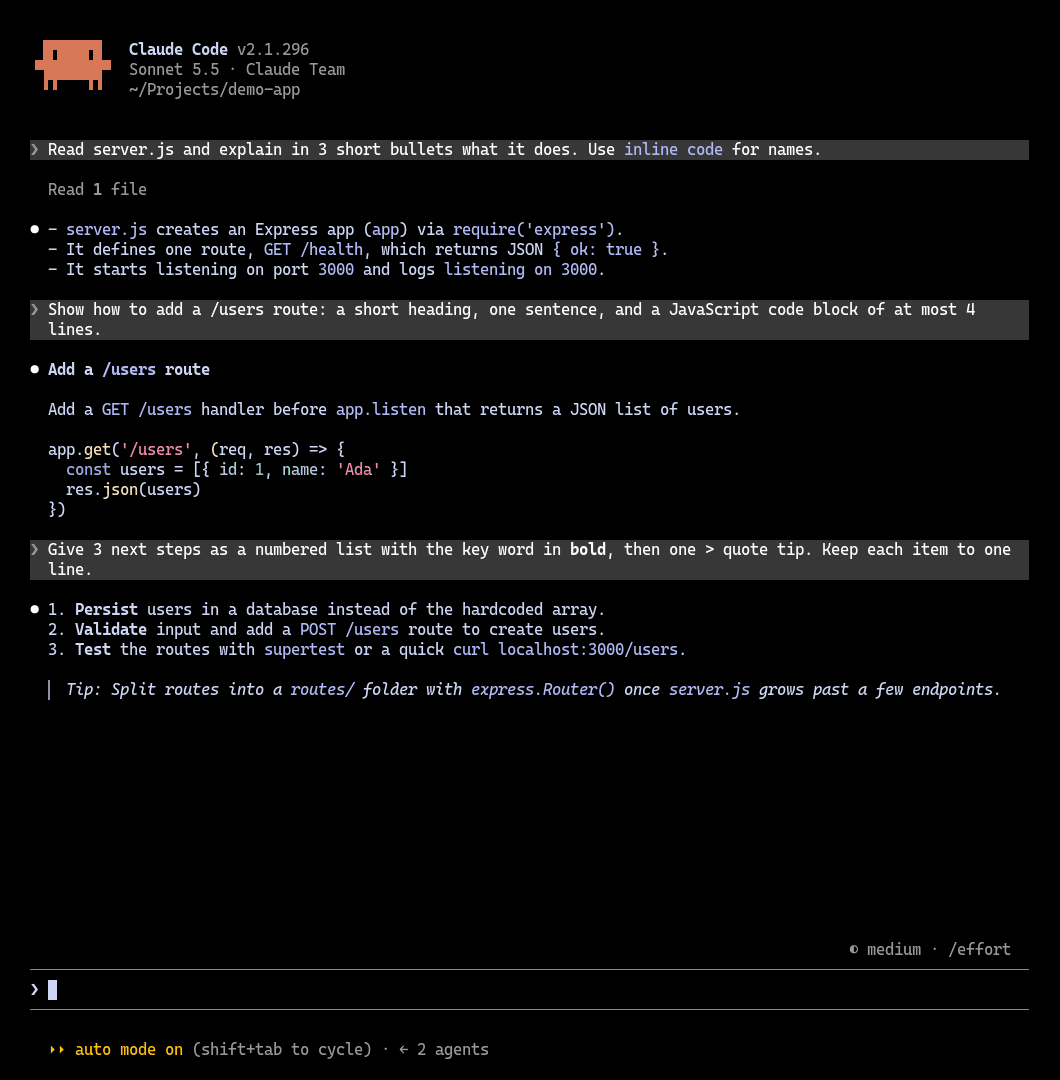 | 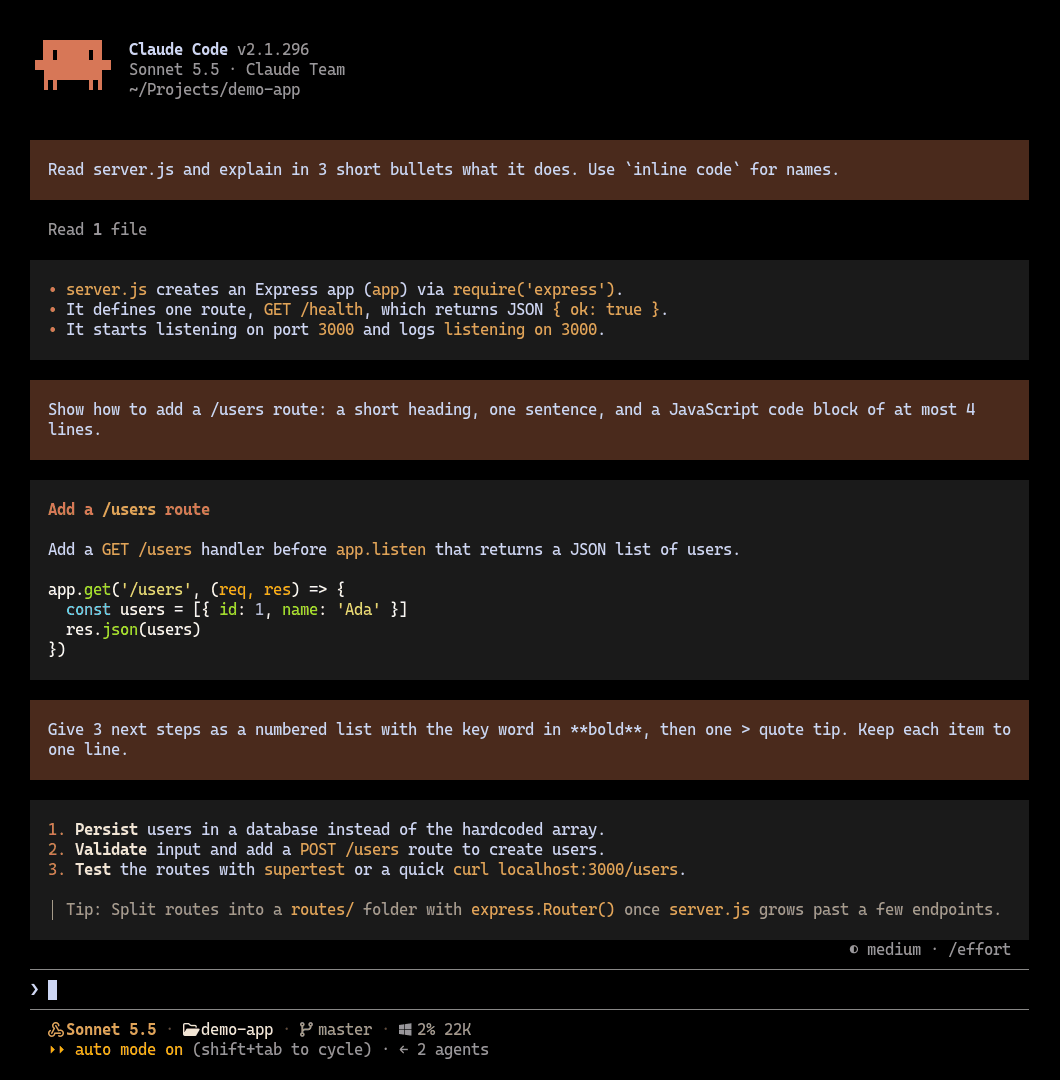 |
Replies get a padded charcoal box and themed markdown, prompts get a padded terracotta box, and the status line follows the theme.
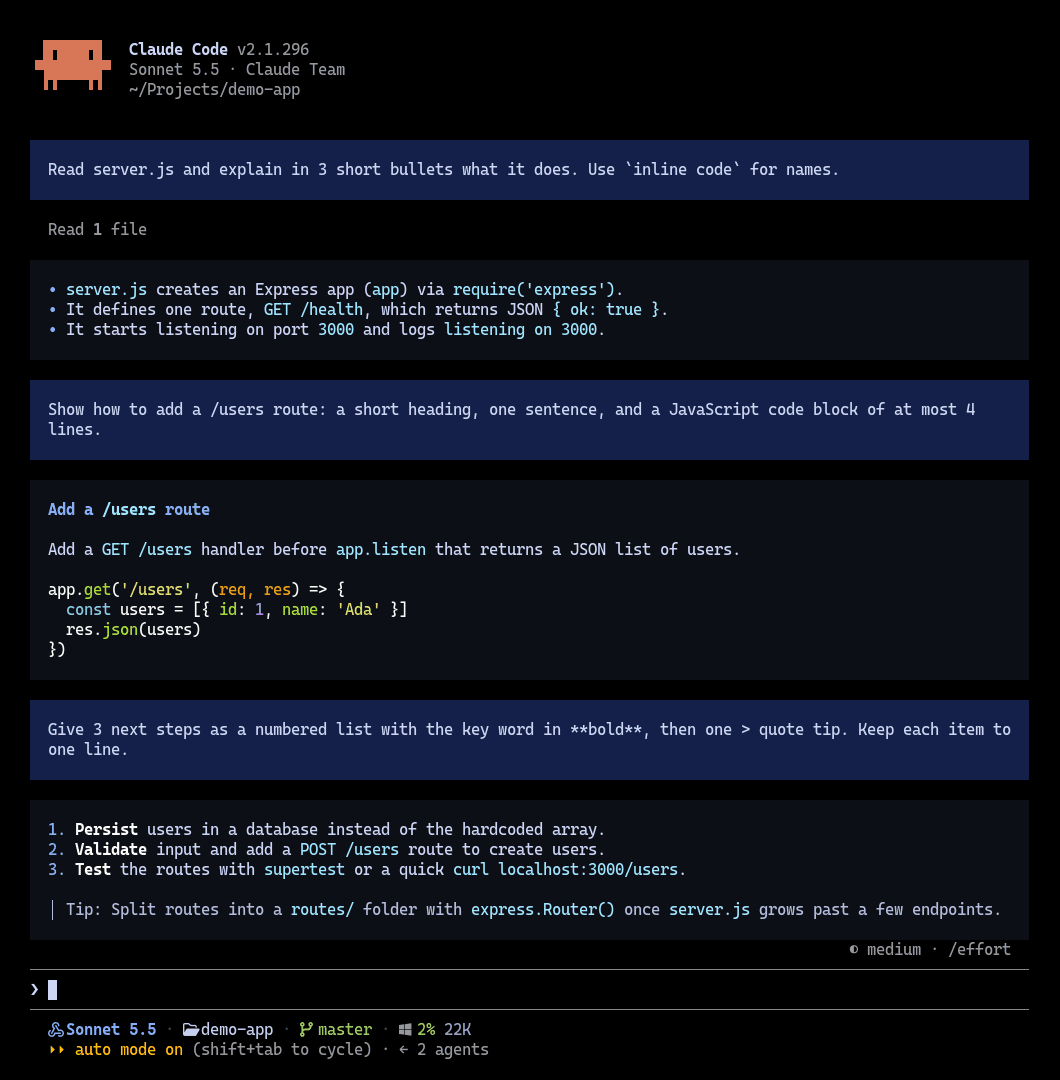
Also included: night-blue, one /ui-theme next away
Why I made this
I like coding agents like Pi, OpenCode and Oh My Pi. Their terminal UIs are clean, structured and light. Claude Code's felt messy and heavy next to them, and I didn't enjoy using it.
But I still use Claude Code. Claude's models are what I want to work with, and my Claude subscription only works through the Claude Code CLI, not through other harnesses. So I was stuck with a UI I didn't like.
When Claude Code added mods, I started tuning it to feel more like those agents: padded message boxes, readable markdown colours, a compact status line, and themes I can switch in one command. It isn't a copy of any of them, and it isn't finished, but it's already much nicer to live in every day.
If you're in the same spot, using Claude Code for the models while missing the feel of other agent CLIs, this plugin is for you.
Ships with three themes:
| Theme | Look |
|---|---|
claude-warm (default) | Terracotta prompts, charcoal replies, Claude orange and honey text |
night-blue | Navy prompts, near-black replies, bright blue and cyan text |
titanium | Oh My Pi inspired: steel blue prompts, brushed titanium replies |
Install
/plugin marketplace add yugal1107/ui-themes
/plugin install ui-themes@ui-themes
Restart Claude Code once after installing.
Use
| Command | What it does |
|---|---|
/ui-theme | Open a picker: arrow keys to choose, Enter to apply, Esc to close |
/ui-theme list | Show the current theme and the available ones as text |
/ui-theme <name> | Switch theme |
/ui-theme next | Cycle to the next theme |
/ui-theme statusline | Show how to enable the matching status line |
Status line
The status line is optional. Add this to ~/.claude/settings.json:
"statusLine": { "type": "command", "command": "bash ~/.claude/ui-themes/statusline.sh" }
It needs jq, and its icons need a Nerd Font in your terminal.
Make your own theme
Themes live in ~/.claude/ui-themes/<name>.json (the built-in ones are copied there on first start). Copy one, rename it and change the colours; it shows up in /ui-theme right away.
{
  "name": "claude-warm",
  "prompt": { "bg": "#4a2a1c" },
  "reply": { "bg": "#1a1a1a" },
  "markdown": {
    "code": "#e0a458", "bold": "#f5e6d3", "heading": "#d97757", "link": "#d97757",
    "bullet": "#d97757", "quote": "#a8998a", "rule": "#3a3029"
  },
  "statusline": {
    "model": "#d97757", "modelOpus": "#d97757", "modelSonnet": "#e0a458",
    "modelHaiku": "#a3b18a", "modelFable": "#c49bbb", "dir": "#f5e6d3", "git": "#a3b18a", "dirty": "#e0a458",
    "label": "#a8998a", "muted": "#8a7b6e", "ok": "#a3b18a", "warn": "#e0a458",
    "hot": "#e5534b", "sep": "#5c4a3d"
  }
}
Notes
- Built on Claude Code's function-hook plugin API, which is in early access and may change between releases.
- Code blocks and tables keep Claude Code's own rendering.
- While a reply is still streaming, Claude Code draws it with its own view; it moves into the coloured box once the block finishes.
/themeis Claude Code's own command and is left untouched; this plugin uses/ui-theme.
// faq
What is ui-themes?
Switchable UI themes for Claude Code: padded message boxes, themed markdown, matching status line. It is open-source on GitHub.
Is ui-themes free to use?
ui-themes is open-source, so it is free to use.
What category does ui-themes belong to?
ui-themes is listed under devtools in the Claudeers registry of Claude-compatible tools.
// embed badge

[](https://claudeers.com/ui-themes)
// retro hit counter

[](https://claudeers.com/ui-themes)
// reviews
// guestbook
// related in Developer Tools
 🔓
The agent harness performance optimization system. Skills, instincts, memory, security, and research-first development for Claude Code, Codex, Opencode, Curs…
 🔓
Makes your AI agent think like the laziest senior dev in the room. The best code is the code you never wrote.
 🔓
AI coding assistant skill (Claude Code, Codex, OpenCode, Cursor, Gemini CLI, and more). Turn any folder of code, SQL schemas, R scripts, shell scripts, docs,…
 🔓
Use Garry Tan's exact Claude Code setup: 23 opinionated tools that serve as CEO, Designer, Eng Manager, Release Manager, Doc Engineer, and QA