
k1tty-tools
Universal AI conversation history editor, thread unlocker, and converter for Google Antigravity, OpenAI Codex, Claude Code, and OpenCode.
Install with your AI
Paste into Claude Code, Cursor, or any agent — it reads the repo and wires the tool into your project.
Install and set up k1tty-tools (git-clone project) into my current project.
Found on https://claudeers.com/k1tty-tools
Repo: https://github.com/quesada-lab/k1tty-tools
Homepage/docs: —
Detected install method: git-clone → git clone https://github.com/quesada-lab/k1tty-tools
Category: other. Platforms: cli, api, web, mobile.
Read the repo's README for exact setup and env vars, then install it and wire it into my project.

Claudeers Health Verdict:
unknown; community-verified: false. Confirm the source before running anything.
git clone https://github.com/quesada-lab/k1tty-tools
// compatibility
| Platforms | cli, api, web, mobile |
|---|---|
| Operating systems | — |
| AI compatibility | claude |
| License | MIT |
| Pricing | open-source |
| Language | Python |
K1tty Tools
Python-скрипт с веб-интерфейсом для просмотра, редактирования, очистки и переноса истории диалогов в Google Antigravity, OpenAI Codex, Claude Code и OpenCode.
A Python script with a web interface for viewing, editing, cleaning, and transferring conversation history between Google Antigravity, OpenAI Codex, Claude Code, and OpenCode.
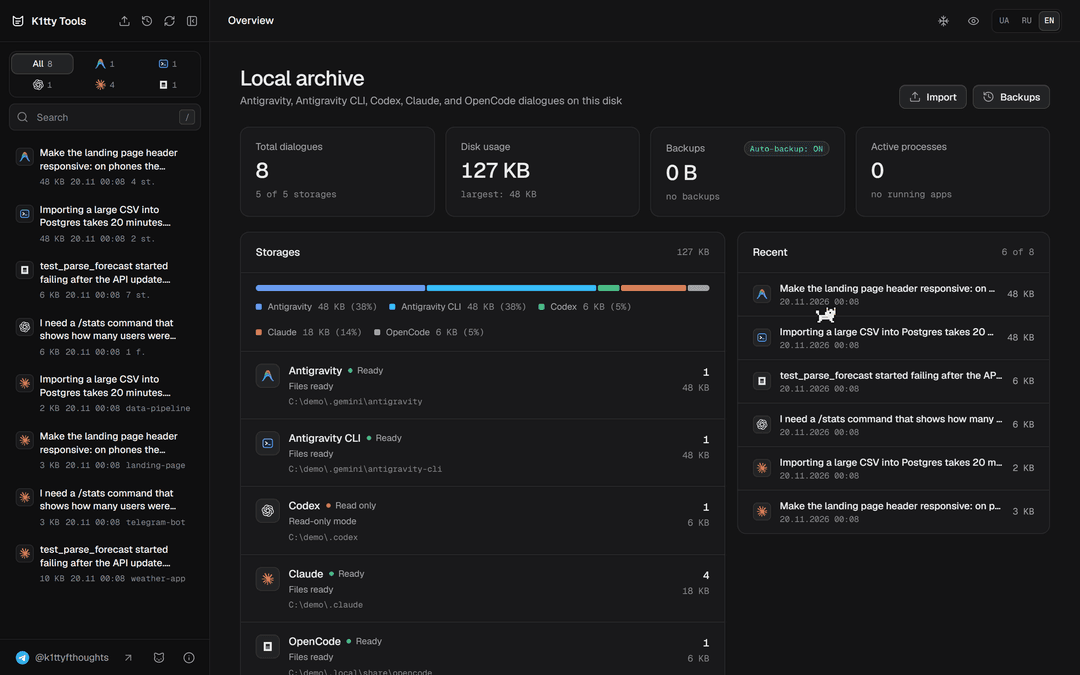
Возможности / Features
Блокировки в Codex / Codex Locks
Когда Codex блокирует чат из-за фильтров безопасности, инструмент показывает причину и снимает блокировку в один клик. Тред можно и вручную заблокировать с любой указанной причиной для тестов.
When Codex blocks a chat due to safety filters, the tool shows the reason and unlocks it in one click. You can also manually lock a thread with any custom reason for testing purposes.
Редактирование сообщений и системных промптов / Editing Messages and System Prompts
Можно менять системный промпт, внутренние инструкции и метаданные чата. Править текст сообщений пользователя и ответы модели. Править вызовы инструментов и ошибки, не ломая структуру файла.
You can edit the system prompt, internal instructions, and chat metadata. Modify user messages and model responses. Edit tool calls and errors without breaking the file structure.
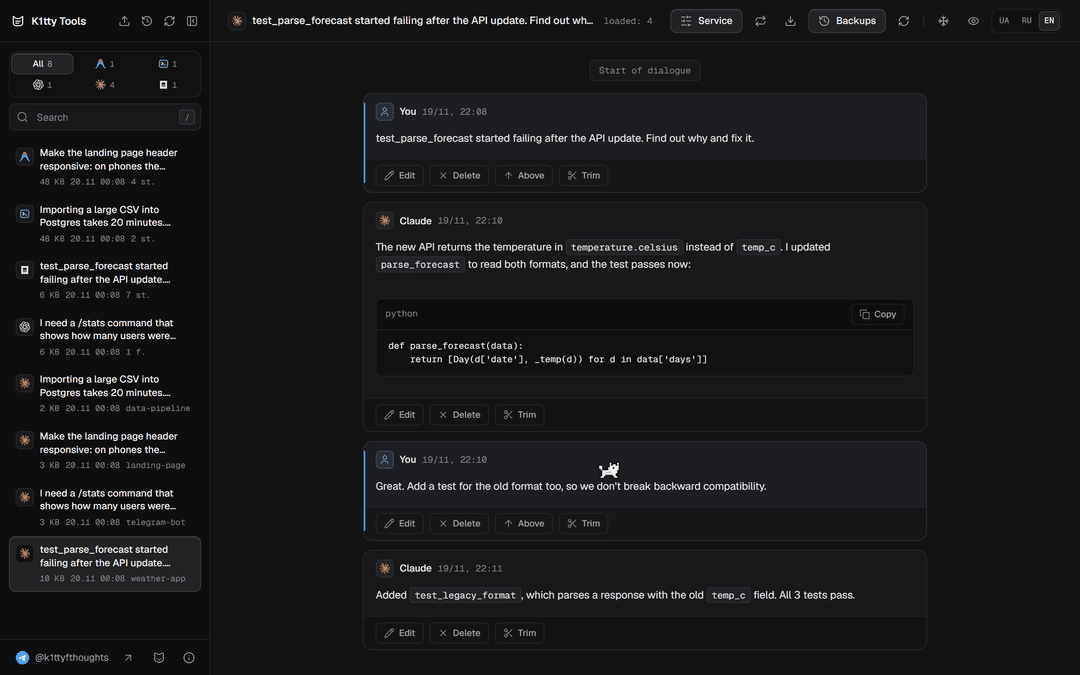
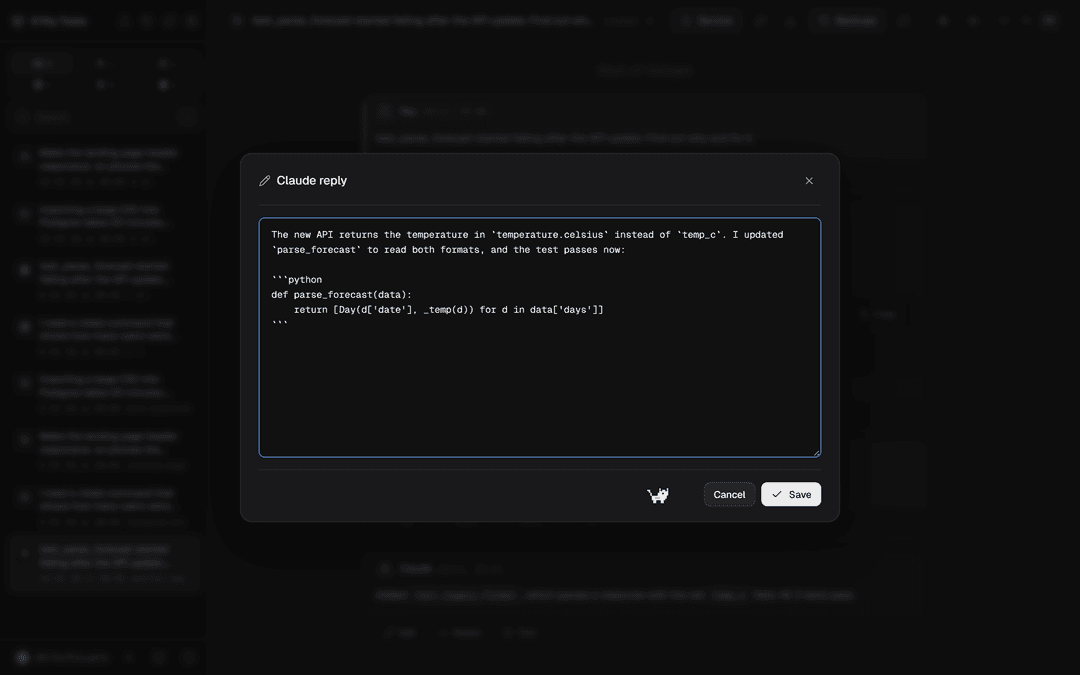
Удаление и обрезка истории / Deleting and Trimming History
Удаление отдельных сообщений без сбоя нумерации шагов. Обрезка начала диалога до выбранного места или удаление всей переписки после нужного шага. Полное удаление ненужных диалогов из папок приложений.
Delete individual messages without breaking step numbering. Trim the beginning of a conversation up to a selected point, or remove everything after a specific step. Completely delete unwanted conversations from the application folders.
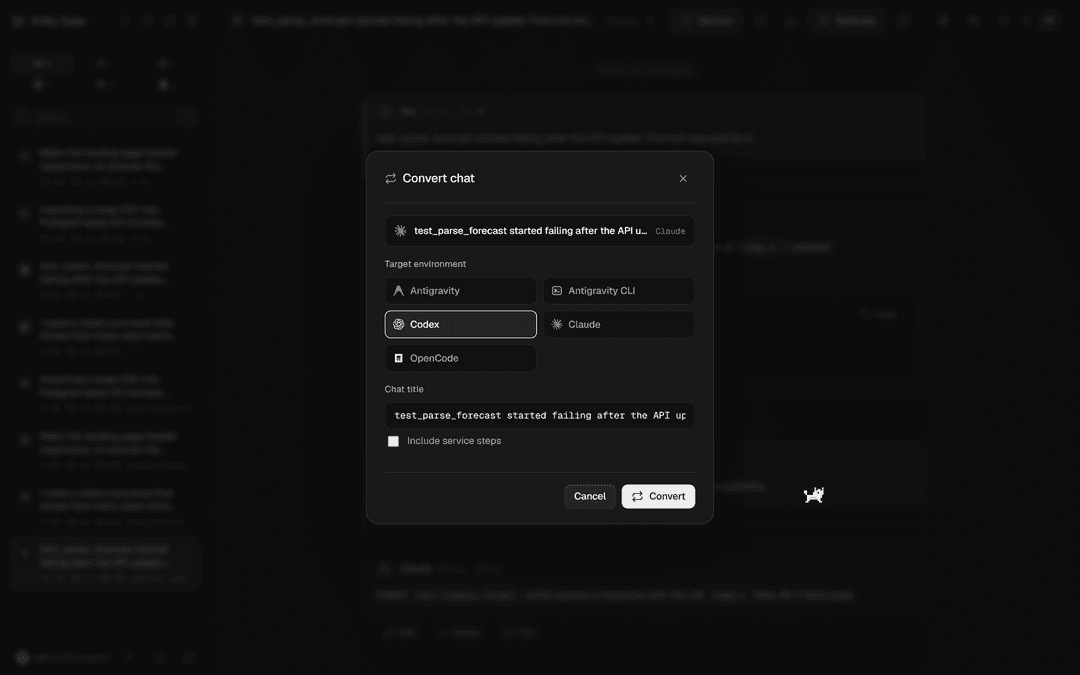
Конвертация между средами / Conversion Between Environments
Перенос диалогов между любыми из четырёх сред:
- Antigravity в Codex, Claude, OpenCode
- Codex в Antigravity, Claude, OpenCode
- Claude в Antigravity, Codex, OpenCode
- OpenCode в Antigravity, Codex, Claude
Скрипт переводит формат сообщений, роли и вызовы инструментов под требования целевого приложения.
Transfer conversations between any of the four environments:
- Antigravity → Codex, Claude, OpenCode
- Codex → Antigravity, Claude, OpenCode
- Claude → Antigravity, Codex, OpenCode
- OpenCode → Antigravity, Codex, Claude
The script converts message formats, roles, and tool calls to match the requirements of the target application.
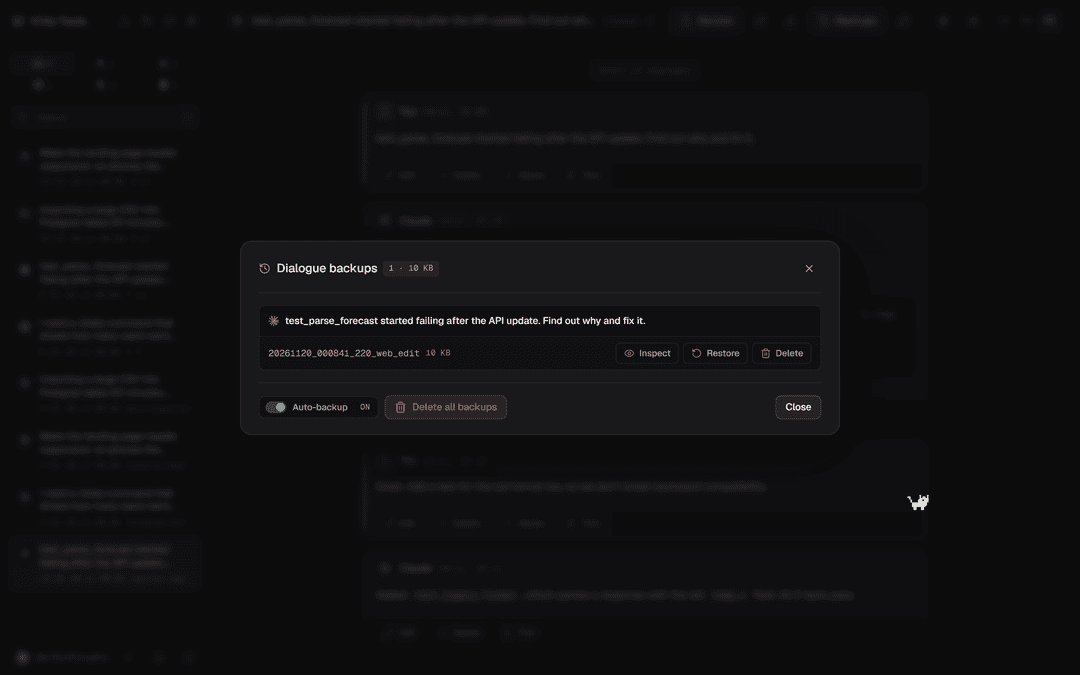
Бэкапы / Backups
Автобэкапы отключаются тумблером. Показывает вес диалогов и бэкапов по каждому приложению. Любую сохранённую копию можно открыть и восстановить.
Automatic backups can be toggled off. Shows the size of conversations and backups for each application. Any saved copy can be opened and restored.
Примеры использования / Usage Examples
Подмена ответов модели / Spoofing Model Responses. Можно отредактировать прошлый ответ ассистента в истории так, чтобы модель в следующем шаге опиралась на него как на собственный вывод. Это показывает, насколько модель доверяет своему прошлому ответу и как далеко может уйти от исходной линии рассуждения, если предыдущий шаг подменён. Полезно для оценки устойчивости к prompt injection через историю.
You can edit a previous assistant response in the history so that the model treats it as its own previous output in the next step. This demonstrates how much the model trusts its past responses and how far it can deviate from the original reasoning path when a previous step is spoofed. Useful for evaluating robustness against prompt injection via conversation history.
Восстановление чата после срабатывания Safety Guard / Recovering a Chat After Safety Guard Trigger. Когда чат получил Safe Guard и модель отказывается продолжать работу, причину можно найти по истории. Дальше два пути. Первый — отредактировать сообщение, которое триггернуло фильтр, или подменить ответ модели на нейтральный, чтобы следующий шаг опирался на него как на собственный вывод. Второй — откатиться до сообщения перед срабатыванием, удалив всё после него, и продолжить с чистой точки. Оба варианта возвращают чат в рабочее состояние, а исходную ветку можно сохранить в бэкапе и восстановить позже.
When a chat hits a Safety Guard and the model refuses to continue, you can find the cause in the history. There are two approaches. First — edit the message that triggered the filter, or replace the model’s response with a neutral one so the next step treats it as its own previous output. Second — roll back to the message before the trigger by deleting everything after it, and continue from a clean point. Both methods restore the chat to a working state, while the original branch can be saved in a backup and restored later.
Подмена системного промпта / Spoofing the System Prompt. Смена системного промпта в существующем чате позволяет сравнить поведение модели на одном и том же наборе сообщений при разных инструкциях. Этот сценарий особенно удобен для внедрения джейлбрейка. Системный промпт задаёт рамку, в которой модель интерпретирует всю переписку, поэтому его правка меняет поведение сразу во всех следующих шагах, без необходимости редактировать отдельные сообщения. Можно подставить роль, стиль ответа или набор разрешений, которые через интерфейс не выставить, и посмотреть, как модель реагирует на тот же диалог в новой рамке. Полезно и для сравнения, как формулировка системного промпта влияет на отказы, стиль и выбор инструментов.
Changing the system prompt in an existing chat lets you compare the model’s behavior on the same set of messages under different instructions. This scenario is especially useful for injecting a jailbreak. The system prompt defines the frame in which the model interprets the entire conversation, so editing it immediately changes behavior in all subsequent steps without needing to modify individual messages. You can inject a role, response style, or set of permissions that cannot be set through the UI, and observe how the model reacts to the same dialogue under the new frame. Also useful for comparing how system prompt wording affects refusals, style, and tool selection.
Подмена контекста (context spoofing) / Context Spoofing. Редактирование метаданных, ролей и tool calls даёт возможность собрать состояние чата, которое через интерфейс не создать. Это позволяет тестировать, как модель реагирует на нестандартные или противоречивые состояния контекста.
Editing metadata, roles, and tool calls lets you construct chat states that cannot be created through the UI. This enables testing how the model reacts to non-standard or contradictory context states.
Контролируемое тестирование джейлбрейков / Controlled Jailbreak Testing. В локальной среде можно воспроизводимо проверять, какие формулировки промптов и какая структура истории приводят к обходу ограничений, а какие нет. Результат воспроизводим, потому что состояние чата хранится в файле и его можно откатить.
In a local environment you can reproducibly test which prompt formulations and conversation structures lead to bypassing restrictions and which do not. Results are reproducible because the chat state is stored in a file and can be rolled back.
Перенос сценариев между средами / Transferring Scenarios Between Environments. Один и тот же диалог можно перенести в другую среду и посмотреть, как её модель ведёт себя на идентичном контексте. Это даёт сравнение моделей на одинаковых входных данных.
The same conversation can be transferred to another environment to see how its model behaves on an identical context. This enables direct model comparison on the same inputs.
Требования / Requirements
- Python 3.10+ (рекомендуется 3.14+ со встроенным
compression.zstd; для 3.10–3.13 автоматически ставитсяzstandardизrequirements.txt) / Python 3.10+ (3.14+ recommended with built-incompression.zstd; on 3.10–3.13zstandardis installed viarequirements.txt) - Зависимости / Dependencies:
aiohttp,psutil(иzstandardна Python < 3.14) (requirements.txt) - Windows, macOS или Linux / Windows, macOS or Linux
Ограничения на macOS и Linux / macOS and Linux limitations:
Claude Code нельзя править, пока он запущен: на этих системах нельзя проверить, занят ли конкретный файл сессии, поэтому правка блокируется целиком, пока работает любой процесс Claude.
Claude Code history can’t be edited while Claude is running: these systems can’t tell whether a specific session file is in use, so editing is blocked while any Claude process is running.
Установка и запуск / Installation and Running
После запуска сервер сам откроет браузер на http://127.0.0.1:8780.
Once started, the server opens your browser at http://127.0.0.1:8780.
Windows
- Установить Python 3.14+ с python.org (отметить «Add python.exe to PATH») или через winget:
Install Python 3.14+ from python.org (check “Add python.exe to PATH”) or via winget:winget install Python.Python.3.14 - Склонировать репозиторий и запустить / Clone and run:
git clone https://github.com/quesada-lab/k1tty-tools.git
cd k1tty-tools
py -3.14 -m venv .venv
.venv\Scripts\activate
pip install -r requirements.txt
python -X utf8 server.py
macOS
Быстрый способ: открыть K1ttyTools.command двойным кликом в Finder или выполнить ./K1ttyTools.command в терминале — скрипт сам найдёт Python 3.10+, создаст .venv, поставит зависимости из requirements.txt и запустит сервер (также работает на Linux).
Quick start: double-click K1ttyTools.command in Finder or run ./K1ttyTools.command in Terminal — it automatically picks Python 3.10+, creates .venv, installs dependencies from requirements.txt, and starts the server (also works on Linux).
Либо вручную / Or manually:
- Установить Python 3.10+ (например 3.14) / Install Python 3.10+ (e.g. 3.14):
brew install [email protected] - Склонировать репозиторий и запустить / Clone and run:
git clone https://github.com/quesada-lab/k1tty-tools.git
cd k1tty-tools
python3.14 -m venv .venv
source .venv/bin/activate
pip install -r requirements.txt
python -X utf8 server.py
Linux
- Установить Python 3.14+ из пакетов дистрибутива, а если его там ещё нет — через uv или pyenv.
Install Python 3.14+ from your distro packages, or via uv / pyenv if your distro doesn’t ship it yet. - Склонировать репозиторий и запустить / Clone and run:
git clone https://github.com/quesada-lab/k1tty-tools.git
cd k1tty-tools
python3.14 -m venv .venv
source .venv/bin/activate
pip install -r requirements.txt
python -X utf8 server.py
Через uv (любая ОС) / With uv (any OS)
uv сам скачает нужный Python и зависимости:
uv downloads the right Python and dependencies by itself:
uv run --python 3.14 --with-requirements requirements.txt python -X utf8 server.py
Параметры запуска / Launch Options
| Параметр / Option | Описание / Description |
|---|---|
python -X utf8 server.py 9000 | другой порт (по умолчанию 8780) / custom port (default 8780) |
--no-open или / or NO_BROWSER=1 | не открывать браузер / don’t open the browser |
Нестандартные пути к данным / Custom Data Paths
По умолчанию данные ищутся в домашней папке пользователя. Пути можно переопределить переменными окружения:
By default data is looked up in the user’s home directory. Override the paths with environment variables:
| Переменная / Variable | По умолчанию / Default |
|---|---|
ANTIGRAVITY_APPDATA | ~/.gemini/antigravity |
ANTIGRAVITY_CLI_APPDATA | ~/.gemini/antigravity-cli |
CLAUDE_HOME | ~/.claude |
CODEX_HOME | ~/.codex |
OPENCODE_DATA_DIR | ~/.local/share/opencode |
Где хранятся бэкапы / Where Backups Are Stored
| Среда / App | Папка / Folder | Переменная / Variable |
|---|---|---|
| Antigravity | backups/antigravity/ | ANTIGRAVITY_BACKUP_ROOT |
| Antigravity CLI | backups/antigravity_cli/ | ANTIGRAVITY_CLI_BACKUP_ROOT |
| OpenCode | backups/opencode/ | OPENCODE_BACKUP_ROOT |
| Claude Code | ~/claude_backups/ (рядом с / next to CLAUDE_HOME) | — |
| Codex | ~/codex_backups/ (рядом с / next to CODEX_HOME) | — |
Пути backups/... указаны относительно папки проекта. Список бэкапов, их размер и восстановление доступны в интерфейсе.
backups/... paths are relative to the project folder. The UI lists backups, shows their size and restores them.
Структура проекта / Project Structure
k1tty-tools/
├── server.py             # веб-сервер (aiohttp), точка входа / web server, entry point
├── K1ttyTools.command    # быстрый запуск на macOS и Linux / macOS & Linux launcher
├── requirements.txt      # зависимости Python / Python dependencies
├── engines/              # чтение и запись истории каждой среды, конвертер, монитор процессов
│                         # per-app history I/O, converter, process monitor
├── providers/            # адаптеры сред для сервера / app adapters used by the server
├── docs/screenshots/     # скриншоты для README / README screenshots
└── static/               # веб-интерфейс (HTML/JS/CSS) / web UI
    └── icons/
Бэкапы (backups/) и настройки (k1tty_settings.json) создаются локально и в репозиторий не попадают.
Backups (backups/) and settings (k1tty_settings.json) are created locally and are excluded from the repository.
Обновление со старой версии / Upgrading From an Older Version
Раньше код лежал в папке k1tty_editor/. После git pull и первого запуска server.py бэкапы и настройки из k1tty_editor/ автоматически переносятся в корень проекта; существующие файлы не перезаписываются. Запускать теперь нужно server.py вместо K1ttyTools.bat.
The code used to live in k1tty_editor/. After git pull, the first run of server.py moves backups and settings from k1tty_editor/ to the project root without overwriting existing files. Run server.py instead of K1ttyTools.bat from now on.
Лицензия / License
// faq
What is k1tty-tools?
Universal AI conversation history editor, thread unlocker, and converter for Google Antigravity, OpenAI Codex, Claude Code, and OpenCode.. It is open-source on GitHub.
Is k1tty-tools free to use?
k1tty-tools is open-source under the MIT license, so it is free to use.
What category does k1tty-tools belong to?
k1tty-tools is listed under other in the Claudeers registry of Claude-compatible tools.
// embed badge

[](https://claudeers.com/k1tty-tools)
// retro hit counter

[](https://claudeers.com/k1tty-tools)
// reviews
// guestbook
// related in Other
 🔓
 🔓
Anti-AI-slop design skill for Claude Code, Cursor, and Codex.
 🔓
Huashu Design · HTML-native design skill for Claude Code · Claude Code 里 HTML 原生的设计 skill · 高保真原型 / 幻灯片 / 动画 + 20 设计哲学 + 5 维评审 + MP4 导出 · Agent-agnostic
 🔓
Open source Ghostty-based macOS terminal with vertical tabs and notifications for AI coding agents. Built for multitasking, organization, and programmability.