
headroom
macOS menu bar stats with live graphs: CPU, GPU, memory, battery, plus Claude Code and Grok plan limits and token usage.
Install with your AI
Paste into Claude Code, Cursor, or any agent — it reads the repo and wires the tool into your project.
Install and set up headroom (release-binary project) into my current project.
Found on https://claudeers.com/headroom-4
Repo: https://github.com/sandrich/headroom
Homepage/docs: —
Detected install method: release-binary → inspect the README
Category: productivity. Platforms: cli, api.
Read the repo's README for exact setup and env vars, then install it and wire it into my project.

Claudeers Health Verdict:
active; community-verified: false. Confirm the source before running anything.
Grab the latest release asset from GitHub.
# download a build from https://github.com/sandrich/headroom/releases
git clone https://github.com/sandrich/headroom
// compatibility
| Platforms | cli, api |
|---|---|
| Operating systems | — |
| AI compatibility | claude |
| License | MIT |
| Pricing | open-source |
| Language | Swift |
Headroom
A tiny macOS menu bar app that shows how much headroom you have left: on your machine (CPU, GPU, memory, battery) and on your AI coding plans (Claude Code and Grok).
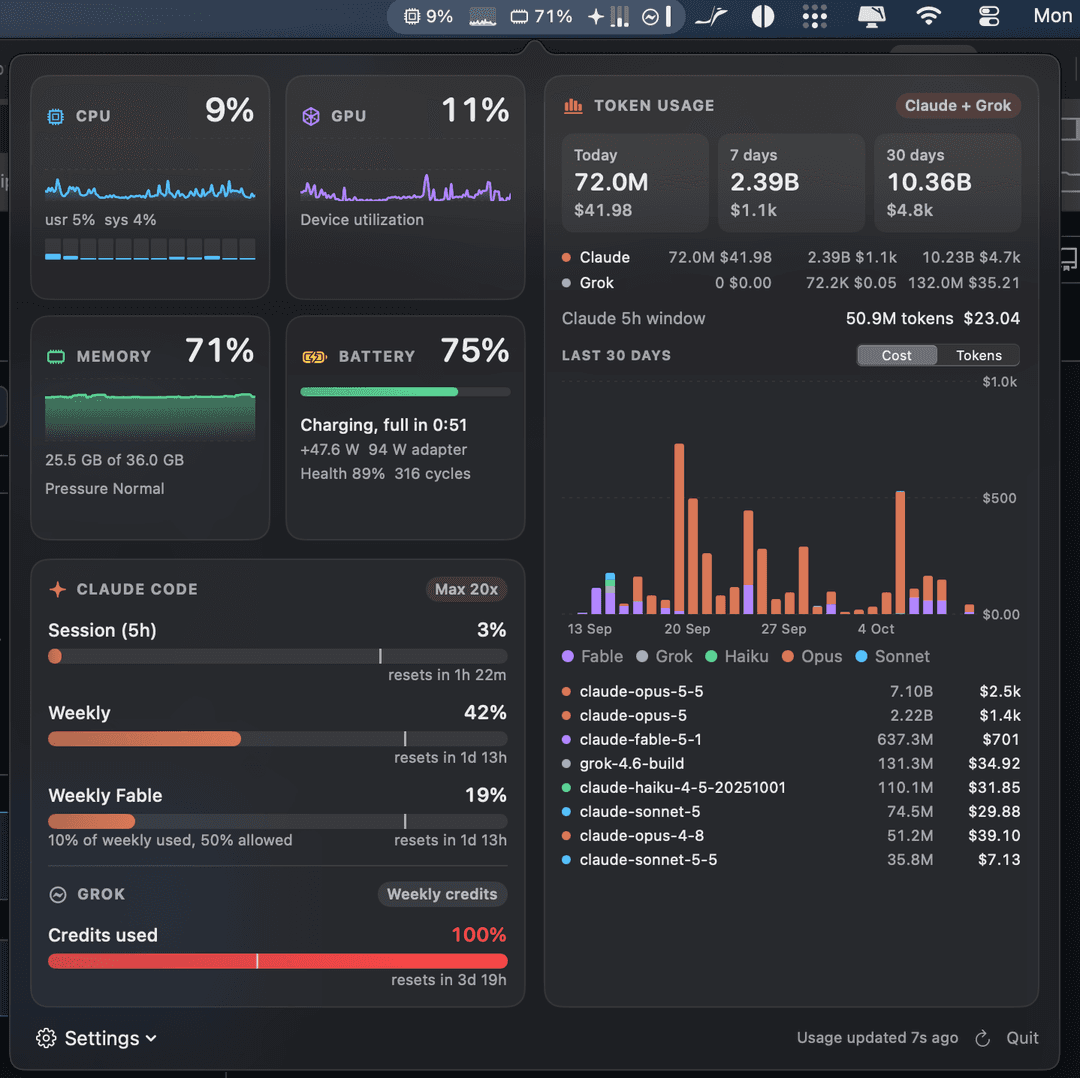
One compact, native-looking item in the menu bar. Click it for a dashboard with live graphs; hover an item to see what is using it.
Features
Menu bar
- One line, monochrome, tinted by macOS like every other menu bar item
- CPU and GPU with live sparklines, memory, battery
- Claude Code limits as three slim gauges (5h session, weekly, per-model weekly such as Fable)
- Grok credits gauge
- Each item can be switched on or off; sampling every 0.5 to 5 seconds
Hover
- CPU, GPU, memory, battery: top apps (helper processes are grouped under their app)
- Claude, Grok: exact limit percentages and reset times
Dashboard
- Live charts for CPU (with per-core bars), GPU and memory; battery state, power draw, health and cycles
- Claude Code plan limits with reset countdowns and a pace marker (where you would be if usage were spread evenly)
- Grok weekly credits
- Combined token usage for Claude Code and Grok: today, last 7 days, last 30 days, tokens and cost, a 30-day chart by model family, and a per-model table, similar to ccusage
Providers you do not use are hidden automatically.
Keep awake (like Amphetamine or caffeinate)
- Keep the Mac from idle sleeping for 1, 2, 4 or 8 hours, or indefinitely, from the cup menu in the dashboard footer
- Option-click the menu bar item to toggle it; a cup appears in the menu bar while it is on
- Optional: stay awake while Claude Code or Grok is working (any transcript written in the last 10 minutes), so long agent runs are not cut off by sleep
- Optionally keep the display on too
- Uses a standard power assertion (visible in
pmset -g assertions), released automatically if Headroom quits; closing the lid still sleeps
Requirements
- macOS 14 or newer (built and tested on Apple Silicon)
- Xcode command line tools (Swift 5.9+)
- Optional: Claude Code signed in with a Claude subscription
- Optional: the Grok CLI signed in (
grok login)
Install
- Download the latest Headroom-x.y.dmg from Releases.
- Open it and drag Headroom onto Applications.
- Launch Headroom. It lives in the menu bar, not the Dock.
Headroom is not notarized by Apple yet, so macOS blocks the first launch once. Open System Settings > Privacy & Security and click Open Anyway, or run xattr -dr com.apple.quarantine /Applications/Headroom.app.
Build from source
./build.sh            # builds build/Headroom.app
./build.sh install    # copies it to /Applications and launches it
./build.sh dmg        # packages build/Headroom-<version>.dmg
Builds are universal (Apple Silicon and Intel). To publish a release, bump CFBundleShortVersionString in Resources/Info.plist, then push a matching tag such as v1.1; the release workflow builds the DMG and attaches it.
Headroom registers itself as a login item on first launch. Turn that off under Settings in the dashboard footer.
How it works
Everything is sampled locally and cheaply. Steady-state cost is around 1% of one core with the dashboard closed.
| Data | Source |
|---|---|
| CPU | host_processor_info tick deltas |
| Memory | host_statistics64 (app + wired + compressed, like Activity Monitor), memory pressure via sysctl |
| GPU | IOKit IOAccelerator PerformanceStatistics |
| Battery | IOKit power sources and AppleSmartBattery |
| Top apps | libproc (proc_pid_rusage) and per-client GPU time from the GPU driver's IORegistry entries; only sampled while a hover panel is open |
| Claude Code limits | The usage endpoint Claude Code itself uses, authenticated with Claude Code's OAuth token from the login keychain (read via /usr/bin/security; never stored, logged or refreshed by Headroom) |
| Claude Code tokens | ~/.claude/projects/**/*.jsonl, tailed incrementally by byte offset and cached in ~/Library/Application Support/Headroom |
| Grok credits | The billing endpoint the Grok CLI's /usage uses, with the CLI's token from ~/.grok/auth.json. If that token has expired, Headroom runs grok models once so the CLI refreshes it; Headroom never writes the file. |
| Grok tokens | ~/.grok/sessions/*/*/usage.json |
| Prices | LiteLLM's model price list, refreshed daily |
Accuracy notes
- Token totals follow ccusage's rules: deduplicated by message id and request id, keeping the final counts of messages that were logged several times while streaming, and including advisor sub-calls. Days are local calendar days; "7 days" and "30 days" include today.
- Cost can differ slightly from ccusage because Headroom prices 1-hour cache writes at their own (higher) rate.
- Grok cost comes from the CLI's own per-turn cost figures.
- Energy in the battery hover panel is shown as each app's share of energy used, because the kernel counters do not have a documented unit.
- Root-owned processes (for example
WindowServerCPU orkernel_task) cannot be read without elevated rights and are missing from the CPU, memory and energy lists.
Caveats
The Claude and Grok usage endpoints are not public APIs. They may change without notice, in which case those sections show the last known values and an error until Headroom is updated.
Development
swift build                                     # debug build
swift test                                      # unit tests (Swift Testing)
.build/release/Headroom --snapshot /tmp/shots   # renders the menu bar strip and dashboard to PNGs, then exits
Source layout (Sources/Headroom):
main.swift: app delegate, timers, status item, popoverSystemSampler.swift: CPU, GPU, memory, batteryConsumers.swift: per-app top consumers for the hover panelsClients.swift: Claude Code and Grok plan limitsLedger.swift: token ledger, pricing, summariesStatusRenderer.swift: draws the menu bar stripPopoverView.swift,Hover.swift: SwiftUI dashboard and hover panelsKeepAwake.swift: keep awake power assertion
scripts/make-icon.swift regenerates Resources/AppIcon.icns, scripts/make-banner.swift regenerates docs/banner.png.
Tests live in Tests/HeadroomTests and run on every push and pull request.
License
MIT, see LICENSE.
// faq
What is headroom?
macOS menu bar stats with live graphs: CPU, GPU, memory, battery, plus Claude Code and Grok plan limits and token usage.. It is open-source on GitHub.
Is headroom free to use?
headroom is open-source under the MIT license, so it is free to use.
What category does headroom belong to?
headroom is listed under productivity in the Claudeers registry of Claude-compatible tools.
// embed badge

[](https://claudeers.com/headroom-4)
// retro hit counter

[](https://claudeers.com/headroom-4)
// reviews
// guestbook
// related in Productivity
 🔓
Agent skills for Obsidian. Teach your agent to use Obsidian CLI and open formats including Markdown, Bases, JSON Canvas.
 🔓
Open source repository of plugins primarily intended for knowledge workers to use in Claude Cowork
 🔓
Garry's Opinionated OpenClaw/Hermes Agent Brain
 🔓
An open-source alternative to Claude Cowork (powered by opencode)