
herdr-usage-limits
Herdr mod: Claude Code and Codex limits (5-hour, weekly, per-model) plus OpenCode and Pi usage in the status bar, with pace, session context and a hover pane…
Install with your AI
Paste into Claude Code, Cursor, or any agent — it reads the repo and wires the tool into your project.
Install and set up herdr-usage-limits (git-clone project) into my current project.
Found on https://claudeers.com/herdr-usage-limits
Repo: https://github.com/nozikov/herdr-usage-limits
Homepage/docs: —
Detected install method: git-clone → git clone https://github.com/nozikov/herdr-usage-limits
Category: productivity. Platforms: cli, api.
Read the repo's README for exact setup and env vars, then install it and wire it into my project.

Claudeers Health Verdict:
unknown; community-verified: false. Confirm the source before running anything.
git clone https://github.com/nozikov/herdr-usage-limits
// compatibility
| Platforms | cli, api |
|---|---|
| Operating systems | — |
| AI compatibility | claude |
| License | MIT |
| Pricing | open-source |
| Language | JavaScript |
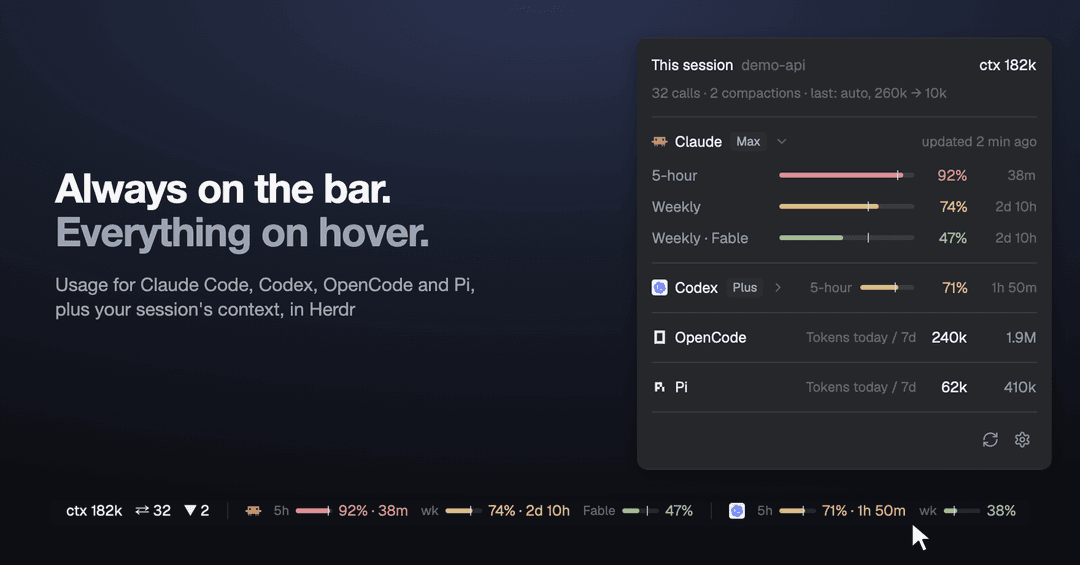
Usage limits for Herdr
Know how much Claude Code and Codex you have left, and what OpenCode and Pi have spent, without leaving your agents.
Install · Read it · Hover · Settings · What it runs · Recipe
See how much Claude Code and Codex you have left, right in Herdr's status bar:
- Your limits: 5-hour, weekly and per-model, each with a bar and a percent.
- Everything on hover: rest the pointer on the limits for the full picture.
- Your current session: how full the context is, how many messages you've sent, how many times it was compacted.
- OpenCode and Pi: the tokens they used today and over the last 7 days. They have no limits to show.
OpenCode session statistics support both legacy and current SQLite storage automatically. Both appear as the same OpenCode block, with the same settings and counters; there is no version selector. Schema adapters handle message and compaction differences internally.
It asks your own claude and codex CLIs, reads OpenCode's local database and Pi's
session files, so there is no API key to add and no model usage to pay for.
Read the bar

- The bar is how much of the limit you've used.
- The tick is how much of the time has passed. Bar past the tick? You're using it up too fast.
| 🟢 Under 70% | 🟡 70–89% | 🔴 90% and up |
|---|---|---|
41% | 74% · 2d 10h | 92% · 38m |
From amber on, you also see the time left until the limit resets.
Hover for everything
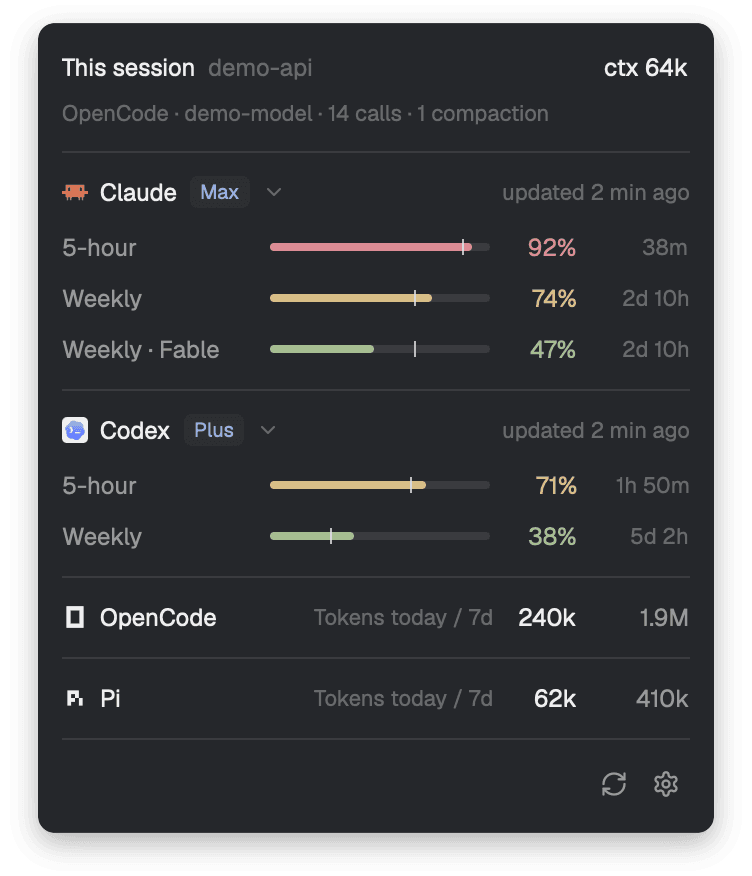
Rest the pointer on the limits. The panel shows every limit and when it resets. Rest it on a limit to see what its tick means in numbers. ↻ refreshes, ⚙ opens the settings.
Click a provider's name to fold it to one line: its tightest limit, with the bar, percent and time to reset. Click again to open it. Everything starts open, and a fold is remembered. An arrow beside the name shows while the pointer is on it, and always on a folded line or when the panel holds three providers or more.
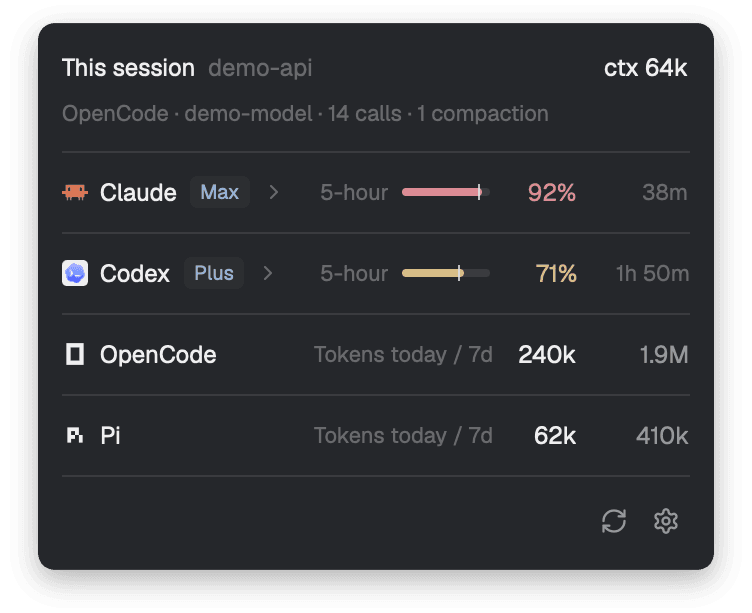
OpenCode and Pi get one line each: Tokens today / 7d, with both numbers. They don't
fold. One you haven't used in 7 days isn't shown.
Codex's session block includes context, calls and compactions. Embedded Codex and older
child app-servers are detected automatically. If Codex uses a shared daemon, choose the
conversation open in your terminal from Choose Codex session in the hover panel.
Service subagents are excluded from detection; they do not make their parent's session
ambiguous. The conversation list stays collapsed until you click the selection button.
The choice expires when that terminal's Codex process restarts; Change Codex session
lets you update it after /new or a switch to another conversation. A confirmed manual
choice in Patchbay Chat is also recognised, unless you chose a session in this mod.
Process-bound Patchbay choices survive interface reloads and are revalidated against
Codex's OS process start time, so an idle conversation keeps its statistics.
After compaction, context is hidden until Codex records fresh token usage.
The block at the top is the session in the terminal you're focused on, and it changes when you switch terminals:
- Context: how much of it is filled. Codex shows a percent. Claude Code, OpenCode and Pi show tokens, because their session records don't say how big the window is.
- Calls: how many messages you've sent.
- Compactions: how many times the conversation was compacted. Claude Code and OpenCode, for now.
For OpenCode and Pi the second line also names the agent and the model: Pi · demo-model · 2 calls.
Choose what the bar shows
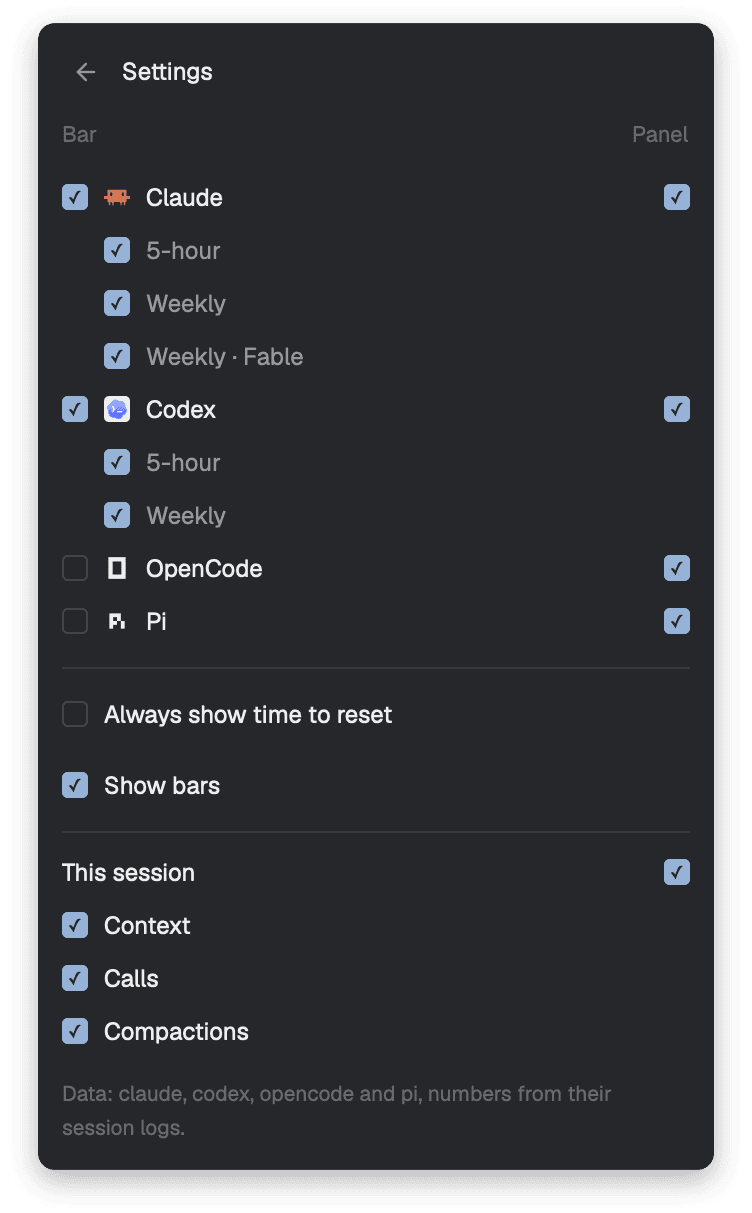
Click ⚙ in the panel. Each provider has two boxes: the left one, under Bar, is about the bar; the right one, under Panel, is about the panel. They are separate, and by default the panel still shows everything. "This session" has a Panel box too. A provider on neither the bar nor the panel isn't asked, and the session isn't read while its block is out of the panel and none of its numbers is on the bar. Every choice, and every fold, is remembered across restarts.
- Claude, Codex and their limits are on by default. Untick what you don't watch.
- OpenCode and Pi put today's tokens on the bar:
today 240k. They're off the bar by default, unless no provider with limits has any numbers; then they're on. - Always show time to reset adds the time to every limit, green ones too.
- Show bars keeps a bar beside each limit. Untick it for numbers only.
- This session puts the numbers on the bar:
ctxfor context,⇄for calls,▼for compactions.


It doesn't guess
- A failing provider says so. Offline or signed out, it shows a dim
!and keeps its last good reading, dimmed, with its age. - Old numbers look old. Anything over 15 minutes old is dimmed.
- A passed reset shows
—until the next reading, never a made-up 0%. - Codex's session log is only a fallback. It's marked as a past reading, never as live.
- Codex sessions are identified explicitly. An open rollout or writer-lock identifies an embedded session. Multiple open rollouts are ambiguous; the mod offers a choice, rather than following whichever conversation wrote last. Shared-daemon sessions also require a choice. The folder only filters the list; it never selects a conversation.
- No session rather than the wrong one. OpenCode and Pi don't say which session a terminal shows, so the mod ties them by folder and start time, and shows nothing when that isn't certain. With one copy of the agent in the folder,
/newtakes the block away. OpenCode's then stays away until you restart it, as it does after another OpenCode wrote in that folder. Pi's is away whenever another session in the folder was written after the one this Pi started with: after another Pi that has since quit wrote in that folder (it comes back at this Pi's next reply), and after/new(until Pi is restarted). Right after OpenCode compacts, the block isn't shown until its next reply, as OpenCode itself has no count then. Two gaps are left: an OpenCode that hasn't sent anything since it started can show a session another short-lived OpenCode wrote in that folder, until its own first message; and with several Pi in one folder, a terminal whose Pi did/newkeeps showing that terminal's previous session, because nothing on disk tells that apart from another Pi writing. - A failing token count says so too. It keeps its last good numbers, dimmed.
- Narrow window? Bars go first, then labels, then the time on calm windows. Percents and providers stay.
Install
Ask your Herdr agent to add this repository:
Add the Herdr mod github.com/nozikov/herdr-usage-limits to my status bar
Or by hand, on macOS or Linux, with the claude or codex CLI signed in, or OpenCode
or Pi installed (OpenCode's session block also needs sqlite3):
git clone https://github.com/nozikov/herdr-usage-limits.git
cp -R herdr-usage-limits/mods/usage-limits ~/.config/herdr-app/mods/
herdr-app do layout.clone '{"name":"main","as":"my-main"}'
Then, in ~/.config/herdr-app/layouts/my-main.json, replace the status block with
this row:
{ "id": "status-row", "type": "row", "size": { "px": 28 }, "resizable": false, "children": [
  { "id": "status", "type": "block", "size": { "weight": 1 }, "content": { "mod": "workspace-status" } },
  { "id": "usage-limits", "type": "block", "size": { "weight": 2.2 }, "min": 130,
    "content": { "mod": "usage-limits" } } ] }
Give the block more weight if you want the bars to stay when a window gets tight.
What it runs
-
sh, yourclaudeCLI and yourcodexCLI, each briefly, every 5 minutes. They use their own sign-ins and talk to Anthropic and OpenAI. The mod makes no network requests itself. -
OpenCode's local database, read-only, for today's and seven calendar days' tokens. This works for both storage formats, including OpenCode installed through NVM and legacy CLIs without
stats --json. Only numeric totals reach the mod. If no database exists, it falls back toopencode stats --days 0 --jsonand--days 7 --json. An explicitHERDR_USAGE_OPENCODE_BINoverride also selects that CLI path. -
hc, to find the agent in the focused terminal,lsof, to find Codex's open session file, andpsandlsof, to find an OpenCode or Pi process's folder and start time.psalso lists your processes, to count the copies of that agent in the folder; their names and arguments stay on your machine. -
python3(standard library only) for Codex session statistics: it inspects the terminal process and its children, reads the identified rollout as JSON, and uses Codex'sstate_*.sqliteindex read-only for writer-lock lookup and the session picker. The picker passes session IDs and titles to the mod; rollout message text stays in the helper.CODEX_HOMEandCODEX_SQLITE_HOMEare respected. -
It reads no token or credential file.
-
It reads the focused session's log (
~/.claude/projects/,~/.codex/sessions/), which holds your conversation.helpers/session.shpasses on numbers only.~/.codex/sessions/**/*.jsonlis also the fallback for Codex's limits. -
For OpenCode's session it reads OpenCode's database (
$XDG_DATA_HOME/opencode/opencode.db, by default~/.local/share/opencode/opencode.db) withsqlite3, read-only. For Pi it reads Pi's session files (~/.pi/agent/sessions/): the focused session's, and those written in the last 8 days for the tokens. Both hold your conversation.helpers/session.shandhelpers/pi-spend.shpass on only numbers (counts and times) and a model id. It never runspi.OpenCode's storage adapters live in
helpers/opencode/:legacy.sqlreadssession/message/part, andcurrent.sqlreadssession_v2/session_message.opencode-session.shdetects available schemas, andsession.sqlapplies one shared selection and counting policy. Empty migration tables do not override legacy messages; duplicate migrated session IDs are deduplicated, and distinct sessions remain ambiguous. The helper creates connection-local TEMP views in a read-only transaction and never changes OpenCode's database. Legacy compaction requests and synthetic continuations are excluded from user-call counts; only successful compactions reset context. Separate spend adapters include paid compactions and subagents, aggregate from local midnight (today and six previous days), and deduplicate migrated session IDs. -
It sends no prompt and starts no turn, so it uses no model time.
-
It changes no Claude Code, Codex, OpenCode or Pi settings.
[!NOTE]
get_usageis an internal Claude Code interface, checked on 2.1.317. If an update changes it, Claude shows!with the error instead of numbers.
Develop
rsync -a --delete mods/usage-limits/ ~/.config/herdr-app/mods/usage-limits/
npm test                                    # node --test, no dependencies
herdr-app check ~/.config/herdr-app/mods/usage-limits
Copy the mod, don't symlink it: Herdr won't load icons through a link that leaves its
home, so ↻ and ⚙ would be blank. It doesn't hot-reload either: after copying, switch
layouts away and back (herdr-app do layout.switch '{"name":"main"}', then your layout).
RECIPE.md is the brief to build the mod from scratch. A new provider is
one file in providers/ plus its helper; kind: "spend" makes it count tokens instead
of limits. A new agent for "This session" is a mode in helpers/session.sh and its
Herdr name in AGENTS in main.js.
Credits
The approach for Claude's get_usage comes from
jmalicki/herdr-mod-ai-usage (MIT).
Screenshots are the real mod in a demo window, with sample numbers.
The panel's icons are from Lucide (ISC).
License
// faq
What is herdr-usage-limits?
Herdr mod: Claude Code and Codex limits (5-hour, weekly, per-model) plus OpenCode and Pi usage in the status bar, with pace, session context and a hover panel. Reads no tokens.. It is open-source on GitHub.
Is herdr-usage-limits free to use?
herdr-usage-limits is open-source under the MIT license, so it is free to use.
What category does herdr-usage-limits belong to?
herdr-usage-limits is listed under productivity in the Claudeers registry of Claude-compatible tools.
// embed badge

[](https://claudeers.com/herdr-usage-limits)
// retro hit counter

[](https://claudeers.com/herdr-usage-limits)
// reviews
// guestbook
// related in Productivity
 🔓
Agent skills for Obsidian. Teach your agent to use Obsidian CLI and open formats including Markdown, Bases, JSON Canvas.
 🔓
Open source repository of plugins primarily intended for knowledge workers to use in Claude Cowork
 🔓
Garry's Opinionated OpenClaw/Hermes Agent Brain
 🔓
An open-source alternative to Claude Cowork (powered by opencode)