
ClaudeDesktop-Installer
绕过网络限制,一键安装 Claude Desktop 并修复 Host Claude Code binary not available 问题。
Install with your AI
Paste into Claude Code, Cursor, or any agent — it reads the repo and wires the tool into your project.
Install and set up ClaudeDesktop-Installer (release-binary project) into my current project.
Found on https://claudeers.com/claudedesktop-installer
Repo: https://github.com/l1i1/ClaudeDesktop-Installer
Homepage/docs: —
Detected install method: release-binary → inspect the README
Category: other. Platforms: api, desktop.
Read the repo's README for exact setup and env vars, then install it and wire it into my project.

Claudeers Health Verdict:
active; community-verified: false. Confirm the source before running anything.
Grab the latest release asset from GitHub.
# download a build from https://github.com/l1i1/ClaudeDesktop-Installer/releases
git clone https://github.com/l1i1/ClaudeDesktop-Installer
// compatibility
| Platforms | api, desktop |
|---|---|
| Operating systems | — |
| AI compatibility | claude |
| License | — |
| Pricing | open-source |
| Language | C# |
Claude Desktop 一键安装程序(国内网络优化版)
Windows 上绕过网络限制,一键安装 Claude Desktop 并修复 Host Claude Code binary not available 问题。
快速开始(使用教程)
1. 下载:下载 ClaudeDesktop-Installer.exe,或从 Releases 获取。
2. 运行:双击 exe,在 UAC 弹窗点"是"。程序自动完成:
下载 MSIX(GitHub 镜像 → R2 → 官方,有缓存则秒过)
→ 校验 SHA256
→ 静默安装(已装则跳过)
→ Node.js 检测(已装则跳过)
→ 安装 claude-code 并修复 Claude Code 二进制
→ 创建桌面快捷方式
→ 聚合 API 配置(见下一步)
3. 配置聚合 API(Tokeness,回车即默认值):
是否配置聚合 API?Key 请到 https://tokeness.ai/keys 注册获取 [Y/n]   回车(默认 Y)
  聚合 Base URL [默认 https://n.tokeness.dev]:                        回车
  API Key(格式 sk-xxxxxx):                                         粘贴你的 Key
  模型 ID(回车使用官方最新 claude-opus-5,...):                     回车
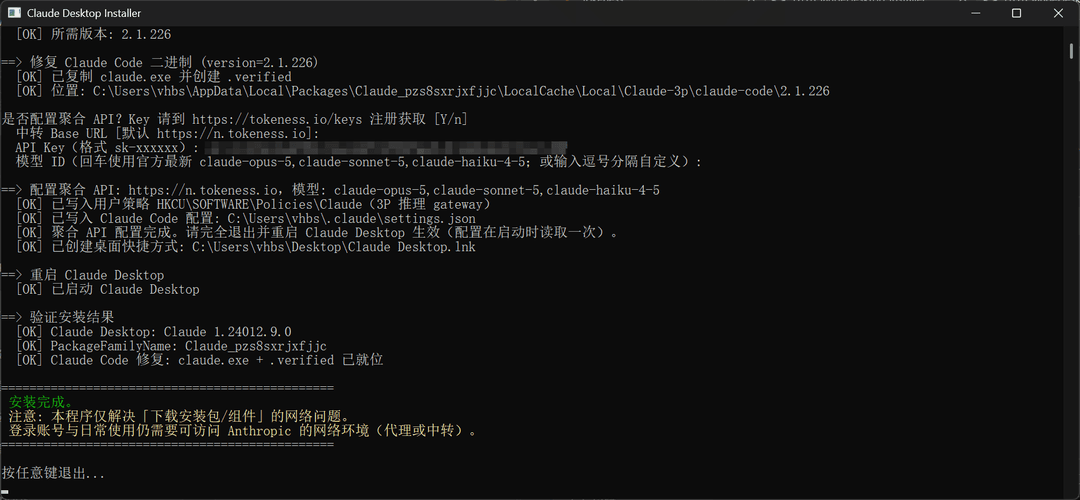
- Key 在 https://tokeness.ai/keys 注册获取
- Key 留空回车会自动打开浏览器跳转到获取页面
4. 重启生效:完全退出 Claude Desktop(含系统托盘图标)再重新打开。
5. 验证:开始对话。若仍提示连接失败,检查 reg query HKCU\SOFTWARE\Policies\Claude 应有 4 个 inference* 值。
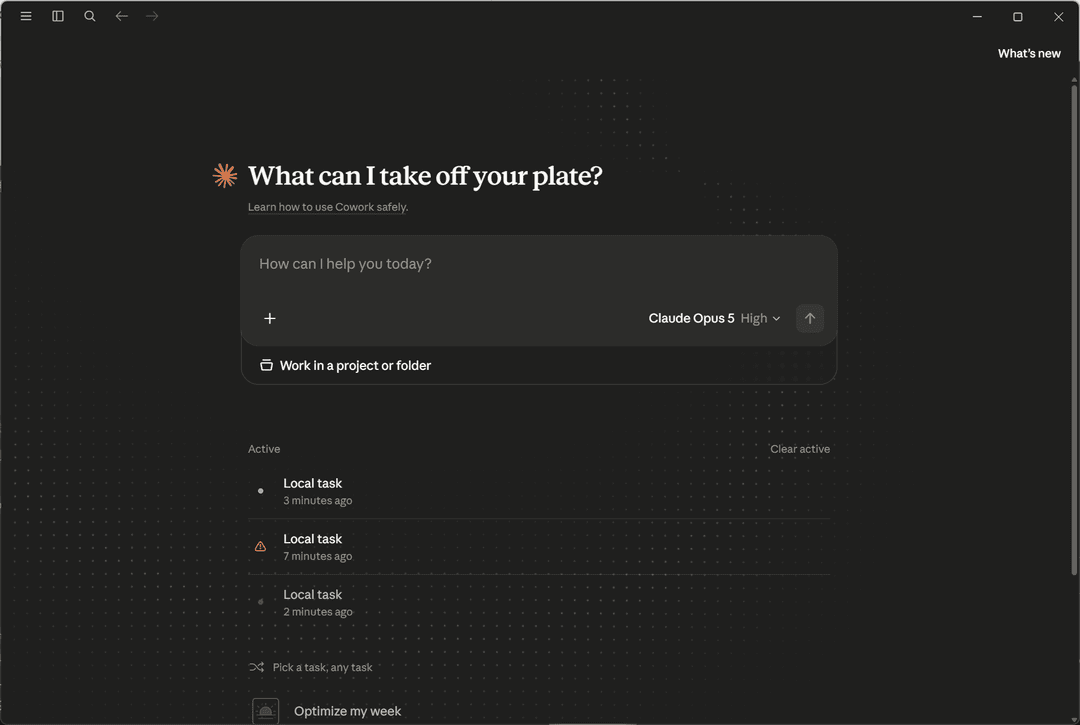
已安装过的环境重复运行会命中缓存并跳过已装步骤,可安全重复执行。
文件
| 文件 | 说明 |
|---|---|
ClaudeDesktop-Installer.exe | 最终分发物,全 C# 自包含(~36KB)。双击即用,自动提权 |
Installer.cs | 完整源码(下载 / 校验 / 安装 / Node.js / claude-code / 修复 / 验证) |
build-exe.bat | 重新编译脚本(本机 .NET Framework csc + PowerShell SDK,无第三方依赖) |
用法
双击 ClaudeDesktop-Installer.exe,在 UAC 弹窗点"是"即可。
参数:
ClaudeDesktop-Installer.exe -Force                      :: 强制重装(先卸载旧版)
ClaudeDesktop-Installer.exe -SkipClaudeCode             :: 只装桌面版,跳过 Claude Code 修复
ClaudeDesktop-Installer.exe -SkipNodeJs                 :: 使用系统已有 Node.js
ClaudeDesktop-Installer.exe -NodeVersion v24.19.0       :: 指定 Node.js 版本(npmmirror)
ClaudeDesktop-Installer.exe -ClaudeCodeVersion 2.1.138  :: 手动指定 claude-code 版本
ClaudeDesktop-Installer.exe -Mirror github|r2|official  :: 下载源优先级(默认 github)
ClaudeDesktop-Installer.exe -SkipChecksum               :: 跳过 SHA256 校验(不推荐)
ClaudeDesktop-Installer.exe -h                          :: 帮助
工作原理
1. 绕过下载网络限制(多源回退)
| 优先级 | 来源 | 说明 |
|---|---|---|
| 1 | GitHub Release + gh-proxy(v4.gh-proxy.org → gh-proxy.org 双前缀回退) | tag 通过 api.github.com 动态获取 |
| 2 | Cloudflare R2 短链 claudeapp.agentsmirror.com/latest/win-x64 | 镜像仓库 Wangnov/claude-app-mirror 提供,自动跟随最新版 |
| 3 | 官方 redirect claude.ai/api/desktop/... | 国内通常被 region 封锁(302 到 app-unavailable-in-region),仅兜底 |
- 下载用 .NET HttpWebRequest 流式传输(64KB 分块),进度/速度每 200ms 实时刷新,支持系统代理,失败自动重试 3 次
- 下载后按来源比对 SHA256(R2 比对 R2 checksums,GitHub 比对同 Release 的
SHA256SUMS.txt),防镜像篡改 - 下载缓存:MSIX 与 Node 安装包缓存到
%LOCALAPPDATA%\ClaudeInstaller\cache(跨重启持久),SHA256 校验一致时直接复用跳过下载;镜像仓库发布新版本后哈希变化,缓存自动失效重下
官网 Windows 下载按钮给的
ClaudeSetup.exe(约 7MB)只是在线引导器,安装时仍会从被墙的downloads.claude.ai拉取真正的 MSIX,所以直接下载自包含可离线安装的.msix。
2. 安装 MSIX
进程内调用 PowerShell SDK:优先 Add-AppxProvisionedPackage(机器范围注册,所有用户可用,注册 Cowork 虚拟化服务);失败回退 Add-AppxPackage(用户级)。
安装完成后在桌面创建 Claude Desktop.lnk 快捷方式(WScript.Shell 指向 shell:AppsFolder\<AUMID>,AUMID 通过 Get-StartApps 动态获取——AppId 不一定是 App,如 Claude 实际是 Claude)。
3. 修复 "Host Claude Code binary not available"
根因:Claude Desktop 内部依赖独立二进制 claude.exe,需从 Anthropic 服务器自动下载到用户数据目录,国内网络下 DNS 解析失败(ERR_NAME_NOT_RESOLVED)导致组件缺失。
修复流程(全部自动):
- 若系统无 Node.js,从 npmmirror 镜像静默安装(默认 v24.19.0)
npm config set registry https://registry.npmmirror.comnpm install -g @anthropic-ai/claude-code- 确定 claude-code 版本:优先使用 Desktop 已初始化的版本目录,否则直接用 npm 最新版(读 package.json / claude --version),可用
-ClaudeCodeVersion覆盖 - 将
claude.exe复制到%LOCALAPPDATA%\Packages\<PackageFamilyName>\LocalCache\Local\Claude-3p\claude-code\<version>\ - 创建
.verified标记文件(二进制下载完成标记) - 重启 Claude Desktop
4. 聚合 API 配置(Tokeness 等 Anthropic 兼容端点)
国内无法直接登录 Anthropic 账号时,可配置第三方聚合端点:
- 默认端点
https://n.tokeness.dev,API Key 到 https://tokeness.ai/keys 注册获取(格式sk-xxxxxx) - 运行到该步骤默认选 Y(直接回车即配置聚合 API);Base URL 可回车取默认;Key 留空回车会自动打开浏览器跳到 https://tokeness.ai/keys 引导获取
- 也可直接参数指定:
ClaudeDesktop-Installer.exe -ApiBaseUrl https://n.tokeness.dev -ApiKey sk-xxxxxx - 模型 ID 默认官方最新(2026-08:
claude-opus-5,claude-sonnet-5,claude-haiku-4-5):交互时回车即采用默认,或输入逗号分隔自定义;也可参数-ApiModels claude-opus-5,claude-sonnet-5覆盖;会写入注册表inferenceModels(REG_SZ 存 JSON 数组字符串)。模型名需符合 Claude 角色命名,具体支持以 Tokeness 平台为准 - 写入位置(自动合并保留原内容):
- 注册表策略(Claude Desktop 3P 推理配置,官方 MDM 方式):
HKCU\SOFTWARE\Policies\Claude(若 HKLM 已存在机器策略则写 HKLM),键为inferenceProvider=gateway、inferenceGatewayBaseUrl、inferenceGatewayApiKey、inferenceGatewayAuthScheme=bearer ~/.claude/settings.json的apiBaseUrl/apiKey(Claude Code 端)- 不再写
claude_desktop_config.json——该文件由 Claude Desktop 3P 部署模式自行管理,注入非官方字段会导致 "Could not load app settings" 解析错误
- 注册表策略(Claude Desktop 3P 推理配置,官方 MDM 方式):
- 输入统一清理首尾空格;Key 非
sk-开头会提示确认 - 配置后需完全退出并重启 Claude Desktop 生效;跳过配置用
-SkipApi - 聚合端点需兼容 Anthropic Messages API,模型名为
claude-*角色
边界与风险
- 本程序只解决安装环节的网络问题(下载安装包 / 组件)。登录账号与日常使用仍需要能访问 Anthropic 的网络环境(代理服务)。
- MSIX 来自第三方镜像但未重打包,且按源比对官方 SHA256;对供应链敏感可改用
-Mirror official并自行挂代理。 - 需要 Windows 10/11 64 位、管理员权限。
- 若组策略限制 MSIX 侧载,机器范围注册会失败并自动回退用户级(此时 Cowork 可能不可用,属官方行为)。
故障排查
| 现象 | 处理 |
|---|---|
| 所有下载源失败 | 检查网络;或挂代理后 -Mirror official;或手动下载 MSIX 后调用 Add-AppxPackage |
| 提示无法探测 claude-code 版本 | 手动指定 -ClaudeCodeVersion 2.1.xxx(版本可从 Claude-3p\logs\main.log 查看) |
npm install 失败 | 检查 registry.npmmirror.com 连通性,或先执行 npm config set registry https://registry.npmmirror.com |
| 安装后 Cowork 不可用 | 确认安装输出为"机器范围注册成功"(本程序默认) |
// faq
What is ClaudeDesktop-Installer?
绕过网络限制,一键安装 Claude Desktop 并修复 Host Claude Code binary not available 问题。. It is open-source on GitHub.
Is ClaudeDesktop-Installer free to use?
ClaudeDesktop-Installer is open-source, so it is free to use.
What category does ClaudeDesktop-Installer belong to?
ClaudeDesktop-Installer is listed under other in the Claudeers registry of Claude-compatible tools.
// embed badge

[](https://claudeers.com/claudedesktop-installer)
// retro hit counter

[](https://claudeers.com/claudedesktop-installer)
// reviews
// guestbook
// related in Other
 🔓
🔓 🔓
🔓Anti-AI-slop design skill for Claude Code, Cursor, and Codex.
 🔓
🔓Open source Ghostty-based macOS terminal with vertical tabs and notifications for AI coding agents. Built for multitasking, organization, and programmability.
 🔓
🔓Huashu Design · HTML-native design skill for Claude Code · Claude Code 里 HTML 原生的设计 skill · 高保真原型 / 幻灯片 / 动画 + 20 设计哲学 + 5 维评审 + MP4 导出 · Agent-agnostic