
claudemon
Live Claude Code usage in your macOS menu bar — download the signed, notarized DMG from Releases. Requires Claude Code CLI + macOS 14+.
Install with your AI
Paste into Claude Code, Cursor, or any agent — it reads the repo and wires the tool into your project.
Install and set up claudemon (release-binary project) into my current project.
Found on https://claudeers.com/claudemon
Repo: https://github.com/ardabalkandev/claudemon
Homepage/docs: —
Detected install method: release-binary → inspect the README
Category: other. Platforms: cli, api, desktop.
Read the repo's README for exact setup and env vars, then install it and wire it into my project.

Claudeers Health Verdict:
active; community-verified: false. Confirm the source before running anything.
Grab the latest release asset from GitHub.
# download a build from https://github.com/ardabalkandev/claudemon/releases
git clone https://github.com/ardabalkandev/claudemon
// compatibility
| Platforms | cli, api, desktop |
|---|---|
| Operating systems | — |
| AI compatibility | claude |
| License | MIT |
| Pricing | open-source |
| Language | Swift |
Claudemon
Claudemon is a native macOS menu-bar app that shows your Claude Code subscription usage live. It reads the same limits the Claude Code CLI reports and surfaces them in three places:
- a compact gauge + session percentage in the menu bar,
- an optional always-on-top floating desktop window (double-click to toggle a mini session-only view), and
- a Notification Center / desktop widget (WidgetKit).
It tracks the three limits Claude Code reports — Current Session (5h),
Current Week (all models), and Current Week (Sonnet only) — each with a
labeled progress bar, the percent used, a resets in Xh Ym countdown, and the
absolute reset time in the limit's own timezone.
Unofficial tool. Claudemon is a third-party app and is not affiliated with, endorsed by, or sponsored by Anthropic. See the Disclaimer below.
Screenshots
| Menu bar panel | Floating window | Mini view |
|---|---|---|
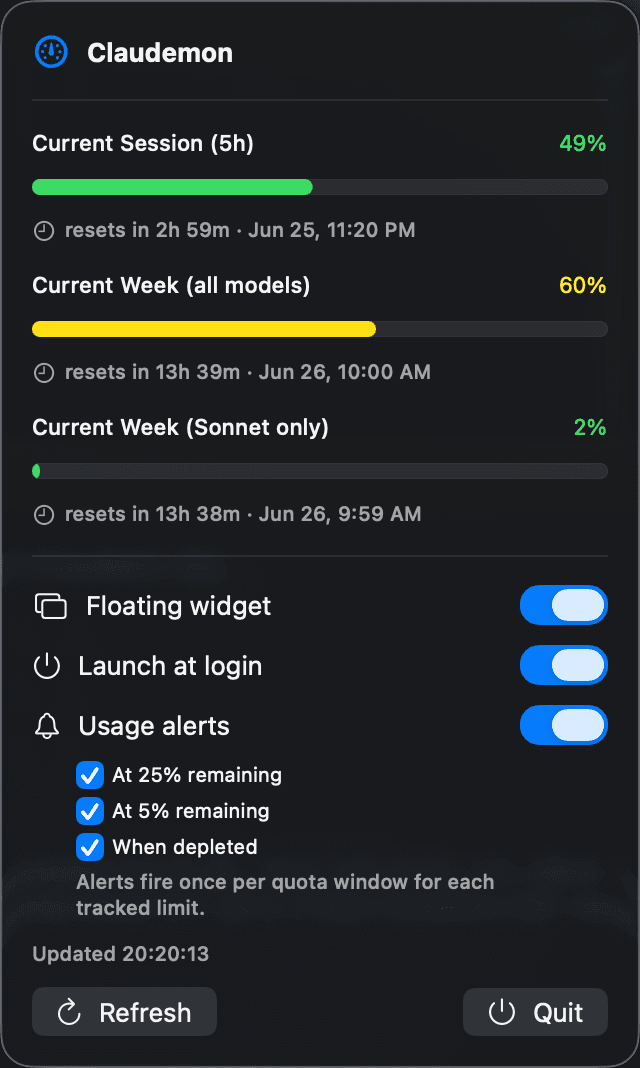 | 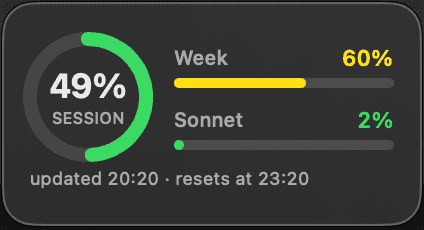 | 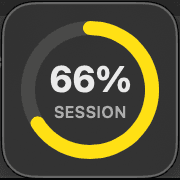 |
The floating window has two forms: the full view (session ring + weekly bars
- reset footer) and a mini view that shows just the session ring. Double-click the floating window to switch between them — the mini view is a smaller, glanceable indicator that stays out of the way; double-click again to return.
Requirements
Please read this before installing — most "it didn't work" reports come from a missing prerequisite.
- macOS 14 (Sonoma) or later.
- The Claude Code CLI must be installed and signed in to your own Claude
subscription. Claudemon does not call any Anthropic API itself — it runs the
claudeCLI locally and reads its output. It therefore shows your own signed-in usage, not anyone else's. - Claudemon auto-detects the
claudebinary across the common install layouts. GUI apps on macOS do not inherit your shellPATH, so it resolvesclaudeby absolute path, checking (in priority order):/opt/homebrew/bin/claude(Homebrew) and/usr/local/bin/claude~/.claude/local/claude(the official local installer)~/.local/bin/claude~/.npm-global/bin/claude(npm global)~/Library/pnpm/claude(pnpm)~/.volta/bin/claude(Volta)~/.asdf/shims/claude(asdf)- per-version directories under
~/.nvm/versions/nodeand~/.fnm(nvm / fnm) - finally, a login-shell
command -v claudefallback (zsh, then bash) so any other PATH set in your shell rc files is honored.
If claude is not installed, Claudemon shows a calm in-app prompt with the
install command and a link rather than failing silently:
npm install -g @anthropic-ai/claude-code
(The panel also links to https://claude.ai/download.) If claude is installed
but not signed in, the panel tells you to run claude in a terminal and use
/login.
Install (for end users / friends)
Homebrew (recommended)
brew install --cask ardabalkandev/tap/claudemon
This taps ardabalkandev/homebrew-tap
and installs the same Developer ID signed + notarized app. Update later with
brew upgrade --cask claudemon, or remove it completely with
brew uninstall --zap --cask claudemon.
Note: From Homebrew 5.2.0/6.0.0 onward (whichever comes first), third-party taps require explicit trust. The fully-qualified command above is unaffected and keeps working with no extra steps. If you prefer the
brew tap ardabalkandev/tap
- short-name workflow, run
brew trust --cask ardabalkandev/tap/claudemonfirst. See Tap Trust for details.
Manual (DMG)
- Download
Claudemon.dmgfrom the GitHub Releases page. - Open the DMG. A window appears with the Claudemon icon and an Applications folder.
- Drag Claudemon onto Applications.
- Launch Claudemon from Applications (or Launchpad).
There is no Dock icon — Claudemon lives in the menu bar (top-right of the
screen). Look for the gauge with a session percentage, e.g. ◐ 28%. Click it to
open the full panel, where you can toggle the floating window and "Launch at
login." Once the floating window is on screen, double-click it to switch
between the full and mini views.
Because the app is notarized by Apple, it opens without a Gatekeeper warning. If macOS still complains (for example after copying it via an unusual route), right-click the app → Open, then confirm once.
To add the widget, right-click the desktop or open Notification Center → Edit Widgets, find Claude Usage, and place it.
How it works
When running, Claudemon runs the CLI roughly every 60 seconds:
claude -p "/usage" --output-format json
It decodes the outer JSON, reads the .result field (a newline-delimited,
human-readable string), and tolerantly parses the three usage lines, e.g.:
Current session: 28% used · resets Jun 24 at 2:49am (Europe/Istanbul)
Current week (all models): 29% used · resets Jun 26 at 9:59am (Europe/Istanbul)
Current week (Sonnet only): 2% used · resets Jun 26 at 10am (Europe/Istanbul)
The reset year is not present in the text, so Claudemon infers the nearest
future occurrence using each line's IANA timezone (e.g. Europe/Istanbul).
A single UsageStore owns one 60-second polling timer (with an immediate
refresh on launch) and is the single source of truth observed by both the menu
bar and the floating window — so both are genuinely live. The subprocess
runs off the main thread with a ~15s timeout, so the UI never blocks. If
claude is missing, errors, times out, or its output can't be parsed,
Claudemon shows a clear error/onboarding state, keeps the last good values, and
keeps polling. Polling pauses on system sleep and resumes on wake.
The widget (App Group bridge)
WidgetKit extensions are sandboxed and cannot run claude or hit the network.
Instead, the app writes each successful poll to a JSON cache in the shared App
Group container (3QKMW9HR59.group.com.claudemon.app), and the widget reads
only from that cache. Both targets carry the App Group entitlement
(Support/Claudemon.entitlements, Support/ClaudemonWidget.entitlements).
Because the main app is non-sandboxed, this data bridge only works in the
signed/notarized build — an ad-hoc local build cannot share the App Group
container, so the widget will stay on its "Open Claudemon" prompt there.
The widget is best-effort fresh, not per-minute. Apple throttles widget timeline reloads, so Claudemon rate-limits them and the widget's own timeline policy targets roughly every 15 minutes. The menu bar and floating window remain the genuinely live (60s) surfaces; the widget is a glance view that shows "as of HH:mm" from the cache timestamp (and an "Open Claudemon" prompt when the cache is empty).
Build from source
You need Xcode on macOS 14+. The deployment target is macOS 14.0.
Open the Xcode project (canonical)
The shippable product — the menu-bar app plus the WidgetKit extension and
the shared framework — is built from Claudemon.xcodeproj, which is committed
to the repo.
open Claudemon.xcodeproj
Open
Claudemon.xcodeprojin Xcode, not the bare folder. Opening the folder would load it as a Swift Package (viaPackage.swift) and miss the widget and entitlements.
The project defines four targets:
| Target | Type | Role |
|---|---|---|
Claudemon | macOS app | Menu-bar app (UI, AppKit glue, the fetch engine) |
ClaudemonWidget | App extension | WidgetKit widget (reads only the App Group cache) |
ClaudemonCore | Framework | Shared, network-free model + parser + cache + colors |
ClaudemonTests | Unit-test bundle | Parser / model / cache / locator tests (links the core) |
Run the unit tests (SwiftPM)
A Package.swift is kept so the shared core and tests can be built and run from
the command line without Xcode. This path covers ClaudemonCore, the app
target, and the tests — it does not include the widget or App Group
entitlements.
swift build   # debug build of ClaudemonCore + the app
swift test    # runs the unit test suite (currently 50 tests)
XcodeGen (optional regeneration fallback)
project.yml is an XcodeGen spec kept
as optional documentation and a regeneration fallback. The .xcodeproj is the
source you open day to day; only run this if you need to rebuild it:
xcodegen generate # regenerates Claudemon.xcodeproj from project.yml
Release / signing (building the signed DMG)
scripts/release-dmg.sh produces a Developer ID signed + notarized + stapled
dist/Claudemon.dmg for sharing outside the App Store:
./scripts/release-dmg.sh
The pipeline:
xcodegen generate+xcodebuildRelease (codesigning is off at build time, so no provisioning profile is needed during the build).- Sign inside-out with the Developer ID Application identity, Hardened
Runtime (
--options runtime) and a secure--timestamp, applying each target's entitlements: framework → widget appex → app. - Verify signatures (
codesign --verify --deep --strict). - Notarize the app (
xcrun notarytool submit --wait), then staple and validate. - Build a drag-to-install DMG (app +
Applicationssymlink), sign it, then notarize + staple the DMG. - Gatekeeper assessment (
spctl).
Prerequisites on the build machine:
- A paid Apple Developer account.
- A Developer ID Application certificate in the keychain.
- A
notarytoolkeychain profile namedclaudemon. (Override it withNOTARY_PROFILE=<name> ./scripts/release-dmg.sh.) No secrets are stored in this repo — the script references the profile by name only.
Known limitations
- Only updates while running. Claudemon has no background daemon; the numbers refresh only while the app is open.
- The widget is best-effort fresh, not per-minute — Apple throttles widget refreshes.
- Requires the Claude Code CLI installed and signed in to an active Claude subscription.
- Requires macOS 14 (Sonoma) or later.
- The
/usagetext is free-form. The parser is tolerant, but if Anthropic changes the wording substantially, Claudemon will fail soft into an error state rather than crash.
Privacy
All data stays on your machine. Claudemon only runs the claude CLI locally and
reads its output; it makes no network calls of its own and has no
telemetry. It does not collect, transmit, or share any of your data.
Disclaimer
Claudemon is an unofficial, third-party tool. It is not affiliated with,
endorsed by, or sponsored by Anthropic. "Claude" and "Claude Code" are
trademarks of Anthropic. Claudemon simply reads the output of the official
claude CLI that you install and sign in to yourself.
License
Claudemon is released under the MIT License. Copyright (c) 2026 Arda Balkan.
// faq
What is claudemon?
Live Claude Code usage in your macOS menu bar — download the signed, notarized DMG from Releases. Requires Claude Code CLI + macOS 14+.. It is open-source on GitHub.
Is claudemon free to use?
claudemon is open-source under the MIT license, so it is free to use.
What category does claudemon belong to?
claudemon is listed under other in the Claudeers registry of Claude-compatible tools.
// embed badge

[](https://claudeers.com/claudemon)
// retro hit counter

[](https://claudeers.com/claudemon)
// reviews
// guestbook
// related in Other
 🔓
🔓 🔓
🔓Anti-AI-slop design skill for Claude Code, Cursor, and Codex.
 🔓
🔓Open source Ghostty-based macOS terminal with vertical tabs and notifications for AI coding agents. Built for multitasking, organization, and programmability.
 🔓
🔓Huashu Design · HTML-native design skill for Claude Code · Claude Code 里 HTML 原生的设计 skill · 高保真原型 / 幻灯片 / 动画 + 20 设计哲学 + 5 维评审 + MP4 导出 · Agent-agnostic