
claude-dev-team
An orchestrated software team for Claude Code: tiered triage, contract-driven parallel agents, quality gates, Bug Council, Task Loop, cost analytics, and Dis…
Install with your AI
Paste into Claude Code, Cursor, or any agent — it reads the repo and wires the tool into your project.
Install and set up claude-dev-team (claude-plugin project) into my current project.
Found on https://claudeers.com/claude-dev-team
Repo: https://github.com/jaysonventura/claude-dev-team
Homepage/docs: —
Detected install method: claude-plugin → /plugin install claude-dev-team@jaysonventura/claude-dev-team
Category: data. Platforms: cli, api, desktop, web, mobile.
Read the repo's README for exact setup and env vars, then install it and wire it into my project.

Claudeers Health Verdict:
slowing; community-verified: false. Confirm the source before running anything.
/plugin marketplace add jaysonventura/claude-dev-team
/plugin install claude-dev-team@jaysonventura/claude-dev-team
git clone https://github.com/jaysonventura/claude-dev-team
// compatibility
| Platforms | cli, api, desktop, web, mobile |
|---|---|
| Operating systems | — |
| AI compatibility | claude |
| License | MIT |
| Pricing | open-source |
| Language | Shell |
claude-dev-team
An orchestrated software team for Claude Code. One tech-lead orchestrator triages every request, writes per-agent contracts, dispatches specialist subagents in parallel, runs a quality-gate chain, gets independent review, then ships — and remembers what it learned.
It is built to be cost-effective on Claude Max while staying high quality: cheap work stays cheap (most tasks need no team), and the expensive machinery only engages when complexity or risk demands it.
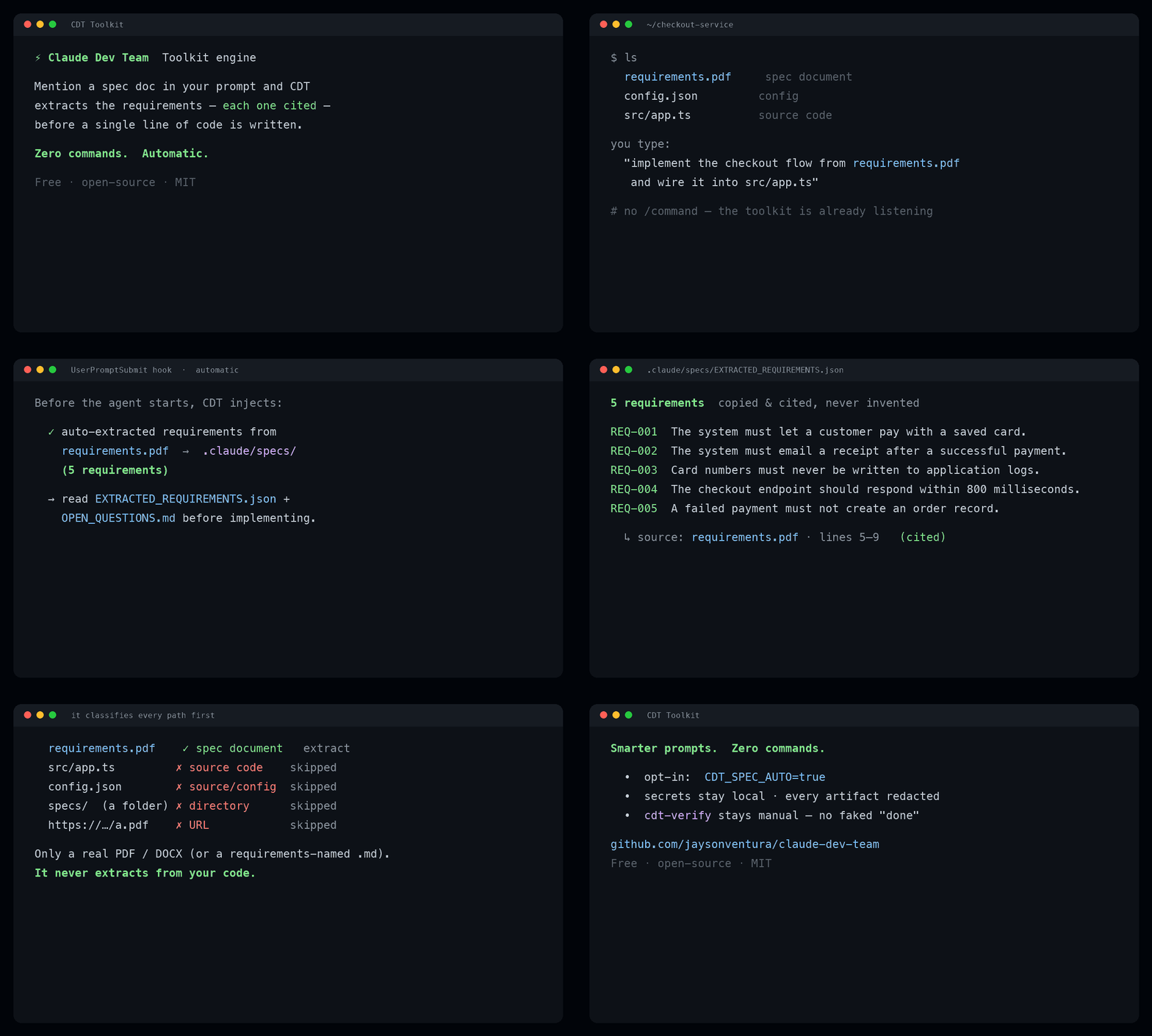
Mention a spec doc and CDT extracts the requirements — each cited — before any code. Zero commands.
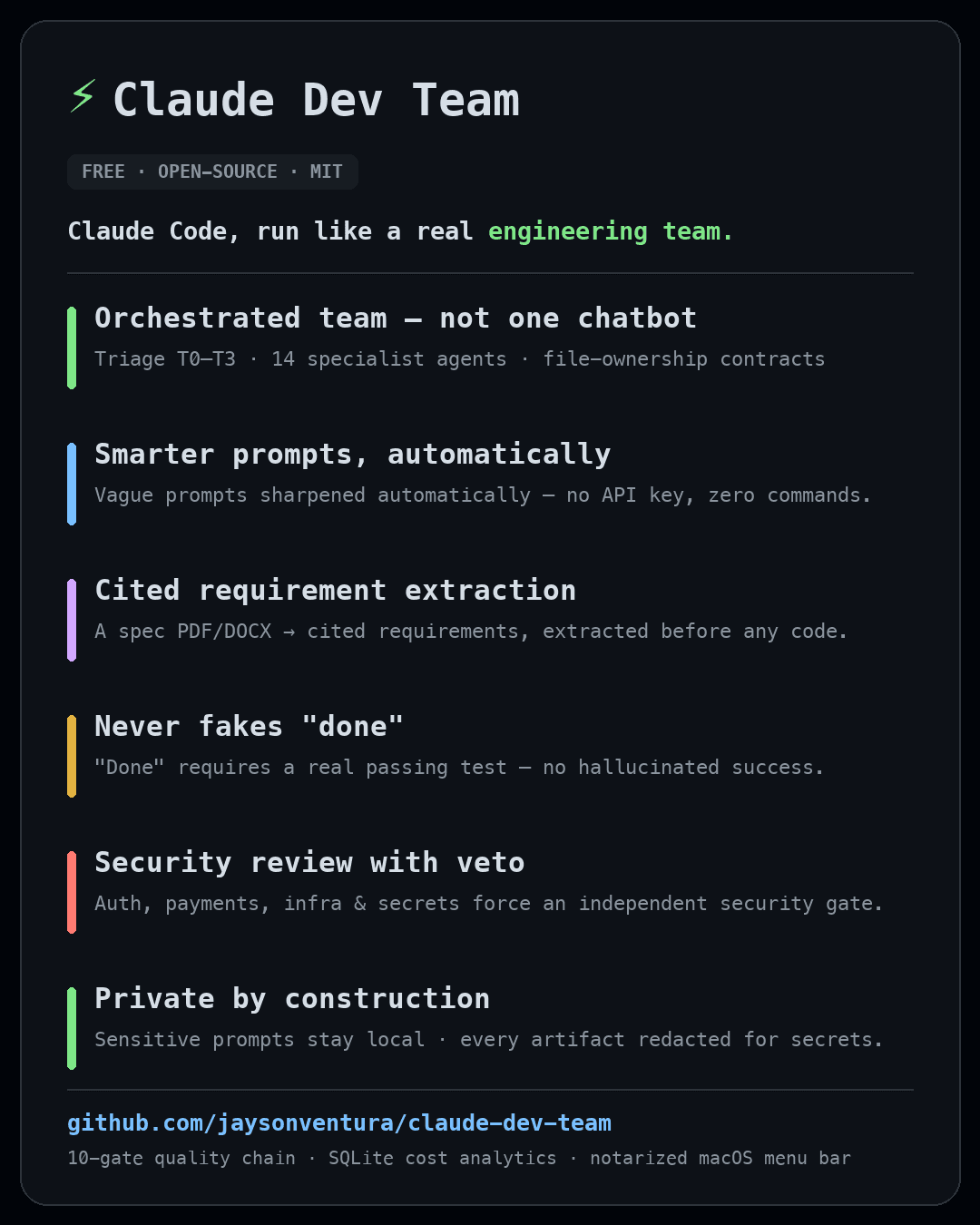
Contents
Jump to a section
- What you get · Why
- Architecture · Execution model · Triage & tiers
- The team · Skills · Commands
- Installation · Requirements
- Usage examples · Autonomy & debugging
- Parallel isolation (git worktrees) · Autonomous orchestration
- State & cost analytics · Memory & recall
- Menu bar usage monitor (macOS) · Configuration
- Security & privacy · Troubleshooting · How to review / audit
- Uninstall · Project layout · Roadmap & contributing · License
What you get
- Tiered triage (T0–T3) — trivial edits run solo; features escalate to a parallel team.
- Autonomous orchestration — a mode router that escalates to a debating agent-team (depth) or a fan-out dynamic workflow (breadth) whenever the work benefits — on by default, kept capped and budget-aware by a weekly safety valve so a big run can't lock you out on Max.
- Parallel isolation (git worktrees) —
cdt-worktreegives each parallel strand its own checkout+branch (interops withclaude --worktree) for collision-free big features. - Contract-driven dispatch — every agent gets exclusive file ownership, a read-list, a verifiable done-condition, guardrails, and a ≤150-word structured report. (This is the anti-hallucination engine.)
- Grounded builders (code-backed) — the engineering builders (backend / frontend / mobile / data /
devops / qa) natively carry the context7 doc tools, so "look it up, don't guess the API" is
actually possible;
lint-agents.shfails CI if a builder ever loses them. - Automation-first (no improvised deploys) — agents prefer existing repo automation over hand-written
commands: explicit user command > Makefile > package/composer scripts >
scripts/> docs/CI > manual. Dev deploy/build →make up-dev; on a Makefile-target failure they stop and report instead of improvising another path. Reviewers + QA flag manualserverless/gradle/npm·ng build/cap sync/AWS deploy commands when an equivalent target/script exists. (automation-firstskill) - Deterministic-first toolkit engine (TypeScript) — runs on every prompt, zero commands: sharpens your
prompt (conditional Haiku via your existing login — no API key; sensitive/trivial prompts never leave the
machine), routes it, auto-extracts a spec doc you mention (
cdt-spec, cited sources, source/folders excluded), and refuses to fake "done" (evidence-onlycdt-verify). Mandatory redaction + arealpath()write-jail; toggle it independently of core CDT. See Toolkit engine. - 14 role agents (product-manager → architect → ui-ux-engineer → builders → technical-writer →
reviewers, incl. a Haiku
fast-opstier) + a gated 5-agent Bug Council for stuck bugs. - 10-gate quality chain (incl. e2e for user-facing flows) + a bounded Task Loop (iterate to green, anti-abandonment, capped).
- Completion mandate (tier-scaled) — simplify, review, reuse-audit, dead-code scan, learn, ship.
- SQLite cost analytics with real per-agent token telemetry (
/cdt:statsranks which roles cost the most) so you can see and tune spend on Max. - A markdown vault for durable memory (learnings, ADRs, session logs).
- 8 quality skills (karpathy guidelines, clean TS, code-splitting, gauge-improvements, RCA, web
design, ui/ux pro-max, technical-writing) plus first-class reuse of the official
superpowers,code-review,frontend-design,figma, andcontext7plugins.
Why
LLM coding fails in predictable ways: it hallucinates APIs, claims "done" without checking, sprawls a
simple change into ten files, and forgets yesterday's lesson. claude-dev-team is a discipline layer
that fixes those structurally — contracts force grounding, gates force verification, reviewers catch
mistakes, the vault remembers, and tiering keeps it all affordable.
Enforcement — code-backed, not just instructed
Those four failure modes are caught by hooks and CI, so the discipline holds even when the model
would rather skip it. Each gate is default-on but configurable, fires once per session, and is
fail-open (a missing python3/marker never breaks or blocks your session):
| Predictable failure | Code-backed enforcement | Tune |
|---|---|---|
| Claims "done" without checking | Verify gate — a Stop hook blocks a session that edited files but ran no test/build/lint/typecheck afterward (subagent test runs count). | cdt-config verify block|warn|off |
| Hallucinates APIs | Grounding — builder agents carry the context7 doc tools; lint-agents.sh fails CI if one loses them. | always on (CI-enforced) |
| Sprawls a change into ten files | Scope gate — SubagentStop diffs what each agent actually wrote against its exclusive-file contract; flags overreach/collisions. | cdt-config scope warn|block|off |
| Forgets yesterday's lesson | Memory gate — a team-tier session that edits but records no vault lesson is nudged; cdt-recall ranks by recency + outcome. | cdt-config memory warn|block|off |
| Blind expensive fan-out | Cost governor — escalation is budget-gated; BREADTH is slice-first (measure a slice, project the full cost vs the cap before fanning out); per-agent + orchestrator-overhead telemetry. | cdt-auto, cdt-config eco |
Honest scope: the gates detect, surface, and block — they don't author the work. The orchestrator
still has to write the contracts, pick the right tier, run the independent review, and emit each agent's
CDT-CONTRACT: line; those remain model-driven (the strong-Opus bet), with the hooks as the backstop.
Design notes: docs/specs/2026-06-16-enforcement-gates.md.
Architecture
How a request flows (Diagram A):
flowchart TD
    U["User request"] --> T["Triage: files + domains + keyword + risk"]
    T --> TIER{"Tier T0-T3"}
    TIER -->|"T0 / T1"| SOLO["Solo / pair"]
    TIER -->|"T2 / T3"| C["Write per-agent contracts"]
    C --> E["Execute: parallel waves"]
    E --> G["Quality gates + Task Loop"]
    G --> R["Independent review + security veto"]
    SOLO --> M["Completion mandate (tier-scaled)"]
    R --> M
    M --> S["Ship"]
    S --> V[("Vault + SQLite")]
Execution model
Parallel waves and the quality-gate chain (Diagram B):
flowchart TD
    W0["Wave 0: product-manager + architect + ui-ux-engineer + Explore"] --> W1["Wave 1: builders on exclusive paths"]
    W1 --> GATES["Gates: fmt, lint, type, unit, intg, e2e, build, smoke"]
    GATES -->|"fail"| FIX["Fix agent"]
    FIX --> GATES
    GATES -->|"pass"| W2["Wave 2: code + security + ui-ux review"]
    W2 -->|"security risk >= medium"| VETO["VETO: block ship"]
    W2 -->|"pass"| DONE["Proceed to completion mandate"]
Triage & tiers
complexity = files + domains + keyword + risk. Anything touching auth, payments, infra, migrations,
or secrets is force-escalated to T2+ and gets the full mandate (the risk floor).
| Tier | Name | Agents | When |
|---|---|---|---|
| T0 | solo | 0 | one file, one domain, no risk |
| T1 | pair | 0–1 | small single-domain change |
| T2 | squad | 3–5 | multi-domain, or any risk |
| T3 | full | 6–10 | large / cross-cutting feature |
Tier decision (Diagram C):
flowchart TD
    A["Task"] --> RISK{"auth / payments / infra / migrations / secrets?"}
    RISK -->|"yes"| T2["T2+ forced"]
    RISK -->|"no"| SZ{"files and domains"}
    SZ -->|"1 file, 1 domain"| T0["T0 solo"]
    SZ -->|"small, 1 domain"| T1["T1 pair"]
    SZ -->|"multi-domain"| T2b["T2 squad"]
    SZ -->|"large / cross-cutting"| T3["T3 full"]
Overrides you can type: T0: forces solo/cheap · FULL: forces full-Opus + all gates for critical
work (raises model + gates only — never effort or engine).
The team
Orchestrator, specialists, and skills (Diagram D):
flowchart LR
    O(("Orchestrator")) --> RES["product-manager / architect / ui-ux-engineer / Explore"]
    O --> BUILD["backend / frontend / mobile / data / devops / qa / writer"]
    O --> REV["code-reviewer / security-reviewer / ui-ux-engineer"]
    O -.->|"stuck bug"| BC["Bug Council x5"]
    O --> SK["skills: karpathy, clean-ts, code-splitting,<br/>gauge, rca, web-design, ui-ux"]
| Agent | Model | Role / file scope |
|---|---|---|
product-manager | Opus | requirements + testable acceptance criteria + scope/non-goals (read-only, Wave 0) |
architect | Opus | design, interfaces, contracts (read-only) |
backend-engineer | Opus | APIs, server, data access, logic (api/server/*) |
frontend-engineer | Opus | web UI/components (ui/client/*) |
mobile-engineer | Opus | RN/Expo/Flutter/native (mobile/app/*) |
ui-ux-engineer | Opus | UX flows, design system/tokens, accessibility + visual-polish review (design/*) |
qa-engineer | Opus | tests + the gate chain (test/*) |
code-reviewer | Opus | independent correctness/scope review (read-only) |
security-reviewer | Opus | security review with veto (read-only) |
devops-engineer | Opus | CI/CD, Docker, infra (ci/* infra/*) — destructive/prod infra keeps the security-veto |
diagrams | Opus | mermaid / figma visuals |
data-engineer | Opus | schema, migrations, queries (db/*) — destructive/irreversible migration keeps the security-veto |
technical-writer | Opus | user-facing docs — README/guides/release notes/ADRs (docs/* prose) |
| Bug Council (gated ×5) | Opus | root-cause-analyst · code-archaeologist · pattern-matcher · systems-thinker · adversarial-tester |
fast-ops | Haiku | the cheap "hands" tier — trivial mechanical ops only (gather, literal find/replace, rename, template fill); never dev/test/review/security |
Model routing — role-based, deterministic, and lint-enforced. Every substantive agent is pinned
Opus for production-grade output — the judgment/review panel (product-manager, architect,
ui-ux-engineer, code-reviewer, security-reviewer), the engineering builders (backend,
frontend, mobile, data, devops, qa, diagrams), technical-writer, and the gated Bug
Council ×5 are all Opus, independent of the session model; keep the orchestrator session on Opus too.
(The earlier Sonnet throughput pin on the builders was reverted — builders run on Opus for quality.)
data-engineer / devops-engineer keep the mandatory security-veto on destructive/irreversible
changes. Haiku (fast-ops) is the low tier for trivial mechanical ops only — it never touches
quality-sensitive work and escalates the instant a task needs judgment. The Opus floor + the one-Haiku
rule are enforced by lint-agents.sh (CI fails if either regresses). For ad-hoc subtasks cdt-route may
still advise Opus vs Sonnet by difficulty.
Skills
| Skill | Use it for |
|---|---|
orchestration | the whole workflow (auto-triggers on dev tasks) |
karpathy-guidelines | simplicity-first engineering bar |
clean-code-typescript | strict, readable TS |
code-splitting | file/module/bundle boundaries |
gauge-improvements | prove a change is actually better |
root-cause-analysis | debug to the cause, not the symptom |
web-design-guidelines | UI fundamentals + a11y |
ui-ux-pro-max | polish, motion, micro-interactions |
technical-writing | accurate, scannable, current docs — READMEs, guides, release notes, ADRs |
Reused official plugins: superpowers, code-review, frontend-design, context7 — these
auto-install as dependencies when you install claude-dev-team (see Installation). figma is optional.
Commands
Plugin commands are namespaced — invoke them as /cdt:<command> (auto-loaded in a fresh
session; the bare /command form won't match).
| Command | Does |
|---|---|
/cdt:triage <task> | preview the tier + proposed dispatch without executing |
/cdt:prompt "<task>" | toolkit: prompt intake + routing + conditional enhancement → .claude/{TASK_BRIEF,ROUTING,NEXT_PROMPT} (also auto-runs on every non-trivial prompt) |
/cdt:spec <files…> | toolkit: deterministic requirement/spec extraction → .claude/specs/* with cited sources |
/cdt:ship | run the completion mandate on the current work and ship |
/cdt:bug-council <symptom> | convene the 5-agent diagnostic squad |
/cdt:autopilot <PR#> [--live] | drive a GitHub PR toward green — CI fixes, conflicts, review (dry-run by default) |
/cdt:stats [today|week|all] | cost & activity report from the state DB — incl. which agents cost the most tokens |
/cdt:recall <task> | recall the most relevant past lessons from the vault for a task |
/cdt:advise <task> | advisory tier/effort prior learned from how similar past tasks went |
/cdt:config [...] | enable/disable CDT + the toolkit + set defaults (effort, model, eco, statusline, prompt-mode, redact, …); defaults xhigh + Opus 4.8 |
/cdt:doctor | health-check the install (hooks, CLIs, DB, gh, menu bar, deps) |
/cdt:deps [--install] | check / install system prerequisites (python3, git, curl, sqlite3, gh) |
/cdt:worktree [new|list|rm|...] | git-worktree isolation for parallel work (interops with claude --worktree) |
/cdt:auto [status|gate|explain|off|assist|auto] | the autonomous mode router + cost governor (BOUNDED / DEPTH / BREADTH) |
/cdt:budget | show usage % + the Eco (conserve-when-low) recommendation |
/cdt:learn <lesson> | teach the vault a durable lesson (surfaced later by recall) |
/cdt:menubar [install|status|...] | macOS menu bar usage monitor (subscription % + local tokens) |
/cdt:version | show the installed version (plugin + menu bar app) |
Toolkit engine — your prompts get smarter, automatically
A deterministic-first TypeScript engine (under toolkit/) that runs on every prompt — no commands to
remember. You just type; CDT quietly sharpens the prompt, routes it, pulls in any spec you mention, and
keeps "done" honest. Everything stays on your machine (.claude/) — nothing is sent anywhere,
no API key (it uses your existing Claude login).
What happens the moment you hit Enter
You type:  "improve the checkout flow and use requirements.pdf"
              │
              ▼   AUTOMATIC — the toolkit (deterministic, with a touch of Haiku)
   • routes it → tier, model, which specialists, security review?   → ROUTING.json
   • sharpens a vague/risky prompt with Haiku (your login, no key)   → a *suggestion*, never a rewrite
   • spots "requirements.pdf", extracts cited requirements           → .claude/specs/
   • redacts every secret before anything is written to disk
              │
              ▼   THE WORK — the Orchestrator (the model @ xhigh, the tech-lead)
   triage → write per-agent contracts → dispatch specialist agents in parallel
          → quality gates → independent + security review → ship
              │
              ▼   HONESTY BACKSTOP — hooks
   "done" is blocked without a real passing command · cdt-verify records the proof
The toolkit preps & guards (automatic, advisory). The Orchestrator decides & ships (it does the real engineering). Routing is advisory —
advisory: true, never auto-dispatch. The toolkit can't build your feature; the orchestrator can — the toolkit just hands it a cleaner brief and refuses to let it fake "done."
The pieces (all auto-run — or invoke them yourself)
| Tool | What it does for you |
|---|---|
cdt-prompt | Fires on every non-trivial prompt (UserPromptSubmit hook): intake → routing → conditional Haiku enhancement → .claude/{TASK_BRIEF, ROUTING, NEXT_PROMPT}. /cdt:prompt is just the manual button. |
cdt-spec | Turns a PDF/DOCX/MD into a clean requirement list — one cited source per requirement, never hallucinated. With CDT_SPEC_AUTO=true it auto-detects a spec doc named in your prompt (and ignores source files & folders). |
cdt-verify -- <cmd> | The only way verification: passed is earned — runs your real test/build and captures the actual exit code. No more "it works" without proof. |
cdt enable|disable · cdt status · cdt init | Toggle the toolkit (separately from core CDT), check state, scaffold a project. |
Why it's safe — by construction, not by promise
- 🔒 Your secrets never leave the machine. A fail-closed sensitivity gate sends sensitive prompts/docs to no external model; every artifact is redacted (the raw prompt isn't even stored — only a redacted copy + an HMAC hash).
- ✅ No fake "done."
verificationcomes only from a real command's exit code. - 📄 No hallucinated requirements.
cdt-speccopies + cites; it never invents — and its auto-detect classifies every path first, so.ts/.pysource files, project folders, missing paths, and URLs are excluded; only a real.pdf/.docx(or requirement-named.md) is treated as a spec. - 🧱 Can't write outside
.claude/(realpath write-jail); validators safe-degrade instead of crashing; a docs-only edit never trips the verify gate.
Controls (CLI or the macOS menu bar)
cdt enable | cdt disable                   # the whole toolkit, separate from core CDT (cdt-config on|off)
cdt-config prompt-mode auto|always|off     # when Haiku fires (auto = only unclear/risky prompts)
cdt-config prompt-effort medium|high       # the enhancer's effort (Haiku) — your real work stays xhigh
cdt-config spec-auto on|off                # auto-extract a spec doc named in your prompt (default off)
cdt-config redact on|off                   # mask secrets/PII in artifacts (default on — keep it)
On macOS the menu bar has the same toggles (Enabled / Toolkit engine / Prompt enhance), shows your live usage %, and auto-rebuilds itself when you update the plugin.
Builds on first session (cd toolkit && npm install && npm run build). Config precedence: packaged defaults
< global ~/.claude/claude-dev-team.env < project .claude/cdt.config.json < env.
Installation
Requirements
Claude Code ≥ 2.1.143 (so dependencies auto-enable, not just install; on 2.1.110–2.1.142 the
companions install but you may need to enable them once). The official marketplace must be registered (it
ships by default — else claude plugin marketplace add anthropics/claude-plugins-official).
System tools — run ~/.claude/bin/cdt-deps to check what's present, cdt-deps --install to
install the missing ones via your package manager:
| Tool | Required? | Used for | macOS | Debian/Ubuntu | Windows |
|---|---|---|---|---|---|
| python3 | required | recall, advise, config, status line, analytics | brew install python3 | apt install python3 | python.org · winget install Python.Python.3.12 |
| git | required | install, autopilot, version ops | brew install git | apt install git | gitforwindows.org · winget install Git.Git |
| bash | required | runs the hooks & cdt-* CLIs | preinstalled | preinstalled | Git for Windows (Git Bash) |
| sqlite3 (CLI) | optional | analytics CLI — python3 fallback exists | brew install sqlite | apt install sqlite3 | winget install SQLite.SQLite |
| gh | optional | PR autopilot | brew install gh | apt install gh | winget install GitHub.cli |
| swift (Xcode) | optional | the macOS menu bar app only | xcode-select --install | — | — |
No Python packages to install — every script uses the python3 standard library only (json,
sqlite3, re, …). There is no pip install step.
Companion plugins auto-install with claude-dev-team (declared as manifest dependencies):
superpowers, code-review, frontend-design, context7 (figma is optional).
Platforms: macOS · Linux · Windows — each has a step-by-step guide in Step 2 — Set up your platform below. The menu bar is macOS-only; elsewhere use the cross-platform status line.
Step 1 — Install the plugin (all platforms)
claude plugin marketplace add jaysonventura/claude-dev-team
claude plugin install cdt@claude-dev-team
The repo / marketplace is
claude-dev-team(the project); the plugin installs ascdt, so its commands are short —/cdt:ship,/cdt:doctor, … (matching thecdt-*CLIs).
Install auto-enables the plugin and its companions (superpowers, code-review, frontend-design,
context7) — no manual enable step. It's a user-scope install in ~/.claude/, shared across every
Claude Code surface on this machine (the CLI, the VS Code & JetBrains extensions, and the desktop app).
(Non–Claude-Code tools like Google Antigravity run a different engine and won't load it.)
Step 2 — Set up your platform
Follow the guide for your OS, then run /cdt:doctor — it verifies hooks, CLIs, the DB, gh, the
menu bar, and companion plugins, and prints a fix for anything not green.
🍎 macOS
- Install the system tools (or run
~/.claude/bin/cdt-deps --installto do it for you):brew install python3 git # required · gh + sqlite are optional - Restart your Claude Code session (or run
/reload-plugins) so the plugin loads. - Menu bar app — it builds + installs automatically on your first session (look for the CDT item
showing your session/weekly %). It needs the Swift toolchain — if it doesn't appear, run
xcode-select --install, or grab the notarized DMG from the Releases page. Manage it with/cdt:menubar. - Verify:
/cdt:doctor→ all green. Done — just describe a task.
🪟 Windows
Claude Code runs the plugin's .sh hooks through Git Bash, so:
- Install Git for Windows (provides Bash) and Python 3 — tick "Add Python to PATH" during setup.
- If you also have WSL, pin Git Bash so hooks don't resolve to WSL's
bash.exe. Add to%USERPROFILE%\.claude\settings.json:{ "env": { "CLAUDE_CODE_GIT_BASH_PATH": "C:\\Program Files\\Git\\bin\\bash.exe" } } - Restart your Claude Code session (or
/reload-plugins). - Usage display — the menu bar is macOS-only; turn on the cross-platform status line instead:
~/.claude/bin/cdt-config statusline on - Verify:
/cdt:doctor→ all green. (Shell scripts ship with LF line endings via.gitattributes, so Git's autocrlf can't break them.)
🐧 Linux
Bash + Python 3 are standard, so it works out of the box:
- Make sure
python3andgitare installed (~/.claude/bin/cdt-deps --installadds any missing via apt / dnf / pacman / zypper). - Restart your Claude Code session.
- Usage display — the menu bar is macOS-only; use the status line:
cdt-config statusline on. - Verify:
/cdt:doctor→ all green.
After install → just prompt (zero config)
Describe any task normally. The orchestration skill auto-triggers, the SessionStart hook bootstraps the
vault + SQLite DB + cdt-* CLIs, skills auto-apply, and the /cdt:* commands are available.
- Always-on (power users): for a hard guarantee every session, drop the
orchestrationsummary into your global~/.claude/CLAUDE.md(seedocs/architecture.md). Most users don't need this.
Updating CDT (get the latest version)
CDT is tracked from main, so updating is two commands + a restart:
claude plugin marketplace update claude-dev-team   # refresh the marketplace from the repo
claude plugin update cdt@claude-dev-team           # update the plugin (restart required to apply)
Then restart your Claude Code session (or /reload-plugins). Check your version with
claude plugin list or /cdt:version — it also flags the macOS menu-bar app when it lags the plugin.
macOS menu-bar app — the plugin update ships the new app source; refresh the running app one of two ways:
- Re-run
/cdt:menubar— rebuilds & relaunchesCDT Usage.appfrom the updated source (needs the Swift toolchain), or - Download the notarized DMG from the latest release, drag
CDT Usageto Applications, and open it (notarized — no Gatekeeper warnings).
Releases follow semver; the CHANGELOG lists every version. Latest: v1.51.1.
Usage examples
Just describe the task — the orchestrator triages and runs the right amount of process.
- T0 — "fix this typo in the README" → stays solo, edits, verifies, ships. One model call.
- T2 — "add a rate-limited
/loginendpoint with tests" → risk floor forces T2+:architectdesigns the interface,backend-engineerimplements (api/*),qa-engineerwrites tests (test/*), gates run,security-reviewerchecks the auth path, then ship. - T3 — "build a settings page (web + mobile) with API + a migration" → full team in parallel waves: architect → backend + frontend + mobile + data (exclusive paths) → gates + Task Loop → code + security review → ship + vault learning.
T2 example as a sequence (Diagram E):
sequenceDiagram
    participant U as User
    participant O as Orchestrator
    participant A as architect
    participant B as backend-engineer
    participant Q as qa-engineer
    participant S as security-reviewer
    U->>O: add rate-limited /login with tests
    O->>A: contract - design auth + interfaces
    A-->>O: interfaces + file plan
    O->>B: contract - implement api/*
    O->>Q: contract - tests test/*
    B-->>O: done + evidence
    Q-->>O: gates green
    O->>S: security review (risk floor)
    S-->>O: PASS
    O-->>U: shipped
Autonomy & debugging
Task Loop — bounded autonomous quality enforcement (Diagram F):
stateDiagram-v2
    [*] --> Build
    Build --> Gates
    Gates --> Pass: all green
    Gates --> Fix: failure
    Fix --> Gates: re-run
    Gates --> Stuck: same failure twice
    Stuck --> BugCouncil
    BugCouncil --> Gates
    Fix --> Cap: hit CDT_MAX_ITERATIONS
    Cap --> Report: BLOCKER / DEFERRED
    Pass --> [*]
    Report --> [*]
Bug Council — convened only when stuck (Diagram G):
flowchart TD
    BUG["Stuck bug"] --> O(("Orchestrator"))
    O --> RCA["root-cause-analyst"]
    O --> ARCH["code-archaeologist"]
    O --> PM["pattern-matcher"]
    O --> ST["systems-thinker"]
    O --> AT["adversarial-tester"]
    RCA --> SYN["Synthesize: ranked root cause + fix plan"]
    ARCH --> SYN
    PM --> SYN
    ST --> SYN
    AT --> SYN
    SYN --> ENG["Engineer implements fix"]
Anti-abandonment: agents must emit a structured BLOCKER rather than quit or fake success. The loop
stops after CDT_MAX_ITERATIONS (default 5) and reports what's left — protecting your Max rate limits.
DEPTH upgrade. With agent teams enabled (
cdt-config teams on), the Council convenes as a debating agent-team — a shared task list + mailbox so the five lenses challenge each other before a verdict, instead of five parallel monologues. It's gated by the cost governor (cdt-auto gate team) and falls back to parallel subagents when teams are off. See Autonomous orchestration.
PR autopilot (opt-in). /cdt:autopilot <PR#> drives a real GitHub PR toward green: read
CI status → diagnose + dispatch a focused fix → push to the branch → re-check → and, once green, post a
code-reviewer + security-reviewer synthesis as a PR comment. It's deliberately safe: dry-run by
default (add --live to act), never force-pushes, never auto-merges, never closes — merging stays
your explicit call. Bounded by CDT_MAX_ITERATIONS, reports each step to you. Needs gh
authenticated. Uses a read-mostly wrapper (cdt-pr) whose only write is posting a comment.
Parallel isolation (git worktrees) + budget-elastic fan-out
For parallel multi-writer waves — several features at once, or each builder in a T2+/T3 wave —
CDT turns its disjoint-paths convention into a hard filesystem guarantee with git worktrees: each
strand gets its own checkout + branch, so even shared-file edits can't collide and strands run truly in
parallel (faster shipping). This is on by default when ≥2 agents write concurrently
(CDT_WORKTREE_DEFAULT=0 to force in-place; single-writer waves and T0/T1 stay in-place).
Before fanning out, the orchestrator sizes the wave with cdt-auto fanout <tier> — full tier width
when there's weekly budget headroom, trimmed toward the floor near the ceiling, but never below the
security-review + qa-verify floor. More concurrency when it's affordable; trim only the optional
agents when it isn't.
Shared context packs (dedup) — instead of each parallel agent re-reading the codebase, Wave 0
distills the shared files once into a manifest (cdt-context pack <files…> → file list + key
signatures) that's injected into each agent's READ list and kept as a prompt-cache-friendly prefix. Fewer
tokens, faster ramp.
Production-grade model floor — the judgment roles and the engineering builders are pinned Opus
for production-grade output (lint-agents.sh fails CI if a builder drops below it, or if any non-fast-ops
agent is pinned to Haiku). For ad-hoc subtasks cdt-route "<subtask>" still advises Opus vs Sonnet by
difficulty; only the trivial fast-ops hands tier runs Haiku.
Quality-via-parallelism (high-stakes work) — for risk-flagged changes or findings you must trust, CDT
spends a few extra parallel agents on Opus (bounded agents, or a dynamic workflow for large verification sets): adversarial verify
(/cdt:adversarial — 2-3 independent reviewers each try to refute it; rework if a majority do),
diverse-lens Wave-2 review (each reviewer a distinct lens), and an optional design judge-panel
(2-3 architect variants → judge → synthesize). Budget-gated; it deepens the Wave-2 review + security
veto, never replaces them.
~/.claude/bin/cdt-worktree new <name>     # isolated checkout at .claude/worktrees/<name> (branch worktree-<name>)
~/.claude/bin/cdt-worktree list           # see all worktrees
~/.claude/bin/cdt-worktree rm <name>      # remove after committing + merging back (refuses dirty without --force)
It interoperates with Claude Code's native flag — cdt-worktree new feat and claude --worktree feat
open the same checkout — so you can spin up a worktree and drop a parallel session into it. CDT's state
(DB, vault, cdt-* CLIs) lives in ~/.claude/, so every worktree inherits the full toolchain for
free. Safe by design: names are validated (no path traversal), removal refuses a dirty/locked worktree
unless you pass --force, and .claude/worktrees/ is auto-added to .gitignore.
On by default for parallel multi-writer waves. Worktree setup has a small cost, so single-writer waves and T0/T1 stay in-place — but whenever ≥2 agents write at once, each strand gets its own checkout automatically. This is Phase 1 of the scaling track (
docs/roadmap.md); the autonomous controller below drives the rest.
Autonomous orchestration (router + cost governor)
On top of tiered triage, CDT runs an autonomous mode router: after scoring a task it reads the work
shape and decides whether to stay BOUNDED (contained work) or escalate to DEPTH (an agent-team
Bug Council that debates) or BREADTH (a dynamic workflow that fans out). It escalates freely
whenever the shape benefits — a stuck/ambiguous bug → a team; a large or homogeneous set
(audit/migration/exhaustive review) → a workflow — and always at xhigh effort, Opus for judgment, never
Haiku, never max.
A lightweight budget safety valve keeps "use the big engines freely" and "don't lock yourself out on Max" both true. Before a big escalation the orchestrator does a quick check:
~/.claude/bin/cdt-auto status            # mode, engines, caps, live weekly-budget headroom
~/.claude/bin/cdt-auto gate team|scale   # -> ALLOW (proceed) | ASK (confirm near ceiling) | DENY (autonomy off)
~/.claude/bin/cdt-auto explain "<task>"  # advisory: which mode the router would pick, and why
With the engines on, the gate normally returns ALLOW; it ASKs only as you near the weekly-budget
ceiling (or before the first un-measured fan-out), and DENYs only if you've turned autonomy off. Every
escalation's real token cost lands in /cdt:stats.
| Autonomy mode | Agent-teams (DEPTH) | Workflows (BREADTH) |
|---|---|---|
off | — | — (pure bounded, like stock) |
assist | auto-summons on stuck bugs (≤5, time-boxed) | proposes + asks first |
auto (default) | auto-summons within budget | self-runs within the budget ceiling, else asks |
cdt-config autonomy off|assist|auto      # the leash (default: auto)
cdt-config teams on|off                  # DEPTH on by default (sets the experimental agent-teams flag)
cdt-config scale on|off                  # BREADTH on by default (needs Claude Code >= 2.1.154)
On by default, still measured. The engines ship on — depth + breadth are first-class tools, not a last resort. They stay capped, measured, and logged: a weekly-budget safety valve asks before a run that would push you toward the Max ceiling, and the per-agent token telemetry records every escalation's real cost. Turn an engine off per machine with
cdt-config teams off/cdt-config scale off.
State & cost analytics
A local SQLite DB (~/.claude/claude-dev-team.db) records sessions, tasks, agent_runs, events,
and usage. Run /cdt:stats (or cdt-stats today|week|all) for activity by tier/agent, iteration
counts, and blocker rate. Activity/timing is precise. "Cost" here means token / rate-limit budget
(Claude subscription session + weekly limits, not money); for exact tokens used, see Claude Code's /cost.
Per-agent token telemetry (real, not estimated). A SubagentStop hook reads each dispatched
subagent's actual token usage from its transcript and stores it on the agent_runs row — so
/cdt:stats ranks which roles cost the most. The headline figure is cost-relevant tokens
(input + output + cache-creation); cache reads are tracked and shown separately because they're
heavily discounted and — for a subagent re-reading its cached context every turn — would otherwise be
~100× larger and swamp the ranking. Grounded in real usage rows, never a guess. Example:
Agent runs — which roles cost the most (role · runs · tokens; +cache reads, discounted):
  security-reviewer  ×6  142.0k  (+8.1M cache)
  backend-engineer   ×3   98.5k  (+5.2M cache)
  qa-engineer        ×2   23.0k  (+1.4M cache)
Total agent tokens: 263.5k  (+ 14.7M cache reads, discounted)
Use it to tune routing — e.g. if a role dominates the cost-relevant spend, reserve FULL: / Opus
builders for the work that truly needs them.
Adaptive routing (learns from history): on T2+, the orchestrator also runs
cdt-advise "<task>" — an advisory prior derived from how similar past tasks went (typical tier,
iteration budget, blocker rate). It's a hint that sharpens triage over time, never a hard rule — the
orchestrator still decides. Pure local DB read, no new dependencies.
Memory & recall
The orchestrator keeps durable memory in a markdown vault (~/.claude/vault/): learnings.md
(lessons), sessions/ (per-task notes), adrs/, and log.md / status-log.md. The completion mandate
appends a lesson after meaningful work, so it gets smarter over time.
To stay cost-effective as the vault grows, memory is retrieved, not dumped: each session injects only the few most recent lessons, and for a specific task the orchestrator runs targeted recall —
~/.claude/bin/cdt-recall "<task or topic>" # or: /cdt:recall <task>
— which ranks the lessons by relevance and returns just the top matches (pure stdlib — no embedding model or network). Among relevant lessons it re-ranks by recency (newer wins) and outcome (lessons whose terms appear in painful past tasks — high iterations / blocked — surface first), so hard-won lessons rank higher. Context stays lean and sharp no matter how large the vault grows.
Persisting a lesson is also gate-checked: a team-tier session that edits files but records none is
nudged at Stop (cdt-config memory warn|block|off, default warn; solo work is exempt).
Menu bar usage monitor (macOS)
A native Swift app (menubar/) puts your usage in the menu bar as a compact CDT badge with the
current-session % stacked over the weekly % (each color-coded 80/90) — a deliberately narrow,
two-line shape that survives a crowded or notched menu bar. Click it for the full dropdown:
- Subscription % — current session, weekly (all-models), and weekly Sonnet, each with a reset
countdown, from Anthropic's
oauth/usageendpoint. - Tokens today (local) — your real token usage by model (with cache) and the 7-day total, summed
from your own
~/.claude/projectstranscripts. claude-dev-teamactivity panel — separate Enabled (core CDT) and Toolkit engine toggles, a Prompt enhance (auto / always / off) submenu, plus Eco mode / Effort / Model submenus to change CDT's defaults right from the bar (they callcdt-config; effort/model apply next session), then the 7-day activity: sessions logged, tasks by tier (e.g.T2×4 T3×2), and the specialist subagents dispatched by role (e.g.security-reviewer ×6). For each role's token cost, run/cdt:stats.- Installed version — the dropdown footer shows the running version (e.g.
v1.22.0) alongside the last refresh; check it any time without leaving the bar (or run/cdt:version). - Updates (Settings → Updates) — the app checks GitHub for a newer release on launch and every 6h; when
one's out it shows a ⬆ Update available — get vX.Y.Z banner (click → release page) + a notification.
The Updates submenu has Check Now, an Auto-check toggle, and the last-checked time. Notify-only
— it never auto-installs (re-run
/cdt:menubaror grab the DMG to update).
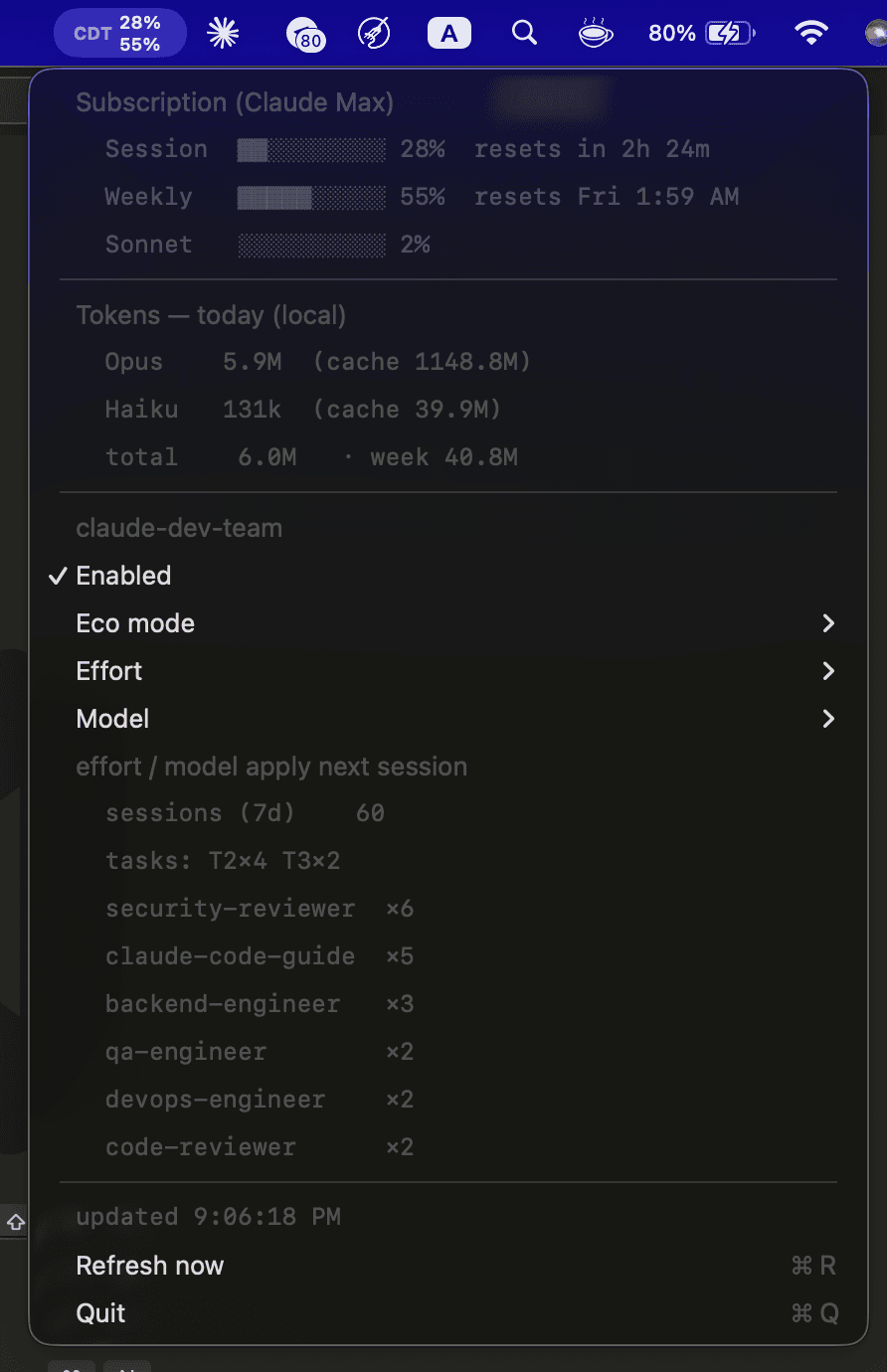
macOS only. On Windows/Linux there's no menu bar — use the cross-platform status line for the same usage display:
~/.claude/bin/cdt-config statusline on(showsCDT on · Opus 4.8 · 12% session · 41% weekly— each segment explained below).
On macOS it auto-installs on your first session after the plugin is installed — it builds, launches,
and enables login auto-start automatically (set CDT_MENUBAR_AUTO=0 in ~/.claude/claude-dev-team.env
to opt out). Manage it any time:
!~/.claude/bin/cdt-menubar status      # one-shot terminal readout, no GUI
/cdt:menubar restart       # or: install | start | stop | uninstall
Requires macOS + the Swift toolchain (xcode-select --install); first launch shows a one-time Keychain
approval (Always Allow). The subscription %s use an undocumented endpoint (the same one Claude
Code calls) and may change — it fails soft, and your local token data always works. cdt-menubar uninstall removes the login item + binary (and stops auto-reinstall).
Distributing a prebuilt app: the build auto-signs with any available code-signing identity. To ship a
notarized DMG that opens on any Mac with no Gatekeeper warnings (drag to Applications, like an App
Store app), see menubar/RELEASING.md — it needs a Developer ID Application
certificate + notarytool credentials, then cd menubar && ./release.sh.
Status line (cross-platform)
The status line is the bottom-bar usage display — the menu bar's cross-platform equivalent (works on
macOS, Linux, and Windows; no Swift/Keychain needed). Turn it on with ~/.claude/bin/cdt-config statusline on
(restart Claude Code to see it). It's display-only and costs zero tokens — a hook renders it from the
session JSON Claude Code already provides, and it fails soft (any missing piece is just omitted). It's
plain text — no emoji.
The full line:
CDT on · Opus 4.8 · 12% session · 41% weekly
Each ·-separated segment:
| Segment | Example | Meaning |
|---|---|---|
CDT <on|OFF> | CDT on | whether claude-dev-team is enabled (cdt-config on|off) |
| model | Opus 4.8 | the active session model |
| N% session | 12% session | current session usage — your rolling 5-hour rate-limit utilization |
| N% weekly | 41% weekly | weekly usage — your 7-day rate-limit utilization |
Both percentages are account-wide (your subscription's rate limits read the same in every terminal).
They're cached to ~/.claude/.cdt-usage.json so cdt-budget / Eco mode can read them without the Keychain.
The per-agent dispatch/finish lines in the transcript are likewise plain text (CDT dispatch: Explore,
CDT done: Explore · 74.1k tok); the plugin namespace is stripped (shows backend-engineer, not
cdt:backend-engineer). Claude Code's own running-agents tree still shows the namespaced name — that
prefix is fixed by Claude Code.
Configuration
| Setting | Default | Meaning |
|---|---|---|
| session model | your choice | Sonnet = cheap throughput; Opus = max power |
FULL: / T0: prefixes | — | up/down-throttle a single request |
CDT_MAX_ITERATIONS | 5 | Task Loop hard cap |
CDT_AUTONOMY | auto | autonomous escalation leash: off / assist / auto |
CDT_TEAMS · CDT_SCALE | on · on | the DEPTH (agent-team) / BREADTH (workflow) engines — on by default |
CDT_AUTONOMY_WEEKLY_CEILING | 85 | budget safety valve pauses to ASK at/above this weekly usage % |
CDT_STOP_REMINDER | 0 | 1 = remind once to run the mandate at session end |
CDT_AGENT_ACTIVITY | on | on / compact / off — pretty per-agent dispatch/finish lines + token cost in the CLI (display-only, zero tokens) |
CDT_PHASE_BOARD | on | on / off — per-wave phase board + a phase i/N status-line indicator on T2/T3 tasks (display-only) |
Effort runs at your session level (xhigh, never max). The heavier engines — parallel git-worktree
sessions and dynamic-workflow fan-out — are on by default and used whenever the work benefits;
a weekly-budget safety valve only ASKs as you near the rate-limit ceiling (see
Autonomous orchestration). Pin any agent's model: in
agents/*.md to taste.
Enable/disable + defaults — cdt-config (or /cdt:config):
~/.claude/bin/cdt-config                 # show current config
~/.claude/bin/cdt-config off | on        # disable / enable the whole orchestration layer
~/.claude/bin/cdt-config effort xhigh    # default effort: low | medium | high | xhigh
~/.claude/bin/cdt-config model  opus     # default model (e.g. claude-opus-4-8 / opus / sonnet)
~/.claude/bin/cdt-config autonomy auto   # autonomous escalation: off | assist | auto  (see /cdt:auto)
~/.claude/bin/cdt-config teams on|off    # the agent-team DEPTH engine (on by default)
~/.claude/bin/cdt-config scale on|off    # the dynamic-workflow BREADTH engine (on by default)
~/.claude/bin/cdt-config reset           # restore defaults: enabled, xhigh, Opus 4.8, autonomy=auto, engines on
Defaults are xhigh effort + Opus 4.8 (claude-opus-4-8). off makes the next session behave as
stock Claude Code (the SessionStart hook stops injecting the orchestration protocol). effort/model
are written to ~/.claude/settings.json as a safe merge (your other settings are preserved) and
apply next session. The macOS menu bar dropdown also lets you change all of this with a click — an
Enabled toggle plus Eco mode, Effort, and Model submenus (each runs cdt-config for you).
(max effort is session-only — /effort max — and intentionally can't be persisted; xhigh is the cap.)
Budget-aware Eco mode + status line (also via cdt-config):
~/.claude/bin/cdt-config eco auto         # opt in to conserve when weekly usage is high (default: off)
~/.claude/bin/cdt-config statusline on    # terminal status line: CDT on · Opus 4.8 · 12% session · 41% weekly
~/.claude/bin/cdt-doctor                  # health-check the whole install
~/.claude/bin/cdt-budget                  # current usage % + Eco recommendation
~/.claude/bin/cdt-learn "<lesson>"        # teach the vault a durable lesson
Eco is off by default (full quality). Opt in with cdt-config eco on (always conserve) or
eco auto (conserve only when your weekly usage is high). When conserving, the orchestrator prefers
Sonnet, the smallest safe tier, and skips optional agents — and tells you why. Eco never weakens the
risk floor or skips the security review, and never uses Haiku for real work. Usage data is supplied
automatically by the macOS menu bar (it caches each fetch); on Linux/Windows, enable the
cross-platform status line (cdt-config statusline on) to feed it.
Verification gate (code-enforced — on by default): the discipline layer's "gates force
verification" promise is real, not advisory. If a session edited files but never ran a
test/build/lint/typecheck afterward, a Stop hook blocks it from ending with a clear reason — so a
false "done" is caught structurally. It's symmetric with how edits are tracked, so tests run inside a
subagent (the qa-engineer flow) count too; it fires at most once per session (never traps you),
and degrades fail-open when python3/markers are unavailable. Tune it:
~/.claude/bin/cdt-config verify block      # default — block a Stop with edits but no verify after them
~/.claude/bin/cdt-config verify warn       # surface a notice instead of blocking
~/.claude/bin/cdt-config verify off        # disable
The allowlist is verb-anchored (pytest, go test, npm test, tsc, eslint, cargo test, … —
but never echo, git, ls), so it won't false-trigger on non-verifying commands.
Scope/sprawl detection (code-backed): the "exclusive file ownership" contract is no longer just
prose. When the orchestrator dispatches a specialist, it emits a CDT-CONTRACT: exclusive=… line; a
PreToolUse hook records it, and SubagentStop diffs what the agent actually wrote (from its own
transcript — works even when parallel agents share one tree) against that contract. Anything outside
its scope (overreach) or inside a peer's scope (collision) is flagged. Inspect with
cdt-contract findings; tune with:
~/.claude/bin/cdt-config scope warn       # default — surface a notice at Stop
~/.claude/bin/cdt-config scope block       # stop until the sprawl is reconciled
~/.claude/bin/cdt-config scope off
Security & privacy
claude-dev-team runs entirely on your machine and phones home to nothing.
- No telemetry, no outbound traffic. The plugin sends nothing anywhere — no analytics. Everything runs and is stored locally.
// faq
What is claude-dev-team?
An orchestrated software team for Claude Code: tiered triage, contract-driven parallel agents, quality gates, Bug Council, Task Loop, cost analytics, and Discord/Telegram notifications. Cost-effective and high quality on Claude Max.. It is open-source on GitHub.
Is claude-dev-team free to use?
claude-dev-team is open-source under the MIT license, so it is free to use.
What category does claude-dev-team belong to?
claude-dev-team is listed under automation in the Claudeers registry of Claude-compatible tools.
// embed badge

[](https://claudeers.com/claude-dev-team)
// retro hit counter

[](https://claudeers.com/claude-dev-team)
// reviews
// guestbook
// related in Data & Analytics
 🔓
🔓Wrap Antigravity, ChatGPT Codex, Claude Code, Grok Build as an OpenAI/Gemini/Claude/Codex compatible API service, allowing you to enjoy the free Gemini 3.1 P…
 🔓
🔓Marketing skills for Claude Code and AI agents. CRO, copywriting, SEO, analytics, and growth engineering.
 🔓
🔓Apache Airflow - A platform to programmatically author, schedule, and monitor workflows
 🔓
🔓CLI tool for configuring and monitoring Claude Code