
claude-fleet
Dashboard for orchestrating many concurrent Claude Code / Codex windows — triage, full-text search, skill/memory analytics
Install with your AI
Paste into Claude Code, Cursor, or any agent — it reads the repo and wires the tool into your project.
Install and set up claude-fleet (git-clone project) into my current project.
Found on https://claudeers.com/claude-fleet
Repo: https://github.com/tianyilt/claude-fleet
Homepage/docs: —
Detected install method: git-clone → git clone https://github.com/tianyilt/claude-fleet
Category: data. Platforms: cli, api, web.
Read the repo's README for exact setup and env vars, then install it and wire it into my project.

Claudeers Health Verdict:
slowing; community-verified: false. Confirm the source before running anything.
git clone https://github.com/tianyilt/claude-fleet
// compatibility
| Platforms | cli, api, web |
|---|---|
| Operating systems | — |
| AI compatibility | claude |
| License | MIT |
| Pricing | open-source |
| Language | Python |
English | 中文
Claude Fleet
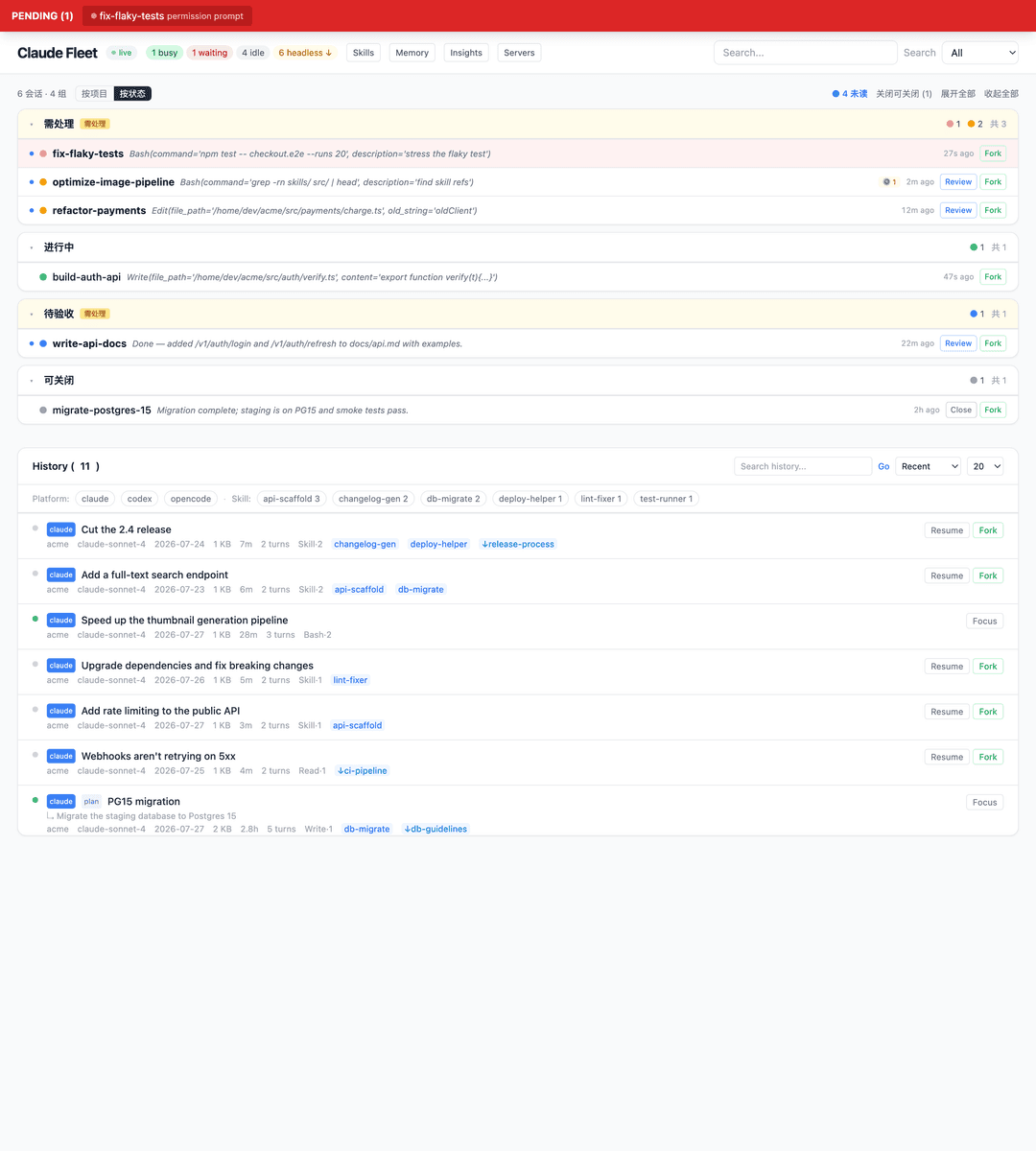
When you're vibe coding with 5–7 Claude Code windows open at once, you need one place to see what every window is doing — who's stuck, who's waiting on you, who's done.
Run it in 30 seconds
git clone https://github.com/tianyilt/claude-fleet
cd claude-fleet && bash run.sh
# open http://127.0.0.1:7878 in your browser
The first run creates a venv and installs dependencies automatically — nothing to set up.
Install options
Run as a macOS app (recommended on Mac). A signed, double-clickable .app:
./scripts/build-app.sh --install # builds + copies to /Applications
Resume/Fork open a new terminal via open -a (LaunchServices) — no Automation
permission needed, so they work even after a restart. Focus (raising the tab
that owns a session) does use AppleScript; the first time you use it, approve
“Claude Fleet” wants to control “iTerm.app” — the signed app makes that grant
stick. For development with hot-reload, use ./run.sh.
Run anywhere (Windows / Linux). The dashboard, history, search and monitoring are cross-platform:
pip install -e .
./run.sh        # macOS/Linux
run.bat         # Windows
Resume/Fork open a real terminal on macOS (open -a) and Linux (gnome-terminal /
konsole / kitty / wezterm / xterm …; set CLAUDE_FLEET_TERMINAL_CMD to force one),
for both Claude and Codex sessions. On Windows (or any host without a known
launcher) they copy the claude --resume … command to your clipboard to paste
into your own terminal. Focus is macOS-only.
Releases. Tagged releases ship three artifacts: claude-fleet-macos-app.zip
(double-clickable app), claude-fleet-src.tar.gz (run anywhere), and
claude-fleet-windows.zip.
What it solves
The everyday pain of multi-window vibe coding:
- Permission prompts flash by and you miss them → a persistent red bar at the top; click it to jump back to that terminal.
- You don't know what each window is doing → every card shows the current task, triage status, and background jobs.
- Finished windows get left open → the patrol engine marks them
closeable; close with one click. - You can't find that session from last week → full-text search returns in ~50ms with VS Code–style match context.
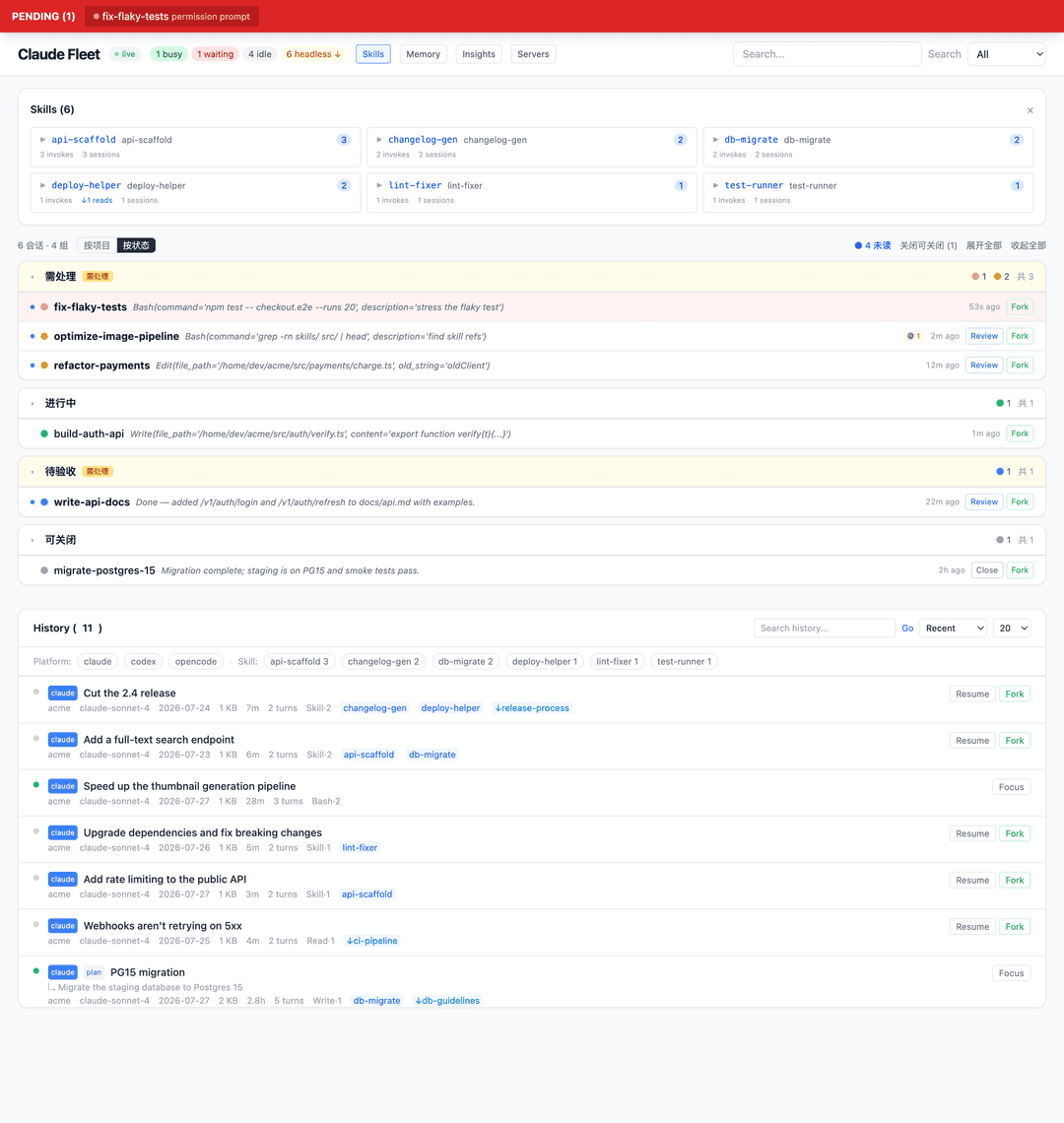
- You don't know how much a skill actually gets used → 3-dimensional stats (invokes + file read/write + bash references).
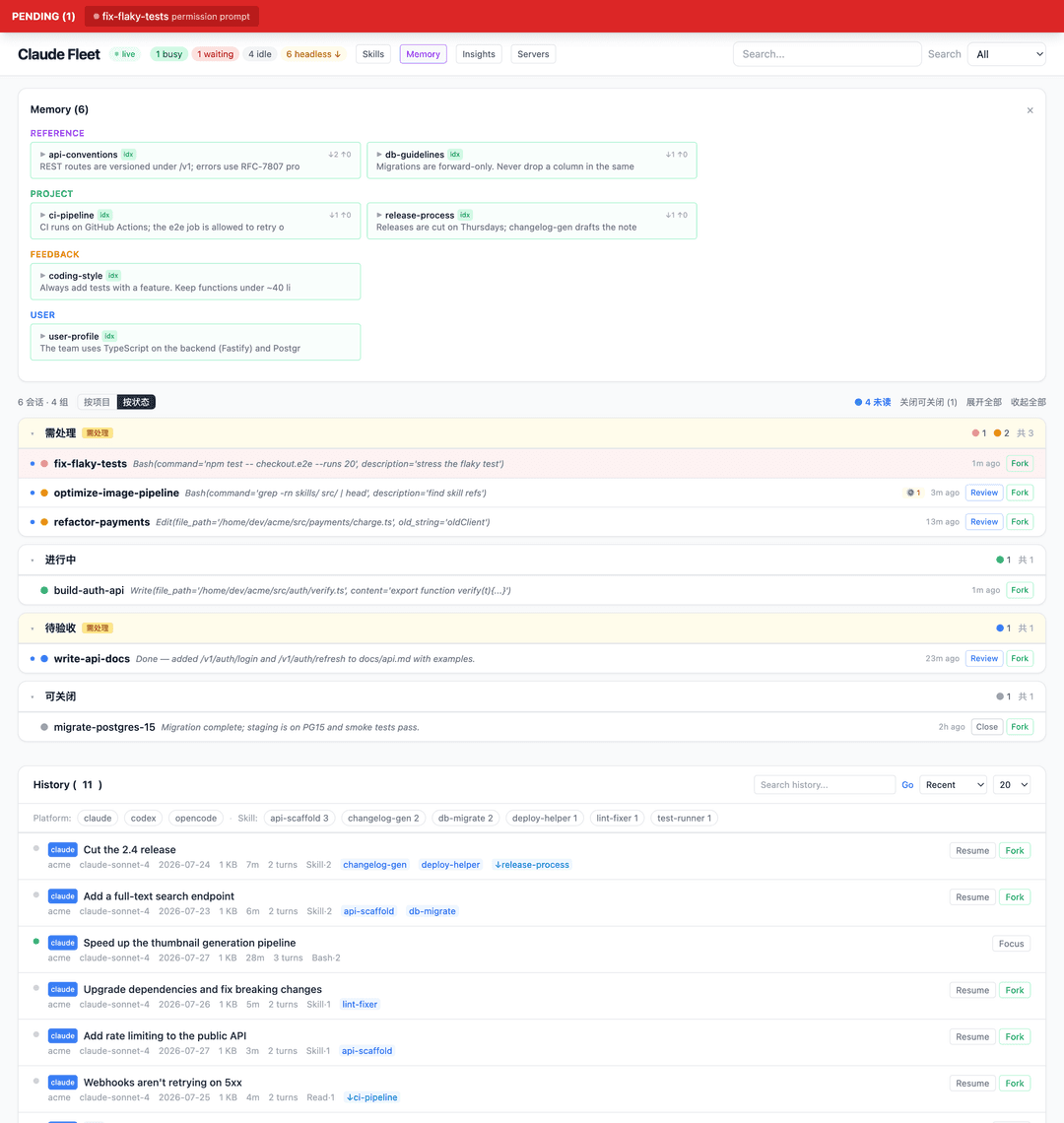
- You don't know who touched a memory → in-degree (↓ sessions that read it) + out-degree (↑ sessions that wrote it).
Core features
Triage classification
Not a simple busy/idle flag. The patrol engine reads each transcript's
stop_reason, queue-operation events, and background-task state:
| Status | Meaning | How it's decided |
|---|---|---|
| 🟢 working | actively working | busy, or has a live Monitor/Bash background task |
| 🔴 waiting | waiting on you | permission prompt / dialog open |
| 🟡 stalled | stuck | stop_reason=tool_use + idle > 5 min |
| 🔵 completed | done | stop_reason=end_turn + idle > 5 min |
| ⚪ closeable | safe to close | completed + idle > 1 h |
Background tasks (Bash run_in_background, Monitor persistent) are tracked by
pairing tool_use/tool_result; finished ones are cleared automatically, so they
don't get misread as working.
Search
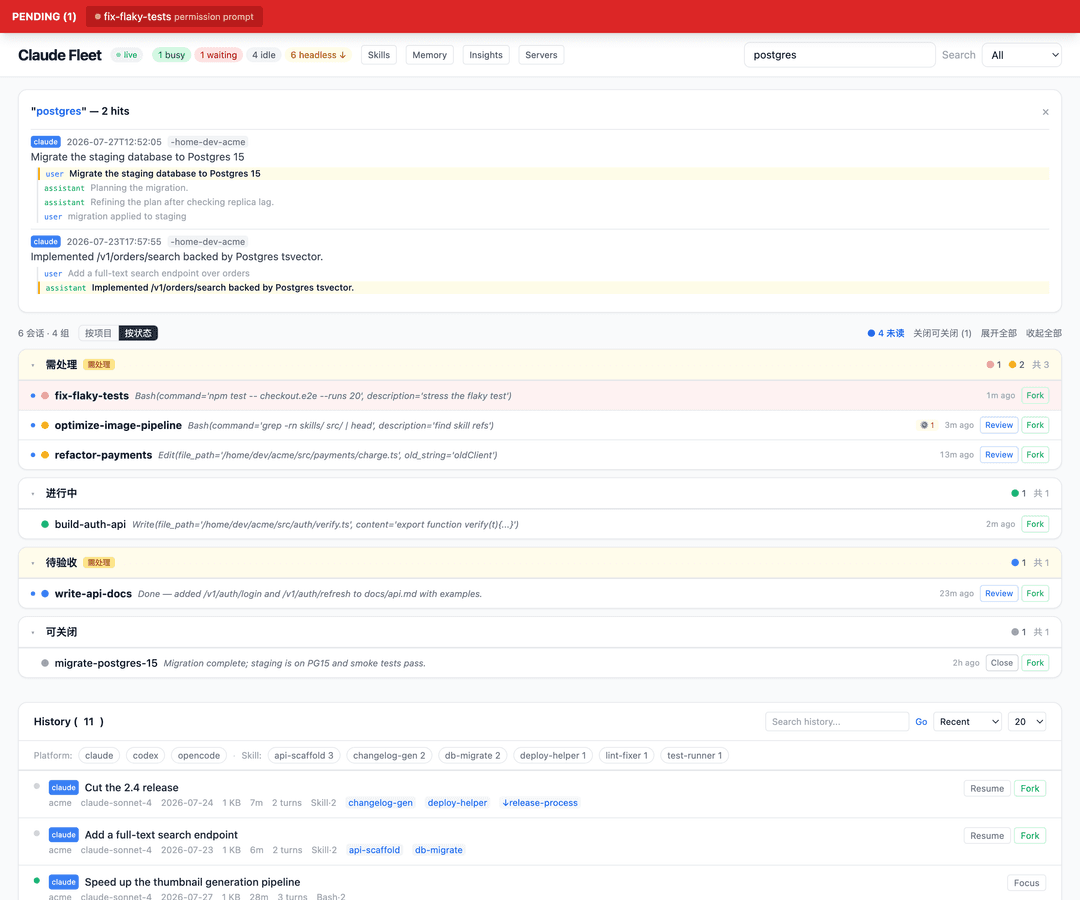
ripgrep across all Claude + Codex transcripts, ~50ms. It doesn't just search session titles — searching "hailuo" finds a session that mentioned Hailuo in the conversation, even if the title is "you should check klingai.com".
Each result carries up to 3 match-context snippets so you can see at a glance why it matched.
Skill / memory tracking
The skill panel reports three dimensions:
paper2video        333   1 invoke · ↓122 reads · ↑53 writes · 157 bash
feishu-notify       45  24 invokes · ↓7 reads · ↑7 writes · 7 bash
qzcli-topdowneval   12   3 invokes · ↓1 reads · ↑2 writes · 6 bash
If you only counted formal /skill-name invocations you'd get 44; adding
Read/Write/Edit of skill files plus Bash references to skills/ brings the real
total to 431.
The memory panel groups by type (user / feedback / project / reference) and shows
↓3 ↑2 per entry (read by 3 sessions, modified by 2).
Timeline + plan history
Open any session to see the full conversation flow. Skill calls are purple, memory reads are dashed blue, memory writes are pink.
Plan version history: a session typically iterates on its plan 5–14 times — each Write is a full snapshot, each Edit is a red/green diff.
Every event has a ⑂ fork button, and the header has a Share button (below).
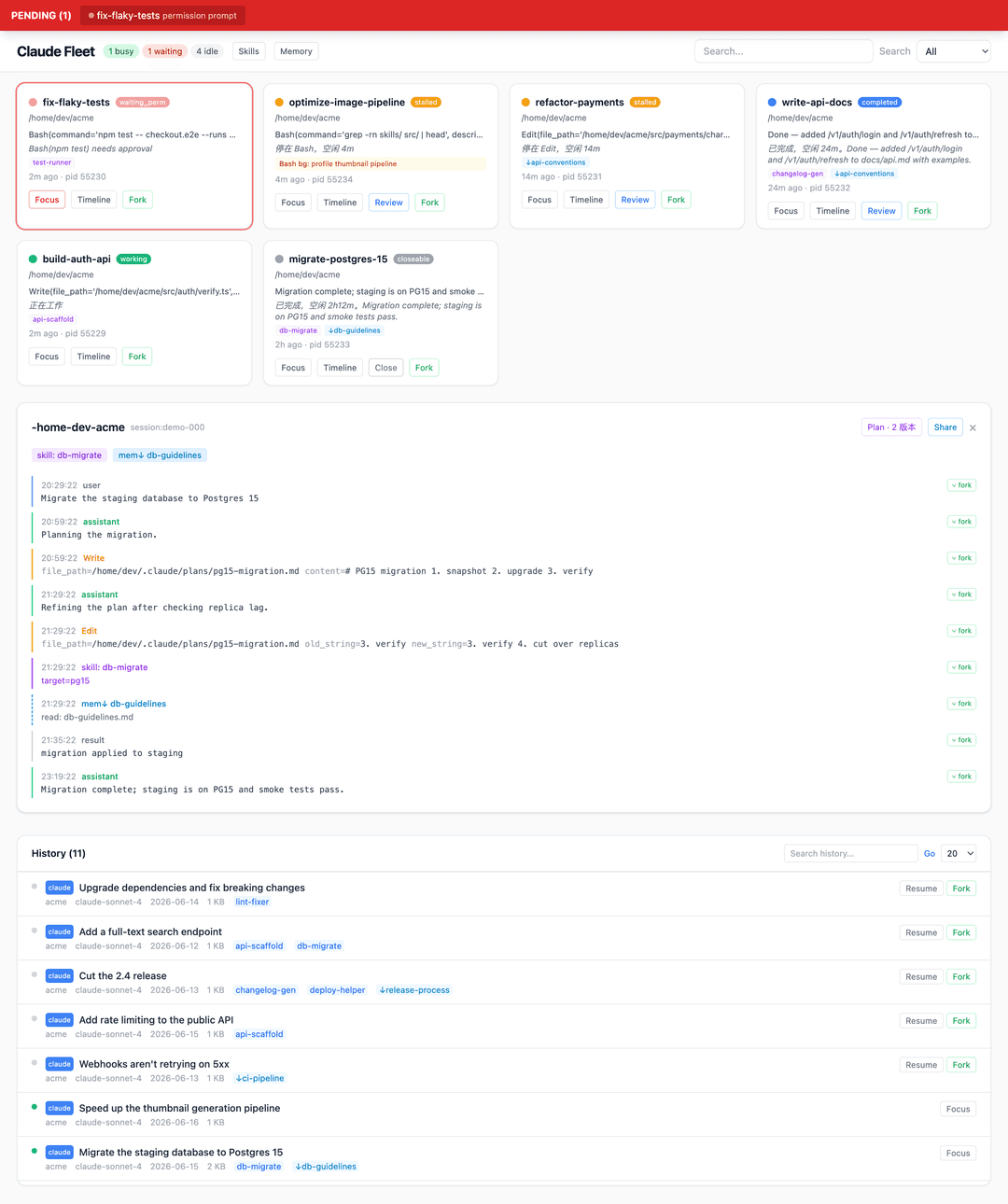
Fork from any node
Don't just resume the latest state — branch from any point in a long conversation. Click ⑂ fork on a timeline event and Claude Fleet copies the transcript truncated at that node into a new session (rewriting the session id) and resumes it, so you continue from there with the earlier history but none of the later turns. (Requested in #3.)
For long sessions, you don't have to scroll to find the right node: the Plan history panel anchors to each plan version — ↳ jump scrolls the timeline to where that plan was written, and ⑂ fork (done) branches from the point where that version finished executing (right before the next plan revision). So "fork from where plan v3 was done" is one click.
Share a session as a read-only web page
Click Share to render a self-contained, CDN-free HTML page of the whole
timeline, served at /share/<id> — drop it in a wiki / Feishu doc / PR. Optional
one-click redaction masks emails, API keys, tokens and home-dir usernames so it's
safe to post publicly. (Requested in #4.)
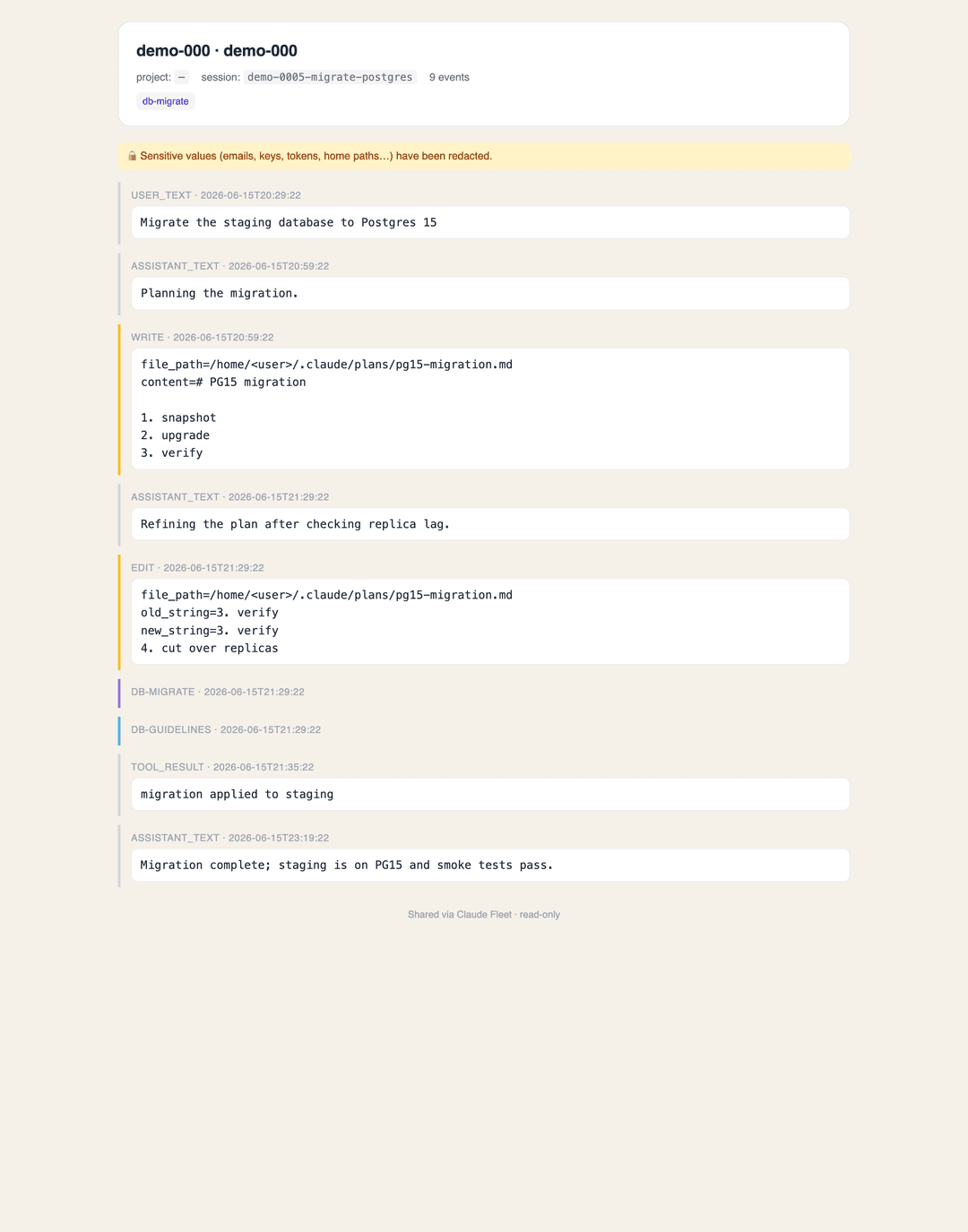
Actions
| Button | What it does |
|---|---|
| Focus | jump to that terminal tab |
| Fork | claude --resume <sid> --fork-session — new session inherits the history |
| ⑂ fork (per event) | branch a new session truncated at that timeline node |
| Resume | claude --resume <sid> — continue the original session |
| Review | run claude -p review in the background; the verdict (PASS/FAIL/PARTIAL) shows on the card |
| Share | export a read-only HTML page of the session (optional redaction) |
| Close | SIGTERM |
Fork/Resume open a real terminal on macOS and Linux (Claude and Codex sessions); on Windows or any host with no known launcher they copy the command to your clipboard instead. Focus is macOS-only.
Focus setup (macOS). Focus works out of the box on Terminal.app and iTerm2 — including when your sessions run inside tmux — via the bundled
scripts/focus-tty.sh(maps process tty → owning terminal tab → raises it). To customize for another terminal/window manager, drop an executable~/.claude/focus-tty.shtaking a<tty>arg; it takes precedence over the bundled default. (Bundled shim contributed by @wanshuiyin.)
Architecture
Single-file frontend (Alpine.js + Tailwind via CDN — no npm). The Python backend
only reads ~/.claude/ and ~/.codex/; it never mutates any agent state.
app.py                FastAPI + SSE (2s polling)
core/
  sessions.py         read sessions/*.json, map to TTY
  transcripts.py      parse JSONL; extract skill/memory/plan/background tasks
  patrol.py           triage classification engine
  codex.py            Codex session parsing
  search.py           cross-platform ripgrep search
  terminal.py         per-platform terminal control (macOS iTerm2; degrades elsewhere)
  actions.py          fork / review / close (session lookup around terminal.py)
  history.py          unified index + full-text rg search
  skills.py           skill directory scan
  memory.py           memory file parsing
  plans.py            plan association (extracted from transcripts)
  perms.py            permission events
static/index.html     single-file SPA
Acknowledgements
- HarnessKit — UI reference for cross-platform skill management
- Synergy — inspiration for the memory-engram classification view
License
// faq
What is claude-fleet?
Dashboard for orchestrating many concurrent Claude Code / Codex windows — triage, full-text search, skill/memory analytics. It is open-source on GitHub.
Is claude-fleet free to use?
claude-fleet is open-source under the MIT license, so it is free to use.
What category does claude-fleet belong to?
claude-fleet is listed under skills in the Claudeers registry of Claude-compatible tools.
// embed badge

[](https://claudeers.com/claude-fleet)
// retro hit counter

[](https://claudeers.com/claude-fleet)
// reviews
// guestbook
// related in Data & Analytics
 🔓
🔓Wrap Antigravity, ChatGPT Codex, Claude Code, Grok Build as an OpenAI/Gemini/Claude/Codex compatible API service, allowing you to enjoy the free Gemini 3.1 P…
 🔓
🔓Marketing skills for Claude Code and AI agents. CRO, copywriting, SEO, analytics, and growth engineering.
 🔓
🔓Apache Airflow - A platform to programmatically author, schedule, and monitor workflows
 🔓
🔓CLI tool for configuring and monitoring Claude Code