
ask-user-questions-mcp
Better 'AskUserQuestion' - A lightweight MCP server/OpenCode plugin/Agent Skills + CLI interface which allows parallel AI agents ask questions to you. Be the…
Install with your AI
Paste into Claude Code, Cursor, or any agent — it reads the repo and wires the tool into your project.
Install and set up ask-user-questions-mcp (mcp-stdio project) into my current project.
Found on https://claudeers.com/ask-user-questions-mcp
Repo: https://github.com/paulp-o/ask-user-questions-mcp
Homepage/docs: —
Detected install method: mcp-stdio → claude mcp add ask-user-questions-mcp -- npx -y auq-mcp-server
Category: mcp-servers. Platforms: cli, api, desktop, web.
Read the repo's README for exact setup and env vars, then install it and wire it into my project.

Claudeers Health Verdict:
slowing; community-verified: false. Confirm the source before running anything.
claude mcp add ask-user-questions-mcp -- npx -y auq-mcp-server
git clone https://github.com/paulp-o/ask-user-questions-mcp
// compatibility
| Platforms | cli, api, desktop, web |
|---|---|
| Operating systems | — |
| AI compatibility | claude |
| License | MIT |
| Pricing | open-source |
| Language | TypeScript |
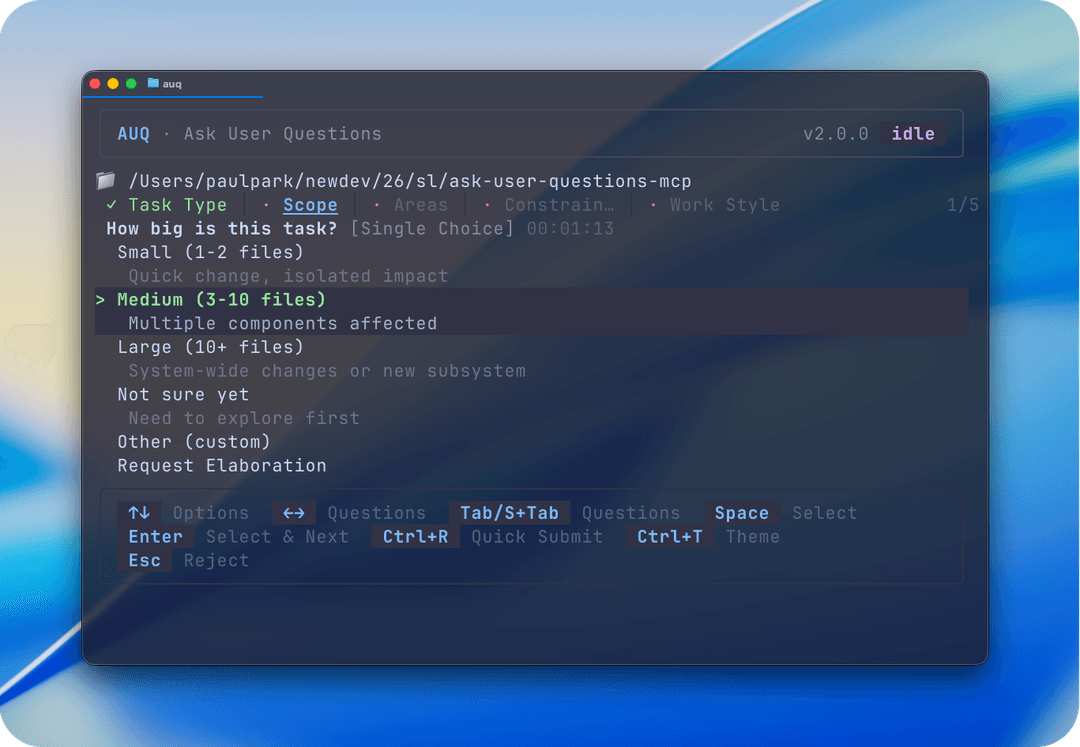
AUQ - Ask User Questions
AskUserQuestion pushed to the max

A complete toolset that enables maximum level of human-(intention-)in-the-loop onto any long-running, multi-agentic AI workflows (like Ralph Loop!).
Single/multiple choice questions, custom options, multi-agent interoperability, question queueing, question rejection with explanation, elaboration requesting, quick recommendations auto-selection, themes, native OS notification, terminal progress bar, multi-language support, agent skills support... and more. You can customize them all too!
Can be used via MCP server / OpenCode plugin / Agent Skills.
🤔 I already have question tool in CC/OC/Cursor. Why use this?
What does it do?
AUQ lets your AI assistants ask clarifying questions consisting of multiple-choice/single-choice questions (with an "Other" option for custom input / rejection / ask for elaboration) while coding or working, and wait for your answers through a separate CLI window without messing up your workflow.
This lets you inject your intent into long-running autonomous AI tasks—no more switching windows or babysitting AIs. Turn on the CLI anytime, even remotely via SSH!
A no no fun background story
In AI-assisted coding, guiding LLMs to ask clarifying questions have been widely recognized as a powerful prompt engineering technique to overcome LLM hallucination and generate more contextually appropriate code [1].
On October 18th, Claude Code 2.0.21 introduced an internal AskUserQuestion tool. Inspired by it, I decided to build a similar tool that is:
- Integration-flexible - Works with MCP clients (Claude Desktop, Cursor, etc.) and has official OpenCode plugin support
- Non-invasive - Doesn't heavily integrate with your coding CLI workflow or occupy UI space
- Multi-agent friendly - Supports receiving questions from multiple agents simultaneously in parallel workflows
✨ Demo
https://github.com/user-attachments/assets/3a135a13-fcb1-4795-9a6b-f426fa079674
Setup Instructions
🚀 Install CLI Tool
First, install the AUQ CLI:
Global Installation (Recommended)
Bun (recommended — required for default OpenTUI renderer)
bun add -g auq-mcp-server
npm
npm install -g auq-mcp-server
pnpm
pnpm add -g auq-mcp-server
yarn
yarn global add auq-mcp-server
Note: Bun is recommended for the default OpenTUI renderer. When installed via npm/pnpm/yarn, the shell wrapper auto-detects Bun at runtime. If Bun is not available, it falls back to Node.js with the legacy Ink renderer.
Local (Project-specific) Installation
# Install in your project
bun add auq-mcp-server
Sessions are stored globally regardless of installation method. See Troubleshooting for session locations.
🔌 Integrate to your AI
AUQ supports multiple AI environments. Choose between OpenCode plugin and MCP server.
Option A: MCP Server
Note: Due to differences in how some MCP clients are implemented, AUQ may be forcibly cancelled in tools that do not allow extending the global MCP timeout. If that's the case, consider using Agent Skills. Use OpenCode plugin if you use OpenCode.
Cursor
Claude Code
Method 1: Using CLI (Recommended)
claude mcp add --transport stdio ask-user-questions -- bunx -y auq-mcp-server server
Note:
npxalso works if you prefer npm.
Method 2: Manual Configuration
Add to .mcp.json in your project root (for team-wide sharing):
{
  "mcpServers": {
    "ask-user-questions": {
      "type": "stdio",
      "command": "bunx",
      "args": ["-y", "auq-mcp-server", "server"]
    }
  }
}
Or add to ~/.claude.json for global access across all projects.
Note: Replace bunx if you don't use bun.
Verify setup: Type /mcp in Claude Code to check server status.
Codex CLI
Add to ~/.codex/config.toml:
[mcp_servers.ask-user-questions]
command = "bunx"
args = ["-y", "auq-mcp-server", "server"]
tool_timeout_sec = 99999  // Extend timeout for long sessions
Claude Desktop
Add to ~/Library/Application Support/Claude/claude_desktop_config.json (macOS) or %APPDATA%\Claude\claude_desktop_config.json (Windows):
{
  "mcpServers": {
    "ask-user-questions": {
      "command": "bunx",
      "args": ["-y", "auq-mcp-server", "server"]
    }
  }
}
Replace
bunxif you don't use bun.
Restart Claude Desktop after saving.
Option B: OpenCode Plugin
Direct integration for OpenCode users. Adds working directory viewability feature exclusively.
Configuration
Add to opencode.json:
{
  "plugin": ["@paulp-o/opencode-auq@latest"]
}
Option C: Agent Skills (Experimental)
Usage with Skills-Compatible Agents
Copy the skills/ask-user-questions/ folder to your agent's skills directory.
Limitations
This skill guides the AI to use AUQ CLI's hidden command, auq ask with raw JSON as parameters. Unlike MCP or proper tool harness systems, malformed JSON healing/schema enforcement aren't supported natively; therefore a less capable model could struggle to call properly.
💻 Usage
Starting the CLI tool
auq       # if installed globally (bun add -g)
# bunx auq
# npx auq
Start by defining your workflow to use AUQ tool for clarifying questions, on AGENTS.md (or CLAUDE.md), like:
Whenever you need clarification on what you are working on, never guess, and call AUQ(ask-user-questions).
When the AI asks questions, you'll see them appear in the AUQ TUI. Answer them at your convenience.
Renderer Selection
AUQ supports two terminal rendering engines:
| Renderer | Description | Status |
|---|---|---|
| OpenTUI (default) | Native Zig-based renderer with improved performance | Stable (requires Bun) |
| ink | React-based terminal renderer | Fallback (Node.js) |
OpenTUI is the default renderer and requires Bun runtime. When Bun is unavailable, AUQ automatically falls back to the Ink renderer.
To force a specific renderer, set one of the following (in priority order):
-
Environment variable (highest priority):
AUQ_RENDERER=ink auq # force ink AUQ_RENDERER=opentui auq # force opentui -
Config file (
.auqrc.json):{ "renderer": "ink" } -
CLI command:
auq config set renderer ink
Note: OpenTUI provides native CJK character support, built-in markdown rendering with syntax highlighting, and mouse support. The shell wrapper (
bin/auq) auto-detects Bun at runtime.
Markdown rendering in question prompts
Question prompts now support Markdown formatting in the prompt text.
- Supported: bold, italic,
strikethrough,inline code, links, and fenced code blocks (with syntax highlighting) - Links render as
text (url)for broad terminal compatibility - Code blocks use theme-aware colors (background/text/border)
- Always enabled (no configuration needed)
- Plain text prompts pass through unchanged
- Graceful fallback: if Markdown parsing fails, the raw text is shown
Note: AUQ is an unopinionated tool and doesn't include prompts on HOW AI should leverage it. It is expected that you do your own prompt engineering to make the most out of it in your own workflows. I personally enjoy prompting it to ask at least 30 questions repeatedly before action!
Recommended Setups
It is recommended to disable the built-in questioning tool in your harness (like the question tool in OpenCode or AskUserQuestion in Claude Code) to avoid AI from mixing them up.
Useful Keyboard Shortcuts
| Key | Action | Description |
|---|---|---|
Space | Select | Select/toggle option without advancing |
Enter | Select & Next | Select option and advance to next question |
R | Recommended | Select recommended option(s) for current question |
Ctrl+R | Quick Submit | Auto-select recommended options for all questions and go to review |
Esc | Reject | Reject the whole question set and optionally explain why to the AI |
Ctrl+T | Theme | Cycle through available color themes |
[/] | Sessions | Switch to previous/next session (OpenTUI: also click session dots) |
Mouse Support (OpenTUI renderer only):
| Action | Description |
|---|---|
| Click option | Select/toggle option |
| Scroll | Scroll through session picker or update overlay |
| Click session dot | Switch to that session |
⌨️ All Keyboard Shortcuts
| Key | Action |
|---|---|
↑↓ | Navigate options |
←→/Tab | Switch between questions |
Space | Select/toggle option without advancing |
Enter | Select option and advance to next question |
R | Select recommended option(s) for current question |
Ctrl+R | Quick submit — auto-fill recommended, go to review |
Esc | Reject the whole question set and optionally explain why |
Ctrl+T | Cycle through available color themes |
Ctrl+S | Open session picker |
1-9 | Jump directly to session by number |
[/] | Navigate between sessions |
U | Open update overlay (when update available) |
More Commands (advanced)
# you won't likely need these at all
auq server       # Start MCP server
auq --version    # Show version
auq update       # Check for and install updates
auq --help       # Show help
📋 Full CLI Reference
CLI Commands
AUQ provides headless CLI commands for managing sessions and configuration without the TUI.
Run auq --help for the complete reference.
Answer Sessions
auq answer <sessionId> --answers '{"0": {"selectedOption": "option1"}}'
auq answer <sessionId> --answers '{"0": {"selectedOptions": ["A", "B"]}}'  # multi-select
auq answer <sessionId> --answers '{"0": {"customText": "free text"}}'  # custom text
auq answer <sessionId> --reject --reason "Not applicable"
auq answer <sessionId> --answers '...' --force  # abandoned session
auq answer <sessionId> --answers '...' --json
Manage Sessions
auq sessions list                    # pending sessions (default)
auq sessions list --stale             # stale sessions only
auq sessions list --all               # all sessions
auq sessions show <sessionId>         # session details
auq sessions dismiss <sessionId>      # dismiss stale session
auq sessions dismiss <sessionId> --force
auq sessions list --limit 10 --page 2 # pagination
auq sessions list --json
Session History
auq history                           # list session history
auq history --all                     # include abandoned
auq history --unread                  # unread only
auq history --search "deploy"          # search
auq history --limit 10 --page 2       # pagination
auq history show <sessionId>          # full Q&A detail
auq history --json
Fetch Answers (Programmatic)
auq fetch-answers --unread            # list unread answered sessions
auq fetch-answers <sessionId>         # fetch specific session
auq fetch-answers <sessionId> --blocking  # wait until answered
auq fetch-answers --limit 10 --page 2
auq fetch-answers --json
Configuration
auq config get                        # view all
auq config get staleThreshold         # view specific
auq config set staleThreshold 3600000 # set local
auq config set staleThreshold 3600000 --global  # set global
Update
auq update        # interactive update check
auq update -y     # skip confirmation
Pagination
List commands (sessions list, history, fetch-answers) support:
--limit <N>— Max items per page (default: 20)--page <N>— Page number (default: 1)
🌍 Environment Variables
| Variable | Description |
|---|---|
AUQ_RENDERER | Override renderer ("ink" or "opentui") |
AUQ_SESSION_DIR | Custom session storage directory |
XDG_CONFIG_HOME | Custom config directory (default: ~/.config) |
NO_UPDATE_NOTIFIER | Set to "1" to disable update checks |
Stale Session Detection
Sessions that remain unanswered longer than the configured threshold are marked as "stale" (potentially orphaned). This helps identify sessions where the AI may have disconnected or timed out.
- Visual indicators: Stale sessions show a ⚠ warning icon and yellow highlighting in the TUI
- Toast notifications: A notification appears when a session becomes stale (configurable)
- Grace period: Interacting with a stale session provides a 30-minute grace period
- Configurable threshold: Default is 2 hours (7,200,000ms)
Abandoned Session Handling
When an AI client disconnects, associated sessions are marked as "abandoned". These sessions:
- Remain visible in the TUI with a red indicator
- Show a confirmation dialog before answering ("AI가 disconnect되었습니다")
- Can still be answered via CLI with the
--forceflag - Are detectable via
auq sessions list --all
Auto-Update
AUQ automatically checks for updates and keeps itself up to date.
How it works
- All updates (patch, minor, major): A fullscreen overlay is shown with changelog and options to update, skip, or defer.
- Update checks: Run on every TUI launch (no delay/cache).
- CLI notification: When running non-TUI commands, a one-line update notification is shown if a newer version is available.
Manual update
Run auq update to manually check for and install updates:
auq update        # Interactive update check
auq update -y     # Skip confirmation prompt
Disabling update checks
Disable automatic update checks via config:
auq config set updateCheck false
Or set the environment variable:
NO_UPDATE_NOTIFIER=1 auq ask "question"
Update checks are automatically disabled in CI environments (CI=true).
The auq update command always works regardless of these settings.
Theme System
AUQ supports 16 built-in color themes with automatic persistence. Press Ctrl+T to cycle through themes.
Theme Differences by Renderer
| Feature | ink | OpenTUI |
|---|---|---|
| Header text | Gradient animation | Solid accent color |
| Toast animations | setTimeout based | useTimeline based |
| Markdown syntax | Basic highlighting | Tree-sitter powered |
| Mouse support | No | Yes (click options, scroll, session dots) |
Both renderers support all 16 built-in themes and custom themes. Colors are consistent; only implementation details differ.
Built-in Themes
| Theme | Style |
|---|---|
| AUQ dark | Default dark theme |
| AUQ light | Default light theme |
| Nord | Arctic, bluish |
| Dracula | Dark purple/pink |
| Catppuccin Mocha | Warm dark pastels |
| Catppuccin Latte | Warm light pastels |
| Solarized Dark | Low contrast dark |
| Solarized Light | Low contrast light |
| Gruvbox Dark | Retro groove dark |
| Gruvbox Light | Retro groove light |
| Tokyo Night | Dark with vibrant colors |
| One Dark | Atom-inspired dark |
| Monokai | Classic vibrant dark |
| GitHub Dark | GitHub's dark mode |
| GitHub Light | GitHub's light mode |
| Rosé Pine | Warm, cozy pinks |
Your selected theme is automatically saved to ~/.config/auq/config.json and restored on next launch.
Custom Themes
Create custom themes by placing .theme.json files in:
- macOS/Linux:
~/.config/auq/themes/
Example custom theme (~/.config/auq/themes/my-theme.theme.json):
{
  "name": "my-theme",
  "colors": {
    "primary": "#ff6b6b",
    "success": "#51cf66",
    "text": "#f8f9fa"
  }
}
Custom themes inherit from the default dark theme—only override the colors you want to change. See the JSON schema for all available properties.
Manual session cleanup
Sessions auto-clean after retention period. However, you can manually clean them up if you want to.
rm -rf ~/Library/Application\ Support/auq/sessions/*  # macOS
rm -rf ~/.local/share/auq/sessions/*                  # Linux
Local Development & Testing
To test the MCP server and CLI locally during development:
1. Start the MCP Server (Terminal 1)
# Option A: Run with tsx (recommended for development)
bun run start

# Option B: Run with fastmcp dev mode (includes web inspector at http://localhost:6274)
bun run dev

# Option C: Run the built version
bun run build && bun run server
2. Create a Test Session (Terminal 2)
Use the auq ask command to create a session and wait for answers:
# Run directly with bun during development
bun run bin/auq.tsx ask '{"questions": [{"prompt": "Which language?", "title": "Lang", "options": [{"label": "TypeScript"}, {"label": "Python"}], "multiSelect": false}]}'

# Or pipe JSON to stdin
echo '{"questions": [{"prompt": "Which database?", "title": "DB", "options": [{"label": "PostgreSQL"}, {"label": "MongoDB"}], "multiSelect": false}]}' | bun run bin/auq.tsx ask
This will create a session and wait for the TUI to provide answers.
3. Answer with the TUI (Terminal 3)
# Run the TUI to answer pending questions
bun run bin/auq.tsx
Create Mock Sessions for TUI Testing
To test the TUI with multiple pending sessions:
# Create 3 mock sessions (default)
bun run scripts/create-mock-session.ts

# Create a specific number of sessions
bun run scripts/create-mock-session.ts 5
Then run the TUI to see and answer them:
bun run bin/auq.tsx
Verify MCP and CLI Use Same Session Directory
Both components should report the same session directory path. Check the logs:
- MCP server logs session directory on startup
auq askprints[AUQ] Session directory: <path>to stderr
On macOS, both should use: ~/Library/Application Support/auq/sessions
Development Commands
# Regenerate the skill from source
bun run generate:skill

# Validate skill structure and content
bun run validate:skill
Troubleshooting
Session Storage
Sessions are stored in platform-specific global locations:
- macOS:
~/Library/Application Support/auq/sessions - Linux:
~/.local/share/auq/sessions(or$XDG_DATA_HOME/auq/sessions) - Windows:
%APPDATA%\auq\sessions
Can be customized with AUQ_SESSION_DIR environment variable.
Configuration
AUQ can be configured via a .auqrc.json file. Settings are loaded from (in priority order):
- Local:
./.auqrc.json(project directory) - Global:
~/.config/auq/.auqrc.json(or$XDG_CONFIG_HOME/auq/.auqrc.json) - Defaults: Built-in values
Settings from local config override global config, which overrides defaults.
Default Configuration
{
  "renderer": "opentui",
  "maxOptions": 5,
  "maxQuestions": 5,
  "recommendedOptions": 4,
  "recommendedQuestions": 4,
  "sessionTimeout": 0,
  "retentionPeriod": 604800000,
  "language": "auto",
  "theme": "system",
  "autoSelectRecommended": true,
  "updateCheck": true,
  "notifications": {
    "enabled": true,
    "sound": true
  }
}
Available Settings
| Setting | Type | Default | Range/Values | Description |
|---|---|---|---|---|
renderer | string | "opentui" | "ink", "opentui" | Terminal rendering engine (OpenTUI default, ink fallback) |
maxOptions | number | 5 | 2-10 | Maximum options per question |
maxQuestions | number | 5 | 1-10 | Maximum questions per session |
recommendedOptions | number | 4 | 1-10 | Suggested number of options (for AI guidance) |
recommendedQuestions | number | 4 | 1-10 | Suggested number of questions (for AI guidance) |
language | string | "auto" | "auto", "en", "ko" | UI language (auto-detects from system if "auto") |
theme | string | "system" | "system", "dark", "light", etc. | Color theme for TUI |
sessionTimeout | number | 0 | 0+ (milliseconds) | Session timeout (0 = no timeout) |
retentionPeriod | number | 604800000 | 0+ (milliseconds) | How long to keep completed sessions (default: 7 days) |
notifications.enabled | boolean | true | true/false | Enable desktop notifications for new questions |
notifications.sound | boolean | true | true/false | Play sound with notifications |
staleThreshold | number | 7200000 | 0+ (milliseconds) | Time before a session is considered stale (2 hours) |
notifyOnStale | boolean | true | true/false | Show toast notification when sessions become stale |
staleAction | string | "warn" | "warn", "remove", "archive" | Action for stale sessions |
updateCheck | boolean | true | true/false | Enable automatic update checks on startup |
Language Support
AUQ supports multiple languages for the TUI interface:
- English (
en) - Default - Korean (
ko) - 한국어
Language is auto-detected from system locale (LANG, LC_ALL, LC_MESSAGES environment variables) when set to "auto".
Desktop Notifications
AUQ uses native desktop notifications to alert you when new questions arrive.
Platform Requirements
| Platform | Status | Notes |
|---|---|---|
| macOS | ✅ Works out of the box | Uses Notification Center |
| Windows | ✅ Works out of the box | Uses Action Center |
| Linux | ⚠️ Requires libnotify | Install: sudo apt-get install libnotify-bin |
Notifications can be disabled in configuration if needed.
Features:
- Batched Notifications: Rapid session arrivals are batched into a single notification
- Progress Bar: Shows question completion progress in terminal dock icon (supported terminals like iTerm2 and WezTerm)
- Native Integration: Uses system-native notification centers
Configuration:
{
  "notifications": {
    "enabled": true,
    "sound": true
  }
}
notifications.enabled(default:true): Enable desktop notificationsnotifications.sound(default:true): Play sound with notifications
Set notifications.enabled to false to disable all notifications.
🤔 Why AUQ vs. Built-in Questioning Tools?
A clean decision inbox so you & AI stay in flow.
You're an AI power user, running multiple agents on multiple instances. Highly parallelized, the AIs ask questions to you simultaneously, on multiple threads—scattered across different windows. AUQ enables them to ask anytime, collects everything in one inbox, and lets you respond on your terms—then elegantly routes answers back to each agent.
       Claude Code    Cursor    OpenCode
            │           │           │
            ▼           ▼           ▼
          ┌─────────────────────────────┐
          │        📥 AUQ Inbox         │
          └─────────────────────────────┘
                        │
                        ▼
                      🖥️ TUI
                        │
                        ▼
          ┌─────────────────────────────┐
          │       Your Answers          │
          └─────────────────────────────┘
            │           │           │
            ▼           ▼           ▼
       Claude Code    Cursor    OpenCode
📥 One Inbox for All Agents — Multiple agents ask in one place. One queue, one source of truth.
🧠 Teach the AI — Reject bad questions and tell it why. Turn "no" into better follow-ups.
❓ Fix the Question First — Can't answer because it's vague? Request elaboration before you guess.
⚡ Blast Through the Obvious — Ctrl+R accepts all recommended options. Focus on the hard decisions.
🔔 Pinged When It Matters — Native notifications, batched so you're not spammed.
🌐 Works Where You Work — SSH into a remote server? AUQ runs there too.
Nice Extras
- 🎨 16 built-in themes + custom theme support
- 🌍 i18n (English, Korean) with auto-detection
- 📊 Dock progress bar (iTerm2, WezTerm, Ghostty)
- 🔤 Full CJK character support
Power Moves
| Shortcut | What it does |
|---|---|
Space | Select option without advancing |
Enter | Select option and advance to next question |
R | Select recommended option(s) for current question |
Ctrl+R | Quick submit — auto-fill recommended, go to review |
Esc | Reject question set — optionally explain why |
Ctrl+T | Cycle through 16 themes |
📄 License
MIT License - see LICENSE file for details.
[1] arXiv:2308.13507 https://arxiv.org/abs/2308.13507
// faq
What is ask-user-questions-mcp?
Better 'AskUserQuestion' - A lightweight MCP server/OpenCode plugin/Agent Skills + CLI interface which allows parallel AI agents ask questions to you. Be the human in the human-in-the-loop!. It is open-source on GitHub.
Is ask-user-questions-mcp free to use?
ask-user-questions-mcp is open-source under the MIT license, so it is free to use.
What category does ask-user-questions-mcp belong to?
ask-user-questions-mcp is listed under mcp-servers in the Claudeers registry of Claude-compatible tools.
// embed badge

[](https://claudeers.com/ask-user-questions-mcp)
// retro hit counter

[](https://claudeers.com/ask-user-questions-mcp)
// reviews
// guestbook
// related in MCP Servers
 🔓
🔓f.k.a. Awesome ChatGPT Prompts. Share, discover, and collect prompts from the community. Free and open source — self-host for your organization with complete…
 🔓
🔓A cross-platform desktop All-in-One assistant for Claude Code, Codex, OpenCode, OpenClaw, Gemini CLI & Hermes Agent. Only official website: ccswitch.io
 🔓
🔓🪨 why use many token when few token do trick — Claude Code skill that cuts 65% of tokens by talking like caveman
 🔓
🔓An open-source AI agent that brings the power of Gemini directly into your terminal.