
ashlar
Ashlar - let AI assistants (Claude, ChatGPT, Cursor...) survey, render, build and inspect a live Minecraft Paper server through MCP
Install with your AI
Paste into Claude Code, Cursor, or any agent — it reads the repo and wires the tool into your project.
Install and set up ashlar (release-binary project) into my current project.
Found on https://claudeers.com/ashlar
Repo: https://github.com/rcwalter24/ashlar
Homepage/docs: https://ashlar.wujm.cc
Detected install method: release-binary → inspect the README
Category: mcp-servers. Platforms: cli, api, desktop, web.
Read the repo's README for exact setup and env vars, then install it and wire it into my project.

Claudeers Health Verdict:
unknown; community-verified: false. Confirm the source before running anything.
Grab the latest release asset from GitHub.
# download a build from https://github.com/rcwalter24/ashlar/releases
git clone https://github.com/rcwalter24/ashlar
// compatibility
| Platforms | cli, api, desktop, web |
|---|---|
| Operating systems | — |
| AI compatibility | claude |
| License | AGPL-3.0 |
| Pricing | open-source |
| Language | Java |

Ashlar
English | 简体中文
AI building tools for Minecraft Paper servers - no SSH, no LAN world: one jar plus one URL.
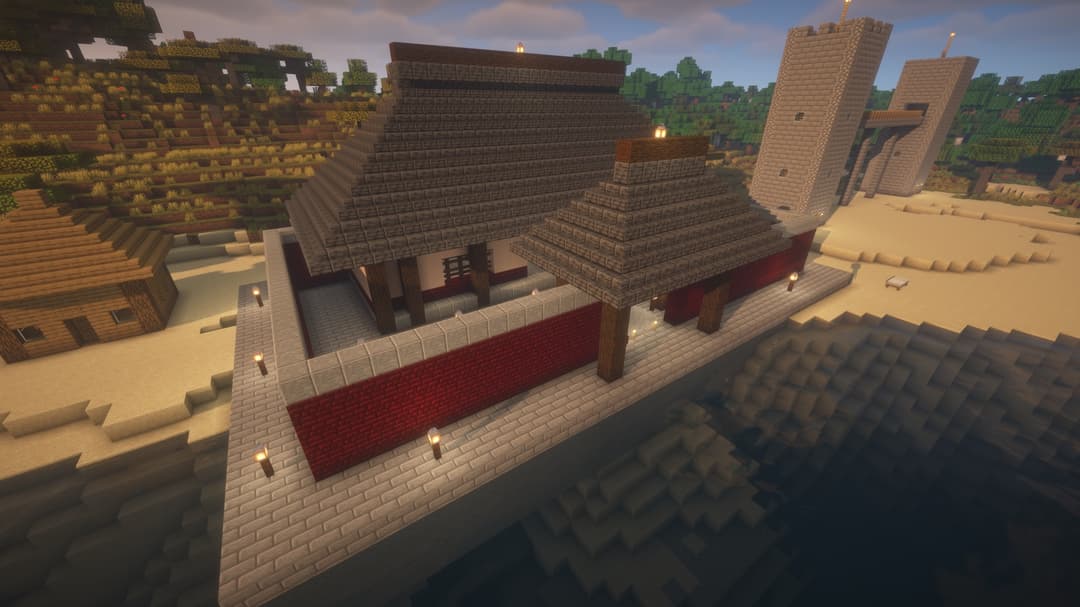
Built by Claude through this MCP.
Ashlar is a Paper plugin plus a Node MCP server. Point an AI client - Claude Desktop, Claude Code, OpenCode, Cursor, or anything else that speaks MCP - at the MCP server, and it gets nine tools to survey terrain, render images of the world, build in bulk, inspect exact block data, snapshot/restore regions, and run console commands. No mods, no SSH access to the host, no need to run the world on your own machine: the plugin runs inside your existing Paper server (a panel-hosted one works fine) and talks to the MCP server over a WebSocket. Players who have no MCP client at all can instead just type /ashlar <request> in chat and get an answer from the plugin's own built-in assistant - no Node process or inbound port needed for that path; see In-game assistant below.
How it works
AI client                MCP server                 Paper plugin
(Claude/ChatGPT/...)     (Node, mcp-server/,         (Java, plugin/ - owns the
                          a protocol adapter)         tool layer: descriptions,
                                                       schemas, result text,
                                                       execution)

   mc_* tool call  --->  tool_catalog/tool_call  --->   main-thread block
   (stdio or HTTP)       over WebSocket RPC             writes, tick-budgeted
                         (ws:// / wss://)
        <---  text/image result  <---  JSON result / progress events

player's /ashlar  --->  plugin's built-in assistant  --->  model API (DeepSeek by default)  --->  same tools above
The tool layer lives entirely in the plugin, not in the MCP server: ashlar-mcp fetches the tool catalog (descriptions, JSON schemas, and the server-level instructions text) from the plugin at startup and just forwards calls, so there is one definition of every tool, reused by any MCP client and by the in-game assistant alike. The /ashlar path needs no Node process and no inbound port at all: the plugin calls the model API directly (an outbound HTTPS connection) and runs the same in-process tool layer the MCP adapter forwards to.
- Coarse-grained tools: one
mc_buildcall places up to 500,000 blocks, instead of the AI placing blocks one at a time. - All block edits run on the server's main thread, spread across ticks under a per-tick time budget, so a large build does not freeze the server or lag players.
- Physics is off while writing (sand does not fall, water does not flow); a connection pass afterward lets fences/panes/walls/stairs connect to their neighbours, and any block left without support is reported back as a warning instead of silently popping off.
mc_buildcan snapshot the affected region before writing, so any build can be rolled back withmc_restore.
The tools
| Tool | What it does |
|---|---|
mc_status | Server/plugin health and queue length. |
mc_players | Online players with position and facing ("here", "in front of me", "at my feet"). |
mc_survey | Terrain survey of an x/z area: heightmap image plus exact numbers (min/max/median height, surface mix, largest flat zone); format:"text" for an ASCII map. |
mc_render | PNG image of a region: top view, north/south/east/west facades, a slice, or a heightmap (top/heightmap are area-priced, any y range). |
mc_build | Places blocks in bulk (cuboid fills with modes replace/keep/outline/hollow/walls, individual blocks and sign text, plus lettering rendered by the plugin via text); the only tool that builds. |
mc_inspect | Exact block contents of a region (statistics, ASCII slice, sign text). |
mc_snapshot | Save a region before changing it (or list saved snapshots). |
mc_restore | Roll a region back to a snapshot. |
mc_command | Run a server console command and return its output (escape hatch). |
Typical flow: mc_players (if the request is relative to a player) -> mc_survey or mc_render to see the site -> mc_snapshot -> mc_build -> mc_render/mc_inspect to verify -> mc_restore if it went wrong. Coordinates: X grows east, Z grows south, Y grows up; from/to corners are inclusive.
Install (three steps)
1. Install the plugin
- Download
ashlar-0.4.9.jarfrom the Releases page into your server'splugins/folder. - Start the server once, then stop it. The plugin refuses to fully start on this first run - it writes a default
plugins/Ashlar/config.ymland disables itself because the token is empty. - Edit
plugins/Ashlar/config.yml:mode: how this server is used -both(default: MCP clients and/ashlar),mcp(MCP clients only),ingame(/ashlaronly) orexternal(see In-game assistant). Only using/ashlarin game, no AI client? Setmode: ingame, skip the rest of this list and go straight to that section: no port is opened and no token is needed.server.token: a long random value, e.g.openssl rand -hex 24. Unlessmodeisingame, the plugin refuses to start if this is missing or shorter than 16 characters.server.port: an idle TCP port your host/panel exposes.server.allowed-ips: optional. If the MCP server runs somewhere with a fixed public IP (a VPS), put that IP here. If it runs on your own PC behind a typical home connection, your IP changes and an allow-list would lock you out - leave it empty and rely on the token, which is the real authentication. See Security for what an empty list means and how to tighten it anyway.
- Restart the server.
2. Have Node on the client machine
There is nothing to install by hand. The client configs below start the MCP server with npx -y ashlar-mcp, which downloads it from npm on first launch and caches it; the only requirement is Node >= 22 on the machine that runs your AI client. (ashlar-mcp 0.4 needs plugin 0.3 or newer and exits with a clear message otherwise. If you would rather have a fixed path, npm install -g ashlar-mcp once and point the configs at the resulting ashlar-mcp binary.)
3. Connect a client
Claude Desktop
Edit claude_desktop_config.json (Settings -> Developer -> Edit Config) and add:
{
  "mcpServers": {
    "ashlar": {
      "command": "/absolute/path/to/npx",
      "args": ["-y", "ashlar-mcp", "--stdio"],
      "env": {
        "MC_PLUGIN_URL": "ws://<your-server-ip>:8765",
        "MC_PLUGIN_TOKEN": "<the token from config.yml>"
      }
    }
  }
}
Use an absolute path to npx (which npx) - Claude Desktop does not inherit your shell's PATH. After adding the server, open its "Tool access" settings and pick "Tools already loaded"; the alternative, "Load tools when needed", is unreliable in practice (the model can end up seeing only one or two mc_* tools). Claude Desktop starts two instances of the MCP server per configured connector - this is normal and harmless.
Claude Code
claude mcp add --scope user --transport stdio ashlar \
  -e MC_PLUGIN_URL=ws://<your-server-ip>:8765 \
  -e MC_PLUGIN_TOKEN=<the token from config.yml> \
  -- npx -y ashlar-mcp --stdio
OpenCode
Add to opencode.json (in the project, or ~/.config/opencode/opencode.json for every project):
{
  "$schema": "https://opencode.ai/config.json",
  "mcp": {
    "ashlar": {
      "type": "local",
      "command": ["npx", "-y", "ashlar-mcp", "--stdio"],
      "environment": {
        "MC_PLUGIN_URL": "ws://<your-server-ip>:8765",
        "MC_PLUGIN_TOKEN": "<the token from config.yml>"
      },
      "enabled": true
    }
  }
}
A project-level opencode.json contains the token, so keep it out of git (or use the global file). For an HTTP-mode server (below) use "type": "remote" with "url": "http://<host>:3000/mcp" and "headers": {"Authorization": "Bearer <MCP_HTTP_TOKEN>"} instead.
Remote/HTTP mode (for a VPS-hosted MCP server)
Run the MCP server itself over HTTP instead of stdio, e.g. on the same VPS as a panel-hosted Paper server:
MC_PLUGIN_URL=ws://127.0.0.1:8765 \
MC_PLUGIN_TOKEN=<plugin token> \
MCP_HTTP_TOKEN=<a second, separate long random token> \
npx -y ashlar-mcp --http
Clients that can send custom headers authenticate with Authorization: Bearer <MCP_HTTP_TOKEN> against POST /mcp. Clients that cannot set headers (such as a remote MCP connector configured with only a URL) can instead use POST /mcp/<MCP_HTTP_TOKEN>, which puts the token in the path. GET /healthz is unauthenticated and reports whether the MCP server currently has a live connection to the plugin.
Put a TLS-terminating reverse proxy in front of the HTTP port - the server itself only speaks plain HTTP. Claude Desktop's remote connector setup requires HTTPS. A minimal Caddy config does this in one line:
mcp.example.com {
    reverse_proxy 127.0.0.1:3000
}
First build
A worked example. The user says:
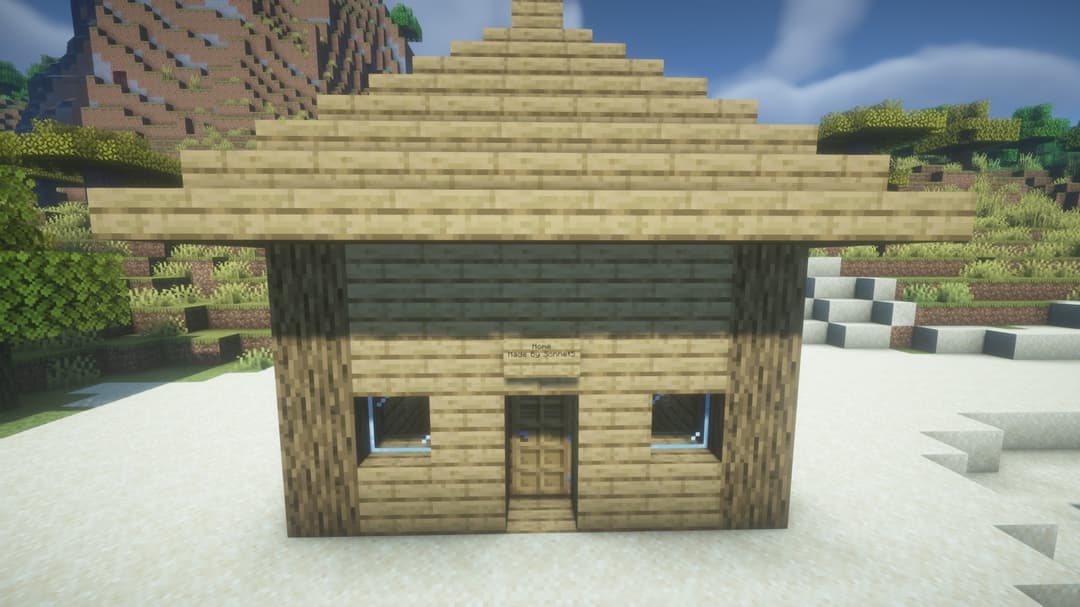
Survey the area around me and build a small stone cottage with glass windows and a sign over the door saying "Home". Snapshot first.
The model's tool calls, in order:
mc_players{}- finds the caller's block position, e.g.pos: [104, 65, -212], and facing.mc_survey{ "from": [84, -232], "to": [124, -192] }- a 40x40 area centered on the player; returns a heightmap image plus text such asLargest flat zone (+/-1 block): 12x9 at x=98..109 z=-220..-211, y=65.mc_snapshot{ "action": "create", "from": [98, 64, -220], "to": [109, 71, -211] }- captures the build region; returns a snapshot id likesnap-20260914-101532-7c2a.mc_buildwith a handful offills(floor, walls viamode: "walls", roof) usingminecraft:stone_bricks, window openings via a secondfillsentry withminecraft:glass, and oneblocksentry forminecraft:oak_doorplus one for a sign (minecraft:oak_wall_sign[facing=south]withsign.front: ["Home"]) placed in the air block above the door frame.mc_render{ "from": [98, 64, -220], "to": [109, 71, -211], "view": "south" }- a facade image to check the result.
If the door or sign ended up without solid support behind it, mc_build's response text ends with a block like:
WARNINGS (blocks that would fall or pop off in vanilla, including ones next to something you just removed; physics is disabled so they stay - fix them):
  1x minecraft:oak_wall_sign[facing=south] at 103,68,-215: no solid block behind it
The model is expected to read this and fix the flagged blocks (or explain the trade-off) before telling the user the build is done - physics being off means nothing falls on its own.
In-game assistant (no AI client needed)
Everything above needs an AI client on the player's own machine. /ashlar <request> is the alternative: the plugin runs the assistant itself, inside the same process as everything else, through the same nine tools - without anyone needing Claude Desktop, Claude Code, Cursor, any other MCP client, or a separate Node process. This is for the players and friends on your server who do not run an AI client at all - the server owner sets one API key and pays for the model API; everyone else just types in chat.
Setup
-
Plugin only. Set
agent.model.api-keyinplugins/Ashlar/config.ymlto a DeepSeek key from platform.deepseek.com (the defaults already point atdeepseek-flash), restart the server, and/ashlarworks - no other process to run:mode: both # default: MCP clients and /ashlar; "ingame" = /ashlar only, no port, no token agent: model: api-key: "sk-..." # required; leave empty and /ashlar replies "not configured"Whether the assistant runs is decided by the top-level
modekey:both(default) - the WebSocket server for MCP clients and the assistant, run by the plugin itself usingagent.model.*below; no Node process needed for/ashlar.ingame- the assistant only: no WebSocket server, no port, noserver.token.mcp- the WebSocket server only;/ashlaris disabled.external- the WebSocket server, with/ashlarrequests forwarded to a connectedashlar-mcp-style process over the plugin's chat events, for integrators; this is the previous 0.2 layout.
-
Any OpenAI-compatible endpoint works by setting
agent.model.base-urlandagent.model.modelinstead of the DeepSeek defaults (OpenAI, OpenRouter, a local Ollama), as long as the model supports tool calling. Vision is recommended: without it the assistant cannot look at the imagesmc_render/mc_surveyreturn, only their text. -
Who may use it is decided in this order (unchanged from 0.2):
- Operators always can.
- A permissions plugin that has explicitly granted or denied
ashlar.usewins (e.g./lp user <name> permission set ashlar.use truewith LuckPerms; an explicitfalseblocks the player even if they are on the allow list below). - Otherwise the plugin's own allow list decides:
/ashlar allow <player>,/ashlar deny <player>,/ashlar allowed(operators only; stored inplugins/Ashlar/allowed-players.yml). This is enough for a friends' server with no permissions plugin at all. agent.everyone-can-use: trueopens/ashlarto every player (the daily limits and cooldown still apply). Defaultfalse.
Using it
/ashlar build a small stone cottage in front of me
/ashlar ask <request> is the same thing spelled out - use it when a request happens to start with one of the command words (usage, cancel, limit, ...). Tab completion lists the subcommands the player may use and fills in player names.
The player sees [Ashlar]-prefixed progress lines as the assistant works (> mc_survey ..., > mc_build ...) followed by its final reply. /ashlar cancel stops a request in progress (it takes effect between tool calls, not inside one). /ashlar undo rolls back the player's own last assistant build with no model call at all - it restores the newest snapshot the caller's own requests created (an MCP client's snapshots are never touched) and marks it undone, so a second /ashlar undo goes one step further back; a reply that made a snapshot hints at it in its footer. Follow-up requests remember the recent conversation - only what the player asked and what the assistant finally answered (coordinates, materials, snapshot id), never the tool traffic in between - so "make the roof taller" works without repeating the whole description while the context stays small; /ashlar reset forgets it and starts fresh. Replies come back in whatever language the request was written in. Players with the ashlar.monitor permission (default op) see a compact echo of every other player's request and final reply - "<name> asked: ..." and [Ashlar -> <name>]-prefixed replies, but none of the progress lines; turn it off with agent.echo-to-monitors: false.
From the server console (no player needed), ashlar simulate <x> <y> <z> [facing] <request> drives one request through the same code path, with progress and the final reply printed to the console instead of chat - the way to test the assistant without a player online:
ashlar simulate 100 64 -200 south build a small stone cottage
Usage, cost and limits
Every final reply ends with a footer line, e.g. (this request: 21.9k tokens, $0.0061 | today: $0.04 of $1.00) - of $1.00 is omitted when there is no cost limit, and it shows tokens instead of cost when every agent.pricing.* price is 0 (a free/local model). Usage, per-player limit overrides and a global pause flag are persisted to plugins/Ashlar/usage.json so they survive a restart.
Players with the ashlar.admin permission (default op) get these in-game commands (/ashlar help lists the ones the caller may use):
/ashlar usage [player|all]- with no argument, the caller's own usage; a player name, theirs;alllists every player who has used the assistant, sorted by today's cost (top 20, with a note if more exist). Each report shows today's and all-time requests/tokens/cost, plus the effective per-day limits and which are overrides./ashlar usage [player|all] <days>//ashlar usage [player|all] <from> <to>- a per-day report instead of the today/total summary: the last N days (1-31, ending today) or an explicit inclusive date range (also capped at 31 days; a reversedfrom/tois swapped, and a future date is clamped to today). A bare range with no player is the caller's own usage - unlike the target form above, this needs noashlar.monitor, onlyashlar.use. Dates may be written asYYYY-MM-DD,YYYYMMDD, orMM-DD/M-D(day/month in the current UTC year); the two ends of a range may mix spellings. For example,/ashlar usage 7:Usage for Steve, 2026-09-08..2026-09-14: 2026-09-08 0 req 0 tok $0.00 2026-09-09 0 req 0 tok $0.00 2026-09-10 3 req 41.2k tok $0.02 2026-09-11 0 req 0 tok $0.00 2026-09-12 5 req 102.4k tok $0.05 2026-09-13 0 req 0 tok $0.00 2026-09-14 1 req 9.8k tok $0.01 total: 9 req, 153.4k tok, $0.08/ashlar limit [player] <cost|tokens|requests> <value|off>//ashlar limit [player] reset- sets (or clears) a per-day cap. With no player, it sets the server default;offmeans unlimited. Precedence: a player's own override, then the server default, then theagent.limits.*config value./ashlar pause//ashlar resume- a global switch; while paused, every new/ashlarrequest is rejected with a message, without touching one already running./ashlar cancel <player>- cancels another player's running or queued request (their own/ashlar cancelstill works too); the target is told who cancelled it./ashlar allow <player>//ashlar deny <player>//ashlar allowed- the plugin's own allow list (see Setup)./ashlar credit <player>//ashlar credit <player> <add|set> <amount>//ashlar credit <player> off- manage a player's prepaid credit (see "Prepaid credit" below)./ashlar reload(alsoashlar reloadfrom the console) - re-readsconfig.ymland applies most keys immediately, no restart; config.yml marks each keyReloadorRestart, and a changedRestartkey is listed in the reply but still needs one. An invalid file is rejected with the error and the running config is left untouched.
Prepaid credit
Daily limits (above) are the operator's own safety valve and are checked only before a request starts. Credit is different: it is someone else's money, so it is checked before a request and enforced while one is running. Give a player credit with /ashlar credit <player> add <amount> (tops up, enabling credit if it was off) or /ashlar credit <player> set <amount> (replaces the balance outright); /ashlar credit <player> off disables it again; /ashlar credit <player> with no further arguments shows the balance. A player without credit enabled is completely unaffected by any of this - /ashlar usage and the reply footer only show a credit line once they have some.
The balance is deducted after every model turn, the same per-turn accounting the usage counters already use. If it reaches zero while a request is still running, the request is wrapped up gracefully rather than cut off mid-build: the tool call already in flight finishes, then the model gets one final turn with no tools to say what it completed, what is left, and the snapshot id - the same mechanism used when a request hits agent.model.max-tool-calls. The final reply gets an extra line telling the player to ask an operator to top up and then say "continue". Starting a new request with a balance already at or below zero is rejected up front, like any other limit. Daily limits still apply on top of credit - both are checked. Balances persist in the same plugins/Ashlar/usage.json as everything else above.
agent.limits.* and agent.pricing.* in plugins/Ashlar/config.yml (in-game assistant only):
| Key | Default | Meaning |
|---|---|---|
agent.model.max-tool-calls | 25 | Max tool calls per player request before forcing a final answer. |
agent.limits.max-requests-per-player-per-day | 40 | Per-player daily request cap, reset at UTC midnight; 0 = unlimited. Overridable per-player via /ashlar limit. |
agent.limits.max-tokens-per-player-per-day | 0 | Per-player daily token cap (input + cached + output); 0 = unlimited. Overridable per-player. |
agent.limits.max-cost-per-player-per-day | 0 | Per-player daily cost cap, in agent.pricing.currency; 0 = unlimited. Overridable per-player. |
agent.model.allow-command | false | Whether mc_command is included in the assistant's tool list. |
agent.limits.max-concurrent | 2 | Requests running at once across all players. |
agent.limits.history-turns | 6 | User/assistant exchanges remembered per player. |
agent.limits.history-ttl-minutes | 30 | Idle minutes after which a player's history is dropped. |
agent.model.image-detail | "high" | Image detail passed through on image parts: low/high/auto. |
agent.model.system-prompt-file | "" (none) | Optional path to a text file appended to the built-in system prompt. |
agent.model.request-timeout-ms | 120000 | Per model call timeout, in milliseconds. |
agent.pricing.input | 0.30 | Price per 1M uncached input tokens, at peak price (verified DeepSeek deepseek-flash rate, 2026-09-14). |
agent.pricing.cached-input | 0.006 | Price per 1M cached input tokens, at peak price. |
agent.pricing.output | 1.20 | Price per 1M output tokens, at peak price. |
agent.pricing.currency | "USD" | Label only: USD shows as $, anything else as a <code> prefix. |
agent.pricing.peak-hours | "mon-fri 01:00-04:00,06:00-10:00" | UTC windows in which agent.pricing.* prices apply in full - DeepSeek's own peak schedule. always disables the off-peak discount, for providers that do not offer one. |
agent.pricing.off-peak-multiplier | 0.5 | Price multiplier applied outside agent.pricing.peak-hours. |
A small hut (survey, snapshot, build, a couple of renders, a final reply - about a dozen model calls) ran roughly 320k prompt tokens, dominated by the tool descriptions and the images sent back on each call, for about $0.05 at DeepSeek's peak price (half that off-peak); budget agent.limits.max-cost-per-player-per-day accordingly - a cap of 1 (one dollar) covers roughly 20 such requests at peak price.
Safety
mc_commandis never offered to the model unless the operator setsagent.model.allow-command: true.agent.limits.max-requests-per-player-per-day,agent.limits.max-tokens-per-player-per-dayandagent.limits.max-cost-per-player-per-daycap what one player can spend per day; operators (ashlar.admin) can tighten or loosen any of them per player from in-game chat, or pause the assistant entirely.- The plugin's
agent.cooldown-secondsandagent.max-message-lengththrottle and bound individual/ashlarrequests before they even reach the assistant. - Use
world.build-region(see Configuration reference) to fence off where the assistant is allowed to build, the same way you would for a human builder. - The assistant snapshots the region before building, so a bad result can be rolled back with
mc_restore- ask it to restore, or usemc_restoreyourself. agent.model.system-prompt-fileadds house rules to the built-in system prompt, e.g. a file containing a line likeNever build within 50 blocks of spawn.
Upgrading from 0.2
- Stop the old Node-based assistant process - the flag that used to start it no longer exists and now exits immediately with a message pointing at
agent.mode: embedded. - If you want to keep your usage counters, copy the old usage file (next to wherever that process used to run) to
plugins/Ashlar/usage.json(same format). - Move the old process's provider/limit/pricing environment-variable values into the matching
agent.model.*/agent.limits.*/agent.pricing.*keys inplugins/Ashlar/config.yml- see the table above and Configuration reference for the exact key names. - If you still want a separate process driving
/ashlar(e.g. a custom integration), setmode: external- that is the old 0.2 behaviour.
Compatibility
| Component | Status |
|---|---|
| Paper 26.2 | Tested (build 124) |
| Paper 26.3 | Tested (build 5, alpha channel - the same jar, api-version stays 26.2) |
| Paper 26.x | Expected to work (same major API line) |
| Java | 25 required (Paper 26.x's hard requirement) |
| Node | >= 22 required (MCP server uses the built-in WebSocket global) |
| MCP clients | Any MCP SDK v2 client: Claude Desktop, Claude Code, OpenCode, Cursor, etc. |
ashlar-mcp <-> plugin | ashlar-mcp 0.4 requires plugin >= 0.3.0 (fetches the tool catalog via tool_catalog at startup; exits with a clear message otherwise); plugin 0.3+ still serves every RPC an ashlar-mcp 0.2 client uses, so an older ashlar-mcp keeps working against a newer plugin. |
| In-game assistant | Plugin only (no Node) once agent.model.api-key is set. |
| Language | Plugin chat text: English or Simplified Chinese (language in config.yml), or each player's own client language (auto). The AI's own replies always follow whatever language the request was written in, regardless of this setting. |
Not supported: Minecraft 1.21.x and older (different Paper API version), Folia (single main-thread scheduling model assumed throughout), Bedrock Edition.
Security
The plugin's WebSocket port is a remote console with full build and (optionally) command-execution privileges. Treat the token like a root password.
- Set a long, random
server.token(>= 16 characters; the plugin enforces this and refuses to start otherwise).openssl rand -hex 24is a good source. server.allowed-ipsis a second layer, not the first: the token is what actually authenticates a client (a failed or missing handshake is closed within 5 seconds). Set the allow-list when the MCP server has a fixed IP (a VPS). When it runs on a home PC with a dynamic IP, leave it empty rather than pinning today's address; if you want to lock it down anyway, use the host's firewall or panel rules, or put both machines on a private overlay network (Tailscale, WireGuard) and allow only that address range.- The plugin does not provide TLS. Plaintext
ws://across the open internet exposes the token to anyone on the path - acceptable only for local/LAN testing. For anything crossing an untrusted network, put a reverse proxy (Caddy, Nginx, Cloudflare Tunnel, ...) in front of it to terminate TLS (wss://), and do the same for the MCP server's own HTTP mode. - Disable
run-command.enabledif you do not need themc_commandescape hatch - it runs arbitrary console commands with full operator privileges. - Every executed operation is appended to
plugins/Ashlar/operations.log(IP, method, summary, blocks changed) whenlogging.log-operationsis on, as an audit trail. limits.*bound how much a single call can touch (blocks, chunks, read volume);world.allowed-worldsand the optionalworld.build-regionbound where it can happen. Configure these to match what you actually want an AI to be able to do.- The built-in assistant turns chat into a control channel for whoever may use
/ashlar: anyone with theashlar.usepermission can make it call every tool the assistant has, includingmc_commandifagent.model.allow-command: true. Grantashlar.use(or an allow-list entry) deliberately, the same way you would grant an operator permission, and keepagent.everyone-can-useoff on a public server. The model API key inconfig.yml(agent.model.api-key) should be treated like the server token - anyone who can read it can run up your model API bill.
Configuration reference
Plugin (plugins/Ashlar/config.yml)
| Key | Default | Meaning |
|---|---|---|
language | "en" | Language for everything the plugin itself says in chat (usage/help lines, progress lines, the usage footer, limit/credit/pause messages); does not affect the AI's own replies. en, zh_CN, or auto (each player's own client language, console always English). |
mode | "both" | How this server is used: both = WebSocket server (MCP clients) and the in-game assistant; mcp = WebSocket server only, /ashlar disabled; ingame = /ashlar only, no WebSocket server, no port, no token; external = WebSocket server with /ashlar forwarded to a connected external process (0.2 layout). Replaces agent.mode (still read when mode is absent). |
server.host | "0.0.0.0" | Interface the WebSocket server binds to. |
server.port | 8765 | TCP port for the WebSocket server. |
server.token | "" | Auth token for MCP clients; must be >= 16 characters or the plugin refuses to start (not checked under mode: ingame). |
server.allowed-ips | [] | Allow-list of exact client IPs (IPv4/IPv6, no CIDR/hostnames in v1). Empty = allow any IP. |
limits.max-blocks-per-operation | 500000 | Max blocks a single fill_batch/set_blocks request may touch. |
limits.max-read-volume | 200000 | Max region volume read_region/heightmap may return in one call. |
limits.tick-budget-ms | 20 | Max milliseconds of work per server tick for build tasks. |
limits.max-queued-operations | 16 | Max operations that may be queued at once before new ones are rejected. |
limits.max-chunks-per-operation | 1024 | Max 16x16 chunk columns a single operation's bounding box may force-load (a 1024-chunk cap covers a 512x512 block footprint). |
world.default | "world" | World used when a request omits world. |
world.allowed-worlds | ["world"] | Whitelist of world names operations may touch. |
world.build-region.enabled | false | Whether to further restrict builds to a bounding box. |
world.build-region.min / .max | {x:-1000,z:-1000} / {x:1000,z:1000} | The bounding box, when enabled. |
snapshot.enabled | true | Whether mc_snapshot/mc_restore are available. |
snapshot.max-snapshots | 20 | Snapshots kept on disk; oldest is evicted first. |
snapshot.max-volume | 200000 | Max region volume a single snapshot may capture. |
logging.log-operations | true | Whether executed operations are appended to operations.log. |
run-command.enabled | true | Whether the run_command/mc_command escape hatch is available at all. |
engine.connect-blocks | true | Whether writes get a shape-only connection pass (panes/fences/walls/bars/stairs connect to neighbours). Overridable per-request via mc_build's connect field. |
engine.support-warnings | true | Whether writes are checked afterward for unsupported attached blocks (reported as warnings, nothing is fixed automatically). No per-request override. |
engine.text-font-file | "" | Path to a .ttf/.otf/.ttc file mc_build's text entries use for non-ASCII (CJK) lettering instead of this JVM's system font. Empty keeps today's behaviour; relative paths resolve against the plugin data folder. A bad path only falls back to the system font with a logged warning - it never stops the server. |
agent.model.base-url | "https://api.deepseek.com" | OpenAI-compatible base URL; /chat/completions is appended. Only with the in-game assistant (mode: both/ingame). |
agent.model.api-key | "" | Bearer token for the model API. Required for the in-game assistant - empty means /ashlar replies "not configured" instead of the plugin refusing to start. |
agent.model.model | "deepseek-flash" | Model name sent in each request. Only with the in-game assistant (mode: both/ingame). |
agent.model.max-tool-calls | 25 | Max tool calls per player request before forcing a final answer. Only with the in-game assistant (mode: both/ingame). |
agent.model.request-timeout-ms | 120000 | Per model API call timeout, in milliseconds. Only with the in-game assistant (mode: both/ingame). |
agent.model.image-detail | "high" | Image detail passed through on image parts: low/high/auto. Only with the in-game assistant (mode: both/ingame). |
agent.model.system-prompt-file | "" | Optional path to a text file appended to the built-in system prompt. Only with the in-game assistant (mode: both/ingame). |
agent.model.allow-command | false | Whether mc_command is offered to the model as a tool. Only with the in-game assistant (mode: both/ingame). |
agent.limits.max-requests-per-player-per-day | 40 | Per-player daily request cap, reset at UTC midnight; 0 = unlimited. Overridable per-player via /ashlar limit. Only with the in-game assistant (mode: both/ingame). |
agent.limits.max-tokens-per-player-per-day | 0 | Per-player daily token cap (input + cached + output); 0 = unlimited. Overridable per-player. Only with the in-game assistant (mode: both/ingame). |
agent.limits.max-cost-per-player-per-day | 0 | Per-player daily cost cap, in agent.pricing.currency; 0 = unlimited. Overridable per-player. Only with the in-game assistant (mode: both/ingame). |
agent.limits.max-concurrent | 2 | Requests running at once across all players. Only with the in-game assistant (mode: both/ingame). |
agent.limits.history-turns | 6 | User/assistant exchanges remembered per player. Only with the in-game assistant (mode: both/ingame). |
agent.limits.history-ttl-minutes | 30 | Idle minutes after which a player's history is dropped. Only with the in-game assistant (mode: both/ingame). |
agent.pricing.input | 0.30 | Price per 1M uncached input tokens, at peak price. Only with the in-game assistant (mode: both/ingame). |
agent.pricing.cached-input | 0.006 | Price per 1M cached input tokens, at peak price. Only with the in-game assistant (mode: both/ingame). |
agent.pricing.output | 1.20 | Price per 1M output tokens, at peak price. Only with the in-game assistant (mode: both/ingame). |
agent.pricing.currency | "USD" | Label only: USD shows as $, anything else as a <code> prefix. Only with the in-game assistant (mode: both/ingame). |
agent.pricing.peak-hours | "mon-fri 01:00-04:00,06:00-10:00" | UTC windows in which agent.pricing.* prices apply in full; always disables the off-peak discount. Only with the in-game assistant (mode: both/ingame). |
agent.pricing.off-peak-multiplier | 0.5 | Price multiplier applied outside agent.pricing.peak-hours. Only with the in-game assistant (mode: both/ingame). |
agent.cooldown-seconds | 5 | Minimum seconds between two /ashlar requests from the same player. |
agent.max-message-length | 500 | Longest /ashlar request text accepted, in characters. |
agent.everyone-can-use | false | Whether every player may use /ashlar without being an operator, permission-granted, or on the allow list. |
agent.echo-to-monitors | true | Whether players with ashlar.monitor see a compact echo of other players' /ashlar requests and final replies (no progress lines). |
MCP server (environment variables)
| Variable | Required | Default | Meaning |
|---|---|---|---|
MC_PLUGIN_URL | Always | - | WebSocket URL of the Paper plugin, e.g. ws://127.0.0.1:8765. Must start with ws:// or wss://. |
MC_PLUGIN_TOKEN | Always | - | Must match server.token in the plugin's config.yml. |
MC_REQUEST_TIMEOUT_MS | No | 600000 | Per-request timeout waiting on the plugin, in milliseconds. |
MC_LOG_USAGE | No | on | Set to 0 to stop logging per-call size/token estimates to stderr. |
MC_USAGE_LOG | No | off | Path of a JSONL file to append one line per tool call to (consumed by tools/overlay.mjs). |
MCP_HTTP_HOST | --http only | 127.0.0.1 | Interface to bind. |
MCP_HTTP_PORT | --http only | 3000 | Port to bind. |
MCP_HTTP_TOKEN | --http only | - | Bearer token MCP clients must present. Required, >= 16 characters. |
MCP_ALLOWED_HOSTS | --http only, when not bound to localhost | - | Comma-separated hostnames accepted in Host/Origin headers. Required once MCP_HTTP_HOST is not localhost/127.0.0.1/::1. |
The in-game assistant has no environment variables of its own any more - see the agent.* keys in the plugin table above.
Troubleshooting
Symptom: connection closes with code 1006, and running curl against the plugin's port returns an HTML "domain not whitelisted" page.
Cause: some hosting providers filter plain HTTP by the Host header and reject anything that is not a recognized domain, including a raw WebSocket upgrade request sent to an IP.
Fix: set MC_PLUGIN_URL to the server's raw IP address, not a domain name.
Symptom: Claude only sees one or two mc_* tools instead of nine.
Cause: Claude Desktop's "Load tools when needed" setting loads tool definitions lazily and unreliably.
Fix: switch the connector's tool access setting to "Tools already loaded", or start a new chat.
Symptom: the plugin's log says the token is empty (or too short) and the plugin does not start.
Cause: server.token in config.yml is blank, whitespace, or shorter than 16 characters.
Fix: set a real token (openssl rand -hex 24) and restart - or, if nothing but /ashlar will be used, set mode: ingame.
Symptom: mc_render fails with VOLUME_EXCEEDED.
Cause: a facade/slice view is volume-priced (<= 200,000 blocks); a tall or deep from/to range can exceed that quickly.
Fix: use the top or heightmap views (area-priced, any y range) when you only need a footprint, or shrink the y range to the structure's actual height.
Symptom: sand, torches, ladders, signs or carpets end up floating or missing after a build.
Cause: physics is off by design (so intentional overhangs and floating platforms are possible); unsupported blocks are not auto-corrected.
Fix: read the WARNINGS block in mc_build's response - it lists exactly which blocks lack support and why.
Symptom: /ashlar says the assistant is not configured.
Cause: mode is both (the default) or ingame, but agent.model.api-key in config.yml is empty.
Fix: set agent.model.api-key to a real key and restart.
Symptom: the console says Ashlar agent: mode=external but nothing answers /ashlar.
Cause: mode: external forwards requests to a connected external process instead of running the assistant inside the plugin; none is connected.
Fix: either connect an ashlar-mcp-style external process that subscribes to the plugin's chat events, or set mode: both (the normal setup for most servers).
Symptom: mc_build's text fails saying this server's Java has no font for a character (typically CJK), especially in a Docker container.
Cause: the JVM reads the system font list once at startup, and a container image usually ships with no CJK font at all.
Fix: the quick one - mount a .ttf you already have into the container, set engine.text-font-file to its path, and run /ashlar reload (no restart needed). Otherwise install a system font (Debian/Ubuntu: apt install fonts-noto-cjk) and restart the server, or a Docker image needs the font baked into the image.
Symptom: the model's reply says it cannot see the image, or answers as if it never looked at the survey/render.
Cause: agent.model.model does not support vision, so the images sent alongside mc_render/mc_survey results are effectively invisible to it.
Fix: switch to a vision-capable model, or accept that the assistant is working from the text-only numbers in mc_survey's response.
Symptom: need to see the MCP server's logs for any of the above. Fix: Claude Desktop's MCP server logs live at:
- macOS:
~/Library/Logs/Claude/mcp-server-ashlar.log - Windows:
%APPDATA%\Claude\logs\mcp-server-ashlar.log - Linux:
~/.config/Claude/logs/mcp-server-ashlar.log
Measuring token usage
Every tool call logs one line to stderr with its size and a rough token estimate (text at ~4 characters/token, images at width*height/750):
[tool 60695] mc_survey: 812 ms, image 1024x1024 (~1398 tokens) + 240 chars (~60 tokens) = ~1458 tokens
Set MC_LOG_USAGE=0 to silence these lines. Set MC_USAGE_LOG=<path> to also append one JSON line per call to a file, independent of whether your client keeps stderr around (useful for Claude Code, or for building a spreadsheet).
For a live on-screen counter while recording or streaming, run the zero-dependency OBS overlay:
node mcp-server/tools/overlay.mjs
It auto-detects Claude Desktop's log file per OS (or reads MC_USAGE_LOG/--file), and serves a transparent page at http://127.0.0.1:4545/ to add as an OBS Browser Source. Visit .../?reset=1 once to zero the running total for a new take.
Development
# plugin (JDK 25 required)
cd plugin && JAVA_HOME=/opt/homebrew/opt/openjdk@25 ./gradlew build --no-daemon   # produces build/libs/ashlar-<version>-dev.jar; the release workflow builds the bare version
JAVA_HOME=/opt/homebrew/opt/openjdk@25 ./gradlew runServer --no-daemon   # local Paper test server in plugin/run

# mcp-server
cd mcp-server && env -u HTTP_PROXY -u HTTPS_PROXY npm install --omit=optional
env -u HTTP_PROXY -u HTTPS_PROXY npm run build && env -u HTTP_PROXY -u HTTPS_PROXY npm test
node tools/e2e.mjs        # end-to-end check against a running plugin test server
Project layout: plugin/ is an independent Gradle project (Paper plugin, Java 25); mcp-server/ is an independent npm project (TypeScript, MCP SDK v2). Both sides follow the same hard rules: Bukkit API only on the main thread inside the tick-budgeted executor, block writes only via setBlockData(data, false), requests fully validated on the network thread before being queued, no NMS/reflection, and pure-ASCII sources.
The tool layer lives entirely under plugin/: each mc_* tool is a Java class in plugin/src/main/java/cc/wujm/ashlar/tool/mc/, its description and JSON Schema are a resource file in plugin/src/main/resources/tools/<name>.json, and the server-level instructions text sent to the model is plugin/src/main/resources/tools/instructions.txt. To change a tool's description, schema, or the instructions text, edit the matching resource - both MCP clients and the in-game assistant pick it up automatically, since both go through the plugin's tool_catalog/tool_call RPCs and neither hardcodes any tool knowledge of its own. Result text formatting (headers, warnings, ASCII maps, error text) lives in plugin/src/main/java/cc/wujm/ashlar/tool/text/; the golden files under plugin/src/test/resources/goldens/ are the reference for that formatting and should be updated deliberately, not silently, when it changes.
Roadmap
v0.4:
- Mid-build cancellation: today
/ashlar cancelonly takes effect between tool calls, not inside a singlemc_buildfill. - A native Anthropic-format provider for the embedded assistant, alongside the current OpenAI-compatible chat-completions one.
v0.5:
- Event bus for world/player events, and per-token scopes (a token can be limited to a subset of tools/worlds instead of all-or-nothing).
v1.1:
- Deterministic color tinting so blocks sharing a Minecraft map color (e.g. stone/stone bricks/cobblestone) are distinguishable in
mc_render/mc_surveyimages. mc_inspectslice: merge block types beyond the current 47-distinct-type limit, plus an optionalfocusparameter to highlight one block type.- Snapshots capture block entity contents (sign text, container items) so
mc_restoredoes not lose them. - CIDR ranges in
server.allowed-ips(exact IPs only today).
v2 (candidates, not committed):
- Block entity content in
set_blocks/read_region: container contents (chest/hopper/dispenser/furnace), command block text. - WorldEdit-compatible
.schemimport/export as a soft dependency. - Parametric structure generators (sphere, column, roof, spiral staircase).
- An optional "redstone domain" (
mc_interactto toggle levers/buttons and sample block state over several ticks,mc_entitiesto list moving parts) for actually testing redstone builds, not just placing them. - MCP endpoint inside the plugin (the Paper plugin speaks MCP directly, so a local/single-player setup would not need
mcp-serverat all) - under evaluation, not committed.
License
AGPL-3.0-or-later (see LICENSE). In short: if you run a modified version of this project on a server that other people interact with over a network, you must make that modified source available to them - the same copyleft as the GPL, extended to cover network use instead of only distribution. This matters if you fork the MCP server or plugin to run as part of a hosted service.
Contributions are welcome. A CLA will be added before external pull requests are accepted.
// faq
What is ashlar?
Ashlar - let AI assistants (Claude, ChatGPT, Cursor...) survey, render, build and inspect a live Minecraft Paper server through MCP. It is open-source on GitHub.
Is ashlar free to use?
ashlar is open-source under the AGPL-3.0 license, so it is free to use.
What category does ashlar belong to?
ashlar is listed under mcp-servers in the Claudeers registry of Claude-compatible tools.
// embed badge

[](https://claudeers.com/ashlar)
// retro hit counter

[](https://claudeers.com/ashlar)
// reviews
// guestbook
// related in MCP Servers
 🔓
🔓f.k.a. Awesome ChatGPT Prompts. Share, discover, and collect prompts from the community. Free and open source — self-host for your organization with complete…
 🔓
🔓A cross-platform desktop All-in-One assistant for Claude Code, Codex, OpenCode, OpenClaw, Gemini CLI & Hermes Agent. Only official website: ccswitch.io
 🔓
🔓🪨 why use many token when few token do trick — Claude Code skill that cuts 65% of tokens by talking like caveman
 🔓
🔓An open-source AI agent that brings the power of Gemini directly into your terminal.