
agent-speed
Agent Speed — A lightweight, real-time token speed monitor for Codex and Claude Code. Track tokens per second (TPS), detect slowdowns, and monitor AI agent p…
Install with your AI
Paste into Claude Code, Cursor, or any agent — it reads the repo and wires the tool into your project.
Install and set up agent-speed (release-binary project) into my current project.
Found on https://claudeers.com/agent-speed
Repo: https://github.com/zoefix/agent-speed
Homepage/docs: —
Detected install method: release-binary → inspect the README
Category: other. Platforms: cli, desktop.
Read the repo's README for exact setup and env vars, then install it and wire it into my project.

Claudeers Health Verdict:
active; community-verified: false. Confirm the source before running anything.
Grab the latest release asset from GitHub.
# download a build from https://github.com/zoefix/agent-speed/releases
git clone https://github.com/zoefix/agent-speed
// compatibility
| Platforms | cli, desktop |
|---|---|
| Operating systems | — |
| AI compatibility | claude |
| License | MIT |
| Pricing | open-source |
| Language | C# |
Agent Speed
Feel your AI agents run. A native racing instrument for the live token speed of Codex, Claude Code, Claude Desktop, DeepSeek Harness, OpenCode and Gemini CLI — calm when idle, on fire at the redline.
Install
macOS 14 or later (Apple Silicon and Intel) — paste into Terminal:
curl -fsSL https://raw.githubusercontent.com/zoefix/agent-speed/main/install.sh | sh
Windows 10 / 11 (x64 and ARM64) — paste into PowerShell:
irm https://raw.githubusercontent.com/zoefix/agent-speed/main/install.ps1 | iex
That's it. The installer downloads the latest release from GitHub, verifies its SHA-256 checksum, installs it and starts it. Run the same command again to update.
Uninstall
curl -fsSL https://raw.githubusercontent.com/zoefix/agent-speed/main/install.sh | sh -s -- --uninstall
& ([scriptblock]::Create((irm https://raw.githubusercontent.com/zoefix/agent-speed/main/install.ps1))) -Uninstall
Add --purge / -Purge to remove settings as well. On Windows you can also uninstall from Settings → Apps.
What you get
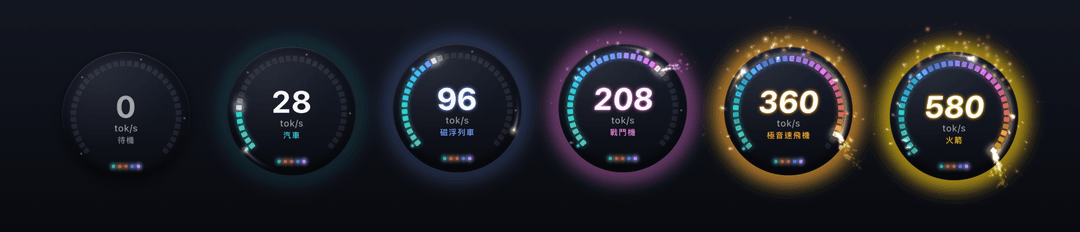
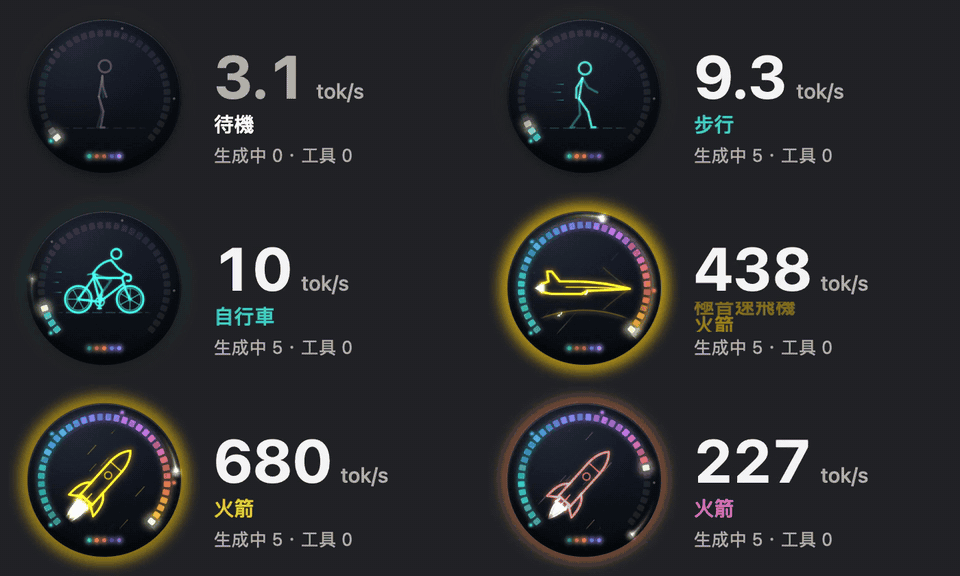
- Floating orb — a smoked-glass instrument with a 36-segment LED gauge. As speed climbs, so does its title — from Walking and Bicycle through Bullet Train and Fighter Jet to Rocket at the redline — while the gauge sweeps through the heat spectrum, a comet races around the ring, sparks fly, embers rise and every finished response sends out a shockwave. Beat your daily peak and it celebrates.
- Menu bar / taskbar — a compact gauge and number that never jitters, right where you look. On Windows it lives inside the taskbar, next to the clock.
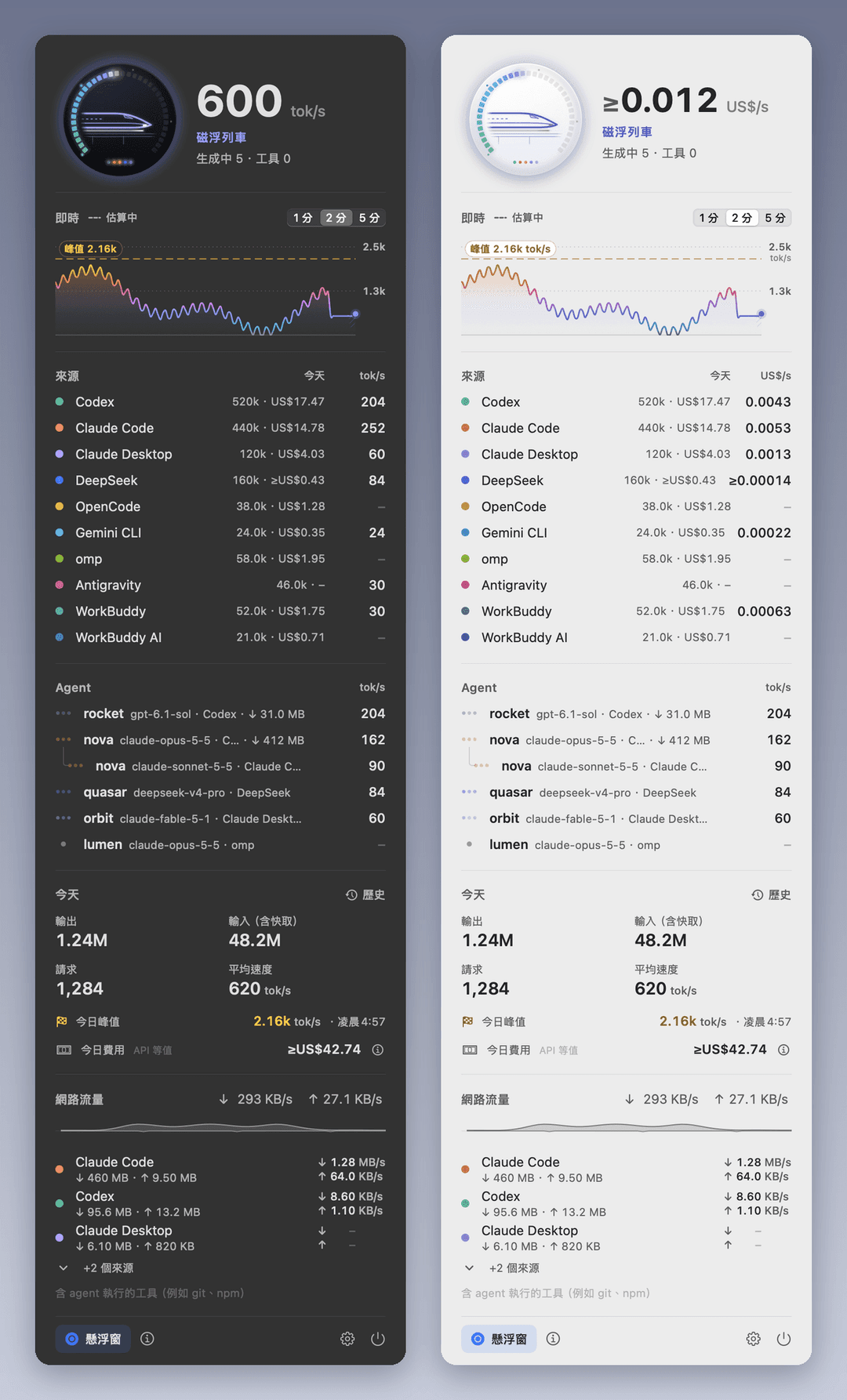
- Dashboard — a glowing line drawing of your current speed title's vehicle moves inside its orb — a walker, a bicycle pushing off, all the way to a rocket at the redline — plus a live chart, per-source speed, every active agent (including sub-agents) with its phase, and today's totals. Click a source to open its history.
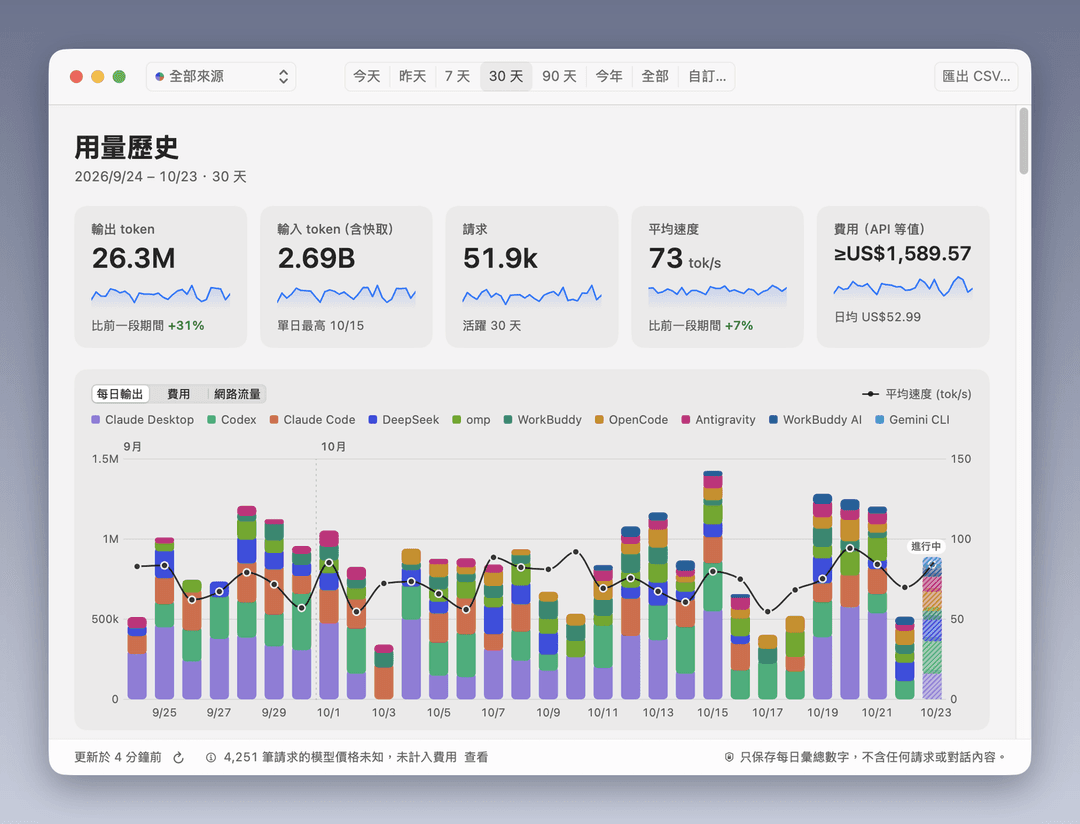
- Usage history — every day since your oldest log: output and input tokens, requests, average speed and peak, charted by source over any date range, with CSV export. Only daily totals are kept, so your history survives even after your tools delete old logs.
- Native everywhere — SwiftUI + AppKit on macOS, WPF with Fluent/Mica on Windows. Light, dark or automatic theme. English, 繁體中文, 简体中文, 日本語.
- Humane — effects intensity from Off to Max, respects Reduce Motion and high contrast, click-through mode, magnetic edges, remembers its place on every display, launches at login.
- Always current — checks GitHub Releases in the background and updates with one click, verified by SHA-256.
How speed is measured
Agent Speed reads the transcripts your agents already write on your disk:
| Source | Folder |
|---|---|
| Codex (CLI, IDE, desktop) | ~/.codex/sessions and archived_sessions, compressed logs included (or $CODEX_HOME) |
| Claude Code (CLI, IDE) | ~/.claude/projects (or $CLAUDE_CONFIG_DIR/projects) |
| Claude Desktop (Code and agent sessions) | ~/.claude/projects, told apart automatically |
DeepSeek Harness (dsh, desktop and CLI) | ~/.dsh/sessions (or $DSH_HOME/sessions) |
| OpenCode (CLI and desktop) | ~/.local/share/opencode/opencode.db (or $XDG_DATA_HOME/opencode) |
| Gemini CLI | ~/.gemini/tmp (or $GEMINI_CLI_HOME/.gemini/tmp) |
Speed = output tokens ÷ the real time the model spent on them — from the moment the request was sent until the response finished, including time to first token. Parallel agents add up. While a response is still streaming, it is estimated from that agent's recent measured speed and corrected with the measured value the instant it completes. Optionally you can switch to total throughput (input + output).
The full, testable specification lives in spec/METRICS.md. Both apps are verified against the same fixtures and an independent reference implementation.
Ordinary Claude Desktop chat conversations are not stored on your computer, so they cannot be measured.
Privacy
Read-only. Local-only. No telemetry, no accounts. The only network request is the update check against GitHub Releases (it can be turned off), which sends nothing about you. Agent Speed never stores or displays conversation content — only token counts, model names and project folder names. The usage history keeps only daily totals, in a small database on your computer (~/Library/Application Support/AgentSpeed, %LOCALAPPDATA%\AgentSpeed), and can be cleared in Settings. Updates are verified against the release's SHA-256 checksums before they are installed; the checksums are published with the release, so they catch corrupted or tampered downloads, not a compromised repository.
Build from source
macOS (Xcode 26 or later)
cd macos
swift test
./scripts/build-app.sh          # → dist/AgentSpeed-macOS.zip
Windows (.NET 10 SDK; also cross-builds from macOS/Linux)
dotnet test windows/tests/AgentSpeed.Core.Tests
dotnet test windows/tests/AgentSpeed.Presentation.Tests
./windows/scripts/publish.sh    # → dist/AgentSpeed-Windows-{x64,arm64}.zip
Project layout
spec/       measurement + design specification, shared fixtures, reference implementation
macos/      Swift package: AgentSpeedCore (engine) and AgentSpeed (SwiftUI app)
windows/    .NET solution: AgentSpeed.Core (engine), AgentSpeed.Presentation, AgentSpeed (WPF app)
assets/     icon artwork
install.sh  install.ps1
Friends
License
MIT © 2026 zoefix
// faq
What is agent-speed?
Agent Speed — A lightweight, real-time token speed monitor for Codex and Claude Code. Track tokens per second (TPS), detect slowdowns, and monitor AI agent performance at a glance.. It is open-source on GitHub.
Is agent-speed free to use?
agent-speed is open-source under the MIT license, so it is free to use.
What category does agent-speed belong to?
agent-speed is listed under other in the Claudeers registry of Claude-compatible tools.
// embed badge

[](https://claudeers.com/agent-speed)
// retro hit counter

[](https://claudeers.com/agent-speed)
// reviews
// guestbook
// related in Other
 🔓
 🔓
Anti-AI-slop design skill for Claude Code, Cursor, and Codex.
 🔓
Huashu Design · HTML-native design skill for Claude Code · Claude Code 里 HTML 原生的设计 skill · 高保真原型 / 幻灯片 / 动画 + 20 设计哲学 + 5 维评审 + MP4 导出 · Agent-agnostic
 🔓
Open source Ghostty-based macOS terminal with vertical tabs and notifications for AI coding agents. Built for multitasking, organization, and programmability.