
agent-relay-portable
Local conversation migration and portable conversation/Skill storage for WorkBuddy, DSH, CodeBuddy, Claude Code/SDK and Codex. Windows, macOS and Linux.
Install with your AI
Paste into Claude Code, Cursor, or any agent — it reads the repo and wires the tool into your project.
Install and set up agent-relay-portable (git-clone project) into my current project.
Found on https://claudeers.com/agent-relay-portable
Repo: https://github.com/FriedOnion2/agent-relay-portable
Homepage/docs: —
Detected install method: git-clone → git clone https://github.com/FriedOnion2/agent-relay-portable
Category: other. Platforms: cli, web.
Read the repo's README for exact setup and env vars, then install it and wire it into my project.

Claudeers Health Verdict:
active; community-verified: false. Confirm the source before running anything.
git clone https://github.com/FriedOnion2/agent-relay-portable
// compatibility
| Platforms | cli, web |
|---|---|
| Operating systems | — |
| AI compatibility | claude |
| License | MIT |
| Pricing | open-source |
| Language | Python |
AgentRelay Portable
中文 | English
在本机浏览、导出和迁移 AI 编程助手的对话与 Skill,并可打包到移动盘,在另一台设备恢复。
支持 WorkBuddy、DeepSeek Harness(DSH)、CodeBuddy、Claude Code、Claude Agent SDK、OpenAI Codex、腾讯元宝 JSON 导出,提供中英文网页和命令行,适用于 Windows、macOS、Ubuntu / Linux。
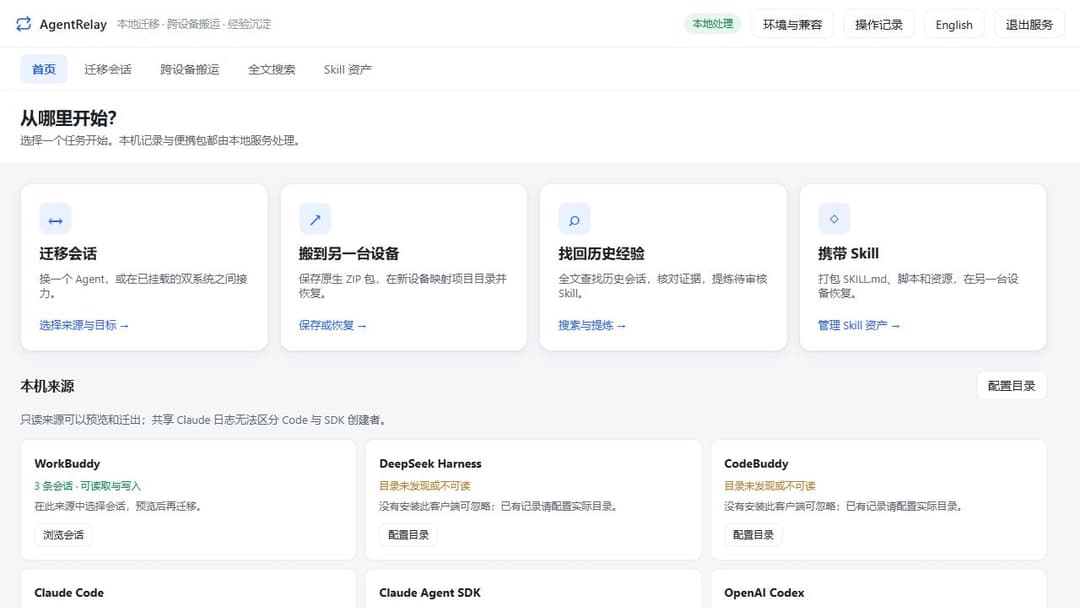
🔒 数据只在本机处理。 服务只监听本机地址,不上传会话,不调用模型;迁移前先预览“保留 / 降级 / 丢弃 / 未知”,确认后才写入。
能做什么
- 查看与导出:按来源浏览、搜索、预览会话,导出为 Markdown。
- 跨软件迁移:把会话转换到 WorkBuddy、DSH、Claude Code、Codex,保留可表达的正文、思考和工具历史。
- 跨设备存储:把对话、Skill 保存为原生 ZIP 包,复制到另一台设备后恢复到对应软件。
- 全文搜索:本地 SQLite/FTS5 索引,支持中文短词、中英混合与来源 / 项目 / 时间 / 工具筛选。
- 提炼 Skill 草稿:从多条相似的历史会话提炼带证据的 Skill 草稿,由你审核后导出,不自动安装或执行。
- Windows ↔ Ubuntu:双系统间搬迁同款软件的原生记录。
快速开始
正式版:v1.0.0。各 Agent 的实测范围见下方支持表与 兼容状态。
当前开发版本:1.1.0-dev(计划 1.1 版,尚未正式发布)。
普通用户:到 Releases 下载 AgentRelay-<版本>-universal.zip,完整解压后运行启动器。总包内置 Python 与依赖,无需另装 Python / Node.js,首次启动不联网下载。不要选择 GitHub 自动生成的 Source code 压缩包。
| 设备 | 启动入口 | 支持范围 |
|---|---|---|
| Windows | 启动_AgentRelay.bat | Windows 10/11 x64 |
| macOS | AgentRelay.app 或 bash 启动_AgentRelay.command | Apple Silicon:macOS 14+;Intel:macOS 15+ |
| Linux | bash 启动_AgentRelay.sh | Ubuntu 22.04+ / glibc 2.35+ x64 |
启动后在浏览器打开提示的地址(默认 http://127.0.0.1:8745/)。退出请点网页右上角「退出服务」。macOS 应用未经 Apple 公证,被系统阻止时的处理见 安装与启动。
从源码运行(需要 Python 3.8+):
python -m pip install -r requirements-optional.txt   # 读写 DSH 压缩历史需要 zstandard
python app/cli.py serve                              # 启动网页
python app/cli.py list codex                         # 命令行:列出某来源的会话
python app/cli.py export codex <会话id> -o out.md    # 导出 Markdown
python app/cli.py transfer codex <会话id> --to dsh --dry-run   # 先预览迁移
python app/cli.py --lang en list codex                # 命令行输出改为英文(或设 RELAY_LANG=en)
用 pip / pipx 安装(只用命令行和网页,不需要 U 盘便携):
pipx install git+https://github.com/FriedOnion2/agent-relay-portable   # 或 pip install .
relay serve
relay list codex
这种方式下配置、日志和存储包放在每用户数据目录(Linux ~/.local/share/agent-relay,macOS ~/Library/Application Support/AgentRelay,Windows %APPDATA%\AgentRelay),可用 RELAY_PORTABLE_ROOT 指定别处。
Ubuntu / macOS 可用 Ubuntu首次准备.sh / Mac首次准备.command 自动建立隔离环境。完整步骤见 安装与启动。
支持的来源
| 来源 | 默认会话位置 | 读取 / 导出 | 作为迁移目标 | 实机验证 |
|---|---|---|---|---|
| WorkBuddy | ~/.workbuddy/projects | ✅ | ✅ | 仅文件层核对 |
| DeepSeek Harness / DSH | ~/.dsh/sessions | ✅(v0–v4) | ✅ | 真实客户端已验证 |
| CodeBuddy CLI / IDE | ~/.codebuddy/projects 等 | ✅ | — | 仅文件层核对 |
| Claude Code | ~/.claude/projects | ✅ | ✅ | 导出已验证 |
| Claude Agent SDK | ~/.claude/projects(与 Claude Code 共享) | ✅ | — | 与 Claude Code 共享存储 |
| OpenAI Codex | ~/.codex/sessions | ✅ | ✅ | 真实客户端已验证 |
| 腾讯元宝 JSON 导出 | 便携目录 imports/yuanbao | ✅ | 仅导出文件存包恢复 | 合成 JSON 回归,未验证原生客户端 |
元宝入口位于「迁移会话 → 腾讯元宝」:填入兼容 JSON 文件的本机绝对路径后导入。需要先取得 JSON 导出;本次不读取元宝电脑版数据库或云端账户,也不把 ZIP 写回元宝客户端。换设备后可恢复到 AgentRelay 再查看或迁出,见元宝使用与格式说明。
“实机验证”指用真实客户端打开、续聊过迁移或恢复后的会话;其余只验证了文件层读写。厂商格式可能变化,详见 兼容状态 与 当前限制。
文档
完整索引见 docs/README.md,分为使用指南(guide/)、参考(reference/)、开发与维护(dev/)和调研记录(research/)。常用入口:
| 主题 | 文档 |
|---|---|
| 下载、安装、启动与退出 | docs/guide/install.md |
| 网页任务导航、恢复与草稿打包 | docs/guide/web-workflow.md |
| 批量存储、跨软件 / 双系统迁移与预览 | docs/guide/storage-and-migration.md |
| 搜索与 Skill 草稿 | docs/guide/search-and-skills.md |
| 便携存储、Ubuntu 双系统 | docs/guide/portable-storage.md · docs/guide/ubuntu-dual-boot.md |
| 配置与数据目录、故障排查 | docs/guide/configuration.md · docs/guide/troubleshooting.md |
| 兼容状态、已知限制、来源格式 | docs/reference/compatibility.md · docs/reference/limitations.md · docs/reference/source-formats.md |
| 腾讯元宝接入范围 | docs/reference/yuanbao-compatibility.md |
| 适配器与插件开发、测试 | docs/dev/adapters.md · docs/dev/writing-a-plugin.md · docs/dev/testing.md |
| 命令行完整说明 | 命令行参考(快速上手见 使用说明.md) |
参与贡献
欢迎提 issue 和 PR:请先阅读 CONTRIBUTING.md。安全问题请按 SECURITY.md 私密报告。版本变更见 CHANGELOG.md,维护流程见 docs/dev/maintainers.md。
许可
// faq
What is agent-relay-portable?
Local conversation migration and portable conversation/Skill storage for WorkBuddy, DSH, CodeBuddy, Claude Code/SDK and Codex. Windows, macOS and Linux.. It is open-source on GitHub.
Is agent-relay-portable free to use?
agent-relay-portable is open-source under the MIT license, so it is free to use.
What category does agent-relay-portable belong to?
agent-relay-portable is listed under other in the Claudeers registry of Claude-compatible tools.
// embed badge

[](https://claudeers.com/agent-relay-portable)
// retro hit counter

[](https://claudeers.com/agent-relay-portable)
// reviews
// guestbook
// related in Other
 🔓
 🔓
Anti-AI-slop design skill for Claude Code, Cursor, and Codex.
 🔓
Huashu Design · HTML-native design skill for Claude Code · Claude Code 里 HTML 原生的设计 skill · 高保真原型 / 幻灯片 / 动画 + 20 设计哲学 + 5 维评审 + MP4 导出 · Agent-agnostic
 🔓
Open source Ghostty-based macOS terminal with vertical tabs and notifications for AI coding agents. Built for multitasking, organization, and programmability.