
vitalaize
A wall screen for Claude Code and Codex sessions and your GitHub builds
Install with your AI
Paste into Claude Code, Cursor, or any agent — it reads the repo and wires the tool into your project.
Install and set up vitalaize (release-binary project) into my current project.
Found on https://claudeers.com/vitalaize
Repo: https://github.com/kyroco/vitalaize
Homepage/docs: —
Detected install method: release-binary → inspect the README
Category: other. Platforms: cli, api, web, mobile.
Read the repo's README for exact setup and env vars, then install it and wire it into my project.

Claudeers Health Verdict:
unknown; community-verified: false. Confirm the source before running anything.
Grab the latest release asset from GitHub.
# download a build from https://github.com/kyroco/vitalaize/releases
git clone https://github.com/kyroco/vitalaize
// compatibility
| Platforms | cli, api, web, mobile |
|---|---|
| Operating systems | — |
| AI compatibility | claude |
| License | Apache-2.0 |
| Pricing | open-source |
| Language | Elixir |
Kyroco VitalAIze
VitalAIze is a wall screen for teams that build software with AI coding
agents. Put it on an iPad (or any browser) and at a glance you see every
Claude Code and Codex session at work on the machine that runs it, which one
is waiting on you (on your other machines too), what your GitHub builds are
doing across all your repositories, and how the work trends over days and
weeks. Sessions from your other machines are saved for the archive and
trends, and their Claude sessions show on the live board while they wait on
you. When a session needs you, it can tell you by Messages, Slack, ntfy or
Pushover. It runs on your own Mac or Linux machine, and needs Claude Code
and the GitHub CLI (gh), both signed in; Codex is optional.
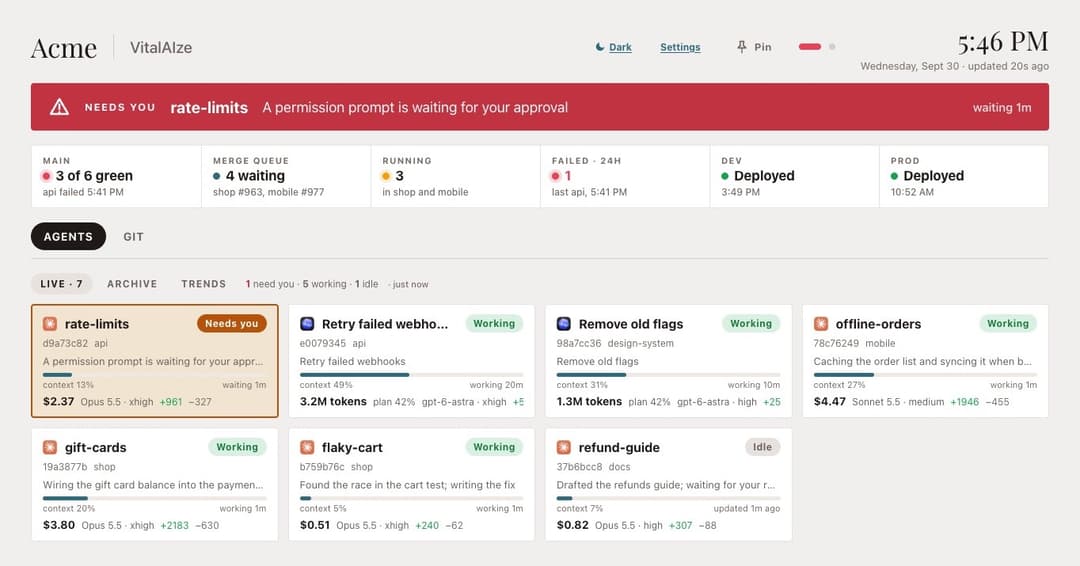
The wiki covers everything else: what each part of the board shows, settings and alerts, connecting other machines, known limits, building from source and how it works.
What's new in 0.3.0
- Several repositories, added up in the status line. The Git tab gives the four busiest a column each and lists the rest below.
- Alerts anywhere: Slack, ntfy (iPhone or Android) and Pushover, besides Messages on a Mac.
- Alerts for your other machines: a connected machine tells the hub the moment one of its Claude sessions starts waiting on you.
- Codex: Codex sessions can show Needs you (new, and not yet tried with a real Codex), and connected machines send their Codex sessions to the hub.
- A note when a new version is out, which you can turn off in Settings.
If you run 0.2.0 on Linux, upgrade. Every copy of that download had the same
built-in secret for remote control, so if you started the board by hand
(not with systemd.sh), anyone on your network who also had the download
could run commands on your machine. 0.3.0 turns remote control off. On a
machine connected by 0.2.0 or earlier, run the command from the hub's
Settings page (Connect another Mac) once more, or on a Mac with the app, run
its setup again, to add the new hooks.
Install on a Mac
- Download
VitalAIze-<version>.pkgfrom the latest release and open it. It is signed and notarized by Apple. - The installer says what it will do, then puts VitalAIze in your Applications folder and opens it.
- VitalAIze asks what this Mac does:
- Hub and collector, for your main Mac: it runs the board and saves this Mac's sessions.
- Hub only: it runs the board and keeps what other Macs send it.
- Collector only, for your other Macs: it sends this Mac's Claude and
Codex sessions to a hub, and tells the hub when a Claude session is
waiting on you. It finds hubs on your network by itself; you paste the
hub's key from the hub's Settings page (Connect another Mac). Codex
runs a new hook only once you trust it, so afterwards type
/hooksin Codex and trust the twowallboard-upload.shhooks.
- On a hub, it fills in what it can find (your Claude and Codex folders, the GitHub repositories your sessions work in, up to six, busiest first, the busiest one's workflows, your AWS profiles) and asks you to check it. Add or remove repositories there. Click Install. The board starts now and again every time you log in. On a collector, click Connect this Mac instead; steps 5 and 6 are for the hub.
- On your iPad, open the address VitalAIze shows in Safari, tap Share, then Add to Home Screen. Opened from the Home Screen, the board fills the screen. Turn the iPad sideways, and set Auto-Lock to Never in the iPad's Display & Brightness settings so the screen stays on.
- Choose how alerts reach you. Setup asks only for a phone number, for Messages. For Slack, ntfy or Pushover, open the board on this Mac, tap Settings and fill in the Alerts section. You can change the repositories there too.
Open VitalAIze again any time to see the board, restart it, change the setup or remove it.
Install on Linux
-
Download
vitalaize-<version>-linux-x86_64.tar.gz(Intel and AMD) orvitalaize-<version>-linux-arm64.tar.gz(ARM) from the latest release. It carries everything it runs on; you do not need Elixir or Erlang. It runs on Ubuntu 22.04 or newer, Debian 12 or newer, and other Linux systems of the same age or newer, and needs OpenSSL 3 (libssl3), which they already have. -
Unpack it and make your settings file:
tar -xzf vitalaize-*-linux-*.tar.gz cd vitalaize cp settings.example.exs settings.exs # then edit it -
Try it:
WALLBOARD_SETTINGS=$PWD/settings.exs bin/wallboard start. It prints the address to open. -
To keep it running, and start it whenever you log in:
./systemd.sh on(./systemd.sh offturns it off). To keep it running after you log out too, runloginctl enable-linger $USERonce.
What differs from a Mac: there is no setup app, so you edit settings.exs
(or the board's Settings page, which opens only in a browser on the same
machine until you set token). List your repositories in github.repos.
Text alerts by Messages need a Mac, so use Slack, ntfy or Pushover instead.
The database lives in ~/.local/share/vitalaize. To have other machines
find the hub on the network by themselves, install avahi-utils on the hub;
without it, collectors type the hub's address.
A Linux machine can be a collector too: run the command from the hub's
Settings page (Connect another Mac) there. It hooks up ~/.claude, or the
folder in CLAUDE_CONFIG_DIR, so run it once per Claude folder. It needs
python3 and curl, and to report prompts you approve or deny as they
happen, claude and perl. Like the app, the command hooks up Codex too
when the machine has it. Codex runs a new hook only once you trust it, so
afterwards type /hooks in Codex on that machine and trust the two
wallboard-upload.sh hooks.
Sessions from other machines travel to the hub unencrypted, so connect machines only on a network you trust. See the known limits in the wiki before you do.
Questions and ideas
Read the wiki first. Ask for help in Q&A and suggest features in Ideas, both in Discussions. Report bugs in Issues.
License
Apache License 2.0. See LICENSE and NOTICE.
Claude is a trademark of Anthropic, and Codex of OpenAI. VitalAIze is not made by or affiliated with either; it shows their icons only to mark which tool ran a session.
// faq
What is vitalaize?
A wall screen for Claude Code and Codex sessions and your GitHub builds. It is open-source on GitHub.
Is vitalaize free to use?
vitalaize is open-source under the Apache-2.0 license, so it is free to use.
What category does vitalaize belong to?
vitalaize is listed under other in the Claudeers registry of Claude-compatible tools.
// embed badge

[](https://claudeers.com/vitalaize)
// retro hit counter

[](https://claudeers.com/vitalaize)
// reviews
// guestbook
// related in Other
 🔓
🔓 🔓
🔓Anti-AI-slop design skill for Claude Code, Cursor, and Codex.
 🔓
🔓Open source Ghostty-based macOS terminal with vertical tabs and notifications for AI coding agents. Built for multitasking, organization, and programmability.
 🔓
🔓Huashu Design · HTML-native design skill for Claude Code · Claude Code 里 HTML 原生的设计 skill · 高保真原型 / 幻灯片 / 动画 + 20 设计哲学 + 5 维评审 + MP4 导出 · Agent-agnostic