
visual-review-page
Agent skill for Claude Code and Codex: shows plans and decisions as a local visual page and collects your answers
Install with your AI
Paste into Claude Code, Cursor, or any agent — it reads the repo and wires the tool into your project.
Install and set up visual-review-page (git-clone project) into my current project.
Found on https://claudeers.com/visual-review-page
Repo: https://github.com/pavel-molyanov/visual-review-page
Homepage/docs: https://neurozeh.ru/skills/visual-review-page/
Detected install method: git-clone → git clone https://github.com/pavel-molyanov/visual-review-page
Category: skills. Platforms: api, desktop, web.
Read the repo's README for exact setup and env vars, then install it and wire it into my project.

Claudeers Health Verdict:
active; community-verified: false. Confirm the source before running anything.
git clone https://github.com/pavel-molyanov/visual-review-page
// compatibility
| Platforms | api, desktop, web |
|---|---|
| Operating systems | — |
| AI compatibility | claude |
| License | MIT |
| Pricing | open-source |
| Language | HTML |
English | Русский
Visual Review Page
Teach your agent to present its ideas properly. A free skill for Claude Code and Codex that will save you a lot of nerves.
Skill page on the Neurozeh site →
Author's Telegram channel — subscribe: @molyanov_blog
This is how an agent usually writes a plan
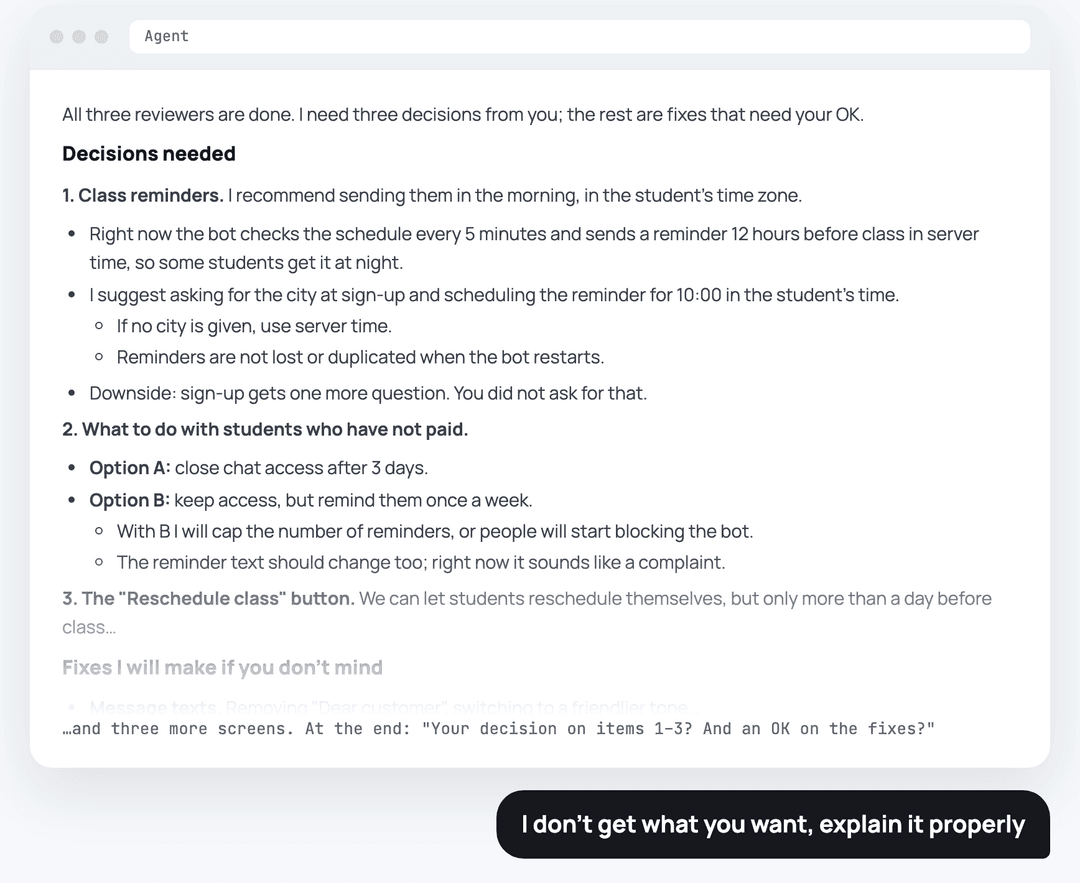
A wall of nested lists that is hard to make sense of.
The skill teaches the agent to explain like a human
Instead of a wall of text in chat, the agent builds a page that shows what it proposes to change, why, and how it will work. You leave a comment on any item right on the page, and the agent takes it into account.
It fits any task where the agent brings a plan: a bot, a website, an automation, video editing. The agent shows a layout on screenshots, a process diagram, options side by side, or audio in one player.
1. Plain words
Not "webhook and grace period", but what changes for you and your users: how it works now, how it will work, and a real-life example.
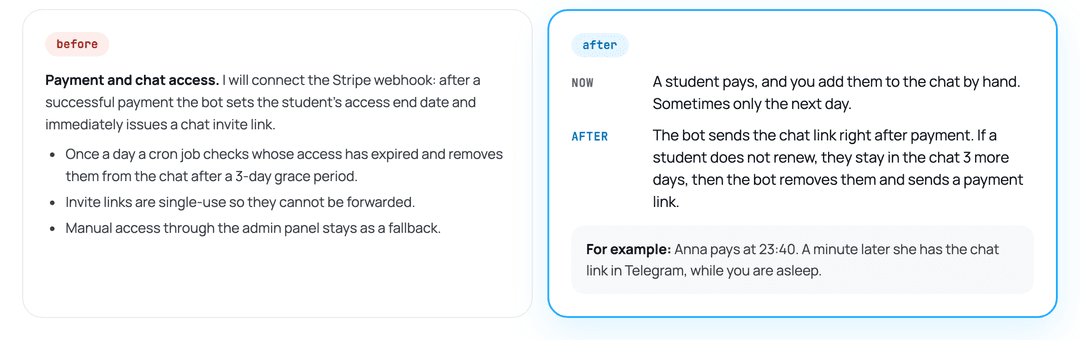
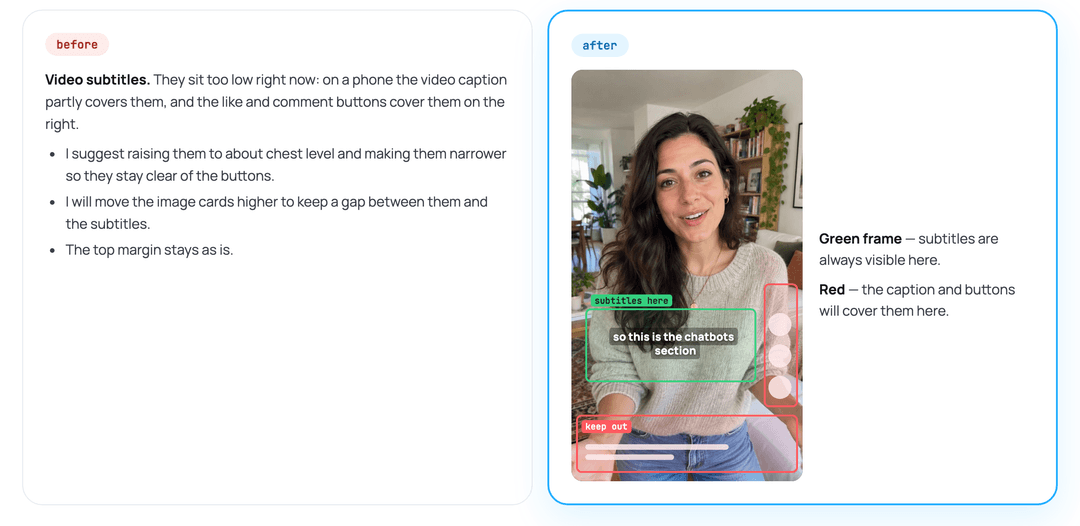
2. Show, don't tell
Whatever can be shown, the agent shows: a frame, a screenshot, options side by side. Zones are marked right on the real frame.
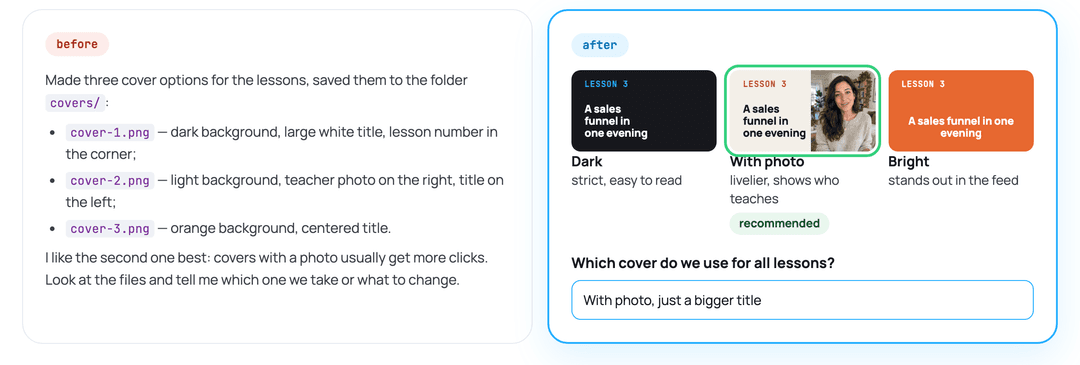
3. Everything in one place
Not "file 1 is like this, file 2 is like that", but the picture, the description, and the question side by side.
4. Short and clear
Not a wall of prompts and details, but the point in three lines. Details on request.
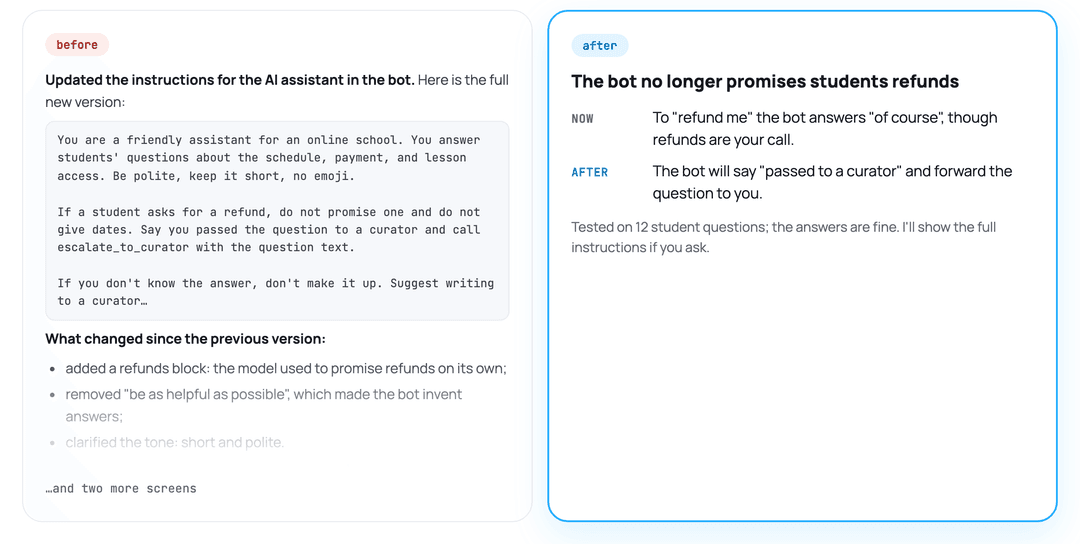
5. A comment on every proposal
Not "which of these do we agree on?" at the end of a wall of text, but an answer field under each item.
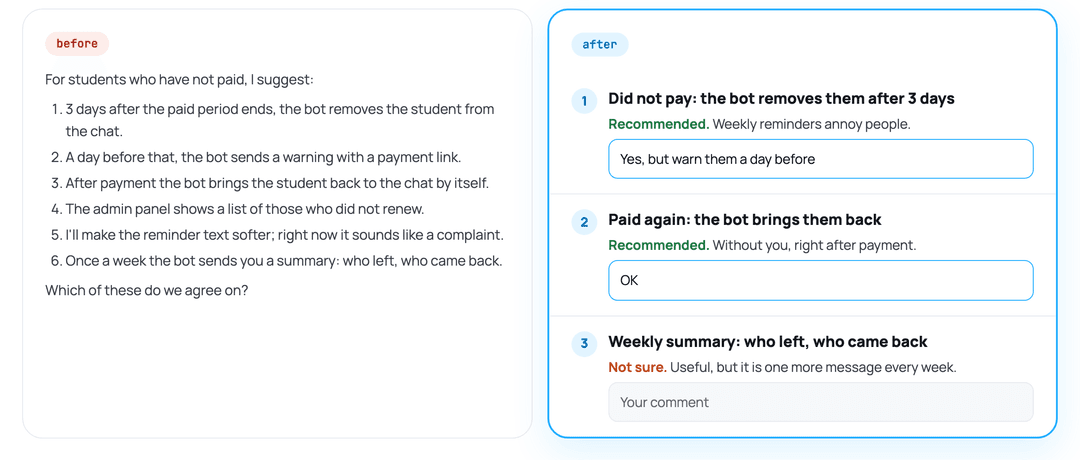
How to use it
- When the agent brings a plan, ask: "show it visually", "pack it into a page", or "present the solution". Ordinary questions and short plans still go to chat.
- The agent builds the page in a folder of your project, starts a small local server, and opens
the page in its built-in browser. If your agent has no browser, open the printed
http://127.0.0.1:<port>/link yourself. - Write your answers in the fields under the items; they are saved as you type. An empty field means "not answered", never "agreed".
- Tell the agent in chat that you have answered, in any words. It reads your answers, revises the
page, and shows above each answer what it changed or why not. Agreed items collapse, and the
fields start empty for the next round: earlier answers are kept as
answers-<round>.json. - Work starts only when you explicitly tell the agent to do it. Answers on the page agree on or change items; they never start the work.
Install
The easiest way: download the archive from the skill page or here (Code → Download ZIP), open Claude Code or Codex, write "Install the skill from this archive", and attach the file.
Manually: the skill is one folder, visual-review-page/, used as is by both runtimes. The commands
below are for macOS and Linux; on Windows, run them in WSL.
git clone https://github.com/pavel-molyanov/visual-review-page.git
Claude Code:
mkdir -p ~/.claude/skills && cp -R visual-review-page/visual-review-page ~/.claude/skills/
Codex:
mkdir -p ~/.agents/skills && cp -R visual-review-page/visual-review-page ~/.agents/skills/
Downloaded a ZIP archive instead? Unpack it and copy the inner visual-review-page/ folder, the
one that contains SKILL.md, the same way.
Codex also reads the older ~/.codex/skills/ folder. To use the skill in one project only, copy
the folder into that project's .claude/skills/ or .agents/skills/ instead. Restart the agent
session after installing. The skill sits next to your own skills and turns on only when you ask to
show a plan visually.
To update, delete the installed folder and copy the new version again, so files removed in the
new version do not stay behind (for Codex, use ~/.agents/skills in the second line):
git -C visual-review-page pull
rm -rf ~/.claude/skills/visual-review-page && cp -R visual-review-page/visual-review-page ~/.claude/skills/
Requirements
- Claude Code and/or Codex
- Python 3.7 or newer (the server uses only the standard library)
- A browser; the built-in browser of the Claude or Codex desktop app works best, because the agent can check the page before showing it to you
Privacy
The page never goes online. The server listens only on 127.0.0.1 and answers only the page
itself: requests with a foreign Host header or from another site are rejected. Your answers are
saved in answers.json in the page folder; the agent reads them like a chat message, and nothing
else is sent anywhere. The agent does not commit page folders unless you ask; if you commit
everything in your project, add them to .gitignore.
What is inside
| File | Purpose |
|---|---|
visual-review-page/SKILL.md | Instructions for the agent: what to show, how to word decisions, page shape, answer rounds |
visual-review-page/assets/page.html | Page template: one reading column, answer fields, autosave |
visual-review-page/scripts/serve.py | Local server: serves the page and media (with seeking), stores answers |
License
MIT: use it in your own and commercial projects and change it as you like.
Author
Pavel Molyanov
My website: molyanov.ru
I write a Telegram channel about AI, entrepreneurship, management, and vibecoding — subscribe: @molyanov_blog
// faq
What is visual-review-page?
Agent skill for Claude Code and Codex: shows plans and decisions as a local visual page and collects your answers. It is open-source on GitHub.
Is visual-review-page free to use?
visual-review-page is open-source under the MIT license, so it is free to use.
What category does visual-review-page belong to?
visual-review-page is listed under skills in the Claudeers registry of Claude-compatible tools.
// embed badge

[](https://claudeers.com/visual-review-page)
// retro hit counter

[](https://claudeers.com/visual-review-page)
// reviews
// guestbook
// related in Claude Skills
 🔓
An agentic skills framework & software development methodology that works.
 🔓
 🔓
AI coding assistant skill (Claude Code, Codex, OpenCode, Cursor, Gemini CLI, and more). Turn any folder of code, SQL schemas, R scripts, shell scripts, docs,…
 🔓
💫 Toolkit to help you get started with Spec-Driven Development