
visual-planning-skills
Tool-agnostic Claude skills — visual-explainer, visual-plan, and challenge-plan: single-file interactive HTML explainers and browser-reviewed plans.
Install with your AI
Paste into Claude Code, Cursor, or any agent — it reads the repo and wires the tool into your project.
Install and set up visual-planning-skills (claude-plugin project) into my current project.
Found on https://claudeers.com/visual-planning-skills
Repo: https://github.com/parthjshah95/visual-planning-skills
Homepage/docs: —
Detected install method: claude-plugin → /plugin install visual-planning-skills@parthjshah95/visual-planning-skills
Category: skills. Platforms: web.
Read the repo's README for exact setup and env vars, then install it and wire it into my project.

Claudeers Health Verdict:
active; community-verified: false. Confirm the source before running anything.
/plugin marketplace add parthjshah95/visual-planning-skills
/plugin install visual-planning-skills@parthjshah95/visual-planning-skills
git clone https://github.com/parthjshah95/visual-planning-skills
// compatibility
| Platforms | web |
|---|---|
| Operating systems | — |
| AI compatibility | claude |
| License | MIT |
| Pricing | open-source |
| Language | HTML |
Visual Planning Skills
Struggling to understand the giant walls of text your AI throws at you? Frustrated by jargon AI invents that only it can fathom?
You are not alone.
No one understands AI these days.
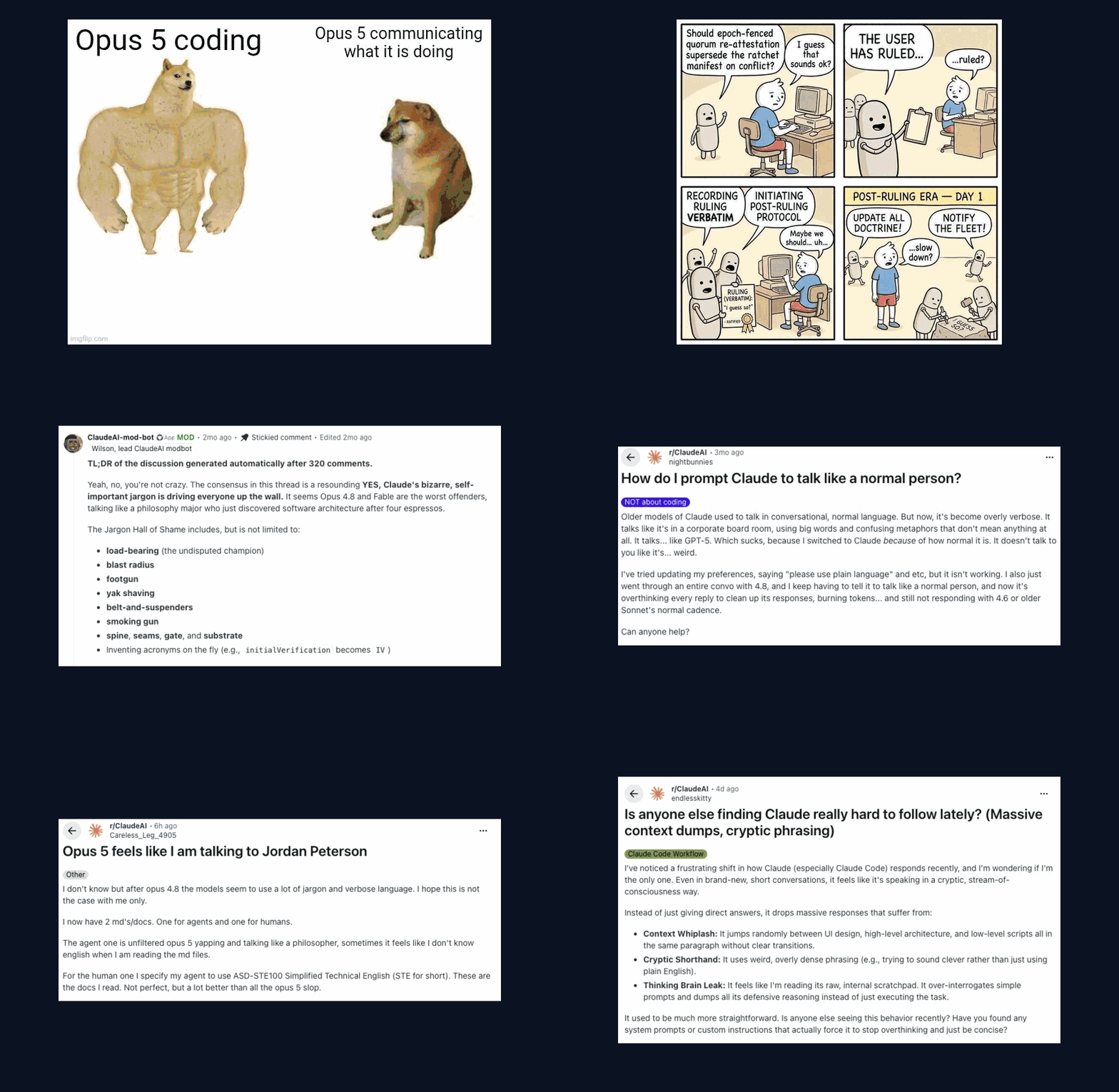
Open the interactive explainer → It plays this deck with controls. It shows the whole flow, a live decision card, and install steps for eight agents.
Slide credits: Steve Yegge (the workflow comic); the r/ClaudeAI community: the moderator-bot summary, u/nightbunnies, u/endlesskitty, u/Careless_Leg_4905; the Swole Doge format. The ASD-STE100 subskill draws on danyuchn/asd-ste100-skill.
The fix

visual-plan draws the plan. asd-ste100 keeps the words plain. Decision cards ask questions you can answer.
The skills
| Skill | What it does |
|---|---|
visual-explainer | "Visually explain how the code works." Creates an HTML file with animations and diagrams. |
visual-plan | "Visually plan this task." Replaces the plan mode with an HTML version of it. Less text, more interactivity. |
visual-schema | "Visualize my database schema." Visually see the models, relationships, and fields on a draggable canvas. |
challenge-plan | "Challenge this plan for over-engineering." A different model reviews the plan. It may only cut, never add. |
The skills work together, but none needs the others.
visual-planreuses the drawing patterns fromvisual-explainer.challenge-planis separate.visual-plannever runs it for you. You run it when a plan needs a check.
visual-explainer example
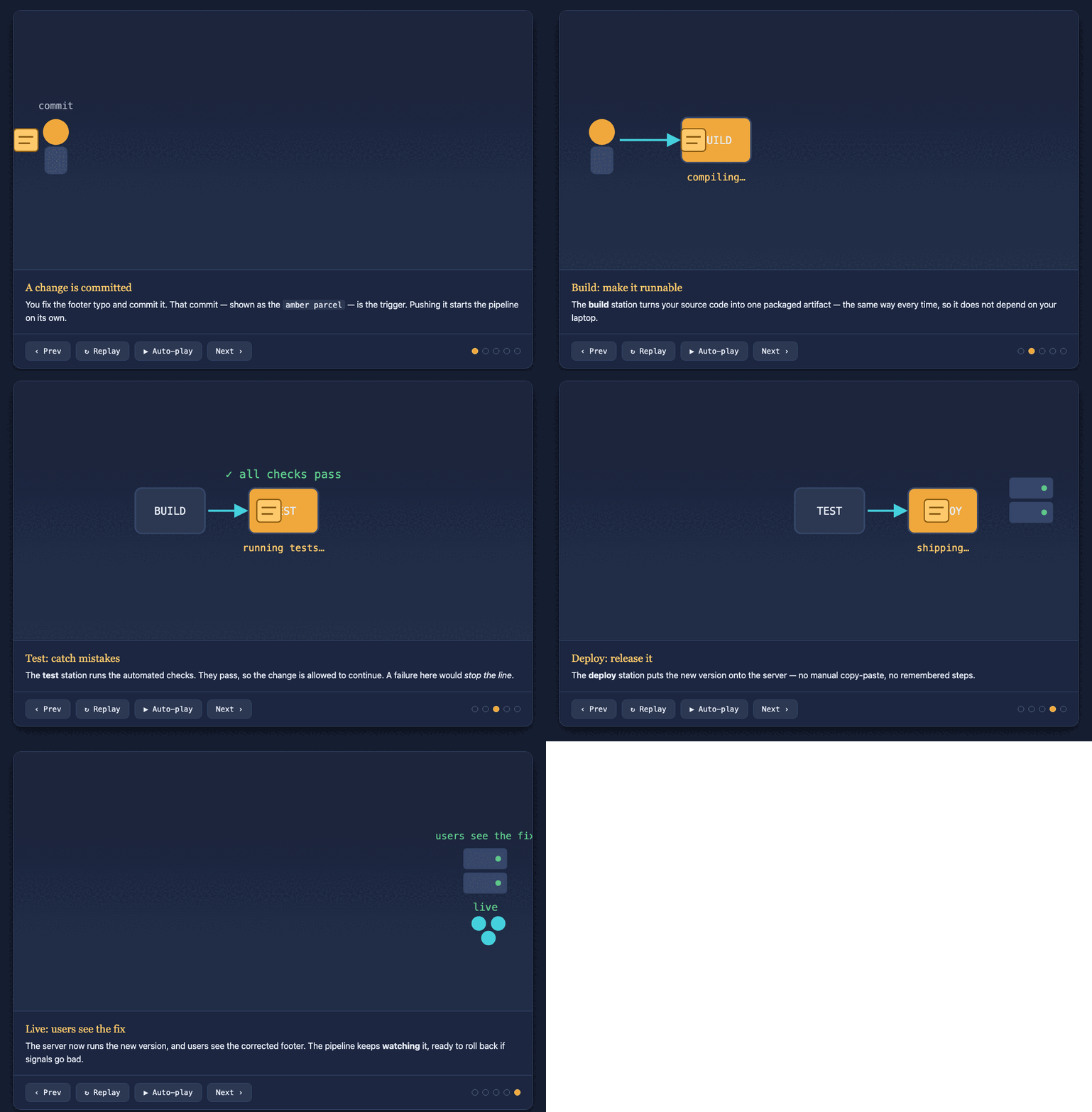
▶ View it live on GitHub Pages
Above: visual-explainer explains one subject, how a deploy pipeline works. A scene player walks the mechanism step by step. Source: pipeline-explainer.html.
visual-plan example
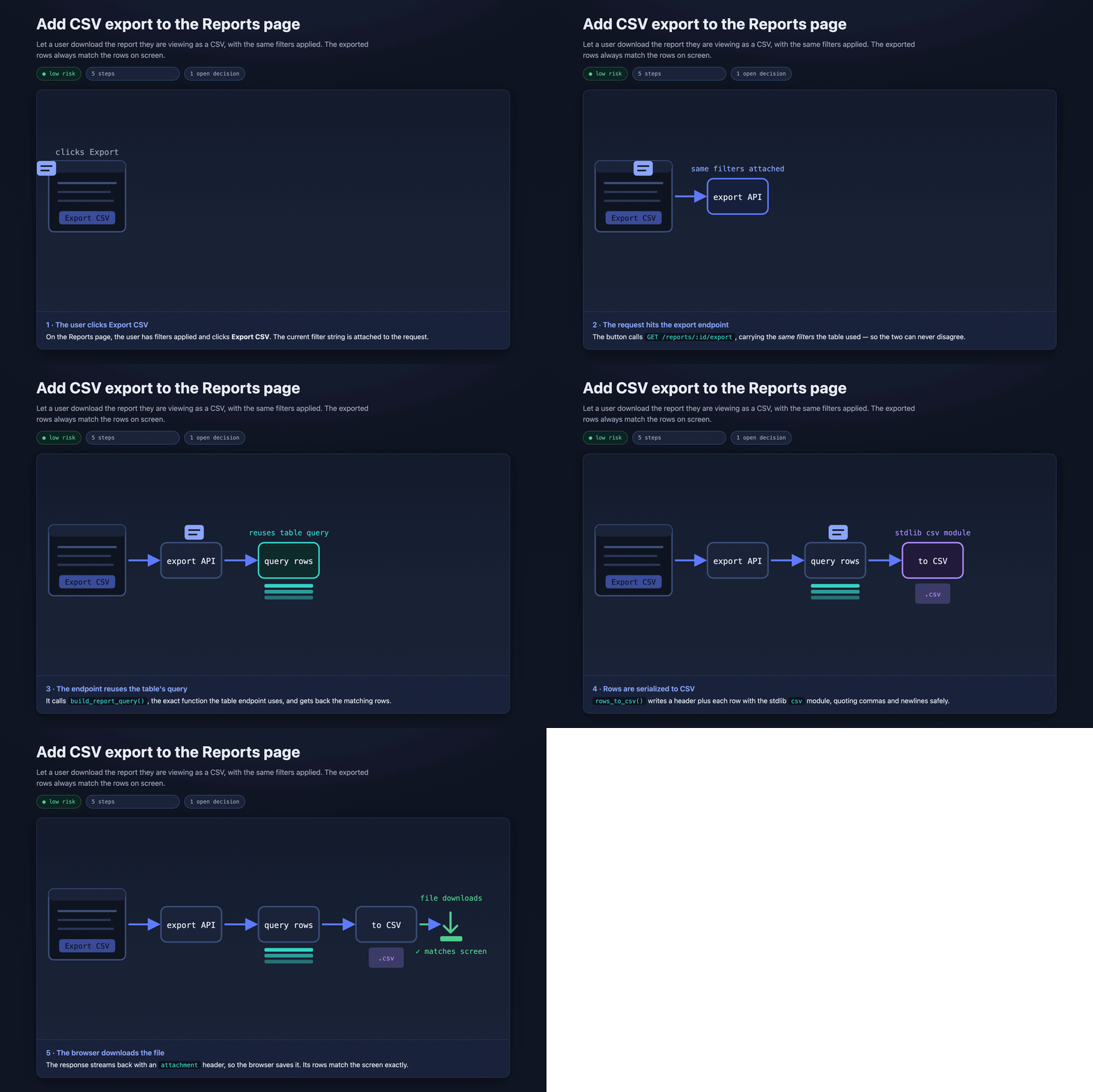
▶ View it live on GitHub Pages
Above: visual-plan plans one small feature, Add CSV export to the Reports page. It shows the change as an animation. It turns the one real decision into a card you answer in the browser. Source: plan.html.
visual-schema example
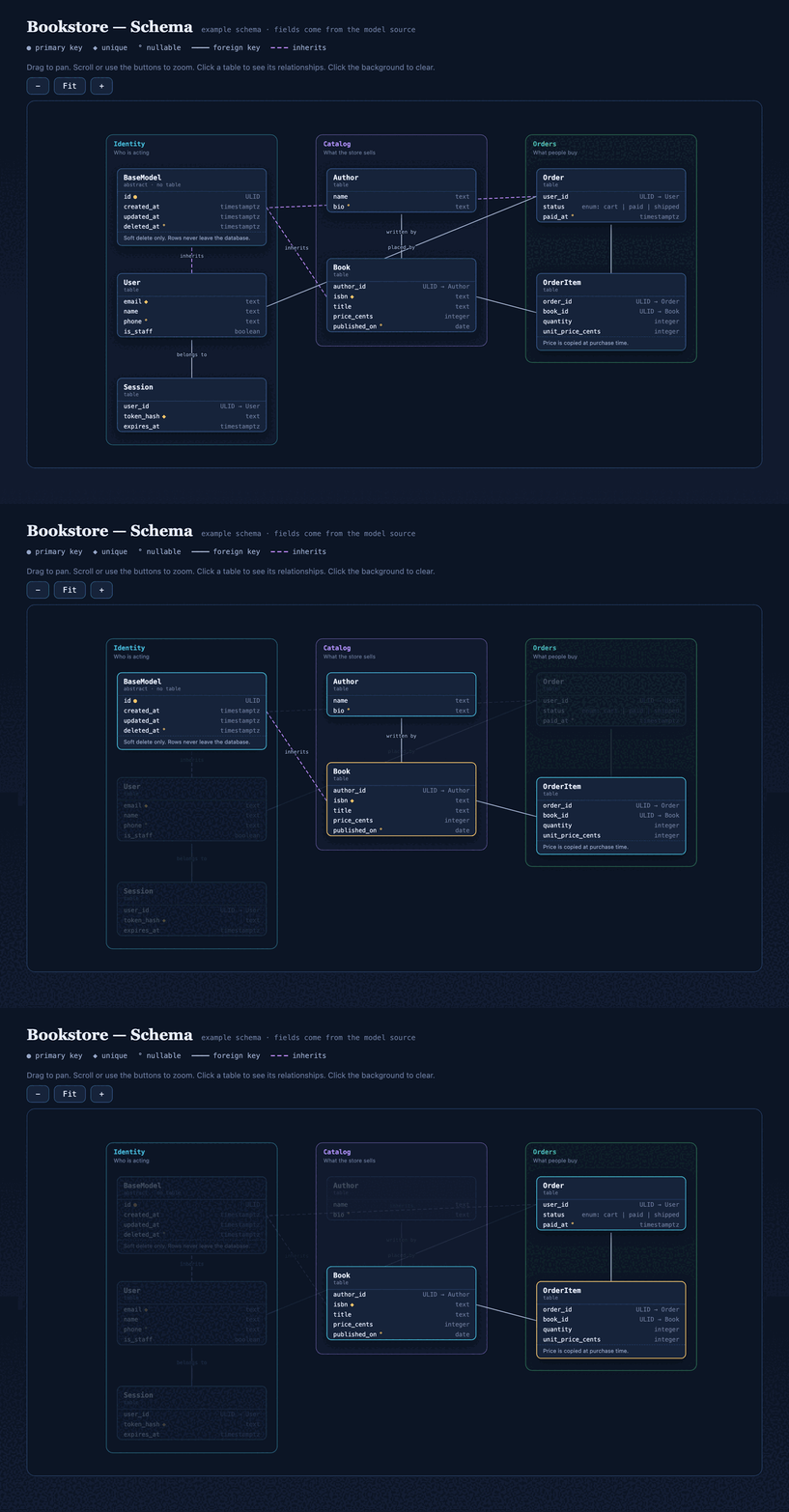
▶ View it live on GitHub Pages
Above: visual-schema draws a small bookstore database. The tables come from the model source. Click a table to see its relationships. Drag to pan, zoom to fit. Source: bookstore-schema.html.
Examples
Every example is one self-contained HTML file. Open the live link, or download the source and open it in a browser.
| Example | Made with | Open |
|---|---|---|
| Deploy-pipeline explainer | visual-explainer | live · source |
| The visual-plan explainer (the deck above) | visual-explainer | live · source |
| CSV-export plan | visual-plan | live · source |
| Bookstore schema | visual-schema | live · source |
Install
Clone the repo once. Then copy the skill folders to where your agent loads skills.
git clone https://github.com/parthjshah95/visual-planning-skills
cd visual-planning-skills
| Agent | Copy the skills to |
|---|---|
| Claude Code | cp -R skills/* ~/.claude/skills/ |
| Codex / ChatGPT | cp -R skills/* ~/.codex/skills/ |
| Cursor | cp -R skills/* ~/.cursor/skills/ |
| OpenCode | cp -R skills/* ~/.config/opencode/skills/ |
| OpenClaw | cp -R skills/* ~/.openclaw/skills/ |
| Hermes | cp -R skills/* ~/.hermes/profiles/<profile>/skills/ |
| Windsurf (per project) | cp -R skills/* <project>/.windsurf/skills/ |
| Antigravity (per workspace) | cp -R skills/* <workspace>/.agents/skills/ |
Each SKILL.md is self-contained.
Custom instructions
Optional: set what a finished plan must contain for your team.
A finished plan means different things to different teams. One team merges straight to trunk. Another team needs a dev environment, a monitoring window, and a sign-off. So visual-plan keeps that contract in an optional file, not in the skill.
- Pass a file with
instructions=<path>, or drop acustom-instructions.mdfile at your workspace root. - With no file, the skill uses a default: a goal, a picture of the change, the steps, a check that it worked, and the open decisions.
- A
custom-instructions.mdfile adds three things only: extra required sections, extra required decisions (each one becomes a card), and where the agent records the approved plan.
Example: a staged delivery pipeline
Save this as custom-instructions.md. It adds a dev test plan, a prod monitoring plan, and four fixed decisions. Change it or delete it as you need.
# Custom instructions: staged dev/prod delivery

## Required sections
- **Dev test plan**: the environment, the steps, the expected results, and the logs to check.
- **Prod monitoring plan**: one production-only check, a fixed monitoring window, the failure
  threshold, the rollback choice, and who to notify.

## Required decisions
- Pause for a human PR review before the dev merge? (default: no, for low-risk changes)
- Confirm the dev test steps and expected results.
- Confirm the prod validation steps and the rollback choice.
- Is extended monitoring needed? If yes, give the window and thresholds.

## Record the approved plan in
- The tracker ticket. Move the ticket to "ready to start" on approval.
License
MIT. See LICENSE.
// faq
What is visual-planning-skills?
Tool-agnostic Claude skills — visual-explainer, visual-plan, and challenge-plan: single-file interactive HTML explainers and browser-reviewed plans.. It is open-source on GitHub.
Is visual-planning-skills free to use?
visual-planning-skills is open-source under the MIT license, so it is free to use.
What category does visual-planning-skills belong to?
visual-planning-skills is listed under skills in the Claudeers registry of Claude-compatible tools.
// embed badge

[](https://claudeers.com/visual-planning-skills)
// retro hit counter

[](https://claudeers.com/visual-planning-skills)
// reviews
// guestbook
// related in Claude Skills
 🔓
🔓An agentic skills framework & software development methodology that works.
 🔓
🔓 🔓
🔓💫 Toolkit to help you get started with Spec-Driven Development
 🔓
🔓AI coding assistant skill (Claude Code, Codex, OpenCode, Cursor, Gemini CLI, and more). Turn any folder of code, SQL schemas, R scripts, shell scripts, docs,…