
vibepulse
A shelf-top AMOLED screen showing your Claude Code & Codex usage, live agent activity, and a NEEDS YOU alert when an agent waits for your input. ESP32-S3 + a…
Install with your AI
Paste into Claude Code, Cursor, or any agent — it reads the repo and wires the tool into your project.
Install and set up vibepulse (release-binary project) into my current project.
Found on https://claudeers.com/vibepulse
Repo: https://github.com/niclasvestlund-YT/vibepulse
Homepage/docs: https://vibeonchip.com
Detected install method: release-binary → inspect the README
Category: other. Platforms: cli, api.
Read the repo's README for exact setup and env vars, then install it and wire it into my project.

Claudeers Health Verdict:
active; community-verified: false. Confirm the source before running anything.
Grab the latest release asset from GitHub.
# download a build from https://github.com/niclasvestlund-YT/vibepulse/releases
git clone https://github.com/niclasvestlund-YT/vibepulse
// compatibility
| Platforms | cli, api |
|---|---|
| Operating systems | — |
| AI compatibility | claude |
| License | MIT |
| Pricing | open-source |
| Language | C |
VibePulse
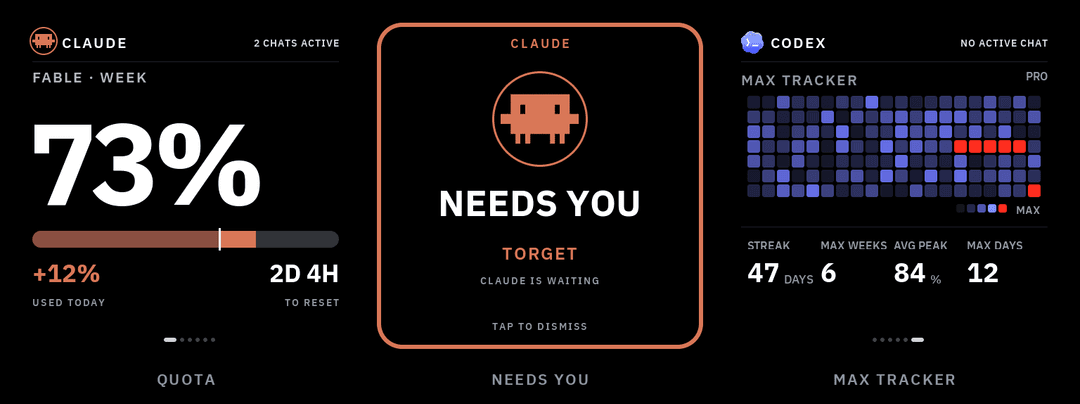
A little always-on screen for your shelf that shows what your AI coding agents are doing — and taps you on the shoulder when one is stuck waiting for you.
Claude Code and Codex usage, live agent activity, and a full-screen NEEDS YOU alert. A ~$30 ESP32-S3 panel plus a pure-stdlib Python service on your Mac. No cloud, no accounts, no API keys on the device. Nothing leaves your LAN.
The problem
When you run coding agents all day, two things are invisible:
- How much quota is left. You usually find out you're at the wall when a long task dies halfway through — not before you start it.
- When an agent stopped. It asks one yes/no question and then just sits there. You're in another window. Sometimes for twenty minutes.
Both answers already exist, buried in a terminal you're not looking at. VibePulse moves them onto a screen you can't miss: one glance from across the room, no window to switch to, no menu bar to squint at.
Status: work in progress. This is an ongoing project for me and plenty of tweaks are still on the list, but enough people asked about it that I'm opening it up now rather than when it feels "done". Expect rough edges and frequent commits.
What's on screen
Six pages, swipe or auto-rotate. Every image below is an exact 480×480 frame — the simulator renders the same pixels as the panel.
 |
Usage — Claude's weekly and heaviest-model-weekly quota, plus Codex's weekly quota. Each with a reset countdown and how much you've burned today. |
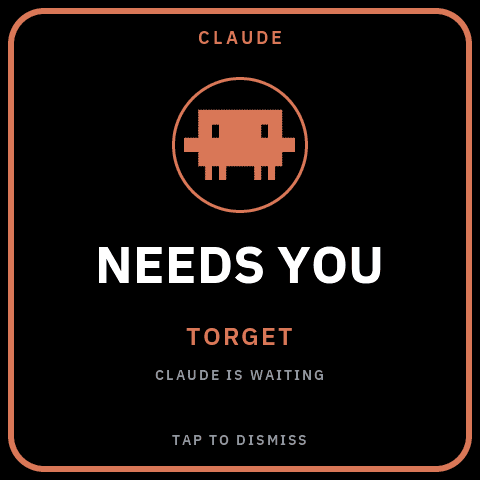 |
NEEDS YOU — when an agent blocks on your input, the whole screen turns into the alert, in that provider's colour, naming the project it's waiting on. Tap to dismiss. |
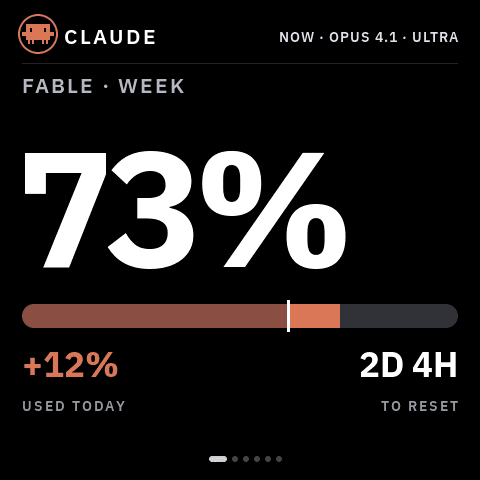 |
Live agent monitor — the header shows which agents are working right
now, with model and effort, on every page. |
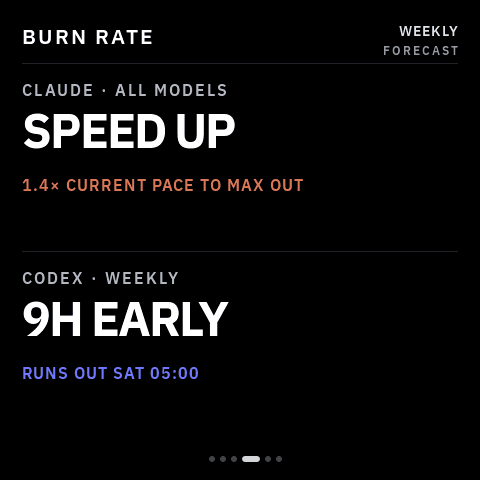 |
Burn rate — a forecast per provider: on pace, running out early (and when), or how much head-room is left at reset. |
 |
Max Tracker — a GitHub-style heatmap of your daily quota peaks, with coding streaks and max counters, per provider. Red cells are days you maxed out. |
Both providers get equal treatment — same pages, same alert, their own accent colour:
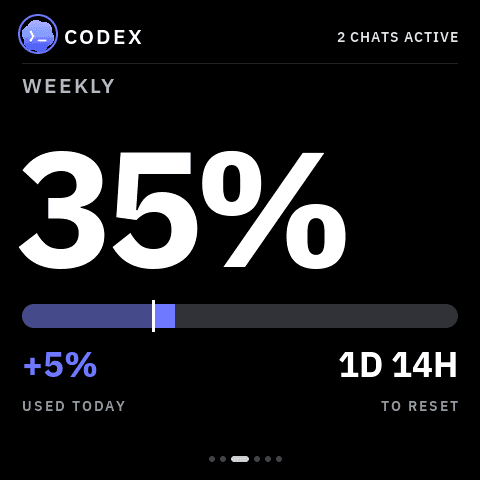 | 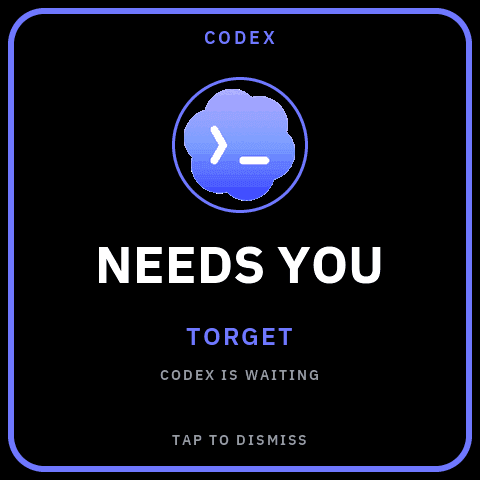 |  |
It never makes numbers up
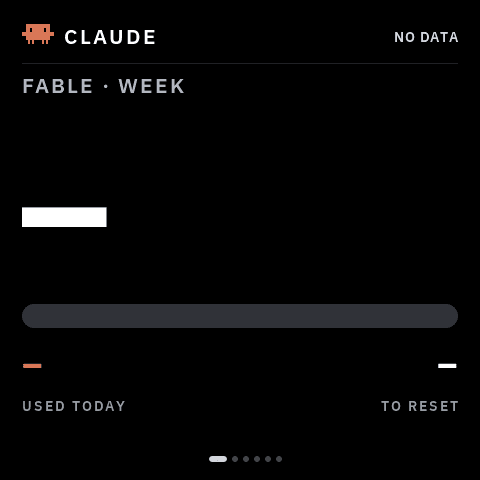
Before the first successful fetch, and whenever a source is missing, you get
dashes — never a placeholder 0% that you might believe. If the service
goes away, the last good numbers stay on screen and get marked stale rather
than silently drifting.
Run Claude only, or Codex only, and the other half simply shows dashes.
How it works
        your Mac                             your shelf
┌────────────────────────────┐          ┌──────────────┐
│ ~/.claude/projects/*.jsonl │          │              │
│ ~/.codex/sessions/*.jsonl  │ ───────► │   ESP32-S3   │
│ rate-limit headers         │          │    AMOLED    │
└────────────────────────────┘          └──────────────┘
     tokenserver.py :8737           plain JSON over your LAN,
     pure Python stdlib                polled every 30 s
A tiny Python service on your Mac reads your local Claude Code / Codex logs and rate-limit headers, and serves plain numbers over your LAN. The screen polls it every 30 seconds. Your OAuth token never leaves the Mac; the screen only ever receives percentages, counts and coarse status.
What you need
- Waveshare ESP32-S3-Touch-AMOLED-2.16 (~$30). No soldering, just a USB-C cable. It's the same board Clawdmeter uses, so if you already own one you're 10 minutes away.
- A Mac on the same WiFi (the log-reading service is macOS-only for now)
- Claude Code and/or Codex. Either alone is fine.
- 2.4 GHz WiFi. The ESP32-S3 can't see 5 GHz networks.
Setup, the vibecoder way
Clone the repo, open your coding agent inside it (Claude Code, Codex, Cursor, whatever you run), and say:
Set up VibePulse for me: help me fill in secrets.h, build and flash the board over USB, and start the tokenserver on this Mac.
The repo is built for this. CLAUDE.md and AGENTS.md point your agent
straight at docs/agent-setup.md — an English
runbook written for agents, with a verification after every step, the traps
that actually cost people an evening, and a symptom→fix table. That's the
whole onboarding.
Reading rather than running? That runbook is also the fastest way to understand how the pieces fit together.
Setup, the manual way
-
Install ESP-IDF 5.5 and
brew install cmake ninja -
Clone this repo, then:
cp secrets.h.example secrets.h   # fill in WiFi + your Mac's hostname (2 min)
. ~/esp/esp-idf/export.sh
idf.py set-target esp32s3
idf.py build
idf.py -p /dev/cu.usbmodem101 flash
Don't miss this: in
secrets.h, point theTK_VIBEPULSE_BASE_URLblock at your Mac by replacing theDIN-MACplaceholder. Those URLs ship active on purpose — a wrong hostname is visible in the log, whereas an undefined URL compiles the fetch out entirely and the screen boots fine and shows dashes forever. Use your Mac's Bonjour name (scutil --get LocalHostName) rather than an IP, so the same firmware works on your home network and on a phone hotspot.Board not showing up under
/dev/cu.usbmodem*? Hold BOOT, tap RESET, release BOOT and it re-enumerates in download mode.Power matters: flash with the board in download mode (screen dark). A computer USB port often cannot feed the running firmware. The AMOLED panel's draw makes the board bounce off the bus or hang, which looks like a flaky cable. After flashing, run the screen from its own USB power supply, not your computer.
-
Start the service on your Mac. Pure Python stdlib, nothing to install:
python3 tools/tokenserver/tokenserver.pyAutostart on login: see tools/tokenserver/README.md.
Over-the-air updates
After the first USB flash, the screen updates itself over WiFi. The consent
chain is deliberate and three-factor: a physical 3-second hold on KEY3
opens a ten-minute maintenance window (the glass shows an UPDATES ON ring
with the lease draining clockwise), a 64-hex token from secrets.h
authenticates the upload, and the window closes itself — a short KEY3
press closes it early. No button, no update; a script can never open the
window for you.
idf.py build
tools/ota-flash.sh <device-ip>     # waits for your KEY3 hold, then uploads
The device verifies the image (magic, chip, project, SHA-256), writes it to
the inactive A/B slot (ota_0/ota_1, 5 MB each — see
partitions.csv), reboots into it, and a boot-health gate must approve
the new image within 15 seconds — display, UI, scheduler, NVS and memory
proofs — or the bootloader rolls back to the previous slot automatically.
USB-C remains the rescue path and is never written by an OTA. After an OTA
reboot the window re-arms itself once, so a build-test-build session needs
one hold, not one per build.
The tokenserver announces the newest build on your Mac
(otaAvailableVersion on /api/tokens); when the screen runs an older
version it takes the glass with an UPDATE READY notice — hold KEY3 to
receive — or answer the on-glass LATER/UPDATE pills by touch; tapping
UPDATE opens the window just like the hold does. A snooze returns every
hour until installed. Full lifecycle reference: docs/ota.md.
If someone tells you "this project has no OTA": they are reading a tree
where partitions.csv still has a single factory partition. The OTA
foundation replaced that table (A/B slots + otadata) — check the branch
you are on before concluding anything, and never assume the flash layout
without reading partitions.csv in the checkout you are actually building.
No hardware? Run the simulator
brew install sdl2 cmake ninja
cmake -S sim -B sim/build -G Ninja && ninja -C sim/build
./sim/build/torget-sim
(On Debian/Ubuntu: apt-get install libsdl2-dev cmake ninja-build instead.)
Same code, same fonts, same pixels as the device — it builds the real
platform and VibePulse against the real LVGL, and feeds it the recorded
fixtures in sim-fixtures/ through the same parsers the board runs. Every
device screenshot in this README is an unmodified simulator frame (the
banner just places three of them side by side), and the physical panel was
reviewed against them (review).
Keys: [ / ] change VibePulse page, S cycles agent status, M cycles
Max Tracker fixtures, T re-feeds tokens, L opens the launcher.
Privacy
- Everything stays on your LAN; the screen only ever receives percentages, counts and coarse status — a project name, a model, an effort level.
- No prompts, no code, no commands, no file contents are stored or served. The service keeps only content-free quota points (at most one per 15 minutes, kept 8 days) for the trends.
- Your OAuth token never leaves the Mac.
- A lost or stolen screen leaks your WiFi credentials and the LAN hostname of your Mac — both of which you rotate yourself, not in any cloud.
Tweak it
VibePulse is an app on Torget, a deliberately small LVGL 9 app platform
for this panel. An app is one component exporting
torget_app_t { name, icon, create, enter, leave }; the platform owns WiFi,
the panel, brightness and the launcher.
This repo ships exactly one app, so that's all you get on the screen — one binary, one thing, nothing to wonder about. The platform can hold several apps at once (that's what the launcher is for), but any others live in their own repos and are only built in if you check them out.
Design rules: true black background, IBM Plex, dashes instead of invented
zeros, and provider accents locked to Claude #D97757 and Codex #6F78FF.
platform/            app contract + launcher + fonts (IBM Plex)
main/                ESP32 host layer: boot, WiFi, SNTP, app registry
components/app_*     the app (VibePulse lives in app_tokens/)
tools/tokenserver/   the Mac service (Python stdlib)
sim/                 SDL simulator, the whole platform on your Mac
test/                host tests, run with ./test/run.sh (no ESP-IDF needed)
spec/                hardware truth + UI design system
The deeper docs (architecture, writing an app, hardware traps) are in README.sv.md, in Swedish, because this started as a Swedish hobby project. Your agent reads Swedish just fine.
Hardware knowledge
Hardware truth — capabilities, sources and which claims are verified on a
real unit — lives in the validated registries under spec/. Read
spec/hardware.md before any hardware-dependent work, and don't promote a
capability to "verified" without a physical check.
./test/run.sh is the host gate that enforces those registries, alongside
the C core tests and the Python suites. No ESP-IDF required, but it does
need a reproducible Python:
python3.12 -m venv .venv
. .venv/bin/activate
python -m pip install -r requirements-dev.txt
./test/run.sh
Python 3.11+ is required. The script uses the activated environment's Python
by default; set PYTHON_BIN to point at a different 3.11+ interpreter.
FAQ
- Windows or Linux for the Mac service? Not yet — the log paths and keychain reads are macOS-specific. Tracked in #3 (Windows) and #2 (Linux); contributions very welcome.
- Other boards or panel sizes? Not yet. The platform is pinned to this exact panel so one pixel-perfect build stays pixel-perfect, but a port is a contained job (BSP, layout constants, fonts) — #5.
- Cursor, Gemini CLI, other providers? Not yet — #4.
- Just Claude, no Codex (or vice versa)? Works. The other half shows dashes.
- Does it need internet? No. The board talks to one host on your LAN.
License
MIT © Niclas Vestlund
The "Claude" and "Codex" names and icons belong to Anthropic and OpenAI. They appear here only to identify which provider a number belongs to, they are not covered by the MIT license, and they will be removed on request. The IBM Plex fonts are used under the SIL Open Font License (platform/fonts/LICENSE-OFL.txt).
This is my first open source release. Issues and PRs are very welcome, and if VibePulse ends up on your shelf, a ⭐ helps others find it.
Built by Niclas Vestlund.
// faq
What is vibepulse?
A shelf-top AMOLED screen showing your Claude Code & Codex usage, live agent activity, and a NEEDS YOU alert when an agent waits for your input. ESP32-S3 + a pure-stdlib Mac service. Nothing leaves your LAN.. It is open-source on GitHub.
Is vibepulse free to use?
vibepulse is open-source under the MIT license, so it is free to use.
What category does vibepulse belong to?
vibepulse is listed under other in the Claudeers registry of Claude-compatible tools.
// embed badge

[](https://claudeers.com/vibepulse)
// retro hit counter

[](https://claudeers.com/vibepulse)
// reviews
// guestbook
// related in Other
 🔓
🔓 🔓
🔓Anti-AI-slop design skill for Claude Code, Cursor, and Codex.
 🔓
🔓Open source Ghostty-based macOS terminal with vertical tabs and notifications for AI coding agents. Built for multitasking, organization, and programmability.
 🔓
🔓Huashu Design · HTML-native design skill for Claude Code · Claude Code 里 HTML 原生的设计 skill · 高保真原型 / 幻灯片 / 动画 + 20 设计哲学 + 5 维评审 + MP4 导出 · Agent-agnostic