
vibe-pet
Agent token and task monitoring, thousands of pet avatars, cross-platform support, and compatibility with popular AI agents. 一眼查看 Token 与任务状态,海量 Petdex 形象可选…
Install with your AI
Paste into Claude Code, Cursor, or any agent — it reads the repo and wires the tool into your project.
Install and set up vibe-pet (git-clone project) into my current project.
Found on https://claudeers.com/vibe-pet-2
Repo: https://github.com/Seeed-Solution/vibe-pet
Homepage/docs: —
Detected install method: git-clone → git clone https://github.com/Seeed-Solution/vibe-pet
Category: other. Platforms: cli, api, desktop.
Read the repo's README for exact setup and env vars, then install it and wire it into my project.

Claudeers Health Verdict:
slowing; community-verified: false. Confirm the source before running anything.
git clone https://github.com/Seeed-Solution/vibe-pet
// compatibility
| Platforms | cli, api, desktop |
|---|---|
| Operating systems | — |
| AI compatibility | claude |
| License | MIT |
| Pricing | open-source |
| Language | C |
Vibe Pet
Hardware desktop pets for your AI coding agents
Choose from thousands of characters or create your own in one click
Turn Codex, Cursor, Windsurf, and other agents into live companions across desktop and hardware
English · Protocol · Petdex · 中文 · 日本語
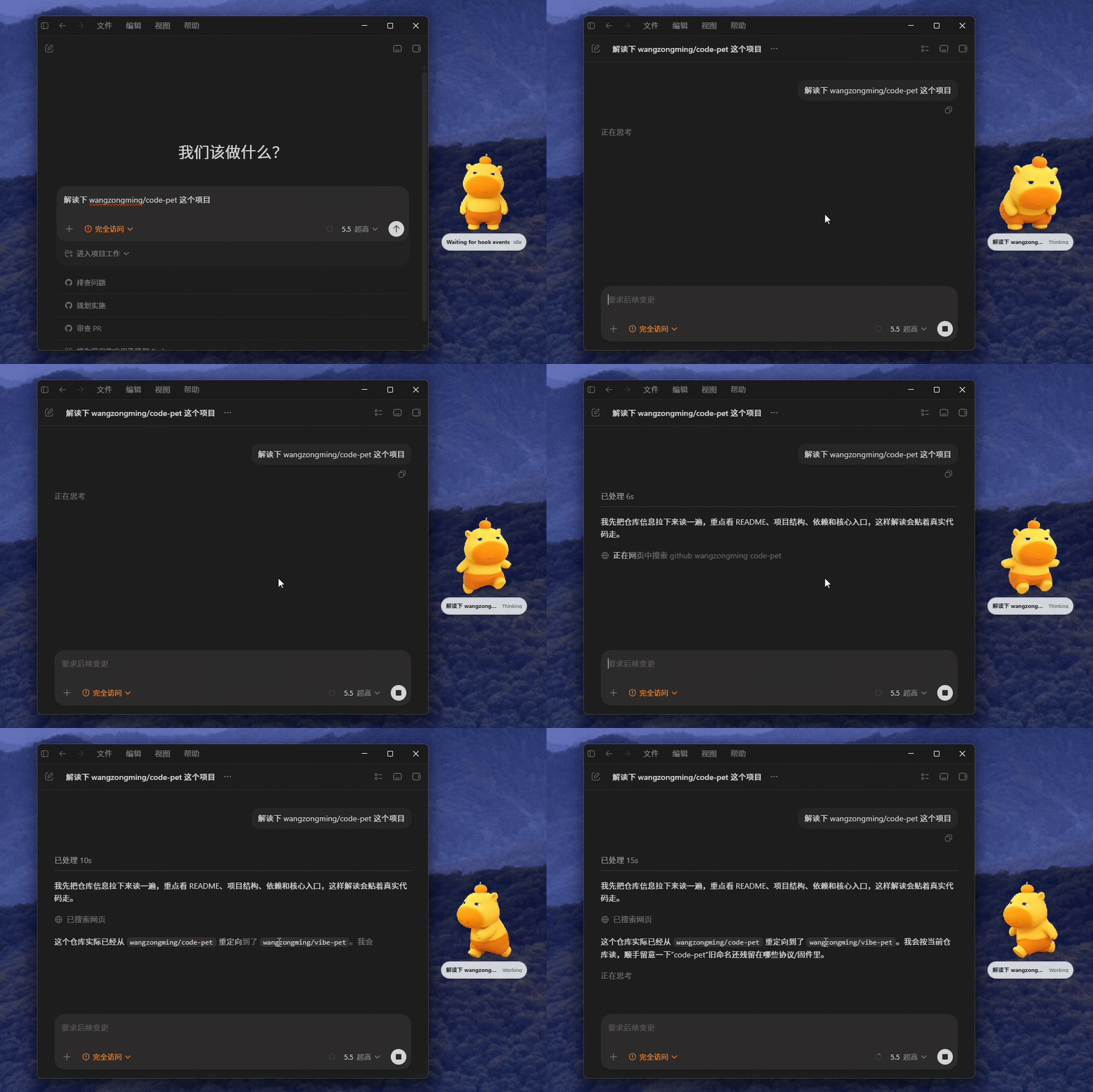
Vibe Pet is a hardware desktop pet project for AI coding agents. It watches live activity from Codex, Cursor, Windsurf, and other AI coding agents in CLIs and IDEs, turns states such as thinking, tool use, waiting for approval, completed, and error into animated pets, then syncs the same state to Wio Terminal or ESP32-S3 hardware over BLE.
Highlights
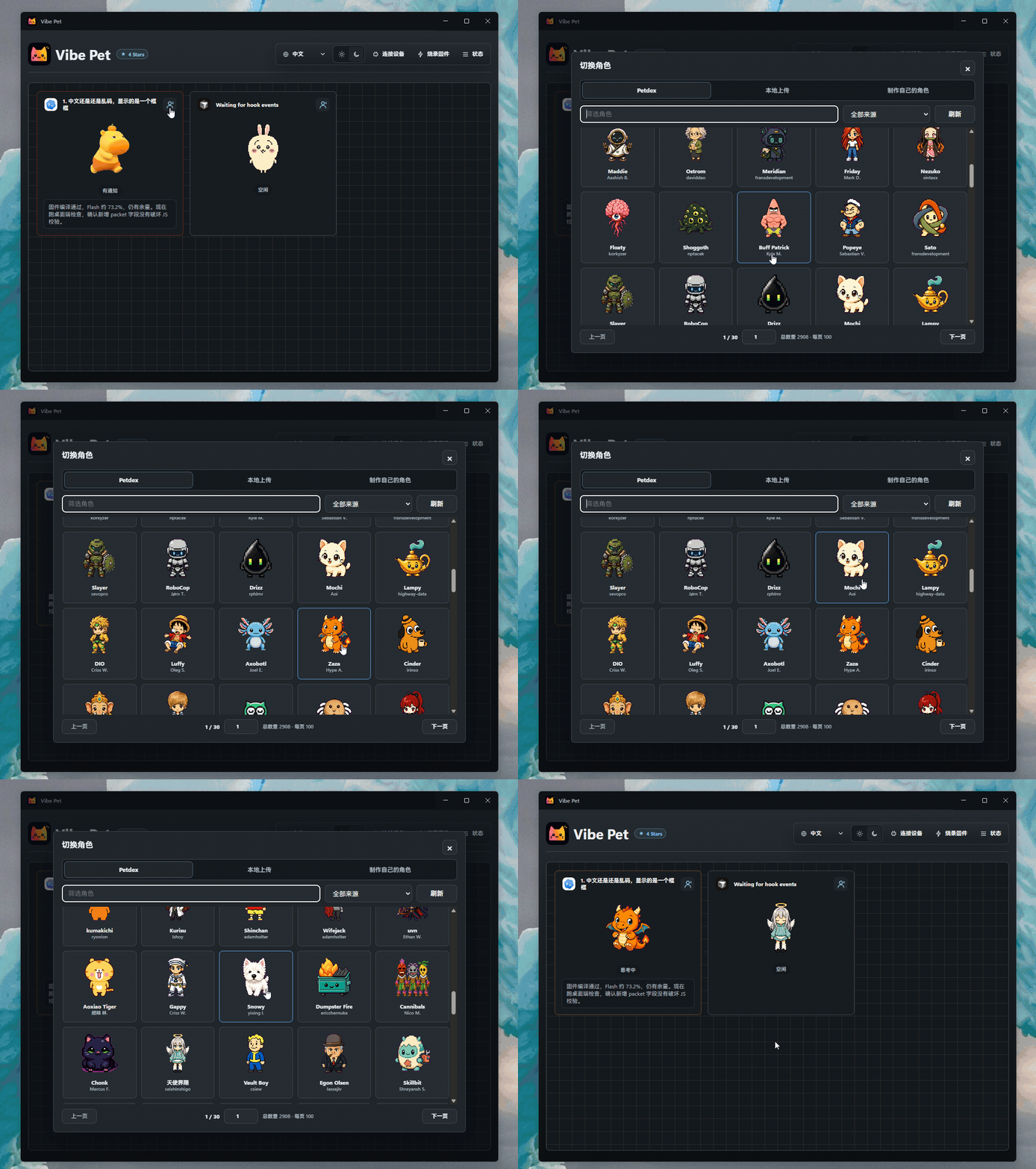
- Multi-agent pet view: every active editor or AI coding agent gets its own pet card instead of sharing one combined state.
- Real desktop pets: pets from the main window are also spawned onto the desktop, and each one can be dragged independently.
- Hardware sync: send state over Bluetooth to devices such as Wio Terminal or ESP-AI-MINI AI Dev Kit.
- Character switching: choose a character from Petdex by default or use a custom character you made.
Supported Agents
Vibe Pet automatically tries to install or sync integrations for:
| Agent | Integration |
|---|---|
| Codex | Hooks and JSONL session monitoring |
| Cursor | Hooks |
| Windsurf | Cascade hooks |
| Claude CLI | Hooks |
| Claude Code | Hooks |
| Gemini CLI | Hooks |
| Copilot CLI | Hooks |
| CodeBuddy | Hooks |
| Kimi Code CLI | Hooks |
| Qwen Code | Hooks |
| OpenClaw | Plugin |
| opencode | Plugin |
| Qoder | Hooks |
| Hermes Agent | Plugin |
| Reasonix CLI | Hooks |
Supported Hardware
| Hardware | Display / role | Sync | Adapted | Notes |
|---|---|---|---|---|
| SenseCAP Indicator | 4-inch 480×480 touch display | BLE | Ing | ESP32-S3 + RP2040; ST7701S RGB display; LVGL character rendering. |
| Wio Terminal | Main animated pet display | BLE | Ing | Mature BLE animated display target. |
| ESP-AI-MINI AI Dev Kit | ESP32-S3-based AI dev kit | BLE | Ing | TFT target; LVGL character rendering. |
Want to bring Vibe Pet to your own device? The BLE and Wi-Fi hardware payloads are intentionally small, so new screens, status lights, badges, and custom boards can be added without changing the desktop app.
Download and Install
Download the installer for your platform from the Releases page.
- macOS: download the
.dmgor.zipbuild. - Windows: download the
.exeinstaller. - Linux: download the
.AppImageor.debpackage.
After installation, launch Vibe Pet and use the desktop app to connect your device. You can also use Vibe Pet without hardware if you only want the desktop pets.
Technical Documentation
- Project structure, local endpoints, BLE / Wi-Fi behavior, and hook mapping are documented in AGENT.MD
- Protocol documentation starts at the protocol index
- English protocol docs:
- Chinese protocol docs:
Sponsor

Contributing
Ideas, bug reports, hardware ports, new agent integrations, translations, and UI improvements are all welcome. If you want to contribute code, read CONTRIBUTING.md for development setup, packaging, testing, and PR guidance.
// faq
What is vibe-pet?
Agent token and task monitoring, thousands of pet avatars, cross-platform support, and compatibility with popular AI agents. 一眼查看 Token 与任务状态,海量 Petdex 形象可选,支持 Windows/macOS/Linux、ESP/Wio Terminal,兼容 Cursor、Codex、Claude、Windsurf 等主流 Agent。. It is open-source on GitHub.
Is vibe-pet free to use?
vibe-pet is open-source under the MIT license, so it is free to use.
What category does vibe-pet belong to?
vibe-pet is listed under other in the Claudeers registry of Claude-compatible tools.
// embed badge

[](https://claudeers.com/vibe-pet-2)
// retro hit counter

[](https://claudeers.com/vibe-pet-2)
// reviews
// guestbook
// related in Other
 🔓
🔓 🔓
🔓Anti-AI-slop design skill for Claude Code, Cursor, and Codex.
 🔓
🔓Open source Ghostty-based macOS terminal with vertical tabs and notifications for AI coding agents. Built for multitasking, organization, and programmability.
 🔓
🔓Huashu Design · HTML-native design skill for Claude Code · Claude Code 里 HTML 原生的设计 skill · 高保真原型 / 幻灯片 / 动画 + 20 设计哲学 + 5 维评审 + MP4 导出 · Agent-agnostic