
unlimited-claude-AI
Claude AI. No backend, no server costs, 100% free.
Install with your AI
Paste into Claude Code, Cursor, or any agent — it reads the repo and wires the tool into your project.
⚠ Unverified source (community-unclaimed, low activity) — reveal the prompt
⚠ Unverified source (community-unclaimed, low activity). Inspect the repo before letting your agent install it.

Install and set up unlimited-claude-AI (git-clone project) into my current project.
Found on https://claudeers.com/unlimited-claude-ai
Repo: https://github.com/hassanmsthf11/unlimited-claude-AI
Homepage/docs: —
Detected install method: git-clone → git clone https://github.com/hassanmsthf11/unlimited-claude-AI
Category: other. Platforms: cli, api, web.
Read the repo's README for exact setup and env vars, then install it and wire it into my project.

Claudeers Health Verdict:
dormant; community-verified: false. Confirm the source before running anything.
git clone https://github.com/hassanmsthf11/unlimited-claude-AI
// compatibility
| Platforms | cli, api, web |
|---|---|
| Operating systems | — |
| AI compatibility | claude |
| License | MIT |
| Pricing | open-source |
| Language | HTML |
🤖 Free, Self-Hosted Claude AI Interface
A fully functional, polished, and self-hosted web interface for Anthropic's Claude AI. This project runs entirely in your browser, using the free tier of Puter.js for secure access to the Claude API. No backend, no server costs, 100% free.
✨ Live Demo
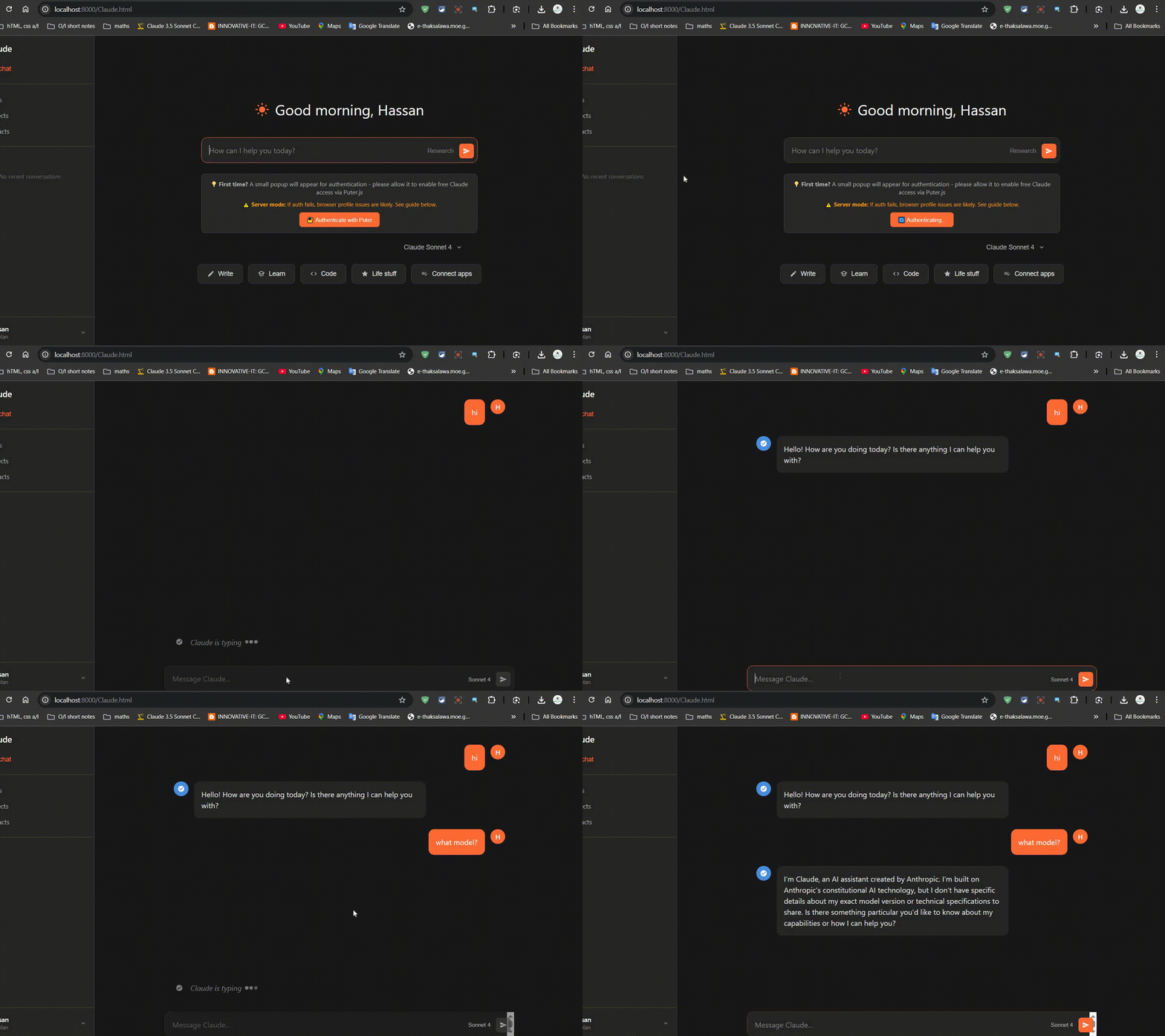
🚀 Key Features
- ✅ 100% Free Access: Leverages the free tier of Puter.js to interact with the Claude API at no cost.
- 🎨 Polished UI: A clean, modern interface inspired by the official Claude UI, with light and dark mode support.
- 📄 Artifact Generation: Automatically renders code blocks into beautiful, interactive "artifact" canvases with syntax highlighting, copy, download, and even an HTML preview feature.
- 💬 Streaming Responses: Watch Claude's responses appear in real-time, just like the official experience.
- 📂 Local Chat History: Remembers your recent conversations in your browser's local storage.
- 🔐 Secure Authentication: Handles Puter.js authentication directly in the browser with a clear, user-friendly flow.
❓ How It Works
This interface does not use a pirated or reverse-engineered API. It uses the official, legitimate Puter.js library. When you first use the app, it will ask for a one-time authentication with your Puter account. This securely connects the web app to your own account's free Claude API access, ensuring everything is secure and above board.
▶️ Getting Started (How to Run)
Because browsers have security rules (CORS), you cannot simply open the index.html file directly. You must run it from a local web server. I've made this easy for you.
✅ Prerequisites
This project has minimal dependencies, making it very easy to set up. All you need is:
-
🐍 Python 3:
- This is only required to run the simple local web server. The application itself is 100% JavaScript.
- No
pippackages are needed. Thehttp.servermodule is included with Python by default. - Most macOS and Linux systems have Python pre-installed. For Windows, you can download it from python.org.
-
🌐 A Modern Web Browser:
- Google Chrome, Mozilla Firefox, Microsoft Edge, or Safari.
That's it! There are no other libraries or frameworks to install.
For Windows Users (Easiest Method):
- Download: Download this project as a ZIP file and extract it.
- Run the Script: Simply double-click the
run_server.batfile. - Open: A command prompt will appear, and your default web browser will automatically open to
http://localhost:8000. That's it!
For Mac / Linux / Other Users:
- Download: Download this project as a ZIP file and extract it.
- Open Terminal: Open your terminal or command prompt and navigate into the project folder.
- Run Server: Run the following command:
python -m http.server 8000 - Open Browser: Open your web browser and go to the address
http://localhost:8000.
First Use: The first time you send a message, a small popup will appear asking you to authenticate with Puter. Please allow the popup to enable the free AI access.
❤️ Support The Project
If you find this tool useful, please consider making a small donation to support future development. Thank you!
🛠️ Tech Stack
- Core: Vanilla JavaScript (ES6+), HTML5, CSS3
- API Integration: Puter.js SDK (
@puter.com/v2) - Development: No frameworks, just pure, efficient code.
📄 License
This project is licensed under the MIT License.
// faq
What is unlimited-claude-AI?
Claude AI. No backend, no server costs, 100% free.. It is open-source on GitHub.
Is unlimited-claude-AI free to use?
unlimited-claude-AI is open-source under the MIT license, so it is free to use.
What category does unlimited-claude-AI belong to?
unlimited-claude-AI is listed under other in the Claudeers registry of Claude-compatible tools.
// embed badge

[](https://claudeers.com/unlimited-claude-ai)
// retro hit counter

[](https://claudeers.com/unlimited-claude-ai)
// reviews
// guestbook
// related in Other
 🔓
🔓 🔓
🔓Anti-AI-slop design skill for Claude Code, Cursor, and Codex.
 🔓
🔓Open source Ghostty-based macOS terminal with vertical tabs and notifications for AI coding agents. Built for multitasking, organization, and programmability.
 🔓
🔓Huashu Design · HTML-native design skill for Claude Code · Claude Code 里 HTML 原生的设计 skill · 高保真原型 / 幻灯片 / 动画 + 20 设计哲学 + 5 维评审 + MP4 导出 · Agent-agnostic