
unity-mcp
Unity MCP acts as a bridge between AI assistants and your Unity Editor. Give your LLM tools to manage assets, control scenes, edit scripts, and automate task…
Install with your AI
Paste into Claude Code, Cursor, or any agent — it reads the repo and wires the tool into your project.
Install and set up unity-mcp (release-binary project) into my current project.
Found on https://claudeers.com/unity-mcp
Repo: https://github.com/CoplayDev/unity-mcp
Homepage/docs: https://www.coplay.dev
Detected install method: release-binary → inspect the README
Category: mcp-servers. Platforms: api, web.
Read the repo's README for exact setup and env vars, then install it and wire it into my project.

Claudeers Health Verdict:
active; community-verified: false. Confirm the source before running anything.
Grab the latest release asset from GitHub.
# download a build from https://github.com/CoplayDev/unity-mcp/releases
git clone https://github.com/CoplayDev/unity-mcp
// compatibility
| Platforms | api, web |
|---|---|
| Operating systems | — |
| AI compatibility | claude |
| License | MIT |
| Pricing | open-source |
| Language | C# |

| English | 简体中文 |
|---|
Proudly sponsored and maintained by Aura — the AI assistant for Unreal & Unity.
And don't miss Godot AI, the new open source MCP/AI project from the makers of MCP for Unity.
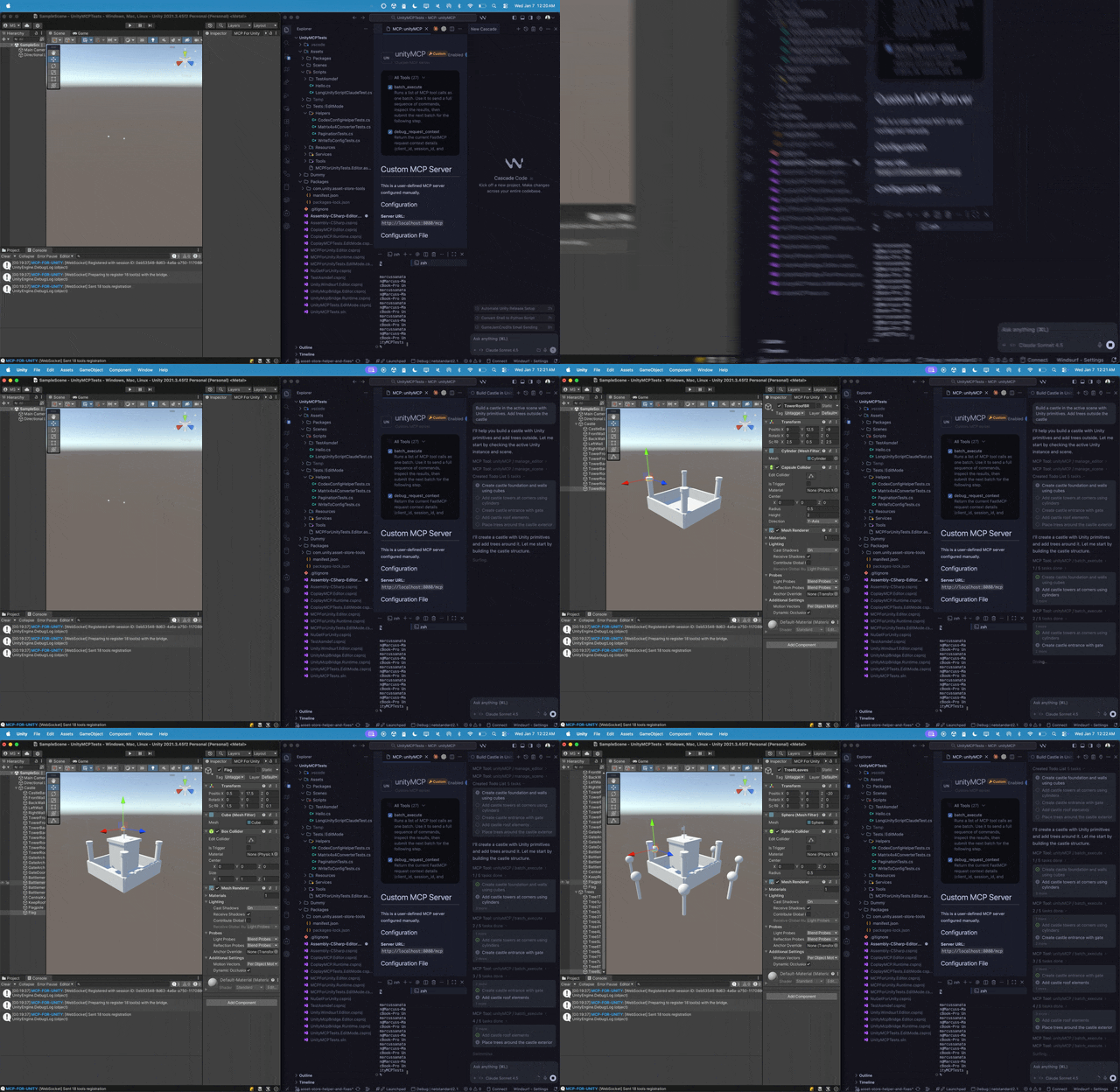
Create your Unity apps with LLMs. MCP for Unity bridges AI assistants — Claude, Codex, VS Code, local LLMs, and more — with your Unity Editor via the Model Context Protocol. Give your LLM the tools to manage assets, control scenes, edit scripts, run tests, and automate workflows.
Read the Docs
→ coplaydev.github.io/unity-mcp
Install
In Unity: Window → Package Manager → + → Add package from git URL, paste:
https://github.com/CoplayDev/unity-mcp.git?path=/MCPForUnity#main
Beta channel uses #beta. Asset Store and OpenUPM paths are documented in the Install guide.
Then Window → MCP for Unity → Configure All Detected Clients. That's it — try a prompt:
Create a red, blue, and yellow cube in the current scene.
Full walkthrough: Your First Prompt.
Recent Updates
Full history: Release Notes.
Community
- Discord — chat with maintainers and other contributors
- Issues — bugs and feature requests
- Discussions — design ideas and broader questions
- Security: see SECURITY.md for private reporting
Contributing
See CONTRIBUTING.md. Branch off beta, not main. The full dev setup, testing, and release process live in the Contributing docs.
Advanced
- Multiple Unity instances — Multi-Instance Routing
- Tool groups (vfx / animation / ui / testing / etc.) — Tool Groups
- Roslyn script validation — Roslyn Validation
- Remote-hosted server with auth — Remote Server Auth
Star History
Citation
If MCP for Unity helped your research, please cite it.
@inproceedings{wu2025mcpunity,
  author    = {Wu, Shutong and Barnett, Justin P.},
  title     = {{MCP-Unity}: {Protocol-Driven} Framework for Interactive {3D} Authoring},
  year      = {2025},
  isbn      = {9798400721366},
  publisher = {Association for Computing Machinery},
  address   = {New York, NY, USA},
  url       = {https://doi.org/10.1145/3757376.3771417},
  doi       = {10.1145/3757376.3771417},
  series    = {SA Technical Communications '25}
}
Unity AI Tools by Aura
Aura offers 2 AI tools for Unity:
- MCP for Unity is available freely under the MIT license.
- Aura for Unity is a premium Unity/Unreal AI assistant built for game devs.
Disclaimer
This project is a free and open-source tool for the Unity Editor, and is not affiliated with Unity Technologies.
License: MIT — see LICENSE.
// faq
What is unity-mcp?
Unity MCP acts as a bridge between AI assistants and your Unity Editor. Give your LLM tools to manage assets, control scenes, edit scripts, and automate tasks within Unity.. It is open-source on GitHub.
Is unity-mcp free to use?
unity-mcp is open-source under the MIT license, so it is free to use.
What category does unity-mcp belong to?
unity-mcp is listed under mcp-servers in the Claudeers registry of Claude-compatible tools.
// embed badge

[](https://claudeers.com/unity-mcp)
// retro hit counter

[](https://claudeers.com/unity-mcp)
// reviews
// guestbook
// related in MCP Servers
 🔓
🔓f.k.a. Awesome ChatGPT Prompts. Share, discover, and collect prompts from the community. Free and open source — self-host for your organization with complete…
 🔓
🔓A cross-platform desktop All-in-One assistant for Claude Code, Codex, OpenCode, OpenClaw, Gemini CLI & Hermes Agent. Only official website: ccswitch.io
 🔓
🔓🪨 why use many token when few token do trick — Claude Code skill that cuts 65% of tokens by talking like caveman
 🔓
🔓An open-source AI agent that brings the power of Gemini directly into your terminal.
// built by
1 of its contributors also build on official projects — claude-agent-sdk-python, claude-code
→ see how unity-mcp connects across the ecosystem