
ui-redline-walkthrough
Claude skill: turn before/after UI screenshots into an animated redline walkthrough video (red ink marks, morphing UI, MP4 export)
Install with your AI
Paste into Claude Code, Cursor, or any agent — it reads the repo and wires the tool into your project.
Install and set up ui-redline-walkthrough (claude-skill project) into my current project.
Found on https://claudeers.com/ui-redline-walkthrough
Repo: https://github.com/rjmahesh/ui-redline-walkthrough
Homepage/docs: https://x.com/rjmahesh
Detected install method: claude-skill → # copy this skill into .claude/skills/ui-redline-walkthrough/
Category: skills. Platforms: web.
Read the repo's README for exact setup and env vars, then install it and wire it into my project.

Claudeers Health Verdict:
unknown; community-verified: false. Confirm the source before running anything.
# copy the skill dir into your project:
# .claude/skills/ui-redline-walkthrough/   (or ~/.claude/skills/ui-redline-walkthrough/ for all projects)
git clone https://github.com/rjmahesh/ui-redline-walkthrough
// compatibility
| Platforms | web |
|---|---|
| Operating systems | — |
| AI compatibility | claude |
| License | MIT |
| Pricing | open-source |
| Language | HTML |
ui-redline-walkthrough
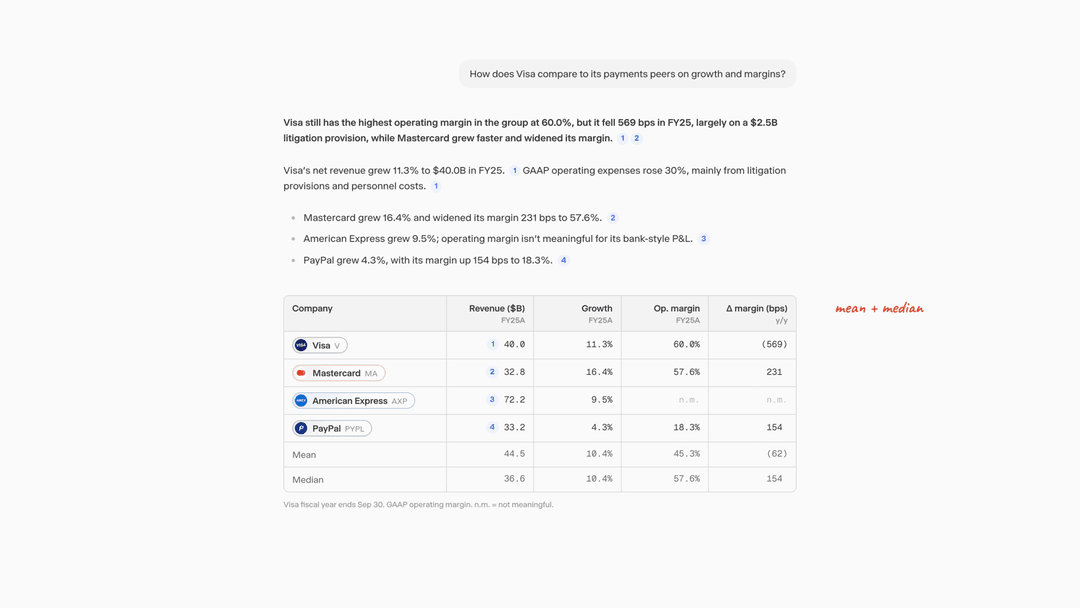
A Claude skill that turns before/after screenshots of a product UI into an animated redline walkthrough: red ink and handwritten notes mark each problem on the real interface, the UI morphs into the fix, and the film ends on the clean redesign. Output is a self-contained HTML animation and a high-quality MP4.
Example output
A chat answer redesign (a Visa vs. payments peers response), made with this skill from one before and one after screenshot. 19 seconds, 3200x1800, 60 fps.
Install
Copy the ui-redline-walkthrough folder into your skills directory (for Claude Code, ~/.claude/skills/), or upload the packaged .skill file in Claude's skill settings.
Requirements
- Python 3.9+ with
numpy,pillow,scipy playwrightwith Chromium (pip install playwright && playwright install chromium) for stills and MP4 exportffmpegon your PATH
Contents
| Path | Purpose |
|---|---|
SKILL.md | The workflow Claude follows |
references/intake.md | Questions to ask before building, with defaults |
references/measuring.md | Measuring screenshots, raster vs live markup, alignment traps |
references/choreography.md | Beat structure, ordering, timing, camera, ink, notes, morph patterns |
references/review-checklist.md | Polish checklist drawn from real review rounds |
assets/template.html | Animation engine plus a runnable demo |
scripts/measure.py | Boxes, colors, text lines and extents from screenshots |
scripts/extract_icons.py | Icons cut out with clean transparency into one sprite |
scripts/export_mp4.py | Frame-accurate stills and MP4 export via headless Chromium |
examples/ | A finished walkthrough MP4 and its preview still |
Try the demo
Open assets/template.html in a browser (space pauses, arrow keys seek), or render it:
python scripts/export_mp4.py assets/template.html --out demo.mp4
License
MIT
// faq
What is ui-redline-walkthrough?
Claude skill: turn before/after UI screenshots into an animated redline walkthrough video (red ink marks, morphing UI, MP4 export). It is open-source on GitHub.
Is ui-redline-walkthrough free to use?
ui-redline-walkthrough is open-source under the MIT license, so it is free to use.
What category does ui-redline-walkthrough belong to?
ui-redline-walkthrough is listed under skills in the Claudeers registry of Claude-compatible tools.
// embed badge

[](https://claudeers.com/ui-redline-walkthrough)
// retro hit counter

[](https://claudeers.com/ui-redline-walkthrough)
// reviews
// guestbook
// related in Claude Skills
 🔓
An agentic skills framework & software development methodology that works.
 🔓
 🔓
AI coding assistant skill (Claude Code, Codex, OpenCode, Cursor, Gemini CLI, and more). Turn any folder of code, SQL schemas, R scripts, shell scripts, docs,…
 🔓
💫 Toolkit to help you get started with Spec-Driven Development