
trueforge
The open-source agent harness - the runtime layer that turns an LLM into a working agent.
Install with your AI
Paste into Claude Code, Cursor, or any agent — it reads the repo and wires the tool into your project.
Install and set up trueforge (git-clone project) into my current project.
Found on https://claudeers.com/trueforge
Repo: https://github.com/truefoundry/trueforge
Homepage/docs: https://trueforge.dev
Detected install method: git-clone → git clone https://github.com/truefoundry/trueforge
Category: uncategorized. Platforms: cli, api.
Read the repo's README for exact setup and env vars, then install it and wire it into my project.

Claudeers Health Verdict:
active; community-verified: false. Confirm the source before running anything.
git clone https://github.com/truefoundry/trueforge
// compatibility
| Platforms | cli, api |
|---|---|
| Operating systems | — |
| AI compatibility | claude |
| License | MIT |
| Pricing | open-source |
| Language | TypeScript |

The open-source agent harness - the runtime layer that turns an LLM into a working agent
TrueForge
TrueForge runs the agent execution loop for you - model calls, MCP tools, skills, sandboxing, approvals, context management, and session state - and exposes it three ways: a chat UI, an HTTP API with a TypeScript SDK, and an embeddable UI SDK.
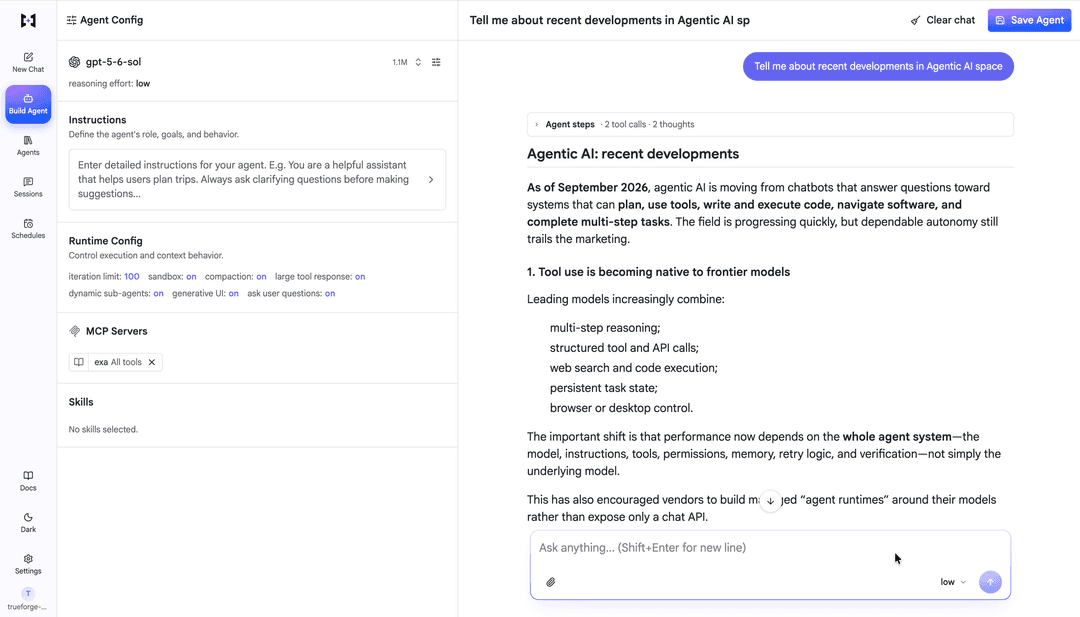
Why TrueForge?
Building an agent is easy. Running one well is not - you need streaming, session persistence, tool servers, sandboxing, approvals, and a UI. TrueForge gives you that out of the box:
- Initial setup from catalogs - configure models, MCP servers, skills, and a sandbox once; agents pick from what you connected. Presets come from shipped YAML catalogs you can customize.
- Any model provider - OpenAI, Anthropic, Google Gemini, and other catalog providers, or any OpenAI-compatible endpoint.
- MCP tools - remote MCP servers with header auth or OAuth, including in-chat authorization.
- Skills - git-backed
SKILL.mdinstruction packs, loaded on demand in the sandbox. - Sandbox as a tool - isolated code/file execution (Daytona today; more providers planned), provisioned only when needed. Secrets stay in the harness.
- Human checkpoints - tool approval, ask-user-questions, and Generative UI in chat.
- Context engineering - subagents, deferred tool loading, Code Mode, large-result offloading, and compaction.
- Chat UI + SDK - use the bundled UI, automate with
@truefoundry/trueforge-sdk, or embed@truefoundry/trueforge-ui.
It scales down and up: local mode (one process, SQLite) or hosted mode (Postgres + Redis, Docker Compose, Helm, or Railway).
Getting started
Quickstart with npx
npx @truefoundry/trueforge@latest
Use the Quickstart guide to run TrueForge using various methods (Local, Docker Compose, Kubernetes, or Railway). Connect models, tools, skills and build your first reusable agent.
To work on TrueForge from this repository, see CONTRIBUTING.md.
Architecture

| Mode | Best for | Storage | Extra infra | How to run |
|---|---|---|---|---|
| Local | Personal use, trying it out | SQLite | None | npx @truefoundry/trueforge |
| Hosted | Teams, multi-replica | Postgres | Postgres + Redis | Docker Compose, Helm, or Railway |
Local mode is for your machine only. It is a convenient way to try TrueForge — not a production or internet-facing setup. There is no login by default, and data lives in a local SQLite file. Please keep it on localhost. We cannot take responsibility for data loss or unauthorized access if local mode is used beyond that. For a shared or production deployment, use hosted mode.
Documentation
| Section | What you'll find |
|---|---|
| Introduction | What an agent harness is and how TrueForge fits together |
| Quickstart | Run local or hosted, build your first agent |
| Initial Setup | Models, MCP, skills, sandbox - catalogs and overrides |
| Create an Agent | Select resources; tool approval, questions, Generative UI |
| Sessions | Inspect past runs: turns, tool calls, subagents, tokens, timing |
| Schedules | Run a saved agent on a recurring cadence, unattended |
| Harness Capabilities | Sandbox-as-tool, subagents, deferred tools, Code Mode, compaction |
| Setup Login | Optional OIDC for shared deployments |
| Benchmarking | Cost/accuracy vs Claude Managed Agents and deepagents |
| SDK | TypeScript client: sessions, turns, events |
| Chat UI | Bundled UI and embedding @truefoundry/trueforge-ui |
| API Reference | OpenAPI paths and schemas |
Benchmarks
We compare TrueForge against Claude Managed Agents and deepagents on the same tasks, tools, and model - same accuracy, lower cost. Reproduce it from benchmark/. Write-up: Benchmarking.
Contributing
We love contributions - bug reports, features, and docs fixes. See CONTRIBUTING.md and our Code of Conduct. Fork PRs should change source only; maintainers regenerate the SDK after merge.
To report a security vulnerability, follow SECURITY.md instead of opening a public issue.
Talk to us
- Community Discord
- Founder emails: [email protected] / [email protected]
License
TrueForge is released under the MIT License.
// faq
What is trueforge?
The open-source agent harness - the runtime layer that turns an LLM into a working agent.. It is open-source on GitHub.
Is trueforge free to use?
trueforge is open-source under the MIT license, so it is free to use.
What category does trueforge belong to?
trueforge is listed under uncategorized in the Claudeers registry of Claude-compatible tools.
// embed badge

[](https://claudeers.com/trueforge)
// retro hit counter

[](https://claudeers.com/trueforge)
// reviews
// guestbook
// related in Uncategorized / Others
 🔓
Reverse engineer anything with agents, from app behavior down to native binaries.
 🔓
Fair-code workflow automation platform with native AI capabilities. Combine visual building with custom code, self-host or cloud, 400+ integrations.
 🔓
The agent engineering platform.
 🔓
100+ AI Agent & RAG apps you can actually run — clone, customize, ship.