
rea
Reverse engineer anything with agents, from app behavior down to native binaries.
Install with your AI
Paste into Claude Code, Cursor, or any agent — it reads the repo and wires the tool into your project.
Install and set up rea (git-clone project) into my current project.
Found on https://claudeers.com/rea
Repo: https://github.com/morluto/rea
Homepage/docs: —
Detected install method: git-clone → git clone https://github.com/morluto/rea
Category: uncategorized. Platforms: cli, api, desktop, web, mobile.
Read the repo's README for exact setup and env vars, then install it and wire it into my project.

Claudeers Health Verdict:
unknown; community-verified: false. Confirm the source before running anything.
git clone https://github.com/morluto/rea
// compatibility
| Platforms | cli, api, desktop, web, mobile |
|---|---|
| Operating systems | — |
| AI compatibility | claude |
| License | MIT |
| Pricing | open-source |
| Language | TypeScript |
English · 简体中文 · 日本語 · 한국어 · العربية
REA: Reverse Engineer Anything
Reverse engineer anything with agents, from app behavior down to native binaries.
See a feature you like. Understand how it works, down to the binary level.
Quick start · Current status · Investigation model · Tool catalog · Roadmap · How it works
npm install --global rea-agents && rea setup
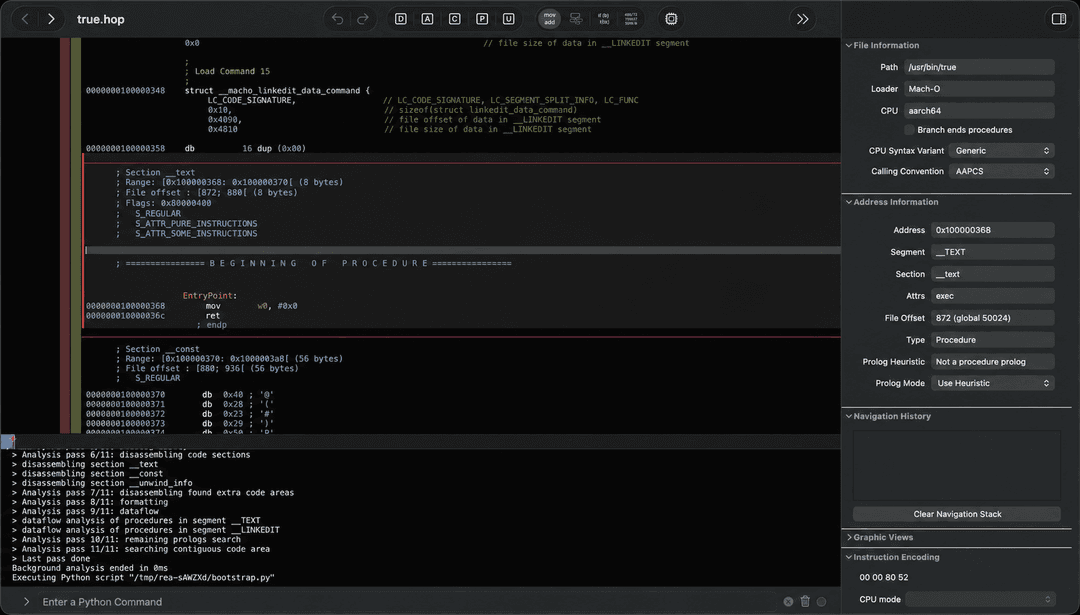
See a feature in an app that you want in your own product? Give the app to your agent—even without its source code. With REA, the agent can investigate the feature, explain how it works, show its evidence, and build a version adapted to your stack and requirements.
REA gives agents one consistent way to investigate software. Today that includes deep native analysis and function dossiers through Hopper or bring-your-own Ghidra on Linux and macOS, plus an experimental Windows x64 Ghidra P0 for approved native PE applications; execution-free managed PE/CLI triage; reproducible Evidence records; controlled process capture; passive website, Electron page, and Node/Electron V8 Inspector observation; JavaScript/source-map reconstruction; and provider-neutral graphs for connecting application layers without confusing static inference with runtime observation. The longer-term toolkit extends the same agent workflow to APIs, protocols, mobile artifacts, firmware, richer runtime behavior, and differences between versions.
Reverse engineering normally makes the operator choose a tool, learn its API, move evidence between programs, and decide what to inspect next. REA gives that work to the agent through commands, skills, structured results, and repeatable investigation workflows.
Just ask your agent
Run setup once. Agent integration installs an aligned MCP registration and the bundled routing skill together:
npx rea-agents setup
Then ask:
Understand how search works in the Notes app, show me the evidence, and build a
similar feature for my project.
Notes is only an example. Name any app you want to understand, or ask the agent to start with an overview.
The investigation model
|
Decompile Open an app and recover readable code, strings, names, and other clues about how it works. |
Understand Follow the code from one part of the app to another until the agent can explain how a feature actually works. |
Recreate Turn what the agent learned into a feature for your own product, adapted to your stack, interface, and requirements. |
REA shows how it reached its conclusions. It does not claim to recover original source code or automatically clone an application.
Why REA
| Built for agents | Ask what an app does and let your agent inspect it instead of guessing. |
| CLI and MCP | Run the same reverse-engineering capabilities from your terminal or agent. |
| Complexity handled | REA installs and manages the reverse-engineering tools behind the scenes. |
| From insight to code | Understand a feature, then build your own version in the same coding session. |
| Local by design | Analysis runs on your supported local host. REA does not upload the app to a hosted analysis service. |
| Keeps context | Investigate several apps without starting over for every question. |
Quick start
Run setup — recommended
npx --yes rea-agents@latest setup
The npm package-runner prompt, when shown, approves downloading REA for this invocation; it does not approve any setup changes. The REA wizard separately shows its complete plan and asks before applying it. Setup does not update Homebrew, Node.js, or npm. The setup command opens with the work it enables: investigate local apps from an agent, recover evidence through a deep-analysis provider, and reuse REA's guided workflow. It summarizes the detected agents, then asks which capabilities to set up: agent integration (MCP plus the matching guided workflow) and—when needed—the Hopper provider. Nothing is preselected. Choosing agent integration opens a second empty checklist for the specific detected agents that should receive a registration.
@latest makes the requested release explicit and asks npm for the release
currently published under that tag. REA does not silently replace the package
version npm selected. Intentional rollbacks therefore remain available through
an exact package request.
REA keeps the journey inline so its history remains in the terminal. Selecting a capability does not select every detected target or authorize a change. Before anything changes, REA validates existing configuration, prints exact paths and external effects, and asks for final approval with No as the default. The screen keeps the available keys visible while you choose; Ctrl-C and declining leave the system unchanged.
REA detects Claude Code, Claude Desktop, Codex, Cursor, Gemini CLI, Windsurf, and Devin. It configures the first six when detected; Devin is reported but left unchanged because it has no documented local MCP configuration boundary. Registrations are additive, backup-first, and read back after writing. You can safely rerun setup.
Use rea setup --dry-run to inspect the plan, repeat --client to select exact
agents, and --accessible for sequential vertical prompts. Machine output
remains available through --json; prompt UI and progress go to stderr.
After a successful setup, REA reports the capabilities now ready to use and a concrete next step, such as restarting a configured agent before asking it to investigate an application. It does not claim an integration or provider is ready unless setup and its final diagnostic check verified it.
An optional curl wrapper installs the same CLI package and starts setup only when a terminal is available:
curl -fsSL https://raw.githubusercontent.com/morluto/rea/main/install.sh | bash
Pass installer options after bash -s --, for example --dry-run, --no-setup, or --version 1.0.0. The curl wrapper never installs prerequisites or configures integrations itself. See Installation and setup for its exact mutation boundary.
With an agent — recommended
npx --yes rea-agents@latest setup
Choose Agent Integration in the reviewed setup plan. REA installs the pinned MCP registration and its matching routing skill as one transaction. After setup, restart the configured agent so it loads the aligned integration.
Review the setup plan, approve it if appropriate, then describe the app or feature you want to understand. Hopper can run in its free demo mode; if it shows a first-run prompt, choose the demo or enter an existing license.
From Terminal — no installation
npx --yes rea-agents@latest setup
npx -y rea-agents@latest doctor
npx -y rea-agents@latest analyze /Applications/Notes.app
Review the setup plan before confirming it. Restart a configured agent so it loads REA.
From Terminal — install the rea command
npm install --global rea-agents
rea setup
rea doctor
rea analyze /Applications/Notes.app
Update that global installation in place:
rea upgrade
REA checks npm for the latest release and verifies that the running package is
the global installation it will replace. Source, local, and npx copies report
the manual npm install --global rea-agents@latest command instead of updating
an unrelated global package.
Choose either the no-install commands or the global installation. You do not need both.
npm install rea-agents without --global installs rea only into the
current project's node_modules/.bin; it does not add rea to your shell
PATH. Use the npx commands above for one-off runs or --global when you
want a shell-visible rea command.
Requirements
- macOS 12 or newer
- Ubuntu 24.04+, Fedora 41+, or 64-bit Arch Linux
- Windows x64 for the experimental, Ghidra-only native PE P0 boundary
- Node.js 22.19+ or 24.11+ (including newer releases)
- npm; REA does not require or install a particular npm version
Deep binary operations use Hopper, a separate desktop application with its own license, or a caller-selected Ghidra provider. Ghidra supplies read-only inventory, function metadata, decompilation, assembly, resolved calls, typed references, xrefs, CFG, and function dossiers; GUI state and mutations remain unavailable through that provider. Setup reuses an existing Hopper installation or an operator-supplied Ghidra installation. It never downloads Ghidra or installs Java. If neither provider is ready, interactive setup proposes Hopper; unattended Hopper installation requires rea setup --yes --install-hopper.
If something is not working, run:
npx -y rea-agents@latest doctor
rea doctor --json is read-only and distinguishes unsupported hosts, missing dependencies, a missing local analysis engine, configuration drift, and healthy checks. Paid-license activation is optional: on Linux, REA runs the supported Hopper demo build on a private Xvfb display and selects Hopper's offered demo mode for each analysis session.
Linux installation and troubleshooting
On macOS, approved setup downloads Hopper's official DMG, verifies it, and installs the app into ~/Applications without Homebrew or administrator privileges. Hopper may show its demo or license prompt when first opened; no manual drag-and-drop is required.
On Ubuntu 24.04+, Fedora 41+, and 64-bit Arch Linux, approved setup downloads the pinned official Hopper 6.4.2 package, restricts downloads to Hopper's public origin, verifies the published size and checksum, and invokes apt-get, dnf, or pacman to install Hopper and the Xvfb, Python, X11, and XTEST packages used by demo sessions. When REA is not already running as root, pkexec presents the system authorization prompt. REA never invokes sudo. Demo sessions run on an isolated 1280×1024 Xvfb display. REA verifies the exact supported Hopper binary, its owned process ancestry, the expected dialog geometry, and bridge state before selecting Try the Demo; any mismatch fails closed.
The normal Linux launcher is /opt/hopper/bin/Hopper. If Hopper was installed elsewhere:
export HOPPER_LAUNCHER_PATH=/absolute/path/to/Hopper
rea doctor --json
If doctor reports a missing analysis engine even though the file exists, inspect shared-library resolution with:
ldd /opt/hopper/bin/Hopper | grep 'not found'
Install the missing distribution packages and rerun rea setup. Linux demo automation requires Xvfb, Python 3, libX11.so.6, and libXtst.so.6; approved setup installs those direct runtime dependencies and does not interact with the user's desktop display. Hopper's free demo supports analysis with vendor-defined limits, and a paid license is optional. The curl installer places the rea command in ~/.local/bin on Linux; add that directory to future shell PATH values if it is not already present.
REA defaults HOPPER_LAUNCHER_PATH to /Applications/Hopper Disassembler.app/Contents/MacOS/hopper on macOS and /opt/hopper/bin/Hopper on Linux. Explicit configuration always takes precedence.
Ghidra read-only analysis provider
The Ghidra adapter supports the exact official Ghidra 12.1.4 release with a 64-bit full JDK 21 on Linux x64 and macOS x64/arm64. macOS additionally requires the matching native Ghidra decompiler; the adapter does not build or install it. The adapter also provides an experimental Windows x64 P0 limited to approved native x86-64 PE applications. Download and extract those projects yourself, then configure absolute paths:
export GHIDRA_INSTALL_DIR=/absolute/path/to/ghidra_12.1.4_PUBLIC
export JAVA_HOME=/absolute/path/to/jdk-21 # optional when java and javac resolve from PATH
rea doctor --json
rea setup
rea providers --json
Doctor distinguishes missing configuration, a bad installation root, the wrong Ghidra or Java version, a JRE without javac, a missing support/analyzeHeadless, and an unsupported platform or architecture. Approved setup only copies the verified non-secret paths into detected MCP registrations; it does not modify the Ghidra installation or install/download Ghidra or Java.
On Windows, set the same variables in PowerShell and run rea doctor --json; automated rea setup and Hopper installation remain unavailable. The P0 target boundary rejects DLLs, managed PE files, non-x86-64 images, mutable/hostile inputs, and non-PE formats. See the Windows Ghidra P0 operations guide for registration, exact limitations, CI evidence, and acceptance gates.
REA loads its packaged Java HeadlessScript with -scriptPath, copies and digest-verifies the target in an ephemeral runtime, enables -readOnly and -deleteProject, and authenticates every request. Auto-analysis completes before operations are served; startup has a deadline, while tool requests run until a result, caller cancellation, or provider shutdown. Linux and macOS use a mode-0600 Unix socket. Windows P0 uses token-authenticated IPv4 loopback and a token-free endpoint record because Node path-based IPC does not connect to Java AF_UNIX sockets on Windows. The bridge verifies Ghidra's imported-byte SHA-256 before serving any operation.
The Ghidra adapter declares 22 direct and enhanced operations. Its ten inventory operations are list_documents, list_procedures, list_strings, list_names, list_segments, address_name, procedure_address, resolve_containing_procedure, search_procedures, and search_strings. It also admits procedure_info, procedure_pseudo_code, procedure_assembly, read_function_instructions, procedure_callers, procedure_callees, procedure_references, xrefs, analyze_function, inspect_native_instruction, resolve_native_call_targets, and inspect_native_data_type. The exact-object primitives report instruction tokens, static call targets, and recovered database layouts; unsupported facets remain explicit. trace_native_values composes bounded decompiler-derived argument/parameter and return/output dependencies across resolved calls. read_function_instructions is the offset-paginated fast path for raw instruction windows: it does not invoke the decompiler or whole-program name/string inventories, and is also exposed as rea instructions. These capabilities enable the shared Swift/Objective-C inventory workflows, binary_overview, batch_decompile, get_call_graph, find_xrefs_to_name, trace_feature, and complete function dossiers. Default-space addresses are lowercase 0x hexadecimal. Other spaces, including EXTERNAL, use <percent-encoded-space>:0x<hex>. Symbol results identify primary, dynamic, external, type, and source facts; procedures distinguish external functions and thunks; strings identify charset, missing-terminator state, byte length, and value truncation; memory-block ends are exclusive and permissions come directly from Ghidra.
The bridge serves operations only after auto-analysis completes. Each Program owns one persistent DecompInterface, and a serial FIFO keeps Ghidra API access on the owning program's thread; it has no fixed queue length or per-operation deadline. Reference results preserve Ghidra's call/jump/data/read/write/indirect/computed/external facts, while unresolved targetless flows remain explicitly unknown. Synthetic entry-point references without actionable memory sources are omitted. Pseudocode and assembly are provider-specific observations, not original source or Hopper-equivalent text. Caller cancellation and provider shutdown remain available; provider results are returned without a fixed response-size ceiling.
npm run verify:ghidra builds debug and stripped host-native fixtures (Linux x64 ELF or macOS Mach-O) and a native DWARF 4 type-layout object. Against real Ghidra 12.1.4 it validates every admitted operation, direct and indirect calls, imports/exports/thunks, typed references, strings/xrefs, multi-block CFG, cancellation, deadlines, concurrency, malformed inputs, and complete process/project cleanup. It needs a host C compiler and the Ghidra/JDK prerequisites above.
npm run verify:ghidra:cross-format adds AArch64 ELF, x86-64 PE, and x86-64 Mach-O fixtures. This separate lane requires clang, LLD, and lld-link; use REA_CLANG, REA_LLD, or REA_LLD_LINK to select alternate command paths. It preflights the required toolchain before compiling fixtures.
npm run verify:ghidra:windows uses a deterministic source-owned native x86-64 PE application and requires the Windows P0 operations, target/snapshot/import digest linkage, authenticated loopback transport, and cleanup on a controlled Windows x64 Ghidra 12.1.4 runner. This proof does not establish Job Object ownership, private DACLs, or reparse-point-safe authority.
To remove only REA-owned MCP registrations and the managed skill:
rea uninstall
rea uninstall --purge-data # also removes only ~/.rea/cache and ~/.rea/state
Uninstall preserves Hopper, Node.js, Evidence files, captures, unrelated skills, and other MCP servers. It refuses malformed client configuration and never follows purge-data symlinks.
CLI or agent?
| If you want to… | Use |
|---|---|
| Ask an agent to investigate an app and build a feature | Install the skill, then talk to your agent |
| Inspect or decompile one part of an app from the Terminal | rea analyze or rea decompile |
| Validate, canonicalize, or compare Evidence bundles | rea evidence-import, rea evidence-export, or rea compare |
| Map a local JavaScript/Electron application without executing it | rea analyze PATH or rea analyze-javascript-application |
| Reuse immutable analysis results without relaunching a provider | Pass --snapshot /approved/path/analysis.json to a deep-analysis command |
| Import source as historical reference | rea import-reference-source |
| Capture or compare controlled process behavior | rea capture-process or rea compare-process-captures |
rea evidence-import /absolute/path/to/evidence/bundle.json
rea evidence-export /absolute/path/to/evidence/bundle.json /absolute/path/to/evidence/canonical.json
rea compare /absolute/path/to/evidence/left.json /absolute/path/to/evidence/right.json
JavaScript application analysis reads the selected directory or ASAR directly; the command uses the supplied path directly:
rea analyze /absolute/path/to/releases/app.asar --json
rea analyze-javascript-application /absolute/path/to/releases/app.asar --json
For a directory or .asar, generic rea analyze automatically selects the
static JavaScript application provider when neither --provider nor
--snapshot is supplied. Both routes return the analysis and its Evidence
context inline.
Historical source import takes the directory directly and never treats source as current behavioral authority:
rea import-reference-source /absolute/path/to/source
Imports read the path supplied to the command and validate every Evidence ID and manifest. Exports never replace an existing file unless --overwrite is explicit.
Provider-neutral analysis snapshots persist successful, immutable REA calls and their Evidence records. They are exact caches rather than Hopper databases: REA reuses a v2 entry only when the binary digest, kind, format, architecture, operation parameters, concrete provider build, and canonical analysis-profile digest match. Hopper loader defaults and configured overrides are normalized by the Hopper adapter and committed to that profile, so overrides occupy a distinct safe cache partition instead of disabling snapshots. Cursor-dependent and mutating calls are never cached. Snapshot files can contain proprietary analysis results and local paths, so REA keeps them local and writes them with owner-only permissions. The caller supplies the snapshot path directly:
rea analyze /absolute/path/to/app --snapshot /absolute/path/to/analysis/app.json
# The same exact query can be answered from that snapshot.
rea analyze /absolute/path/to/app --snapshot /absolute/path/to/analysis/app.json
Exact CLI evidence replays happen before any provider process starts. In MCP sessions,
pass snapshot_path to open_binary to import a snapshot atomically while
opening its matching target; MCP providers may still start before a cached call
is replayed. Pass snapshot_path and, when required, overwrite: true to
close_binary to save atomically before Hopper resources are released. If the
save fails, REA deliberately leaves the session open.
One prompt, a full investigation
Reverse engineer the Notes app. Find how offline search works, explain it,
and build a version for my project using TypeScript and SQLite.
REA gives the agent a clear path from that request to working code:
| Step | What the agent does | REA tools |
|---|---|---|
| 1 | Opens and identifies the binary | open_binary, binary_overview |
| 2 | Finds likely offline-search clues | search_strings, search_procedures, list_names |
| 3 | Connects those clues to executable code | find_xrefs_to_name, xrefs, procedure_callers |
| 4 | Reconstructs the relevant control flow | get_call_graph, procedure_callees, procedure_info |
| 5 | Decompiles the relevant routines | procedure_pseudo_code, procedure_assembly, batch_decompile |
| 6 | Builds the feature in your project | code adapted to your stack, product, and requirements |
REA handles the app analysis in steps 1–5. The agent performs step 6 with its normal file-editing and test tools, using what it learned about the app.
What agents can do
- Investigate a feature you like and build a version tailored to your own product.
- Explain how a feature works when its source code is unavailable.
- Reconstruct an app's authentication, storage, update, or networking flow.
- Recover enough structure to document an undocumented format or interface.
- Trace a suspicious behavior from a string or symbol to the code that implements it.
- Turn recovered behavior into product features, tests, migration notes, ports, or interoperable replacements.
- Analyze Swift and Objective-C metadata without manually untangling every mangled symbol.
- Leave names, comments, and bookmarks in Hopper so human and agent analysis reinforce each other.
See native investigation for keyed archives, instruction/call/type primitives, typed dispatch metadata, value traces and approved native desktop observation.
Tool catalog for investigation
| Tool family | Count | Examples |
|---|---|---|
| Native inspection | 39 | procedures, pseudocode, assembly, strings, names, segments, callers, callees, xrefs, annotations, bounded byte reads, file-offset translation |
| Investigation workflows | 15 | binary_overview, analyze_function, inspect_native_api, inspect_native_dispatch_metadata, batch_decompile, trace_feature, trace_native_investigation, exact string-to-code lookup, bounded call paths, call graphs, Swift and Objective-C discovery |
| Native macOS utilities | 7 | Mach-O metadata, code signatures, plists, architectures, Swift demangling; Hopper-free and provenance-bearing |
| Artifact graph | 5 | complete inline inspection of directories and supported packages, compiled Interface Builder UI graph decoding, paginated Apple asset catalog metadata, plus explicitly selected extraction into an absent owned tree |
| Managed PE/CLI | 8 | PE/CLI identity, metadata members, CIL hashes, P/Invoke/native-boundary declarations and verification, application-graph projection, decompiler reconstruction import, token remapping, runtime-correlation plans, and version comparison |
| Browser observation | 9 | exact-origin passive CDP capture, bundle and source-map analysis, WebMCP discovery, session timelines, capture diff, visual evidence, and bounded Playwright scenarios |
| Electron analysis | 5 | passive root-confined observation, static application mapping, evidence-backed static/runtime reconciliation, and provider-owned click/wait scenarios |
| JavaScript runtime | 2 | approved attach-only Node/Electron Inspector target discovery plus bounded script and execution-context observation without evaluation or instrumentation |
| Application workflows | 10 | complete cross-layer traces, unique-only version matching, historical-source to bundle mapping, static export return-shape comparison, approved Linux-isolated extracted-module replay, managed-runtime characterization, reconstruction coverage closure, and deterministic obligation ledgers |
| Workspace and observation | 22 | target lifecycle, inline Evidence bundle retrieval, aggregate navigation/address context, direct finite replay-machine evaluation, process/artifact/function comparison, evidence-linked residual-unknown lifecycle |
The public interface describes what the agent is trying to learn. Providers decide how to answer. macOS utilities handle common semantic inspection without launching Hopper; Hopper handles deeper native analysis; the process harness implements controlled behavioral capture.
Current status
REA is already useful for native application, browser, and Electron investigation on supported macOS and Linux hosts, plus the bounded Windows Ghidra P0 described above:
- Open Mach-O, ELF, PE,
.app, ZIP, APK, IPA, ASAR, plist, JavaScript, source-map, and generic analysis-database targets; Hopper remains the only adapter that accepts legacy.hopdatabases. - Discover deep-analysis candidates without starting them, choose deterministically, and retain one immutable provider/profile binding until an explicit switch or close; provider failures never trigger transparent fallback.
- Attach to a user-owned Chrome-family browser over a configured loopback CDP endpoint; capture exact-origin web structure, safe metadata, approved value-free payload shapes, bundle/source-map evidence, WebMCP declarations, user-action timelines, capture diffs, and explicitly approved screenshots without navigation or JavaScript evaluation.
- Inspect Electron
file://renderer pages through a separate canonical-root permission boundary without invoking Electron APIs; script contents remain separately approved and byte bounded. - Attach to one exact approved Node or Electron V8 Inspector target and retain bounded
scriptParsedplus execution-context lifecycle metadata without evaluation, breakpoints, resume, source reads, or instrumentation. require/import edges, EventEmitter activity, Electron IPC, PID identity, and role identity remain unknown. See passive Node and Electron runtime observation. - Validate and canonically serialize a provider-neutral JavaScript Application Graph spanning packages, ASAR entries, Electron roles, JavaScript/source-map entities, browser/runtime instances, IPC, endpoints, storage, and native add-ons. This shipped domain contract performs no extraction or I/O by itself.
- Reconstruct static package, entrypoint, Webpack/Rspack module, import, worker, endpoint, storage, source-map, BrowserWindow, preload, contextBridge, IPC, utility-process, and native-add-on structure from a selected local directory or ASAR through
analyze_javascript_applicationorrea analyze-javascript-application. Results and Evidence context are returned inline. The AST-only application service never executes bootstrap code, pairs only unique exact literal IPC channels, and reports dynamic or ambiguous channels as unresolved. - Reconcile that static graph with existing passive web or Electron Evidence through
reconcile_javascript_runtimeorrea reconcile-javascript-runtime. Exact captured bytes outrank caller-declared file/URL mappings; target, frame, script, worker, cache, and asset ambiguity stays explicit, source-map authority stays separate, and a module resident in an observed bundle is never reported as executed. See JavaScript static/runtime reconciliation. - Trace a literal route, string, API, IPC channel, module, or native export through the complete reachable graph in authenticated application Evidence, then hand exact native artifact digests and requested exports to retained Ghidra or Hopper Evidence without automatic provider switching. Compare application versions using unique-only digest, source-map, structural, and semantic tiers; map a committed historical source inventory to bundle nodes with explicit digest and path scores; compare one exact JavaScript export's static return shapes through unique literal discriminants and JSON Pointer changes. Duplicate, dynamic, incomplete, ambiguous, and truncated facts stay unknown. See cross-layer JavaScript application workflows.
- Classify PE/CLI managed artifacts with
inspect_managed_artifact/rea inspect-managed-artifact, inspect file-backed metadata members, signatures, raw CIL hashes, decoded-instruction-tuple fingerprints, separately reported exception regions, call edges, and field-access anchors withinspect_managed_members/rea inspect-managed-members, inventory declared ModuleRef/ImplMap/PInvoke and non-IL method boundary indicators withinspect_managed_native_boundaries/rea inspect-managed-native-boundaries, then compare two authenticated member observations withcompare_managed_members/rea compare-managed-members.verify_managed_native_boundaries/rea verify-managed-native-boundarieschecks managed P/Invoke declarations against authenticated native export or function Evidence while keeping verified, inferred, contradicted, and unresolved states distinct. The comparison treats build-local tokens as build-local and uses unique decoded-CIL/signature and structural method-shape tiers, never names alone; tuple fingerprints do not themselves resolve tokens or fully commit control flow.project_managed_application_graph/rea project-managed-application-graphprojects authenticated managed artifact/member/native-boundary Evidence into the existing application graph for cross-layer feature tracing.import_managed_reconstruction/rea import-managed-reconstructionadmits user-supplied decompiler C#/IL/pseudocode as analyst inference only after exact artifact SHA-256, MVID, signature, and decoded-IL commitments match. Separately,plan_managed_runtime_correlation/rea plan-managed-runtime-correlationcan admit a default-disabled, permission-gated runtime-correlation plan locked to the same build evidence. These paths never load the assembly, resolve CLR dependencies, execute target code, run a decompiler, or translate managed tokens into native addresses; complete normalized-CIL semantics, native-body bridge mapping, and an actual runtime executor remain future managed-code contracts. - Configure
REA_ILSPY_CMD_PATH=/absolute/path/to/ilspycmdonly when you want doctor andverify:managedto inspect a bring-your-own ILSpy command as a real reconstruction oracle. REA does not install ILSpy and does not treat decompiler text as canonical metadata or CIL observation. - Traverse content-addressed artifact graphs without extraction; on macOS, read-only DMG traversal additionally requires
native_mount_approved: trueandREA_ARTIFACT_NATIVE_MOUNT_ENABLED=true. Materialize only approved occurrences into absent output roots. - Build function dossiers with pseudocode, assembly, CFG edges, comments, calls, references, strings, and names.
- Search and trace features across symbols, strings, metadata, references, and call paths.
- Record every successful result as deterministic Evidence with artifact and provider identity, confidence, authority, limitations, and locations.
- Export and import evidence bundles across sessions.
- Capture approved PTY scenarios as Process Capture Evidence, including committed run manifests, raw and rendered terminal frames, scripted interactions, descendant settlement, named filesystem checkpoints, deterministic command shims, and loopback HTTP/WebSocket exchanges.
- Validate finite replay machines without launching a target through
run_replay_machineorrea run-replay-machine; ordered events return typed decisions, actions, captured aliases, transition journals, final state, and exact limit use without echoing request or captured values. - Compare complete artifact inventories by stable path, content, metadata, and relations; incomplete evidence never implies equivalence.
- Compare explicit function dossiers across text, calls, references, strings, and address-normalized CFG topology with per-facet unknowns.
- Compare canonical Evidence bundles by exact membership, explicit observation pairs, and residual-unknown histories without turning omissions into behavioral absence.
- Aggregate runtime comparisons into observed behavior changes while keeping static artifact/function differences labeled as candidates.
- Build Evidence-cited direct call paths by exact address without treating missing dossiers as graph leaves.
- Correlate exact static/runtime findings through explicit hypotheses without claiming causality from cochange.
- Verify finite behavioral and structural reconstruction specifications with pass, fail, and unknown kept distinct.
- Track residual unknowns through immutable CAS revisions, evidence-qualified resolution, contradictions, probes, and validated dependency relationships.
- Evidence-producing workflows record returned residual uncertainty as residual unknowns linked to their result Evidence. Errors without supporting Evidence do not create registry records.
- Start six guided MCP workflows with live, session-aware completion for documents, procedures, providers, evidence, captures, artifact IDs, and active unknowns.
Hopper is the first provider, not the boundary of the project. Some current workflows still require Hopper and macOS; every evidence record identifies the provider and limitations behind its result.
Website observation with CDP
REA can inspect an already-running Chrome-family browser that you own. Browser observation is disabled by default and requires a literal loopback CDP endpoint plus exact approved page origins:
export REA_BROWSER_OBSERVE_ENABLED=true
export REA_BROWSER_CDP_ENDPOINTS_JSON='["http://127.0.0.1:9222"]'
export REA_BROWSER_ALLOWED_ORIGINS_JSON='["http://127.0.0.1:3000"]'

rea list-browser-targets http://127.0.0.1:9222 --approved --json
rea inspect-web-page http://127.0.0.1:9222 TARGET_ID --approved --json
All eight browser tools expose the same Evidence contracts over CLI and MCP. Inspection is passive: REA does not evaluate page JavaScript, navigate, click, close the page, or close the browser. Query values, credentials, cookies, authorization headers, storage values, and raw JSON or WebSocket values are never retained. Separately approved captures can retain bounded redacted console primitives, value-free JSON/WebSocket shapes, script sources, accessibility text, or screenshot pixels. Existing activity before attach is explicitly unavailable. See Website observation with CDP for browser startup, schemas, limits, and the threat model.
Controlled browser scenarios
capture_browser_scenario is a separate, explicitly mutating browser boundary.
It runs only the fixed, versioned scenario vocabulary through Playwright and
returns step-indexed Evidence for screenshots, DOM, accessibility, URL/history,
storage, console/errors, network, WebSockets, frames, workers, popups, and
cancelled downloads. Missing or truncated sections can never support equality
claims.
export REA_BROWSER_SCENARIO_ENABLED=true
export REA_BROWSER_SCENARIO_EXECUTABLE_ROOTS_JSON='["/usr/bin"]'
export REA_BROWSER_SCENARIO_CDP_ENDPOINTS_JSON='["http://127.0.0.1:9222"]'
export REA_BROWSER_SCENARIO_ALLOWED_ORIGINS_JSON='["http://127.0.0.1:3000"]'
export REA_BROWSER_SCENARIO_ALLOWED_ENV_JSON='["REA_TEST_PASSWORD"]'

rea capture-browser-scenario ./scenario.json --json
Launch mode owns a temporary browser profile and removes it after terminating
the launched browser. Connect mode accepts one exact loopback CDP target and
disconnects without closing the external browser. Automation has no default
grant: use the shared project/session policy, or set
REA_BROWSER_SCENARIO_AUTO_GRANT=true only for a trusted unattended
environment. Scenario JSON contains secret references and environment-variable
names, never secret values. See the
browser scenario contract.
Node and Electron V8 Inspector observation
Attach-only JavaScript runtime observation is separately disabled by default:
export REA_V8_INSPECTOR_OBSERVE_ENABLED=true

rea list-javascript-runtime-targets http://127.0.0.1:9229 --json
rea observe-javascript-runtime http://127.0.0.1:9229 TARGET_ID \
  --runtime-kind node --json
REA sends only Runtime.enable and Debugger.enable. It retains validated
script locations and execution-context lifecycle events;
require/import edges, EventEmitter activity, Electron IPC, PID identity, and
Electron role identity stay explicit unknowns. See
passive Node and Electron runtime observation.
Exact package, tool-family, provider, setup-client, schema, and CLI facts are generated from source in docs/product-catalog.json. PR CI verifies this catalog, narrative documentation, generated schemas, and a clean TypeDoc render.
Roadmap
REA is growing into a toolkit for understanding software across static artifacts and observed behavior. The current status above is the shipped baseline; the items below are planned work.
Now
- Maintain truthful product metadata — extend the shipped canonical catalog and drift checks whenever versions, tools, providers, schemas, setup clients, or CLI capabilities change.
- Cross-provider conformance growth — add source-owned architectures and difficult indirect/thunk cases while preserving semantic comparison and provider-specific text boundaries.
Next
- Controlled replay conformance growth — extend the shipped Linux extracted-module sandbox with more source-owned hostile fixtures and cross-kernel conformance; browser and Electron scenarios remain separately permissioned authorities.
- Broader application graph evidence — extend authenticated cross-layer traces with additional static extractors and additional runtime authorities.
- Professional managed-code analysis — extend shipped PE/CLI triage, CIL evidence, managed/native declaration inventory, source-owned conformance, and obfuscation-resistant comparisons toward verified native-provider composition under the accepted managed-code boundary.
- Deterministic behavior harnesses — extend process ownership, protocol fixtures, filesystem observation, reconnects, and cross-version behavioral comparison.
Later
- Broader controlled application interaction — extend the separately authorized browser and Electron scenario surfaces beyond the current bounded click/wait actions without widening passive observation or extracted-module replay authority.
- Native runtime observation — approval-gated LLDB, Frida, system logs, process/filesystem observers, and native API tracing.
- Additional providers and targets — evaluate IDA/Hex-Rays, Binary Ninja, Rizin, LIEF, Windows-native providers, mobile artifacts, firmware, document formats, and other software-defined systems.
New providers must produce the same evidence and safety metadata as existing capabilities before they become part of the public workflow. Once REA has multiple optional toolchains, setup can become capability-selective; the consent rules for that future work are recorded in the installation roadmap.
See the static-analysis provider evaluation for the shipped Ghidra function-analysis boundary, remaining admission gates, and provider comparison matrix; ADR-0001 for binding, selection, profile, snapshot, and compatibility decisions; the controlled replay guide plus ADR-0002 for the shipped JavaScript replay boundary; and ADR-0003 for the managed-code evidence and provider design.
See the native UI and dispatch investigation guide for compiled Interface Builder decoding, symbol-derived metadata limits, and the current p-code value-flow boundary.
Using REA with other agents
Setup detects Claude Code, Claude Desktop, Codex, Cursor, Gemini CLI, Windsurf, and Devin. It automatically configures the first six when present; detected Devin installations are reported but left unchanged. Any agent that supports local MCP servers can use REA with the configuration below.
Manual MCP configuration
{
  "mcpServers": {
    "rea": {
      "command": "npx",
      "args": ["-y", "[email protected]", "mcp"]
    }
  }
}
Persistent registrations should use one exact package version. rea setup
maintains that pin, upgrades the bundled skill at the same time, and gives Codex
a 30-second startup allowance for a cold package-runner start. An interactive
rea upgrade opens the updated setup plan after installing the new executable;
structured or non-interactive upgrades tell you to run that sync explicitly.
Restart clients whose approved registration changed.
MCP clients that support prompts can also discover six ordered investigation
workflows through prompts/list. Their optional identifier arguments use the
current session for bounded completion/complete suggestions; see
Guided MCP prompts and completion.
How it works
flowchart LR
    Agent["Agent"] --> REA["REA<br/>CLI + MCP"]
    Terminal --> REA
    REA --> Session["Target-bound session router"]
    Session --> Registry["Deep-provider registry<br/>deterministic selection"]
    Registry --> Hopper["Hopper provider"]
    Registry --> Ghidra["Ghidra provider<br/>read-only inventory + function analysis"]
    Hopper --> Runtime["Owned provider runtime<br/>deadline + bounded diagnostics + cleanup"]
    Ghidra --> Runtime
    Session --> Native["Native macOS provider"]
    Session --> Artifact["Artifact graph provider"]
    REA --> Browser["Browser CDP provider"]
    REA --> Process["Process capture provider"]
    Runtime --> Target["Target software"]
    Process --> Target
    Native --> Target
    Artifact --> Target
The CLI and MCP server use the same application workflows and evidence contracts. A provider declares which capabilities it supports and the side effects those capabilities may have. Terminal commands are short-lived; an MCP session can retain an active target and evidence ledger for the session.
CLI
The agent workflow above is the easiest way to use REA. For a one-off overview from the Terminal:
npx -y rea-agents@latest analyze /Applications/Notes.app
npx -y rea-agents@latest inspect /Applications/Notes.app
npx -y rea-agents@latest search /Applications/Notes.app "offline"
npx -y rea-agents@latest function /Applications/Notes.app 0x1000
npx -y rea-agents@latest xrefs /Applications/Notes.app 0x1000
npx -y rea-agents@latest trace /Applications/Notes.app "offline"
npx -y rea-agents@latest compare /absolute/path/to/left-evidence.json /absolute/path/to/right-evidence.json
npx -y rea-agents@latest capabilities
npx -y rea-agents@latest providers
Run npx -y rea-agents@latest --help for direct decompilation, bounded search and
other options. analyze and inspect share the same overview workflow;
function, xrefs, and trace return the same Evidence envelopes as MCP.
Or install the rea command globally:
npm install --global rea-agents
rea --help
rea upgrade
rea mcp
REA accepts a Mac .app folder directly. If an agent cannot find an app by name, tell it where the app is installed.
Choosing a deep-analysis provider
Every deep-analysis open resolves a provider before creating its client. The same selector and precedence apply to the CLI, MCP, and startup configuration:
rea providers --json
rea analyze /absolute/path/to/program --provider hopper
REA_ANALYSIS_PROVIDER=hopper rea decompile /absolute/path/to/program 0x1000
For MCP, pass the optional selector on open_binary:
{
  "path": "/absolute/path/to/program",
  "provider_id": "hopper"
}
The request-level provider_id or --provider wins over
REA_ANALYSIS_PROVIDER; all accept a provider ID or auto. Automatic selection
binds the sole usable deep candidate, reports ambiguous when several are
usable, and can leave an artifact-only target unbound so its disjoint artifact
operations still work. An explicit unknown, unavailable, or unsupported
provider fails with candidate IDs, stable rejection codes, and actionable local
diagnostics. binary_session, rea providers, and rea capabilities expose
// faq
What is rea?
Reverse engineer anything with agents, from app behavior down to native binaries.. It is open-source on GitHub.
Is rea free to use?
rea is open-source under the MIT license, so it is free to use.
What category does rea belong to?
rea is listed under uncategorized in the Claudeers registry of Claude-compatible tools.
// embed badge

[](https://claudeers.com/rea)
// retro hit counter

[](https://claudeers.com/rea)
// reviews
// guestbook
// related in Uncategorized / Others
 🔓
🔓Fair-code workflow automation platform with native AI capabilities. Combine visual building with custom code, self-host or cloud, 400+ integrations.
 🔓
🔓The agent engineering platform.
 🔓
🔓FULL Augment Code, Claude Code, Cluely, CodeBuddy, Comet, Cursor, Devin AI, Junie, Kiro, Leap.new, Lovable, Manus, NotionAI, Orchids.app, Perplexity, Poke, Q…
 🔓
🔓100+ AI Agent & RAG apps you can actually run — clone, customize, ship.