
token-speed
A beautiful Rust TUI for Codex and Claude Code token throughput — four views, local logs, honest metrics.
Install with your AI
Paste into Claude Code, Cursor, or any agent — it reads the repo and wires the tool into your project.
Install and set up token-speed (release-binary project) into my current project.
Found on https://claudeers.com/token-speed
Repo: https://github.com/william1010121/token-speed
Homepage/docs: —
Detected install method: release-binary → inspect the README
Category: devtools. Platforms: cli, api.
Read the repo's README for exact setup and env vars, then install it and wire it into my project.

Claudeers Health Verdict:
active; community-verified: false. Confirm the source before running anything.
Grab the latest release asset from GitHub.
# download a build from https://github.com/william1010121/token-speed/releases
git clone https://github.com/william1010121/token-speed
// compatibility
| Platforms | cli, api |
|---|---|
| Operating systems | — |
| AI compatibility | claude |
| License | MIT |
| Pricing | open-source |
| Language | Rust |
token-speed
Your coding agents, at a glance.
A terminal observatory for Codex and Claude Code.
Four views. Local logs. One native Rust binary.
Quick start · Views · CLI · Metrics · 繁體中文
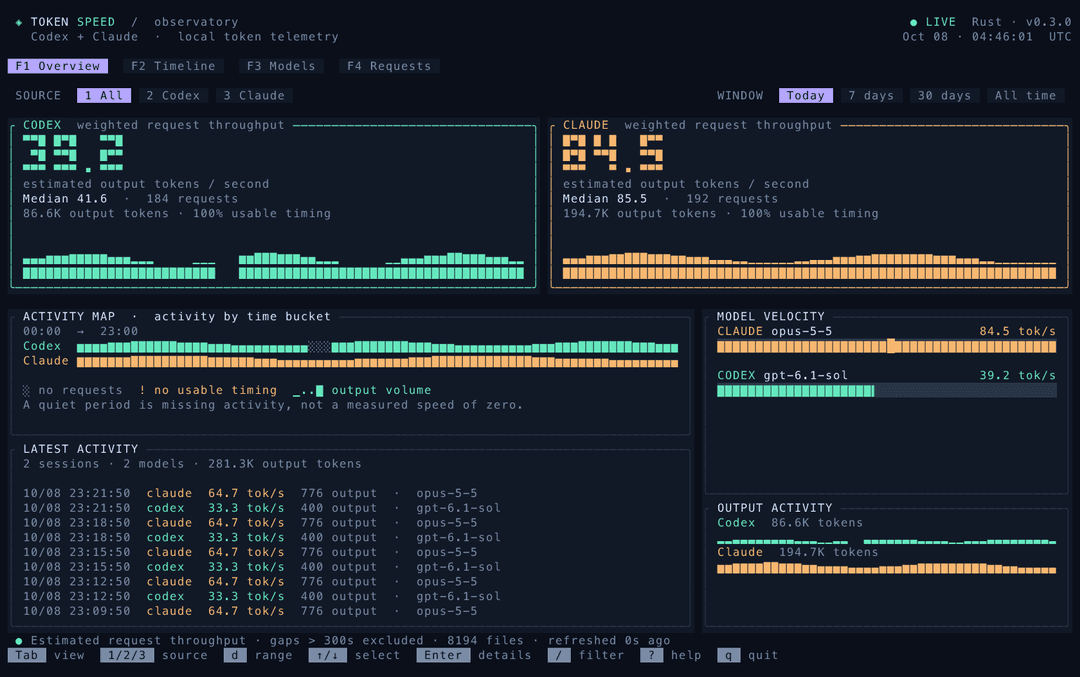
All screenshots use synthetic demo data.
Why token-speed?
You already have usage logs. See when your agents were active, which models were faster in your workload, and which requests need a closer look — without leaving the terminal.
- Four connected views: overview, timeline, models and individual requests. Keep your filters as you move.
- Honest gaps: missing activity and missing timing have distinct indicators. Curves never invent measurements between them.
- Useful comparisons: weighted throughput, P50/P90, speed distributions and context-size scatter plots.
- Local by default: no API keys, model calls or telemetry. An incremental SQLite index keeps subsequent reads fast.
- Works in scripts: table, JSON and CSV reports alongside the interactive dashboard.
[!IMPORTANT] tok/s means estimated request throughput, calculated from output tokens and log timestamps. It includes reasoning, prefill, network delays and residual waits. It is not pure streaming decode speed or a controlled comparison between providers. Timing coverage stays visible; untimed usage still counts. Read the measurement details →
Quick start
npm · macOS / Linux
npm install -g token-speed
token-speed --today
Requires Node.js 18+. The package includes native binaries for Apple Silicon / Intel macOS and ARM64 / x86-64 Linux. No Rust compiler or install scripts are needed. Linux requires glibc 2.35+; Windows and musl-based distributions such as Alpine are not supported by the prebuilt package.
Try without a global install: npx --yes token-speed --today. Update with npm install -g token-speed@latest.
Cargo · build from a tagged release
Requires Rust 1.92+ and a C compiler. SQLite is bundled. No manual clone is needed:
cargo install --git https://github.com/william1010121/token-speed \
  --tag v0.3.1 --locked
token-speed --today
Cargo installs to ~/.cargo/bin by default; ensure it is on your PATH. This uses Git directly and does not require a crates.io package. To update, rerun with a newer release tag. On macOS, if a custom compiler wrapper causes SDK/linker errors, set CC=/usr/bin/clang and CARGO_TARGET_AARCH64_APPLE_DARWIN_LINKER=/usr/bin/clang (Intel: CARGO_TARGET_X86_64_APPLE_DARWIN_LINKER).
Prebuilt binary · macOS / Linux
Download the matching archive from the latest release, or use GitHub CLI:
# macOS Apple Silicon; see the table below for other platforms
asset=token-speed-v0.3.1-aarch64-apple-darwin.tar.gz
gh release download v0.3.1 --repo william1010121/token-speed \
  --pattern "$asset" --pattern SHA256SUMS

# Verify before extracting. Linux: sha256sum --ignore-missing -c SHA256SUMS
shasum -a 256 -c SHA256SUMS --ignore-missing
tar -xzf "$asset"
mkdir -p "$HOME/.local/bin"
install -m 755 token-speed "$HOME/.local/bin/token-speed"
token-speed --today
| Platform | Archive suffix |
|---|---|
| macOS · Apple Silicon | aarch64-apple-darwin.tar.gz |
| macOS · Intel | x86_64-apple-darwin.tar.gz |
| Linux · x86-64 | x86_64-unknown-linux-gnu.tar.gz |
| Linux · ARM64 | aarch64-unknown-linux-gnu.tar.gz |
Linux binaries target Ubuntu 22.04 / glibc 2.35 or newer. For older distributions or other platforms, build from source. Windows releases are not currently provided.
Build from source
Requires Rust 1.92+ and a C compiler. SQLite is bundled.
git clone https://github.com/william1010121/token-speed.git
cd token-speed
./install.sh
token-speed --today
The installer builds with the committed lockfile and writes to ~/.local/bin. Set TOKEN_SPEED_INSTALL_DIR to change the destination. If needed, add export PATH="$HOME/.local/bin:$PATH" to your shell profile.
Use a truecolor terminal. 120 × 40 is recommended; 80 × 24 uses a compact layout. The minimum is 60 × 20.
Four ways to read your work
| View | What you see |
|---|---|
| Overview | Large throughput cards, activity map, latest requests and model rankings. |
| Timeline | Split or overlaid provider curves, coverage strips and a movable bucket inspector. |
| Models | A comparison table, P50/P90, rate histogram and input-size / throughput scatter plot. |
| Requests | A scrollable request ledger with token counts, timing quality and session details. |
Timeline · See exactly why a curve has a gap
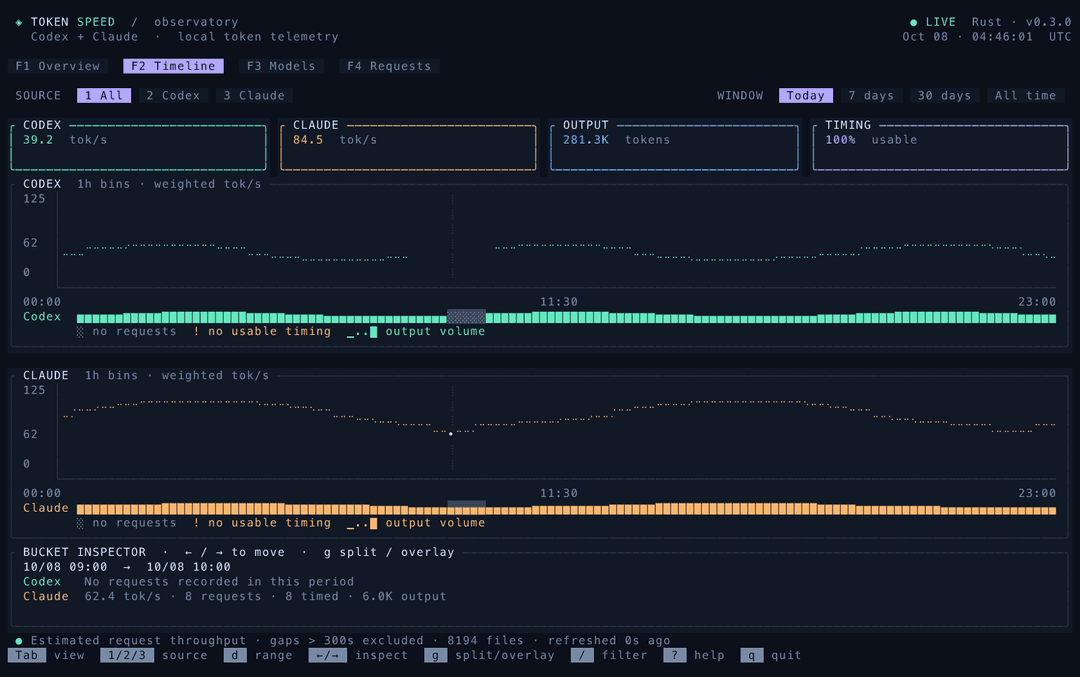
Press g for split / overlay. Use ← / → to inspect a bucket. ░ means no requests; ! means usage without usable timing. Colored blocks indicate output volume, normalized within each provider. The inspector explains the selected bucket.
Models · Compare distributions, not just averages
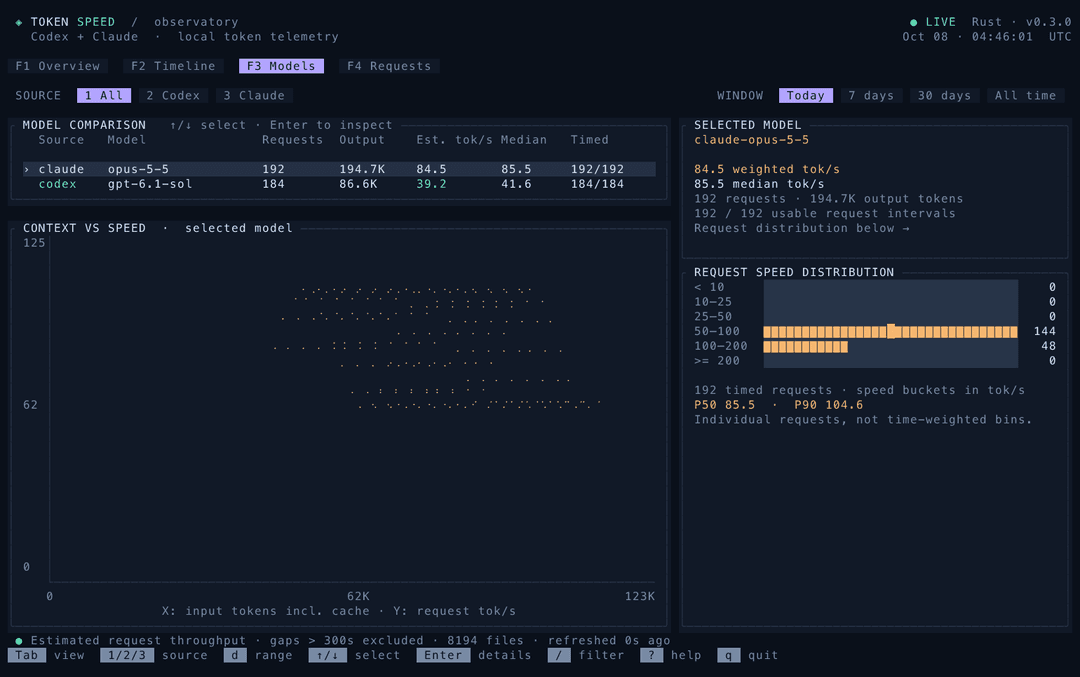
Select a model to inspect its P50/P90, request-rate distribution and context-size relationship.
Requests · Follow a number back to a request
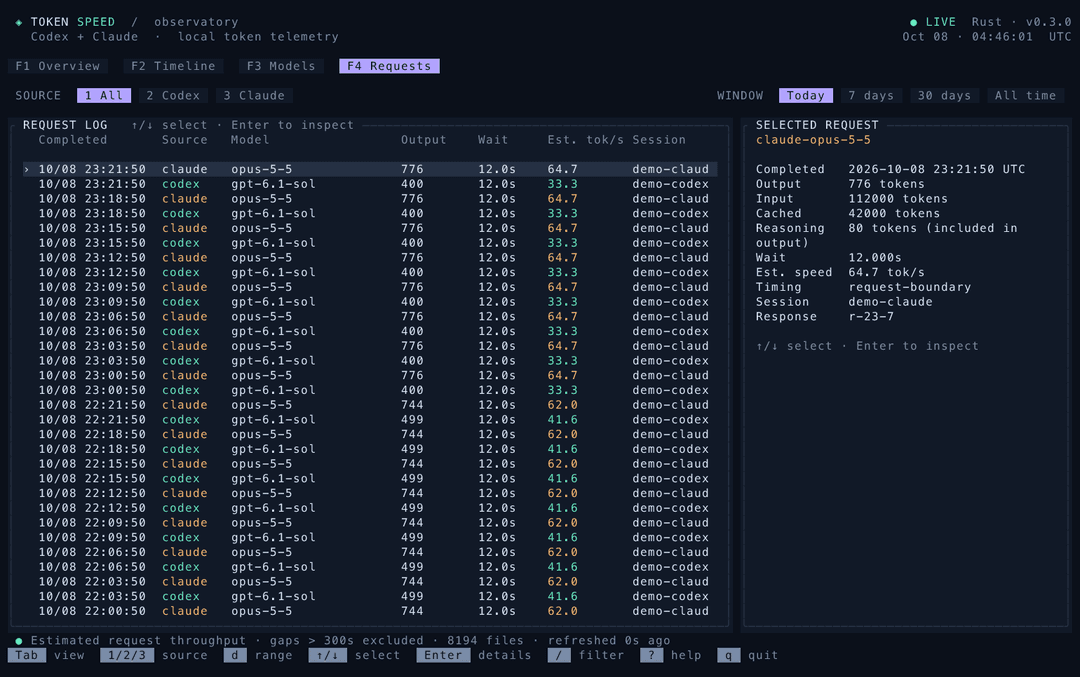
Inspect individual responses and the interval used to estimate throughput. Press Enter for expanded details.
token-speed                         # Last seven days, Overview
token-speed --today --view timeline
token-speed --days 30 --view models
token-speed --provider claude --model opus --view requests
Keyboard-first, mouse-friendly
| Key | Action |
|---|---|
Tab / Shift-Tab, F1–F4 | Switch views; navigation labels are clickable |
1 / 2 / 3 | All / Codex / Claude |
t / w / m / a, d | Today / 7 days / 30 days / all; cycle range |
/, Esc | Filter by model or session; close / clear |
↑ / ↓, j / k, mouse wheel | Select rows; Home / End jump to ends |
← / →, g | Timeline bucket / split or overlay |
Enter | Request details |
Space, r | Pause automatic updates / refresh |
?, q / Ctrl-C | Help / quit |
Updates run in the background every five seconds. --interval adjusts this. The TUI retains at least 200 recent requests; --limit can increase that window.
Scriptable by design
# Plain text table with borders and a weighted total row
token-speed --table --today

# JSON summary (stdout contains only JSON)
token-speed --json --days 7 > speed.json

# Hourly throughput today
token-speed summary --today --group hour

# Model comparison over a longer period
token-speed summary --days 30 --group model --provider codex

# Recent responses, or machine-readable exports
token-speed recent --today --limit 20
token-speed recent --json --today --limit 20 > requests.json
token-speed summary --days 7 --format json > speed.json
token-speed recent --days 30 --format csv > requests.csv

# Inclusive dates in a specific timezone
token-speed --since 2026-10-01 --until 2026-10-08 --timezone Asia/Taipei
--table, --json, or an explicit --format produce a report even in an interactive terminal. With no options, the dashboard remains the default. summary and recent always produce reports; with no interactive terminal, the default command produces a report too. watch requires an interactive terminal and uses the dashboard. Run token-speed --help for every option.
Text tables have borders, right-aligned numeric columns and, for summaries, a total row computed from all matching requests. Missing or excluded timing appears as —; those requests still contribute to usage totals. JSON keeps the existing metric, max_gap_seconds, timezone, metadata and data fields. Missing speeds are null; recent requests also include timing_status (estimated, missing, or excluded).
| Option | Purpose |
|---|---|
--provider all|codex|claude | Choose source |
--model, --session | Substring filters |
--today, --days N, --all-time, --since, --until | Time range |
--timezone | IANA timezone; defaults to TZ or local timezone |
--view | Initial dashboard view |
--table, --json | One-shot text table or JSON report; bypass the TUI |
--group hour|day|model, --format table|json|csv | Report grouping and format |
--max-gap SECONDS | Maximum usable timing interval; default 300 |
--codex-dir, --claude-dir, --cache | Override source / index locations |
--refresh | Rebuild cached entries |
Your logs stay on your machine
| Source | Default location | Override |
|---|---|---|
| Codex | ~/.codex/{sessions,archived_sessions} | CODEX_HOME or --codex-dir |
| Claude Code | ~/.claude/projects | CLAUDE_CONFIG_DIR or --claude-dir |
| SQLite index | ~/.cache/token-speed/index.sqlite3 | XDG_CACHE_HOME or --cache |
The parser includes subagent logs and deduplicates supported usage records. The cache stores token counts, timestamps, model names, session identifiers and source paths. It does not store prompts or tool-output bodies. Reports can contain session identifiers and file paths; redact them before sharing.
The first run indexes your history. Later runs scan file metadata and reparse changed files. An incomplete JSONL tail is skipped and retried when the file changes. See metrics and parser behavior for schema limitations.
Contributing
Run cargo test --locked, cargo clippy --locked --all-targets -- -D warnings, and cargo fmt --check. Use synthetic fixtures; never commit personal agent logs. Contributing guide · Codex review setup · Changelog.
Maintainers: npm packaging and publishing.
Built with Ratatui and Crossterm. Independent community project; not affiliated with OpenAI or Anthropic.
// faq
What is token-speed?
A beautiful Rust TUI for Codex and Claude Code token throughput — four views, local logs, honest metrics.. It is open-source on GitHub.
Is token-speed free to use?
token-speed is open-source under the MIT license, so it is free to use.
What category does token-speed belong to?
token-speed is listed under devtools in the Claudeers registry of Claude-compatible tools.
// embed badge

[](https://claudeers.com/token-speed)
// retro hit counter

[](https://claudeers.com/token-speed)
// reviews
// guestbook
// related in Developer Tools
 🔓
The agent harness performance optimization system. Skills, instincts, memory, security, and research-first development for Claude Code, Codex, Opencode, Curs…
 🔓
Makes your AI agent think like the laziest senior dev in the room. The best code is the code you never wrote.
 🔓
AI coding assistant skill (Claude Code, Codex, OpenCode, Cursor, Gemini CLI, and more). Turn any folder of code, SQL schemas, R scripts, shell scripts, docs,…
 🔓
Use Garry Tan's exact Claude Code setup: 23 opinionated tools that serve as CEO, Designer, Eng Manager, Release Manager, Doc Engineer, and QA