
token-horse
Token usage reactive horse pet for Claude Code statuslines and Codex CLI sessions
Install with your AI
Paste into Claude Code, Cursor, or any agent — it reads the repo and wires the tool into your project.
Install and set up token-horse (npm project) into my current project.
Found on https://claudeers.com/token-horse
Repo: https://github.com/ratelworks/token-horse
Homepage/docs: —
Detected install method: npm → npm install token-horse
Category: devtools. Platforms: cli, web.
Read the repo's README for exact setup and env vars, then install it and wire it into my project.

Claudeers Health Verdict:
slowing; community-verified: false. Confirm the source before running anything.
npm install token-horse
git clone https://github.com/ratelworks/token-horse
// compatibility
| Platforms | cli, web |
|---|---|
| Operating systems | — |
| AI compatibility | claude |
| License | MIT |
| Pricing | open-source |
| Language | JavaScript |
Token Horse
A terminal pet for Claude Code and Codex CLI — a tiny pixel horse that gallops faster as your session burns more tokens per second.
Inspired by the little galloping horse that used to ride on old Korean taxi meters: the faster the fare ticked up, the faster it ran. Same idea here — the harder your model works, the harder this horse gallops.
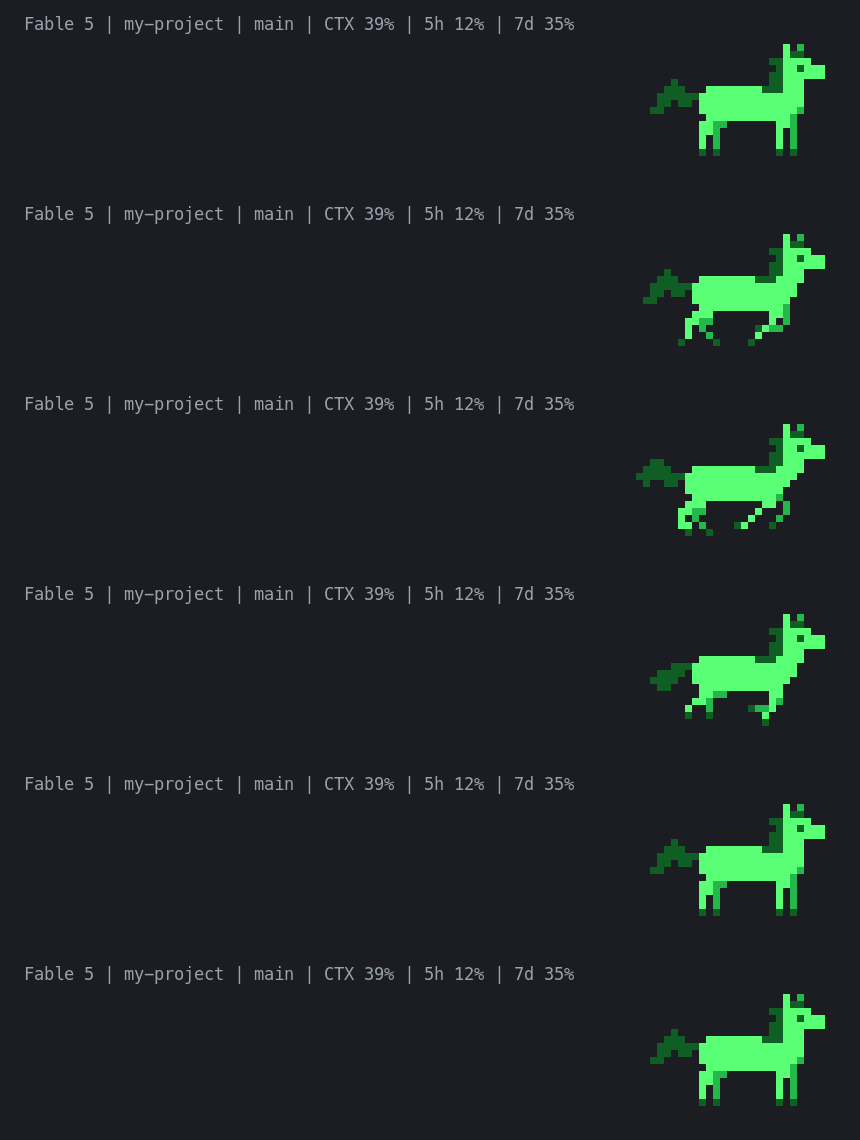
Install
npm install -g token-horse
Or just watch the demo without installing:
npx token-horse --rate=600 --duration=8
Claude Code statusline
Wire it into the statusLine field of your settings.json. The status line officially supports multi-line output, so the horse renders as-is.
{
  "statusLine": {
    "type": "command",
    "command": "token-horse --statusline",
    "padding": 0,
    "refreshInterval": 1
  }
}
refreshInterval: 1is recommended. By default the status line only re-runs on events (new responses, compaction, and so on), so the 1-second timer is what lets the horse slow down naturally during the quiet gaps between responses.- Already running a statusline script? Show it next to the horse with
--info-cmd. Your existing info line stays on the left, and the horse takes the empty space on the right:
{
  "statusLine": {
    "type": "command",
    "command": "token-horse --statusline --info-cmd=\"bash $HOME/.claude/statusline.sh\"",
    "padding": 0,
    "refreshInterval": 1
  }
}
- If your terminal doesn't render truecolor ANSI properly, add
--plain.
Codex CLI
Codex CLI's tui.status_line only accepts built-in widget identifiers and cannot run external commands. So Token Horse tails the Codex session log (~/.codex/sessions/**/rollout-*.jsonl) and reads its token_count events directly. Run it in a separate terminal or tmux pane:
token-horse --watch-codex
- Automatically finds the most recent session file and follows new sessions as they start.
- Computes speed from the delta of the session-cumulative token count (
total_token_usage.total_tokens). - Runs forever by default; stop with Ctrl+C, or cap it with
--duration=SECONDS. - If your session directory differs, point to it with
--codex-sessions=/path/to/sessions.
Example, pinned to a bottom tmux pane:
tmux split-window -v -l 9 'token-horse --watch-codex --no-clear'
Skins
Token Horse ships with several palettes. Pick one with --skin=<name> — the default is green. Run token-horse --list-skins to preview them all (in color, right in your terminal), or token-horse --help for every option.
| Skin | Preview | Look |
|---|---|---|
green |  | The classic — three shades of green (default). |
rapidash |  | Cream coat with a flickering red-and-yellow fire mane and tail, grey hooves — a nod to the fire-horse Pokémon. The flames shift every frame, so the mane really wavers as it gallops. |
bay |  | A realistic bay horse: brown coat with a black mane, tail, and hooves. |
redhare |  | Red Hare (赤兔馬), the legendary crimson warhorse of the Three Kingdoms. |
inferno |  | The whole horse ablaze — red → orange → yellow. |
token-horse --statusline --skin=rapidash
Or preview any skin without installing:
npx token-horse --rate=600 --duration=8 --skin=redhare
Each palette is split by body part (coat / mane + tail / hooves), so a skin re-colours those parts independently while reusing the exact same gallop animation. Single-colour skins (green, inferno) just paint the whole silhouette in one range.
How it behaves
- The default L size is a 32-column × 8-row half-block frame, pixel-identical to the preview GIF. Want it smaller?
--size=sgives you a compact 16×4 frame. - The horse silhouette is drawn with solid block glyphs in three shades (truecolor ANSI) — green by default, or any of the skins above — so it stays crisp in any monospace font.
- In Claude Code, speed tracks this session's real token consumption: token-horse reads the session's
transcript_pathJSONL and measures the per-poll delta of billable tokens (input + output + cache-creation; cached-context reads are excluded). Transcripts are append-only, so context compaction and cache reuse never distort the speed. - Speed is continuous, not stepped: around 20 tokens/sec it trots, and past 900 tokens/sec it's at a full gallop.
- Token pulses register instantly — fast models really do make it run like mad — then decay slowly, so the horse keeps running while you work and only comes to a standstill (in an upright pose) once the tokens have truly stopped.
- While galloping, the mane sways naturally (the original sprite's frames); while standing, it blinks every few seconds.
- Statusline mode reads the stdin JSON once, prints one frame, and exits.
- Frame state lives in
~/.local/state/token-horse/(or$XDG_STATE_HOME). State files are isolated per Claude Codesession_id, so concurrent sessions never pollute each other's speed estimate, and state older than 48 hours is pruned automatically.
Input formats
A direct rate:
{ "tokensPerSecond": 450 }
A cumulative token count:
{ "usage": { "total_tokens": 123456 } }
Claude Code statusline input — token-horse reads the transcript_path JSONL and sums each turn's billable tokens (input + output + cache_creation, excluding cached-context reads); the per-poll delta is the live tokens/sec:
{
  "session_id": "abc123",
  "transcript_path": "~/.claude/projects/your-project/abc123.jsonl"
}
Codex session event line (what --watch-codex parses internally):
{ "type": "event_msg", "payload": { "type": "token_count", "info": { "total_token_usage": { "total_tokens": 20987209 } } } }
When given a cumulative token count, tokens/sec is computed from the delta between calls.
Development
npm run check   # syntax check + tests + OSS hygiene gate
npm run demo    # wave-pattern demo animation
License
MIT © Ratelworks Inc.
// faq
What is token-horse?
Token usage reactive horse pet for Claude Code statuslines and Codex CLI sessions. It is open-source on GitHub.
Is token-horse free to use?
token-horse is open-source under the MIT license, so it is free to use.
What category does token-horse belong to?
token-horse is listed under devtools in the Claudeers registry of Claude-compatible tools.
// embed badge

[](https://claudeers.com/token-horse)
// retro hit counter

[](https://claudeers.com/token-horse)
// reviews
// guestbook
// related in Developer Tools
 🔓
🔓The agent harness performance optimization system. Skills, instincts, memory, security, and research-first development for Claude Code, Codex, Opencode, Curs…
 🔓
🔓Makes your AI agent think like the laziest senior dev in the room. The best code is the code you never wrote.
 🔓
🔓Use Garry Tan's exact Claude Code setup: 23 opinionated tools that serve as CEO, Designer, Eng Manager, Release Manager, Doc Engineer, and QA
 🔓
🔓AI coding assistant skill (Claude Code, Codex, OpenCode, Cursor, Gemini CLI, and more). Turn any folder of code, SQL schemas, R scripts, shell scripts, docs,…