
tg-claude-bot
Telegram bridge for Claude Code: resume any CLI session, per-topic chats, local whisper voice, inline-button approvals, live status
Install with your AI
Paste into Claude Code, Cursor, or any agent — it reads the repo and wires the tool into your project.
Install and set up tg-claude-bot (git-clone project) into my current project.
Found on https://claudeers.com/tg-claude-bot
Repo: https://github.com/xhyumiracle/tg-claude-bot
Homepage/docs: —
Detected install method: git-clone → git clone https://github.com/xhyumiracle/tg-claude-bot
Category: other. Platforms: cli, api, web.
Read the repo's README for exact setup and env vars, then install it and wire it into my project.

Claudeers Health Verdict:
active; community-verified: false. Confirm the source before running anything.
git clone https://github.com/xhyumiracle/tg-claude-bot
// compatibility
| Platforms | cli, api, web |
|---|---|
| Operating systems | — |
| AI compatibility | claude |
| License | MIT |
| Pricing | open-source |
| Language | Python |
tg-claude-bot
Your local Claude Code, in your pocket.
A single-file Telegram bridge to the Claude Code CLI: pick up your sessions from your phone, vibe-code by voice, keep every tool and skill, answer prompts with buttons.
Messaging the bot is like typing claude in a shell — same tools, skills, and
config. It is your local CLI: /resume picks up any session from the
terminal. The bot is a thin stateless router; the CLI owns everything.
✨ Highlights
| 🔁 Resume any real session | Pick up your actual terminal sessions from your phone — an inline picker over ~/.claude/projects, with the CLI's own AI titles, cross-project, cwd auto-detected. |
| 🎤 Vibe-code by voice | Voice messages just work: local faster-whisper, bilingual zh/en, editable 🎤 transcript. No audio leaves your machine. |
| 🌊 Streaming replies | Watch it build live — thinking, each tool call, then text — in one ⏳ Working… message that morphs into the reply, with an elapsed ticker. |
| 🔘 Buttons instead of a TUI | Permissions (incl. the CLI's don't-ask-again), plan approval, and clarifying questions as inline buttons. Answered prompts clean themselves up. |
| ⚡ Type while it works | Mid-turn follow-ups steer into the running answer (👀 to confirm) — never dropped, never a second turn. |
| 💬 Reads like a conversation | Replies land right under the message they answer; reply to any message to quote it in; multi-forwards and split long texts arrive as one. |
| 🧵 Per-topic sessions | Every forum topic is its own conversation — switch projects by switching topics. |
| ⏩ Every command and skill, verbatim | Unknown /commands go straight to the CLI — /compact, your skills, anything headless — output relayed back. Nothing reimplemented. |
| 🎛 CLI parity | /model, /effort, /mode, /permissions, /usage, !shell — from official APIs and the CLI itself, nothing hardcoded. |
| 🖼 Native media | Images ride inside the message for the model to see; other files land in a TTL-cleaned dir. |
| ♻️ Restart-proof | Topics stay bound across restarts — even hard crashes: interrupted turns auto-resume, and messages you sent while it was down are replayed. |
| 🛡 Reliable under load | Send as fast as you like — replies and reactions pace and retry against Telegram's limits, so nothing errors out or is lost. |
| 🟠 Context warnings | 🟠 at 80% / 🔴 at 90% of the real context window, same source as /context. |
| 🔒 Owner/guest profiles | Allowlisted chats only; owner full access, guests scoped to specific dirs with Allow/Deny escalation. |
🚀 Quick start
Claude Code is the prerequisite — so let it install its own bridge. Send it this on the machine that should host the bot:
setup https://github.com/xhyumiracle/tg-claude-bot
This README is the runbook; it will only ask you for the @BotFather token and your user id.
Manual setup
1. Prerequisites — Claude Code CLI installed and logged in, plus uv.
2. Create your bot — @BotFather → /newbot →
copy the token. For groups: disable privacy mode (/setprivacy) or make the
bot admin.
3. Find your user id — message @userinfobot.
4. Install & configure
git clone https://github.com/xhyumiracle/tg-claude-bot && cd tg-claude-bot
uv sync                 # add --extra voice for local voice transcription
cp .env.example .env && chmod 600 .env   # fill in TG_BOT_TOKEN and OWNER_USER_ID
5. Run it
uv run python bot.py
DM your bot /status — you're live.
Run as a service (recommended)
Once the foreground run works, put it under systemd so it stays reachable when you're away:
# edit the YOUR_USER paths in tg-claude-bot.service first
sudo cp tg-claude-bot.service /etc/systemd/system/
sudo systemctl enable --now tg-claude-bot
journalctl -u tg-claude-bot -f          # watch the logs
Deploy an update with touch ~/.tgclaude/restart-requested — the bot restarts
once every conversation is idle, so no reply is cut off. Even a hard crash loses
nothing: topics rebind and interrupted turns resume from the transcript.
Configuration
All in .env (see .env.example):
| Variable | Purpose |
|---|---|
TG_BOT_TOKEN | Bot token from @BotFather (required) |
OWNER_USER_ID | Your numeric Telegram id — full access (required) |
GUEST_USER_IDS | Extra user ids, served with the restricted guest profile |
TARGET_GROUP_ID | A group to serve (guest profile; topics = separate sessions) |
OWNER_DEFAULT_CWD | Default working directory for new owner sessions |
RESUME_SESSION_ID | Session to bind the owner's DM to on first contact |
GUEST_READ_DIRS / GUEST_WRITE_DIRS | Colon-separated dirs guests may read / write |
GUEST_SYSTEM_PROMPT_FILE | Custom system prompt for the guest profile |
WHISPER_MODEL | faster-whisper model (default large-v3-turbo) |
TGCLAUDE_MEDIA_TTL_DAYS | Retention for received files (default 14) |
⚖️ How it compares
| tg-claude-bot | tmux-scraping bridges | direct-API bots | |
|---|---|---|---|
| Backend | Claude Agent SDK — structured events | live TUI + ANSI scraping | raw Anthropic API |
| Sessions | ✅ resume any session in the CLI store, AI titles | ⚠️ only the live pane you attach to | ❌ its own separate history |
| Tools, skills, MCP | ✅ everything the CLI has | ✅ | ❌ reimplemented, if at all |
| Interactive prompts | ✅ native inline buttons — permissions, plan approval, clarifying questions | ⚠️ relayed TUI screen + simulated keypresses | n/a |
| Voice messages | ✅ local whisper, bilingual | ❌ | cloud STT, if any |
| Forum topics = sessions | ✅ one session per topic | ❌ | ❌ |
| Survives bot restarts | ✅ sessions rebind, interrupted turns auto-resume | ⚠️ bridge dies with tmux | ⚠️ needs a database |
| Moving parts | one Python file | tmux + parser + bot | bot + DB + API glue |
Deliberate trade-off: no attaching to a live terminal (what tmux bridges like ccbot do) — in exchange, structured events and statelessness.
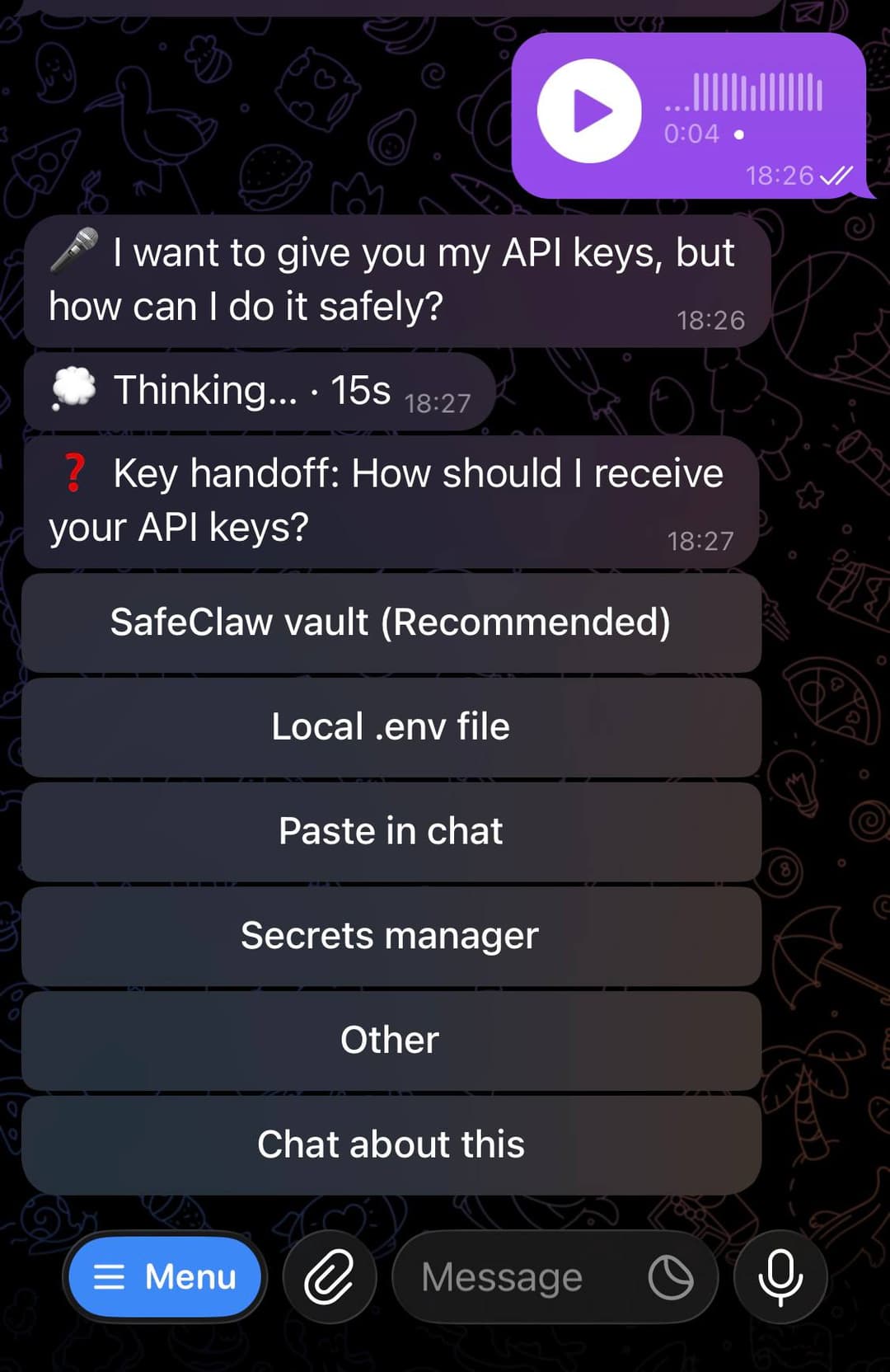
One turn, end to end: voice → local transcript → live status → clarifying question as buttons.
⌨️ Commands
| Command | What it does |
|---|---|
/resume | Inline session picker (titles, project, age); /resume <id> binds directly |
/clear (/new) | Start a fresh session in this chat/topic |
/status | Current binding: session, project, model, effort |
/model | Live model picker — real names and context windows from /v1/models |
/effort | Reasoning-effort picker — levels discovered from the CLI itself |
/mode | Native permission modes: default · acceptEdits · plan · bypassPermissions |
/permissions | View and revoke the allow rules accumulated by don't-ask-again |
/export | Send this session's transcript file |
!command | Bash mode — run a shell command directly in the session's cwd (owner-typed only) |
/usage | Subscription limits (5h / weekly / per-model / credits) |
/login | Re-authenticate from your phone — relays claude setup-token: tap the link, paste the code back |
/whisper | Pick the voice-transcription model |
/esc (/stop) | Interrupt the current turn — the CLI's ESC |
| anything else | Forwarded verbatim to the CLI: /compact, /context, /cost, your skills… |
/ autocompletes in Telegram — the menu is registered via setMyCommands.
🏗 Architecture
Telegram ── python-telegram-bot ── bot.py (stateless router)
                                     │  claude-agent-sdk (one client per chat/topic)
                                     └─ Claude Code CLI ── ~/.claude/projects/*.jsonl
Conversation state lives in the CLI's own files; the bot keeps only a tiny
pointer file (~/.tgclaude/) — which topic resumes which session, plus what
was mid-flight. Kill the bot — or the power — and topics rebind, interrupted
turns continue automatically.
🔒 Security model
- Allowlisted chats only; everything else is ignored.
- All secrets live in
.env(chmod 600) — never in the systemd unit, which is world-readable. - Owner: full permissions. Guests: scoped read/write and a custom prompt; out-of-scope tool calls escalate to the owner as Allow/Deny buttons.
!bash mode is the one deliberate shell surface: owner-typed messages only — forwarded text never executes, guests never reach it.- Session management commands are owner-gated everywhere; so is
/mode— permission modes change the guardrails themselves, andbypass permissionsdisables the guest sandbox for that conversation. /loginrelays the CLI's ownclaude setup-tokenflow; the resulting token goes straight into.envand is never echoed to the chat (prefix only). Owner-typed messages only, 5-minute window,/esccancels.- Voice notes are transcribed locally and deleted; images follow the CLI's transcript retention.
- Full threat model, verified controls, and accepted risks: SECURITY_AUDIT.md — a line-by-line self-audit by the model this bot bridges.
🙅 Non-goals
- Attaching to a live terminal — see the comparison above.
- Replicating TUI-only dialogs (
/configetc.); what matters is rebuilt as bot commands (/model,/effort,/usage). - Being a framework. It's one file — read it, fork it, make it yours.
// faq
What is tg-claude-bot?
Telegram bridge for Claude Code: resume any CLI session, per-topic chats, local whisper voice, inline-button approvals, live status. It is open-source on GitHub.
Is tg-claude-bot free to use?
tg-claude-bot is open-source under the MIT license, so it is free to use.
What category does tg-claude-bot belong to?
tg-claude-bot is listed under other in the Claudeers registry of Claude-compatible tools.
// embed badge

[](https://claudeers.com/tg-claude-bot)
// retro hit counter

[](https://claudeers.com/tg-claude-bot)
// reviews
// guestbook
// related in Other
 🔓
🔓 🔓
🔓Anti-AI-slop design skill for Claude Code, Cursor, and Codex.
 🔓
🔓Open source Ghostty-based macOS terminal with vertical tabs and notifications for AI coding agents. Built for multitasking, organization, and programmability.
 🔓
🔓Huashu Design · HTML-native design skill for Claude Code · Claude Code 里 HTML 原生的设计 skill · 高保真原型 / 幻灯片 / 动画 + 20 设计哲学 + 5 维评审 + MP4 导出 · Agent-agnostic