
sy-styles-20
20 种商用级视频风格,每一帧都由代码算出来|可直接给 Codex / Claude Code 使用 · by 肖雄 XIAOXIONG
Install with your AI
Paste into Claude Code, Cursor, or any agent — it reads the repo and wires the tool into your project.
Install and set up sy-styles-20 (git-clone project) into my current project.
Found on https://claudeers.com/sy-styles-20
Repo: https://github.com/xiaoxiong20xx-code/sy-styles-20
Homepage/docs: —
Detected install method: git-clone → git clone https://github.com/xiaoxiong20xx-code/sy-styles-20
Category: other. Platforms: cli.
Read the repo's README for exact setup and env vars, then install it and wire it into my project.

Claudeers Health Verdict:
active; community-verified: false. Confirm the source before running anything.
git clone https://github.com/xiaoxiong20xx-code/sy-styles-20
// compatibility
| Platforms | cli |
|---|---|
| Operating systems | — |
| AI compatibility | claude |
| License | MIT |
| Pricing | open-source |
| Language | HTML |
20 种视频风格 · 每一帧都是代码算出来的
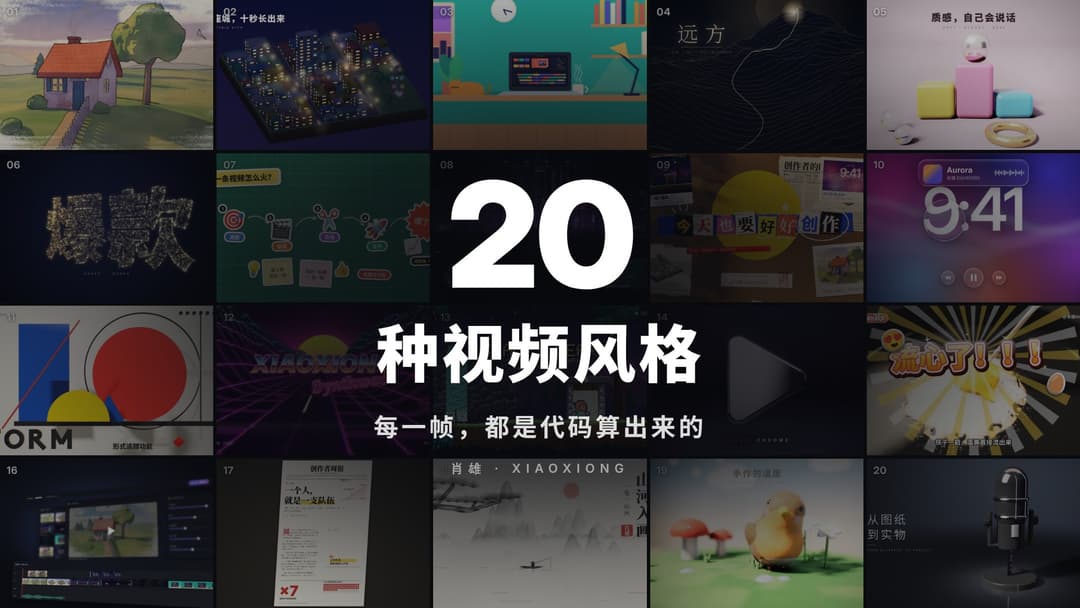
逐帧手绘、等轴城市、液态金属、拼贴、包豪斯、水墨、黏土定格……20 种商用水准的视频风格,没有用任何视频素材、模板或版权音乐:画面由代码(Canvas / WebGL / 光线步进 3D)一帧一帧算出来,音效和配乐也由代码合成。
作者:肖雄 XIAOXIONG · 开源协议 MIT(可以免费用、改、商用,转载或二次分发请保留作者署名)
20 种风格的说明见 docs/STYLES.md。
一、先看效果(不用装任何东西)
用 Chrome 直接打开任意一个 styles/编号-名字/index.html,就会循环播放这个风格。空格暂停,拖动底部进度条可以逐帧看。
预览是实时画的,3D 风格在没有独立显卡的电脑上会卡;导出的视频不会卡。
二、安装(只装一次)
需要 4 样东西:
| 软件 | 用途 | 下载 |
|---|---|---|
| Node.js 18 以上 | 运行渲染程序 | nodejs.org |
| Python 3 | 合成音效和配乐 | python.org(Windows 安装时勾选 Add to PATH) |
| ffmpeg | 把图片合成视频 | ffmpeg.org(Windows 可用 winget install ffmpeg) |
| 字体 | 中文和英文标题 | 思源黑体 / 思源宋体(Noto Sans SC、Noto Serif SC)、Inter,Google Fonts 免费下载 |
然后在这个文件夹里打开终端,运行:
npm install
npm run setup
pip install -r requirements.txt
字体没装全也能出片,只是部分标题会换成系统默认字体。
三、出片
node make.js list                 # 看 20 种风格的编号
node make.js still 09 6.5         # 先渲染一张图看效果(09 风格第 6.5 秒)→ out/09_6.5s.jpg
node make.js style 09             # 渲染一个风格的 10 秒视频(带音效)→ out/09.mp4
node make.js style 01 13 18       # 一次渲染多个
node make.js reel all             # 整条展示片:片头 + 20 个风格 + 信息卡 + 小球转场 + 片尾 + 配乐 → out/reel.mp4
node make.js reel 03,09,11 mini   # 只挑几个风格合成短片 → out/mini.mp4
node make.js cover                # 用关键帧拼封面 → out/cover.jpg
node make.js brand 张三 ZHANGSAN   # 把画面里的署名换成你自己的
有独立显卡的电脑,命令后面加 --hwgpu,3D 风格会快很多。 已经渲染过的风格会自动跳过,想重新渲染加 --force。
要等多久
不加 --hwgpu(纯 CPU 软件渲染)时,一个 10 秒风格大约:
- 平面风格(02、03、04、06、07、08、13、16、17):1–10 分钟
- WebGL 风格(09、10、18):5–40 分钟
- 3D 光影风格(01、05、11、12、14、15、19、20):25–80 分钟
整条片子第一次全渲染要好几个小时,建议先 still 看单帧,再 style 渲单个风格。
四、改成你自己的内容
每个风格文件顶部都有一行 const C = Reel.cfg({ ... }),里面是画面上的文字(标题、署名等),直接改引号里的字就行。
信息卡上的风格名称、介绍、标签和配色在 comp/meta.js。
最省事的办法是让 AI 帮你改:用 Codex、Claude Code、Cursor 等 AI 编程助手打开这个文件夹,直接说"把 09 拼贴风格的标题改成『今天也要好好学习』"或"照着 11 包豪斯的做法新做一个风格"。文件夹里的 AGENTS.md 和 skills/sy-styles-20/SKILL.md 就是写给 AI 看的说明书,它会照着做。
五、文件夹里都是什么
styles/        20 个风格,每个一个 index.html(也是可换文字的模板)
lib/core.js    时间轴:给定第几秒,画出那一帧(保证每次渲染结果一样)
lib/gl.js      WebGL 工具
lib/rm.js      光线步进 3D 工具(软阴影、景深、辉光、电影色调)
render.js      逐帧渲染器:用无头 Chrome 一帧一帧截图,多张子帧叠加出运动模糊
comp/          整片合成:片头、信息卡、小球转场、片尾、封面
audio/         音效和配乐合成(Python),按每个风格的动作时间点配音
make.js        一条命令出片
六、常见问题
- 提示找不到 ffmpeg / python:装好后重开终端;Windows 记得把它们加进 PATH。
- 渲染特别慢:加
--hwgpu用显卡;或者先用still调好画面再整段渲染。 - 画面上有方块字或字体不对:安装上面表格里的字体。
欢迎关注作者 肖雄 XIAOXIONG,分享你用它做出来的作品。
// faq
What is sy-styles-20?
20 种商用级视频风格,每一帧都由代码算出来|可直接给 Codex / Claude Code 使用 · by 肖雄 XIAOXIONG. It is open-source on GitHub.
Is sy-styles-20 free to use?
sy-styles-20 is open-source under the MIT license, so it is free to use.
What category does sy-styles-20 belong to?
sy-styles-20 is listed under other in the Claudeers registry of Claude-compatible tools.
// embed badge

[](https://claudeers.com/sy-styles-20)
// retro hit counter

[](https://claudeers.com/sy-styles-20)
// reviews
// guestbook
// related in Other
 🔓
 🔓
Anti-AI-slop design skill for Claude Code, Cursor, and Codex.
 🔓
Huashu Design · HTML-native design skill for Claude Code · Claude Code 里 HTML 原生的设计 skill · 高保真原型 / 幻灯片 / 动画 + 20 设计哲学 + 5 维评审 + MP4 导出 · Agent-agnostic
 🔓
Open source Ghostty-based macOS terminal with vertical tabs and notifications for AI coding agents. Built for multitasking, organization, and programmability.