
swarmy
Mission control for Claude Code in your terminal: see every agent of every session live, jump to the one that needs you, know where your weekly limit went an…
Install with your AI
Paste into Claude Code, Cursor, or any agent — it reads the repo and wires the tool into your project.
Install and set up swarmy (release-binary project) into my current project.
Found on https://claudeers.com/swarmy
Repo: https://github.com/koorchik/swarmy
Homepage/docs: —
Detected install method: release-binary → inspect the README
Category: devtools. Platforms: cli, api, desktop, web.
Read the repo's README for exact setup and env vars, then install it and wire it into my project.

Claudeers Health Verdict:
unknown; community-verified: false. Confirm the source before running anything.
Grab the latest release asset from GitHub.
# download a build from https://github.com/koorchik/swarmy/releases
git clone https://github.com/koorchik/swarmy
// compatibility
| Platforms | cli, api, desktop, web |
|---|---|
| Operating systems | — |
| AI compatibility | claude |
| License | Apache-2.0 |
| Pricing | open-source |
| Language | Rust |
swarmy
Mission control for Claude Code agents, in your terminal.
You run several Claude Code sessions, each with a crowd of subagents. swarmy shows every one of them live on one screen, tells you the moment one needs you and takes you there, and shows where your weekly limit went and when it runs out.

What you get
- Every agent of every session, live. One tree across all your Claude Code config dirs: what
each agent is doing right now (thinking, running
cargo test, waiting for its own agents, stalled), for how long, its model and effort, context fill, cost, and a 30-minute activity lane. - The moment one needs you, and a key to get there. A permission prompt, a question or a plan
to approve blinks in the tree, rings the terminal bell and goes to the top of ATTENTION.
Jjumps straight to that Claude Code's pane or window (tmux, Zellij, kitty, WezTerm, iTerm2);swarmy jumpdoes the same from a key binding. - Where the weekly limit went, and when it runs out. Per account: the week used, the share each project took, and the time it runs out at the current pace. Early limit resets and logins moved between config dirs are followed.
- Spend at API prices. By project, account, model, effort, agent type, session, agent and day, with trends against the previous period, the model mix, cache hits and thinking.
- A status line inside Claude Code. Who needs you in your other sessions, this session's agents, the exact week used and when it runs out.
- A vault for several accounts. Save each config dir's login, put another account's login in when a limit runs out, and switch back. A switch never loses a token.
- Offline, read-only, light. No network, no telemetry. It reads what Claude Code already writes. About 2 CPU-seconds a minute with 20 live agents on a 4K terminal. One static binary with SQLite built in.

A session asks for permission: it is marked in the tree, comes first in ATTENTION and fills the AGENT panel. (All media is from swarmy demo: made-up data.)
Quick start
Every release has one static binary per
platform, with the man page and shell completions. SHA256SUMS covers every file.
Linux (any distribution, x86_64 or ARM):
V=0.1.0 T=x86_64-unknown-linux-musl     # other targets in the table below
curl -fLO https://github.com/koorchik/swarmy/releases/download/v$V/swarmy-$V-$T.tar.gz
tar xzf swarmy-$V-$T.tar.gz && install -m 755 swarmy-$V-$T/swarmy ~/.local/bin/
| Machine | T | Packages |
|---|---|---|
| x86_64 PC or server | x86_64-unknown-linux-musl | swarmy_<v>-1_amd64.deb, swarmy-<v>-1.x86_64.rpm |
| 64-bit ARM: Raspberry Pi 3/4/5 on a 64-bit OS, ARM servers | aarch64-unknown-linux-musl | _arm64.deb, .aarch64.rpm |
| Raspberry Pi 2–5 on 32-bit Raspberry Pi OS | armv7-unknown-linux-musleabihf | _armhf.deb, .armv7hl.rpm |
| Raspberry Pi Zero, Zero W, 1 (ARMv6) | arm-unknown-linux-musleabihf | _armhf.deb |
The binaries are linked statically against musl, so one file runs on every distribution, old or
new. The .deb and .rpm packages wrap the same binary and are installed by hand (the single
armhf .deb carries the ARMv6 build, which runs on every 32-bit Raspberry Pi):
sudo apt install ./swarmy_0.1.0-1_amd64.deb       # Debian, Ubuntu, Raspberry Pi OS
sudo dnf install ./swarmy-0.1.0-1.x86_64.rpm      # Fedora, RHEL, openSUSE
macOS (one universal binary for Apple silicon and Intel), with Homebrew:
brew install koorchik/tap/swarmy
or from the archive swarmy-<v>-universal-apple-darwin.tar.gz. The binary is not signed yet: a
download from the browser is quarantined, so clear that once with
xattr -d com.apple.quarantine swarmy. Homebrew and curl downloads are not quarantined.
Windows: unpack swarmy-<v>-x86_64-pc-windows-msvc.zip and put swarmy.exe on your PATH.
From source (a recent stable Rust and a C compiler):
cargo install --locked --git https://github.com/koorchik/swarmy
Then:
swarmy demo      # try it on a made-up world first; nothing of yours is read
swarmy           # the live dashboard
swarmy doctor    # what it found: config dirs, transcripts, index, limits
swarmy setup     # optional: the status line (exact limits) and saved logins
swarmy finds ~/.claude, every ~/.claude-* and the CLAUDE_CONFIG_DIR of running claude
processes on its own; other config dirs go into the configuration.
Screens
On a big terminal everything is on one wall; nothing hides behind tabs.
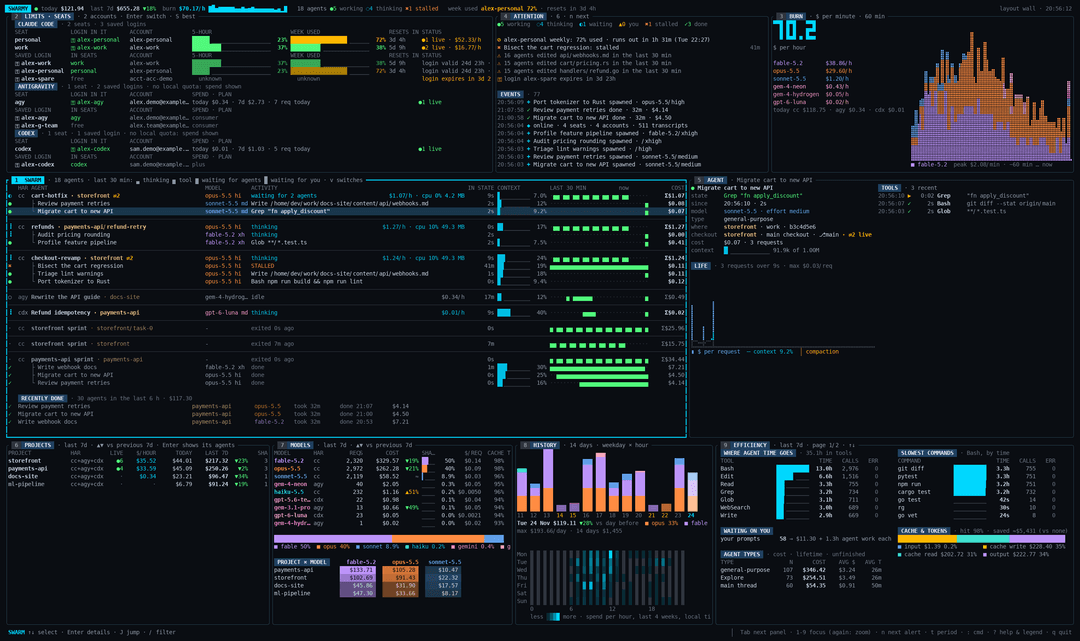
The layout follows the terminal: a wall from 180×45, a column from 110×40, tabs below
that (L switches by hand). Every panel can be zoomed (z).
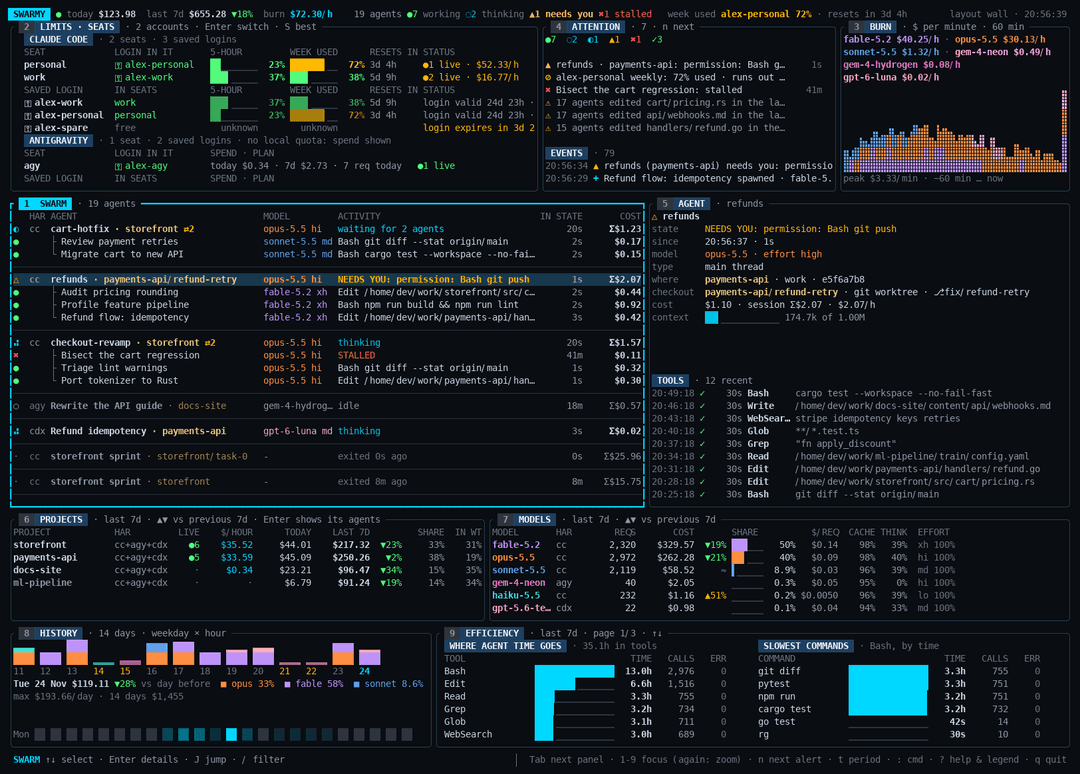 200×60 — the same wall, the bottom panels in two rows | 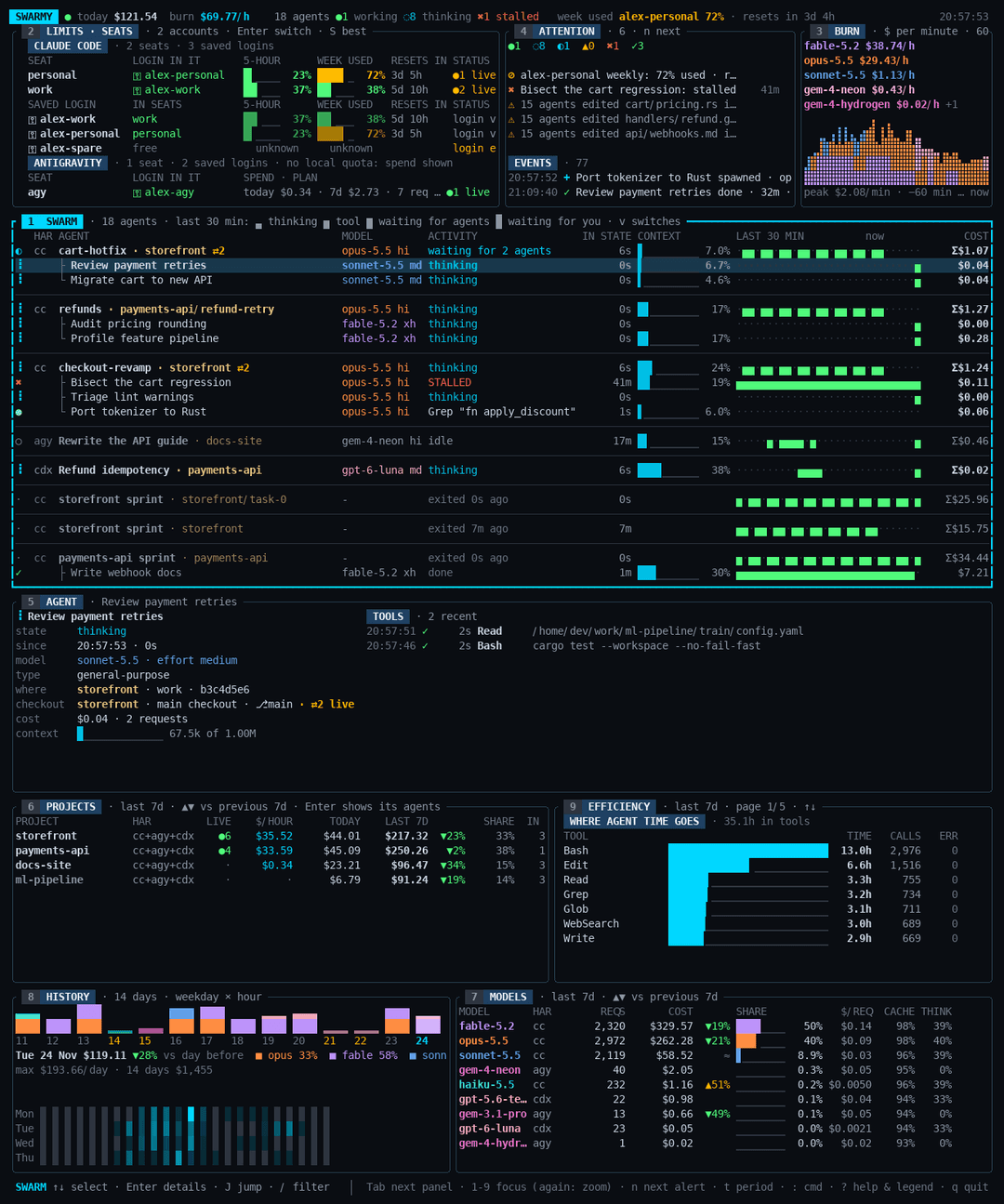 160×81 — the panels stacked in a column |
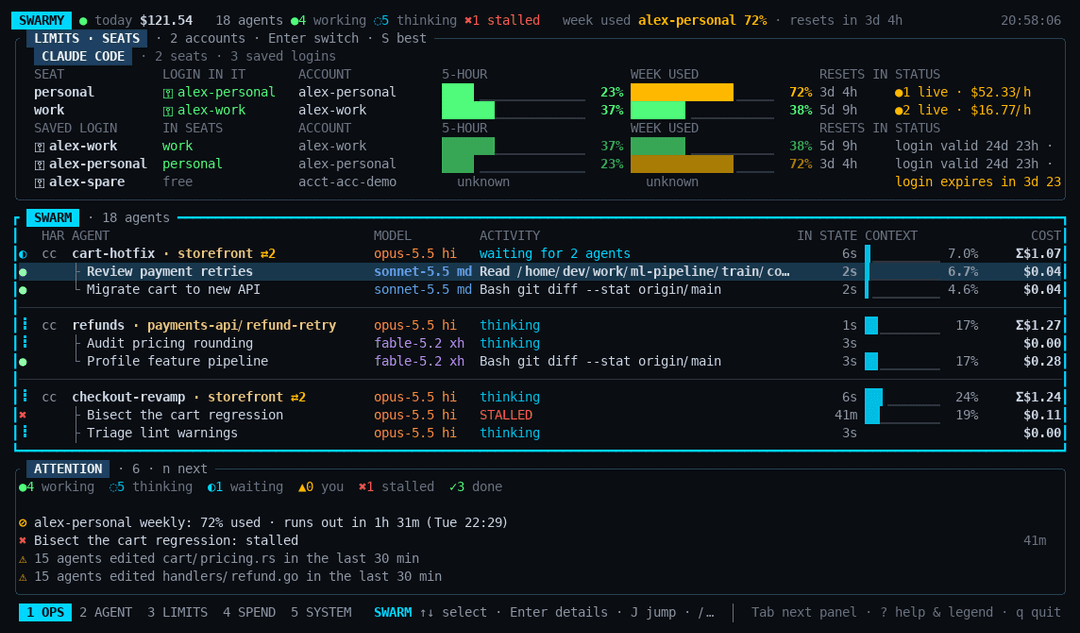 140×34 — a laptop terminal: five tabs | 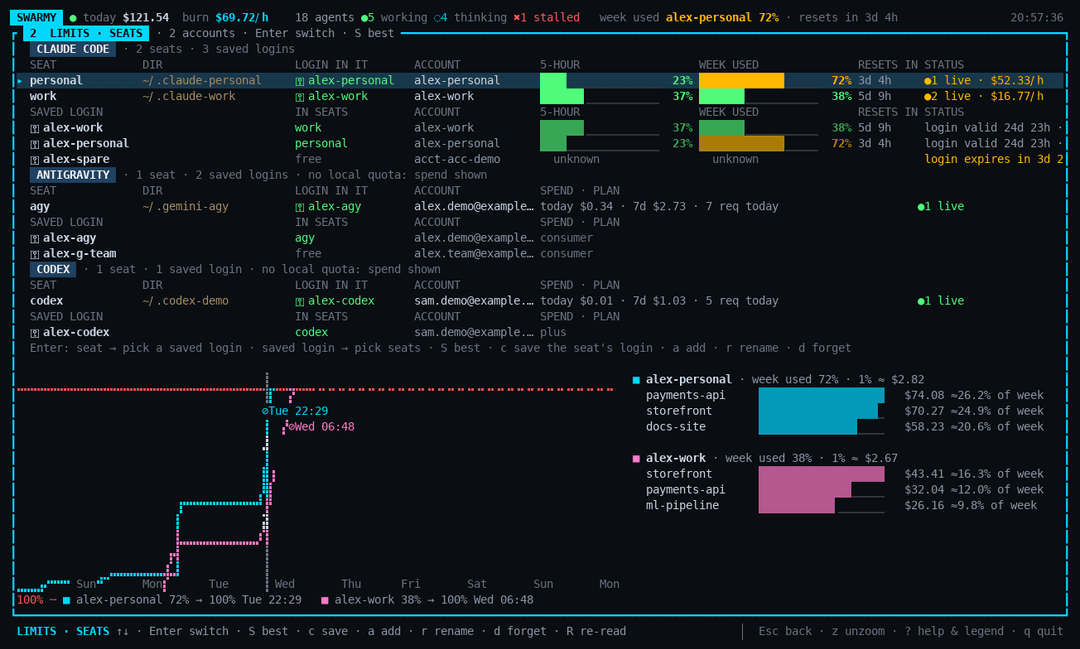 LIMITS · SEATS zoomed — the week per account and where it went |
| Panel | What it shows |
|---|---|
| 1 SWARM | live agents grouped by session, each with its state, activity, context and cost and a 30-minute activity lane (v: spend per 15 minutes instead); what finished recently |
| 2 LIMITS · SEATS | each account's week used, 5-hour window, reset and "runs out in …"; seats and saved logins; the week as a curve per account with the projection to the reset; where each account's week went by project |
| 3 BURN | dollars per hour, and per minute by model over the last hour |
| 4 ATTENTION | needs you, stalled, a limit about to run out, two agents editing one file, logins not saved or about to expire; the event log |
| 5 AGENT | the selected agent: card, last message, cost of each request, context growth, compactions, tool timeline |
| 6 PROJECTS | live agents, $/hour, today, the period with ▲▼ against the previous one, share of the week |
| 7 MODELS | spend and trends per model, cache hits, thinking, effort, project × model |
| 8 HISTORY | 14 days stacked by model (←→ picks a day), a weekday × hour heat map |
| 9 EFFICIENCY | where agent time goes (tools, slowest commands), how long agents waited for you, what a prompt costs, cache savings, agent types, fleet size, rate limits, file conflicts, what a subscription is worth |
| 0 SYSTEM | Claude Code processes with their CPU, RAM and disk; the size of swarmy's index |
Keys
| Key | Action |
|---|---|
Tab Shift-Tab · 1–9 0 | next / previous panel · focus a panel by number (again: zoom); in tabs, 1–5 switch tabs |
↑↓ PgUp PgDn · Enter | move in the focused panel · open: agent → details, alert → go to it, project → its agents, seat → pick a login |
n N | next / previous thing that needs attention |
J | jump to the selected agent's Claude Code (tmux, Zellij, kitty, WezTerm, iTerm2) |
/ | filter: words, p:project, m:model, s:seat, state:needs |
: | commands: switch <seat> <login>, capture <seat>, period 7d, layout wall |
t · g · v | period (today, 7d, 30d, all) · spend grouping · SWARM lanes ↔ spend |
z · Esc | zoom the focused panel · back (closes dialogs, zoom, filter) |
m · p · T · L | mask names · pause animations · theme · layout |
? · q | keys and a legend of every glyph, number, colour and word · quit |
The mouse works too: a click focuses a panel or selects an agent, the wheel scrolls.
On the command line
swarmy limits                         # weekly / 5-hour limits: shares per project, when they run out
swarmy report --by project            # spend; --by account|seat|model|effort|agent-type|session|agent|day|hour|weekday
swarmy report -p 30d --by day --format csv
swarmy models -p 7d                   # per model: cost, cache hits, thinking, effort mix, substitutions
swarmy accounts                       # seats, saved logins and the limit left on each
swarmy prices                         # the price in force for every model and where it comes from
swarmy jump                           # jump to the Claude Code that has waited for you longest
Periods: today, yesterday, week (the current limit window, the default), month, all,
24h, 7d, YYYY-MM-DD, FROM..TO. Reports take --account, --seat, --project and
--model filters and --format table|json|csv. Every command takes --mask. swarmy man and
swarmy completions <shell> print the man page and shell completions.
The status line

swarmy setup adds swarmy's status line to Claude Code. It is optional: the dashboard works
without it. Claude Code then shows under its prompt:
- ▲ who needs you in your other sessions, with the way there (
swarmy, thennandJ, orswarmy jump; bind it to a tmux key:bind-key y run-shell "swarmy jump", or in kitty:map ctrl+shift+y launch --type=background swarmy jump); - ◐ this session's agents and their states;
- this account's week, exact, and when it runs out at the current pace;
- the 5-hour window, context fill, the session's cost and its dollars per hour.
On a narrow terminal the less important pieces go first; "needs you" and the week stay. With the dashboard running, the status line reads the small summary it writes; without it, it finds the waiting sessions in Claude Code's session registry. Either way it only reads files and takes a few milliseconds.
The status line also makes the dashboard's limits exact: Claude Code passes it the real numbers
after every response, and swarmy keeps each reading. A status line you already have is kept and
shown first (swarmy statusline --then '<your command>'). Every changed settings.json is backed
up next to it first.
swarmy setup              # asks before each change
swarmy setup --yes        # no questions
swarmy setup --no-vault   # only the status line
swarmy setup --remove     # take it out again (restores the one it wrapped)
By hand, add this to each config dir's settings.json; swarmy doctor says which have it:
"statusLine": { "type": "command", "command": "/path/to/swarmy statusline" }
Limits and accounts
A seat is a Claude Code config dir; a login is an OAuth sign-in; an account is the Anthropic account behind a login. Seats logged into the same account share one limit, and swarmy counts it once.
- Readings. With the status line, the limit is exact after every response. Without it,
swarmy reads the utilization Claude Code caches now and then (as
/usageshows it) and estimates in between from your spend; estimates are marked≈. - Where it went. Spend inside the window is split by project, and a project's share of the week is its share of that spend. Utilization also counts claude.ai, the desktop app and other computers, which leave no trace here: when two accounts share a plan, the gap is shown as used elsewhere.
- When it runs out is the current burn rate projected to the reset, drawn as a curve against the 100% line.
- Early resets. When a limit is reset before its time, utilization falls while the window is still open; swarmy sees the fall and counts the window from there.
- Which account. Each request is attributed to the account that made it (Claude Code's
session-ownerrecords, else the seat's login history), so moving logins between seats never mixes accounts up.
How Anthropic meters limits is not public, so the shares and projections are estimates.
The vault
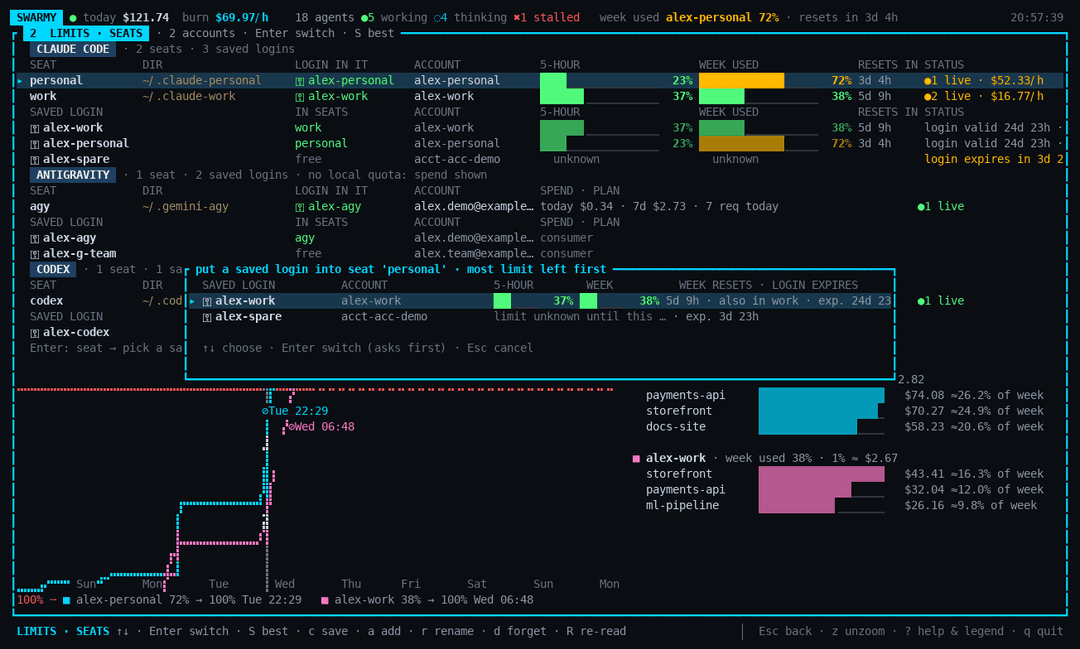
When one account's week runs out, put another account's login into the seat and carry on; switch
back after the reset. In the dashboard: Enter on a seat lists the saved logins, the one with
the most limit left first; S puts that one in directly.
swarmy accounts capture work --label alice    # save the login of seat "work"
swarmy accounts add --label bob               # log into another account in a scratch seat, save it
swarmy accounts switch work bob               # put bob into seat "work"
swarmy accounts switch work alice             # and back
swarmy accounts import backup.json --label carol
What keeps it safe:
- A switch never loses a token. It first saves whatever the seat holds; a login not in the vault yet is saved under the seat's name.
- All or nothing. Both files of the seat are backed up (the last 20 per seat). The login is
written atomically, keeping the seat's MCP tokens, and only while the file still holds what was
just saved.
.claude.jsonis merged as Claude Code last wrote it, never over a version swarmy has not read. If the second write fails, the first is put back. - One transaction at a time. Every change to the vault holds an OS lock and re-reads the vault under it, so a dashboard and a command running at once never lose each other's logins. The vault's own files are backed up before each change (the last 30).
- No surprises. A switch refuses while Claude Code runs in that seat (
--forceto insist), and one login is never put into two seats (--shareto insist). - It follows Claude Code. When Claude Code refreshes a seat's access token, the saved copy
takes it; a new
/loginis shown as not saved instead of overwriting the saved one.
Secrets live in swarmy's data dir in vault/secrets.json, readable only by you: the same
protection Claude Code gives the same tokens in .credentials.json. On macOS, where Claude Code
keeps the login in the Keychain, the vault cannot switch logins yet.
Use it with your own accounts, within your provider's terms.
Storage
Claude Code deletes transcripts after 30 days (cleanupPeriodDays); after that, swarmy's index
is the only record of them. The index keeps two weeks of per-request detail and quarter-hour
rollups of everything older, with every dimension a report groups by. A heavy user (25,000
requests a day) stays under 0.5 GB after a year instead of about 9 GB; a typical one (5,000 a
day) under 120 MB.
- No number changes. Every report, panel and period gives the same totals before and after a
rollup;
swarmy compact --verifychecks that on a scratch copy of your own index. - It runs itself. The dashboard rolls up what aged out every six hours (a day costs about a
CPU-second).
swarmy compactdoes it by hand:--dry-runshows what would move,--vacuumgives the freed space back to the disk. - What goes after two weeks: an old agent's per-request chart and tool timeline, exact request times and API error texts.
swarmy doctor and the SYSTEM panel show the index size, its growth per day and where it will be
in a year. The design: docs/design/storage.md.
Light on the battery
Only the running sessions' transcripts are read every second, and only the files that changed;
heavier figures refresh every minute to ten minutes; the full process table and the disks are
read only while SYSTEM is open. On a 4K wall with 15–20 live agents the dashboard takes about 2 CPU-seconds a minute
(≈3.4% of one core). On battery (Linux, macOS) or with --eco it redraws twice a second and
refreshes every 3 seconds.
Privacy
- No network access and no telemetry. Nothing leaves your machine.
- Read-only. swarmy reads Claude Code's directories and writes into them only when you ask:
a vault switch, and
swarmy setup(after a yes, with a backup). - Its own data (the index, the vault, the status-line readings) lives in swarmy's data dir:
~/.local/share/swarmy/on Linux,~/Library/Application Support/swarmy/on macOS,%APPDATA%\swarmy\dataon Windows (SWARMY_DATA_DIRmoves it). - Screen sharing.
--mask(ormin the dashboard) hides emails, names and full paths;SWARMY_MASK=1does the same for the status line.
Configuration
Everything is optional. config.toml lives in swarmy's config dir (~/.config/swarmy/ on Linux;
swarmy doctor prints the path; SWARMY_CONFIG_DIR moves it):
stall_minutes = 20                 # an unfinished agent with no activity this long is stalled
theme = "ops"                      # ops | phosphor | amber | plain

[[seat]]                           # config dirs that are not ~/.claude or ~/.claude-*
path = "~/agents/cc-work"
label = "work"

[[project]]                        # paths that moved or come from another machine
match = "/home/user/work/old-name"
name = "shop"

[[price]]                          # USD per million tokens, from a date
model = "claude-opus-5-5"
from = "2026-12-01"
input = 4
output = 20

[accounts]                         # display names
"<account uuid>" = "personal"

[subscription]                     # monthly price per account, for "what a subscription is worth"
personal = 200

[statusline]
segments = ["attention", "agents", "week", "five_hour", "context", "cost", "burn"]
lines = 2                          # a second line: model and effort, git branch, session name
refresh_seconds = 10               # written into Claude Code's refreshInterval by `swarmy setup`
reserve = 0                        # columns kept free for Claude Code's own notifications
mask = false                       # hide session names

[storage]
keep_raw_days = 14                 # days of per-request detail; older spend is kept per quarter hour
budget_mb = 1024                   # doctor and SYSTEM warn when the index will pass this in a year
auto_compact = true                # the dashboard rolls up old detail on its own
keep_raw_days is at least 8 (the weekly window is always read from full detail) and at most two
days less than the shortest transcript retention of your seats. Nothing is ever deleted because of
budget_mb.
How the numbers are made
- Cost is API-equivalent, not your bill. Every response's tokens (input, 5-minute and 1-hour cache writes, cache reads, output, web searches) times the list price of its model. On a subscription this is what the same work would cost through the API.
- Each response counts once. Claude Code writes one transcript record per content block, all with the same usage, so responses are de-duplicated by message id.
- Prices are versioned data: built in, overridden by the price table Claude Code caches,
overridden by your
config.toml, each from its date. A model without a price is flagged, never counted as $0. - What is missing: background calls Claude Code makes without a transcript record (titles,
summaries).
swarmy doctorcompares the totals with Claude Code's own counter; they typically agree within 1%. - Projects are git repositories; worktrees count towards the repository they belong to, also after they are removed.
Platforms
| Linux | macOS | Windows | |
|---|---|---|---|
| Dashboard, reports, status line | ✓ | ✓ | ✓ |
Jump to a session (J, swarmy jump) | ✓ tmux, Zellij, kitty, WezTerm | ✓ tmux, Zellij, kitty, WezTerm, iTerm2 | — |
| Vault: save and switch logins | ✓ | not yet (Keychain) | ✓ |
| Eco mode on battery | ✓ | ✓ | with --eco |
Jumping detects where a Claude Code runs (multiplexers take precedence over the outer terminal: tmux → Zellij → kitty → WezTerm → iTerm2). Notes per terminal:
- tmux: works inside tmux (
swarmyswitches your client to the target pane). - Zellij: requires Zellij 0.44+ (
action focus-pane-id) inside the same Zellij session. - kitty: needs
allow_remote_control socket-onlyandlisten_on unix:@kitty-{kitty_pid}inkitty.conf; without themJsays so. - WezTerm: works out of the box via
WEZTERM_UNIX_SOCKET, even from another terminal. - iTerm2 (macOS): focuses via AppleScript; macOS prompts once for Automation permission.
Linux is the main platform. The tests run on Linux, macOS and Windows in CI. Builds: Linux x86_64,
aarch64, ARMv7 and ARMv6 (static musl), macOS universal, Windows x86_64. Release details:
packaging/README.md.
Building from source
git clone https://github.com/koorchik/swarmy && cd swarmy
cargo build --release              # target/release/swarmy
cargo install --locked --path .    # or install it
Rust 2024 edition (a recent stable toolchain) and a C compiler for the bundled SQLite.
Distributions with a system libsqlite3 can build with --no-default-features. The release
archives and packages are made by tools/release-local.sh (Linux and Windows) and the tag
workflow; see packaging/README.md.
Contributing
Issues and pull requests are welcome. Before a pull request:
tools/check.sh                 # the gate: cargo fmt --check, clippy -D warnings, every test
tools/perf.sh                  # the battery budget, for changes to the worker, the index reads or the view (needs tmux)
tools/record-readme.sh         # refresh docs/img after visual changes
CLAUDE.md holds the architecture, the rules and the reasons behind them. Tests use
synthetic data only, and screenshots come only from swarmy demo.
License
MIT OR Apache-2.0, at your option: see LICENSE-MIT and LICENSE-APACHE.
// faq
What is swarmy?
Mission control for Claude Code in your terminal: see every agent of every session live, jump to the one that needs you, know where your weekly limit went and when it runs out, API-equivalent spend, a status line and a login vault. Offline, read-only, one static binary.. It is open-source on GitHub.
Is swarmy free to use?
swarmy is open-source under the Apache-2.0 license, so it is free to use.
What category does swarmy belong to?
swarmy is listed under devtools in the Claudeers registry of Claude-compatible tools.
// embed badge

[](https://claudeers.com/swarmy)
// retro hit counter

[](https://claudeers.com/swarmy)
// reviews
// guestbook
// related in Developer Tools
 🔓
The agent harness performance optimization system. Skills, instincts, memory, security, and research-first development for Claude Code, Codex, Opencode, Curs…
 🔓
Makes your AI agent think like the laziest senior dev in the room. The best code is the code you never wrote.
 🔓
AI coding assistant skill (Claude Code, Codex, OpenCode, Cursor, Gemini CLI, and more). Turn any folder of code, SQL schemas, R scripts, shell scripts, docs,…
 🔓
Orca is the ADE for working with a fleet of parallel agents. Run any coding agent with your own subscription. Available on desktop and mobile.