
switchboard
An open-source, model-agnostic decision router for Claude Code and Codex.
Install with your AI
Paste into Claude Code, Cursor, or any agent — it reads the repo and wires the tool into your project.
Install and set up switchboard (npm project) into my current project.
Found on https://claudeers.com/switchboard
Repo: https://github.com/ruban-24/switchboard
Homepage/docs: https://tryswitchboard.dev
Detected install method: npm → npm install @ruban24/switchboard
Category: devtools. Platforms: cli, api, desktop, web.
Read the repo's README for exact setup and env vars, then install it and wire it into my project.

Claudeers Health Verdict:
unknown; community-verified: false. Confirm the source before running anything.
npm install @ruban24/switchboard
git clone https://github.com/ruban-24/switchboard
// compatibility
| Platforms | cli, api, desktop, web |
|---|---|
| Operating systems | — |
| AI compatibility | claude |
| License | Apache-2.0 |
| Pricing | open-source |
| Language | TypeScript |

Switchboard
Open-source model and reasoning effort routing for coding agents.
Automatic model selection for Claude Code and Codex.
Website · Get started · How it works · Customize your policy · Contribute
Switchboard automatically selects a model and reasoning effort for Claude Code and Codex using Jev's task assessment and your routing policy. It runs inside the coding CLI you already use, keeping the selected pair fixed through follow-ups, tool calls, and resume.
Use it for implementation, debugging, code review, and documentation. You can also route writing, research, and other tasks inside those CLIs; the default routing criteria currently emphasize software engineering.
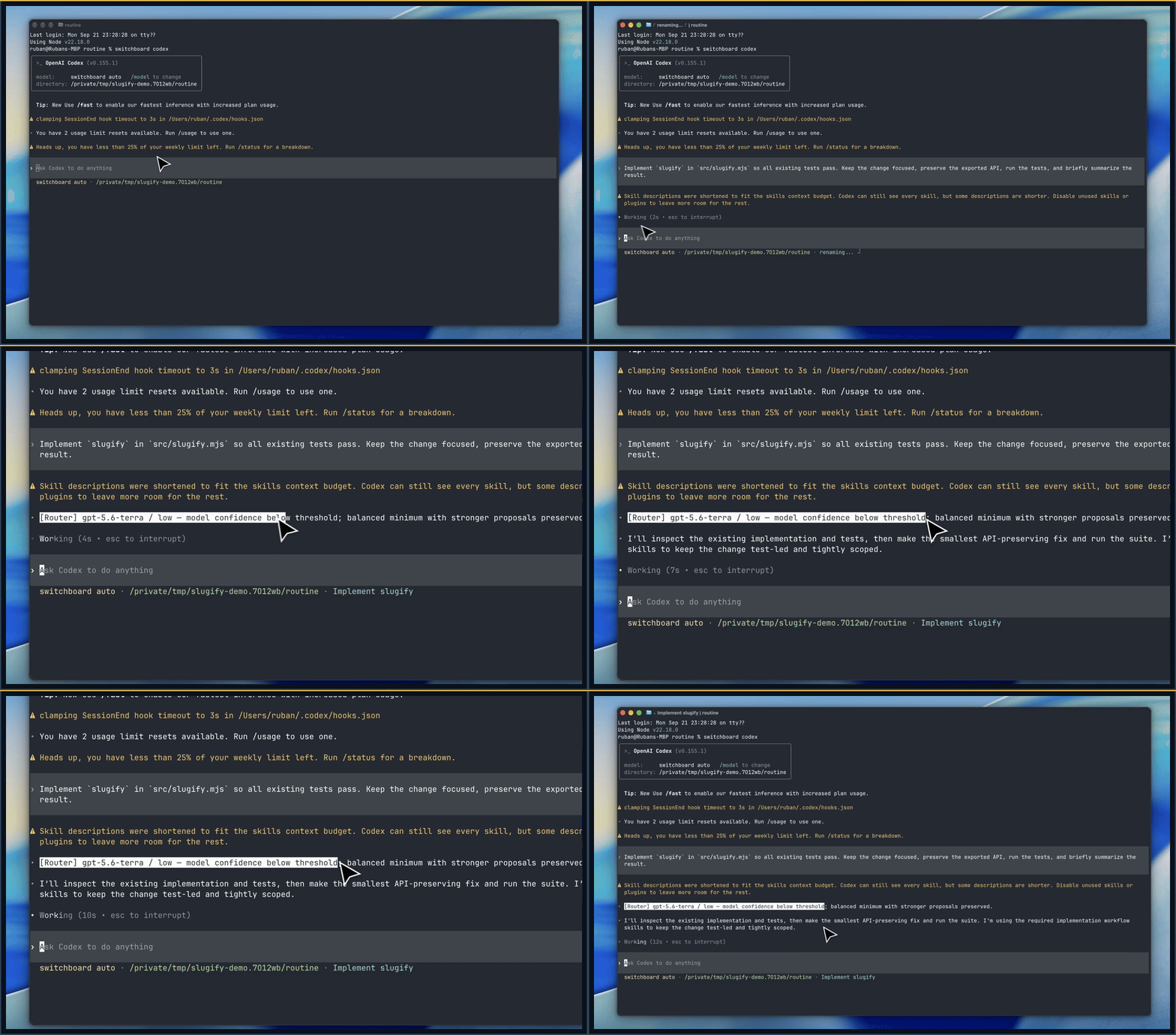
A real Codex session: submit a task and see Switchboard's model and effort choice.
- Task-aware decisions. Powered by Jev, a System One model built for fast, structured judgments. The routing policy is independent of the classifier; see future support for planned additions.
- Stable conversations. Model and effort stay fixed through tool calls, follow-ups, and resume. A new conversation gets a fresh routing decision.
- Your policy. Use the defaults, exclude unavailable models, or customize model tiers, effort caps, confidence thresholds, and fallback behavior.
- Open source and free to use. Apache-2.0. All Switchboard routing code is available to inspect, change, and run yourself. No Switchboard account or subscription; classifier and native-provider usage are billed separately.
- Local control. The proxy and route history run on your machine. No Switchboard telemetry or hosted routing service. Hosted Jev receives task text through your own API key; see privacy and data flow.
⚡ Get started
You need:
- macOS or Linux for this first release.
- Node.js 22.18+ and npm. The Homebrew installation also installs Node.
- Claude Code or Codex, installed and signed in. Follow the Claude Code quickstart or Codex CLI setup first.
- A Jev API key from TypeSafe, Vercel AI Gateway, or OpenRouter.
Switchboard uses your agent's existing login and does not install the agent for you. Choose one package manager for your global installation.
npm
npm install -g @ruban24/switchboard
switchboard init
switchboard doctor
switchboard claude
# Or: switchboard codex
Homebrew
brew install ruban-24/tap/switchboard
switchboard init
switchboard codex
npx (no global installation)
npx --package=@ruban24/switchboard switchboard init
npx --package=@ruban24/switchboard switchboard claude
What setup does
switchboard init walks you through three choices:
- Detect installed coding agents and choose which to enable.
- Select a Jev provider and enter your API key in a hidden prompt.
- Optionally add a configuration path to your shell profile.
The key is saved in a file readable only by your user. You can launch immediately, with no alias or shell restart. Running setup again preserves your personal policy.
Setup makes no AI calls. doctor checks your policy, enabled agents, and whether
a key is present; your first routed task tests the connection.
See classifier connections for endpoints, privacy for what leaves your machine, and the installation guide for shell profiles, environment overrides, updates, and removal.
Run from source
Clone the repository, build, and use the same setup:
git clone https://github.com/ruban-24/switchboard.git
cd switchboard
npm ci
npm run build
npm run switchboard -- init
npm run switchboard -- doctor
npm run switchboard -- claude
# Or: npm run switchboard -- codex
From a checkout, npm run switchboard also loads .env.local if present;
those values override saved connection settings. Installed commands do not
load project environment files.
How model and reasoning effort routing works
Switchboard makes two related decisions:
- Model: which model has enough capability for the task?
- Effort: how much reasoning effort does that model need?
A stronger model at low effort and a smaller model at maximum effort are different choices. Switchboard does not treat them as interchangeable points on one scale.
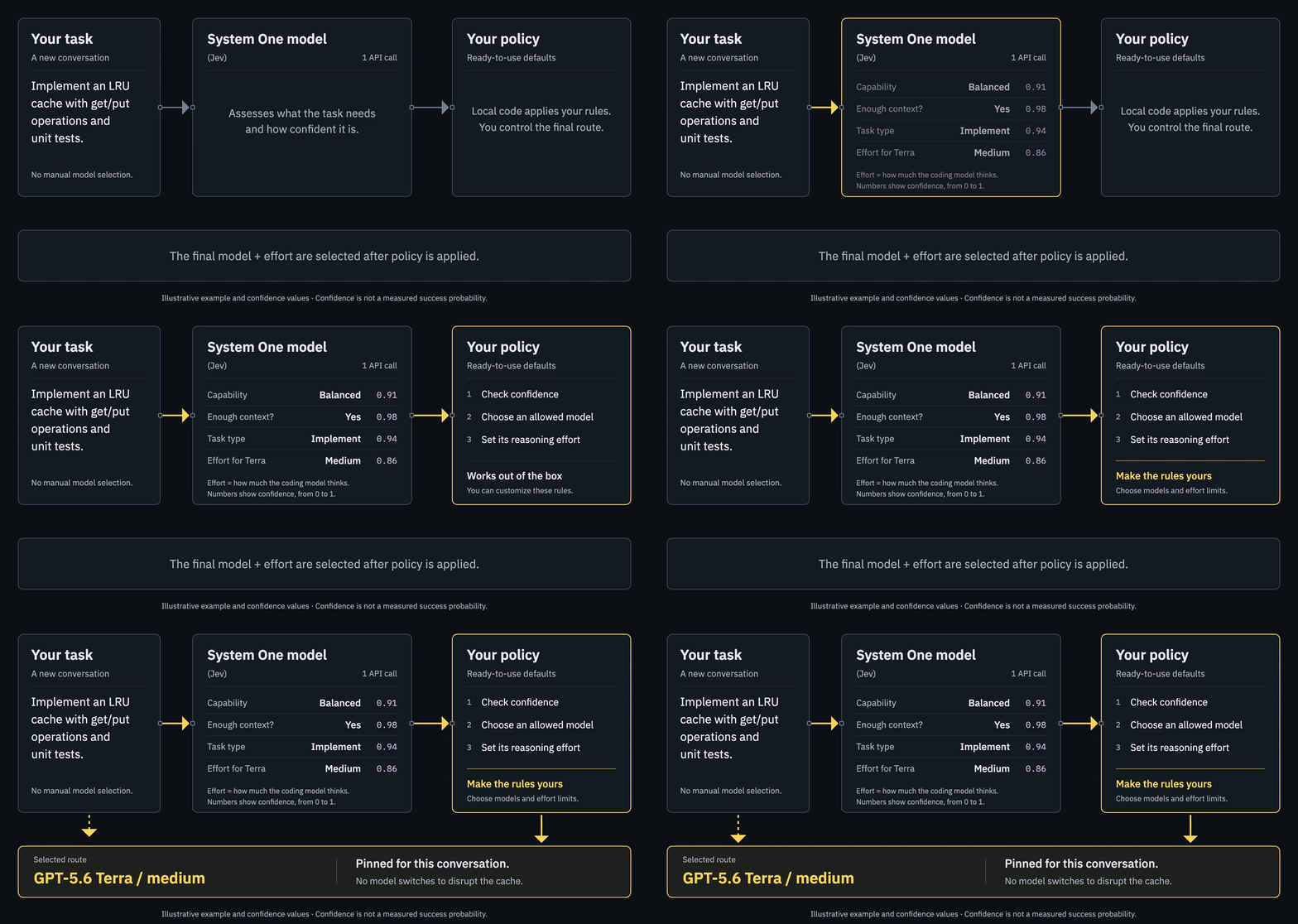
Illustrative example: a System One model (Jev) supplies judgments and confidence; your policy makes the final choice. View the static diagram.
Assess the task
The local proxy extracts the user task and sends one request to Jev. Jev returns structured answers and probabilities; the selected model still does the work.
Jev considers how familiar the work is, what remains uncertain, which constraints interact, and how much analysis is needed. These are criteria for its judgments, not separate numeric scores. Prompt length alone does not determine the route.
| Judgment | What Jev returns | How Switchboard uses it |
|---|---|---|
| Capability needed | Fast, balanced, strong, or highest | Maps to a model through your policy. |
| Enough context to classify? | Yes or no | Uses the configured fallback when difficulty cannot be estimated. |
| Effort for each eligible model | Low, medium, high, xhigh, or max | Reads the answer for the model policy actually selects. Haiku needs no effort answer. |
| Task type | Explain, edit, implement, debug, review, architecture, or other | Records it for diagnostics; it does not set the model tier. |
Each judgment includes a confidence value from 0 to 1:
- Capability and selected-model effort have separate policy thresholds. Both default to 0.70.
- Task-type and context confidence are recorded for diagnostics.
Confidence describes how decisive the classification is, not the probability that the selected model will complete the task correctly. TypeSafe explains confidence here.
Apply your policy
Shipped defaults merge with your personal overrides. Policy then determines:
- Model selection. Map the capability tier to a model and respect your exclusions. Low model confidence applies a balanced minimum; a stronger proposed tier stays stronger.
- Effort selection. Read the selected model's effort answer, apply effort confidence rules and profile defaults, then apply your effort mappings or caps.
- Fallback. If Jev is unavailable or cannot classify the task, use the configured fallback for the new conversation.
Your policy also determines which models get effort questions in the first place. Those conditional questions are bundled into the same Jev request; there is no second call after model selection. The local policy makes the final choice.
Run and remember
The native provider executes the task. Switchboard saves the selected model and effort locally, then:
- Reuses that pair for the conversation, including tool continuations.
- Skips classification for tool continuations.
- Can recommend a stronger route for a new conversation after a later user turn, without changing the active one.
Routing explanations describe the policy decision. Review the result as you normally would; a confident classification does not guarantee a correct answer.
For implementation details, see the architecture and routing rules, request/response examples, and personal policy guide.
Default model tiers
| Tier | Intended work | Claude Code | Codex |
|---|---|---|---|
| Fast | Mechanical edits and simple, bounded requests | Haiku | GPT-5.6 Luna |
| Balanced | Everyday implementation, familiar algorithms and scoped changes | Sonnet | GPT-5.6 Terra |
| Strong | Difficult debugging or consequential correctness decisions | Opus | GPT-5.6 Sol |
| Highest | Exceptional reasoning or extensive work beyond the strong tier | Fable | GPT-6 Astra |
For example, an LRU cache implementation ordinarily fits the balanced tier;
reviewing concurrent money transfers may need the strong tier. These describe
the policy's intent, not fixed prompt-to-model rules. Effort is assessed
separately for the selected model. Haiku gets no effort parameter; the other
configured models support mappings for low, medium, high, xhigh, and
max. See routing and policy for the exact rules.
Keep the cache useful
Coding agents repeatedly send shared context: instructions, tool definitions, conversation history, and code. Provider prompt caching can reuse that work. Moving a conversation to another model can lose that reuse, so a cheaper model midway through a task can still produce a more expensive overall run.
Switchboard keeps both model and effort fixed for the whole conversation. Although some providers offer model-specific cache-preserving effort updates, Switchboard has not yet verified and implemented them through its supported native CLI paths.
- Follow-up prompts, tool calls, and resume keep the saved pair.
- Start a new conversation for an independent task or a stronger-model recommendation.
- An explicit native model choice still overrides automatic routing.
This avoids cache disruption caused by Switchboard changing the active model or effort. It cannot guarantee a cache hit: provider expiration, context changes, compaction, and native CLI behavior still matter. See the Anthropic and OpenAI caching documentation for provider behavior.
See what it chose
- Claude Code: the Switchboard status line shows the selected model and effort
below your existing status line. The model label reads
switchboard. - Codex: a routing notice shows the selected pair in the conversation.
The header reads
switchboard auto.
Those labels identify automatic routing. The status line or notice shows the model actually selected. An illustrative initial selection and follow-up look like this:
[Router] gpt-5.6-terra / medium — Jev capability and effort selection.
[Router] gpt-5.6-terra / medium — pinned for this conversation.
For either CLI, inspect a saved conversation with:
switchboard explain claude CONVERSATION_ID
switchboard explain codex CONVERSATION_ID
Use the native session UUID as CONVERSATION_ID. The
session guide shows how to
find it and resume through Switchboard. From a source checkout, use
npm run switchboard -- explain in place of switchboard explain.
explain shows the active model and effort, the policy reason, confidence
adjustments, and any recommendation for a new conversation.
Native CLI details explain this behavior.
Route metadata is stored locally without raw prompts by default. You can inspect the decision without enabling task-text logging.
⚙️ Set your limits
Personal settings live at ~/.config/switchboard/policy.json by default.
Run doctor to find the actual path. You can change:
- Model choices: exclude unavailable models or change which model each tier uses.
- Reasoning effort: remap effort levels or cap the effort a model can use.
- Decision rules: adjust confidence thresholds and fallback models.
For example, exclude models your plan cannot use or tiers you prefer not to spend on:
{
  "excludedModels": {
    "claude": ["claude-fable-5-1"],
    "codex": ["gpt-6-astra"]
  }
}
To apply a personal override:
- Edit your personal
policy.json. Only include settings you want to change; objects merge with the defaults, while arrays replace them. - Run
switchboard config checkto validate it andswitchboard config showto inspect the merged policy. - Relaunch Switchboard and start a new conversation. Existing conversations retain their saved pair.
Keep overrides in your personal file so package updates preserve them. The customization guide explains each option and its effect.
For setup errors or a route that keeps falling back, see troubleshooting. The installation guide covers updates, uninstallation, and saved settings.
The policy reference also covers profiles, timeouts, and local history settings.
🔒 Privacy and supported use
Switchboard is fully open-source software, with no Switchboard backend receiving your prompts. You control the code, keys, policy, and local route history.
- Classification: the hosted classifier receives extracted task text, including any code or secrets you put in that prompt.
- Native inference: requests go to your native provider.
- Local logging: raw-prompt logging is off by default. Native transcripts and provider retention are separate.
Read the data flow before using it with sensitive work.
Supported coding agents and platforms
- Agents: Claude Code and Codex in local interactive CLI sessions.
- Platforms: macOS and Linux. Both adapters have passed interactive validation on macOS and a Debian Linux VM with native sandboxing.
- Classifier: Jev through TypeSafe, Vercel AI Gateway, or OpenRouter.
Native Windows, desktop-app routing, remote/background sessions, and custom model gateways are outside v0. See native CLI compatibility for tested versions and limitations.
Future support
Planned agent integrations
- Pi (coming soon)
- OpenCode (coming soon)
System One models
- Laya (coming soon)
- Kev (coming soon)
- Cua-S1 (coming soon)
Each classifier needs an adapter for its judgments and confidence format. A new endpoint alone does not make a different model compatible.
Contribute and support
- Contribute code or report a routing problem: start with
CONTRIBUTING.md for setup, checks, and native adapter guidance.
Run
npm testandnpm run test:packagebefore submitting a code change. - Report a vulnerability: follow SECURITY.md.
- Read release notes: see CHANGELOG.md.
If you would like to support development, you can sponsor me or buy me a coffee.
License
Apache-2.0. Copyright 2026 Ruban. See NOTICE and third-party licenses.
If Switchboard helped you, please give it a star ⭐.
// faq
What is switchboard?
An open-source, model-agnostic decision router for Claude Code and Codex.. It is open-source on GitHub.
Is switchboard free to use?
switchboard is open-source under the Apache-2.0 license, so it is free to use.
What category does switchboard belong to?
switchboard is listed under devtools in the Claudeers registry of Claude-compatible tools.
// embed badge

[](https://claudeers.com/switchboard)
// retro hit counter

[](https://claudeers.com/switchboard)
// reviews
// guestbook
// related in Developer Tools
 🔓
🔓The agent harness performance optimization system. Skills, instincts, memory, security, and research-first development for Claude Code, Codex, Opencode, Curs…
 🔓
🔓Makes your AI agent think like the laziest senior dev in the room. The best code is the code you never wrote.
 🔓
🔓Use Garry Tan's exact Claude Code setup: 23 opinionated tools that serve as CEO, Designer, Eng Manager, Release Manager, Doc Engineer, and QA
 🔓
🔓AI coding assistant skill (Claude Code, Codex, OpenCode, Cursor, Gemini CLI, and more). Turn any folder of code, SQL schemas, R scripts, shell scripts, docs,…