
surya
OCR, layout analysis, reading order, table recognition in 90+ languages
Install with your AI
Paste into Claude Code, Cursor, or any agent — it reads the repo and wires the tool into your project.
Install and set up surya (pip project) into my current project.
Found on https://claudeers.com/surya
Repo: https://github.com/datalab-to/surya
Homepage/docs: https://www.datalab.to
Detected install method: pip → pip install surya-ocr
Category: uncategorized. Platforms: cli, api, web.
Read the repo's README for exact setup and env vars, then install it and wire it into my project.

Claudeers Health Verdict:
unknown; community-verified: false. Confirm the source before running anything.
pip install surya-ocr
git clone https://github.com/datalab-to/surya
// compatibility
| Platforms | cli, api, web |
|---|---|
| Operating systems | — |
| AI compatibility | claude |
| License | Apache-2.0 |
| Pricing | open-source |
| Language | Python |

Datalab
State of the Art models for Document Intelligence
Surya
Surya is a 689M param document OCR and layout VLM with these features:
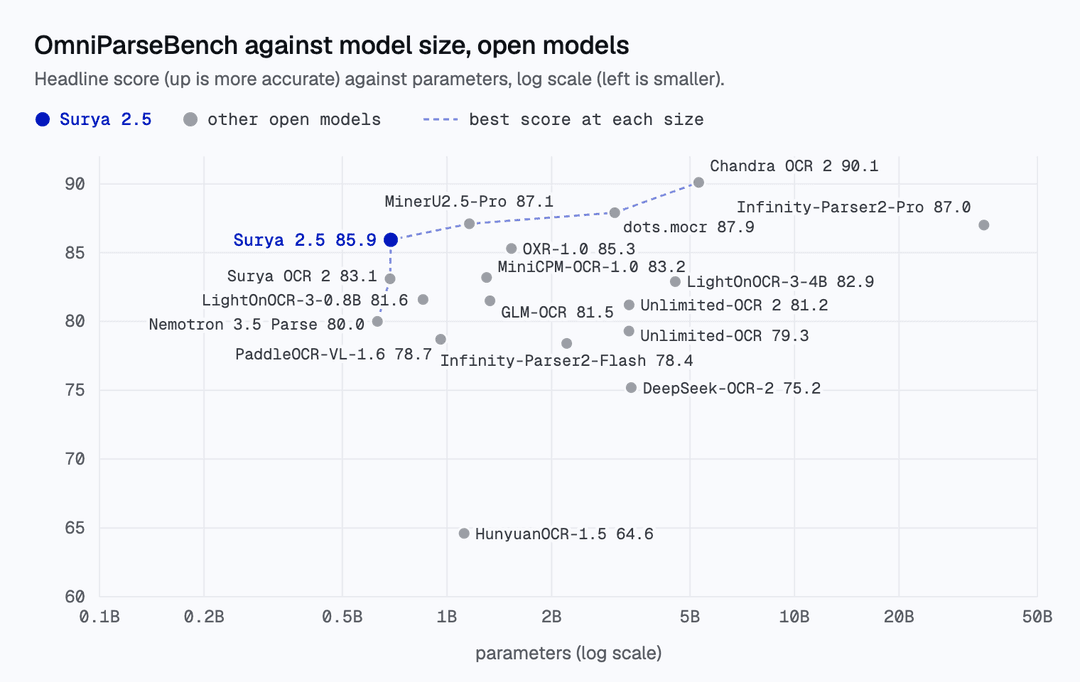
- Accuracy - scores 85.9 on OmniParseBench, the highest of the open models under 1B parameters we have scored, and 83.7% on olmOCR-bench
- Speed - throughput of 4.5 pages/s on one H100 at 192 DPI, 1.7x Surya 2 with MTP (see Throughput)
- Multilingual - scores 74.9% on an internal benchmark set of 91 languages (more here)
- Layout analysis (
Table,Picture,SectionHeader,Equation,Form, etc.) with reading order and token-count estimates - Tables as HTML (
<table>,<tr>,<th>,<td>) with merged cells ascolspan/rowspan - Zero heavy local ML dependencies -
surya-ocris a lightweight client/orchestrator that talks tovllm(Docker / Podman),llama-server(llama.cpp), ormlx_vlm.server(Apple Silicon)
Try Datalab's Managed Platform
Our managed platform uses Surya, our highest accuracy model Chandra, and other models.
The Datalab API turns documents into verifiable knowledge your agents act on. Every result traces back to its page and position, and one API can parse, extract, fill and edit documents.
Get started with about 5,000 free convert pages every month (work email) — sign up (takes under 30 seconds) or try our free public playground.
Model Information
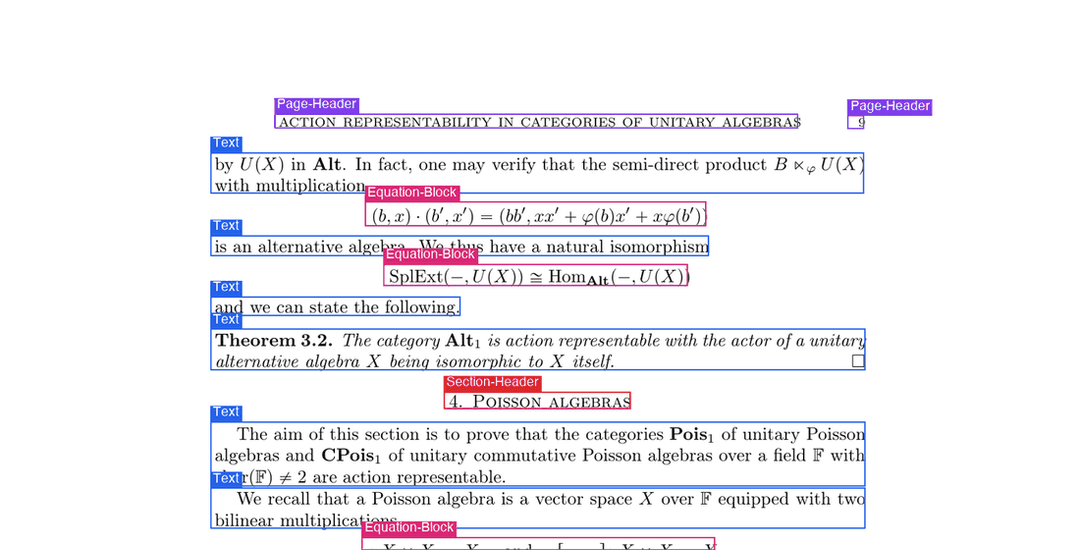
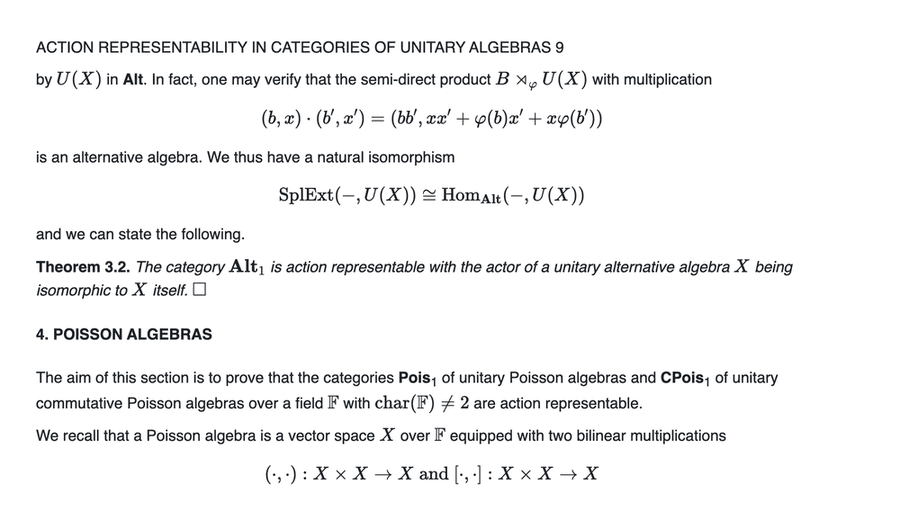
| Layout | OCR |
|---|---|
 |  |
Surya is named for the Hindu sun god, who has universal vision.
Examples
Each row links to annotated views of the same page: OCR, layout, and reading order (Surya 2.5).
| Name | Original | OCR | Layout | Order |
|---|---|---|---|---|
| Newspaper | Image | Image | Image | Image |
| Reference book | Image | Image | Image | Image |
| Math paper | Image | Image | Image | Image |
| Government form | Image | Image | Image | Image |
| Handwritten letter | Image | Image | Image | Image |
| Corporate doc | Image | Image | Image | Image |
| Japanese tax form | Image | Image | Image | Image |
The example pages are public pages from OmniParseBench. The newspaper (The Alpha, 1881), reference book and math paper are from olmOCR-bench (Ai2, ODC-BY 1.0). The government form is a US federal form (public domain). The handwritten letter is from the Library of Congress, Manuscript Division, Carrie Chapman Catt Papers (public domain). The corporate page is from ParseBench (Apache 2.0). The Japanese form is made from a form of the National Tax Agency, Japan, under the Public Data License 1.0: 「国税庁の様式」(国税庁)(https://www.nta.go.jp/)を加工して作成.
Commercial usage
The Surya code is licensed under Apache 2.0. The model weights use a modified AI Pubs Open Rail-M license (free for research, personal use, and startups under $5M funding/revenue). For broader commercial licensing of the model weights, visit our pricing page here.
Installation
Install with:
pip install surya-ocr
Inference backend prerequisites
Surya auto-spawns the inference server on first use, using vllm (NVIDIA GPU) or llama.cpp (CPU / Apple Silicon):
- NVIDIA GPU: Docker or Podman plus the NVIDIA Container Toolkit.
- CPU / Apple Silicon: the
llama-serverbinary from llama.cpp:brew install llama.cpp # macOS # or grab a release from https://github.com/ggml-org/llama.cpp/releases
Upgrading from Surya v1
If you have v1 code, migrate to SuryaInferenceManager:
from PIL import Image
from surya import SuryaInferenceManager, RecognitionPredictor

manager = SuryaInferenceManager()              # auto-spawns vllm or llama-server
rec = RecognitionPredictor(manager)
predictions = rec([Image.open("page.png")])
What's different:
SuryaInferenceManagerreplacesFoundationPredictor. The same manager instance is shared acrossLayoutPredictor,RecognitionPredictor, andTableRecPredictor.- Output schemas return structured
blocks(withhtml,label,polygon,bbox,reading_order,confidence); layout boxes includecount(token budget estimate); table recognition returns full HTML tables (<table>...</table>withcolspan/rowspan).
Usage
Surya 2.5 runs layout, OCR, and table recognition through a single VLM. The inference manager spawns a server for you on first use; you can also point it at an existing OpenAI-compatible server via SURYA_INFERENCE_URL=http://host:port/v1.
- Inspect the settings in
surya/settings.py. You can override any setting via environment variables (e.g.SURYA_INFERENCE_BACKEND=vllm).
Server lifecycle (--keep_server)
By default each CLI command spawns the VLM server on startup and shuts it down on
exit — so running several commands in a row pays the startup (and, on GPU, the
model-load) cost every time. Pass --keep_server to leave the server running
so later commands attach to it instead of re-spawning:
surya_ocr    DATA_PATH --keep_server   # spawns the server and leaves it up
surya_layout DATA_PATH                 # attaches to the running server
surya_table  DATA_PATH                 # ...and so on, no re-spawn
--keep_server works on every command. Stop the server when you're done
(docker stop / podman stop the surya-vllm-* container, or kill the llama-server
process), or set SURYA_INFERENCE_KEEP_ALIVE=1 to make keep-alive the default.
Interactive App
surya_gui launches a self-contained interactive web viewer in your browser (with zero extra dependencies) where you can drop PDFs or images and inspect layout boxes, reading order, KaTeX-rendered math, HTML tables, and JSON page by page across all Surya modes (Full-Page OCR, Block OCR, Layout, and Table Rec):
surya_gui --port 8000
OCR (text recognition)
This command writes out a results.json file with the detected blocks, labels, bboxes, and HTML content:
surya_ocr DATA_PATH
DATA_PATHcan be an image, pdf, or folder of images/pdfs--stdoutwrites the JSON result directly to stdout instead of saving to a directory (ideal for AI agents and shell pipelines)--block_moderuns layout detection first and then OCRs each detected block crop individually (default is single-call full-page OCR)--recursive/-rrecursively searches subdirectories whenDATA_PATHis a folder--imageswill save images of the pages and detected blocks (optional)--output_dirspecifies the directory to save results to instead of the default--page_rangespecifies the page range to process in the PDF, specified as a single number, a comma separated list, a range, or comma separated ranges - example:0,5-10,20.--keep_serverleaves the inference server running after the command exits so later commands reuse it (see Server lifecycle). Available on every command.--skillprints the bundled Surya AI agent skill (SKILL.md) to stdout;--install_skill [DIR]installs it into.agents/skills/surya/SKILL.md.
The results.json file contains a dict keyed by input filename (no extension). Each value is a list of page dicts. Each page dict contains:
blocks- per-block OCR results in reading orderlabel- canonicalized layout label (e.g.Text,SectionHeader,Table,Equation,Picture,Form,PageHeader, ...). Seesurya/layout/label.py:LAYOUT_PRED_RELABELfor the full canonical-name set.raw_label- original label emitted by the model, before canonicalizationreading_order- 0-indexed position in layout outputhtml- block content as HTML (math wrapped in<math>...</math>, tables as<table>...</table>, etc.).""if the block was skippedpolygon- 4-corner polygon in[[x0,y0],[x1,y0],[x1,y1],[x0,y1]]orderbbox- axis-aligned[x0, y0, x1, y1]derived from the polygonconfidence- mean per-token probability across the block's decode (0-1)skipped- true if the block was a visual label (e.g.Picture) and not OCR'derror- true if the block OCR call failed
image_bbox-[0, 0, width, height]for the page image
Performance tips
- Throughput is governed by the inference backend. With
vllm, raise--max-num-seqs/--max-num-batched-tokens(orSURYA_INFERENCE_PARALLELon the client side) to keep more pages in flight. Withllama.cpp, setSURYA_INFERENCE_PARALLELto match--parallelonllama-server. - DPI can also impact throughput significantly - you can adjust
IMAGE_DPI_HIGHRESto make the right throughput/accuracy tradeoff for your use case. Try going from 192 to 96 for improved throughput. - MTP can also impact latency/throughput. It is turned on automatically only when the checkpoint config declares an MTP head; set
VLLM_ENABLE_MTP=true|falseto override, andVLLM_MTP_TOKENSto change the draft length.
From python
from PIL import Image
from surya import LayoutPredictor, RecognitionPredictor, SuryaInferenceManager

manager = SuryaInferenceManager()
recognition_predictor = RecognitionPredictor(manager)

# Default: full-page OCR. One VLM call per page. Returns one PageOCRResult per
# image: `.blocks` (each with label, html, polygon, bbox, confidence, ...) and
# `.image_bbox` — the same schema as block mode.
image = Image.open(IMAGE_PATH)
predictions = recognition_predictor([image])

# Optional: pass skip_labels=[] to also OCR text inside Figure / Picture / Diagram blocks
predictions_all = recognition_predictor([image], skip_labels=[])

# Block mode: pre-run layout (or pass full_page=False to run layout automatically),
# then per-block OCR. Same return schema as above.
layout = LayoutPredictor(manager)
layouts = layout([image])
predictions = recognition_predictor([image], layouts)
Layout and reading order
This command writes out a results.json file with the detected layout and reading order:
surya_layout DATA_PATH
DATA_PATHcan be an image, pdf, or folder of images/pdfs--imageswill save images of the pages and detected layout boxes (optional)--output_dirspecifies the directory to save results to instead of the default--page_rangespecifies the page range to process in the PDF, specified as a single number, a comma separated list, a range, or comma separated ranges - example:0,5-10,20.
The results.json file contains a dict keyed by input filename (no extension). Each value is a list of page dicts. Each page dict contains:
bboxes- layout boxes in reading orderpolygon- 4-corner polygon[[x0,y0],[x1,y0],[x1,y1],[x0,y1]]bbox- axis-aligned[x0, y0, x1, y1]derived from the polygonlabel- canonicalized label. One ofCaption,Footnote,Equation,ListGroup,PageHeader,PageFooter,Picture,SectionHeader,Table,Text,Figure,Code,Form,TableOfContents,ChemicalBlock,Diagram,Bibliography,BlankPageraw_label- original label emitted by the modelposition- 0-indexed reading ordercount- model's token estimate for OCR'ing this block (rounded to multiples of 50; used to size the per-block decode budget)confidence- mean per-token probability across the layout decode (0-1)
image_bbox-[0, 0, width, height]raw- raw JSON the layout model emitted, for debuggingerror- true if the layout call failed
From python
from PIL import Image
from surya.inference import SuryaInferenceManager
from surya.layout import LayoutPredictor

layout_predictor = LayoutPredictor(SuryaInferenceManager())
layout_predictions = layout_predictor([Image.open(IMAGE_PATH)])
Table Recognition
This command writes out a results.json file with each detected table as HTML (with colspan / rowspan for merged cells). For full document conversion to Markdown, JSON, HTML, or RAG chunks, check out Marker.
surya_table DATA_PATH
DATA_PATHcan be an image, pdf, or folder of images/pdfs--imageswill save the cropped table images alongsideresults.json(optional)--output_dirspecifies the directory to save results to instead of the default--page_rangespecifies the page range to process in the PDF, specified as a single number, a comma separated list, a range, or comma separated ranges - example:0,5-10,20.--skip_table_detectiontells table recognition not to detect tables first. Use this if your image is already cropped to a table.
The results.json file contains a dict keyed by input filename (no extension). Each value is a list of per-table dicts. Each table dict contains:
html- full<table>...</table>HTML (includingcolspan,rowspan,<th>,<td>)image_bbox- the table crop bbox[0, 0, width, height]error- true if the table_rec call failed or hit the token capraw- raw model output, for debugging
From python
from PIL import Image
from surya.inference import SuryaInferenceManager
from surya.table_rec import TableRecPredictor

table_rec_predictor = TableRecPredictor(SuryaInferenceManager())
table_predictions = table_rec_predictor([Image.open(IMAGE_PATH)])
Math / equations
Surya 2.5 handles math inline as part of OCR — recognized equations
come back inside <math>...</math> tags in the same HTML output as
surrounding prose, in KaTeX-compatible LaTeX. No separate LaTeX OCR pass is needed.
Output format
The model writes each block as a header of special tokens, a label and four coordinates (x0, y0, x1, y1, normalized to 0-1000), followed by the block content: <|Text|><|120|><|87|><|881|><|255|><p>...</p>. Tables omit closing tags and mark merged cells with data-cs / data-rs and data-kind="parent" / "ghost" spans, which makes pages shorter to write. The surya-ocr package decodes all of this for you. If you serve the model yourself, run its output through surya.inference.parsers.clean_block_html / parse_full_page_html; the lower-level compact.decode alone does not convert parent/ghost spans. Your server must return special tokens (llama-server: --special).
Inference Backends
Layout / OCR / table_rec all share one VLM, served by vllm (GPU), llama.cpp (CPU / Apple Silicon), or mlx_vlm (Apple Silicon). SuryaInferenceManager spawns one automatically; you can also point at a pre-running server:
# Attach to an existing vllm or llama-server
export SURYA_INFERENCE_BACKEND=vllm
export SURYA_INFERENCE_URL=http://localhost:8000/v1
export SURYA_INFERENCE_API_KEY=your-api-key   # optional
| Setting | Default | Notes |
|---|---|---|
SURYA_INFERENCE_BACKEND | auto (vllm if NVIDIA, else llamacpp) | vllm | llamacpp | mlx | unset (auto) |
SURYA_INFERENCE_URL | (auto-spawn) | Attach to a running OpenAI-compatible server |
SURYA_INFERENCE_API_KEY | "EMPTY" (or VLLM_API_KEY) | API key for authenticated OpenAI-compatible servers |
SURYA_CONTAINER_RUNTIME | auto (docker then podman) | Container runtime used to launch vllm/vllm-openai |
SURYA_INFERENCE_PARALLEL | auto (GPU-scaled for vllm, 8 for llamacpp) | Client-side concurrency to the backend |
SURYA_INFERENCE_KEEP_ALIVE | false | Leave the spawned server up after exit (cf. --keep_server) |
SURYA_GUIDED_LAYOUT | true | JSON-schema-constrained layout decode |
VLLM_MAX_MODEL_LEN | 24576 | Must hold the largest image (~8k tokens) + prompt + SURYA_MAX_TOKENS_FULL_PAGE (12288) |
VLLM_ENABLE_MTP | auto | Auto = on only if the checkpoint config declares an MTP head |
SURYA_MLX_MODEL | (none) | MLX checkpoint (local dir or HF repo) for SURYA_INFERENCE_BACKEND=mlx |
SURYA_STOP_STRINGS | (none) | Comma-separated stop strings sent with every request |
SURYA_STOP_TOKEN_IDS | (none) | Comma-separated stop token ids (vllm only; ignored by llama.cpp) |
LLAMA_CPP_SPECIAL | true | Pass --special to llama-server so block labels and coordinates (special tokens in Surya 2.5 output) are returned in the text |
MLX backend (Apple Silicon)
pip install mlx-vlm==0.7.10   # tested version; experimental backend
export SURYA_INFERENCE_BACKEND=mlx
export SURYA_MLX_MODEL=/path/to/surya-mlx-int8     # or an HF repo with MLX weights
surya_ocr page.png
The manager spawns mlx_vlm.server for that checkpoint (or attaches to one at SURYA_INFERENCE_URL) and uses the same OpenAI-compatible client as the other backends. Auto-detection still picks vllm / llama.cpp; MLX is opt-in.
Building GGUF and MLX models for a checkpoint
pip install "surya-ocr[build]"

# llama.cpp (Metal / CPU / CUDA): writes <name>.gguf and <name>-mmproj.gguf
python -m surya.scripts.build_gguf --checkpoint <repo-or-dir> --out-dir ./gguf-build --name <name> --outtype bf16

# MLX (Apple Silicon), optionally quantized (needs `pip install mlx-vlm==0.7.10`)
python surya/scripts/build_mlx.py --checkpoint <repo-or-dir> --out-dir ./mlx-build --q-bits 8
Both scripts repair things the stock converters get wrong for the character-level vocabulary: the GGUF script registers the checkpoint's pre-tokenizer hash and, when the Hugging Face tokenizer spells <|im_end|> in prompts (Surya 2.5), renames the token's text so llama.cpp tokenizes the prompt the same way; the MLX script restores the original tokenizer files and the end-token id after conversion.
Limitations
- Specialized for document OCR and layout analysis. Performance on photos or natural scenes is not the goal.
- Requires a running inference backend (
vllm,llama-server, ormlx_vlm.server). - For hard documents (handwriting, complex tables, math) or large volumes, the hosted Datalab API uses Chandra and other models, with no infrastructure to manage.
Troubleshooting
If OCR isn't working properly:
- Try increasing resolution of the image so the text is bigger (
IMAGE_DPI_HIGHRES=192or300). If the resolution is already very high,scale_to_fitautomatically downscales images to fit within3072×2048. - Preprocessing the image (binarizing, deskewing, etc.) can help with very old/blurry scans.
Manual install
If you want to develop Surya locally, install it with uv:
git clone https://github.com/datalab-to/surya.git
cd surya
uv sync --group dev      # installs runtime + dev deps
uv run surya_ocr ...     # or `source .venv/bin/activate` to enter the venv
Benchmarks
Surya 2.5 is a single VLM that handles layout analysis, OCR (full-page or per-block), and table reading in one model. We evaluate end-to-end on two benchmarks: OmniParseBench, our open parsing benchmark, and olmOCR-bench.
OmniParseBench
Headline score (the mean of the text, table and layout scores) against model size for open models. Surya 2.5 scores 85.9 against 83.3 for Surya 2 (both run through this package), in 689M parameters. Scores for the other models are from the OmniParseBench dataset card.
| Headline | Text | Tables | Layout | |
|---|---|---|---|---|
| Surya 2 | 83.3 | 81.0 | 74.3 | 94.5 |
| Surya 2.5 | 85.9 | 83.8 | 78.3 | 95.7 |
Both rows are Surya run through this package at 192 DPI, public scorer, one run per model. The paired differences (Surya 2.5 minus Surya 2, 95% bootstrap interval over pages) are +2.7 [+1.6, +3.7] headline, +2.8 [+1.7, +3.9] text, +4.0 [+1.3, +6.8] tables and +1.2 [+0.3, +2.2] layout.
olmOCR-bench
Surya 2 and Surya 2.5 on the same harness and settings (mean of three passes, plain model output):
| Model | Score |
|---|---|
| Surya 2 | 82.8 |
| Surya 2.5 | 83.7 |
Per-source pass rate:
| Model | ArXiv | Base | Hdr/Ftr | TinyTxt | MultCol | OldScan | OldMath | Tables |
|---|---|---|---|---|---|---|---|---|
| Surya 2 | 86.7 | 99.7 | 90.7 | 94.4 | 81.3 | 43.2 | 79.0 | 87.4 |
| Surya 2.5 | 87.0 | 99.9 | 90.9 | 94.8 | 83.3 | 44.3 | 78.6 | 90.9 |
Multilingual
We also evaluate Surya 2.5 against a 91-language internal benchmark covering text accuracy, layout, tables, math, and reading order in documents drawn from each language.
Overall pass rate: 74.9% across 91 languages (Surya 2: 74.5%), on a newer, harder version of the benchmark than the 87.2% reported for Surya 2. 21 of the 91 languages score ≥ 90%; 52 score ≥ 80%. Multilingual tables improved (58.1 vs 54.5); text accuracy is level.
Top 15 widely-spoken languages:
| Code | Language | Surya 2 | Surya 2.5 |
|---|---|---|---|
ar | Arabic | 46.0% | 45.4% |
bn | Bengali | 61.6% | 55.3% |
zh | Chinese | 66.7% | 75.7% |
en | English | 94.3% | 90.3% |
fr | French | 88.0% | 90.9% |
de | German | 86.1% | 91.6% |
hi | Hindi | 69.6% | 67.6% |
it | Italian | 90.9% | 94.0% |
ja | Japanese | 78.8% | 80.5% |
ko | Korean | 77.3% | 77.9% |
fa | Persian | 63.8% | 67.9% |
pt | Portuguese | 94.1% | 91.1% |
ru | Russian | 77.8% | 71.7% |
es | Spanish | 92.2% | 93.7% |
vi | Vietnamese | 57.9% | 63.6% |
See static/docs/multilingual.md for the full 91-language table.
Throughput
Full-page OCR throughput against a running inference server, measured client-side.
H100 (vllm)
vllm/vllm-openai:v0.25.1, single H100 80 GB, 32 concurrent requests, full-page OCR, no stop string, 300 OmniParseBench pages per resolution. Pages/s counts pages that finished before the token cap.
| Render DPI | Surya 2 | Surya 2 + MTP | Surya 2.5 |
|---|---|---|---|
| 96 | 2.28 | 2.64 | 6.19 |
| 150 | 2.44 | 2.64 | 6.03 |
| 192 | 2.24 | 2.72 | 4.52 |
| 300 | 1.80 | 2.33 | 2.68 |
At 192 DPI a page takes about 1,514 output tokens in Surya 2.5 and 3,917 in Surya 2; median and 95th percentile latency per page is 6.8 s and 11.3 s for Surya 2.5, 12.0 s and 31.3 s for Surya 2, and 9.9 s and 26.0 s for Surya 2 with MTP.
Apple Silicon (llama.cpp / Metal)
llama-server (llama.cpp bbeb89d) with the Metal backend on an M4 Max (36 GB), on AC power. --parallel 8, 8 concurrent requests, 96 DPI full-page OCR, no stop string, 16 OmniParseBench pages sent twice (32 requests), 12,288-token cap. Pages/s counts pages that finished before the cap.
| Model | Pages/s | Tokens/s | p50 (s) | p95 (s) | avg tok/page | Peak RSS |
|---|---|---|---|---|---|---|
| Surya 2 (bf16) | 0.061 | 274 | 80.6 | 213.8 | 3,907 | 5,875 MB |
| Surya 2.5 (bf16) | 0.190 | 270 | 38.9 | 55.7 | 1,424 | 4,764 MB |
| Surya 2.5 (Q8_0) | 0.198 | 285 | 39.8 | 55.1 | 1,443 | 4,278 MB |
Surya 2 finished 28 of 32 pages before the cap; Surya 2.5 finished all 32. Tokens per second are about the same; Surya 2.5 writes about a third as many tokens per page.
Reproducing
We score Surya 2.5 on olmOCR-bench by serving the model with vllm (or
llama.cpp) and running the olmOCR-bench harness from
allenai/olmocr, with some adjustments applied to account for our output HTML format.
OmniParseBench runs use the Surya adapter in omni_parse_bench at 192 DPI.
Training
Layout, OCR, and table recognition all share a single vision-language model (Qwen3.5-style architecture, ~690M params). It is trained on diverse document images to emit either a layout JSON or a full-page/block HTML output, depending on prompt.
If you want help finetuning Surya on your own data, or to use our managed training stack, reach us at [email protected].
Thanks
This work would not have been possible without amazing open source AI work:
- Qwen3-VL from Alibaba
- vllm and llama.cpp for inference
- transformers from Hugging Face
Thank you to everyone who makes open source AI possible.
Citation
If you use Surya in your work or research, please consider citing us using the following BibTeX entry:
@misc{paruchuri2025surya,
  author       = {Vikas Paruchuri and Datalab Team},
  title        = {Surya: A lightweight document OCR and analysis toolkit},
  year         = {2025},
  howpublished = {\url{https://github.com/datalab-to/surya}},
  note         = {GitHub repository},
}
// faq
What is surya?
OCR, layout analysis, reading order, table recognition in 90+ languages. It is open-source on GitHub.
Is surya free to use?
surya is open-source under the Apache-2.0 license, so it is free to use.
What category does surya belong to?
surya is listed under uncategorized in the Claudeers registry of Claude-compatible tools.
// embed badge

[](https://claudeers.com/surya)
// retro hit counter

[](https://claudeers.com/surya)
// reviews
// guestbook
// related in Uncategorized / Others
 🔓
Reverse engineer anything with agents, from app behavior down to native binaries.
 🔓
Fair-code workflow automation platform with native AI capabilities. Combine visual building with custom code, self-host or cloud, 400+ integrations.
 🔓
The agent engineering platform.
 🔓
100+ AI Agent & RAG apps you can actually run — clone, customize, ship.