
ReMe
ReMe: Memory Management Kit for Agents - Remember Me, Refine Me.
Install with your AI
Paste into Claude Code, Cursor, or any agent — it reads the repo and wires the tool into your project.
Install and set up ReMe (claude-plugin project) into my current project.
Found on https://claudeers.com/reme
Repo: https://github.com/agentscope-ai/ReMe
Homepage/docs: https://reme.agentscope.io/
Detected install method: claude-plugin → /plugin install reme@agentscope-ai/ReMe
Category: uncategorized. Platforms: cli, api, web, mobile.
Read the repo's README for exact setup and env vars, then install it and wire it into my project.

Claudeers Health Verdict:
active; community-verified: false. Confirm the source before running anything.
/plugin marketplace add agentscope-ai/ReMe
/plugin install reme@agentscope-ai/ReMe
git clone https://github.com/agentscope-ai/ReMe
// compatibility
| Platforms | cli, api, web, mobile |
|---|---|
| Operating systems | — |
| AI compatibility | claude |
| License | Apache-2.0 |
| Pricing | open-source |
| Language | Python |

A local-first, self-evolving personal knowledge base for AI agents.
Previous versions: 0.3.x · 0.2.x · MemoryScope
🧠 ReMe turns conversations and resources into readable, editable, searchable, and interconnected Markdown memory. It works alongside agents such as QwenPaw, OpenClaw, Hermes, and Claude Code, continuously organizing what they learn while keeping the files under the user's control.
✨ Core Ideas
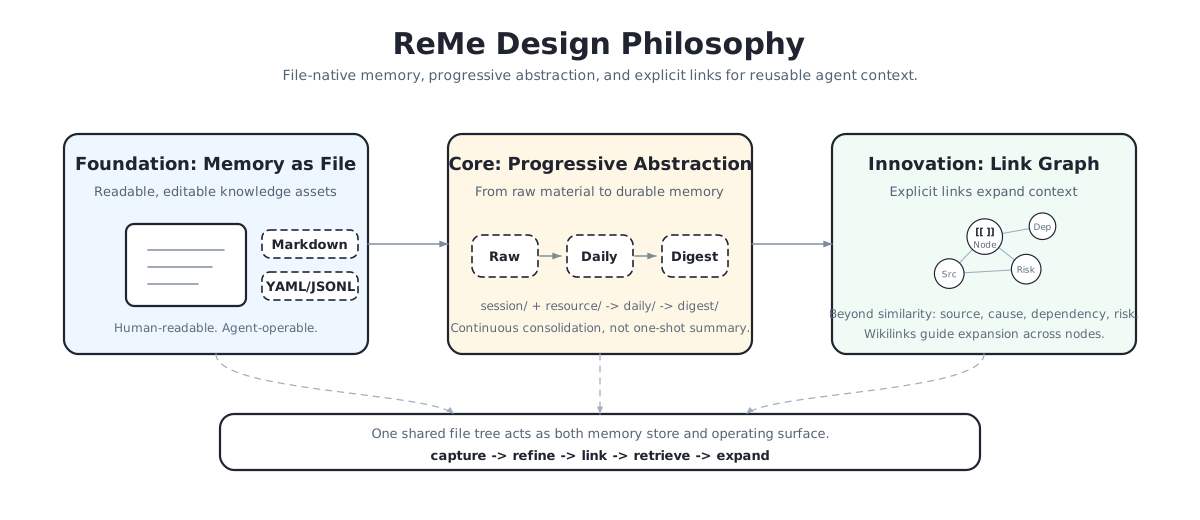
- Memory as File, File as Memory: Markdown files with frontmatter and wikilinks serve as memory nodes that both users and agents can inspect, edit, move, and back up directly.
- Self-evolving knowledge base: Auto Memory, Auto Resource, and Auto Dream progressively transform conversations and resources into daily notes and long-term knowledge, while Auto Link writes relationships and sources back into the files.
- Progressive hybrid search: ReMe combines wikilinks, BM25, and embeddings for hybrid retrieval across keyword matching, optional semantic recall, and relationship expansion without loading every neighboring file into context.
- Agent-friendly integration: SKILL.md + CLI integration makes it easy for different agents to read, write, maintain, and reuse the same local workspace. HTTP, MCP, and Python integrations are also available.
🔭 Use Cases
- Personal assistants: Give personal assistants such as QwenPaw, OpenClaw, and Hermes a user-editable long-term memory layer.
- Coding agents: Preserve coding style, project background, repository decisions, and workflow experience across sessions when integrating with coding agents such as Claude Code.
- LLM Wiki: Turn conversations, notes, and resources into a searchable, traceable, and linked Markdown knowledge base that both users and agents can maintain.
- Self-evolving agents: Support agents that learn from experience by saving successful paths, failed attempts, reusable procedures, and periodic reflections as memory.
📰 News
- [2026.08] - Published the ReMe blog, an end-to-end introduction to its local-first memory architecture, self-evolving workflows, hybrid search, proactive discovery, and benchmark results.
- [2026.08] - Introduced ReMe Studio, a local web workspace for browsing, editing, and searching memory files, chatting with the read-only ReMe Agent, inspecting the digest wikilink graph, and managing the local service.
- [2026.08] - Experience-driven enhancement method of agent tool-use execution built on ReMe is available on arXiv:2608.03403.
- [2026.07] - Introduced optional Cookbooks: Daily Paper for paper discovery and analysis, and Auto Fin for researching the latest 24 hours of topic-related CLS news with local-memory search and validated historical wikilinks.
- [2026.07] - Our paper Remember Me, Refine Me: A Dynamic Procedural Memory Framework for Experience-Driven Agent Evolution has been accepted to Findings of ACL 2026.
🚀 Quick Start
Installation
ReMe requires Python 3.11+.
Install from pip:
pip install "reme-ai[core]"
Install from source:
git clone https://github.com/agentscope-ai/ReMe.git
cd ReMe
pip install -e ".[core]"
Environment Variables
Configure environment variables when you want LLM-powered memory evolution or embedding retrieval. Embeddings are disabled by default, so the default setup does not start an embedding model or require an embedding API key.
cat > .env <<'EOF'
# Optional: used only after embedding components are explicitly enabled in the config.
# EMBEDDING_API_KEY=sk-xxx
# EMBEDDING_BASE_URL=https://dashscope.aliyuncs.com/compatible-mode/v1

# Required for auto_memory, auto_resource, and auto_dream.
LLM_API_KEY=sk-xxx
LLM_BASE_URL=https://dashscope.aliyuncs.com/compatible-mode/v1
EOF
Basic file operations, BM25 search, wikilink traversal, and reading proactive topics can run without LLM credentials.
[!NOTE] To enable embedding-based semantic retrieval, uncomment
components.as_embeddingandcomponents.embedding_storeinreme/config/default.yaml, then changecomponents.file_store.default.embedding_storefrom""todefault. See the memory search guide for details.
Start the Service
reme start
The default service address is 127.0.0.1:2333. If the port is occupied, specify another port:
reme start service.port=8181
# reme start workspace_dir=/tmp/reme-demo service.port=8181
After startup, check the service status. If you use a custom port, replace 2333 in the URL below with that port.
When the web build is available, the HTTP service also serves ReMe Studio at http://127.0.0.1:2333/. Studio can
browse, edit, and search the workspace, chat with the read-only workspace agent, and inspect the digest wikilink graph.
Set service.web_enabled=false to disable it, or use service.web_static_dir / REME_WEB_STATIC_DIR to provide a
custom static build. The Job API remains available when no web build is found.
reme version
reme health_check
reme help
curl -s http://127.0.0.1:2333/version -H 'Content-Type: application/json' -d '{}'
Use ReMe Studio
Open http://127.0.0.1:2333/ after starting the default HTTP service. Studio provides:
- Files, Daily, and Knowledge views for navigating the whole workspace or focusing on
daily/anddigest/. - Markdown tabs with preview, split editing, optimistic save checks, and local download.
- Memory Graph for exploring indexed
personal,procedure, andwikinodes and opening their Markdown sources. - Read-only Agent chat with streamed tool activity and usage; drag a workspace file into the composer to reference it.
- Settings for service/component status, redacted effective configuration, version information, and safe index rebuilding.
- English/Chinese language switching and light, dark, or system appearance.
For frontend development, run ReMe and Studio in separate terminals:
# Terminal 1, repository root
reme start

# Terminal 2
cd website
npm install
npm run dev
Then open http://localhost:3000. The development server uses http://127.0.0.1:2333 by default; set
NEXT_PUBLIC_REME_API_URL to connect to another ReMe HTTP service. Static-build and frontend configuration instructions are
in the ReMe Studio guide.
5-Minute Memory Demo
With the service running, write a memory node, let ReMe index it, then retrieve it:
reme write \
  path=digest/wiki/quick-start-demo \
  name="Quick Start Demo" \
  description="A first ReMe memory node" \
  content="# Quick Start Demo

ReMe stores agent memory as readable Markdown.

Related: [[digest/wiki/memory-as-file.md]]"

reme search query="agent memory markdown" limit=5
reme read path=digest/wiki/quick-start-demo start_line=1 end_line=20
The generated file is ordinary Markdown with frontmatter:
---
name: Quick Start Demo
description: A first ReMe memory node
---

# Quick Start Demo

ReMe stores agent memory as readable Markdown.

Related: [[digest/wiki/memory-as-file.md]]
📚 Usage Guides
These Markdown guides cover the main user workflows and the runtime contracts implemented by the current code.
| Guide | What you will learn |
|---|---|
| Quick Start | Install ReMe, start the service, use Studio, and run the first file and memory operations. |
| Memory as File | Understand workspace layers, frontmatter, wikilinks, chunks, and the file-as-source-of-truth model. |
| Auto Memory | Preserve source conversations and distill reusable daily memory cards. |
| Auto Resource | Import supported text resources and turn them into source-linked daily cards. |
| Auto Dream and Auto Link | Consolidate daily notes into evolving digest nodes and readable wikilink relationships. |
| Memory Search | Use BM25, optional vectors, RRF fusion, line-range recall, and progressive link expansion. |
| Proactive | Read interest topics safely and integrate them into a host agent's decision flow. |
| Agent Integration Scenarios | Choose among CLI/SKILL.md, HTTP, MCP, and embedded Python integration. |
| Framework | Understand Application, Job, Step, Component, service, configuration, and lifecycle boundaries. |
| ReMe Studio | Use, configure, develop, test, and build the web frontend. |
| ReMe Blog | Read the product story, design rationale, examples, and benchmark summary. |
🧑🍳 Cookbooks
Cookbooks are optional, end-to-end workflows assembled from ReMe jobs and steps. They are not enabled by the default configuration; select the cookbook's standalone configuration when starting ReMe. Each new cookbook will be added as another row in this table.
| Cookbook | Capability |
|---|---|
| Daily Paper | Discover and rank papers, analyze PDFs with an agent, and generate file-native notes and a five-minute brief. |
| Auto Fin | Fetch topic-related CLS news, search ReMe history, and generate wikilink-backed Markdown reports. |
📁 Memory System
Memory as File, File as Memory.
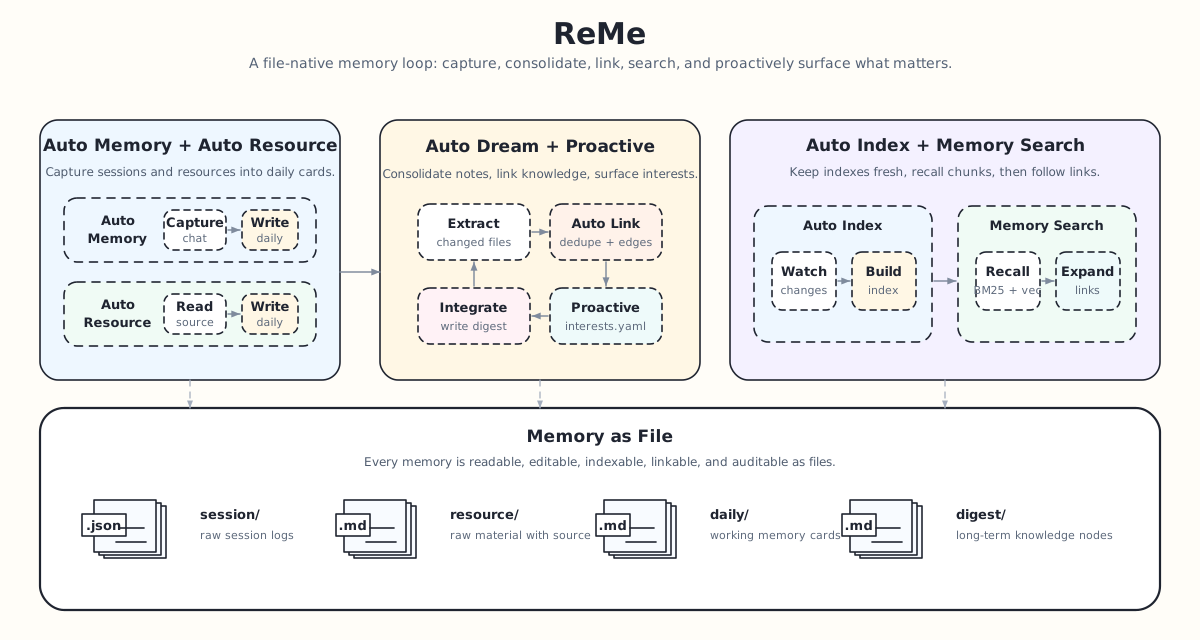
ReMe treats memory as files, progressively processing filtered conversation source records and external resources
from session/ and resource/ into daily/, then consolidating them into reusable long-term memory nodes under
digest/. The default workspace is .reme/ under the current directory; workspace_dir=... selects a different
user-owned location.
Directory Structure
<workspace_dir>/
├── metadata/       # Rebuildable indexes, graphs, catalogs, and caches
├── session/        # Conversation source records and agent sessions
│   ├── dialog/
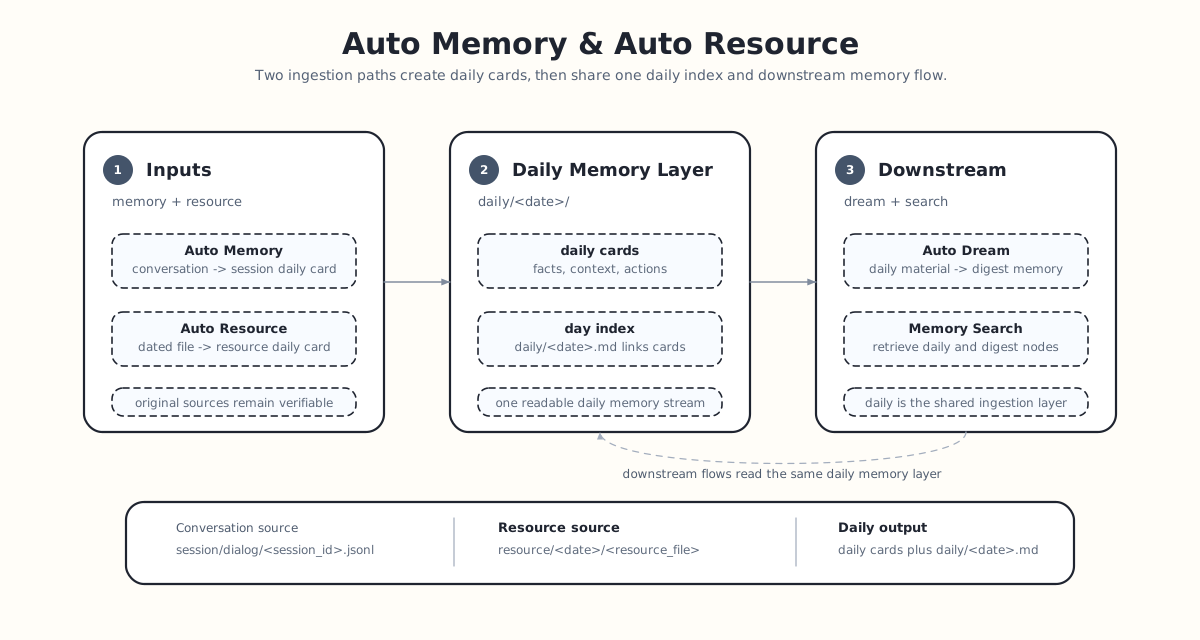
│   │   └── <session_id>.jsonl  # Source messages saved by auto_memory
│   └── claude_code/
│       └── <session_id>.jsonl  # ReMe copy used by auto_memory_cc
├── mem_session/    # Generated agent-wrapper sessions/config, not user memory
│   ├── agentscope/
│   ├── claude_config/
│   └── codex/
├── resource/            # External raw materials
│   ├── <resource>.<ext>  # Root-level files enter today's daily layer
│   └── YYYY-MM-DD/
│       └── <resource>.<ext>
├── daily/               # Lightly processed memory: daily facts, conversation summaries, resource readings
│   ├── YYYY-MM-DD.md
│   └── YYYY-MM-DD/
│       ├── <generated_name>.md  # Topic-named conversation or resource card
│       └── interests.yaml
└── digest/              # Long-term memory: personal facts, procedural experience, knowledge nodes
    ├── personal/
    │   └── {topic/event}.md
    ├── procedure/
    │   └── {topic/event}.md
    └── wiki/
        └── {topic/event}.md
🧭 Memory Design Philosophy
Capture conversation source records and resources, refine them into long-term preferences, reusable experience, and valuable knowledge, while keeping the result editable by humans and agents.
Automatic Memory Flow
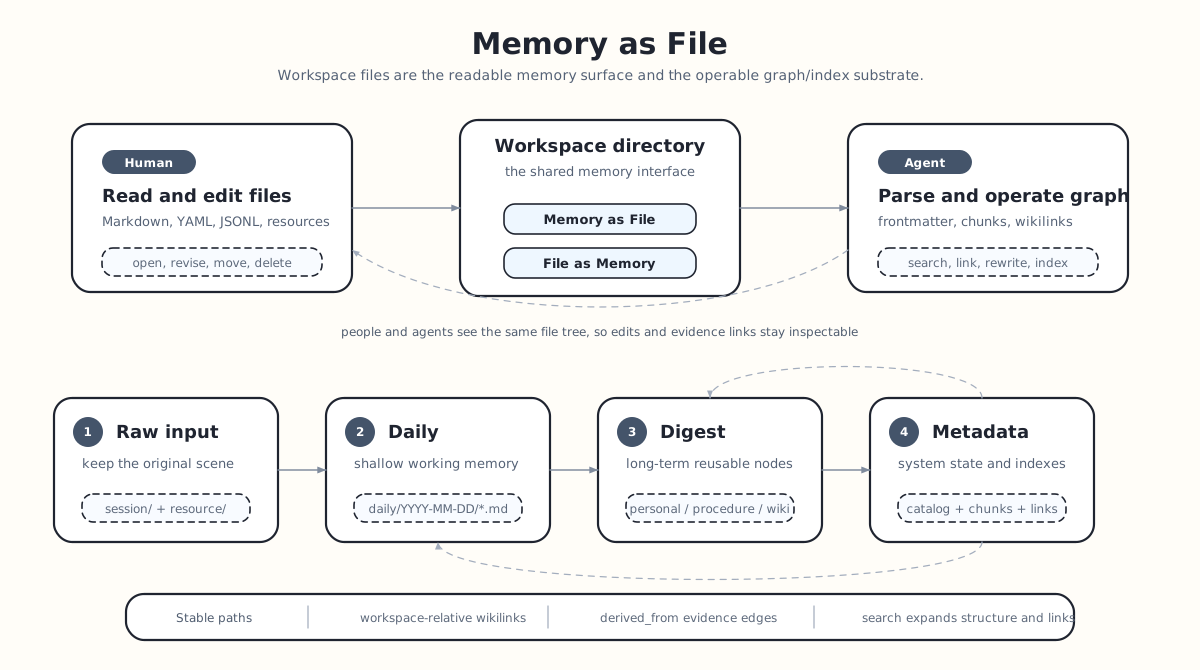
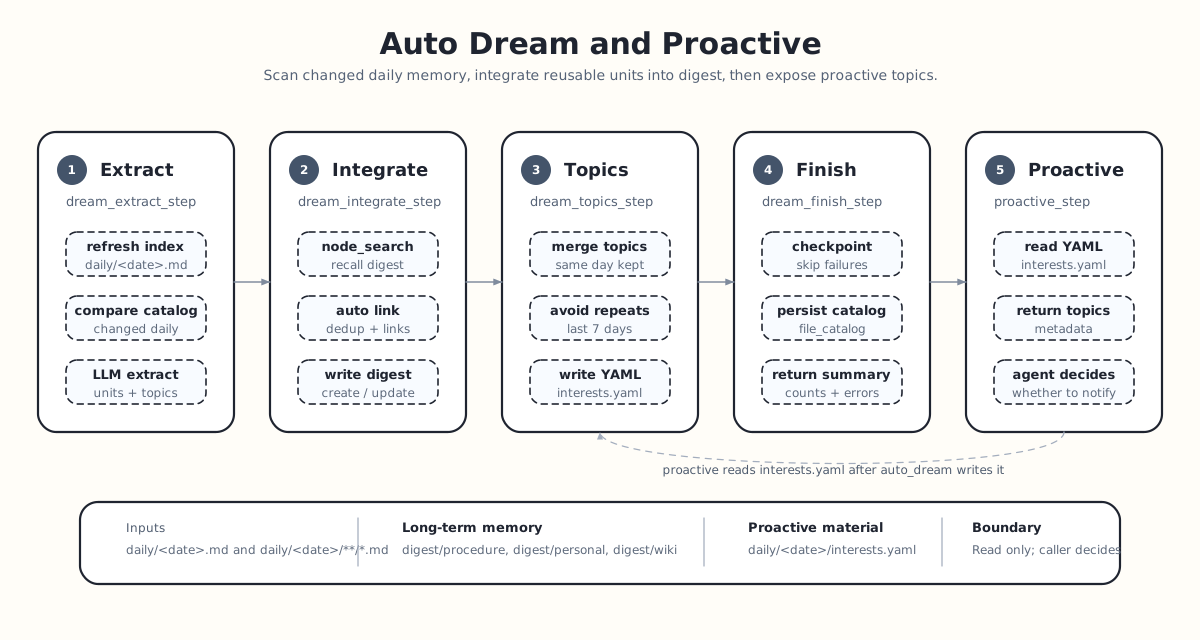
ReMe follows a capture → index → consolidate → recall loop. Conversations and resources first become daily memory cards;
background jobs keep files searchable; auto_dream distills stable knowledge into digest/; agents recall memory
through search, wikilinks, or proactive topics. The files are the durable source of truth—indexes, graphs, catalogs, and
caches under metadata/ can be rebuilt from them.
| Capability | Entry point | What it does | Output |
|---|---|---|---|
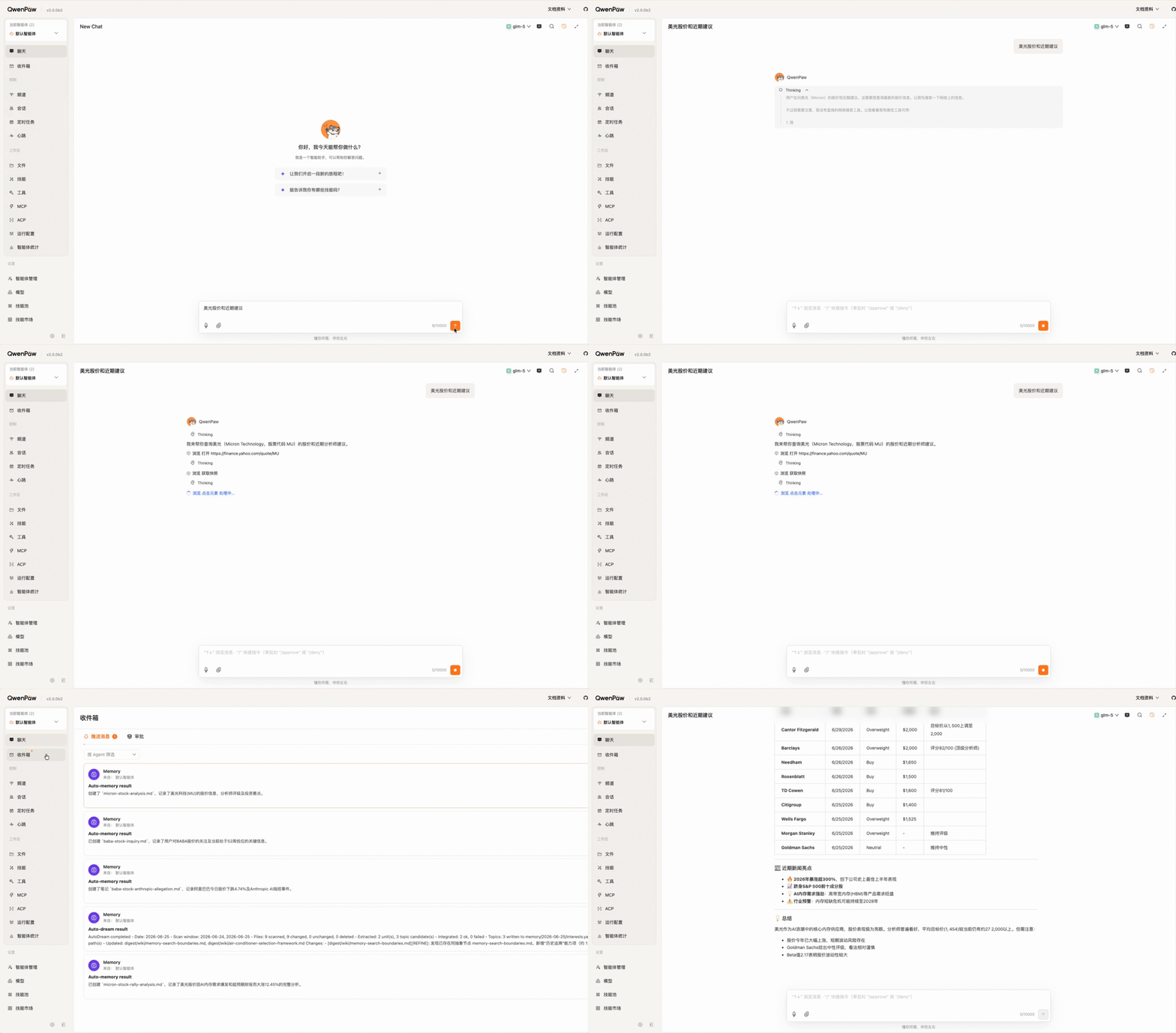
auto_memory | Agent hook or reme auto_memory | Distills useful conversation facts while preserving a filtered conversation source record. | session/dialog/*.jsonl, daily/<date>/<generated-name>.md |
auto_resource | Resource watcher or reme auto_resource | Turns files under resource/ into source-linked, content-named daily cards. | daily/<date>/<resource-card>.md |
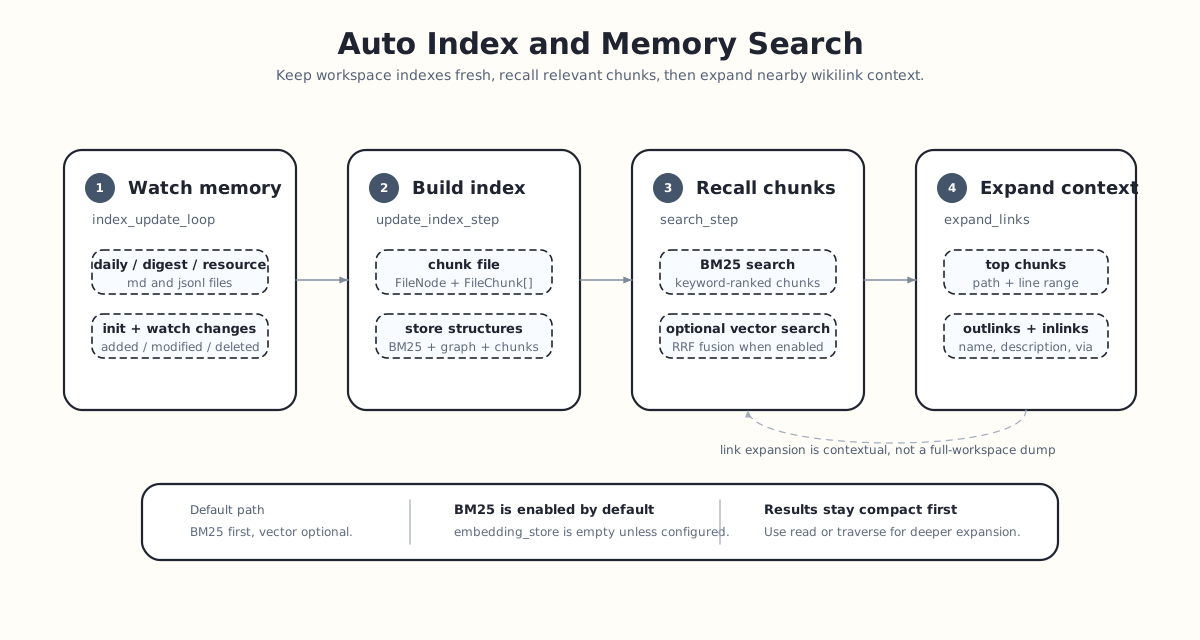
auto_index | Background watcher or reme reindex | Live-indexes Markdown in daily/ and digest/; a full rebuild also scans resource/ and JSONL. | Searchable chunks, BM25, wikilink graph, and optional vectors |
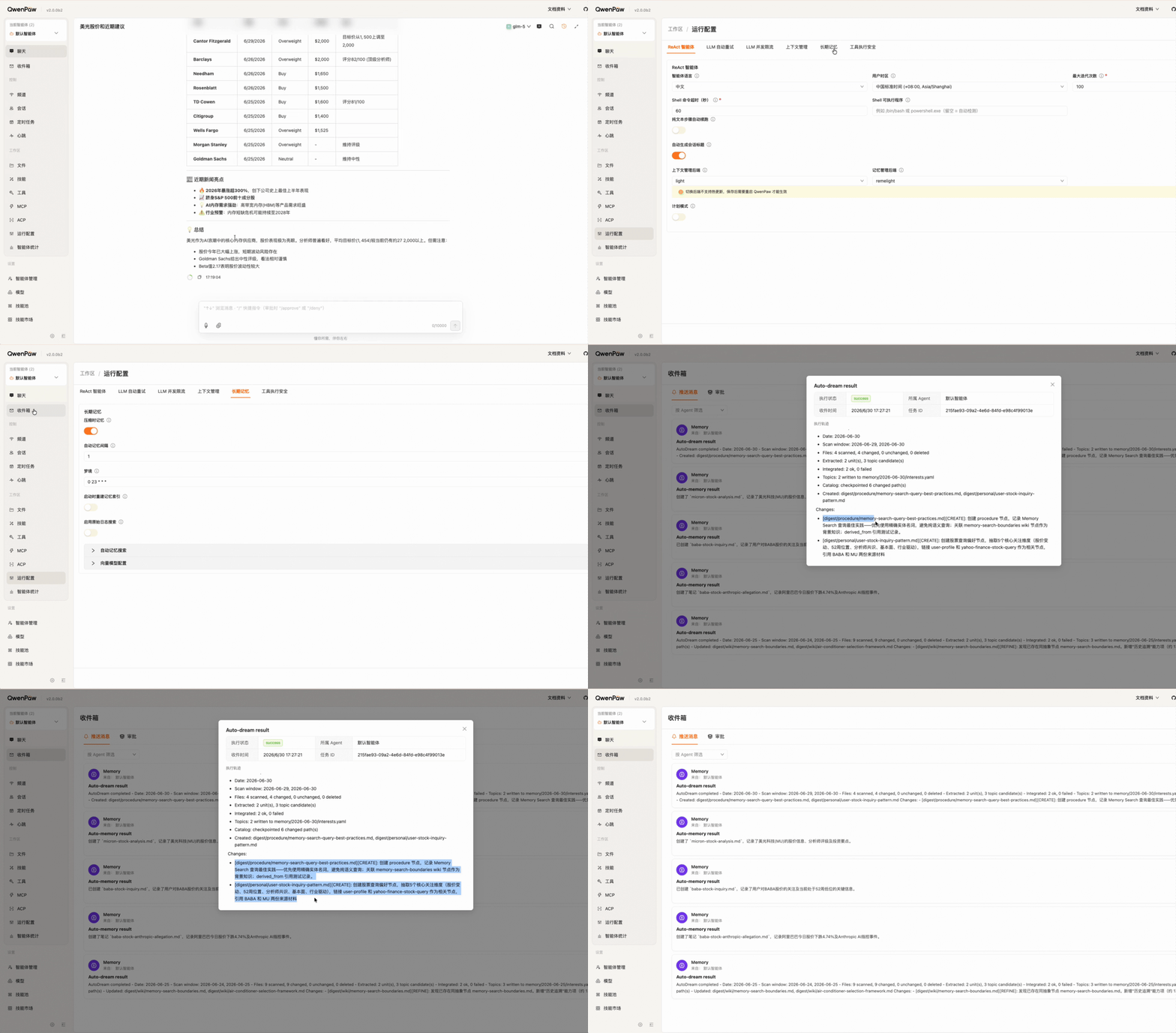
auto_dream | dream_cron or reme auto_dream | By default, extracts up to five reusable units from changed files in the latest two-day window, then creates, corroborates, refines, or corrects digest nodes. | digest/**, daily/<date>/interests.yaml |
proactive | reme proactive before an agent decides to act | Reads topics generated by auto_dream; the host agent decides whether and how to mention them. | Structured topics from daily/<date>/interests.yaml |
|
|
|
|
Search returns the best matching chunks with file paths and line ranges, then lists bounded incoming and outgoing wikilink neighbors by metadata. An agent can read a promising source or traverse the graph only when needed. With embeddings enabled, BM25 and vector rankings are fused with reciprocal rank fusion (RRF); otherwise the default remains BM25 plus wikilink expansion.
[!IMPORTANT]
proactiveonly reads and exposes interest topics produced by Auto Dream. It does not independently browse the web, send notifications, or rewrite the knowledge base; the host agent decides whether and how to act on a topic.
📊 Performance
ReMe evaluates multi-session and long-context memory with agentic search-and-read workflows. The figures below are the published reference runs in this repository; model, prompt, dataset, and judging details are documented with each benchmark.
| Benchmark | Setting | Sample size | Agentic score | Focus |
|---|---|---|---|---|
| LongMemEval cleaned-s | Overall | 500 questions | 89.4% | Cross-session retrieval, knowledge updates, and temporal reasoning |
| BEAM | 100K context | 20 cases / 400 questions | 66.1% | Ten types of long-context memory tasks |
| BEAM | 1M context | 35 cases / 700 questions | 65.0% | Ultra-long conversation settings |
ReMe also achieved a 0.580 PROC score across five user personas in the repository's π-Bench evaluation, 2.4% above NanoBot under the same test-model configuration. PROC measures proactive handling of hidden intent, clarification, cross-session preferences and conventions, task dependencies, and underspecified requests.
🤝 Agent-friendly Integration
ReMe can run as a local memory service accessed through the CLI, HTTP API, or MCP server, or it can be embedded in the host process through its Python API. The default HTTP service can serve ReMe Studio at the same address. Agents can choose the path that fits their runtime and share a local memory workspace when appropriate.
| Agents | Recommended path | Available after integration |
|---|---|---|
| QwenPaw | Embed ReMe in-process through its Python API. | Reuse the host application's lifecycle and model config while keeping memory local and file-based. |
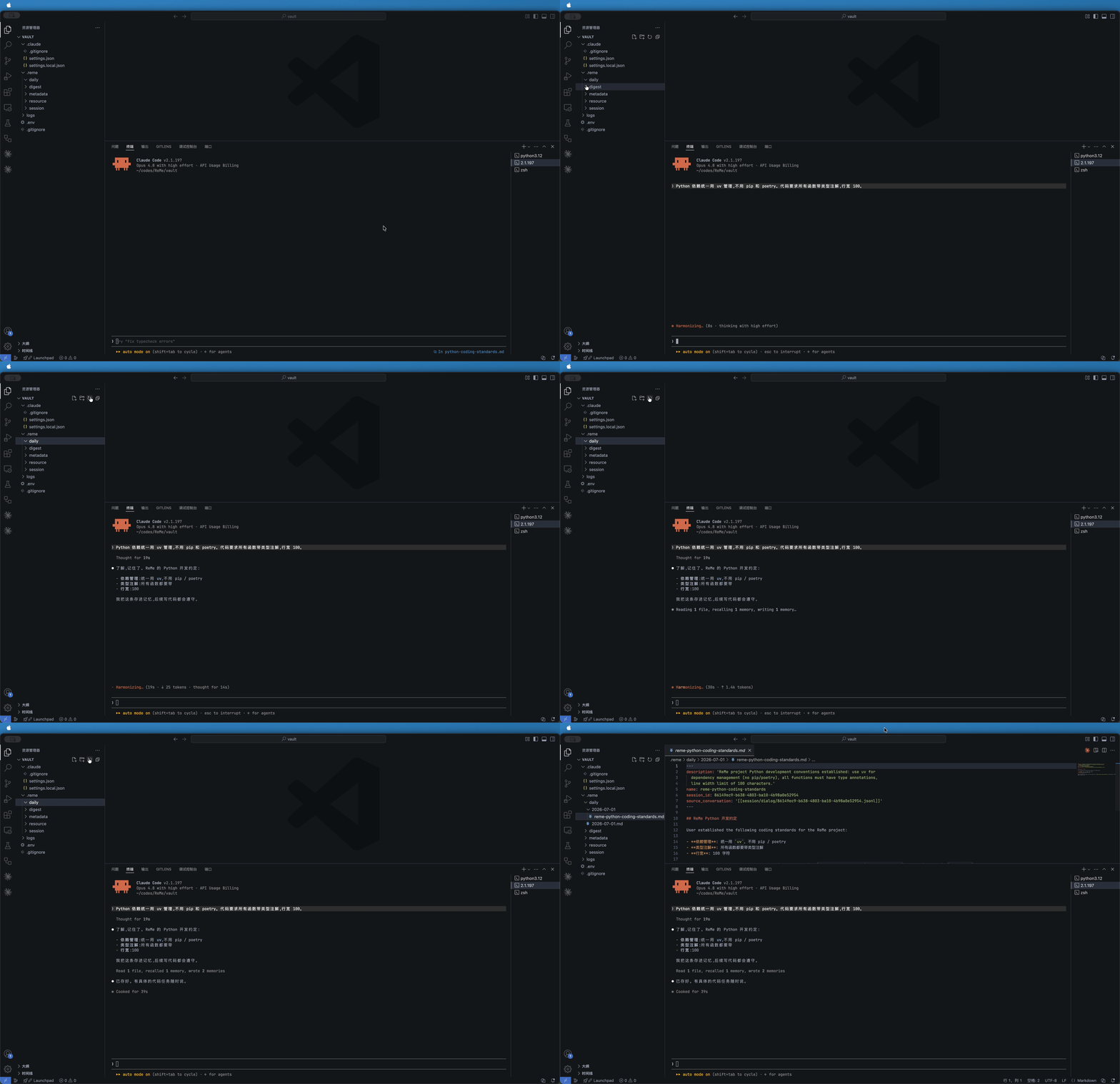
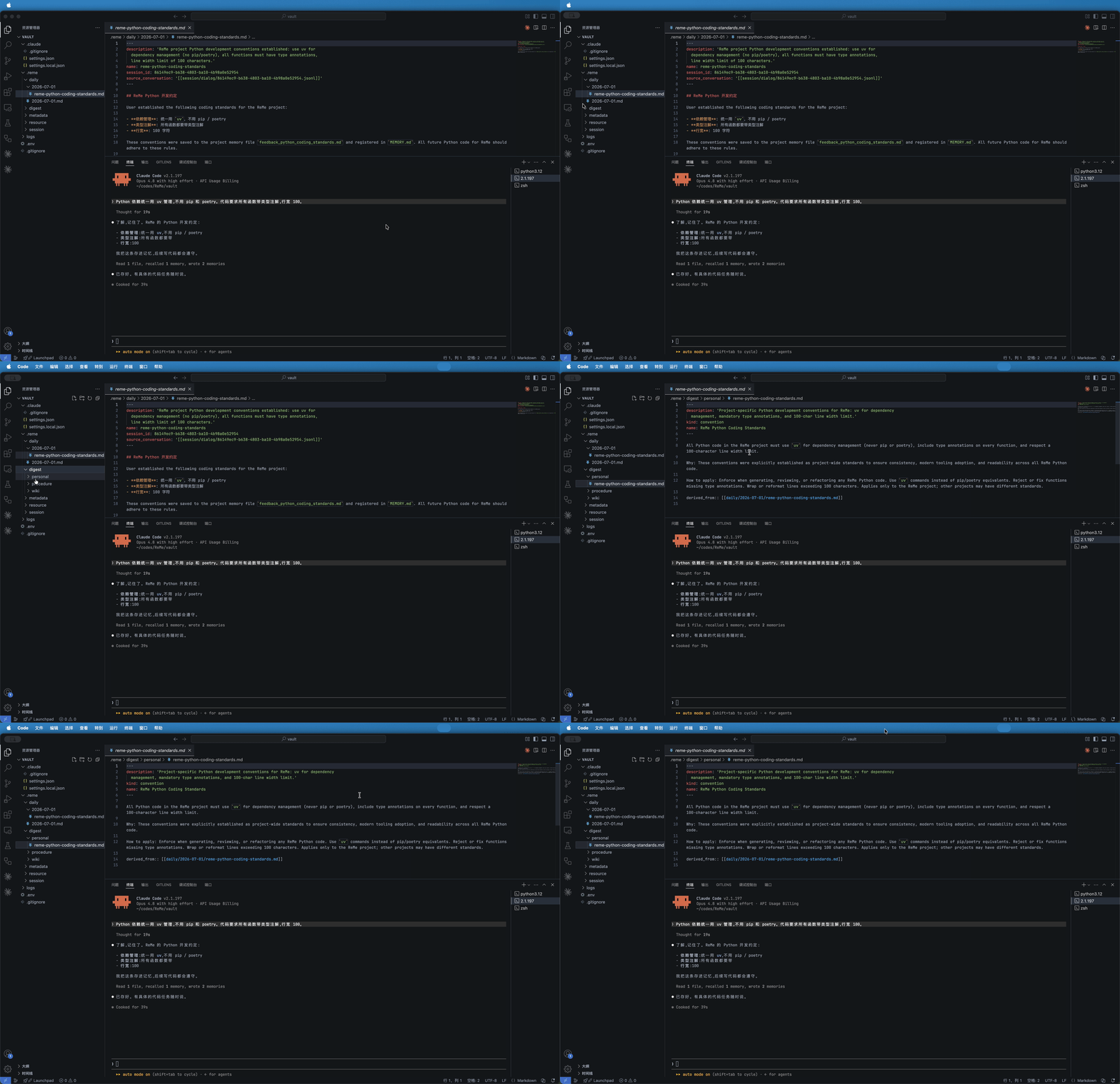
| Claude Code | Start the streamable HTTP MCP service and install plugins/claude_code/reme. | MCP recall tools, a reme-memory skill, and a Stop hook that records sessions automatically. |
| Hermes | Start the HTTP service and install plugins/hermes_agent. | Recall relevant memory before model calls and enqueue auto_memory after each completed turn. |
| Other CLI-capable agents (OpenClaw/Codex) | Copy or install skills/reme_memory/SKILL.md. | Search, read, and write memory via the CLI; automatic recording requires explicit host lifecycle hooks. |
Integration demos
| Auto Memory | Auto Dream | |
| QwenPaw |
|
|
| Claude Code |
|
|
🛠️ ReMe Operations
ReMe operates the workspace through a unified job interface exposed by the CLI. Agents usually only need retrieval,
reading, writing, editing, and automatic memory commands. Lower-level indexing, frontmatter, and file operation commands
are mainly for maintenance, debugging, or advanced integration. Run reme help for the full job list.
| Command | Purpose |
|---|---|
reme start | Start the local ReMe service. |
reme version / reme health_check | Check package and component status. |
reme status | Show stateful data-component memory estimates and process RSS. |
reme search | Retrieve memory with BM25 and wikilinks by default, plus vectors when enabled. |
reme read / reme write / reme edit | Inspect and maintain Markdown memory files. |
reme traverse / reme graph_snapshot | Explore wikilink neighborhoods or the category-rooted digest graph. |
reme chat | Stream a read-only, workspace-aware agent conversation. Requires LLM credentials. |
reme auto_memory | Turn conversation messages into daily memory cards. Requires LLM credentials. |
reme auto_resource | Interpret files under resource/ into daily resource cards. Requires LLM credentials. |
reme auto_dream / reme proactive | Consolidate daily memory into long-term digest and surface topics worth attention. |
reme reindex | Rebuild search and wikilink indexes from existing files. |
🤝 Community and Support
- Issues and requests: Check Open Issues first. If there is no related discussion, open a new issue with background, expected behavior, and impact scope.
- Code contributions: Before making changes, read the contribution guide. Source, schemas, and tests are the authoritative architecture and extension guide.
- Documentation contributions: Submit user-facing documentation changes to the
unified documentation repository under
reme/<version>/{en,zh}/. - Commit convention: Conventional Commits are recommended, for example
feat(search): add link expansion optionordocs(zh): update quick start. - Pre-submit checks: Before submitting a PR, try to run
pre-commit run --all-filesandpytest. If tests that depend on LLMs, embeddings, or external services cannot run, explain that in the PR. - Get help: Use GitHub Issues for bugs and feature requests. Project documentation is available at https://reme.agentscope.io.
Contributors
Thanks to everyone who has contributed to ReMe:
📄 Citation
@software{ReMe2026,
  title = {Remember me, Refine me: Memory Management Kit for Agents},
  author = {ReMe Team},
  url = {https://reme.agentscope.io},
  year = {2026}
}
⚖️ License
This project is open source under the Apache License 2.0. See LICENSE for details.
// faq
What is ReMe?
ReMe: Memory Management Kit for Agents - Remember Me, Refine Me.. It is open-source on GitHub.
Is ReMe free to use?
ReMe is open-source under the Apache-2.0 license, so it is free to use.
What category does ReMe belong to?
ReMe is listed under uncategorized in the Claudeers registry of Claude-compatible tools.
// embed badge

[](https://claudeers.com/reme)
// retro hit counter

[](https://claudeers.com/reme)
// reviews
// guestbook
// related in Uncategorized / Others
 🔓
🔓Fair-code workflow automation platform with native AI capabilities. Combine visual building with custom code, self-host or cloud, 400+ integrations.
 🔓
🔓The agent engineering platform.
 🔓
🔓FULL Augment Code, Claude Code, Cluely, CodeBuddy, Comet, Cursor, Devin AI, Junie, Kiro, Leap.new, Lovable, Manus, NotionAI, Orchids.app, Perplexity, Poke, Q…
 🔓
🔓100+ AI Agent & RAG apps you can actually run — clone, customize, ship.
// built by
1 of its contributors also build on official projects — claude-cookbooks
→ see how ReMe connects across the ecosystem