
rainbow-spinner
A Claude Code mod that draws the spinner line in colour styles switched with /spinner
Install with your AI
Paste into Claude Code, Cursor, or any agent — it reads the repo and wires the tool into your project.
Install and set up rainbow-spinner (claude-plugin project) into my current project.
Found on https://claudeers.com/rainbow-spinner
Repo: https://github.com/Wizard1209/rainbow-spinner
Homepage/docs: https://wizard1209.github.io/rainbow-spinner/
Detected install method: claude-plugin → /plugin install rainbow-spinner@Wizard1209/rainbow-spinner
Category: plugins. Platforms: cli, api.
Read the repo's README for exact setup and env vars, then install it and wire it into my project.

Claudeers Health Verdict:
unknown; community-verified: false. Confirm the source before running anything.
⚠ Unverified / not recently updated — review before pasting a run-this config.
/plugin marketplace add Wizard1209/rainbow-spinner
/plugin install rainbow-spinner@Wizard1209/rainbow-spinner
git clone https://github.com/Wizard1209/rainbow-spinner
// compatibility
| Platforms | cli, api |
|---|---|
| Operating systems | — |
| AI compatibility | claude |
| License | MIT |
| Pricing | open-source |
| Language | TypeScript |


rainbow-spinner
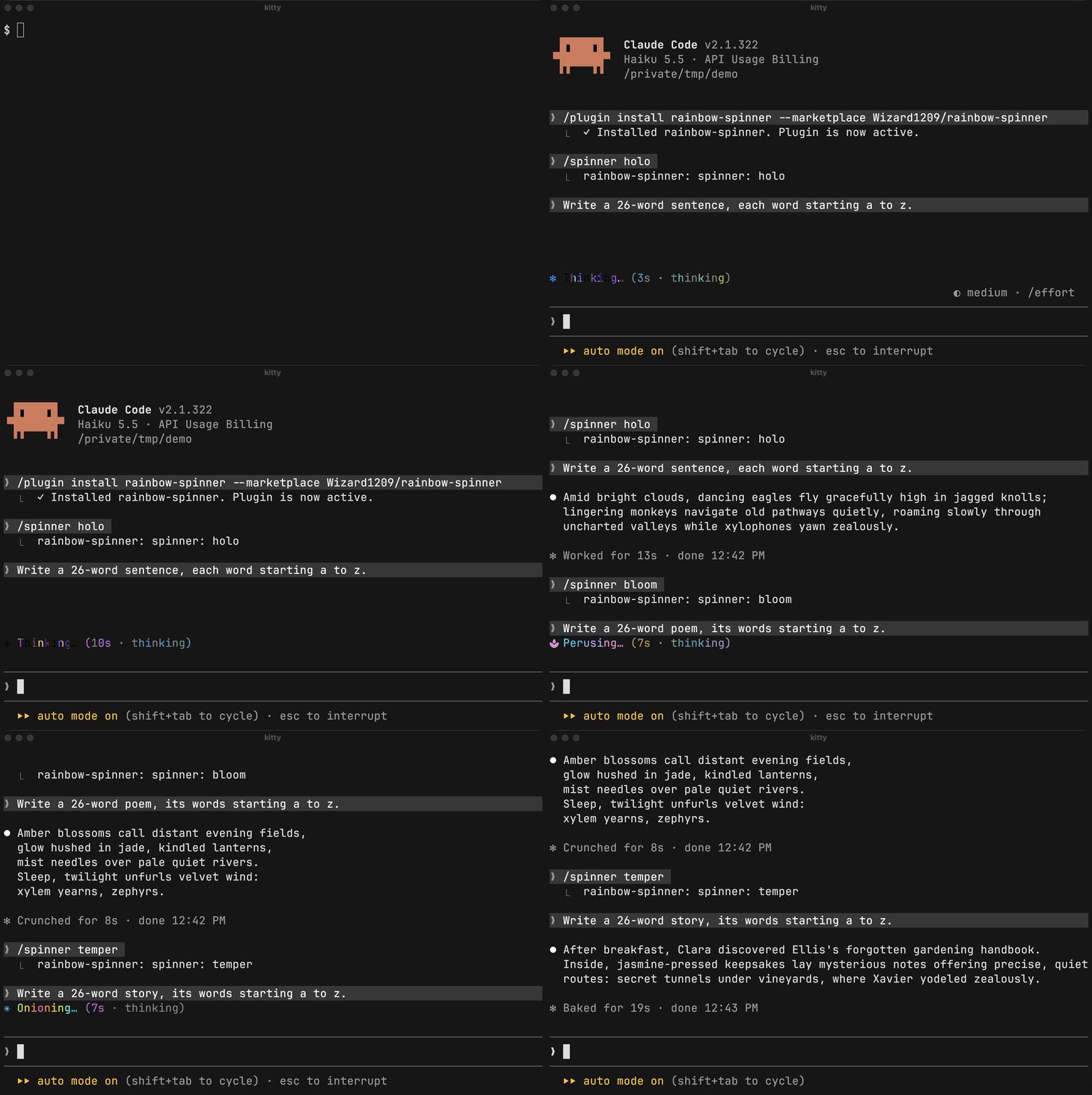
A Claude Code mod that draws the spinner line, the working indicator under the chat, in colour styles switched with /spinner.
Install
In a Claude Code session:
/plugin install rainbow-spinner --marketplace Wizard1209/rainbow-spinner
Claude Code asks to confirm the marketplace and the install scope; /spinner is there at once, without a restart. claude plugin install takes the same arguments in a shell.
# update, then restart Claude Code
claude plugin marketplace update rainbow-spinner && claude plugin update rainbow-spinner

# remove; add --scope to uninstall for a project install
claude plugin uninstall rainbow-spinner && claude plugin marketplace remove rainbow-spinner
The mod uses Claude Code's function hooks, an early-access plugin API that may change between releases. It is tested with Claude Code 2.1.322.
Use
/spinner <style>
| Style | The spinner line |
|---|---|
off | Claude Code's own. The default: the mod changes nothing. |
temper | Coloured text. |
holo | The spinner's word drawn as a picture. |
bloom | Pastel text after a growing plant icon. |
/spinner alone names the style that is on and lists the styles. The choice is kept across sessions, and a /spinner given while Claude works runs when the turn ends.
Where the terminal cannot draw a style, the line is drawn as temper and the reply says why:
rainbow-spinner: spinner: holo → temper · Claude Code draws no pictures in this terminal
Where Claude can fix that, the reply is a box with the reason and what to ask Claude for:
╭──────────────────────────────────────────────────────────────────────────╮
│ The holo style is drawn as temper: iTerm2 shows pictures only in Claude  │
│ Code's fullscreen mode.                                                  │
│ Ask Claude to turn on fullscreen mode.                                   │
╰──────────────────────────────────────────────────────────────────────────╯
Styles
The colours are made for a dark background.
temper

Rims of colour spread from the middle of the word. Under a rim a letter passes through the colours of tempered steel and sinks back into black.
holo

The same colours in bands about two letters wide, so the colour moves inside each letter. The picture's letters are JetBrains Mono, whatever the terminal's font; a word in another script, such as Cyrillic, is drawn as temper.
bloom

A pastel rainbow flows along the line while a plant grows before the word, from seed to flower.
Terminals
temper is text and draws in any terminal. holo needs a terminal Claude Code sends pictures to, or WezTerm running the mod's WezTerm module. bloom draws its plant with the terminal's font where that has Nerd Font icons, otherwise as a picture.
| Terminal | holo | bloom plant | Tested |
|---|---|---|---|
| kitty 0.48 (macOS, Linux under WSLg) | picture | font icon | yes |
| iTerm2 3.7 (macOS), fullscreen mode | picture | font icon if the profile font is a Nerd Font, else picture | yes |
| iTerm2 3.7 (macOS), main screen | temper | font icon if the profile font is a Nerd Font, else temper | yes |
| WezTerm 20240203 and nightly (macOS), nightly (Windows, WSL pane) | picture with the WezTerm module, else temper | font icon | yes |
| Ghostty | picture | font icon | no |
| Windows Terminal, Terminal.app | temper | temper | no |
| Any other terminal | temper, or a picture if Claude Code sends one | the same | no |
Rows marked yes were tested; the rest is what Claude Code's documentation and the mod's code say. Fullscreen mode is Claude Code's fullscreen renderer (/tui fullscreen); the main screen is its classic one. Inside tmux the mod tries pictures, and Claude Code sends them only with tmux's allow-passthrough and focus-events on.
Cost
CPU of the Claude Code process while Claude works, in per cent of one core (Apple M-series):
| Spinner line | kitty | iTerm2, fullscreen mode |
|---|---|---|
| Claude Code's own | 5–6 | 2.7 |
temper | 11–12 | 6.5 |
holo | 20–22 | 10.3 |
bloom costs about as much as temper. The cost is there only while Claude works, and it is the same in a hidden tab. The WezTerm module has a cost of its own: see its README.
How it works
A style is a colour field: a function from a place on the line and a time to a colour. The mod takes over Claude Code's spinner component and samples the field at each letter for text, or at each pixel column of the word for a picture, which goes to the terminal as PNG frames swapped in place.
The architecture page shows it in diagrams.
Development
claude --plugin-dir .                           # a session with the mod from this folder
claude plugin test .                            # tests
npx -y -p [email protected] tsc -p . --noEmit    # type-check
claude plugin validate .                        # manifests and hooks
lua tests/wezterm.test.lua                      # the WezTerm module, with Lua 5.4
The type-check reads Claude Code's API types from .claude-plugin/types/, which Claude Code writes when an interactive session loads the mod from this folder: run claude --plugin-dir . once. A claude -p run does not write them. types/state.d.ts, which .claude-plugin/plugin.json names, declares the type of the mod's session state. A style is one file in hooks/styles/ that exports a Style (hooks/core/style.ts), plus one entry in STYLES in hooks/styles/index.ts and its name in the tests that list the styles, tests/command.test.tsx and tests/caps.test.ts.
bench/ holds the live harness: it records what kitty and iTerm2 show of the line, frame by frame, and what that costs.
Contributing
Contributions are welcome. Two good places to start:
- A style of your own. The style itself is one file in
hooks/styles/; CONTRIBUTING.md walks through the rest. - A terminal marked "no" in the table above. Run the mod there and open an issue with what you see.
Licence
MIT © 2026 Wizard1209. The plant icons are from Material Design Icons (Apache-2.0) and the letters of holo from JetBrains Mono (OFL-1.1): see THIRD_PARTY.md.
// faq
What is rainbow-spinner?
A Claude Code mod that draws the spinner line in colour styles switched with /spinner. It is open-source on GitHub.
Is rainbow-spinner free to use?
rainbow-spinner is open-source under the MIT license, so it is free to use.
What category does rainbow-spinner belong to?
rainbow-spinner is listed under plugins in the Claudeers registry of Claude-compatible tools.
// embed badge

[](https://claudeers.com/rainbow-spinner)
// retro hit counter

[](https://claudeers.com/rainbow-spinner)
// reviews
// guestbook
// related in Claude Plugins
 🔓
A single CLAUDE.md file to improve Claude Code behavior, derived from Andrej Karpathy's observations on LLM coding pitfalls.
 🔓
Claude Code is an agentic coding tool that lives in your terminal, understands your codebase, and helps you code faster by executing routine tasks, explainin…
 🔓
"CLI-Anything: Making ALL Software Agent-Native" -- CLI-Hub: https://clianything.cc/
🔓financial-services — a Claude ecosystem project on GitHub.