
rashomon
Verify what your Claude Code agent actually did. Rashomon keeps an independent record of every tool call, subagent, failed command, and flags when the agent'…
Install with your AI
Paste into Claude Code, Cursor, or any agent — it reads the repo and wires the tool into your project.
Install and set up rashomon (claude-plugin project) into my current project.
Found on https://claudeers.com/rashomon
Repo: https://github.com/altrace-dev-role/rashomon
Homepage/docs: —
Detected install method: claude-plugin → /plugin install rashomon@altrace-dev-role/rashomon
Category: plugins. Platforms: cli, api.
Read the repo's README for exact setup and env vars, then install it and wire it into my project.

Claudeers Health Verdict:
unknown; community-verified: false. Confirm the source before running anything.
⚠ Unverified / not recently updated — review before pasting a run-this config.
/plugin marketplace add altrace-dev-role/rashomon
/plugin install rashomon@altrace-dev-role/rashomon
git clone https://github.com/altrace-dev-role/rashomon
// compatibility
| Platforms | cli, api |
|---|---|
| Operating systems | — |
| AI compatibility | claude |
| License | Apache-2.0 |
| Pricing | open-source |
| Language | Go |
rashomon
Your coding agent writes its own account of what it did. rashomon writes a second one, independently of the agent's narration, and puts the two side by side.
For Claude Code only, on macOS and Linux. Alpha: v0.1.0-alpha.1.
In plain words
When Claude Code finishes a task, it tells you what it did: "Done, all tests pass." That summary comes from the agent itself.
rashomon keeps its own record of every step the agent takes, like each command it runs and each file it edits, and whether each one worked. It puts that record beside the agent's summary: if a step failed and the closing message uses none of rashomon's failure words, it tells you at the end of the turn. Every report also lists what subagents did, which the main conversation does not show.
You keep working the way you do now. rashomon stays quiet unless something is worth a look. The name comes from Rashomon, the film in which witnesses give different accounts of the same event.
Get started
Pick one of these two ways. Using both records everything twice.
As a Claude Code plugin:
claude plugin marketplace add altrace-dev-role/rashomon
claude plugin install rashomon@rashomon
claude plugin enable rashomon@rashomon
Then start a new Claude Code session. Inside it, /rashomon:report shows what
was recorded.
From the command line (macOS and Linux):
curl -fsSL https://raw.githubusercontent.com/altrace-dev-role/rashomon/main/install.sh | sh
rashomon watch
Then use claude as usual, and run rashomon report whenever you want to look.
The installer puts rashomon in ~/.local/bin; if your shell cannot find it,
add that folder to your PATH.
What you'll see
Most of the time, nothing: a turn with nothing worth a look prints nothing.
When something is off, one line appears at the end of the turn (or, if you
refused a permission prompt, when you send your next prompt, marked
previous turn):
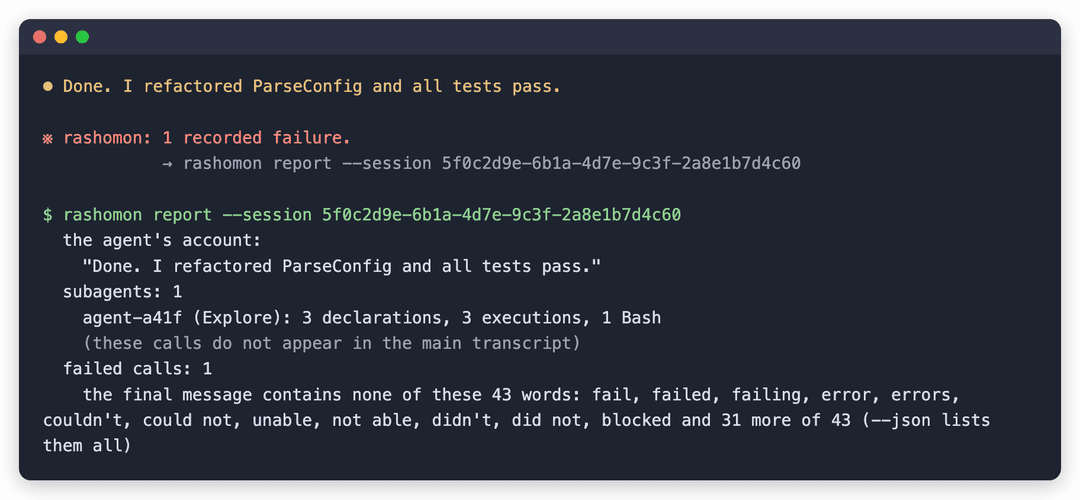
※ rashomon: 1 recorded failure.
            → rashomon report --session <id>
With the plugin, the arrow points at /rashomon:report --session <id> instead.
That command shows the whole story. Here is an example.
What a disagreement looks like
Here the tests failed while a helper agent (a subagent) looked through the
code, yet the agent's closing message says the tests pass. The session is built
by test/acceptance/readme_test.go, which feeds hook payloads through the real
recorder, and that test fails if this excerpt and the render ever differ. This
excerpt is rashomon report exactly as it renders that session:
  the agent's account:
    "Done. I refactored ParseConfig and all tests pass."
  subagents: 1
    agent-a41f (Explore): 3 declarations, 3 executions, 1 Bash
    (these calls do not appear in the main transcript)
  failed calls: 1
    the final message contains none of these 43 words: fail, failed, failing, error, errors, couldn't, could not, unable, not able, didn't, did not, blocked and 31 more of 43 (--json lists them all)
The first line quotes the agent. The rest comes from rashomon's own record,
checked against those words: one call failed (its record holds exit code 1, and
--chain shows which call it was), and the subagent's three calls are recorded
under the subagent's own transcript, not the main one. The report lists the
failure words the summary does not use; it does not guess why.
Try it yourself
You can produce the same kind of report in a few minutes:
- Install rashomon (see Get started).
- In a project you have open, break one test on purpose.
- Start
claude. Ask it to have a subagent look through the code, then to run the tests and finish with a one-line summary. - Run
rashomon report(or/rashomon:reportinside Claude Code).
The report quotes the summary above the subagents and failed calls lines.
Whether the failure is flagged depends on what the agent writes. If the summary
contains none of rashomon's 43 failure words (matched as substrings, so "debug"
counts as "bug"), the failed calls line lists them. Most honest summaries
contain one, and then the report says so instead.
What a report tells you
- What subagents did: the helper agents Claude starts on its own, whose steps the main conversation never shows.
- Which steps failed, and whether the agent's closing summary uses any of rashomon's failure words. It lists the ones that are absent; it never guesses at intent.
- What ran differently from what was asked, for example another hook that rewrote a command's input before it ran.
- What rashomon could not see, on every report, even a healthy one.
Common questions
Does it see my code or my prompts?
It sees them in passing and keeps none of them. Claude Code hands every hook the
tool call's full input (for Write and Edit, that includes the file's text) and
hands the next-prompt hook your prompt; rashomon reads what it needs and
discards the rest. It stores no prompts, responses, file contents or tool
output. A command is reduced to its program name, an argument count and a keyed
digest, by a parser that names nothing when it is unsure. The one thing it keeps
from inside a command is any hostname the command names (and the host of a
WebFetch URL), stored in clear so the report can list it. The working directory
and transcript path are stored too; see
What is recorded. When you run
rashomon report, it quotes the agent's final message from Claude Code's own
transcript; that quote is never stored.
Does it send anything anywhere? It has no account, no telemetry and no network code of its own, and what it records is kept in a folder on your machine. No rashomon package imports a networking package, and CI checks that on every pull request, every push to main and every release tag. On Linux, CI also runs the declaration hook with the network switched off; the other hooks, the report and the end-of-turn line have no such runtime test yet.
Can it break my agent? No. It never stops a command, and if something inside it goes wrong, it exits quietly so Claude Code carries on.
Does it work with Cursor or Codex?
No. This release supports Claude Code only. Cursor (by default) and Codex (after
/import) read Claude Code's settings, so they can trigger the recorder anyway,
and what it records for them can be wrong. If you use Cursor, see
Scope for the setting to turn off.
Is it a sandbox or a security tool? No. It does not stop or contain the agent, and it cannot stop a determined agent from changing its records. It is a second, independent account of what happened, to set beside the agent's own.
Can I see network activity?
rashomon itself observes no network traffic in this alpha: the report says
destinations: not observed in this alpha, and --chain lists only the hosts
each command named. If you run Claude Code inside the
nono sandbox,
rashomon report --nono-audit <path to nono's audit-events.ndjson> adds what
nono allowed and refused in that session's window. This is experimental, and
nono writes that file when its session ends. See
Inside a sandbox first.
How do I turn it off?
Plugin: open /plugin in Claude Code and turn it off. Command line:
rashomon detach. Your records stay in ~/.local/state/rashomon (by default)
until you delete that folder.
Is it finished? No. This is an alpha: Windows is not supported yet, and network destinations are not observed in this release.
The details
Everything below is the precise version: what gets installed, what is stored, and what the report can and cannot see.
Install options, in detail
As a Claude Code plugin (macOS and Linux):
claude plugin marketplace add altrace-dev-role/rashomon
claude plugin install rashomon@rashomon
claude plugin enable rashomon@rashomon
Installing does not start recording; enabling does. Start a new Claude Code
session after enabling. /plugin shows it and turns it off again, and
/rashomon:status / /rashomon:report work inside Claude Code. The plugin
installs the release's rashomon-plugin.zip, which carries a prebuilt recorder
per platform, because a plugin cannot compile Go at install time. So it needs
a tagged release to exist. To try the plugin from a checkout instead:
scripts/build-plugin.sh
claude --plugin-dir ./plugin --settings '{"enabledPlugins": {"rashomon@inline": true}}'
The plugin ships disabled, and a plugin loaded with --plugin-dir (Claude Code
names it rashomon@inline) is enabled only through settings. Without the
--settings flag the session loads the plugin and records nothing.
If you already ran watch, run rashomon detach first. With both installed,
every call is recorded twice, and the report marks the session
duplicate_declarations. rashomon status names the overlap for a plugin
installed from the marketplace; it cannot see one loaded with --plugin-dir.
As a settings install (Windows is not usable yet; see Status). From a release, on macOS or Linux:
curl -fsSL https://raw.githubusercontent.com/altrace-dev-role/rashomon/main/install.sh | sh
It downloads the release archive for your platform, checks it against the
release's checksums.txt, refuses to install on a mismatch, and puts one
binary in ~/.local/bin (set RASHOMON_INSTALL_DIR to change that). Or with
Go:
go install github.com/altrace-dev-role/rashomon/cmd/rashomon@latest
This writes to $GOBIN, or $(go env GOPATH)/bin when GOBIN is unset; make
sure that folder is on your PATH. A binary built this way, or from a clone,
reports its version as dev: only release builds carry the version number. Or
clone and build:
git clone https://github.com/altrace-dev-role/rashomon
cd rashomon && go build ./cmd/rashomon
Install to a location that will not move.
watchwrites the running binary's absolute path into your Claude Code settings, and Claude Code executes that path on every tool call. If you built inside a clone you later delete, every tool call fires a hook that cannot start. Build into a directory you keep (orgo installit), and re-runwatchafter any move.watchrecords the path with symlinks resolved, so a stable symlink that points into a clone still breaks when the clone goes. (watchrefuses a binary whose path runs through ago-builddirectory, which is wherego runbuilds it.)Why a broken hook matters more than usual: a
PreToolUsehook that exits non-zero in the wrong way can block the tool call, and the user sees Claude Code failing rather than this program. Every recoverable failure here is engineered to exit 0 for that reason (a Go runtime fatal error cannot be caught, so those are prevented structurally instead, for example by capping how much input a hook reads); seedocs/design-notes.md.
What watch sets up
rashomon watch                      # install the recorders (the only command that installs anything)
claude                              # work normally
rashomon report                     # read the sessions back
watch adds eight entries to your Claude Code settings: PreToolUse,
PostToolUse, PostToolUseFailure, SessionStart, SessionEnd, Stop,
StopFailure, UserPromptSubmit. The first three match * (every tool);
the rest carry no matcher, so they fire on every occurrence of their event.
All eight run a 5-second timeout except the three recap entries, which get 10:
finding a turn's boundaries means reading a whole run, not one call.
rashomon detach removes them again and leaves every other entry's value
byte-for-byte as found. The top-level keys and the hooks block are re-written
with two-space indentation, so a file kept in another layout comes back with
mixed indentation.
Stop and StopFailure drive an exception-only recap: after a turn, it
prints at most one line, and only when there is something worth looking
at (a recorded failure that the agent's final message does not acknowledge,
meaning it uses none of the failure words; a declaration without recorded
execution; coverage that did not verify; or a truncated/unknown projection).
One known gap: Claude Code discards what a StopFailure hook prints, so a turn
that ends in an API error shows no line, and in this release the next prompt
does not show it either. The line points to
rashomon report --session <id> for the detail. A clean turn prints
nothing at all; rashomon status says whether a turn has actually been
evaluated, so silence never gets read as proof the turn was clean.
Saying No at a permission prompt interrupts the turn, and Claude Code
fires no Stop after an interrupt. UserPromptSubmit catches that case:
when you send your next prompt it checks the turn that just ended, and if no
recap reached it and it has something to show, prints the line then, marked
previous turn. The catch-up has no final message to check, so it can show
every finding except an unacknowledged failure.
What is recorded, and what never is
Recorded: identifiers, shapes and hostnames. tool_use_id, session_id,
prompt_id, agent_id, agent_type, transcript_path, cwd,
permission_mode, tool_name; the call's program, verb_class, argument
count, and a keyed digest (HMAC) of its full input: the whole command line
for Bash, the whole tool input for other tools; how it ended (outcome,
exit_code, is_interrupt, duration_ms); and a file_label classifying the
path named by a Read, Edit, Write or NotebookEdit call into categories such as
ssh-key, env-file, cloud-config, credential-shaped or certificate
(paths touched from Bash are not labelled).
Note that cwd and transcript_path are filesystem paths and carry directory
names. docs/store-schema.json is the field list for
the record files; a record carries no key the schema does not declare (the one
open object is rule_match).
Hostnames are stored in clear, because the report has to name them:
report --chain lists the hosts each call named beside that call, and a
digest cannot be rendered back into a name. They are extracted from
WebFetch.url, from any http(s), ws(s), ssh://, git+ssh:// or git@host:
address in a Bash command line, and from the destination arguments of ssh,
scp, sftp and rsync, whether or not the call reached it. Only those two
tools are read.
Never recorded: prompts, responses, argument values (other than those hostnames), file contents, tool output. Not redacted: structurally absent from the store. The recorder's payload types declare no field for tool output, so it is never decoded into a value and no record has a field that could hold it. The raw hook input is read into memory before decoding, and a failed call's error message, which can quote command output, is decoded and reduced to an exit code; nothing else of it is kept. Commands are reduced to a program name and an argument count, by a parser that names nothing when it is unsure. It can still misread a rare shape; how it decides is described in #29. A misread can store a fragment of a command, so report one privately (see Contributing).
Those rules govern the store. The report additionally reads Claude
Code's own transcript at render time: it quotes the agent's final message, and
checks tool results for the message Claude Code writes when you refuse a call.
That is content: none of it is written to the store or transmitted, and
--redact drops the quote entirely rather than partially cleaning prose that
may name anything.
The digest is an HMAC under a random per-install key kept in the store
(install.key). The same command digests differently on two machines, so
digests cannot be matched against a dictionary built elsewhere. Anyone holding
the store holds the key, though, and can test guessed commands against it. Store
directory 0700, files 0600.
Where the store lives, and how to remove it
$RASHOMON_HOME, else $XDG_STATE_HOME/rashomon, else
~/.local/state/rashomon. RASHOMON_STORE_CAP_BYTES (default 512 MiB) is a
soft limit: at session start and end, the least recently written runs are
evicted, each leaving a gap record so the deletion is visible. The session whose
start or end triggered the pass, and any run written in the last hour, are never
evicted, so the store can run past the cap for a while. Another session left
open but idle for more than an hour is not protected. detach removes the hooks, not the records. To
remove everything, delete that directory.
Redaction, and what it does not hide
report --redact digests hostnames under this install's key. It is for sharing
a report, and its limits are real: the digest is 32 bits, so two hosts can
collide; the last label is kept in clear on purpose, so .internal and
.com survive (x.s3.amazonaws.com keeps only .com), and an IPv4 address
keeps its last octet; and anyone holding this install's store can recompute
every digest. The text report repeats all of this in its own header;
--json --redact marks only "redacted": true.
forget --host <h> removes every call that named that host from this store,
and leaves a gap record saying something was removed. Pass the host exactly as
the report prints it (lower-case, no scheme or port): in this release any other
form matches nothing and reports forgot 0 records. That record is keyed by
a digest of the host, not its name.
What it cannot see
Network destinations are not observed in this alpha. The text report says so in one line:
destinations: not observed in this alpha
It is printed for every session, including a completely healthy one, because it
is a property of the instrument and not of the session. A reader told only what
was observed will read the rest as an absence of traffic rather than an
absence of observation. --json states the same fact in its own form: the
destinations object carries "observed": false and the reason
no_proxy_store, so its empty host lists read as not watched, not as none.
--chain lists the hosts each call named; it does not say whether the call
reached them.
Inside a sandbox
If Claude Code runs inside a sandbox that limits where it can write, the sandbox
must allow rashomon's store directory, or nothing is recorded and nothing says
so. With nono, create the directory first, then grant it:
mkdir -p ~/.local/state/rashomon, and add --allow ~/.local/state/rashomon
to nono run. Running Claude Code under nono has not been tested end to end in
this release.
The two rules it will not break
Never print "nothing happened" where the truth is "not watching." Every
count that could not be measured renders as unknown, never as zero. A run that
could not measure itself does not get to report a number. One known exception
in this release: executed differently from declared prints 0 even when no
declared and executed pair could be compared.
Never print "not watching" where the truth is "nothing happened." Every degradation line has a healthy twin, so a clean run and a blind run do not read the same.
One consequence worth expecting: coverage reads verified only when the probe
can find the recorder's entry, either in the settings file Claude Code itself
resolves (a watch install) or as the enabled plugin. A session started with
claude --settings <other file> records perfectly well and still reports
hook_entry_absent: the probe under-claims rather than confirming an entry it
cannot read.
The reasoning behind all of this, and the acceptance criteria that hold it, is
in docs/design-notes.md.
Commands
| Command | What it does |
|---|---|
rashomon watch | Install the recorders, the liveness probe and the end-of-turn recap (eight entries). The only command that installs anything. |
rashomon report [--session S] [--json] [--redact] [--chain] | Render every recorded session, or one named with --session. --chain adds the causal view: which prompt produced which calls |
rashomon status | Say what is installed here. Reads only; creates nothing |
rashomon pause / rashomon resume | Stop and restart recording on this machine, leaving a record of the change |
rashomon detach | Remove the recorders, leaving every other entry's value as found |
rashomon forget --since T | --before T | --host H | Erase records, leaving a gap record saying so |
rashomon version | Print the version |
rashomon --help lists the commands above and their main flags. It does not
list detach --force, the override a refused detach names in its error
message. The commands in the table do not take --help in this release:
rashomon watch --help runs watch, and rashomon pause --help pauses
recording.
detach has two recovery forms for when things are gone: detach --install <id>
(printed by watch at install time) removes one install's entries without
opening a store, and detach --all removes every entry carrying a rashomon
marker, for when the store is gone and the id with it. Both refuse, naming the
field, if an entry of ours had its matcher, hook count, hook type or timeout
edited by hand.
Editor integration
This repository installs nothing in your sessions. There is no committed
.claude/settings.json; opening this checkout runs nothing. The recorder runs
only once you run watch or enable the plugin.
Slash commands ship as assets you copy from a clone of this repository
(go install leaves none), deliberately not under .claude/ here. A skill in
this repository would load only for someone who has this repository open,
which is the one place it is least useful:
mkdir -p "${CLAUDE_CONFIG_DIR:-$HOME/.claude}/skills" && cp -r skills/rashomon* "${CLAUDE_CONFIG_DIR:-$HOME/.claude}/skills/"   # every project
mkdir -p /path/to/project/.claude/skills && cp -r skills/rashomon* /path/to/project/.claude/skills/                            # one project
scripts/claude-rashomon starts a recorded session in one word once it is on
your PATH. It runs watch, which installs user-wide hooks that keep recording
every later session, in every project, until detach.
scripts/rashomon-sessionstart.sh is an optional SessionStart hook that puts
one line of recorder state into a session's context; its header shows the entry
to add. It reads only a settings install, so with the plugin it wrongly reports
the session as not recorded.
Scope and threat model
Claude Code only. The hooks, the store and the report describe Claude Code
sessions. Other tools that read ~/.claude/settings.json can trigger the
recorder anyway: Cursor by default, and Codex after /import. This release does
not support them, and what gets recorded for them can be wrong. If you use Cursor
with rashomon installed, turn off Include Third-Party Plugins, Skills, and Other
Configs (Cursor Settings, Agents, Third-Party Imports).
rashomon installs no certificate and decrypts nothing.
No account. No telemetry. No phone-home. No model in any path.
What it defends against, stated plainly: this release defends against the
agent's narration: a summary that omits, compresses or misremembers. It does
not defend against an agent that tampers. The store, the digest key and
forget are all reachable by any shell command the agent makes. Treat the
record as an honest second account, not as tamper-proof evidence.
A declaration is not an execution. PreToolUse fires before the permission
prompt resolves, so the store holds records for calls you went on to deny. That
is deliberate (intent is worth keeping whether or not it was granted). Each
declaration carries the session's permission_mode (for example default or
acceptEdits). That is the mode, not the answer you gave the prompt, so it
cannot by itself separate what ran from what you refused.
Building from source
go build ./cmd/rashomon
go test ./...
Status
Alpha: v0.1.0-alpha.1. No signed binaries, no Homebrew formula. macOS and Linux are the supported targets.
Windows is not usable yet. The release publishes Windows binaries, but no
install path has been shown to work there. watch quotes the installed command
line for a POSIX shell, and scripts/claude-rashomon.ps1 runs the same watch.
CI cross-builds and vets the Windows code; no test runs on Windows.
Contributing
Issues and pull requests are welcome. main is protected: changes land through
a pull request with CI green. Security issues should go through
private vulnerability reporting
rather than a public issue; see SECURITY.md.
License
Apache 2.0. See LICENSE.
Built by Altrace.
// faq
What is rashomon?
Verify what your Claude Code agent actually did. Rashomon keeps an independent record of every tool call, subagent, failed command, and flags when the agent's summary says all tests pass but something failed. Open-source AI agent verification, hallucination detection, and audit tool. Local-only, no telemetry.. It is open-source on GitHub.
Is rashomon free to use?
rashomon is open-source under the Apache-2.0 license, so it is free to use.
What category does rashomon belong to?
rashomon is listed under plugins in the Claudeers registry of Claude-compatible tools.
// embed badge

[](https://claudeers.com/rashomon)
// retro hit counter

[](https://claudeers.com/rashomon)
// reviews
// guestbook
// related in Claude Plugins
 🔓
🔓A single CLAUDE.md file to improve Claude Code behavior, derived from Andrej Karpathy's observations on LLM coding pitfalls.
 🔓
🔓Claude Code is an agentic coding tool that lives in your terminal, understands your codebase, and helps you code faster by executing routine tasks, explainin…
 🔓
🔓"CLI-Anything: Making ALL Software Agent-Native" -- CLI-Hub: https://clianything.cc/
🔓financial-services — a Claude ecosystem project on GitHub.