
os-coach
A Claude Code skill that coaches a non-technical person through building their own agentic OS, one layer at a time. Substrate first, model second.
Install with your AI
Paste into Claude Code, Cursor, or any agent — it reads the repo and wires the tool into your project.
Install and set up os-coach (claude-skill project) into my current project.
Found on https://claudeers.com/os-coach
Repo: https://github.com/earlyaidopters/os-coach
Homepage/docs: —
Detected install method: claude-skill → # copy this skill into .claude/skills/os-coach/
Category: templates. Platforms: cli, api.
Read the repo's README for exact setup and env vars, then install it and wire it into my project.

Claudeers Health Verdict:
slowing; community-verified: false. Confirm the source before running anything.
# copy the skill dir into your project:
# .claude/skills/os-coach/   (or ~/.claude/skills/os-coach/ for all projects)
git clone https://github.com/earlyaidopters/os-coach
// compatibility
| Platforms | cli, api |
|---|---|
| Operating systems | — |
| AI compatibility | claude |
| License | — |
| Pricing | open-source |
| Language | Python |
/os-coach
A Claude Code skill that hand-holds a non-technical person through building their own agentic OS, one layer at a time, in whatever folder they run it in. It does the technical work for them. They make the decisions.
The whole thing rests on one idea: an agentic OS is mostly plumbing. The model is the cheap 20%. You cannot talk to your data if the back of house is a mess, so this skill builds the back of house first, then layers capability on top.
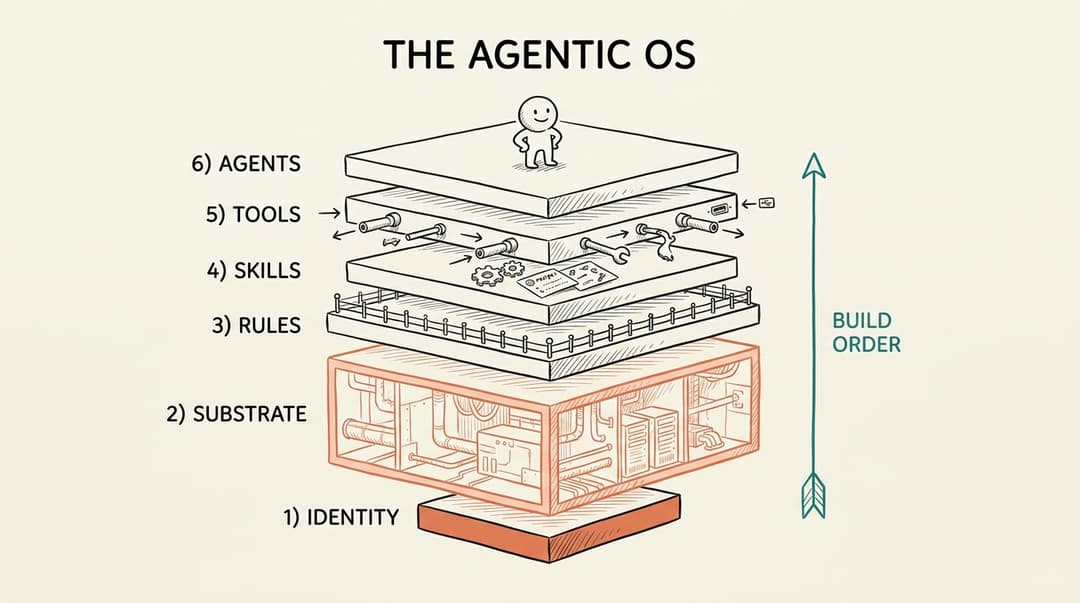
Six layers, built from the ground up. Identity is the foundation, Substrate (the back of house) is the biggest layer, and Agents sit on top once everything beneath them is solid.
What it does
You run /os-coach inside any folder and tell it your goal. The skill:
- Starts a real OS in that folder, captures your goal in your own words, and remembers exactly where you are between sessions in a
memory.mdfile. - Coaches one layer at a time. It asks 2 to 3 plain-English questions, waits for your answer, then builds the actual files and folders for you and explains what it made and why.
- Never talks like a manual. No jargon. When a technical word is unavoidable it gets one short sentence and an everyday analogy. It assumes you have never opened a terminal.
- Refuses to be generic. Every suggestion is grounded in your real goal and what is actually in your folder right now, not boilerplate advice.
- Audits on demand. Ask it to assess and it scores all six layers against your stated goal, gives you the three highest-leverage next moves in priority order, and writes the report to
OS-AUDIT.md. - Protects what you flag as sensitive. If you mark a field private, it never writes that value into the folder, it stores a non-identifying handle instead.
The six layers
It builds and audits them in the order that actually works.
| # | Layer | What it is | Lives in |
|---|---|---|---|
| 1 | Identity | The soul. Who this OS is, who it serves, its refusals. | CLAUDE.md |
| 2 | Substrate / Context | The back of house. The distilled knowledge the OS runs on. The biggest layer. | substrate/ |
| 3 | Rules & Hooks | The guardrails. Black-and-white constraints and automatic reflexes. | rules/ |
| 4 | Skills | The earned verbs. Repeatable jobs packaged to run the same way every time. | skills/ |
| 5 | Tools / Connections | The wires out. Read-only, scoped connections to real data sources. | tools.md |
| 6 | Agents | Roles with judgment that orchestrate the skills. | agents/ |
How a session flows
You only ever take one small step per turn. The coach asks 2 to 3 plain-English questions, builds the real files when you answer, writes down where you are, and points you to the next layer. Everything reads and writes one shared memory.md, so it always knows where you left off, even sessions later. Ask for an audit any time and it scores the whole OS against your goal and feeds the result back into the cycle.
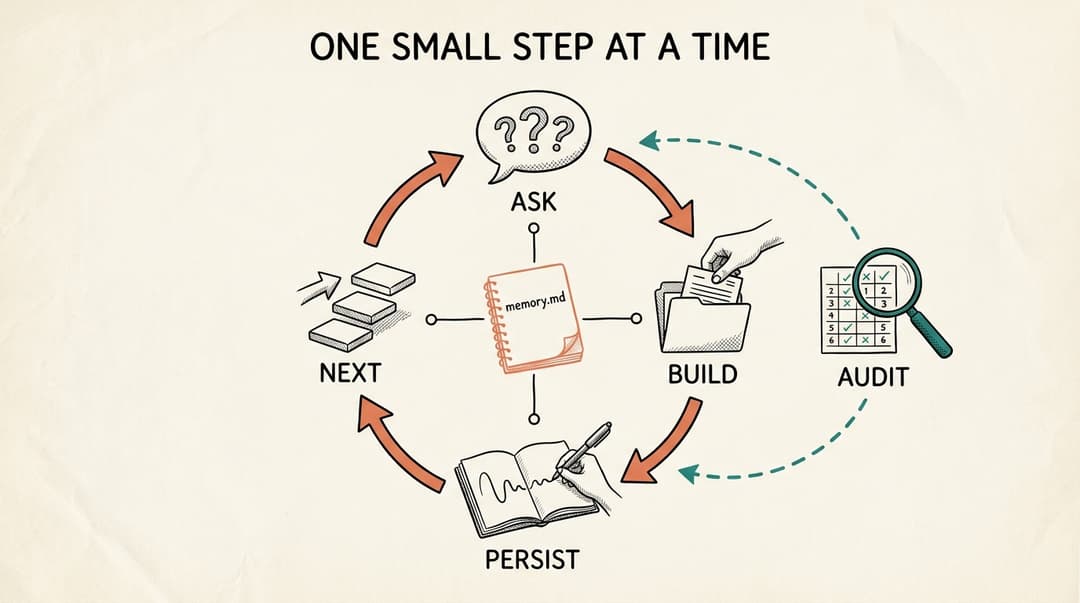
- Ask a couple of plain questions for the current layer, then stop and wait.
- Build the actual file or folder for that layer when you answer, tailored to your goal.
- Persist the decision and your place to
memory.mdso nothing is lost between turns. - Next, move to the layer beneath or above as the build order dictates.
- Audit on demand, scoring every layer against your goal and writing
OS-AUDIT.md, which feeds the next moves back in.
Commands
/os-coach start <your goal>   Begin a brand-new OS
/os-coach next                Move to the next unfinished layer and coach it
/os-coach layer <name>        Jump to a specific layer (identity, substrate, rules, skills, tools, agents)
/os-coach status              Show the progress map from memory
/os-coach audit               Score the whole OS against your goal and get next actions
/os-coach help                Explain what it does and show the commands
Install
cp -r os-coach ~/.claude/skills/
Then, in any folder you want to turn into an OS:
/os-coach start I want to never miss a client deadline again
Prerequisites
- Claude Code installed
- That is it. No dependencies, no API keys, no build step.
What it creates
Everything lands in the folder you run it in, so the folder is the OS:
memory.md, the running state so the coach always knows where you left off.CLAUDE.md, your Identity layer, the lean soul file the whole OS reads first.substrate/sources.mdandsubstrate/compendium.md, the back of house.rules/always.mdandrules/never.md, your guardrails.skills/<name>/SKILL.md, your first repeatable job.tools.md, the read-only connections your goal needs.agents/<name>/AGENT.md, the first role worth promoting, once skills exist.OS-AUDIT.md, a keepable scorecard whenever you run an audit.
A worked example
Here is a real run, condensed. A solo wedding photographer wants to stop missing deadlines. Clients are shown as Couple A, Couple B because the photographer flagged client names as sensitive, so the coach stores non-identifying handles instead of real names.
You:
/os-coach start I keep missing client deadlines and want to never miss a delivery date again
OS Coach confirms the goal, sets up the folder, and asks three short questions, who it is for, the one question you wish you could just ask it, and one thing it should always do plus one it should never do. You answer: just me; "what is due in the next 10 days and what am I already late on"; always warn me within 3 days of a contracted date; never message a client without my approval. It then writes your Identity file:
# Who I am
I am the operating system for a solo wedding photographer. I exist so no client deliverable is ever late.
...
## Hard refusals (never)
- I never message a client without you reading and approving it first.
- I never let a deadline pass quietly. If something is at risk, I surface it loudly.
You: /os-coach next
It opens Substrate, asks where your bookings live and what is sensitive, then builds a tracker that computes both deadlines from each wedding date (sneak peek is wedding plus 1 week, full gallery is wedding plus 6 weeks) and answers your question on the spot:
Within 3 days, your always-warn line just tripped:
- Couple B, full gallery due 2026-07-01 (3 days away)

Coming due within 10 days:
- Couple C, sneak peek due 2026-07-02 (4 days out)
You: /os-coach audit
## Scorecard
| Layer     | Score   | Why |
|-----------|---------|-----|
| Identity  | Solid   | CLAUDE.md states the mission and two refusals. |
| Substrate | Started | Tracker answers "due soon" but not "already late" until you mark what shipped. |
| Rules     | Missing | Client handles now live in the folder with nothing stopping a public backup. |

## The three moves that matter most
1. Rules: write rules/never.md (never back this folder up publicly). A leak cannot be undone, and a gallery is due in 3 days.
2. Substrate: mark which galleries shipped so "due soon" can also answer "already late".
3. Skills: turn the deadline check into one repeatable command.
Your folder now looks like this:
photo-os/
  CLAUDE.md          # Identity, the soul
  memory.md          # where you left off
  substrate/
    sources.md       # where the real data lives
    compendium.md    # the deadline tracker
  OS-AUDIT.md        # the latest scorecard
Every file is real, grounded in your goal, and yours to keep.
How it is built
SKILL.md, the controller. It is user-invoked only, holds the golden rules (talk like a human, one small step at a time, you do the building, never be generic, always persist, protect sensitive data, no em dashes), the guards, and the per-flow logic.references/layer-playbook.md, the per-layer coaching detail: a plain-English explanation, an analogy, the 2 to 3 questions to ask, the artifact to build, and the done-check.references/audit-rubric.md, how to score each layer (Missing, Started, Solid, Compounding), the non-generic test, the prioritization precedence, and the sensitive-field and write-back checks.
The references are loaded only when needed, so the controller stays lean.
FAQ
Do I need to know how to code? No. The coach does all the technical work, it creates the files and folders for you. You only answer plain-English questions and make the decisions. It assumes you have never opened a terminal.
Does my data leave my machine? No. Everything it builds is plain files in the folder you ran it in. The Tools layer connects to your sources read-only and keeps secrets (passwords, keys) out of the folder. If you flag a field as sensitive, the coach stores a non-identifying handle instead of the real value, and never writes a file that claims to exclude a field and then includes it.
What does it cost or require?
Just Claude Code. No API keys, no dependencies, no build step. You run /os-coach and go.
What if a layer does not apply to me yet?
The coach marks it not started with a one-line reason rather than inventing busywork, and moves on. You are never pushed to build an agent before the skills it would orchestrate exist.
How is this different from just writing a CLAUDE.md?
A CLAUDE.md is only the Identity layer. OS Coach builds all six layers, keeps them coherent, and audits them against your goal over time. Identity is the soul, but the substrate, rules, skills, tools, and agents are what make the OS actually do work.
Is this only for businesses? No. Any goal with a back of house works, a research practice, a job search, a household, a creative pipeline. If you have scattered knowledge and a thing you wish you could just ask, it fits.
Where does it keep track of where I am?
In memory.md in your folder. Every run reads it first and updates it last, so you can stop mid-build and pick up later, even in a new session, without losing your place.
Can I edit what it builds?
Yes, and you should. The files are yours. Edit them directly, then run /os-coach audit to see how your changes score against your goal.
// faq
What is os-coach?
A Claude Code skill that coaches a non-technical person through building their own agentic OS, one layer at a time. Substrate first, model second.. It is open-source on GitHub.
Is os-coach free to use?
os-coach is open-source, so it is free to use.
What category does os-coach belong to?
os-coach is listed under templates in the Claudeers registry of Claude-compatible tools.
// embed badge

[](https://claudeers.com/os-coach)
// retro hit counter

[](https://claudeers.com/os-coach)
// reviews
// guestbook
// related in Examples & Templates
 🔓
🔓Claude Code skill that removes signs of AI-generated writing from text
 🔓
🔓👨🏻💻👩🏻💻 Use Ant Design like a Pro!
 🔓
🔓Clone any website with one command using AI coding agents
 🔓
🔓A 100% free modern JS SaaS boilerplate (React, NodeJS, Prisma). Full-featured: Auth (email, google, github, slack, MS), Email sending, Background jobs, Landi…