
open-computer-use
AI computer use powered by open source LLMs and E2B Desktop Sandbox
Install with your AI
Paste into Claude Code, Cursor, or any agent — it reads the repo and wires the tool into your project.
Install and set up open-computer-use (git-clone project) into my current project.
Found on https://claudeers.com/open-computer-use
Repo: https://github.com/e2b-dev/open-computer-use
Homepage/docs: https://e2b.dev
Detected install method: git-clone → git clone https://github.com/e2b-dev/open-computer-use
Category: automation. Platforms: cli, api, desktop, web.
Read the repo's README for exact setup and env vars, then install it and wire it into my project.

Claudeers Health Verdict:
slowing; community-verified: false. Confirm the source before running anything.
git clone https://github.com/e2b-dev/open-computer-use
// compatibility
| Platforms | cli, api, desktop, web |
|---|---|
| Operating systems | — |
| AI compatibility | claude |
| License | Apache-2.0 |
| Pricing | open-source |
| Language | Python |
Open Computer Use
A secure cloud Linux computer powered by E2B Desktop Sandbox and controlled by open-source LLMs.
https://github.com/user-attachments/assets/3837c4f6-45cb-43f2-9d51-a45f742424d4
Features
- Uses E2B for secure Desktop Sandbox
- Operates the computer via the keyboard, mouse, and shell commands
- Supports 10+ LLMs, OS-Atlas/ShowUI and any other models you want to integrate!
- Live streams the display of the sandbox on the client computer
- User can pause and prompt the agent at any time
- Uses Ubuntu, but designed to work with any operating system
Design

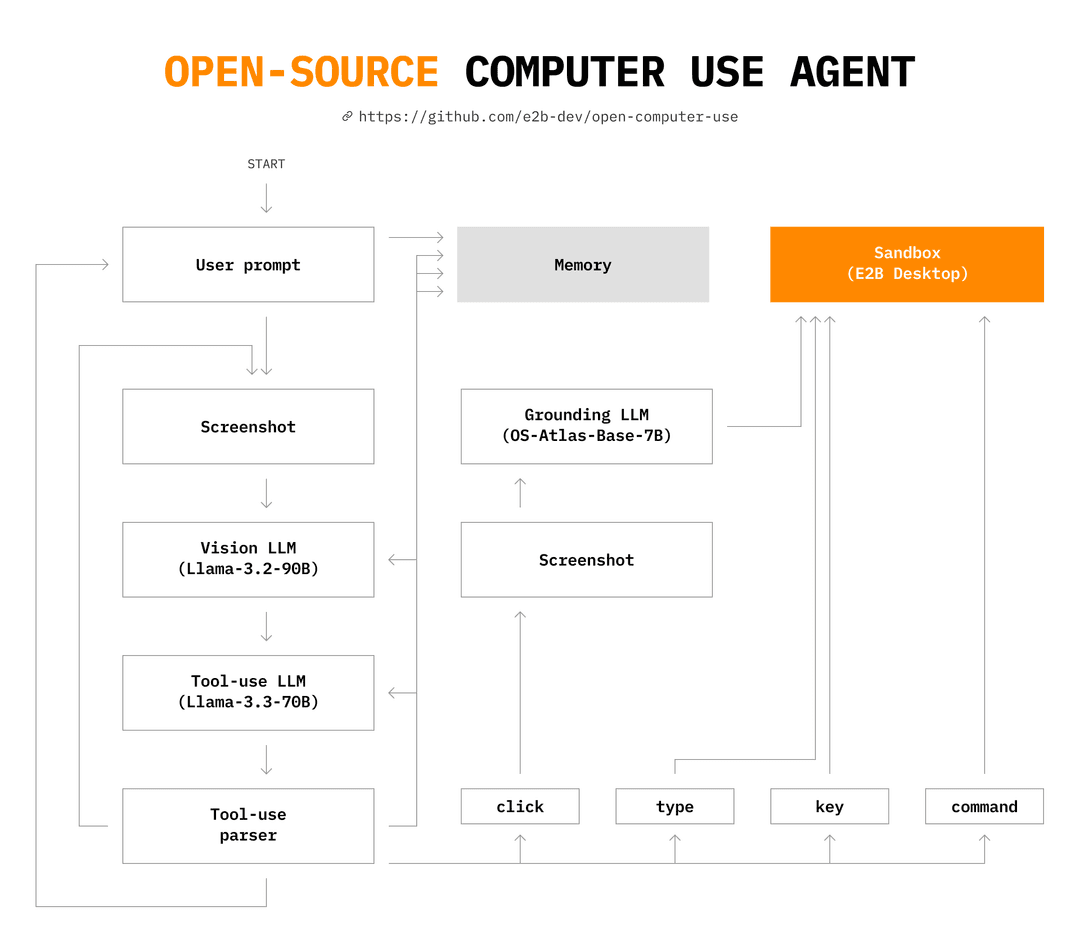
The details of the design are laid out in this article: How I taught an AI to use a computer
LLM support
Open Computer Use is designed to make it easy to swap in and out new LLMs. The LLMs used by the agent are specified in config.py like this:
grounding_model = providers.OSAtlasProvider()
vision_model = providers.GroqProvider("llama3.2")
action_model = providers.GroqProvider("llama3.3")
The providers are imported from providers.py and include:
- Fireworks, OpenRouter, Llama API:
- Llama 3.2 (vision only), Llama 3.3 (action only)
- Groq:
- Llama 3.2 (vision + action), Llama 3.3 (action only)
- DeepSeek:
- DeepSeek (action only)
- Google:
- Gemini 2.0 Flash (vision + action)
- OpenAI:
- GPT-4o and GPT-4o mini (vision + action)
- Anthropic:
- Claude (vision + action)
- HuggingFace Spaces:
- OS-Atlas (grounding)
- ShowUI (grounding)
- Moonshot
- Mistral AI (Pixtral for vision, Mistral Large for actions)
If you add a new model or provider, please make a PR to this repository with the updated providers.py!
Get started
Prerequisites
- Python 3.10 or later
- git
- E2B API key
- API key for an LLM provider (see above)
1. Install the prerequisites
In your terminal:
brew install poetry ffmpeg
2. Clone the repository
In your terminal:
git clone https://github.com/e2b-dev/open-computer-use/
3. Set the environment variables
Enter the project directory:
cd open-computer-use
Create a .env file in open-computer-use and set the following:
# Get your API key here: https://e2b.dev/
E2B_API_KEY="your-e2b-api-key"
Additionally, add API key(s) for any LLM providers you're using:
# You only need the API key for the provider(s) selected in config.py:
# Hugging Face Spaces do not require an API key.
FIREWORKS_API_KEY=...
OPENROUTER_API_KEY=...
LLAMA_API_KEY=...
GROQ_API_KEY=...
GEMINI_API_KEY=...
OPENAI_API_KEY=...
ANTHROPIC_API_KEY=...
MOONSHOT_API_KEY=...
# Required: Provide your Hugging Face token to bypass Gradio rate limits.
HF_TOKEN=...
4. Start the web interface
Run the following command to start the agent:
poetry install
poetry run start
The agent will open and prompt you for its first instruction.
To start the agent with a specified prompt, run:
poetry run start --prompt "use the web browser to get the current weather in sf"
The display stream should be visible a few seconds after the Python program starts.
// faq
What is open-computer-use?
AI computer use powered by open source LLMs and E2B Desktop Sandbox. It is open-source on GitHub.
Is open-computer-use free to use?
open-computer-use is open-source under the Apache-2.0 license, so it is free to use.
What category does open-computer-use belong to?
open-computer-use is listed under data in the Claudeers registry of Claude-compatible tools.
// embed badge

[](https://claudeers.com/open-computer-use)
// retro hit counter

[](https://claudeers.com/open-computer-use)
// reviews
// guestbook
// related in Automation & Workflows
 🔓
🔓 🔓
🔓The API to search, scrape, and interact with the web at scale. 🔥
 🔓
🔓🌐 Make websites accessible for AI agents. Automate tasks online with ease.
 🔓
🔓Taste-Skill - gives your AI good taste. stops the AI from generating boring, generic slop