
oh-my-taiyiforge
AI workflow automation plugin for intelligent code generation with Claude/Codex
Install with your AI
Paste into Claude Code, Cursor, or any agent — it reads the repo and wires the tool into your project.
Install and set up oh-my-taiyiforge (npm project) into my current project.
Found on https://claudeers.com/oh-my-taiyiforge
Repo: https://github.com/Dong90/oh-my-taiyiforge
Homepage/docs: —
Detected install method: npm → npm install oh-my-taiyiforge
Category: devtools. Platforms: cli, api, web.
Read the repo's README for exact setup and env vars, then install it and wire it into my project.

Claudeers Health Verdict:
active; community-verified: false. Confirm the source before running anything.
npm install oh-my-taiyiforge
git clone https://github.com/Dong90/oh-my-taiyiforge
// compatibility
| Platforms | cli, api, web |
|---|---|
| Operating systems | — |
| AI compatibility | claude |
| License | MIT |
| Pricing | open-source |
| Language | TypeScript |
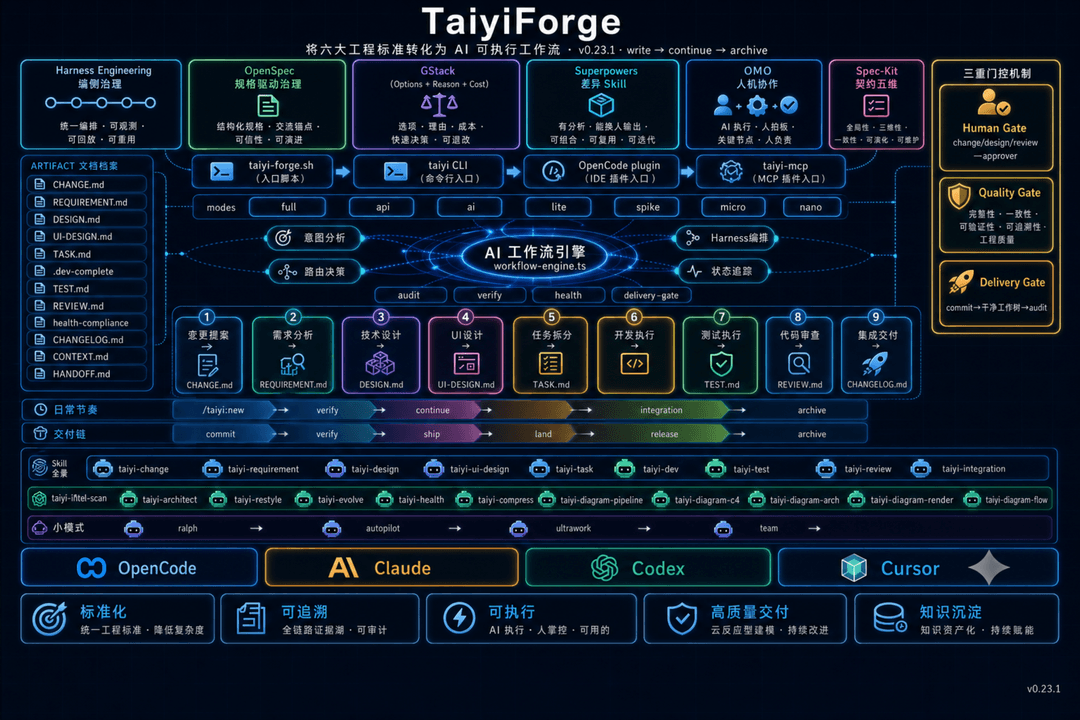
TaiyiForge(太一炉)
把六套 AI 工程标准,变成一条可执行、可审计的九阶段研发流水线
用文档驱动 AI 研发,用门控代替玄学。
不用背阶段顺序。说一句
/taiyi:new,引擎告诉你下一步。
快速上手 · 使用指南 · 架构 · 命令参考 · 完整流程 · 贡献
1 · 问题
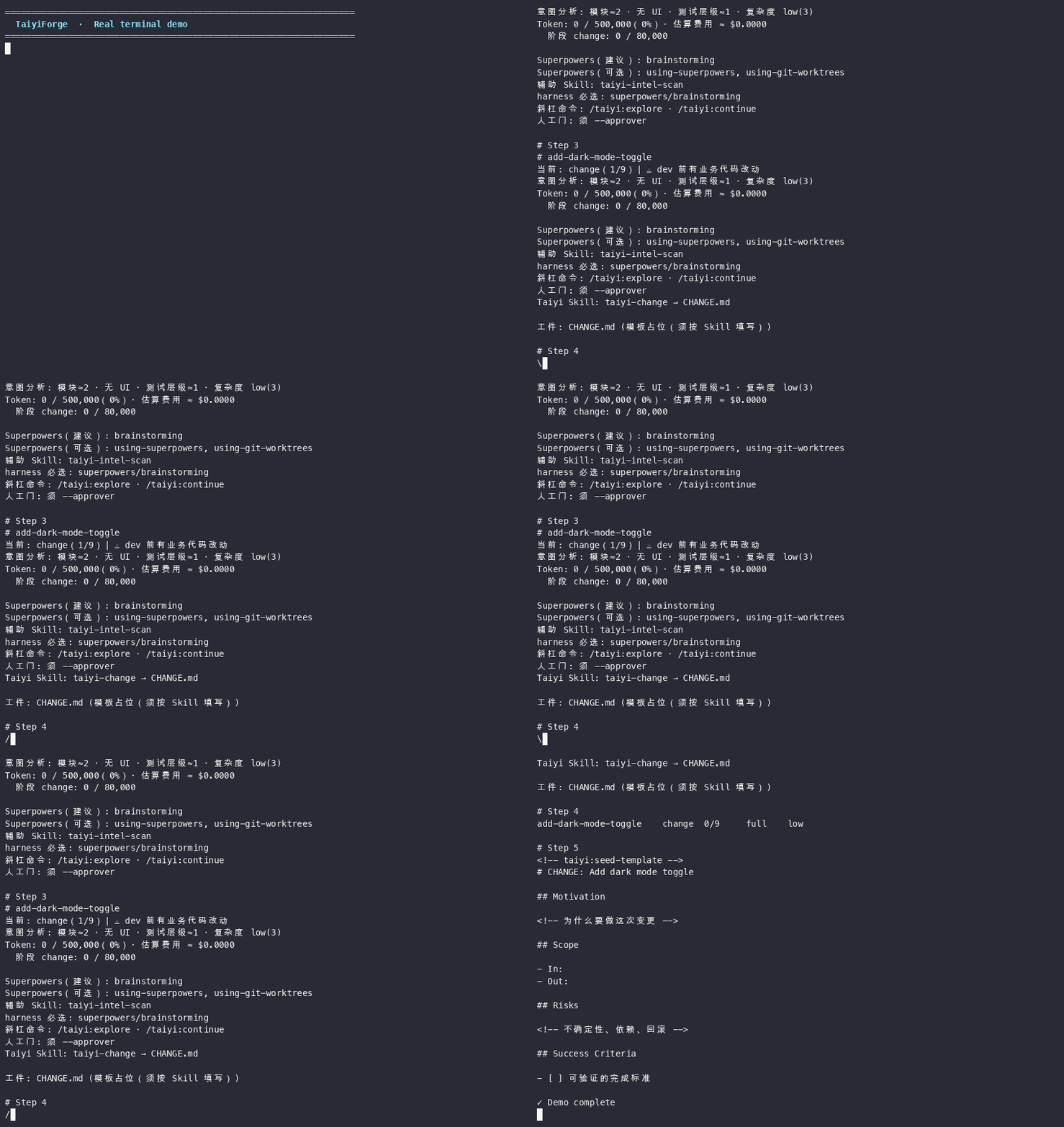
27 秒真实终端录制 · asciicast 源(可在 asciinema.org 播放,或本地 asciinema play docs/diagrams/demo.cast)
每个用 AI 做严肃项目的团队,都踩过这些坑:
| 踩过的坑 | 为什么痛 |
|---|---|
| Agent 中途忘掉阶段顺序,跳到写代码 | 设计半成品、需求丢失、review 重做 |
| 长会话上下文爆炸,需求/设计/代码全丢 | 跨天/跨会话无法续上,只能推倒重来 |
| OpenCode / Claude / Codex / Cursor 各自一套流程 | 同一特性四种仪式,新人按工具入职而不是按团队 |
| 改个 typo 也要走完九阶段 | 死板流水线吃光小修复的节奏 |
| 关键节点不敢让 AI 拍板 | 没有 --approver 的人类门控,review 形同虚设 |
| 装好的 Skill 到底在干啥没人说得清 | 文档和实际行为漂移,出问题没审计 |
| 想跟 OMC / OMX 共存 | 锁死单一编排器就丢掉了可组合性 |
TaiyiForge 对每个问题的回答都在 §2 方案。
2 · 方案
一条九阶段工件契约 + 28 条 v28 顶栏 slash + 6 个 umbrella + 一套 /taiyi:*
词汇表,在四套 AI 终端里行为完全一致。
v28 = 推荐命名 + 顶栏收敛。IDE 菜单已裁剪为 28 条(v0.24),设
TAIYI_FORGE_ALL_PROMPTS=1恢复全量。详见 canonical-commands.md。
TaiyiForge 不发明新标准——它把 Harness · OpenSpec · GStack · Superpowers · OMO · Spec-Kit 编排成一台状态机。装了什么用什么,其余自动跳过。
2.1 · 九阶段主流程
一个 change = 一个 slug,顺序执行,产出固定。人类门控必须带 --approver
才能放行。
| # | 阶段 | 类别 | Skill | 产出 | 备注 |
|---|---|---|---|---|---|
| 1 | change | 人类门控 | taiyi-change | CHANGE.md | 3-5 段方案 + 范围 |
| 2 | requirement | 自动 | taiyi-requirement | REQUIREMENT.md | 验收标准 + AC 复选框 |
| 3 | design | 人类门控 | taiyi-design | DESIGN.md | ≥2 方案对比 + 决策 |
| 4 | ui-design | 自动 | taiyi-ui-design | UI-DESIGN.md | 仅触 UI 的 change |
| 5 | task | 自动 | taiyi-task | TASK.md | 切成可独立 PR 的片段 |
| 6 | dev | 自动 | taiyi-dev | TDD 测试 + 最小实现 | 强制 TDD——先红后绿 |
| 7 | test | 自动 | taiyi-test | TEST.md | 留摘要,E2E 跑 CI |
| 8 | review | 人类门控 | taiyi-review | REVIEW.md | 跨 AI 评审 + 高危必改 |
| 9 | integration | 自动 | taiyi-integration | CHANGELOG.md 合并 | 交付门控: audit + deliveryVerifyCmd |
| — | archive | 收尾 | taiyi-integration | .taiyi/archive/ | 九阶段全过后才执行 |
完整命令表 → canonical-commands.md · 工件布局 → artifact-layout.md
2.2 · v28 顶栏命令(28 条)
真源: canonical-commands.md → canonical_v28。
旧 slash 仍可用,见 Legacy 兼容。
| # | 分组 | Slash | 用途 |
|---|---|---|---|
| 1–6 | 主链 | new · status · write · continue · apply · archive | 日常最短路径 |
| 7–10 | 会话 | pause · resume · cancel · list | 跨会话 |
| 11–13 | 排查 | doctor · audit · verify | 自检 + 交付门控 |
| 14–17 | 交付 | commit · ship · land · release | gstack 交付链 |
| 18–19 | 路由 | gstack <skill> · sp <skill> | 外部 harness 路由 |
| 20–22 | 阶段捷径 | explore · tdd plan|dev · flow | 跳过九阶段 |
| 23–28 | Umbrellas(6) | token … · test … · review … · diagram … · mode … · workflow … | 领域多子命令 |
日常最短路径:
/taiyi:new → /taiyi:write → /taiyi:continue → /taiyi:apply → … → /taiyi:commit → /taiyi:continue integration → /taiyi:archive
Umbrella 速查(完整地图见 canonical-commands.md §伞形命令·子命令地图):
| Umbrella | 子命令 | 数量 |
|---|---|---|
/taiyi:token | status · record · scan · compress | 4 |
/taiyi:test | smoke · e2e · qa · ui · security | 5 |
/taiyi:review | loop · check · health · gstack | 4 |
/taiyi:diagram | pipeline · c4 · arch · render · flow | 5 |
/taiyi:mode | ralph · autopilot · daemon · team · ultrawork · agent · step · stop · list · keyword · preflight | 11 |
/taiyi:workflow | plan · ralplan · loop · check · run · sync · ccg · sciomc · deepinit · remember · ultraqa | 11 |
2.3 · Legacy 兼容
旧 slash & CLI 仍可用——完整列表见 canonical-commands.md §Legacy 兼容。不要在 v28 umbrella 之外再添新的顶栏重复。
| 旧 / legacy | v28 现用 |
|---|---|
/taiyi:pause | /taiyi:pause |
/taiyi:state · /taiyi:state-read | /taiyi:status |
/taiyi:next · /taiyi:done | /taiyi:status + /taiyi:continue |
/taiyi:change … /taiyi:integration | /taiyi:write |
/taiyi:ralph 等 OMC | /taiyi:mode ralph |
npx taiyi new · npx taiyi walkthrough | /taiyi:new · /taiyi:flow help |
3 · 证据
3.1 · 一套 Skill,四端共享
一条 node scripts/taiyi-forge.sh install --all 同步到四端,缺哪端就跳过哪端。
28 条 v28 顶栏 slash 相同,taiyi-* Skill 相同——每端的聊天语法和 MCP 暴露不同:
| Harness | 聊天入口 | 引擎入口 | MCP | Hook / 关键词 | 详见 |
|---|---|---|---|---|---|
| Claude Code | /taiyi:new … /taiyi:archive + Skill + ~/.claude/commands/taiyi-*.md | Agent 跑 Bash | taiyi_doctor · taiyi_audit | keyword hook | control-plane.md §四端对照 |
| Codex | $taiyi-new … $taiyi-archive(prompts/taiyi-*.md——不是 /taiyi:*) | Agent 跑 scripts/taiyi-forge.sh | 无(靠 shell) | codex-keyword-preflight.mjs + developer_instructions(~/.codex/config.toml) | control-plane.md §Codex |
| Cursor | /taiyi:new … /taiyi:status + taiyiforge.mdc 规则 + ~/.cursor/commands/taiyi-*.md | Agent 终端 / MCP | taiyi_doctor · taiyi_audit | keyword hook | mcp-setup.md |
| OpenCode | taiyi_new / taiyi_* 插件工具 + ~/.config/opencode/commands/taiyi-*.md | plugin + /taiyi-* 斜杠 | (插件内置) | 插件自管 | control-plane.md §OpenCode |
Codex 注意:聊天入口是
$taiyi-*关键词(不是/taiyi:*),通过codex-keyword-preflight.mjs和developer_instructions路由。见 control-plane.md。
3.2 · 聊天轨 vs 引擎轨
| 表面 | 谁在用 | 干啥 | 例子 |
|---|---|---|---|
| 聊天 slash | 开发者 / Agent | 写工件、跑 TDD、加载专用 Skill | /taiyi:write · /taiyi:apply · /taiyi:tdd dev |
| 引擎 CLI | Agent / CI(代用户跑) | 校验工件、放行门控、推进阶段 | npx taiyi continue <slug> · npx taiyi complete <slug> change --approver "…" |
| Shell 入口 | Agent / CI | 等价于 CLI;安装到消费项目后写入 | scripts/taiyi-forge.sh status --json --compact |
| MCP | Cursor 等 | 只读排障 | taiyi_doctor · taiyi_audit |
原则:用户只说 /taiyi:*;绝不让用户手打 taiyi-forge.sh。Agent 读
status --json --compact 的 engineTruth;不要把整份工件塞进聊天。
3.3 · 架构一图
┌─────────────────────────────────────────────────────────────┐
│  入口: taiyi CLI · taiyi-forge.sh · OpenCode plugin · MCP    │
└───────────────────────────┬─────────────────────────────────┘
                            ▼
┌─────────────────────────────────────────────────────────────┐
│  workflow-engine — 意图分析 · token 预算 · 路由 · 门控 │
└───────────────────────────┬─────────────────────────────────┘
                            ▼
┌─────────────────────────────────────────────────────────────┐
│  .taiyi/changes/<slug>/  — CHANGE … CHANGELOG(真源)         │
└─────────────────────────────────────────────────────────────┘
   聊天加载 taiyi-* Skill 写工件 ↑   ↓ 引擎校验并推进阶段
- 代码布局 → docs/ARCHITECTURE.md
- C4 源 → docs/c4/
- 视觉海报(README 顶部)→ docs/diagrams/visual/
4 · 快速上手
零构建安装:v0.24.0 起支持
npx taiyi-forge-install --all一键装到四端,无需 clone 仓库。源码安装仍可用。v0.25.0 GitHub 安装:v0.25.x 在 npm 上暂未发布(包名 24h 锁定期中),可从 GitHub tag 直装。详见 方式 A0。
方式 A0 · 从 GitHub 直接安装(v0.25 新增,npm 未发布时用)
# 直接从 GitHub tag 装到本地项目(任何用户工程里跑,不进 npm)
# 必须用 git+ 前缀 —— 这样 npm 会 clone 仓库 + 跑 postinstall (npm run build)
npm install 'git+https://github.com/Dong90/oh-my-taiyiforge.git#v0.25.0'
# 或装到全局 / 用 npx 跑 bin
npm install -g 'git+https://github.com/Dong90/oh-my-taiyiforge.git#v0.25.0'
npx -p 'git+https://github.com/Dong90/oh-my-taiyiforge.git#v0.25.0' taiyi-forge-install --all
必须用
git+前缀(不是 tarball URL),npm 才会 clone 仓库并触发 postinstall 自动 build dist。 想换版本只改 tag:#v0.25.0→#v0.25.1→#main→#<commit-sha>都可以。
方式 A · 一行安装(推荐,v0.24+)
npx taiyi-forge-install --all          # 一键装到四端 + 可选铁三角
npx taiyi-forge-install --cursor       # 只装到 Cursor
npx taiyi-forge-install --claude --opencode

# 装全量 prompt(默认只同步 v28 28 条顶栏):
TAIYI_FORGE_ALL_PROMPTS=1 npx taiyi-forge-install --all
方式 B · 源码安装
git clone https://github.com/Dong90/oh-my-taiyiforge.git
cd oh-my-taiyiforge
npm install && npm run build && npm test
node scripts/taiyi-forge.sh install --all
方式 C · 跑通示例工程(零安装,快速体验)
cd examples/commands-smoke
npm install
npm run chat-demo          # 聊天动词: new / status / check / continue
npm run walkthrough-e2e    # 九阶段 shell E2E + 铁三角
# /taiyi:doctor           # 工作区 + 安装自检(聊天 slash)
| 示例 | 用途 |
|---|---|
| examples/full-flow-demo | 九阶段 + slash E2E |
| examples/commands-smoke | 命令冒烟测试 |
| examples/browser-e2e-smoke | CI 模板 |
| examples/verification-suite | 极简集成验证 |
想用
npm install oh-my-taiyiforge?v0.25 暂时只能从 GitHub 装(见方式 A0),npm 重发布后会恢复npm i oh-my-taiyiforge。
方式 D · 第一个 change(5 分钟)
# 推荐入口: 自动 slug + 引擎引导
npx taiyi walkthrough
npx taiyi init-wizard              # 交互式 config 初始化
npx taiyi new "优化登录流程"     # 写到 .taiyi/changes/<slug>/
npx taiyi status                   # 当前阶段 + 推荐 Skill + 下一步
npx taiyi import <branch>          # 从 git 分支导入变更(自动读 commit 生成 CHANGE.md)

# 编辑 .taiyi/changes/<slug>/CHANGE.md,然后:
npx taiyi complete <slug> change --approver "你的名字"   # 人类门控
npx taiyi continue <slug>                                # 自动门控

# 在聊天里(OpenCode / Claude / Cursor——Codex 用 `$taiyi-*` 关键词):
/taiyi:new "<feature title>"              # 落 CHANGE.md 模板
/taiyi:status                             # 当前阶段 + 推荐 Skill + 下一步
/taiyi:write                              # 写当前阶段工件(覆盖 9 阶段)
/taiyi:continue --approver "你的名字"     # 人类门控(change / design / review)
/taiyi:apply                              # dev/test harness checklist
/taiyi:commit                             # dev 后带 Taiyi-Change trailer 的提交
/taiyi:archive                            # 九阶段全过后归档

# 常用 umbrella 一行:
/taiyi:doctor                             # 安装 + 工作区自检
/taiyi:token compress <slug>              # 长会话 → CONTEXT-COMPACT.md
/taiyi:test smoke                         # Playwright 内置冒烟
/taiyi:flow bug <slug>                    # 小修复走 lite 路径
就这些。阶段顺序、工件模板、门控校验全是引擎的活。你只管写 Markdown 和代码。
Agent 排障:
scripts/taiyi-forge.sh doctor --json --compact
scripts/taiyi-forge.sh audit --json --compact
5 · 参考
5.1 · 文档导航
| 文档 | 覆盖什么 | 何时读 |
|---|---|---|
| docs/QUICKSTART.md | 5 分钟走通 | 首次安装 |
| docs/USAGE.md | 场景 · 日常节奏 · 交付链 | 走通之后 |
| docs/ARCHITECTURE.md | 架构概览 + 代码布局 | 改引擎 / 排障 |
| docs/taiyi/canonical-commands.md | v28 slash 命令表 | 查命令 |
| docs/taiyi/control-plane.md | Agent 纪律 + token 纪律 | 给 Agent 做 onboarding |
| docs/taiyi/full-oss-flow.md | Superpowers + 全插件演示 | 想看完整端到端 |
| docs/taiyi/integrations.md | 铁三角 + 插件集成 | 装可选件 |
| AGENTS.md | Agent 的读态入口 | 配置 Agent |
| CONTRIBUTING.md | 贡献指南 | 开 PR 之前 |
| CHANGELOG.md | 发布说明 | 查更新 |
| docs/diagrams/demo.gif | 真实终端录制(27s) | 快速感受引擎 |
| README.en.md | English | English users |
5.2 · 开发与验证
贡献者克隆:
git clone https://github.com/Dong90/oh-my-taiyiforge.git
cd oh-my-taiyiforge
npm install && npm run build && npm test
node scripts/taiyi-forge.sh install --all
常用命令:
npm test               # Vitest 契约 + 九阶段 E2E
npm run test:watch     # 监听模式
npm run build          # TypeScript → dist/
npm run dogfood        # 根仓库自吃狗粮演示
npm run ci:platforms   # 四端冒烟(opencode/claude/codex/cursor)
npm run check:docs     # doc-vs-commands.yaml 同步校验
CI: .github/workflows/ci.yml——平台冒烟跑 4 × ubuntu
矩阵。
5.3 · 路线图与状态
| 版本 | 状态 | 关键里程碑 |
|---|---|---|
| v0.23.0 | ✅ 已发布 | canonical v28: 28 顶栏 slashes + 6 umbrellas(token/test/review/diagram/mode/workflow) + skill-fusion-principles.md + validateV28CatalogSync gate |
| v0.24.0 | ✅ 已发布 | 首次 npm 发布 · npx taiyi-forge-install 零构建安装 · README v28 收敛重写 · IDE 菜单裁剪为 28 条(umbrella Phase 2) |
| v0.26.0 | ✅ 已发布 | evidence 强校验: AC 必配 evidence{command,exitCode:0} 防假过门 · commit trailer 强制执行 · status 5s 防抖 · profile 扩容 10 种 |
| v0.27.0 | ✅ 已发布 | event bus + structured logger · CLI 62→18 瘦身(handlers map 替代巨型 switch)· TODO 里程碑总览 · schema 扩展 + 10 个 SKILL.md 重写 |
| v0.30.0 | ✅ 已发布 | data-driven Mermaid chain: 设计图 SSOT 三源绑定 + rollback 追溯 · is_cli_only 跳过 UI 阶段契约 · ast-grep 陷阱规则(8 patterns) + scan.sh |
| v0.35.0 | ✅ 已发布 | ChangeGraph 知识图谱: load/edges/query/render — 49 tests · PHASE-CONTEXT.md 图谱驱动生成(替代逐份读上游工件) |
| v0.40.0 | ✅ 最新 | review 日绑定 + SSOT 交叉引用 · E2E fixtures 扩 7 字段 · graph 上下文压缩 · 平台冒烟 CI / Playwright / vitest 超时修复 |
| v1.0.0 | ⏳ 计划 | 锁定 9 阶段 API · 四端 parity · 外部案例收集 |
已就绪: 完整九阶段流水线 · 四端共享 Skill · 强制 TDD · evidence 防假过门 · token 压缩 · ChangeGraph 知识图谱 · 平台冒烟 CI · 零构建一行安装(v0.24+) 未就绪: 生产级 SLA · 完整 i18n
5.4 · 社区与贡献
- 🐛 报告 Bug: GitHub Issues ·
bug标签 - 💡 想法 / RFC: Discussions
- 🔧 开 PR: 先读 CONTRIBUTING.md;
npm test+npm run check:docs必须绿 - ⭐ Star / Watch: 点个星,下次发布就收到通知
- 🧵 Codex 用户: 搜
$taiyi-*关键词;四端入口决策树在 docs/taiyi/invoke.yaml
行为准则: 遵循 Contributor Covenant 精神——批评想法,不批评人。
5.5 · 许可证
MIT © 2026 TaiyiForge contributors
5.6 · 致谢
灵感来自: oh-my-claudecode · oh-my-codex · Harness Engineering · OpenSpec · GStack · Superpowers · OMO · Spec-Kit。
// faq
What is oh-my-taiyiforge?
AI workflow automation plugin for intelligent code generation with Claude/Codex. It is open-source on GitHub.
Is oh-my-taiyiforge free to use?
oh-my-taiyiforge is open-source under the MIT license, so it is free to use.
What category does oh-my-taiyiforge belong to?
oh-my-taiyiforge is listed under automation in the Claudeers registry of Claude-compatible tools.
// embed badge

[](https://claudeers.com/oh-my-taiyiforge)
// retro hit counter

[](https://claudeers.com/oh-my-taiyiforge)
// reviews
// guestbook
// related in Developer Tools
 🔓
🔓The agent harness performance optimization system. Skills, instincts, memory, security, and research-first development for Claude Code, Codex, Opencode, Curs…
 🔓
🔓Makes your AI agent think like the laziest senior dev in the room. The best code is the code you never wrote.
 🔓
🔓Use Garry Tan's exact Claude Code setup: 23 opinionated tools that serve as CEO, Designer, Eng Manager, Release Manager, Doc Engineer, and QA
 🔓
🔓AI coding assistant skill (Claude Code, Codex, OpenCode, Cursor, Gemini CLI, and more). Turn any folder of code, SQL schemas, R scripts, shell scripts, docs,…