
oh-my-resume
Markdown-first resume skill for Codex and Claude Code
Install with your AI
Paste into Claude Code, Cursor, or any agent — it reads the repo and wires the tool into your project.
Install and set up oh-my-resume (claude-skill project) into my current project.
Found on https://claudeers.com/oh-my-resume
Repo: https://github.com/open-agent-power/oh-my-resume
Homepage/docs: —
Detected install method: claude-skill → # copy this skill into .claude/skills/oh-my-resume/
Category: devtools. Platforms: cli, api, web.
Read the repo's README for exact setup and env vars, then install it and wire it into my project.

Claudeers Health Verdict:
active; community-verified: false. Confirm the source before running anything.
# copy the skill dir into your project:
# .claude/skills/oh-my-resume/   (or ~/.claude/skills/oh-my-resume/ for all projects)
git clone https://github.com/open-agent-power/oh-my-resume
// compatibility
| Platforms | cli, api, web |
|---|---|
| Operating systems | — |
| AI compatibility | claude |
| License | MIT |
| Pricing | open-source |
| Language | JavaScript |
Oh My Resume
一个 Skill-first 的 Markdown 简历引擎——让职业经历像代码一样可读、可改、可追踪。
请将下方提示词复制给你的 Agent,实现一键安装与配置:
Clone and set up https://github.com/open-agent-power/oh-my-resume, then help me create my resume PDF.
一份真正有价值的简历,不是一张一次生成的 PDF。它是一份持续演进的职业记录,承载着个人经历、判断、选择与成长。
长期维护一份简历,需要三个核心能力:
-
上下文(Context) —— 理解经历背后的价值。 一个项目不只是技术栈的罗列,而是围绕问题、决策、挑战与成果展开的完整叙事。
-
迭代(Iteration) —— 在持续优化中不断完善。 优秀的简历并非一次完成,而是在反馈、修改与重构中逐渐形成。
-
掌控(Ownership) —— 保持对职业数据的自主权。 经历不应被限制在某个平台或模板中,而应始终保持可读、可改、可追踪、可复用。
Oh My Resume 围绕这三个核心理念构建:
Context(理解经历) · Iteration(持续演进) · Ownership(自主掌控)
在此基础上,Agent 作为智能协作者,参与简历构建的全过程,从内容组织、表达优化到格式生成,帮助将个人经历转化为高质量的职业叙事。
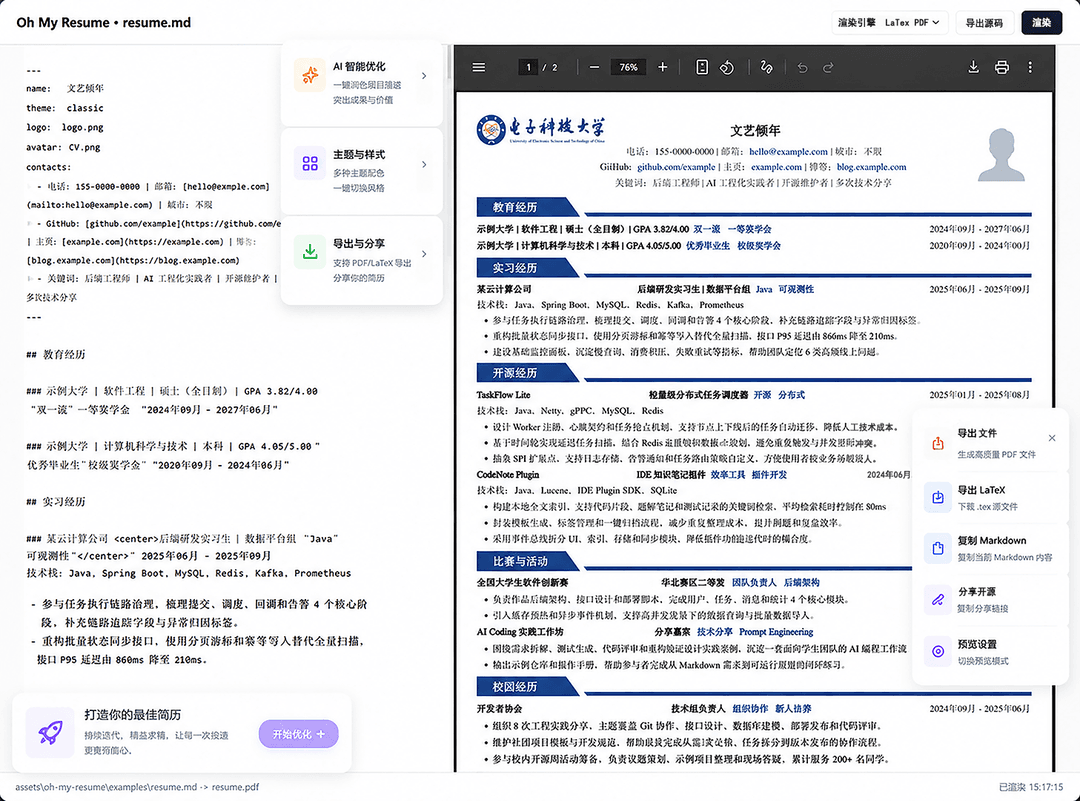
Windows 下的工作流演示
为什么选择 Oh My Resume?
这个领域已有很多成熟产品,它们解决的问题不同。Oh My Resume 不试图复刻一个在线简历网站,而是选择另一条路线:本地、自由、可编程、可被 Agent 深度协作。
| 能力 | 超级简历 | 老鱼简历 | OneResume | LaTeX 模板 | Oh My Resume |
|---|---|---|---|---|---|
| Markdown 原生支持 | ❌ | ❌ | ❌ | ❌ | ✅ |
| 本地文件管理 | ❌ | ❌ | ✅ | ✅ | ✅ |
| Git 版本管理 | ❌ | ❌ | ✅ | ✅ | ✅ |
| 长期维护迭代 | ❌ | ❌ | ❌ | ❌ | ✅ |
| 配置驱动样式 | ❌ | ❌ | ❌ | ❌ | ✅ |
| 自定义排版控制 | ❌ | ❌ | ❌ | ✅ | ✅ |
| 自动生成 PDF | ✅ | ✅ | ✅ | ✅ | ✅ |
| 无平台锁定 | ❌ | ❌ | ✅ | ✅ | ✅ |
| 上下文理解优化 | ❌ | ❌ | ❌ | ❌ | ✅ |
| Agent 协作 | ❌ | ❌ | ❌ | ❌ | ✅ |
快速开始
将本仓库安装为 Codex 或 Claude Code Skill:
oh-my-resume/
  SKILL.md
  agents/openai.yaml
  assets/oh-my-resume/
如果你的工具需要重启 Agent,安装后重启一次。
Agent工作流
Oh My Resume 不是一个在线编辑器,它让 Agent 直接参与简历构建流程:
Use $oh-my-resume to create my resume PDF from resume.md.
Agent 会自动完成:
- 检查 Node.js、XeLaTeX、latexmk 环境;
- 读取 Markdown 简历内容;
- 根据配置生成对应样式;
- 渲染 PDF;
- 输出生成路径和构建信息。
调试模式:
Use $oh-my-resume to debug resume.md.
可以启动本地预览环境,快速调整内容和样式。
Windows 首次使用
Windows 用户第一次生成 PDF 前,建议先准备本地 TeX 环境:
cd assets\oh-my-resume
install.bat
install.bat 会调用 scripts\install.ps1,刷新当前进程可见的 TeX 路径,保存 OMR_TEX_PATH 供后续终端使用,并执行 node scripts\cli.js doctor。脚本会优先复用已安装的 MiKTeX 或 TeX Live。
PowerShell / CI 可以直接运行:
powershell -ExecutionPolicy Bypass -File scripts\install.ps1 -PersistUserEnv -VerifyPdf
Markdown 格式
Oh My Resume 使用 Markdown 作为唯一事实源。
示例:
### 项目名称`标签` <right>2025年01月 - 2025年08月</right>

- 项目描述
  - 技术细节
    - 量化结果
支持:
##表示简历模块###表示经历条目`标签`渲染Tag- 自定义标签渲染文字对齐方式
-多级列表自动映射**重点**渲染粗体强调[文本](https://github.com/open-agent-power/oh-my-resume/blob/HEAD/链接)会保留为可点击链接
配置系统
所有视觉参数均通过omr.config.json控制。
包括:字体、页边距、行间距、主题颜色、图片尺寸等
示例:
{
  "theme": {
    "colors": {
      "omrTagBg": "232,241,255",
      "omrTagText": "37,99,235",
      "omrSectionBg": "242,242,242"
    },
    "lengths": {
      "omrPageMarginLeft": "8mm",
      "omrPhotoWidth": "2.35cm",
      "omrPhotoHeight": "2.75cm",
      "omrHeaderNameGap": "0.41em",
      "omrSectionAfter": "0.54em"
    },
    "fonts": {
      "omrBodyFont": "TeX Gyre Termes",
      "omrCJKMainFont": "Kaiti SC"
    },
    "sizes": {
      "omrBodyFontSize": "11.2pt",
      "omrBodyLineHeight": "14.5pt",
      "omrSectionFontSize": "12.1pt",
      "omrEntryFontSize": "10.5pt"
    }
  }
}
如果需要完全自定义主题,可以在初始化后复制并编辑 themes/classic.tex。
配置优先级
Oh My Resume 会优先读取当前工作目录的本地配置:
-
命令行指定
--config path/to/config.json -
当前目录
omr.config.json -
Skill 默认配置
因此 Skill 更新不会覆盖你的当前简历样式。只要
omr.config.json留在简历目录下,它就会优先覆盖内置推荐值。
本地样式模板
可以把常用样式保存到当前目录的 omr.styles/:
omr.styles/
  current-comfort.json
  compact.json
  interview.json
Debug 页面的「样式设置 -> 模板」只读取当前目录的本地模板。如果没有 omr.styles/*.json,下拉框会显示为空状态。你也可以在「配置路径」里填写任意相对路径,例如:
omr.styles/current-comfort.json
也可以点击「打开文件夹」选择包含 JSON 配置的文件夹,页面会读取其中的配置并应用。应用模板只会合并 theme 和 markdown 配置,不会修改 Markdown 正文、输入路径或输出路径。
环境要求
Skill 会自动检查:
- Node.js 18+
- XeLaTeX
- latexmk
HTML 快速预览不依赖 TeX。html-pdf / 「HTML 导出 PDF」需要本机安装 Google Chrome、Microsoft Edge 或 Chromium;自动检测失败时可设置:
export OMR_HTML_PDF_BROWSER="/Applications/Google Chrome.app/Contents/MacOS/Google Chrome"
macOS
brew install --cask mactex-no-gui
Windows
- 安装 MiKTeX Basic,或安装 TeX Live
- 安装 Strawberry Perl
- 运行
assets\oh-my-resume\install.bat
Ubuntu/Debian
sudo apt-get install latexmk texlive-xetex texlive-lang-chinese
Star History
开源协议
本项目采用 MIT License 开源许可证。
Made with by the open-source community
// faq
What is oh-my-resume?
Markdown-first resume skill for Codex and Claude Code. It is open-source on GitHub.
Is oh-my-resume free to use?
oh-my-resume is open-source under the MIT license, so it is free to use.
What category does oh-my-resume belong to?
oh-my-resume is listed under devtools in the Claudeers registry of Claude-compatible tools.
// embed badge

[](https://claudeers.com/oh-my-resume)
// retro hit counter

[](https://claudeers.com/oh-my-resume)
// reviews
// guestbook
// related in Developer Tools
 🔓
🔓The agent harness performance optimization system. Skills, instincts, memory, security, and research-first development for Claude Code, Codex, Opencode, Curs…
 🔓
🔓Makes your AI agent think like the laziest senior dev in the room. The best code is the code you never wrote.
 🔓
🔓Use Garry Tan's exact Claude Code setup: 23 opinionated tools that serve as CEO, Designer, Eng Manager, Release Manager, Doc Engineer, and QA
 🔓
🔓AI coding assistant skill (Claude Code, Codex, OpenCode, Cursor, Gemini CLI, and more). Turn any folder of code, SQL schemas, R scripts, shell scripts, docs,…