
mr-mak-workspace
A local desktop workspace for Codex and Claude Code, with project reports, creative skills and optional voice.
Install with your AI
Paste into Claude Code, Cursor, or any agent — it reads the repo and wires the tool into your project.
Install and set up mr-mak-workspace (git-clone project) into my current project.
Found on https://claudeers.com/mr-mak-workspace
Repo: https://github.com/witnesstodark/mr-mak-workspace
Homepage/docs: —
Detected install method: git-clone → git clone https://github.com/witnesstodark/mr-mak-workspace
Category: other. Platforms: cli, api, desktop, web.
Read the repo's README for exact setup and env vars, then install it and wire it into my project.

Claudeers Health Verdict:
active; community-verified: false. Confirm the source before running anything.
git clone https://github.com/witnesstodark/mr-mak-workspace
// compatibility
| Platforms | cli, api, desktop, web |
|---|---|
| Operating systems | — |
| AI compatibility | claude |
| License | MIT |
| Pricing | open-source |
| Language | Python |
Mr. Mak Workspace
Your agents do the work. You keep the useful parts in view.
Mr. Mak gives you two connected windows: real CLI chats on the left, and a Workspace for projects, research, images and files. Keep both open, or minimize the Workspace while an agent helps you in Blender, a game engine or your browser.
Prerequisite: install and sign in to Codex CLI and/or Claude Code CLI before setting up Mr. Mak. You need at least one of these CLIs to install and use this agent-first Workspace. Both can be used side by side. They are separate installations and are not bundled with Mr. Mak.
The optional voice coordinator specifically requires Codex CLI, even when Claude Code handles your main tasks. Voice also needs your own OpenAI API key.

Everyday tools
- Your files, close at hand. Browse a folder tree with Main folders or All
files, jump to
inbox,projects,workspace,knowledgeandprocesses, and open any folder in Windows Explorer. - Readable notes you can edit. Open Markdown as a formatted document, switch to Edit, and save changes in the same window. Preview images, video and audio alongside the file tree.
- Chats you can return to. Pin conversations in history, reorder and color
tabs, and see which agents are working or have a reply you have not viewed.
Drop files or folders into a chat to insert their paths; clipboard images are
saved in
inbox/attachments. - Projects with their work attached. Keep research, design versions, saved prompts and motion tests in tabs inside a card. Open images at full size and download them from the preview.
- Skills and tools within reach. The right rail opens project skills, knowledge, workflows, MCP connections, Settings and Help. See which MCP connections come from the project and which come from your agent's global setup.
Start with an agent
Use Use this template on GitHub to create your own repository, then clone it into a folder you control. Open that folder in your installed Codex CLI or Claude Code CLI and paste:
Set up this Mr. Mak Workspace repository on my computer. Read AGENTS.md and docs/getting-started.md, check the prerequisites, and help me run the Windows desktop app. Use my own CLI accounts. Leave optional voice, paid providers, MCP connections and the Win-key shortcut off until I choose to connect them. Keep my credentials in the ignored .env file. Show me the four examples and help me replace them with my own project.
The repository includes examples, instructions and application source. You bring your own agent accounts and any services you want to use.
Run on Windows
- Download the installer from Releases and install Mr. Mak Workspace.
- Open Start Mr. Mak.cmd in your cloned repository. On a first launch from the Start menu, select that repository when asked.
- Use + in Chats to open an installed CLI. Sign in with your own account.
The installer includes the local Node service. It does not include Codex, Claude Code, Kimi, Blender, Python or provider accounts.
To build from source, install Node.js 22.20+ and the Windows Tauri build prerequisites, then run:
powershell -ExecutionPolicy Bypass -File .\Setup.ps1 -Mode Check
powershell -ExecutionPolicy Bypass -File .\Setup.ps1 -Mode Desktop
For a browser preview of the reports, use -Mode Preview. The native desktop
app adds managed terminals, local file operations and voice.
See getting started for the complete setup and
architecture for the source layout.
What is inside
| Example | What it demonstrates |
|---|---|
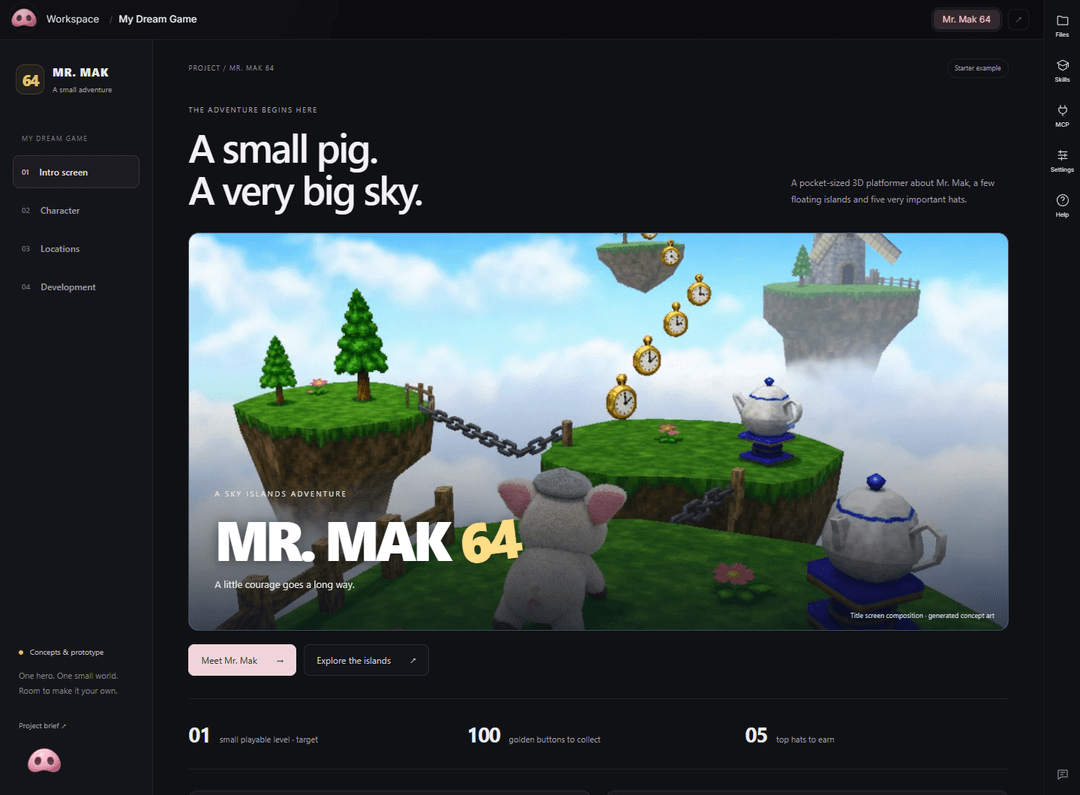
| My Dream Game | Mr. Mak 64: an illustrated game hub with an intro screen, character studies, locations and a development board. |
| Creative MCP Connections | A researched connection shortlist, source links and a practical setup checklist. |
| Make Workspace Yours | Getting started, everyday use and changes you can ask an agent to make. |
| Arachne Character Lab | Versions 1 through 9, expandable saved prompts, 158 images and eight motion studies. |
The examples stay visible until you archive them. Create your own cards next to them, or archive all four when you are ready.
Terminal text settings let you adjust readability. In agent chats, Ctrl+C copies selected text; PowerShell keeps normal shell behavior.
Skills you can keep
Fourteen project skills cover planning, handoffs, Workspace reports, image references, fal.ai generation, Higgsfield workflows, character sheets, procedural Three.js modeling, materials, motion references, Blender game animation, video inspection and dictation setup. Read the skill index.
The maintained instructions live in .agents/skills. Complete copies in
.claude/skills include the same instructions and resources. Both agents get the
full skills. Run npm run skills:sync after editing the maintained source.
Copy a skill together with its referenced resources; keep .env, job receipts
and account configuration private.
Optional voice and connections
You can work entirely through the CLI chats. The floating nose adds an optional
voice assistant: OpenAI Live supplies the voice connection over API, and the
coordinator uses your signed-in Codex CLI. Voice API usage is billed separately
from a CLI subscription. The coordinator uses your Codex model configuration
unless you set MRMAK_COORDINATOR_MODEL in .env.
fal.ai, Higgsfield and other providers are optional and use your own accounts. MCP configuration starts empty. The MCP panel explains where connections are configured, including any global connections your existing agents already have. The research sample is a shortlist, not a claim that those tools are installed.
Make it yours
Edit the placeholder files in context/, keep reusable lessons in knowledge/,
and save workflows in processes/. English is the default for stored content;
ask for another language whenever you need it. The app's Win-key shortcut and
permission bypass both start disabled.
This release targets Windows x64. Browser report previews can run elsewhere; the native Windows shell integration has not been ported or validated on macOS or Linux. See customization and sharing your version.
Application code and original workflow documentation are under the MIT license. Bundled third-party skill materials keep their original licenses. Sample media is supplied for learning and remixing; see third-party notices.
Mr. Mak is small.
// faq
What is mr-mak-workspace?
A local desktop workspace for Codex and Claude Code, with project reports, creative skills and optional voice.. It is open-source on GitHub.
Is mr-mak-workspace free to use?
mr-mak-workspace is open-source under the MIT license, so it is free to use.
What category does mr-mak-workspace belong to?
mr-mak-workspace is listed under other in the Claudeers registry of Claude-compatible tools.
// embed badge

[](https://claudeers.com/mr-mak-workspace)
// retro hit counter

[](https://claudeers.com/mr-mak-workspace)
// reviews
// guestbook
// related in Other
 🔓
🔓 🔓
🔓Anti-AI-slop design skill for Claude Code, Cursor, and Codex.
 🔓
🔓Open source Ghostty-based macOS terminal with vertical tabs and notifications for AI coding agents. Built for multitasking, organization, and programmability.
 🔓
🔓Huashu Design · HTML-native design skill for Claude Code · Claude Code 里 HTML 原生的设计 skill · 高保真原型 / 幻灯片 / 动画 + 20 设计哲学 + 5 维评审 + MP4 导出 · Agent-agnostic