
mindmap-mcts-skill
给智能体安装了思维导图,让 Codex/Claude code/Agent 在复杂问题上用“可见思维树 + 轻量 MCTS”来探索,而不是线性瞎试。
Install with your AI
Paste into Claude Code, Cursor, or any agent — it reads the repo and wires the tool into your project.
Install and set up mindmap-mcts-skill (git-clone project) into my current project.
Found on https://claudeers.com/mindmap-mcts-skill
Repo: https://github.com/cheshireyang/mindmap-mcts-skill
Homepage/docs: —
Detected install method: git-clone → git clone https://github.com/cheshireyang/mindmap-mcts-skill
Category: other. Platforms: cli, api, web.
Read the repo's README for exact setup and env vars, then install it and wire it into my project.

Claudeers Health Verdict:
slowing; community-verified: false. Confirm the source before running anything.
git clone https://github.com/cheshireyang/mindmap-mcts-skill
// compatibility
| Platforms | cli, api, web |
|---|---|
| Operating systems | — |
| AI compatibility | claude |
| License | MIT |
| Pricing | open-source |
| Language | Python |
MindMap-MCTS
Evidence-guided reasoning trees for Codex and Claude Code agents.
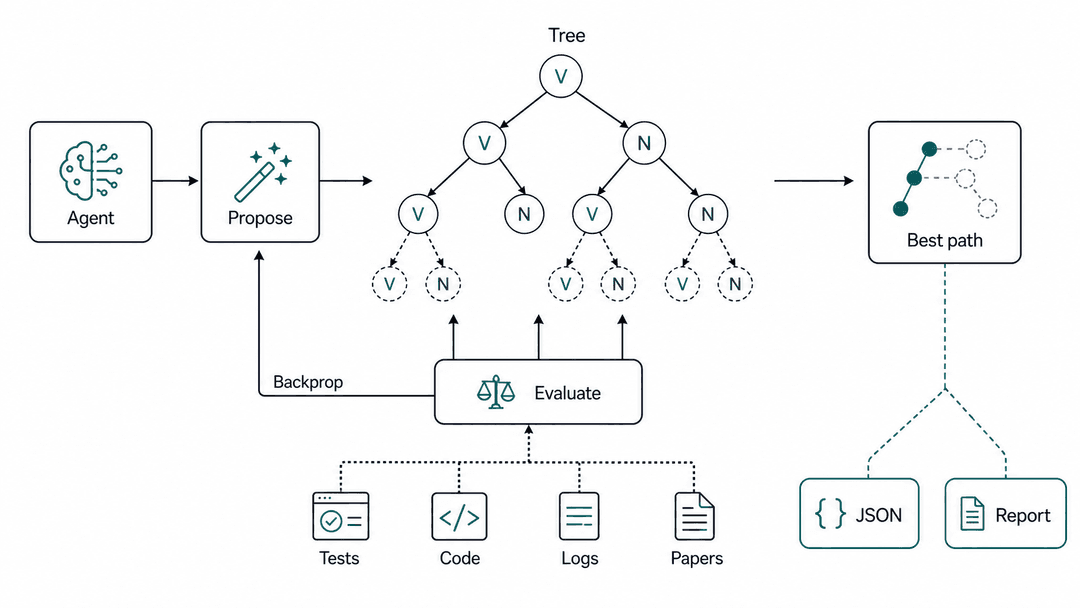
MindMap-MCTS is an installable Codex skill and Claude Code skill pattern for complex debugging, architecture decisions, and research synthesis. It turns agent reasoning into an auditable reasoning tree: propose branches, run real probes, score evidence, backpropagate values, and choose the next step with lightweight Monte Carlo Tree Search (MCTS) and UCB.
In short: this gives AI agents a visible tree search loop instead of a hidden linear trial-and-error thread.
Search Keywords
Codex skill, Claude Code skill, AI agents, agentic AI, agent reasoning, reasoning tree, evidence-guided reasoning, tree search, Monte Carlo Tree Search, MCTS, UCB, debugging workflow, planning workflow, architecture tradeoffs, research synthesis.
中文摘要:MindMap-MCTS 给 Codex、Claude Code 和其他智能体安装一个可见的推理树,让复杂问题可以用“分支探索、证据评分、MCTS/UCB 选择、回传更新”的方式推进,而不是线性瞎试。
What It Does
- Creates a JSON reasoning tree as the truth source.
- Renders readable Markdown, static HTML, and interactive Markmap HTML mindmap views.
- Selects the next branch with lightweight MCTS/UCB.
- Records
Vvalue,Nvisits, state, probe metadata, and evidence per node. - Preserves pruned branches so dead ends are not retried.
- Helps agents stop when a high-evidence path converges or when a user decision is needed.
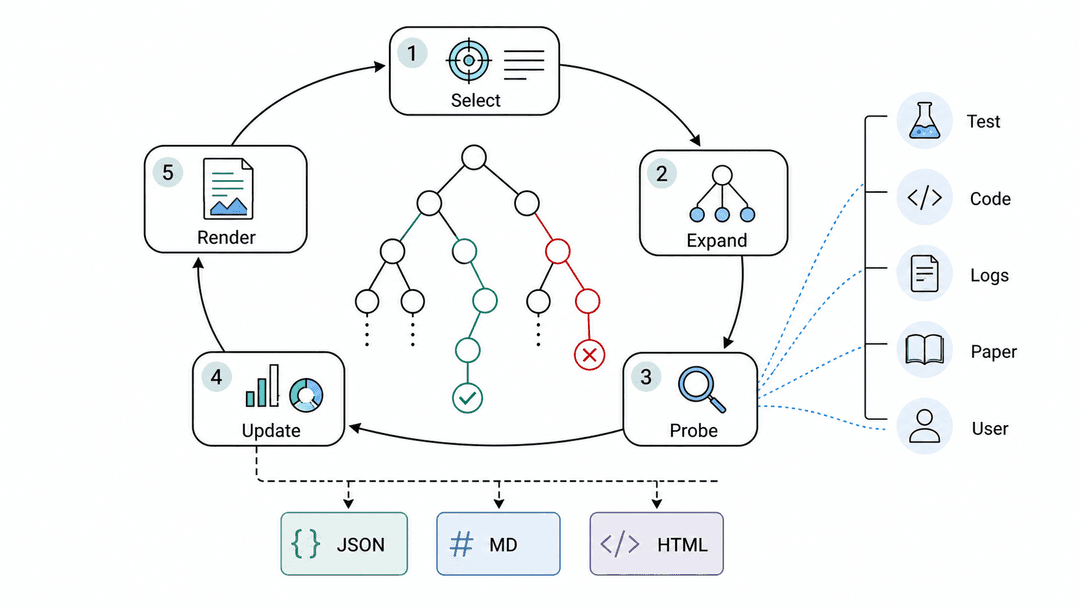
Alpha-Style Search Architecture
MindMap-MCTS turns Codex problem solving into a compact search architecture:
| Alpha-style component | MindMap-MCTS counterpart |
|---|---|
| Policy-like proposal | Codex proposes concrete hypotheses, designs, or next actions. |
| Search tree | .tree.json stores branches, states, visits, values, and evidence. |
| Value signal | Probe-backed evidence scores come from tests, logs, code reads, papers, or user input. |
| Backpropagation | The CLI updates V/N along the selected path after evaluation. |
| Best action | next and path expose the strongest branch for the next Codex step. |
The result is an Alpha-inspired skill implementation: the language model supplies candidate moves and real-world probes; the deterministic CLI preserves the tree, scores branches, and renders an auditable reasoning map.
This project is not affiliated with Google, DeepMind, AlphaGo, AlphaZero, AlphaFold, or any official Alpha-series project.
Repository Layout
mindmap-mcts-skill/
  mindmap-mcts/              # Installable Codex skill folder
    SKILL.md
    agents/openai.yaml
    scripts/mindmap_mcts/    # Bundled CLI tree engine
  examples/                  # Example tree state and rendered view
  docs/                      # Design notes and implementation plan
  assets/                    # GitHub README illustrations
  tests/                     # CLI and engine tests
Install
Clone this repository and run the installer for your agent host.
Codex:
git clone [email protected]:cheshireyang/mindmap-mcts-skill.git
cd mindmap-mcts-skill
./install.sh
Restart Codex so the new skill metadata is loaded.
Claude Code:
git clone [email protected]:cheshireyang/mindmap-mcts-skill.git
cd mindmap-mcts-skill
./install-claude.sh
This installs the same skill folder to ${CLAUDE_HOME:-$HOME/.claude}/skills/mindmap-mcts; the default Claude Code path is ~/.claude/skills/mindmap-mcts. Restart Claude Code so the new skill metadata is loaded.
Manual install is also just a directory copy:
mkdir -p "${CODEX_HOME:-$HOME/.codex}/skills"
cp -R mindmap-mcts "${CODEX_HOME:-$HOME/.codex}/skills/"

mkdir -p "${CLAUDE_HOME:-$HOME/.claude}/skills"
cp -R mindmap-mcts "${CLAUDE_HOME:-$HOME/.claude}/skills/"
Use In Codex
Ask Codex to use the skill explicitly:
Use $mindmap-mcts to explore this debugging task: login sometimes times out under load.
or:
用 $mindmap-mcts 分析这个复杂问题:Transformer 当前有哪些缺陷?
Use In Claude Code
Install with ./install-claude.sh, restart Claude Code, then ask for the same skill by name:
Use $mindmap-mcts to explore this architecture tradeoff.
Use The Bundled CLI Directly
The skill includes a Python CLI under mindmap-mcts/scripts.
Linux, macOS, WSL, or Git Bash:
mindmap-mcts/scripts/mindmap --help
Cross-platform Python launcher:
python mindmap-mcts/scripts/mindmap.py --help
Windows PowerShell can use the native launcher, which sets PYTHONPATH and UTF-8 output before running the Python module:
.\mindmap-mcts\scripts\mindmap.ps1 --help
If PowerShell execution policy blocks .ps1 files, run the Python module directly:
$env:PYTHONPATH = "$PWD\mindmap-mcts\scripts;$env:PYTHONPATH"
$env:PYTHONIOENCODING = "utf-8"
[Console]::OutputEncoding = [System.Text.Encoding]::UTF8
python -m mindmap_mcts.cli --help
Windows cmd.exe can use:
mindmap-mcts\scripts\mindmap.cmd --help
Generate the interactive HTML mind map from PowerShell:
.\mindmap-mcts\scripts\mindmap.ps1 render-markmap task.tree.json --out task.markmap.html
Create and inspect a tree:
mindmap-mcts/scripts/mindmap init \
  --title "Fix intermittent login timeout" \
  --out task.tree.json

# The root node created by init is n1.
mindmap-mcts/scripts/mindmap add task.tree.json \
  --parent n1 \
  --type hypothesis \
  --content "DB connection pool is exhausted"

mindmap-mcts/scripts/mindmap eval task.tree.json \
  --id n2 \
  --value 0.9 \
  --evidence "Logs contain pool timeout during failed login" \
  --probe-type log \
  --source logs/auth.log \
  --confidence high

mindmap-mcts/scripts/mindmap backprop task.tree.json --from n2
mindmap-mcts/scripts/mindmap render task.tree.json --out task.tree.md
mindmap-mcts/scripts/mindmap render-html task.tree.json --out task.tree.html
mindmap-mcts/scripts/mindmap render-markmap task.tree.json --out task.markmap.html
mindmap-mcts/scripts/mindmap show task.tree.json
mindmap-mcts/scripts/mindmap path task.tree.json
mindmap-mcts/scripts/mindmap next task.tree.json
mindmap-mcts/scripts/mindmap doctor task.tree.json
Use render-markmap for an interactive browser mind map. It writes a self-contained HTML shell that loads Markmap in the browser through the official CDN autoloader, so no local Node/npm setup is required. The generated map starts with an Exploration status branch showing best path, selected frontier, state counts, open frontier nodes, verified nodes, and pruned nodes. In the reasoning tree, completed exploration uses a green ✓, partial exploration uses a yellow ◐, and unopened frontier nodes use a gray ○; no red cross is used. Node titles are bold black, and status stays immediately after the title, for example **n11 事实性与幻觉** (V=0.90 N=1 verified). Use render-html when you want the simpler static fallback.
Available commands:
init, add, eval, prune, select, backprop, render, render-html, render-markmap, show, path, next, doctor
Structured evidence fields are optional. Use them when a score is backed by a concrete probe:
--probe-type test|grep|log|paper|code-read|user-input
--source path/to/file.py:42
--confidence low|medium|high
Windows Notes
- The tree root created by
initisn1, notroot. - Prefer
mindmap.ps1,mindmap.cmd,python mindmap-mcts/scripts/mindmap.py, orpython -m mindmap_mcts.cliin PowerShell. The Bashmindmapwrapper is for Unix shells, WSL, and Git Bash. - If Chinese output looks garbled in PowerShell, set UTF-8 before running commands:
$env:PYTHONIOENCODING = "utf-8"
[Console]::OutputEncoding = [System.Text.Encoding]::UTF8
Example
See examples/login-timeout.tree.md:
Best path: n1 -> n2
Best value: 0.90
When To Use
Use this skill when a task has:
- multiple plausible hypotheses or designs
- systematic debugging needs
- repeated trial-and-error risk
- option tradeoffs that should remain visible
- evidence-backed exploration rather than pure speculation
Skip it for one-step commands, obvious edits, or direct fact lookups.
Development
Run tests from the repository root:
PYTHONPATH=mindmap-mcts/scripts pytest tests -q
Validate the skill folder with Codex's skill validator:
python3 ~/.codex/skills/.system/skill-creator/scripts/quick_validate.py mindmap-mcts
Skill evaluation prompts live in evals/evals.json. They cover debugging, architecture tradeoffs, and research synthesis, and are intended to compare agent behavior with and without $mindmap-mcts.
License
MIT
// faq
What is mindmap-mcts-skill?
给智能体安装了思维导图,让 Codex/Claude code/Agent 在复杂问题上用“可见思维树 + 轻量 MCTS”来探索,而不是线性瞎试。. It is open-source on GitHub.
Is mindmap-mcts-skill free to use?
mindmap-mcts-skill is open-source under the MIT license, so it is free to use.
What category does mindmap-mcts-skill belong to?
mindmap-mcts-skill is listed under skills in the Claudeers registry of Claude-compatible tools.
// embed badge

[](https://claudeers.com/mindmap-mcts-skill)
// retro hit counter

[](https://claudeers.com/mindmap-mcts-skill)
// reviews
// guestbook
// related in Other
 🔓
🔓 🔓
🔓Anti-AI-slop design skill for Claude Code, Cursor, and Codex.
 🔓
🔓Open source Ghostty-based macOS terminal with vertical tabs and notifications for AI coding agents. Built for multitasking, organization, and programmability.
 🔓
🔓Huashu Design · HTML-native design skill for Claude Code · Claude Code 里 HTML 原生的设计 skill · 高保真原型 / 幻灯片 / 动画 + 20 设计哲学 + 5 维评审 + MP4 导出 · Agent-agnostic