
mex
Persistent project memory for AI coding agents. Structured scaffold + drift detection CLI.
Install with your AI
Paste into Claude Code, Cursor, or any agent — it reads the repo and wires the tool into your project.
Install and set up mex (git-clone project) into my current project.
Found on https://claudeers.com/mex
Repo: https://github.com/mex-memory/mex
Homepage/docs: https://mexmemory.com
Detected install method: git-clone → git clone https://github.com/mex-memory/mex
Category: uncategorized. Platforms: cli, api, web, mobile.
Read the repo's README for exact setup and env vars, then install it and wire it into my project.

Claudeers Health Verdict:
active; community-verified: false. Confirm the source before running anything.
git clone https://github.com/mex-memory/mex
// compatibility
| Platforms | cli, api, web, mobile |
|---|---|
| Operating systems | — |
| AI compatibility | claude |
| License | MIT |
| Pricing | open-source |
| Language | TypeScript |


Persistent project memory for AI coding agents.
AI agents forget everything between sessions. mex gives them permanent, navigable project memory so every session starts with the right context instead of a cold prompt dump.
npx mex-agent setup
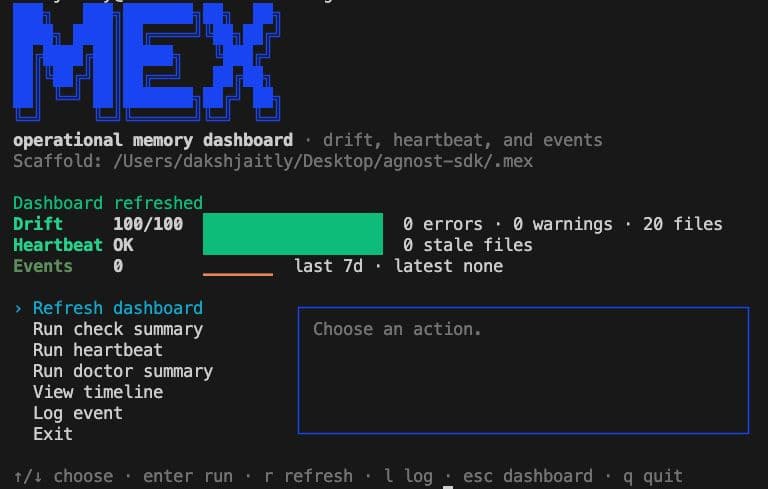
Why mex?
Most agent memory setups become one giant instruction file. That works for a while, then it floods the context window, burns tokens, and drifts away from the real codebase.
| Without mex | With mex |
|---|---|
Giant CLAUDE.md / rules files | Small anchor file plus routed context |
| Agents forget decisions and conventions | Decisions, patterns, and project state persist |
| Docs silently drift from code | mex check catches stale or broken scaffold claims |
| Every session starts cold | Agents load only the files relevant to the task |
| Repeated work stays tribal | New patterns grow from real tasks |
What It Does
mex creates a structured markdown scaffold for agent memory:
AGENTS.md/CLAUDE.md— tiny tool-loaded anchorROUTER.md— routing table for task-specific contextcontext/— architecture, stack, setup, decisions, conventionspatterns/— reusable task guides with gotchas and verification steps.mex/events/decisions.jsonl— append-only notes throughmex log
The CLI keeps that scaffold honest. It checks paths, commands, dependencies, pattern indexes, staleness, and script coverage without spending AI tokens. When drift appears, mex sync builds targeted prompts so the agent fixes only the stale pieces.
Quick Start
The npm package is named mex-agent because mex was already taken. The CLI command is still mex.
npx mex-agent setup
Setup creates the .mex/ scaffold, asks which AI tool you use, pre-scans your codebase, and generates a targeted prompt to populate the memory files. It takes about five minutes.
At the end of setup, you can install mex globally:
mex check        # drift score
mex sync         # fix drift
If you skip global install, use npx:
npx mex-agent check
npx mex-agent sync
Install globally later at any time:
npm install -g mex-agent
Windows
The recommended npx mex-agent setup flow runs in any terminal (Command Prompt, PowerShell, or WSL) and does not need bash, so most Windows users do not have to think about this section.
Windows users (legacy
setup.shflow): Run all commands inside WSL or Git Bash. Do not mix environments.
If you previously installed via the legacy setup.sh script, building inside WSL and then running the CLI from a native Windows terminal causes "module not found" errors because node_modules and path resolution differ between the two filesystems. Run install, build, and CLI commands inside the same environment: either entirely in WSL / Git Bash, or entirely in native Windows via npx mex-agent.
See issue #10 for context.
How It Works
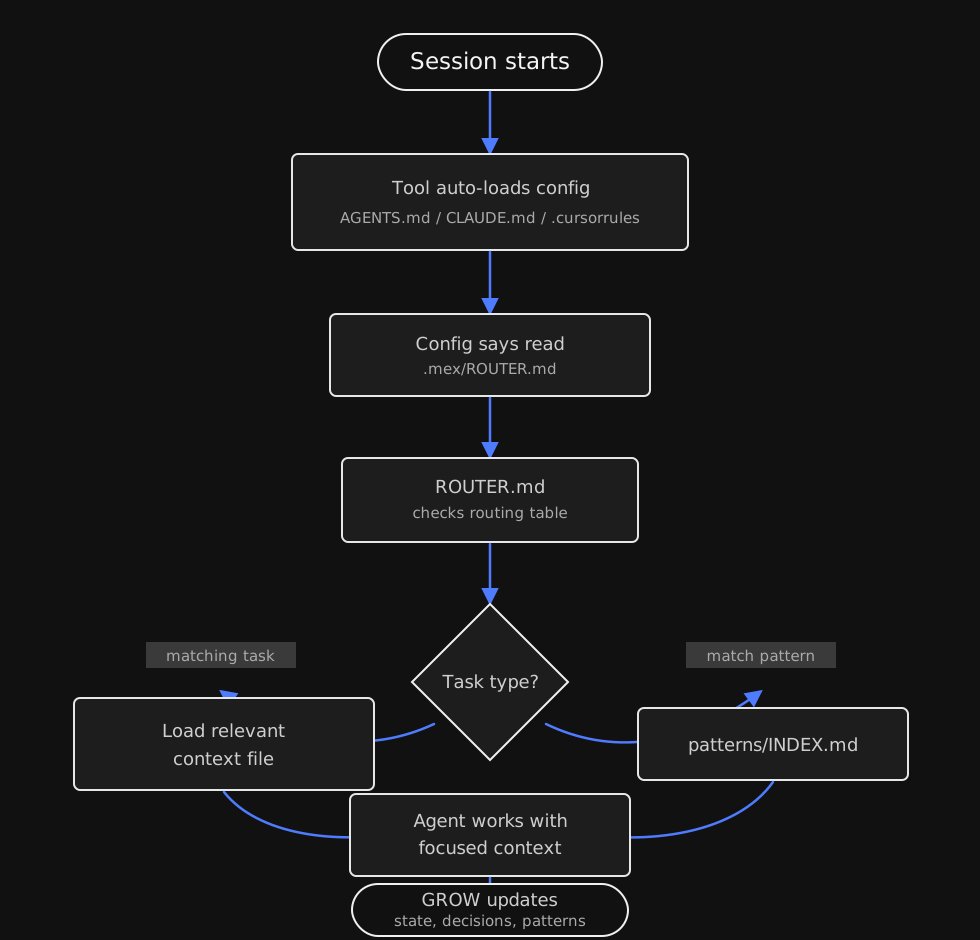
The agent starts with a tiny auto-loaded file. That file points to ROUTER.md, and the router loads only the context needed for the current task. After meaningful work, the GROW step updates project state, decisions, and task patterns so the scaffold becomes more useful over time.
Editable source: docs/diagrams/context-routing.excalidraw
Drift Detection
Eleven checkers validate your scaffold against the real codebase. Zero tokens, zero AI.
| Checker | What it catches |
|---|---|
| path | Referenced file paths that do not exist on disk |
| edges | YAML frontmatter edge targets pointing to missing files |
| index-sync | patterns/INDEX.md out of sync with actual pattern files |
| staleness | Scaffold files not updated in 30+ days or 50+ commits |
| command | npm run X / make X references scripts that do not exist |
| dependency | Claimed dependencies missing from package.json |
| cross-file | Same dependency with different versions across files |
| script-coverage | package.json scripts not mentioned in any scaffold file |
| tool-config-sync | Installed AI tool config files (e.g. CLAUDE.md, .cursorrules) out of sync with each other |
| todo-fixme | Unresolved TODO / FIXME markers left in scaffold markdown |
| broken-link | Markdown links to local files that do not exist on disk |
Scoring starts at 100. mex deducts 10 per error, 3 per warning, and 1 per info.
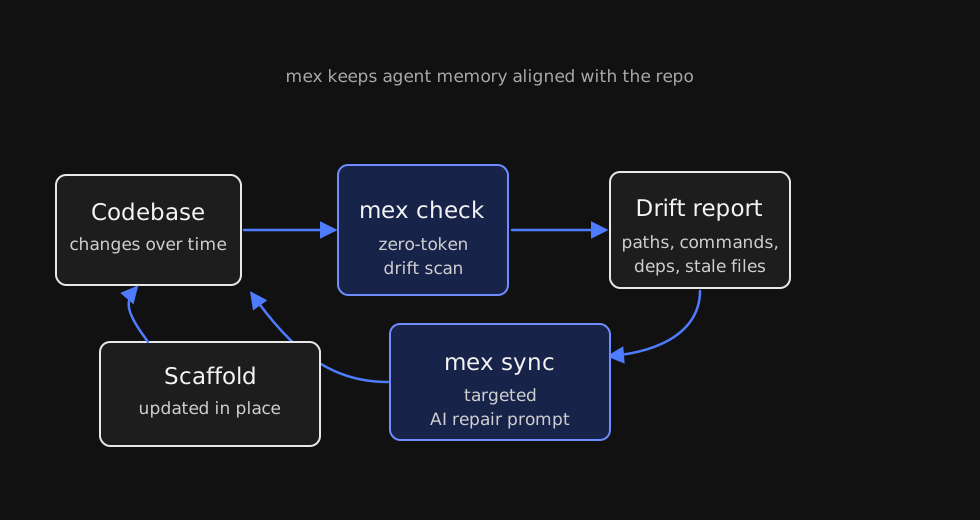
Editable source: docs/diagrams/drift-sync.excalidraw
Commands
All commands run from your project root. If you did not install globally, replace mex with npx mex-agent.
| Command | What it does |
|---|---|
mex | Open the interactive terminal dashboard |
mex tui | Open the interactive terminal dashboard explicitly |
mex setup | First-time setup: create .mex/ scaffold and populate with AI |
mex setup --mode agent-memory | Create templates for persistent-agent / homelab memory workspaces |
mex setup --dry-run | Preview what setup would do without making changes |
mex check | Run drift checkers and output a scored report |
mex check --quiet | One-liner: mex: drift score 92/100 (1 warning) |
mex check --json | Full report as JSON |
mex check --fix | Check and jump straight to sync if errors are found |
mex sync | Detect drift, choose mode, let AI fix, verify, repeat |
mex sync --dry-run | Preview targeted prompts without executing |
mex sync --warnings | Include warning-only files in sync |
mex init | Pre-scan codebase and build a structured brief for AI |
mex init --json | Raw scanner brief as JSON |
mex log <message> | Append a note, decision, risk, or todo |
mex timeline | View recent event log entries |
mex heartbeat | Run lightweight persistent-agent health checks once |
mex doctor | Friendly scaffold health summary |
mex watch | Install post-commit hook |
mex watch --interval | Run heartbeat repeatedly in the foreground |
mex watch --uninstall | Remove the hook |
mex completion <shell> | Print shell completions |
mex commands | List commands and scripts with descriptions |
Supported Tools
mex setup asks which tool you use and creates the right config file.
| Tool | Config file |
|---|---|
| Claude Code | CLAUDE.md |
| Cursor | .cursorrules |
| Windsurf | .windsurfrules |
| GitHub Copilot | .github/copilot-instructions.md |
| OpenCode | .opencode/opencode.json |
| Codex | AGENTS.md |
Neovim users can use docs/vim-neovim.md for Claude Code, Avante.nvim, Copilot.vim, and generic plugin setups.
MCP Server
packages/mex-mcp exposes mex to AI agents over the Model Context Protocol as native tool calls — no shelling out, structured JSON back. It imports mex-agent directly, so the tools run the same code as the CLI and never drift from it.
| Tool | Equivalent CLI | Returns |
|---|---|---|
mex_check | mex check --json | Drift report — score, issues, files checked |
mex_log | mex log / mex timeline | Appends an event (decision/note/risk/todo) or reads recent ones |
mex_timeline | mex timeline | Events filtered by kind/date, newest first |
mex_heartbeat | mex heartbeat | Health check — stale files, memory cleanup due |
mex_read_file | — | A scaffold file's contents, sandboxed to .mex/ |
Every tool takes an optional projectRoot (defaults to the current directory), so one server can target any project. Run mex setup first — the tools need a .mex/ scaffold.
Configure your client (Claude Code / Cursor .mcp.json):
{
  "mcpServers": {
    "mex": {
      "command": "node",
      "args": ["packages/mex-mcp/dist/index.js"]
    }
  }
}
Build it with npm run build --workspace mex-mcp first. Once published, this becomes "command": "npx", "args": ["mex-mcp"].
At session start an agent orients with two calls:
mex_check()                   # is the scaffold drifting?
mex_read_file("ROUTER.md")    # load the router, then pull only the context it needs
Before / After
Real output from testing mex on Agrow, an AI-powered agricultural voice helpline.
Scaffold before setup:
## Current Project State
<!-- What is working. What is not yet built. Known issues.
     Update this section whenever significant work is completed. -->
Scaffold after setup:
## Current Project State

**Working:**
- Voice call pipeline (Twilio -> STT -> LLM -> TTS -> response)
- Multi-provider STT with configurable selection
- RAG system with Supabase pgvector
- Streaming pipeline with barge-in support

**Not yet built:**
- Admin dashboard for call monitoring
- Automated test suite
- Multi-turn conversation memory across calls

**Known issues:**
- Sarvam AI STT bypass active; ElevenLabs fallback in use
Patterns directory after setup:
patterns/
├── add-api-client.md
├── add-language-support.md
├── debug-pipeline.md
└── add-rag-documents.md
Real World Results
Independently tested by a community member on OpenClaw across 10 structured homelab scenarios covering Ubuntu 24.04, Kubernetes, Docker, Ansible, Terraform, networking, and monitoring. 10/10 tests passed. Drift score: 100/100.
| Scenario | Without mex | With mex | Saved |
|---|---|---|---|
| "How does K8s work?" | ~3,300 tokens | ~1,450 tokens | 56% |
| "Open UFW port" | ~3,300 tokens | ~1,050 tokens | 68% |
| "Explain Docker" | ~3,300 tokens | ~1,100 tokens | 67% |
| Multi-context query | ~3,300 tokens | ~1,650 tokens | 50% |
~60% average token reduction per session.
Agent Memory Mode
mex setup --mode agent-memory creates a scaffold for persistent agents whose "project" is an operational environment rather than a code repo. It adds a HEARTBEAT.md contract and templates that frame mex as structured, task-routed memory:
ROUTER.mdtracks current operational state and routes the agent to the right memory files.context/stores architecture, stack, conventions, setup, and decisions.patterns/stores recurring runbooks..mex/events/decisions.jsonlstores append-only notes and rationale throughmex log.
mex heartbeat is intentionally lighter than mex check: it reads last_updated frontmatter and memory cleanup metadata, prints HEARTBEAT_OK when clean, and reports only when the agent needs to review stale context or memory files. Use mex watch --interval to run heartbeat repeatedly in a persistent-agent workspace.
Configuration
Optional settings live in .mex/config.json. Missing values fall back to defaults.
{
  "staleness": {
    "warnDays": 30,
    "errorDays": 90,
    "warnCommits": 50,
    "errorCommits": 200
  },
  "heartbeat": {
    "staleDays": 7,
    "memoryCleanupDays": 7,
    "dailyMemoryRetentionDays": 14
  },
  "watch": {
    "intervalMinutes": 30
  }
}
Telemetry
mex collects anonymous, opt-out usage data (command name, version, OS — never paths, args, file contents, IP, or personal data) to understand how the tool is used. Audit the exact payload with mex telemetry inspect, and opt out any time with DO_NOT_TRACK=1, MEX_TELEMETRY=0, or mex config set telemetry off. Full details: TELEMETRY.md.
Ecosystem
mex is provider-neutral. Integration guides, sponsored examples, and community recipes should be useful on their own, clearly labeled, and live in docs rather than silently changing the default experience.
Contributing
Contributions welcome. See CONTRIBUTING.md for setup and guidelines.
Changelog
See CHANGELOG.md for release history.
License
// faq
What is mex?
Persistent project memory for AI coding agents. Structured scaffold + drift detection CLI.. It is open-source on GitHub.
Is mex free to use?
mex is open-source under the MIT license, so it is free to use.
What category does mex belong to?
mex is listed under uncategorized in the Claudeers registry of Claude-compatible tools.
// embed badge

[](https://claudeers.com/mex)
// retro hit counter

[](https://claudeers.com/mex)
// reviews
// guestbook
// related in Uncategorized / Others
 🔓
🔓Fair-code workflow automation platform with native AI capabilities. Combine visual building with custom code, self-host or cloud, 400+ integrations.
 🔓
🔓The agent engineering platform.
 🔓
🔓FULL Augment Code, Claude Code, Cluely, CodeBuddy, Comet, Cursor, Devin AI, Junie, Kiro, Leap.new, Lovable, Manus, NotionAI, Orchids.app, Perplexity, Poke, Q…
 🔓
🔓100+ AI Agent & RAG apps you can actually run — clone, customize, ship.