
mapsuke
Operate QGIS through a chat with your Claude Code or Codex subscription.
Install with your AI
Paste into Claude Code, Cursor, or any agent — it reads the repo and wires the tool into your project.
Install and set up mapsuke (release-binary project) into my current project.
Found on https://claudeers.com/mapsuke
Repo: https://github.com/MIERUNE/mapsuke
Homepage/docs: —
Detected install method: release-binary → inspect the README
Category: other. Platforms: cli, api.
Read the repo's README for exact setup and env vars, then install it and wire it into my project.

Claudeers Health Verdict:
active; community-verified: false. Confirm the source before running anything.
Grab the latest release asset from GitHub.
# download a build from https://github.com/MIERUNE/mapsuke/releases
git clone https://github.com/MIERUNE/mapsuke
// compatibility
| Platforms | cli, api |
|---|---|
| Operating systems | — |
| AI compatibility | claude |
| License | GPL-2.0 |
| Pricing | open-source |
| Language | Python |

Mapsuke
Mapsuke lets you work with your QGIS project through a chat with Claude Code or Codex.
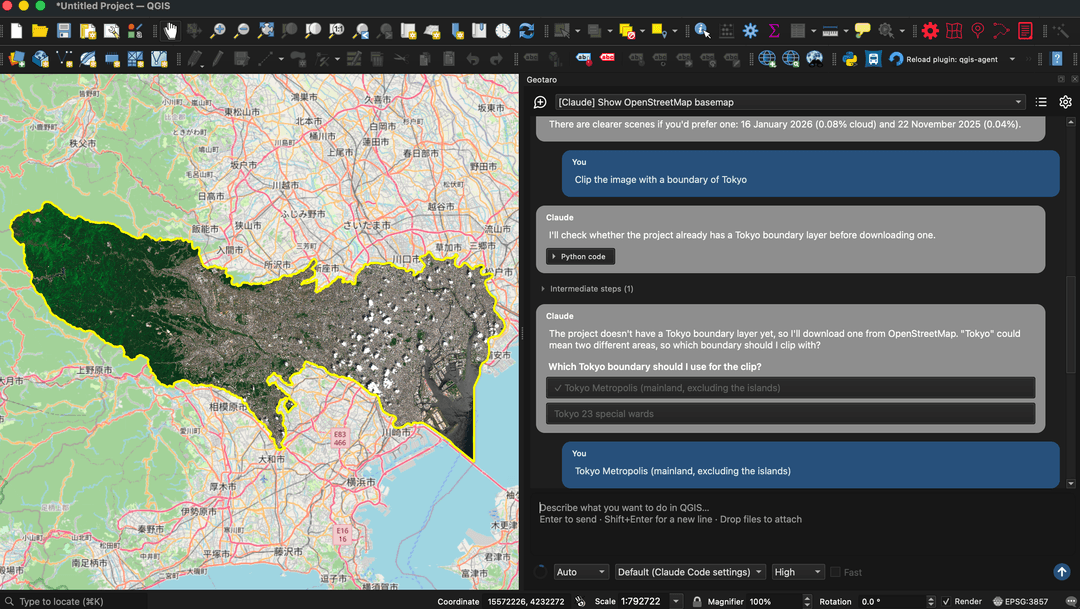
Mapsuke running in QGIS. Map data © OpenStreetMap contributors (ODbL). Contains modified Copernicus Sentinel data 2026.
Key ideas
- No MCP setup: Connect your agent to QGIS directly.
- Your own agent: Use your Claude Code or Codex CLI login, or an API key.
- Python in QGIS: The agent runs Python with QGIS and Processing tools. This code has the same file and network permissions as QGIS; review it before running it.
- Processing tools as skills: The agent discovers the Processing tools available in QGIS and uses them like skills.
- Reusable workflows: Save routine operations as Processing scripts.
Usage
- Install QGIS 3.44 or later and Claude Code or the Codex CLI.
- Install and enable the Mapsuke plugin, then open it from the Plugins menu or toolbar.
- Select New session, choose Claude or Codex, and log in if prompted.
- Enter a request such as “Add a point in Sapporo.” In Ask mode, approve the generated Python before it runs.
If QGIS cannot find the CLI, set its path in Mapsuke's settings. At each session start or restore, Mapsuke first checks that the selected CLI executable is available and its user configuration directory exists. If either cannot be confirmed, or an existing skills path is not a directory, skill synchronization and its prompt are skipped; install/run the CLI or correct its configured path before starting another session. When these checks pass, Mapsuke offers to save any missing bundled mapsuke-* skills for the selected CLI. Existing same-named bundled skills are overwritten with the bundled versions on every session start or restore, including local edits. Declining skips creation of missing skills and the offer returns at the next session start while they are missing; existing copies are still updated. Unrelated skill folders are left alone. Review and remove legacy qgis-* copies and the retired mapsuke-create-report and mapsuke-save-processing-script skills from the CLI skills folders if no longer needed.
// faq
What is mapsuke?
Operate QGIS through a chat with your Claude Code or Codex subscription.. It is open-source on GitHub.
Is mapsuke free to use?
mapsuke is open-source under the GPL-2.0 license, so it is free to use.
What category does mapsuke belong to?
mapsuke is listed under other in the Claudeers registry of Claude-compatible tools.
// embed badge

[](https://claudeers.com/mapsuke)
// retro hit counter

[](https://claudeers.com/mapsuke)
// reviews
// guestbook
// related in Other
 🔓
 🔓
Anti-AI-slop design skill for Claude Code, Cursor, and Codex.
 🔓
Huashu Design · HTML-native design skill for Claude Code · Claude Code 里 HTML 原生的设计 skill · 高保真原型 / 幻灯片 / 动画 + 20 设计哲学 + 5 维评审 + MP4 导出 · Agent-agnostic
 🔓
Open source Ghostty-based macOS terminal with vertical tabs and notifications for AI coding agents. Built for multitasking, organization, and programmability.