
macaz-cli
Your favorite models ❤️ your favorite coding agents. Claude Code, powered by OpenAI, OpenRouter...
Install with your AI
Paste into Claude Code, Cursor, or any agent — it reads the repo and wires the tool into your project.
Install and set up macaz-cli (release-binary project) into my current project.
Found on https://claudeers.com/macaz-cli
Repo: https://github.com/macaz-dev/macaz-cli
Homepage/docs: —
Detected install method: release-binary → inspect the README
Category: mcp-servers. Platforms: cli, api, web.
Read the repo's README for exact setup and env vars, then install it and wire it into my project.

Claudeers Health Verdict:
slowing; community-verified: false. Confirm the source before running anything.
Grab the latest release asset from GitHub.
# download a build from https://github.com/macaz-dev/macaz-cli/releases
git clone https://github.com/macaz-dev/macaz-cli
// compatibility
| Platforms | cli, api, web |
|---|---|
| Operating systems | — |
| AI compatibility | claude |
| License | Apache-2.0 |
| Pricing | open-source |
| Language | Go |
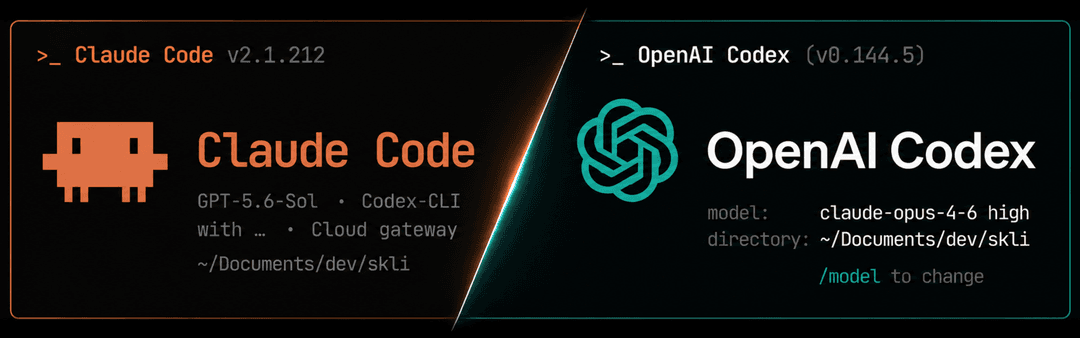
macaz
Use your favorite models and providers with your favorite coding agents.
macaz connects locally installed coding agents with a model provider chosen by the user. It starts Claude Code or Codex CLI and routes model interactions while the selected agent continues to own its local tools, permissions, sessions, skills, and user interface.
macaz is free and open-source software licensed under Apache-2.0. Every build contains the complete feature set.
[!IMPORTANT] macaz is an independent interoperability project. It is not affiliated with, authorized by, endorsed by, or sponsored by Anthropic, OpenAI, or any other client or model provider. Claude Code and Codex CLI are separate products that must be obtained from their authorized sources. Each product and provider remains subject to its own current terms.
Read LEGAL.md and PRIVACY.md before use.
What it does
macaz claude   # Claude Code through the selected provider
macaz codex    # Codex CLI through the selected provider
The two clients have independent provider/model configuration and isolated
macaz profiles. For example, macaz claude can use an OpenAI model while
macaz codex uses the official Anthropic API. macaz reset codex changes
neither the Claude configuration nor shared provider credentials.
The local routing layer translates both directions:
- Anthropic Messages requests and streams used by Claude Code;
- OpenAI Responses requests and streams used by Codex CLI;
- text, images, supported document inputs, reasoning effort, usage, errors, function tools, Codex custom/free-form tools, and tool namespaces; and
- live provider model catalogs into each client's native
/modelinterface.
Client-executed tools stay in the client. Shell commands, file edits,
apply_patch, skills, hooks, MCP tools, namespaced tools, and subagents are not
executed by macaz or by an upstream CLI adapter. Normal client permission and
sandbox behavior is preserved unless the user explicitly passes that client's
own bypass option.
Server-executed tools are different: a tool such as provider-hosted web search is available only when the selected provider exposes a compatible server implementation. macaz disables Codex's OpenAI-hosted web-search request for provider-neutral sessions rather than silently pretending another provider can execute it. Local function, custom, namespace, and MCP tools remain available.
No translation can make different proprietary models semantically identical. The compatibility target is correct protocol and local-tool behavior without a hidden provider fallback.
Install
On macOS or Linux:
curl -fsSL https://raw.githubusercontent.com/macaz-dev/macaz-cli/main/scripts/install.sh | sh
The installer selects the platform release, requires its entry in
SHA256SUMS, verifies SHA-256, and installs to $HOME/.local/bin by default.
Pin a release with --version:
curl -fsSL https://raw.githubusercontent.com/macaz-dev/macaz-cli/main/scripts/install.sh |
  sh -s -- --version 0.2.0
Windows binaries and other release files are published on GitHub Releases.
Install the latest release in place later with:
macaz update
The updater downloads only the exact asset for the current platform, verifies the release checksums and embedded version, and replaces the executable with rollback protection. It does not send prompts, source code, configuration, or provider credentials.
Release builds perform a short best-effort update check on startup. The check never installs automatically and does not block offline use. Disable it with:
export MACAZ_NO_UPDATE_CHECK=1
Requirements
- Go is needed only when building from source.
claudemust be onPATHto usemacaz claude.codexmust be onPATHto usemacaz codex.opencodeis required only when OpenCode CLI is the selected provider. Local agent auth reads existing Codex, OpenCode, or Pi credentials directly and does not start those CLIs.- A browser is used by the OpenAI Subscription authorization flow.
Claude Code, Codex CLI, and OpenCode are not bundled or redistributed.
Setup and providers
The first invocation of each client opens its own setup:
macaz claude
macaz codex
Available upstreams:
| Provider | Claude client | Codex client |
|---|---|---|
| OpenAI Subscription | yes | no (use Codex directly) |
| OpenAI API | yes | no (use Codex directly) |
| OpenRouter API | yes | yes |
| Anthropic API | no (use Claude directly) | yes |
| Codex CLI provider bridge (experimental) | yes | no (recursive) |
| OpenCode CLI provider bridge (experimental) | yes | yes |
| Local agent auth direct adapter (Codex/OpenCode/Pi, experimental) | yes | yes |
| Manual OpenAI-compatible endpoint | yes | yes |
API keys and OAuth credentials configured by macaz are stored in the
operating-system credential store, not in config.json. Local agent auth
instead uses a selected credential from Codex's, OpenCode's, or Pi's
auth.json. Supported discoveries are appended directly to the provider menu
and identify both the source agent and whether the credential is an API key or
a subscription. The initial direct adapter supports OpenAI OAuth and API-key
entries. OAuth refreshes are written back to that same file under the source's
compatible lock where one exists, with stale-token conflict detection so the
source agent and macaz keep one credential source. The Anthropic option uses an Anthropic API key and
the public Messages API; it does not use or convert a Claude consumer
subscription. Anthropic model IDs, token limits, input capabilities, and effort
levels are read from the account's live Models API during setup and startup.
Manual provider accepts either an OpenAI-compatible base URL (including its
port) plus a model ID, or an explicit path to a nonstandard Codex, OpenCode, or
Pi auth.json. A base URL without a path is normalized to /v1. Manual local
endpoints do not require or send an API key.
Each start refreshes the active provider catalog. The resulting public model
IDs and supported reasoning levels are written to the isolated client profile,
so model selection works through Claude Code's or Codex CLI's native /model
interface. The configured provider default is selected at launch; interactive
changes follow the selected client's normal session behavior.
Commands
macaz claude [args...]    Start Claude Code
macaz codex [args...]     Start Codex CLI
macaz status [client]     Check the configured provider and model catalog
macaz doctor [client]     Check the client executable and provider
macaz reset [client]      Reset one client, or all macaz state when omitted
macaz legal               Show the compatibility notice
macaz update              Install the latest verified release
macaz version             Show the installed version
Arguments after macaz claude or macaz codex are forwarded to that client,
except model/provider/profile overrides that would bypass macaz's authenticated
local routing layer.
Examples:
macaz claude --dangerously-skip-permissions
macaz codex --sandbox workspace-write
macaz status codex
macaz doctor claude
macaz reset codex
macaz reset claude or macaz reset codex removes only that client's macaz
configuration and isolated profile. It preserves the other client and shared
provider credentials. macaz reset with no client removes both macaz profiles,
all macaz-managed credentials, configuration, and isolated session history. It
does not remove normal vendor-client profiles or credentials managed directly
by vendor CLIs.
Claude MCP servers
On each macaz claude start, macaz imports user- and local-scoped MCP server
definitions from the normal Claude Code state into the isolated macaz Claude
profile. This lets the same locally configured MCP servers load in normal
Claude Code and through macaz without copying the rest of Claude's identity,
session, trust, or onboarding state. Project-scoped .mcp.json files remain
project files and are discovered normally by both profiles; Claude Code may ask
for approval once per profile.
[!NOTE] Claude.ai account connectors are not local MCP definitions and cannot be imported this way. Claude Code fetches those connectors only while its active authentication method is a Claude.ai subscription; it does not load them when
ANTHROPIC_API_KEY,ANTHROPIC_AUTH_TOKEN, or a third-party provider is active. Macaz must set a local authentication token to route model requests, so entries such asclaude.ai Google Drive,claude.ai Google Calendar, andclaude.ai Gmailshown by normalclaude mcp listare unavailable through macaz. See the official Claude Code MCP documentation.
The normal Claude profile is authoritative for an imported server name:
- additions and updates are refreshed into the macaz profile at startup;
- a removal deletes the prior imported copy when that copy was not changed in the macaz profile; and
- MCP servers with names that exist only in the macaz profile are preserved.
Change or remove an imported server with the normal claude mcp command; the
next macaz start will refresh that change. Use macaz claude mcp add or
remove for servers intended to exist only in the isolated macaz profile.
Only local MCP definitions are imported. Definitions can themselves contain command arguments, URLs, headers, or environment variables, so the isolated copy is written with private file permissions. Claude Code authentication, Claude.ai connectors, and generic profile state are not copied. A standard OAuth-backed MCP server may require a separate login for the isolated profile:
macaz claude mcp login SERVER_NAME
Inspect or manage the resulting profile with Claude Code's normal MCP commands:
macaz claude mcp list
macaz claude mcp get SERVER_NAME
macaz claude mcp add --scope user SERVER_NAME -- COMMAND ARGUMENTS...
macaz claude mcp remove --scope user SERVER_NAME
Isolation and security
- The local routing layer listens on a random
127.0.0.1port. - A new random authentication token is generated for every launch.
- The token exists only in the child process environment.
- Config and profile files use private permissions where supported.
- Normal Claude and Codex profiles are not modified. Claude MCP definitions are read and copied into the isolated macaz profile as described above.
- The local routing process stops when the launched client exits.
- There is no fallback to a different provider or official model.
- macaz contains no project-operated analytics or telemetry client.
The isolated profiles may contain client-owned session history. See PRIVACY.md for exact data flow and deletion behavior.
Provider notes
- OpenAI API and OpenRouter use Responses-compatible HTTP adapters. They reject truncated streams and invalid tool arguments instead of returning partial success. OpenRouter also receives a per-session/per-agent sticky routing key without changing the selected model.
- OpenAI Subscription uses device authorization, refreshes credentials, and applies bounded account retry/backoff. It is experimental and remains subject to OpenAI's current account terms.
- Anthropic API uses native
/v1/models,/v1/messages, and/v1/messages/count_tokens. Responses custom tools are converted to normal Anthropic tools with a typed raw-input wrapper and converted back before Codex executes them. - Codex CLI as a provider uses
codex app-serveronly as the authenticated transport and is offered only to the Claude client; using Codex as both client and upstream would recurse. Macaz derives a private temporary model catalog from Codex's local model caches, including the default profile,CODEX_HOME, sibling profiles, and profiles reported by wrapper executables. Malformed cache revisions are skipped when another valid profile is available;MACAZ_CODEX_MODEL_CATALOGcan explicitly select a fully custom catalog path. Macaz normalizes supported Codex catalog schema revisions, selects direct tool calling, disables Codex execution environments, and leaves every source cache unchanged. Claude executes client tools and macaz returns each structured result to the same app-server thread. Pending turns are isolated by Claude session and agent and expire after five minutes. Macaz reserves one CLI slot for new traffic; excess pending turns use the safe interrupted-turn fallback instead of starving the pool. If the Codex model cache is missing, run Codex once before using this experimental bridge. - OpenCode CLI uses an isolated request-scoped provider configuration. Its project tools and context are not exposed as a second agent layer.
- Local agent auth bypasses the source agent runtime and uses a selected Codex, OpenCode, or Pi credential. The OpenAI adapter follows the same direct API and subscription paths as macaz's native OpenAI providers.
- Claude Code controls skill and subagent fan-out. Parallel subagents and Auto
mode classifier checks can consume substantially more provider usage than a
single-agent Codex session. Macaz keeps the user's selected model for main,
background, and subagent work, while OpenAI Subscription fan-out is bounded
to four concurrent upstream requests by default. Advanced users can change
max_concurrent_subscription_requestsinconfig.json. - Macaz keeps the exact selected model for main, background, classifier, and
subagent paths. It sets Claude's automatic compact window only when the active
provider reports a context limit, and caps reasoning effort only for Claude's
dedicated conversation-compaction request. The default reasoning effort is
mediumand can be changed withdefault_effortinconfig.json.
Local development
Go 1.26.5 or newer is required.
Run from source:
go run ./cmd/macaz version
go run ./cmd/macaz claude
go run ./cmd/macaz codex
Build and run a local binary:
go build -o ./macaz ./cmd/macaz
./macaz version
./macaz codex
Run verification:
go mod verify
go test ./...
go vet ./...
go test -race ./...
Build a complete local release package into ignored dist/:
./scripts/build-release.sh v1.0.0
The release script requires an empty output directory and creates static
macOS, Linux, and Windows binaries for amd64 and arm64, plus SHA256SUMS for
installer and updater verification. To choose another empty directory:
OUTPUT_DIR=/tmp/macaz-release ./scripts/build-release.sh v1.0.0
Opt-in live-provider tests never run in normal CI:
MACAZ_OPENAI_API_INTEGRATION_MODEL=<model> go test ./internal/provider/openai -run LiveOpenAIAPI
MACAZ_OPENAI_SUBSCRIPTION_INTEGRATION_MODEL=<model> go test ./internal/provider/openai -run LiveOpenAISubscription
MACAZ_OPENROUTER_INTEGRATION_MODEL=<provider/model> go test ./internal/provider/openrouter -run LiveOpenRouter
MACAZ_CODEX_INTEGRATION_EXECUTABLE=<codex-or-compatible> go test ./internal/provider/codexcli -run LiveCodex
MACAZ_OPENCODE_INTEGRATION_MODEL=<provider/model> go test ./internal/provider/opencodecli -run LiveOpenCode
MACAZ_CLAUDE_INTEGRATION=1 go test ./internal/app -run LiveClaudeLifecycle
Every merged pull request on main is verified, assigned the next SemVer tag,
built for all supported platforms, and published as a GitHub Release with
checksums, generated release notes, and provenance when the repository is
public. The default bump is patch; the release:minor and release:major
labels select larger bumps.
License
Apache License 2.0. See LICENSE, NOTICE, and THIRD_PARTY_NOTICES.md.
// faq
What is macaz-cli?
Your favorite models ❤️ your favorite coding agents. Claude Code, powered by OpenAI, OpenRouter.... It is open-source on GitHub.
Is macaz-cli free to use?
macaz-cli is open-source under the Apache-2.0 license, so it is free to use.
What category does macaz-cli belong to?
macaz-cli is listed under mcp-servers in the Claudeers registry of Claude-compatible tools.
// embed badge

[](https://claudeers.com/macaz-cli)
// retro hit counter

[](https://claudeers.com/macaz-cli)
// reviews
// guestbook
// related in MCP Servers
 🔓
🔓f.k.a. Awesome ChatGPT Prompts. Share, discover, and collect prompts from the community. Free and open source — self-host for your organization with complete…
 🔓
🔓A cross-platform desktop All-in-One assistant for Claude Code, Codex, OpenCode, OpenClaw, Gemini CLI & Hermes Agent. Only official website: ccswitch.io
 🔓
🔓🪨 why use many token when few token do trick — Claude Code skill that cuts 65% of tokens by talking like caveman
 🔓
🔓An open-source AI agent that brings the power of Gemini directly into your terminal.