
ls-mcp
List MCP Server configurations in your system used by AI applications like Cursor, Claude Desktop, VS Code and others
Install with your AI
Paste into Claude Code, Cursor, or any agent — it reads the repo and wires the tool into your project.
Install and set up ls-mcp (mcp-stdio project) into my current project.
Found on https://claudeers.com/ls-mcp
Repo: https://github.com/lirantal/ls-mcp
Homepage/docs: —
Detected install method: mcp-stdio → claude mcp add ls-mcp -- npx -y ls-mcp
Category: mcp-servers. Platforms: cli, api, desktop.
Read the repo's README for exact setup and env vars, then install it and wire it into my project.

Claudeers Health Verdict:
active; community-verified: false. Confirm the source before running anything.
claude mcp add ls-mcp -- npx -y ls-mcp
git clone https://github.com/lirantal/ls-mcp
// compatibility
| Platforms | cli, api, desktop |
|---|---|
| Operating systems | — |
| AI compatibility | claude |
| License | Apache-2.0 |
| Pricing | open-source |
| Language | TypeScript |
ls-mcp
Detect Configured MCP (Model Context Protocol) in your local dev environment
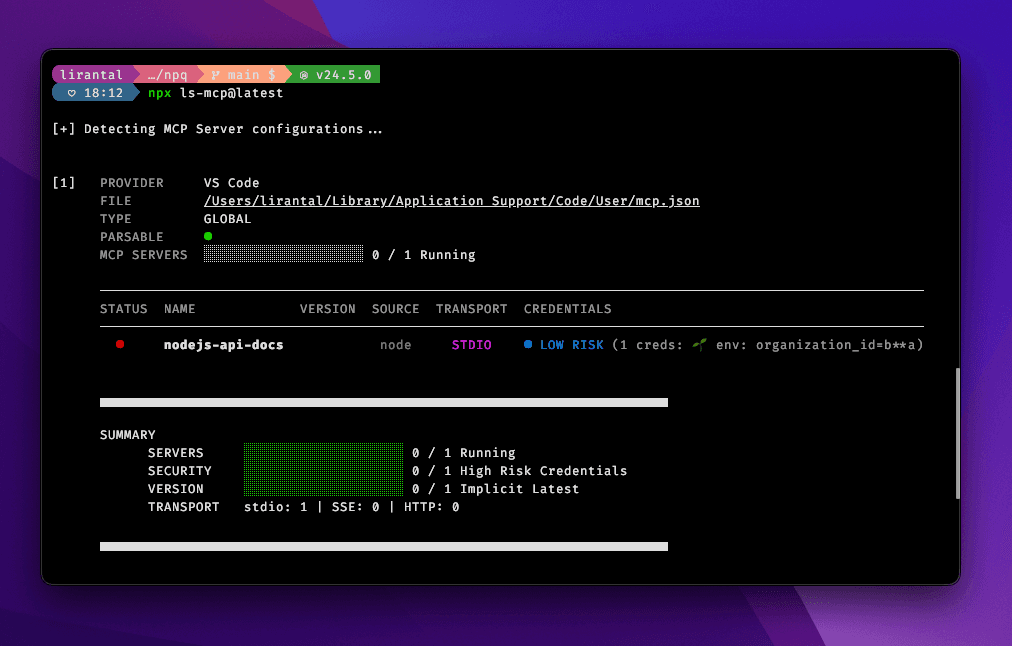
Features
- 🔍 MCP Discovery: Automatically detect MCP servers across various AI applications and agentic IDEs
- 📁 Directory Bubbling: Intelligent discovery of project-scoped MCP configs from nested directories, supporting project-scoped MCP Server configuration and global configurations
- 🔄 Process Detection: Real-time status of running MCP servers
- 🔒 Credential Analysis: Security analysis of environment variables and API keys for potentially exposed credentials in MCP Servers
Usage: CLI
npx ls-mcp
Analyze Specific Files
To analyze specific MCP configuration files instead of using automatic discovery, use the --files flag. This flag replaces automatic discovery and only analyzes the files you specify:
# Single file
npx ls-mcp --files ./mcp-config.json

# Multiple files (comma-separated)
npx ls-mcp --files ./config1.json,./config2.json

# Multiple files (space-separated)
npx ls-mcp --files ./config1.json ./config2.json
The --files flag automatically detects the configuration structure in your files, supporting various formats including:
servers- Standard MCP configuration keymcpServers- Alternative MCP configuration keymcp.servers- Nested configuration formatcontext_servers- Context-based configuration format
Show All Providers
By default, ls-mcp hides providers that have zero configured servers to reduce clutter. To show all providers including those with empty configurations, use the --all or -a flag:
# Show all providers including empty ones
npx ls-mcp --all

# Short form
npx ls-mcp -a

# Combine with JSON output
npx ls-mcp --all --json
Note: When using --files to analyze specific configuration files, the custom group is always shown even if it contains zero servers, as you explicitly requested to analyze those files.
JSON Output
To output results in JSON format (useful for programmatic consumption):
npx ls-mcp --json

# Combine with --files flag
npx ls-mcp --files ./config.json --json
This will return a structured JSON object containing:
mcpFiles: Complete MCP server configurations organized by provider (only includes providers with configured servers unless--allis specified)summary: Statistics including total servers, running servers, credential warnings, and transport breakdown
Debug Mode
To enable verbose debugging output, set the NODE_DEBUG environment variable:
# Enable debug logging for ls-mcp
NODE_DEBUG=ls-mcp npx ls-mcp

# Enable all debug logging
NODE_DEBUG=* npx ls-mcp
Documentation
For detailed information about the project architecture and features:
- Project Overview: Comprehensive project analysis and architecture
- Design Documentation: Technical design decisions and implementation details
- Requirements: Functional and non-functional requirements
- Custom File Analysis: Analyze specific MCP configuration files with the
--filesflag - Directory Bubbling: Intelligent directory traversal feature
- URL Hostname Extraction: Clean display of hostnames for URL-based servers
- Credential Detection: Security analysis features
Contributing
Please consult CONTRIBUTING for guidelines on contributing to this project.
Author
ls-mcp © Liran Tal, Released under the Apache-2.0 License.
// faq
What is ls-mcp?
List MCP Server configurations in your system used by AI applications like Cursor, Claude Desktop, VS Code and others. It is open-source on GitHub.
Is ls-mcp free to use?
ls-mcp is open-source under the Apache-2.0 license, so it is free to use.
What category does ls-mcp belong to?
ls-mcp is listed under mcp-servers in the Claudeers registry of Claude-compatible tools.
// embed badge

[](https://claudeers.com/ls-mcp)
// retro hit counter

[](https://claudeers.com/ls-mcp)
// reviews
// guestbook
// related in MCP Servers
 🔓
🔓f.k.a. Awesome ChatGPT Prompts. Share, discover, and collect prompts from the community. Free and open source — self-host for your organization with complete…
 🔓
🔓A cross-platform desktop All-in-One assistant for Claude Code, Codex, OpenCode, OpenClaw, Gemini CLI & Hermes Agent. Only official website: ccswitch.io
 🔓
🔓🪨 why use many token when few token do trick — Claude Code skill that cuts 65% of tokens by talking like caveman
 🔓
🔓An open-source AI agent that brings the power of Gemini directly into your terminal.