
mac-thermalright-ai-monitor
AI agent (Claude Code + Codex) & system monitor for the Thermalright 9.16 LCD — native macOS
Install with your AI
Paste into Claude Code, Cursor, or any agent — it reads the repo and wires the tool into your project.
Install and set up mac-thermalright-ai-monitor (git-clone project) into my current project.
Found on https://claudeers.com/mac-thermalright-ai-monitor
Repo: https://github.com/m1ng-li/mac-thermalright-ai-monitor
Homepage/docs: —
Detected install method: git-clone → git clone https://github.com/m1ng-li/mac-thermalright-ai-monitor
Category: automation. Platforms: cli, api.
Read the repo's README for exact setup and env vars, then install it and wire it into my project.

Claudeers Health Verdict:
slowing; community-verified: false. Confirm the source before running anything.
git clone https://github.com/m1ng-li/mac-thermalright-ai-monitor
// compatibility
| Platforms | cli, api |
|---|---|
| Operating systems | — |
| AI compatibility | claude |
| License | — |
| Pricing | open-source |
| Language | Swift |
MacTR —— 利民 LCD 上的 AI Agent & 系统监控
把利民 CPU 散热器上的 1920×480 LCD 变成一块实时仪表盘,既显示 Mac 的系统状态,又能看到你的 AI 编程助手此刻在干什么 —— 全部原生运行于 macOS,无需 Windows。
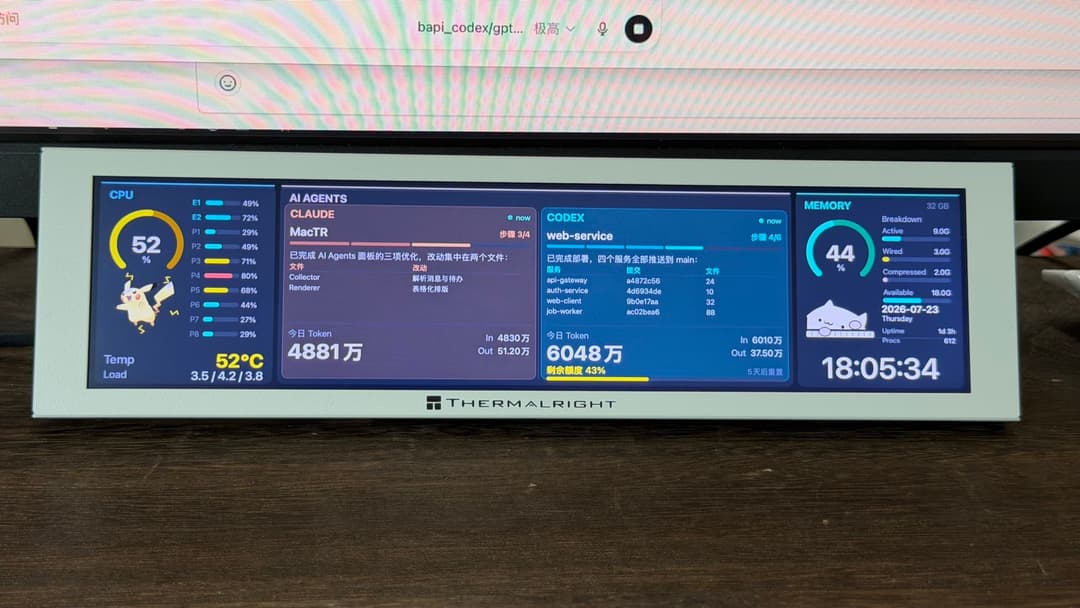
装在利民 Trofeo Vision 9.16 散热器上的实拍效果。
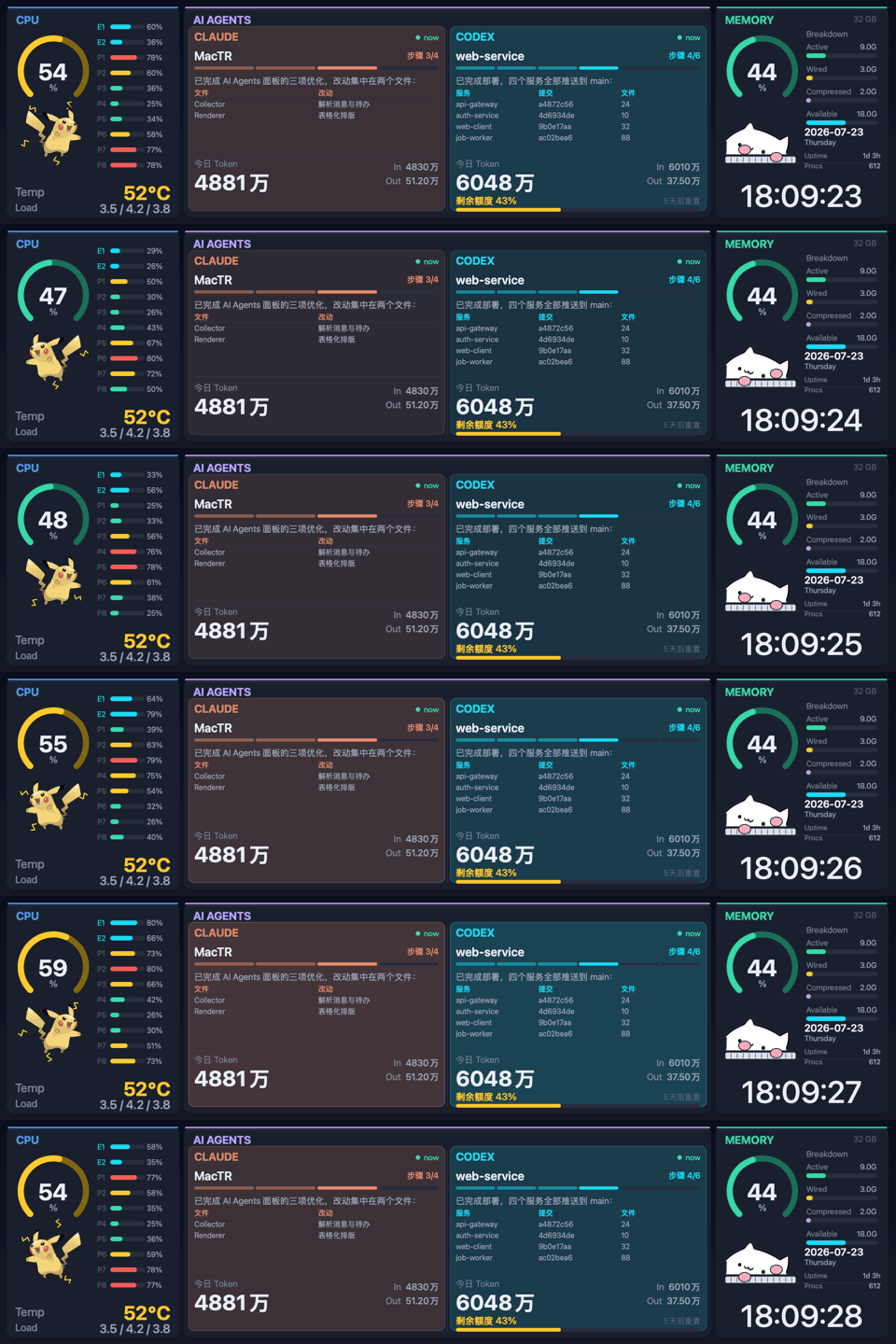
实时演示(假数据)。两个 agent 都在"工作"→ 面板呼吸、Bongo Cat 敲键盘、皮卡丘随 CPU 负载蹦跳放电、时钟走字。
基于 beret21/MacTR 改造,核心是一块实时追踪 Claude Code 与 Codex 会话的 AI Agents 面板。
亮点
🤖 AI Agents 面板
读取本地的 Claude Code 和 Codex 会话日志(只读、不联网),左右并排显示每个 agent 的:
- 当前项目和它最后说的话 —— 消息里的 Markdown 表格会被渲染成对齐的表格,而不是原始的
| … |文本。 - 计划 / 步骤进度 ——
步骤 4/6徽章 + 分段进度条,从 Codex 的update_plan和 Claude 的TodoWrite解析而来。上一轮已完成的旧计划会自动消失。 - 今日 Token 用量 —— 总量 + In/Out,用简洁的
万 / 亿格式。 - Codex 剩余额度 —— 剩余百分比 + 重置倒计时,跨所有近期会话取最新读数。
- 实时状态 —— agent 工作时该栏缓慢呼吸,完成一轮或需要你输入时闪烁约 10 秒提醒。
🖥️ 系统面板
- CPU —— 占用率环形表、每核 P/E 柱状条、温度(经 IOHIDEventSystemClient,无需 sudo)、负载平均值。
- 内存 —— 按内存压力着色的占用环、Active/Wired/Compressed/Available 明细、整宽时钟、日期、开机时长、进程数。
🐱⚡ 会互动的桌宠
- Bongo Cat:agent 工作时在键盘上啪嗒啪嗒敲字,空闲时打盹。
- 皮卡丘:CPU 负载越高电弧越猛;agent 运行时它还会蹦跳、左右转身。
⚙️ 底层
- 自适应帧率 —— 只有在有动画时(agent 工作、CPU 高负载)LCD 才跑约 15fps,其余时间降到 2fps 省电。
- USB 热插拔 —— 插拔、睡眠/唤醒后自动重连。
- 本机预览 —— 没接 LCD 时改为渲染到窗口,方便无硬件开发调试。
- 菜单栏应用 —— 后台运行,无 Dock 图标。
硬件
| 产品 | 利民 Trofeo Vision 9.16 LCD |
| 屏幕 | 9.16" IPS,1920 × 480 |
| 接口 | USB Type-C(USB 2.0) |
| 设备 | 0416:5408(LY Bulk 协议) |
环境要求
- Apple Silicon Mac(M1–M5)
- macOS 15(Sequoia)或更新
- Homebrew 并安装
libusb - 较新的 Swift 工具链(Xcode 16+,或经 Homebrew 的 Swift 6.1+)
构建与运行
brew install libusb pkg-config

git clone https://github.com/m1ng-li/mac-thermalright-ai-monitor.git
cd mac-thermalright-ai-monitor
swift build -c release

.build/release/MacTR          # 菜单栏应用;驱动 LCD,或没接 LCD 时弹预览窗口
如果系统的 Command Line Tools 损坏、
swift build在解析包清单时报错, 装 Homebrew 的 Swift 工具链(brew install swift),改用/opt/homebrew/opt/swift/bin/swift build -c release。
开机(登录)自启
cp packaging/com.beret21.MacTR.plist ~/Library/LaunchAgents/   # 先改里面的路径
launchctl load -w ~/Library/LaunchAgents/com.beret21.MacTR.plist
运行模式
.build/release/MacTR                 # 菜单栏应用(有 LCD 走 LCD,没有则预览窗口)
.build/release/MacTR --preview       # 强制打开本机预览窗口
.build/release/MacTR --demo          # 用精美假数据驱动 LCD(方便拍照 / 展示)
.build/release/MacTR --snapshot x.png --cores 10        # 渲染一帧假数据到 PNG
.build/release/MacTR --gif x.gif --frames 48 --fps 12 --scale 2   # 生成演示 GIF
.build/release/MacTR --benchmark 120 # 测量 LCD 可达帧率
同一时刻只能有一个进程占用 USB 设备 —— 用 --demo / --benchmark 前先停掉正在运行的实例。
Agent 数据怎么读取
MacTR 从不访问任何网络或 API,只读取这些 CLI 本来就写到本地磁盘的会话记录:
| Agent | 来源 | 解析内容 |
|---|---|---|
| Claude Code | ~/.claude/projects/*/*.jsonl | 助手消息、usage token、TodoWrite |
| Codex | ~/.codex/sessions/YYYY/MM/DD/*.jsonl | agent 消息、token_count、rate_limits、update_plan |
Token 总量按本地自然日统计;某个 agent 今天还没跑过时,面板会优雅地显示它上一次会话的上下文。
隐私
一切都在本地、只读。无遥测、无网络请求,没有任何数据离开你的 Mac。
致谢
- beret21/MacTR —— 本项目所基于的原版 macOS 驱动
- thermalright-trcc-linux —— LY Bulk 协议逆向
- fermion-star/apple_sensors —— IOHIDEventSystemClient 温度读取
- kuroni/bongocat-osu —— Bongo Cat 精灵图
- 皮卡丘立绘来自 PokeAPI/sprites —— 宝可梦版权归 © 任天堂 / Creatures / GAME FREAK 所有,此处仅作装饰性致敬
Bongo Cat 与皮卡丘纯属装饰。若你要分发构建产物,请注意它们的美术版权归各自所有者; 需要的话可替换或删除内嵌的
BongoCatAsset.swift/PikachuAsset.swift。
许可证
MIT(继承自上游项目)。第三方素材各自遵循其自身条款。
用 Swift + libusb 构建。与 Claude Code 协作开发。
// faq
What is mac-thermalright-ai-monitor?
AI agent (Claude Code + Codex) & system monitor for the Thermalright 9.16 LCD — native macOS. It is open-source on GitHub.
Is mac-thermalright-ai-monitor free to use?
mac-thermalright-ai-monitor is open-source, so it is free to use.
What category does mac-thermalright-ai-monitor belong to?
mac-thermalright-ai-monitor is listed under automation in the Claudeers registry of Claude-compatible tools.
// embed badge

[](https://claudeers.com/mac-thermalright-ai-monitor)
// retro hit counter

[](https://claudeers.com/mac-thermalright-ai-monitor)
// reviews
// guestbook
// related in Automation & Workflows
 🔓
🔓 🔓
🔓The API to search, scrape, and interact with the web at scale. 🔥
 🔓
🔓🌐 Make websites accessible for AI agents. Automate tasks online with ease.
 🔓
🔓Taste-Skill - gives your AI good taste. stops the AI from generating boring, generic slop