
mac-optimizing-looper
A menu-bar macOS agent loop: every N minutes it asks Claude/Codex what's overloading your Mac and suggests one-click, risk-checked fixes.
Install with your AI
Paste into Claude Code, Cursor, or any agent — it reads the repo and wires the tool into your project.
Install and set up mac-optimizing-looper (release-binary project) into my current project.
Found on https://claudeers.com/mac-optimizing-looper
Repo: https://github.com/kargnas/mac-optimizing-looper
Homepage/docs: —
Detected install method: release-binary → inspect the README
Category: automation. Platforms: cli, api.
Read the repo's README for exact setup and env vars, then install it and wire it into my project.

Claudeers Health Verdict:
slowing; community-verified: false. Confirm the source before running anything.
Grab the latest release asset from GitHub.
# download a build from https://github.com/kargnas/mac-optimizing-looper/releases
git clone https://github.com/kargnas/mac-optimizing-looper
// compatibility
| Platforms | cli, api |
|---|---|
| Operating systems | — |
| AI compatibility | claude |
| License | MIT |
| Pricing | open-source |
| Language | Swift |
🔥 Your Mac is slow. AI Agent finds the culprit.
English · 한국어 · 简体中文 · 繁體中文 · 日本語 · Español · Deutsch · Français · Português · Русский
Your Mac chokes → Claude names the exact process eating it → one click kills it. Nothing happens until you click — so there's no risk to your Mac.
Every hour, your Mac's load goes to Claude. It ranks what's actually hogging your CPU/RAM, writes the exact fix, and drops it in your menu bar — worst-first, color-coded, one click away. And before anything runs, a second Claude pass has to clear the command as SAFE.
Mac Optimizing Looper is a macOS menu-bar app (no Dock icon) that runs a continuous observe → ask the model → advise → (optionally) act loop on top of your local LLM CLI.
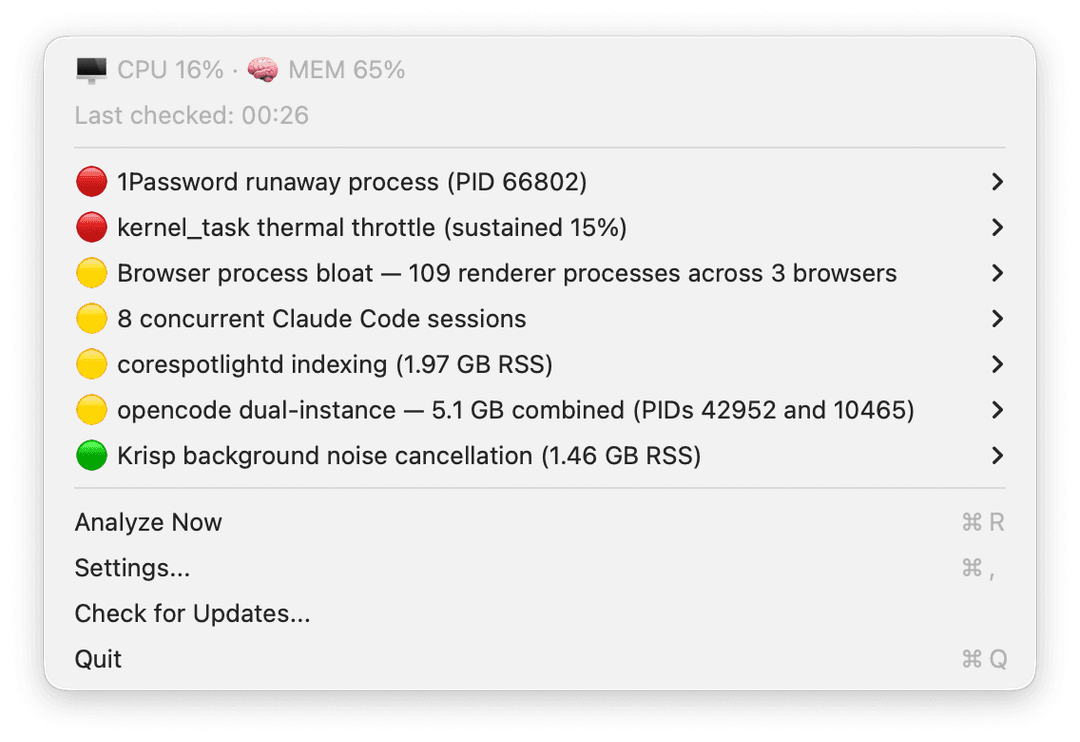
Activity Monitor shows you 200 rows and zero answers. This shows you the one command that fixes it — and why.
How it works
One cycle:
⏱  timer fires (default: every 1h, slider 10m … 36h)
→  collect: CPU/MEM + mac-optimizer snapshot (+ optional sustained sample)
→  claude -p   (analysis pass, --effort max)
→  claude -p   (format pass → ranked JSON suggestions)
The menu bar shows the count. The dropdown is ranked worst-first: 🔴 critical → 🟡 warning → 🟢 hygiene. Each row expands into Copy · Show in Terminal · Review with Claude · Run Command Now.
The safety gate — why it won't nuke your Mac
"Run Command Now" is the only path that executes anything, and it's gated end to end:
click ▸ Run Command Now   ($ kill 8123)
→  claude -p   classifies → RISK: SAFE
→  background run   (sudo → GUI password prompt, because there's no TTY)
→  ✅ notification → click → full stdout/stderr window
→  suggestion marked ✓ done
Anything not classified SAFE (including unknown) pops a confirmation dialog defaulting to Cancel. The advice itself is inert data; the model can never make the app run a thing. Enforced by GuardrailTests.
Mac Optimizing Looper vs the usual suspects
| Activity Monitor | "Cleaner" apps | Mac Optimizing Looper | |
|---|---|---|---|
| Finds the actual culprit | you read 200 rows | guesses | 🟢 Claude ranks worst-first |
| Tells you why it's slow | ✗ | ✗ | 🟢 plain-language reason |
| Gives the exact fix | ✗ | generic "clean" | 🟢 the real kill / unload command |
| Acts on its own | — | 🔴 yes, on a schedule | 🟢 never — only on your click |
| Safety-gated before running | — | ✗ | 🟢 second Claude pass clears it SAFE |
| Where your data goes | local | varies | only to your own Claude CLI |
Install
Needs the claude CLI on your PATH. macOS 13+.
brew install --cask kargnas/tap/mac-optimizing-looper
The cask + DMG go live after the first signed release. The pipeline is wired and waiting on signing secrets — see docs/release-setup.md. Until then, build from source:
git clone https://github.com/kargnas/mac-optimizing-looper
cd mac-optimizing-looper
bash script/build_and_run.sh run     # builds the .app, codesigns ad-hoc, launches
Run the bundle, not the bare binary — UNUserNotificationCenter needs a real bundle id (as.kargn.MacOptimizingLooper).
Make it yours
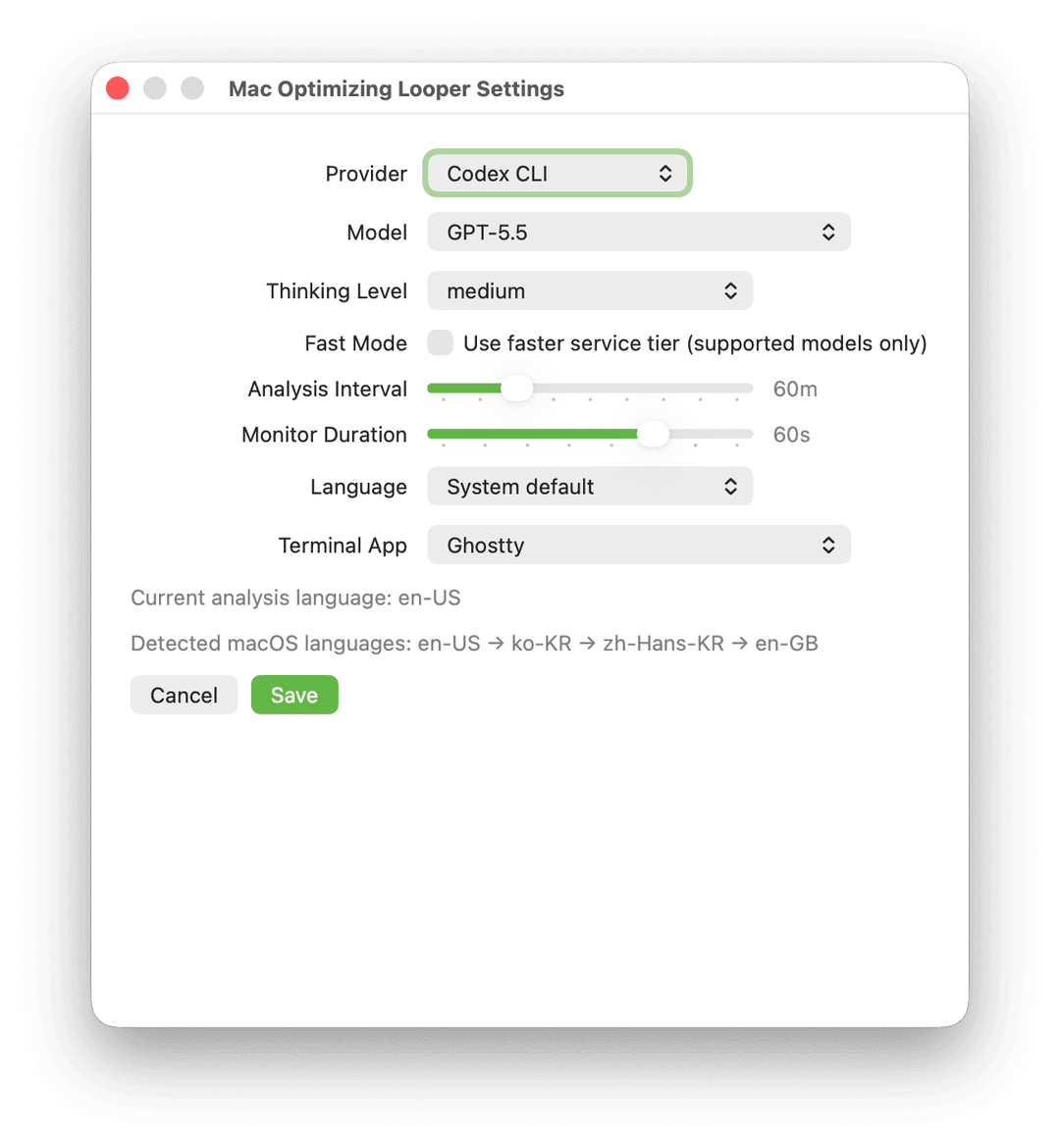
Switch Provider / Model / Effort right from the menu bar — no need to open Settings. Each has a Default option that auto-picks for you: Claude as the backend, a balanced model, and one notch below the top reasoning level. A fresh install just works, and you can still pin an exact value any time. While an analysis runs, the menu bar shows which backend is working. claude is the default backend; codex is also supported (one schema-constrained pass, no separate format step). Settings holds the rest — Fast Mode, analysis interval, terminal app, and Language (which sets both the UI and the language the model analyzes in). Models and reasoning levels are read live from each CLI.
FAQ
Does it ever run anything by itself?
No. Advice is inert data. The single execution path is the "Run Command Now" button, on your click — enforced by GuardrailTests.
Is it safe to hit "Run"?
Every command goes through a second Claude pass. Anything not clearly SAFE (including unknown) pops a confirm dialog defaulting to Cancel. sudo routes through the macOS GUI password prompt.
Does my data leave my Mac?
Only the live metrics + process table, sent to Anthropic via your own claude CLI (or OpenAI via codex). The app adds zero telemetry.
What does it cost?
Nothing beyond your existing claude / codex CLI usage. The app is free and MIT-licensed.
No claude CLI installed?
Then no advice — it surfaces the error instead of guessing.
Under the hood — system prompt, full cycle, decision flow, config, limits
System prompt (sanitized excerpt)
You are a macOS performance analyst.
Given live metrics + a process table, identify the ACTUAL remediation
command (kill / killall / unload) for each real problem — never an
inspection command (no pgrep / ps / top).

MUST:     rank by severity; prefer graceful `kill <pid>` over `kill -9`.
MUST:     return a null command when no command-line action applies.
MUST NOT: claim anything was executed — the app never auto-runs.
What each cycle can touch
| Step | Tool | Side effect |
|---|---|---|
| Collect | MetricsCollector, mac-optimizer.sh | read-only |
| Analyze | claude -p (effort = max) | network, read-only |
| Format | claude -p (effort = low) | ranked JSON |
| Risk-check | claude -p | network, read-only |
| Run | CommandExecutor | runs the command (user-initiated only) |
| Review | configured terminal + interactive claude | opens a terminal |
Decision flow
timer → collect → claude analyze → rank suggestions
                                       │
                 user picks an action ─┼─ Copy / Show in Terminal → no execution
                                       ├─ Review with Claude       → interactive claude session
                                       └─ Run Command Now
                                              → claude risk-check
                                                   ├─ SAFE → run → notify → ✓
                                                   └─ else → confirm (default Cancel)
Config
Config lives at ~/.config/mac-optimizing-looper/config.json (copy config.example.json): provider, model, thinking level, monitor seconds, interval, terminal, language. It's read once at launch — restart after hand-editing.
Limits / what it refuses
- Never acts on its own. Only "Run Command Now" executes, and only on your click.
- Unknown risk = treated as dangerous. Fail-safe; you confirm.
sudo→ GUI password prompt. A background run has no TTY, so root commands route throughosascript … with administrator privileges.- No
claudeCLI = no advice. It surfaces the error instead of guessing. - Notifications need the app bundle; a bare binary falls back to opening the result window.
MIT licensed. Built for people who'd rather know why their Mac is slow than reboot and hope.
// faq
What is mac-optimizing-looper?
A menu-bar macOS agent loop: every N minutes it asks Claude/Codex what's overloading your Mac and suggests one-click, risk-checked fixes.. It is open-source on GitHub.
Is mac-optimizing-looper free to use?
mac-optimizing-looper is open-source under the MIT license, so it is free to use.
What category does mac-optimizing-looper belong to?
mac-optimizing-looper is listed under automation in the Claudeers registry of Claude-compatible tools.
// embed badge

[](https://claudeers.com/mac-optimizing-looper)
// retro hit counter

[](https://claudeers.com/mac-optimizing-looper)
// reviews
// guestbook
// related in Automation & Workflows
 🔓
🔓 🔓
🔓The API to search, scrape, and interact with the web at scale. 🔥
 🔓
🔓🌐 Make websites accessible for AI agents. Automate tasks online with ease.
 🔓
🔓Taste-Skill - gives your AI good taste. stops the AI from generating boring, generic slop