
lazychat
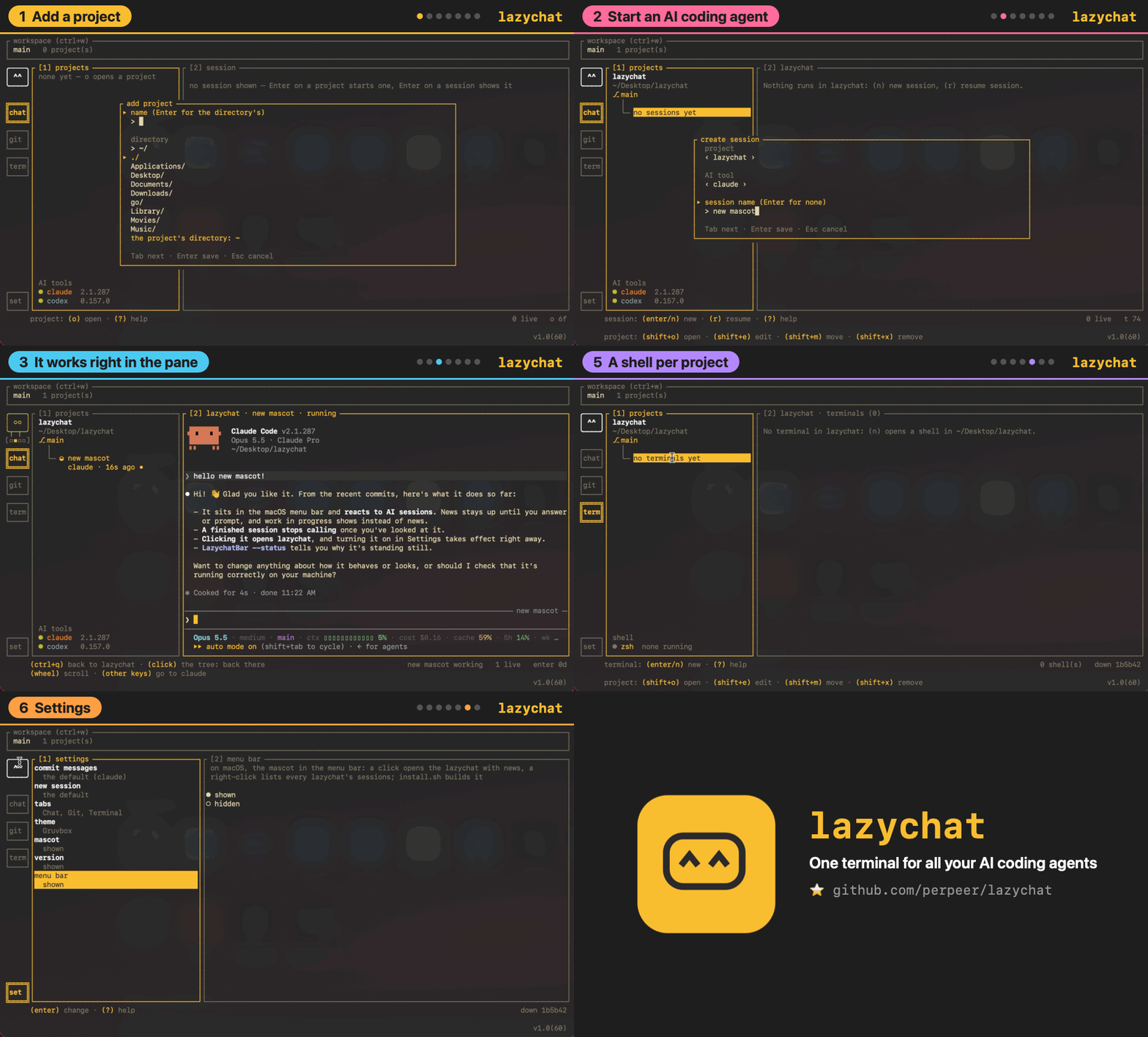
One terminal for all your AI coding agents. Run Claude Code and Codex side by side, see which one needs you, with Git and a shell one key away.
Install with your AI
Paste into Claude Code, Cursor, or any agent — it reads the repo and wires the tool into your project.
Install and set up lazychat (release-binary project) into my current project.
Found on https://claudeers.com/lazychat
Repo: https://github.com/Perpeer/lazychat
Homepage/docs: https://perpeer.github.io/lazychat/
Detected install method: release-binary → inspect the README
Category: devtools. Platforms: cli, api, web.
Read the repo's README for exact setup and env vars, then install it and wire it into my project.

Claudeers Health Verdict:
unknown; community-verified: false. Confirm the source before running anything.
Grab the latest release asset from GitHub.
# download a build from https://github.com/Perpeer/lazychat/releases
git clone https://github.com/Perpeer/lazychat
// compatibility
| Platforms | cli, api, web |
|---|---|
| Operating systems | — |
| AI compatibility | claude |
| License | AGPL-3.0 |
| Pricing | open-source |
| Language | Go |

lazychat
One terminal for all your AI coding agents.
Run Claude Code and Codex sessions side by side, see at a glance which one needs you,
and keep Git and a shell for every project one key away.
Website · Install · Quick start · Features · Sponsor Lazy ♥ · Contributing
Install
You need a Mac (Apple silicon or Intel, macOS 12 or newer) and an AI coding agent you are logged in to: Claude Code or Codex.
Homebrew
brew install perpeer/tap/lazychat
Homebrew builds lazychat on your Mac, along with Lazy's menu bar app, so
macOS opens both without a warning. Then run lazychat; lazychat doctor
says what else is ready. Lazy starts with lazychat; brew services start lazychat keeps it in the menu bar from every login.
To update:
brew update && brew upgrade lazychat
lazychat comes from our own tap for now. Homebrew's own list takes it at
225 stars, and then it is just brew install lazychat. If it saves you a
few tabs, star it: every
star helps lazychat reach more people.
From the source
git clone https://github.com/perpeer/lazychat
cd lazychat
./install.sh
It checks your Mac, says what is missing, and builds
~/.local/bin/lazychat and Lazy's menu bar app. To update, run
git pull && ./install.sh in the same folder.
Updates
When a new release is out, a green new box shows on the left rail over
Settings (and ↑ 1.0.5 beside the version at the bottom right). Click it,
or press U: a small window shows the Homebrew command above, and c
copies it. With Homebrew, Enter upgrades right there in the
background, showing the step it is on, then offers to restart lazychat on
the new version — running sessions stop and stay in the list. If the
upgrade fails it says so and shows the command to run by hand. Homebrew
sees a release within the hour it comes out. From the source, Enter
runs it in a new shell in the Terminal tab instead. If Lazy runs as a
service, brew services restart lazychat brings the new menu bar app too.
To remove lazychat, run brew uninstall lazychat, or ./uninstall.sh for
a source install. Your settings and workspaces stay (./uninstall.sh --purge takes them too); your projects and the agents' own files are
never touched.
Quick start
- Run
lazychatand name a workspace, the set of projects you work on. - Press
oand pick a project folder. - Press
nto start Claude Code or Codex in it,Enterto type to it, andctrl+qto come back. Tabmoves between the tabs, and?lists every key where you are.
lazychat doctor tells you which agents are ready, and why not.
Features
Chat: your agents, side by side
Every session sits under its project with its terminal next to it. You can
see which one works, which one waits for you and how long the last prompt
took. n starts one, r resumes an old one, and w lets you draft the
next prompt while the agent is still busy. i, or
a click on Lazy while several wait, opens the inbox: the sessions asking
you something or finished, Enter opens one. Press 3 for the details. At
the top is the prompt's flow, drawn like git log --graph: each tool it
called in order with the file it touched or the command it ran, a
subagent as a branch that forks off and joins back when it returns, a
question to you, and what each step added to the context. Beside it is the session's context, drawn like Claude
Code's /context: how full the window is, what fills it, which tool's
results took the most, and how many more prompts fit at this pace. At the
bottom are your last ten prompts as a table with their state, duration,
tokens and API cost. Lazy says hello when lazychat opens, and plays a
sound when a session starts on a prompt, asks you something, finishes or
fails; you can turn the sounds off in Settings.
┌ [1] projects ──────────┐┌ [2] session │ [3] details ───────────┐
│ garden-shed            ││ ❯ paint the shed blue                │
│ main                   ││                                      │
│   │                    ││ ● Starting with the north wall.      │
│   ├─ ● ivy             ││   Reading paint.go…                  │
│   │    claude · 42s    ││                                      │
│   │                    ││ > ▌                                  │
│   └─ ○ oak             ││                                      │
│        codex · 3m 18s  ││                                      │
└────────────────────────┘└──────────────────────────────────────┘
session: (enter) continue · (n) new · (r) resume · (w) draft · (?) help
Git: stage, diff and commit without leaving
Changes as a folder tree, a diff you can walk line by line with the code
in its language's colours — v selects lines, space stages just
those — your last commits and the repository's worktrees. Suggest asks the agent for a
commit message written from what you staged.
┌ [1] projects ──┐┌ [2] Unstaged · 1 ────┐┌ [5] diff ──────────────────┐
│ garden-shed    ││ M paint.go           ││ @@ -3,2 +3,2 @@            │
│ main ↑1        │└──────────────────────┘│ - color := "red"           │
│                │┌ [3] Staged · 1 ──────┐│ + color := "blue"          │
│ blue-door      ││ + door.go            ││                            │
│ worktree       │└──────────────────────┘└────────────────────────────┘
│                │┌ [4] commits ─────────┐┌ [6] commit ────────────────┐
│                ││ ↑ a1b2c3d first coat ││ Paint the door blue        │
│                ││   9f8e7d6 sand it    ││────────────────────────────│
│                ││                      ││      [ Suggest ] [ Commit ]│
│                ││                      ││                            │
└────────────────┘└──────────────────────┘└────────────────────────────┘
branch: (c) commit · (p) pull · (shift+p) push · (b) branches · (w) worktrees
Terminal: a shell in every project
Plain shells in your projects' folders, for the things the agents don't do.
┌ [1] projects ──────┐┌ [2] sh 1 ──────────────────────────────┐
│ garden-shed        ││ $ go test ./...                        │
│ main               ││ ok   shed/paint   0.4s                 │
│   │                ││ $ ▌                                    │
│  ├─ ● sh 1         ││                                        │
│  │                 ││                                        │
│  └─ ○ server       ││                                        │
└────────────────────┘└────────────────────────────────────────┘
terminal: (enter) continue · (n) new · (e) rename · (v) copy · (d) close
Settings holds the theme, which tabs show and which agent writes your commit messages. Every key and screen is in the reference.
Sponsor Lazy

Lazy watches your agents all day and has never asked for anything. lazychat is free and stays free; if it saves you time, keep Lazy going:
☕ $3 a coffee · 🍩 $10 a snack · 🛋️ $50 a comfy cushion · 🚀 $100+ super sponsor
Inspiration
lazychat follows lazygit and lazydocker by Jesse Duffield: terminal UIs where everything is one key away. lazychat does the same for AI coding agents.
License
AGPL-3.0, see LICENSE. lazychat is free to use, change and share; a
changed copy that is shipped, sold or run as a service has to stay open
source too, and keeps the credit in NOTICE.
Contributing
Bug reports, ideas and pull requests are welcome: open an issue and tell us which agent lazychat should support next. CONTRIBUTING.md explains how the code fits together and how it is tested.
// faq
What is lazychat?
One terminal for all your AI coding agents. Run Claude Code and Codex side by side, see which one needs you, with Git and a shell one key away. . It is open-source on GitHub.
Is lazychat free to use?
lazychat is open-source under the AGPL-3.0 license, so it is free to use.
What category does lazychat belong to?
lazychat is listed under devtools in the Claudeers registry of Claude-compatible tools.
// embed badge

[](https://claudeers.com/lazychat)
// retro hit counter

[](https://claudeers.com/lazychat)
// reviews
// guestbook
// related in Developer Tools
 🔓
🔓The agent harness performance optimization system. Skills, instincts, memory, security, and research-first development for Claude Code, Codex, Opencode, Curs…
 🔓
🔓Makes your AI agent think like the laziest senior dev in the room. The best code is the code you never wrote.
 🔓
🔓Use Garry Tan's exact Claude Code setup: 23 opinionated tools that serve as CEO, Designer, Eng Manager, Release Manager, Doc Engineer, and QA
 🔓
🔓AI coding assistant skill (Claude Code, Codex, OpenCode, Cursor, Gemini CLI, and more). Turn any folder of code, SQL schemas, R scripts, shell scripts, docs,…