
lattice-app
Self-hosted web workspace for running Claude Code and Codex agents on projects
Install with your AI
Paste into Claude Code, Cursor, or any agent — it reads the repo and wires the tool into your project.
Install and set up lattice-app (npm project) into my current project.
Found on https://claudeers.com/lattice-app
Repo: https://github.com/Liggi/lattice-app
Homepage/docs: —
Detected install method: npm → npm install lattice-app
Category: devtools. Platforms: cli, api, desktop, web.
Read the repo's README for exact setup and env vars, then install it and wire it into my project.

Claudeers Health Verdict:
active; community-verified: false. Confirm the source before running anything.
npm install lattice-app
git clone https://github.com/Liggi/lattice-app
// compatibility
| Platforms | cli, api, desktop, web |
|---|---|
| Operating systems | — |
| AI compatibility | claude |
| License | Apache-2.0 |
| Pricing | open-source |
| Language | TypeScript |

A self-hosted workspace for running Claude Code and Codex agents on your projects.
Install
·
First project
·
Phone access
·
Configuration
·
Development
About
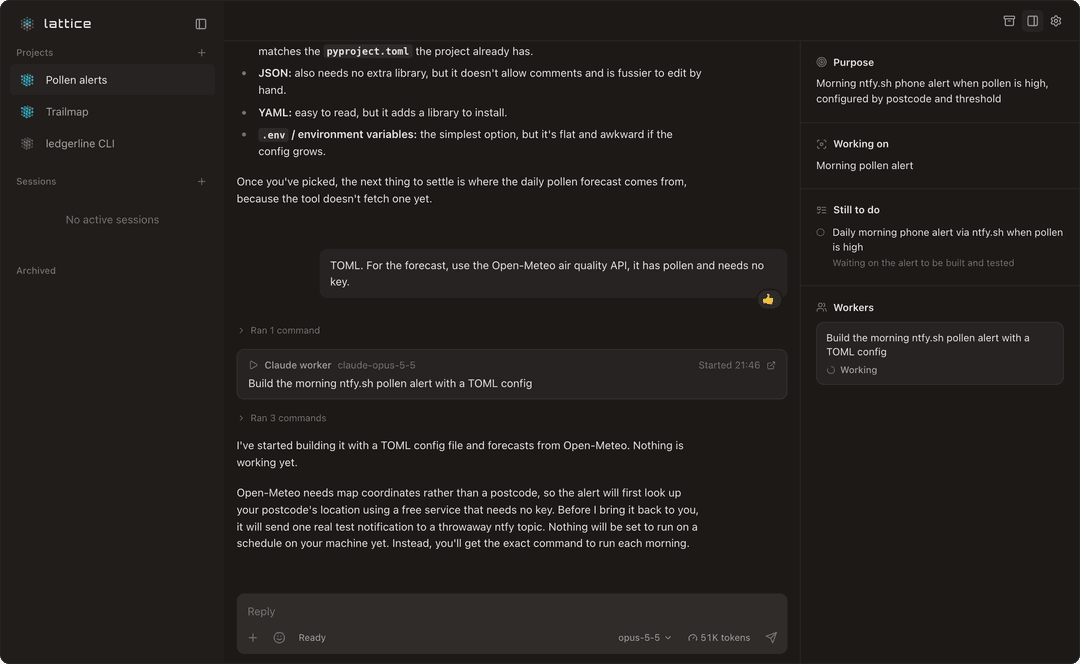
Each project in Lattice has a coordinator: one conversation you talk to about the outcome you want. It agrees the goal with you, starts worker sessions to do the work, keeps a record of what has been decided and what is still open, and reports back in the same thread. You can leave for a day and come back to a project that still knows where it was.
Lattice runs on your own machine and drives the Claude Code and Codex CLIs you already have, signed in with your own accounts. A coordinator can move from Claude to Codex, or back, and keep the project's context. The interface works in a desktop or phone browser, and Tailscale is the simplest way to reach it from your phone.
There is no hosted service. Lattice is pre-release software.
Requirements
- macOS or Linux
- Node.js 22 or newer (tested on 24 and 26)
- At least one of these agent CLIs, installed on the same machine:
- Claude Code (
claude) 2.1.71 or newer - Codex (
codex)
- Claude Code (
You sign each CLI in with your own account. Lattice never sees a password; it runs the CLIs you already have.
Install
npm install -g lattice-app
lattice-app                  # start the server on port 3001
npm prints some warnings while it installs, such as npm warn deprecated node-domexception; they are expected and the install still works.
If the install fails with EACCES, npm can't write to its global folder, which happens when Node came from the nodejs.org installer. Run sudo npm install -g lattice-app instead, typed into a normal Terminal window: sudo asks for your Mac password there, and shows nothing as you type it. It does not work from inside Claude Code (with ! or by asking Claude), because there sudo has nowhere to ask for the password.
Open http://localhost:3001. The server keeps running in that terminal; stop it with Ctrl+C. Run it inside tmux or screen, or under your own service manager, if it should outlive the terminal. lattice-app --port 3100 picks another port.
Settings and data live in ~/.lattice-app/. Set LATTICE_CONFIG_DIR to keep them somewhere else, for example to run a second instance on another port. If you already run the older lattice-orchestrator package, see Running next to an existing Lattice.
Once a day Lattice asks the npm registry for the latest lattice-app version; the request sends nothing about you or your machine. When a newer one is out, the bottom of the sidebar says so and opens the notes from that version's GitHub release. Update and restart installs it with npm install -g and restarts the server in the same process, so a terminal, tmux or a service manager keeps running it; a session that is mid-turn is cut off and carries on after the restart. If Lattice wasn't installed with npm install -g, or can't write to its install folder, it shows the command to run instead.
To work on Lattice itself, build it from a clone instead; see Development.
Your first project
-
Sign in. The start screen shows whether Claude and Codex are signed in. Click one that isn't to open Settings → Providers. For Claude, Connect opens Claude Code's own sign-in in a terminal inside the page: tap the link it prints, sign in to Claude, then paste the code back at its prompt. The CLI does the exchange and keeps the login; Lattice only carries what you type, like a web terminal. Signing in from a terminal with
claudeorcodex loginworks too, and Sign in again renews an expired login the same way. You need one provider; Lattice works with just Claude or just Codex.Claude conversations run on that sign-in, that is, your Claude subscription. If you would rather be billed per token by Anthropic, choose API key under the Claude card and save a key; it is stored on this machine and never shown again. The same key powers summaries and other background features, and saving it for those does not switch conversations to it unless you choose that.
-
Set the folder. Every session starts in one launch folder, your home folder until you change it under Settings → General → Launch folder. Point it at the folder your projects live in; a coordinator finds the repositories under it. Agents read and change files there.
-
Start a project. Click New project in the sidebar, pick whether its coordinator runs on Claude or Codex, describe the outcome you want and send it.
The coordinator is the conversation you talk to. It agrees the goal with you, starts worker sessions (Claude or Codex) to do the work, and reports back in the same thread. It starts workers with a lattice command that the server writes to ~/.lattice-app/bin/lattice each time it starts, so you don't need to install anything on your PATH.
To run a single agent without a coordinator, click New session and choose Claude or Codex.
Setting up keys from a file
If someone sends you API keys to use, they can send them as a small JSON file. Either key can be left out:
{
  "anthropic": "sk-ant-...",
  "typesafe": "..."
}
Save it anywhere (your Downloads folder is fine) and ask your project to set up your keys from it. Its agent runs lattice keys import <file>, which saves the keys exactly as Save in Settings → Providers does, prints only which keys it saved, and deletes the file. If the file is malformed or the save fails, it says why and leaves the file where it was. Send the file privately, for example as a 1Password share, not in a chat.
[!WARNING] Claude workers run in Claude's
automode by default: a classifier reviews each action and blocks risky ones. Coordinators and sessions you start yourself run with permission prompts off (Claude'sbypassPermissionsmode), and Codex runs with full access. They can run any command your user account can, in any folder. Point them only at work you're happy for an agent to do unattended.
Use it from your phone with Tailscale
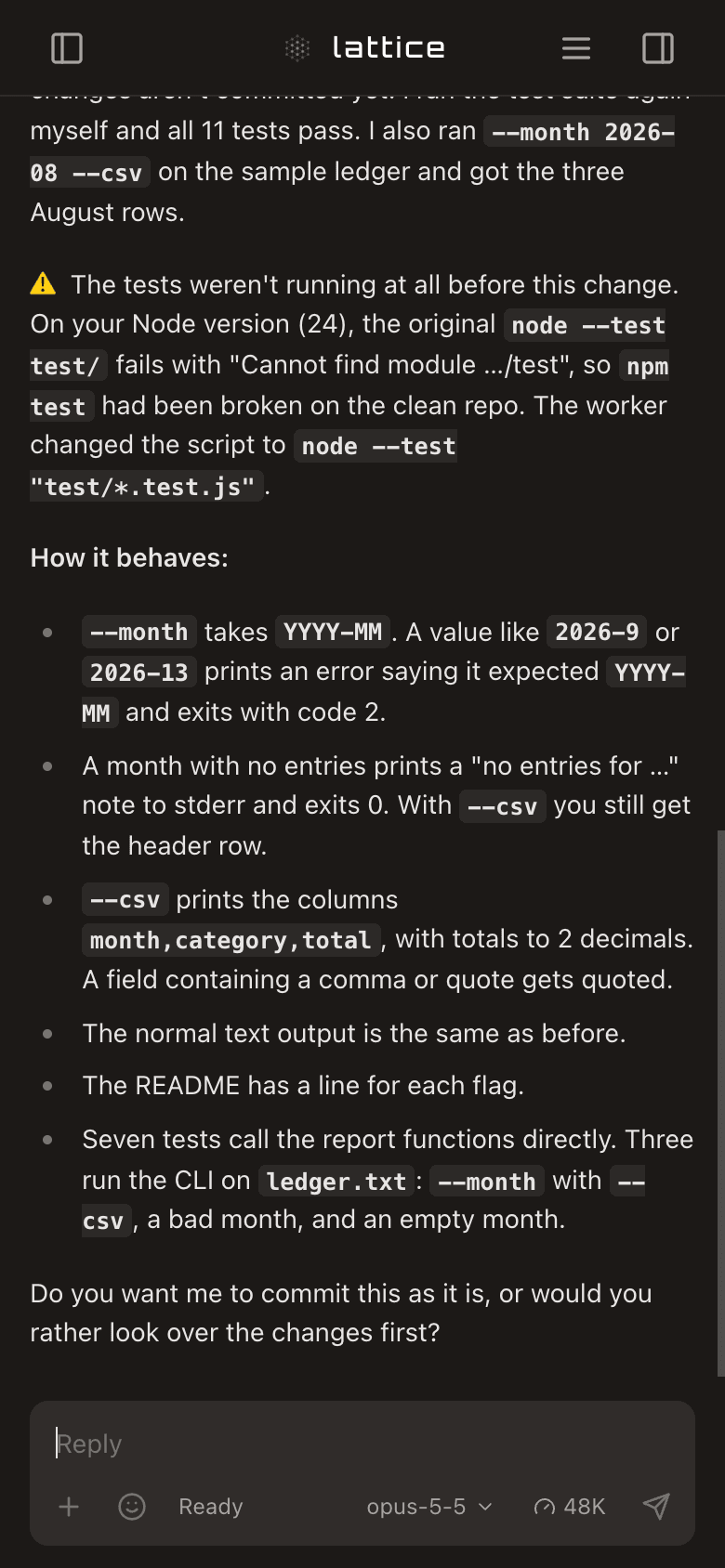
The server only listens on this machine (127.0.0.1). To reach it from your phone or another computer, use Tailscale:
-
Install Tailscale on the machine running Lattice and on your phone, and sign both into the same tailnet.
-
On the Lattice machine, run:
tailscale serve --bg 3001With the Mac App Store version of Tailscale,
tailscaleis not on your PATH; use/Applications/Tailscale.app/Contents/MacOS/Tailscalein its place. Settings → Access shows the command with the right path for your machine; if something else is already served on your Tailscale address, it gives an--https=<port>form that leaves it alone.It prints an address like
https://your-machine.your-tailnet.ts.net. Tailscale forwards it to Lattice, over HTTPS, and only devices on your tailnet can reach it. -
Open that address on your phone. In Safari or Chrome you can add it to your home screen.
Anyone on your tailnet who can open that address can run agents as you, so check your tailnet's sharing and access rules. tailscale serve reset turns it off. Lattice has no login of its own yet: don't bind it to 0.0.0.0 or put it on the public internet.
Settings → Access shows the addresses Lattice can see and the command for your port.
Configuration
~/.lattice-app/config.json is created on first run. Useful settings:
| Setting | What it does |
|---|---|
server.port | Port to listen on (default 3001; --port overrides it) |
server.defaultWorkingDirectory | Folder new sessions start in until you pick one |
server.defaultModel | Claude model for new Claude sessions |
server.defaultPermissionMode | Claude permission mode: default (ask), acceptEdits, bypassPermissions, plan, auto |
server.workerPermissionMode | Permission mode for Claude workers a coordinator starts (default auto) |
coordinator.provider | claude or codex: which one the Coordinator choice starts on |
feedback.enabled | Whether you can send feedback about Lattice (default on; the switch in Settings → General) |
feedback.collectorUrl | Where feedback goes; a fork running its own feedback collector points this at it |
Asking for permission (default mode) needs Lattice to register hooks in ~/.claude/settings.json. It only does that for the instance you allow; see docs/host-integration-marker.md.
Feedback
Feedback is on by default and nothing is sent until you press Send. The first send runs one check that you are a person; after that each message sends with one click. Switch it off in Settings → General. The Feedback button on a session, the phone menu and Settings → General open a form that shows exactly what will be sent. Agents can propose feedback with lattice feedback "…" --session <conv-id>; that only saves a draft, which appears as a card in your chat (a worker's in its project's chat) for you to send, edit or reject.
Whoever runs the collector reads what arrives in their own Lattice: put {"collectorUrl": "https://…", "readToken": "…"} in ~/.lattice-app/feedback-inbox.json with mode 600, and a Feedback inbox appears in the sidebar. Without that file there is no inbox.
Personal settings
Agents refer to you as "the user" unless you set a name. Standing guidance you want every coordinator or worker to follow goes here too:
{
  "user": {
    "name": "Sam",
    "coordinatorGuidance": "Ask before changing a public API.",
    "workerGuidance": "Run the project's tests before reporting.",
    "projects": ["my-app", "my-library"]
  }
}
projects gives session summaries a list of project names to match against.
Repository layout
| Path | What it is |
|---|---|
src/ | The Lattice server, CLI and web app |
packages/harness | @liggi/agent-ui-harness: runs an agent CLI process and streams its events to a browser |
packages/toolkit | @liggi/agent-ui-toolkit: React components for rendering agent tool calls |
Development
Building from a clone needs pnpm 10 as well as Node. Install pnpm with npm install -g pnpm@10 or brew install pnpm. On Node 22–24 corepack enable also works; Node 25 and later no longer include corepack.
git clone https://github.com/Liggi/lattice-app.git lattice
cd lattice
pnpm install     # also builds the bundled harness and toolkit packages
pnpm build
pnpm start       # same as: node dist/cli.js serve
A clone uses the same ~/.lattice-app/ data folder as the npm package, so stop one before starting the other, or give the clone its own folder with LATTICE_CONFIG_DIR. Don't npm link the clone next to an installed lattice-app: both provide the lattice-app command. pnpm pack:release builds the npm tarball from a built clone. Each published version also gets a GitHub release tagged v<version> with short notes; that is what the Update dialog shows.
pnpm typecheck
pnpm lint
pnpm test:unit        # app unit tests
pnpm test:packages    # harness and toolkit tests
pnpm test             # Playwright behavioural tests (needs `npx playwright install`)
pnpm dev              # server with reload on change, from source
pnpm dev runs from src/ under tsx and reloads on changes. A clone never checks for new versions; start it with LATTICE_UPDATE_PREVIEW=0.9.0 to see the update notice, with sample notes and an Update button that installs nothing. On Linux, pnpm service:setup installs optional systemd user services; the other service:* scripts manage them.
Licence
Apache License 2.0; see LICENSE. The harness and toolkit packages are MIT-licensed; see their own LICENSE files. Lattice began as a fork of CUI by Wenbo Pan; see NOTICE.
// faq
What is lattice-app?
Self-hosted web workspace for running Claude Code and Codex agents on projects. It is open-source on GitHub.
Is lattice-app free to use?
lattice-app is open-source under the Apache-2.0 license, so it is free to use.
What category does lattice-app belong to?
lattice-app is listed under devtools in the Claudeers registry of Claude-compatible tools.
// embed badge

[](https://claudeers.com/lattice-app)
// retro hit counter

[](https://claudeers.com/lattice-app)
// reviews
// guestbook
// related in Developer Tools
 🔓
The agent harness performance optimization system. Skills, instincts, memory, security, and research-first development for Claude Code, Codex, Opencode, Curs…
 🔓
Makes your AI agent think like the laziest senior dev in the room. The best code is the code you never wrote.
 🔓
AI coding assistant skill (Claude Code, Codex, OpenCode, Cursor, Gemini CLI, and more). Turn any folder of code, SQL schemas, R scripts, shell scripts, docs,…
 🔓
Use Garry Tan's exact Claude Code setup: 23 opinionated tools that serve as CEO, Designer, Eng Manager, Release Manager, Doc Engineer, and QA