
labyrinth-exploration
An agent skill for Codex, Claude Code and other clients: open-ended research as the exploration of a labyrinth, with a map of what is proved, refuted, conjec…
Install with your AI
Paste into Claude Code, Cursor, or any agent — it reads the repo and wires the tool into your project.
Install and set up labyrinth-exploration (claude-skill project) into my current project.
Found on https://claudeers.com/labyrinth-exploration
Repo: https://github.com/nasqret/labyrinth-exploration
Homepage/docs: —
Detected install method: claude-skill → # copy this skill into .claude/skills/labyrinth-exploration/
Category: skills. Platforms: cli, api, desktop, web.
Read the repo's README for exact setup and env vars, then install it and wire it into my project.

Claudeers Health Verdict:
active; community-verified: false. Confirm the source before running anything.
# copy the skill dir into your project:
# .claude/skills/labyrinth-exploration/   (or ~/.claude/skills/labyrinth-exploration/ for all projects)
git clone https://github.com/nasqret/labyrinth-exploration
// compatibility
| Platforms | cli, api, desktop, web |
|---|---|
| Operating systems | — |
| AI compatibility | claude |
| License | MIT |
| Pricing | open-source |
| Language | Python |

Labyrinth exploration
A skill for Codex and Claude Code, for open-ended research: mathematics, theoretical science, algorithms, anywhere the goal is to find out what is still unknown.
The skill treats a research programme as the exploration of a labyrinth. Your agent keeps an exact map of where you are:
- which corridors are charted (proved, or computed exhaustively);
- which are walled off (refuted, or impossible);
- which doors are visible but not yet entered (questions, conjectures);
- where it is still dark.
Every session starts from that map and leaves it changed. A refutation counts as progress: it turns a hoped-for corridor into a wall and usually reveals a new door.
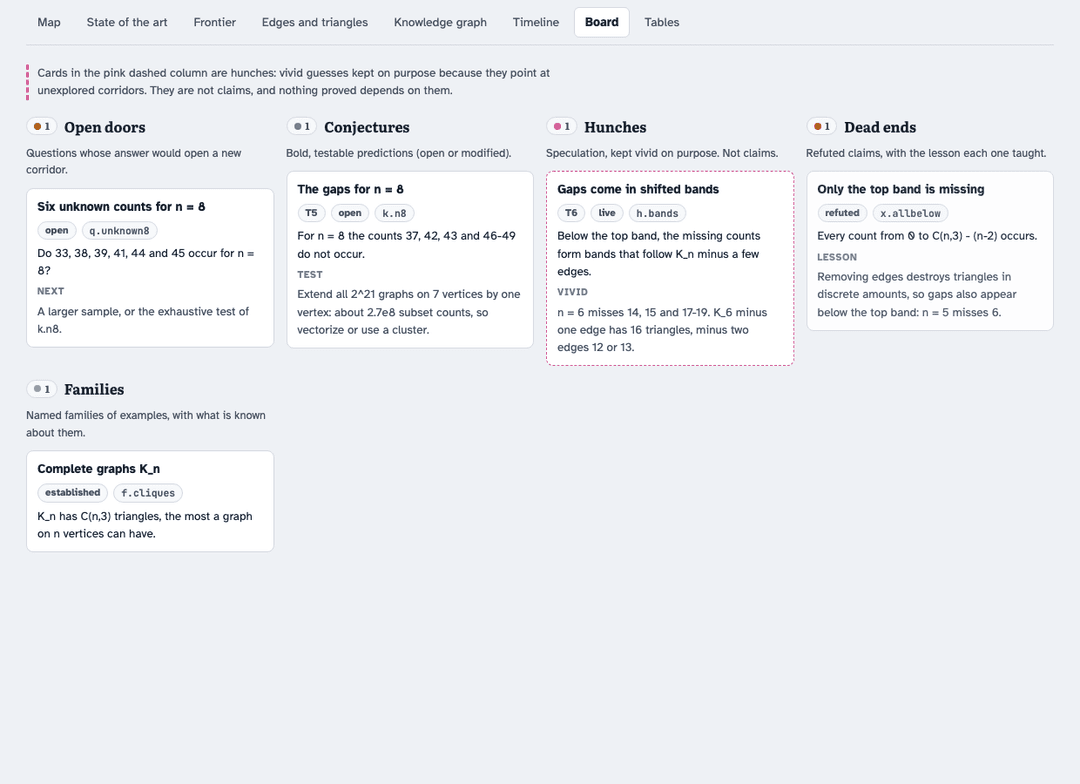
- Proof stays apart from speculation. Every claim carries a tier, from T1 (proved in the literature) to T6 (a hunch). Nothing below T3 is ever cited as a fact, and hunches are kept on the board on purpose, clearly marked.
- "How much is left" becomes a number. For each size, every admissible value is classified as realized, impossible, conditional, conjecturally impossible or unknown. The dashboard shows the resolved share and how it moved over time.
- Nothing is used before it is checked. Results from agents or external models pass an independent referee, with its own code, before they enter the notes.
- It scales. For many open problems at once, it runs campaigns: attack agents, a literature agent, a referee for every report, writers who draft on a copy, and you (or the main agent) as the coordinator.
The method was developed on a research programme in pure mathematics in September and October 2026. The lessons from that programme are part of the skill.
Quick start
1. Install the whole repository for your client.
Codex (CLI, desktop app or IDE extension):
mkdir -p "$HOME/.agents/skills"
git clone https://github.com/nasqret/labyrinth-exploration "$HOME/.agents/skills/labyrinth-exploration"
For a project-scoped Codex installation, clone under .agents/skills/labyrinth-exploration
in that project's repository instead. See the Codex guide for
resource paths, native subagents, permissions and session handoff.
Claude Code:
mkdir -p "$HOME/.claude/skills"
git clone https://github.com/nasqret/labyrinth-exploration "$HOME/.claude/skills/labyrinth-exploration"
Run your client from the research project, not the installed skill directory. In Codex,
invoke $labyrinth-exploration or describe a matching task; in Claude Code, invoke
/labyrinth-exploration or describe the task. Codex detects new skills automatically;
restart if it does not appear. Start a new Claude Code session after installing.
Both clients use the same SKILL.md, references, templates and data formats. No MCP server,
client SDK or third-party Python package is needed for the engine or initial example.
2. See a complete map. The repository includes a small public example: how many triangles can a graph on n vertices have? It builds in seconds and needs only Python 3:
LABYRINTH_SKILL_DIR="$HOME/.agents/skills/labyrinth-exploration"  # Codex
# For Claude Code: LABYRINTH_SKILL_DIR="$HOME/.claude/skills/labyrinth-exploration"
LABYRINTH_DEMO_DIR="$(mktemp -d "${TMPDIR:-/tmp}/labyrinth-demo.XXXXXX")"
mkdir -p "$LABYRINTH_DEMO_DIR/labyrinth/dashboard"
cp "$LABYRINTH_SKILL_DIR/templates/lab.py" "$LABYRINTH_DEMO_DIR/labyrinth/"
cp "$LABYRINTH_SKILL_DIR/templates/dashboard.html" "$LABYRINTH_DEMO_DIR/labyrinth/dashboard/template.html"
cp "$LABYRINTH_SKILL_DIR"/examples/triangle-counts/{knowledge.json,events.jsonl,sota.json} "$LABYRINTH_DEMO_DIR/labyrinth/"
python3 "$LABYRINTH_SKILL_DIR/examples/triangle-counts/make_example.py" "$LABYRINTH_DEMO_DIR/labyrinth"
cd "$LABYRINTH_DEMO_DIR"
python3 labyrinth/lab.py check && python3 labyrinth/lab.py build
open labyrinth/dashboard/index.html        # or xdg-open on Linux
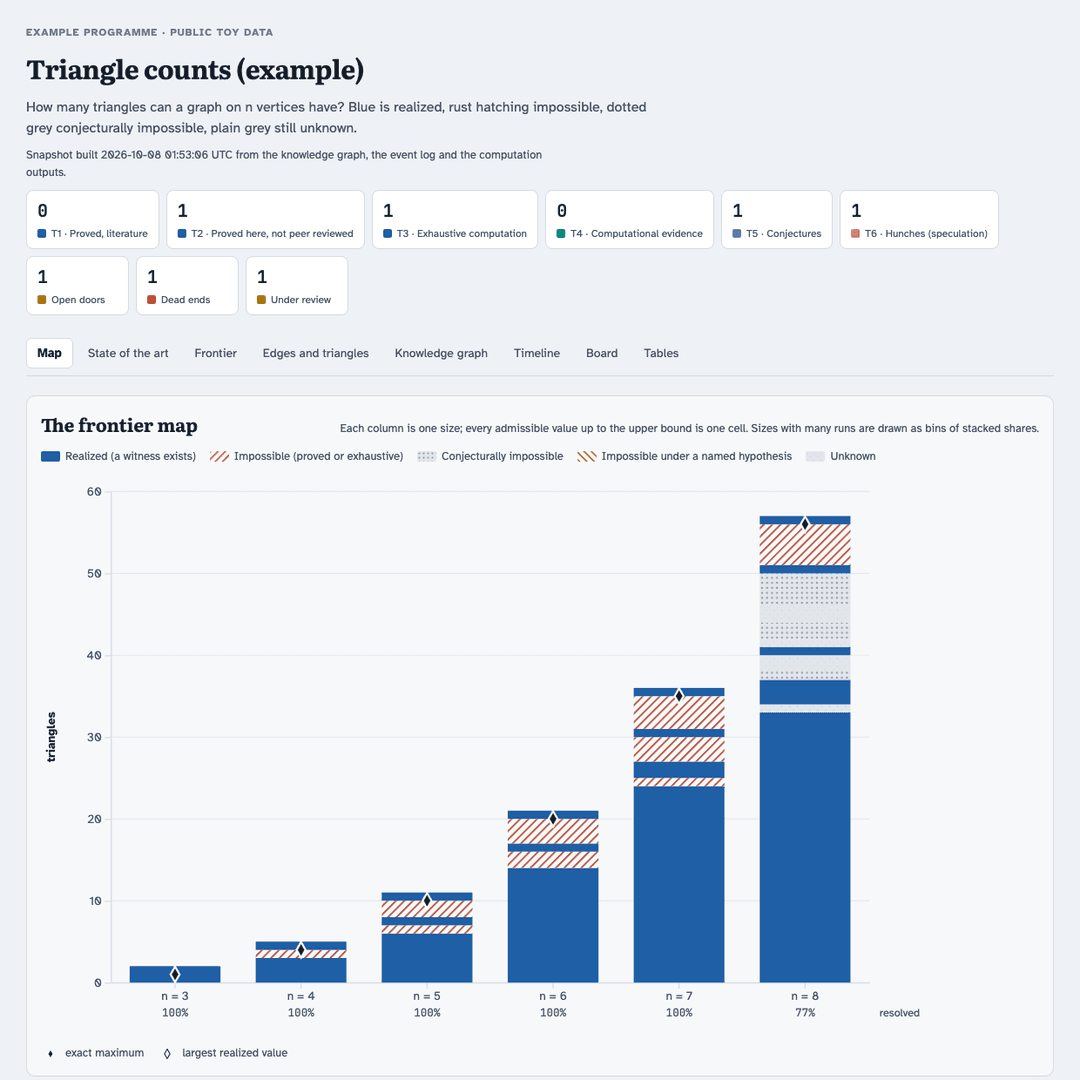
3. Use it on your own question. In either client, describe the programme, for example:
I want to understand which values the crossing number takes on cubic graphs of each size. Map what is known, set up the labyrinth for this project, and push the bounds.
The agent reads the skill and sets up labyrinth/ in your repository. It then works in the
loop below and leaves a dashboard and a state-of-the-art table behind. More prompts are in
examples/prompts.md.
How it works

Each iteration picks one to three doors and explores them with several tool families at once: literature sweeps in the background, small computations, extreme and named examples. It then states a bold conjecture with its test, runs the test, logs the outcome, has it refereed, and updates the map. A refuted claim becomes a dead end with a one-line lesson, followed by the modified statement. When the map stops changing, an escalation ladder takes over: change the tools, the parameter or the extremes, relax a hypothesis, invert the question, import from another community, or launch a broad attack.
The tutorial walks through all of this step by step, on the example.
The map
| artifact | file | what it holds |
|---|---|---|
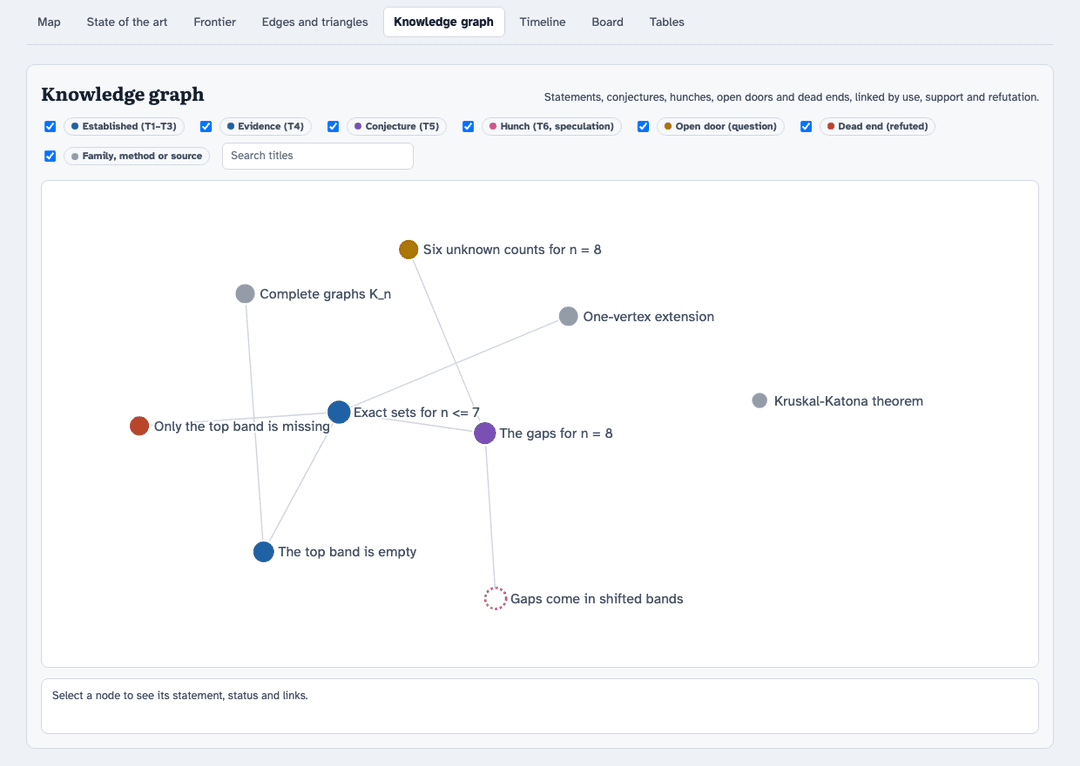
| knowledge graph | labyrinth/knowledge.json | results, conjectures, hunches, open doors, dead ends, families, methods, sources, with typed links |
| event log | labyrinth/events.jsonl | every discovery, the moment it happens |
| frontier map | labyrinth/frontier.json | for each size, the status of every admissible value (written by your scripts) |
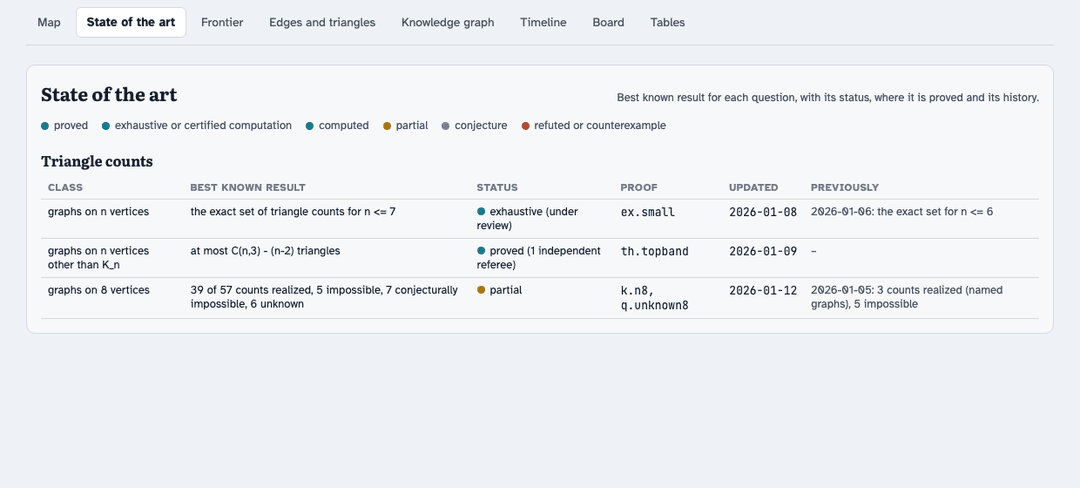
| state of the art | labyrinth/sota.json | the best known result for each question, with its history |
| dashboard | labyrinth/dashboard/index.html | all of the above, built by lab.py build |
| agent archive | research/agents/<name>/ | every agent's report, verbatim, with its code and its referee |
Tiers

Campaigns

When there are more open doors than one iteration can enter, the skill runs a campaign. One
attack agent works on each conjecture, trying at least five perspectives. Each report goes
to an independent referee, who returns a verdict per item and corrections ready to apply.
Writers turn refereed results into drafts and exact edits, tested on a copy. The
coordinator reviews everything and integrates it. The
campaign guide has the integration checklist and the failure
modes we hit; fill-in briefs are in templates/briefs/.
The example, tab by tab
| state of the art | knowledge graph |
|---|---|
 |  |
| board | frontier |
 | 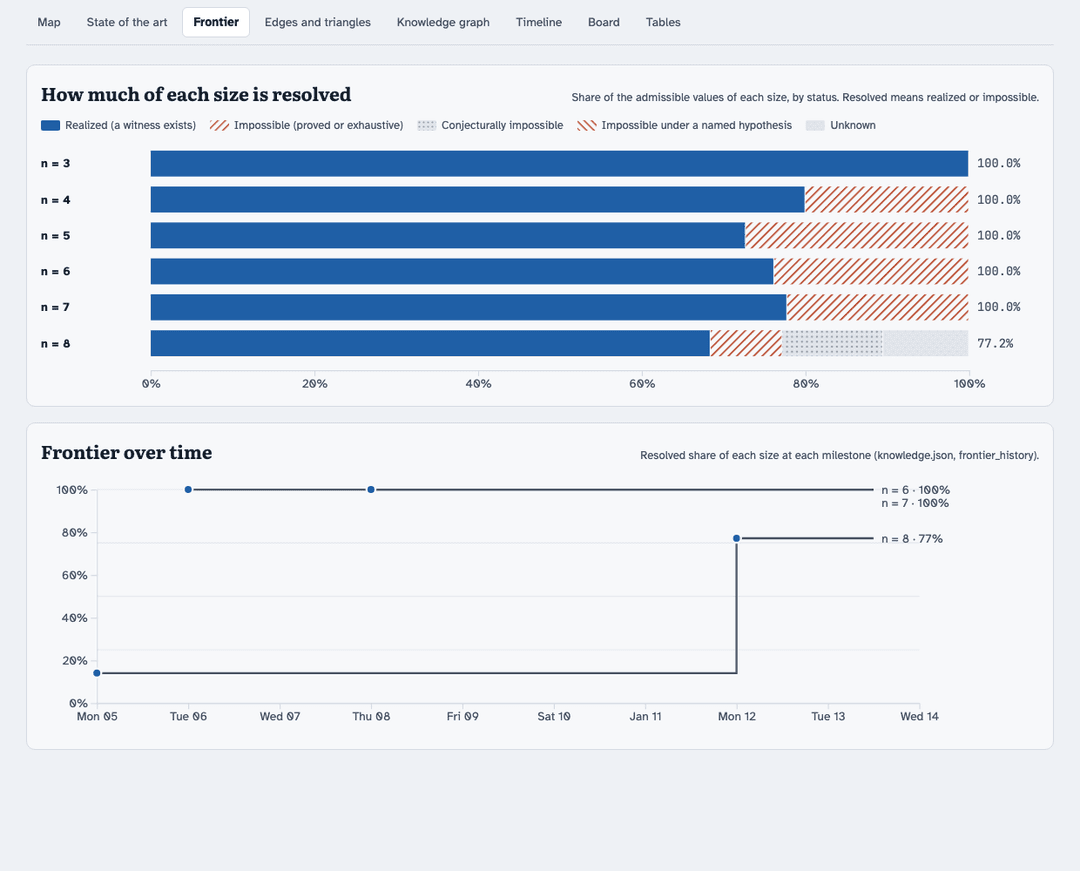 |
See examples/ for the example's files, the prompts, and the briefs.
What is in this repository
SKILL.md                    the shared skill: what the agent reads when it triggers
agents/openai.yaml          Codex display metadata and starting prompt
references/                 loaded on demand: the loop, campaigns, compute etiquette,
                            saturation, the schema, lessons from a long programme
templates/lab.py            the engine (standard-library Python): event log, check, build, status
templates/dashboard.html    the dashboard (one HTML file, d3), filled in by lab.py build
templates/briefs/           fill-in briefs for attack agents, referees and writers
examples/                   the runnable example, example prompts
docs/tutorial.md            the step-by-step tutorial
docs/codex-testing.md        native discovery and behavioral validation in Codex
assets/                     the graphics (generated by tools/make_graphics.py) and screenshots
tests/                      tests of the engine and of the skill's internal consistency
Requirements
- Codex or Claude Code, for the skill itself. Native subagents are used for literature sweeps, independent referees and campaigns. When delegation is unavailable, results stay under review until an independent check exists.
- Python 3.9 or newer, standard library only, for the engine and the example. The optional exhaustive test in the tutorial uses numpy.
- A browser for the dashboard. It loads d3 and its fonts from CDNs.
- Optional: an authorized Slurm cluster for heavy computations (see the compute etiquette), LaTeX for notes, and a configured private dashboard destination. Claude Artifacts can serve that role in Claude; Codex can keep the generated HTML local or use an authorized private host.
Privacy
The dashboard and the notes of a real programme usually contain unpublished results. The skill keeps them local or publishes them privately to an authorized destination, and it never puts unpublished results into anything public (a post, a figure, a shared skill) without your consent. This repository contains no results of the programme it was developed on.
Contributing and updates
The installed skill is a clone of this repository, so updating it is git pull.
MAINTAINING.md describes how changes are made and released. In short:
edit, run the tests, record the change in the changelog, push. Issues and
pull requests are welcome.
Run the engine and consistency suite with python3 -m unittest discover -s tests -v.
The Codex testing guide adds a native skill-discovery check and
isolated behavioral tests; model-backed tests are opt-in.
License
MIT © 2026 Bartosz Naskręcki
// faq
What is labyrinth-exploration?
An agent skill for Codex, Claude Code and other clients: open-ended research as the exploration of a labyrinth, with a map of what is proved, refuted, conjectured and still dark, proof tiers, independent referees and campaigns of agents.. It is open-source on GitHub.
Is labyrinth-exploration free to use?
labyrinth-exploration is open-source under the MIT license, so it is free to use.
What category does labyrinth-exploration belong to?
labyrinth-exploration is listed under skills in the Claudeers registry of Claude-compatible tools.
// embed badge

[](https://claudeers.com/labyrinth-exploration)
// retro hit counter

[](https://claudeers.com/labyrinth-exploration)
// reviews
// guestbook
// related in Claude Skills
 🔓
An agentic skills framework & software development methodology that works.
 🔓
 🔓
AI coding assistant skill (Claude Code, Codex, OpenCode, Cursor, Gemini CLI, and more). Turn any folder of code, SQL schemas, R scripts, shell scripts, docs,…
 🔓
💫 Toolkit to help you get started with Spec-Driven Development