
Islet
Free Dynamic Island for Windows 10 and 11: a notch pill with music, Claude Code and Codex status, notifications, battery, clipboard, timer and a pet cat. Ope…
Install with your AI
Paste into Claude Code, Cursor, or any agent — it reads the repo and wires the tool into your project.
Install and set up Islet (git-clone project) into my current project.
Found on https://claudeers.com/islet
Repo: https://github.com/goprocker/Islet
Homepage/docs: https://islet.loopfound.in
Detected install method: git-clone → git clone https://github.com/goprocker/Islet
Category: productivity. Platforms: cli, api, desktop, web, mobile.
Read the repo's README for exact setup and env vars, then install it and wire it into my project.

Claudeers Health Verdict:
unknown; community-verified: false. Confirm the source before running anything.
git clone https://github.com/goprocker/Islet
// compatibility
| Platforms | cli, api, desktop, web, mobile |
|---|---|
| Operating systems | — |
| AI compatibility | claude |
| License | MIT |
| Pricing | open-source |
| Language | JavaScript |
Islet
The notch Windows never had.
A Dynamic-Island-style pill at the top of your screen for music, Claude Code and Codex, notifications, battery, search and a dock of small tools. Free, open source, one installer.
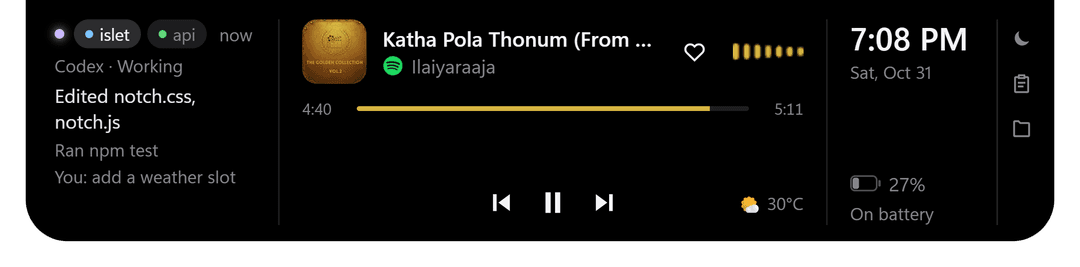
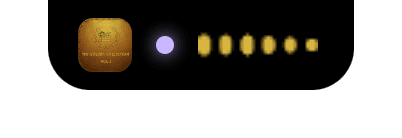 Pill quiet until it matters | 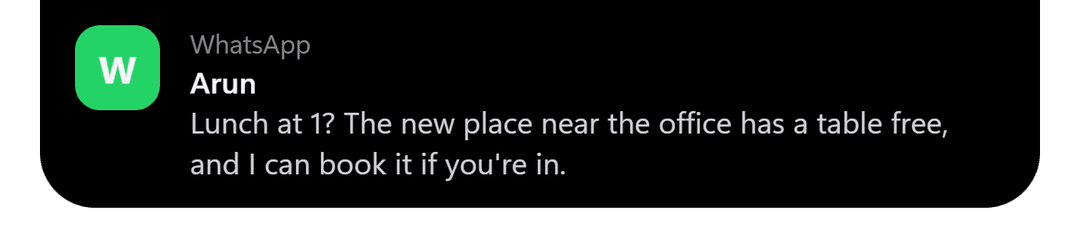 Notifications real app logos, full text | 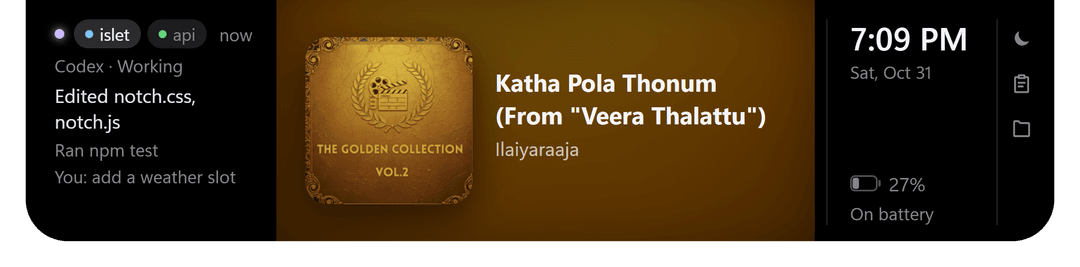 Album view with timed lyrics |
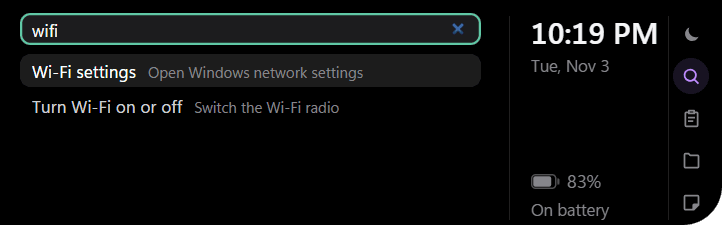 Search · Alt+Space |  Volume HUD brightness and mic too | |
| Alt + Space Search | Ctrl + Alt + N Pill / open / hidden | Ctrl + Alt + M Next monitor | Alt + Shift + B Like on Spotify |
Features · Dock and pet · Install · Usage · Claude Code & Codex · Settings · How it works
[!TIP] Hover to open it, click anywhere else to close it. When nothing is happening Islet shrinks to a plain black pill with one dot.
The open notch, left to right: agent sessions → music → time and battery → tools.
✨ What's new
| 🎨 2.5: control and style | Theme Studio (6 themes, 3 pill shapes, motion presets, shareable islet-theme: codes), per-app volume, a screen-recording timer with OBS controls, notification actions (Open, Snooze, Dismiss, Reply), Focus Mode 2.0, a tabbed Dev panel (git, ports, snippets) and Clipboard Actions. The AI coding panel shows how full each Claude session's context window is. |
| ⚡ 2.4: live activities | GitHub Actions runs, PR checks and deploys in the pill (needs a signed-in gh CLI), Bluetooth connect pop-ups with battery level, smart shelf actions (resize, convert, compress, ZIP) and a much lighter idle notch. |
| 🐾 2.3: bring your own pet | Load any pet in the Codex Pets format. The pet talks in the closed pill, codes along with your agent, asks when it needs you and plants a flower after focus sessions. |
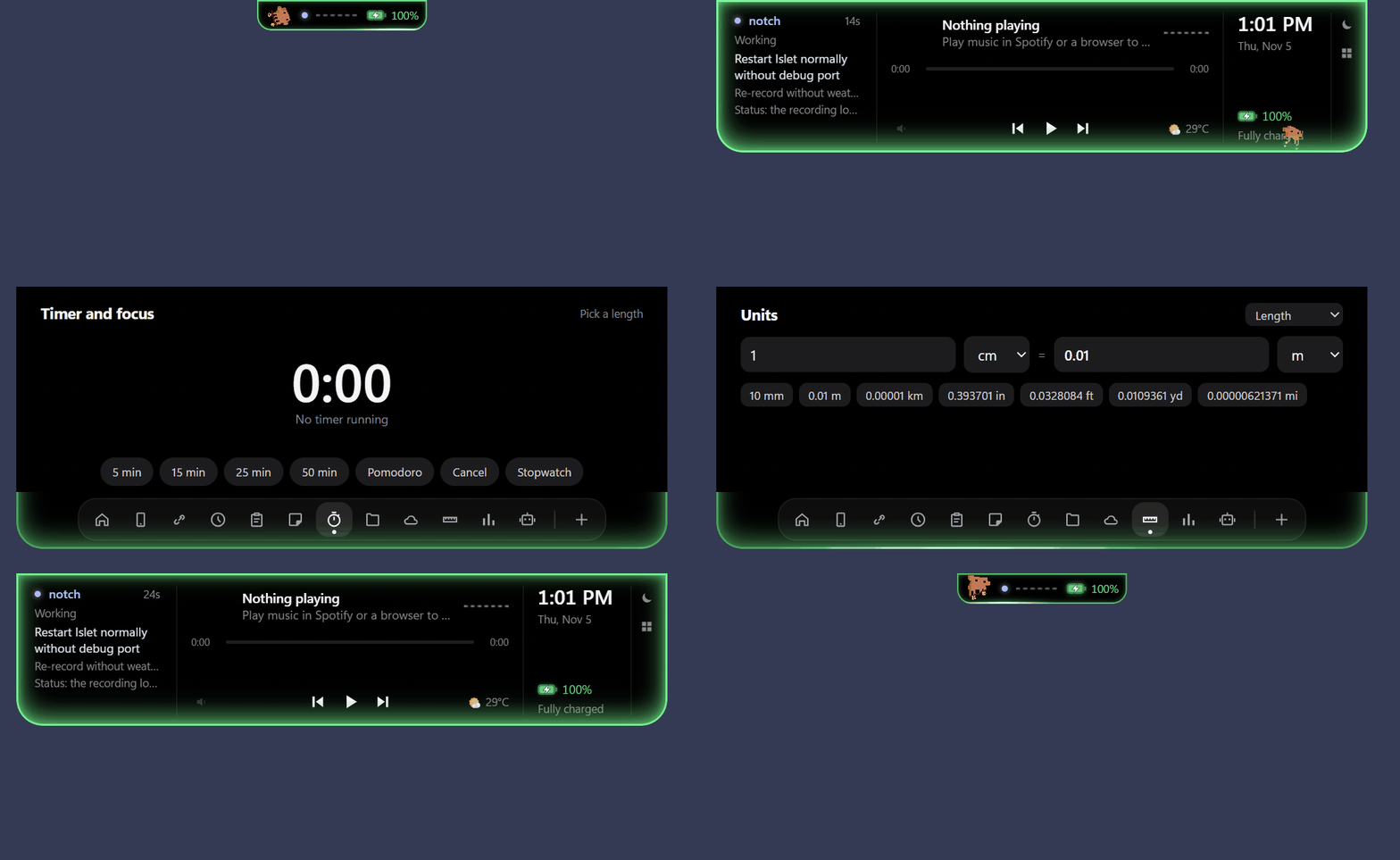
| 📱 2.2: dock and Phone drop | A dock with Phone drop, Links, World clock, Clipboard, Notes, Timer, Shelf, System and AI coding. Scan a QR code to move files between phone and PC over Wi-Fi. |
| 🔎 Search | Alt+Space finds apps, files, folders, Wi-Fi and Bluetooth switches, settings, clipboard items and notes. |
| 🍅 Focus tools | Pomodoro and stopwatch from the tray. Do Not Disturb turns on by itself during focus. |
| 🔊 Volume, brightness and mic HUD | Level bars and clean icons in the notch; a muted mic gets its own red toast. |
| 🌌 Black hole charger animation | Interstellar-style, when the charger goes in or out. Cinematic, Subtle or off. |
| 🔄 2.1: installer and auto-update | A proper installer, a welcome screen that asks before changing anything, authenticated agent hooks and updates from GitHub Releases. |
2.3.2 fixes
- Phone drop download links keep pointing at the file you picked, even if the shelf changes (a removed file now returns 404).
- A phone upload that is cut off no longer leaves a half-written file on the PC.
- The phone page reports network failures per file, carries on with the rest and lets you retry.
- Importing a pet from a
.zipworks again. - The downloads page no longer overlaps its header on phones.
🚀 Features
🎵 Music
|
🤖 Claude Code and Codex
|
🔔 Notifications
|
🔋 Battery and system
|
🌤️ Info
|
🧰 Tools
|
🐾 The dock and the pet
The dock row opens a tall view with every tool, each in its own panel:
| Tool | What it does |
|---|---|
| 📱 Phone drop | A temporary page on your local network: scan the QR code, send files to the shelf, take shelf files back. Stops after 10 minutes. |
| 🔗 Links | Your saved links, one click away |
| 🕒 World clock | Times in other cities |
| 📋 Clipboard · 📝 Notes · 🗂️ Shelf | History with pins, quick notes, drag files in and out |
| ⏱️ Timer | Timer, Pomodoro, stopwatch, Focus Mode |
| 💻 Dev | Git status, listening ports, snippets and clipboard decoding |
| 📊 System · 🤖 AI coding | Live PC stats; your agent sessions with each Claude session's context use |
The pet reacts to your PC. The first matching mood wins:
| Mood | When |
|---|---|
| 🤒 Sick | Battery under 20% and not charging |
| 🚨 Alert | A pop-up arrived in the last 4 seconds |
| 🙋 Ask | A Claude Code or Codex session needs you |
| 🌱 Plant | A focus session just ended |
| 🎧 Work | A focus or Pomodoro timer is running |
| 💻 Code | An agent session is working |
| 🎵 Dance | Something is playing |
| 😴 Sleep / idle | Two quiet minutes / anything else |
Settings → Choose a pet… loads a pet in the Codex Pets format (a .zip or its pet.json, with a sprite sheet of 192 × 208 frames). Use the cat switches back.
📦 Install
You need: Windows 10 1903+ or 11 · Windows PowerShell 5.1 (built into Windows)
Download the installer
Get Islet-Setup-<version>.exe from the latest release and run it. It installs for everyone on the PC (Windows asks for admin permission once), adds a Start menu entry and a firewall rule for Phone drop on private networks. From 2.1 on, Islet downloads updates from GitHub Releases by itself and installs them when you quit, or from tray → Restart to update.
[!NOTE] The installer is not code-signed yet, so SmartScreen may warn about it and Smart App Control may block it. If it's blocked, run from source.
Run from source
You also need: Node.js 22 or 24 (a supported LTS release) · Git
git clone https://github.com/goprocker/Islet.git
cd Islet
npm install
npm start
Code changes apply on restart. To build your own installer, run npm run dist, then run dist\Islet Setup <version>.exe.
[!TIP] Run
npm run distfrom PowerShell. It fails under Git Bash.
Only one copy of Islet runs at a time, so quit the npm start copy before installing.
On first run, a welcome screen asks about Start with Windows, notifications and the agent hooks. Islet changes none of them until you click Continue. Right-click the tray icon for the menu.
🖱️ Usage
| Action | How |
|---|---|
| Open / close | Hover the notch / move away or click elsewhere |
| Search | Alt+Space, then type; arrow keys move, Enter opens, Esc closes |
| Cycle pill → open → hidden | Ctrl+Alt+N |
| Next monitor | Ctrl+Alt+M, or tray → Show on screen |
| Volume / seek | Scroll over the music side / click the progress bar |
| Album view | Click the album art |
| Like | Heart button, shown for Spotify (sends Spotify's Alt+Shift+B) |
| Search / clipboard / shelf / notes / DND | Buttons in the tools column |
| Pin a clipboard item | Right-click it |
| Timer, Pomodoro, stopwatch / settings | Tray → Timer / Settings… |
| Quit | Tray → Quit (Alt+F4 is ignored on purpose) |
🤖 Claude Code and Codex
The welcome screen offers to install the hooks. Tray → Connect to Claude Code and Codex removes or adds them later. Adding saves a backup next to each file, and only Islet's own handlers are ever removed.
[!IMPORTANT] The hooks run with
node, so Node.js must be on your PATH, even with the installed app. They also point at the copy of Islet that installed them. If you move that folder or switch between source and the installed app, untick and tick the option again in the copy you're using.
| Hook event | Notch shows |
|---|---|
UserPromptSubmit, PostToolUse | 🟣 Working, plus the latest actions |
PermissionRequest, permission Notification | 🟠 Needs you; Claude Code and Codex requests get Allow / Deny |
Stop, any other Notification | ✅ Done |
SessionStart (Codex) | A new session |
SessionEnd | The session leaves the list |
More details
- Claude Code: hooks go into
~/.claude/settings.json(backup:settings.json.islet-backup).hooks/islet-hook.jsPOSTs each event to127.0.0.1:47321/claude. - Codex: if
~/.codexexists, hooks are also added to~/.codex/hooks.json(backup:hooks.json.islet-backup). Codex asks you to trust new hooks, so approve Islet's once, through the prompt Codex shows or/hooks. - A Claude Code or Codex permission request is held for
permissionWaitSeconds(default 8). If you don't answer in the notch, the agent asks as usual. Set it to0to never hold. - With both agents running, the status line says
Claude ·orCodex ·, and Codex chips have a blue dot. - Without hooks, Islet guesses the status from the newest transcript in
~/.claude/projects.
⚙️ Settings
Stored in %APPDATA%\islet\config.json and edited from the settings window. Hand edits are picked up within 2 s. A file that can't be read is left alone, not overwritten.
All 27 settings
| Key | Default | Meaning |
|---|---|---|
size | normal | compact, normal or large |
accent | album | album (colour from the art) or #rrggbb |
themeBase | midnight | midnight, graphite, ocean, forest, mocha or plum |
pillShape | notch | notch, island or square |
motion | bouncy | bouncy, smooth, snappy or off |
githubLive | true | Show GitHub Actions, PR checks and deploys (needs gh) |
idleHide | false | Shrink to a thin line when nothing is happening |
powerAnim | true | Black hole animation when the charger goes in or out |
powerAnimStyle | cinematic | cinematic or subtle |
hideInFullscreen | true | Hide while a fullscreen app is in front |
notifications | true | Show Windows notifications in the notch |
hideWindowsBanners | true | Turn off Windows' banners while Islet runs (they come back on the lock screen) |
dnd, dndFrom, dndTo | off | Do Not Disturb, with an optional daily HH:MM window |
permissionWaitSeconds | 8 | How long to hold a permission request for Allow / Deny (0–24) |
lyrics | true | Fetch lyrics from lrclib.net |
weatherCity | "" | e.g. Chennai; empty turns weather off |
weatherUnit | C | C or F |
calendarIcsUrl | "" | Private iCal link |
downloadsFolder | "" | Empty means your Downloads folder |
clipboardHistory | true | Keep the last 20 copied texts (pinned ones are saved) |
volumeHud | true | Show volume, brightness and microphone mute changes in the notch |
focusDnd | true | Turn on Do Not Disturb during Pomodoro focus |
universalSearch | true | Alt+Space search; turn off to free the hotkey |
displayId | null | Screen to show on (set by Ctrl+Alt+M or the tray) |
spotifyClientId | "" | Optional Spotify Web API (Premium only) |
🧠 How it works
src/main.js ── window, tray, hotkeys, powerMonitor, config, IPC
 ├─ helpers.ps1           one PowerShell that runs the four watchers below
 ├─ media.ps1             Windows media session → JSON every second; play/seek/next
 ├─ spotify-audio.ps1/.cs process-loopback capture of Spotify → 24 FFT bands, volume
 ├─ system.ps1            mic / camera / screen use, fullscreen detection
 ├─ volume-hud.ps1        volume, mute, microphone mute and brightness changes
 ├─ radios.ps1            Wi-Fi and Bluetooth on / off (Windows radio API)
 ├─ search.js             Alt+Space matching, app / file index, commands
 ├─ pomodoro.js  clip-history.js  notes.js  volume-hud.js
 ├─ notifications.js      reads wpndatabase.db (node:sqlite, read-only); toggles banners
 ├─ icons.js              real app logos (Store manifests, shortcuts, exe icons)
 ├─ claude-bridge.js      HTTP server for Claude Code + Codex hooks; installs/removes them
 ├─ calendar.js  weather.js  lyrics.js  downloads.js  shelf-file.js  spotify-web.js
 └─ preload.js ── renderer/  (index.html, notch.css, notch.js, blackhole.js)
                  settings/  (settings window)
Design notes
- The window is frameless, transparent and always on top. It ignores the mouse except while the pointer is over the notch.
- Notch states are CSS classes on
#notch:open,toast,hidden,quiet,idle,charging. With reduced motion on, the animations stay still. - The black hole is drawn with Canvas 2D (
renderer/blackhole.js) and driven by ElectronpowerMonitorevents, with no polling. It only animates while playing. - C# runs through
Add-Typeinside PowerShell, so no unsigned exe ships, which keeps it working with Smart App Control on. - Windows has no notification-listener API for unpackaged apps, so Islet reads the notification database read-only.
- To hide Windows' banners, Islet sets
ShowBanner = 0underHKCU\…\Notifications\Settings\<app id>. The previous values are saved in%APPDATA%\islet\banners.jsonand put back on quit or at the lock screen.
🛠️ Develop
npm test     # 66 test files, node --test
node_modules\electron\dist\electron.exe . --remote-debugging-port=9333   # then chrome://inspect
Useful page globals: setOpen(true), render().
🔐 Privacy
Everything runs on your PC. Network calls go only to GitHub (update checks in the installed app), lrclib.net (title and artist, when lyrics are on), Open-Meteo (the city name), your ICS link, and Spotify if you connect it. Unpinned clipboard history stays in memory; pinned items and your notes are saved in %APPDATA%\islet. The shelf stores file paths only. Search keeps file names in memory and never reads inside files. The hook server listens on 127.0.0.1 only. Phone drop runs a temporary server on your local network and stops when you close it or after 10 minutes. Its QR secret stays in the browser fragment (which HTTP never sends); uploads, lists and downloads use one-time HMAC proofs, so captured LAN traffic cannot reveal or replay the reusable capability. File contents still travel over local HTTP, so use Phone drop only on a private network you trust. Full policy: islet.loopfound.in/privacy.
🩺 Troubleshooting
| Problem | Fix |
|---|---|
| Banners still bottom-right | Start Islet normally, not from a sandboxed shell, which can't write the registry. Sign out and in once if needed. |
| Banners stay off after a crash | Start Islet and quit it from the tray, or turn off the setting. |
| Codex column is empty | Approve Islet's hooks in Codex (/hooks). |
| Agent status stops updating | Check that node is on your PATH. If Islet moved, untick and tick Connect to Claude Code and Codex. |
npm run dist fails | Run it from PowerShell, not Git Bash. |
| Installer blocked | Smart App Control; run from source. |
| Installed app ignores code changes | Rebuild with npm run dist and reinstall. |
| Second launch does nothing | Only one copy runs; the second launch opens the running copy's settings. |
🗑️ Uninstall
- Tray → untick Connect to Claude Code and Codex and Start with Windows.
- Tray → Quit (puts Windows banners back).
- Installed app: Settings → Apps → Islet → Uninstall. From source: delete the folder.
- Delete
%APPDATA%\islet.
🤝 Contributing
Issues and pull requests are welcome. See the contributing guide and Code of Conduct. Report security problems through the security policy, not a public issue.
// faq
What is Islet?
Free Dynamic Island for Windows 10 and 11: a notch pill with music, Claude Code and Codex status, notifications, battery, clipboard, timer and a pet cat. Open source, Electron.. It is open-source on GitHub.
Is Islet free to use?
Islet is open-source under the MIT license, so it is free to use.
What category does Islet belong to?
Islet is listed under productivity in the Claudeers registry of Claude-compatible tools.
// embed badge

[](https://claudeers.com/islet)
// retro hit counter

[](https://claudeers.com/islet)
// reviews
// guestbook
// related in Productivity
 🔓
Agent skills for Obsidian. Teach your agent to use Obsidian CLI and open formats including Markdown, Bases, JSON Canvas.
 🔓
Open source repository of plugins primarily intended for knowledge workers to use in Claude Cowork
 🔓
Garry's Opinionated OpenClaw/Hermes Agent Brain
 🔓
An open-source alternative to Claude Cowork (powered by opencode)